F#, Chain Of Responsibility, And High Ordered Functions

I was working though Tao Liu’s F# for C#  Developers book

image

when I got to the chapter on F# and Design Patterns.  This is a great chapter.    Typically F# books introduce the language from the language on out.  This chapter takes a different approach – it shows the language in action using commonly accepted design patterns.  I was working through the section on the Chain Of Responsibility pattern when I got to this code snippet

  1. let check f (record,result) =
  2.     if not result then record, false
  3.     else record, f(record)


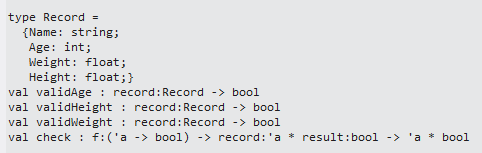
Looking at the code, I get that we are assigning a function called check that has a tuple with record called ‘record” and a Boolean called ‘result’.  However, what is that ‘f’?  Basically, what the F is that f in F#?  Looking at the REPL results, I see that it was this signature:
image

Basically, f is a function called ‘f’ that I am passing in.  I am then invoking this function here:

  1. let chainOfResponsibility = check validAge >> check validHeight >> check validWeight
  2.  
  3. let test1 = {Name="Test"; Age=45; Weight=175.; Height=175.}
  4.  
  5. printfn "test result = %A" (chainOfResponsibility (test1, true) |> snd)


So this is an example, I think, of two language constructs.  The first is high ordered functions – where check takes in a function as a parameter.  Next, this is an example of currying – where chainOfResponsibility only passes in the function, not the tuple.  I think.

To further research this, I looked up Chain of Responsibility on Wikipedia and took a look at the C# example.  To do it the C# way, created 6 files

image

with each file having the implementation found on the Wikipedia article.  The Logger class defines the behavior:

  1. public abstract class Logger
  2. {
  3.     protected LogLevel logMask;
  4.     protected Logger next;
  5.  
  6.     public Logger(LogLevel mask)
  7.     {
  8.         this.logMask = mask;
  9.     }
  10.  
  11.     public Logger SetNext(Logger nextlogger)
  12.     {
  13.         next = nextlogger;
  14.         return nextlogger;
  15.     }
  16.  
  17.     public void Message(string msg, LogLevel severity)
  18.     {
  19.         if ((severity & logMask) != 0)
  20.         {
  21.             WriteMessage(msg);
  22.         }
  23.         if (next != null)
  24.         {
  25.             next.Message(msg, severity);
  26.         }
  27.     }
  28.  
  29.     abstract public void WriteMessage(string msg);
  30.  
  31. }


and the individual implementations in the classes:

  1. public class FileLogger : Logger
  2. {
  3.     public FileLogger(LogLevel mask)
  4.         : base(mask)
  5.     { }
  6.  
  7.     public override void WriteMessage(string msg)
  8.     {
  9.         //Placeholder for File writing logic
  10.         Debug.WriteLine("Writing to Log File: " + msg);
  11.     }
  12. }

What is interesting to me is the Logger.SetNext() method is used to move to the next implementation in the chain.  I then set to write the example in FSharp using Liu’s template.  I did this:

  1. type Logger() =
  2.     let LogToConsole logLevel =
  3.         //Implementation
  4.         true
  5.  
  6.     let LogToEmail logLevel =
  7.         //Implementation
  8.         true
  9.  
  10.     let LogToFile logLevel =
  11.         //Implementation
  12.         true
  13.  
  14.     let check f (logLevel, result) =
  15.         if not result then logLevel, false
  16.         else logLevel, f(logLevel)
  17.  
  18.     let chainOfResponsibility =
  19.         check LogToConsole >> check LogToEmail >> check LogToFile
  20.  
  21.     let mutable logLevel = LogLevel.None
  22.     member this.CurrentLogLevel with get() = logLevel
  23.                                 and set(v) = logLevel <- v
  24.  
  25.     member this.WriteMessage () =
  26.         chainOfResponsibility (logLevel,true) |> snd

So there are a couple of observations.

1) F# is more terse – and more readable

2) Instead of creating a MoveNext function, the chainOfResponsibility uses the >> operator to move to the next.

3) These 2 code bases are not functionally equivalent – I have to keep working on the F# one.

4) How much fun is F#?

 

Tech Jam and Team Islington Green

IslingtonGreen


So a couple of friends from TRINUG – Ian Cillay and David Green – invited me to join them at a 36 hour continuous code fest called Tech Jam. Tech Jam was put on Met Life and the Department of Veterans Affairs on Nov 1 and 2 in RTP. This team of 3 developers was joined by Ian Henshaw who helped with some primary data provision and much of the user story development. David handled the MongoDB part, Ian took care of the UI (Bootstrap and Knockout), and I did the analytics (F# and R) and security piece.

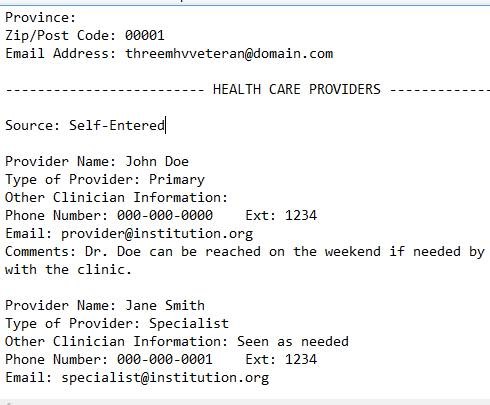
The problem domain was that the Veterans Administration has this format of medical records called Blue Button. Blue Button is an unstructured format which make typical parsing and analysis very difficult. Here is a sample:

clip_image002

Also, the VA wanted some kind of mutli-platform solution that a vet can use that can make sense of this data and allow him/her to provide it to a care giver when needed.

Some random thoughts about the contest:

  • MongoDB makes a lot of sense for the data because of it being so unstructured. Note that the VA has now introduced BlueButton+, which is XML format – so that is a step in the right direction. I was impressed how easy Mongo was to use and how powerful it is to tackle unstructured data – but note that even MongoDb still needs some kind of structure – just not xNF relational…
  • Bootstrap was awesome – we used an out of the box template and it was great to knock out an easy design.
  • F# made analytics and predictive analysis a snap. 
  • There were 15 teams registered, 10 actually presented at the end. There were 2 community teams (us and another), 1 high school team (awesome), and a bunch of corporate teams (Deutsche Bank, IBM, Tata(X3!), etc…).
  • One of the teams (Infusion) was a vendor for Met Life already (they worked on the wall project and the infinity project). Unsurprisingly, they won the grand prize.  My only comment on that is that civic/community hackers already view events like this with a skeptical eye – and this did nothing to help MetLife in the eyes of those kind of people – in fact probably did the opposite.
  • I was amazed by how many teams did not actually address the primary problems that the VA needed fixed.  The problems were taming unstructured data and presenting it in a platform-agnostic way.  Most teams used HTML5/Phonegap for req #2 – which is the easier one.  I think only 3 teams actually addressed requirement #1?
  • I am proud to say that my team did address both requirements.  As I sometimes say “I listen to two things in life: my wife and the requirements.  It goes better for me if I do that.”
  • Another team was from a company where the boss showed up on Saturday to present the team’s work. I guess that is the difference with a corporate hack-a-thon.  Also, you can tell the corporate teams because they had more powerpoint and less code in their final presentation.  Not that there is anything wrong with that….
  • The best line this weekend was when I asked a D level person at Metlife why no one at Metlife was retweeting my tweets with their hashtags (#techjam) and he said "we have a guy for that." Sure enough, they had 1 person who was their tweet guy.
  • MetLife really know how to put on a contest. The MC for this – Gary Hoberman – was awesome – a V-Level techie that really could communicate with the coders. The food was good (they took into account different dietary needs), the working space was good and the swag was useable.  Also, they had dev mentors circulating around the room, though they seemed to spend their time with other teams – so we didn’t interact with them.  They also had reps from MongoDB and MSFT helping out – which is great because we leaned on them for specific problems.

The problem with a code contest is that you have little time to learn from your fellow devs – it is pretty much heads down and check-in. In any event, the best part was hanging out great developers like Ian and David and working on a worthwhile project for our country’s vets.  At the end, it was a fun time and my team delivered that the VA can use to springboard into a real application.

F# and C#: The cross-over syntax

As part of my F# presentation to the TRINUG code camp, I did Question #1 of Project Euler.  I started with a typical way a C# programmer might approach it: using mutable variables and looping.  Something like this:

  1. public static Int32 TryOne()
  2. {
  3.     List<Int32> selectedNumbers = new List<int>();
  4.     for (int number = 0; number < 1000; number++)
  5.     {
  6.         if (number % 3 == 0)
  7.         {
  8.             selectedNumbers.Add(number);
  9.         }
  10.  
  11.         if (number % 5 == 0)
  12.         {
  13.             if (!selectedNumbers.Contains(number))
  14.             {
  15.                 selectedNumbers.Add(number);
  16.             }
  17.         }
  18.     }
  19.  
  20.     Int32 total = 0;
  21.     foreach (Int32 number in selectedNumbers)
  22.     {
  23.         total += number;
  24.     }
  25.  
  26.     return total;
  27. }


I then demonstrated they way a typical F# might approach the problem:

  1. open System
  2. let tryOne = [1..1000]
  3.                     |> Seq.filter(fun number -> (number%3 = 0 || number%5 = 0))
  4.                     |> Seq.sum


There are some differences worth noting.  The first is the terseness of F# and less “noise” of curley-braces and semi-colons.  The second is that the F# is more readable than the C# – assuming the person reading the code is not steeped in the java/C++/C# syntax.  Finally, there are less chance for bugs in the F# code.  In the C# code, there is a chance that selectedNumbers varaible might be altered and the total variable might be altered – esp. when doing the program in a multi-threaded manner.

Next, a more advanced C# developer might use Linq or Lambdas to write the answer like this:

  1. public static Int32 TryTwo()
  2. {
  3.     var total = Enumerable.Range(0, 1000)
  4.                         .Where(number => (number % 3 == 0) || (number % 5 == 0))
  5.                         .Sum();
  6.     return total;
  7. }


The similarity between this C# code and the F# code is striking.  The biggest difference is that the OO syntax makes the functions a part of the object being acted upon while the functional syntax makes the functions a part of a separate construct.  This change in perspective is the only real difference – and I am noticing that the more you look at code via the functional way, more mental doors are opened when solving a problem…

Relative Speed: F# v C# v VB.NET

(Spoiler alert: F# is faster – by alot)

As part of my presentation on F# which I hope to show at CodeCamp 2013, I did a quick speed test among C#, VB.NET, and F#.  I thought about Dr. Evil and how he tried to ransom the UN for “One Million Dollars”  and I thought about how the Federal Reserve is creating money from nothing to the tune of $40 Million a month via QE3 – so I built a quick app that does the exact same thing as the Federal Reserve does (except mine has unit tests, theirs probably does not).

I created a class for a Dollar bill (C#, VB, F#):

  1. public class Dollar
  2. {
  3.     public Int32 Id { get; set; }
  4.     public String SerialNumber { get; set; }
  5.     public Int32 FederalReserveDistrict { get; set; }
  6.     public Int32 SeriesDate { get; set; }
  7.     public String Signature { get; set; }
  8. }

  1. Public Class Dollar
  2.     Public Property Id As Int32
  3.     Public Property SerialNumber As String
  4.     Public Property FederalReserveDistrictNumber As Int32
  5.     Public Property SeriesDate As Int32
  6.     Public Property Signature As String
  7. End Class

  1. type dollar =
  2.     {Id: int;
  3.      SerialNumber: string;
  4.      federalReserveDistrict: int;
  5.      seriesDate: int;
  6.      signature: string}

I then implemented the same algorithm that the Federal reserve uses (C#, VB, F#):

  1. public List<Dollar> GetDollars(Int32 numberOfDollars)
  2. {
  3.     List<Dollar> dollars = new List<Dollar>();
  4.     Dollar currentDollar = null;
  5.     Random random = new Random();
  6.     for (int i = 0; i < numberOfDollars; i++)
  7.     {
  8.         currentDollar = new Dollar();
  9.         currentDollar.FederalReserveDistrict = random.Next(1, 13);
  10.         currentDollar.Id = i;
  11.  
  12.         String serialNumber = String.Empty;
  13.         for (int j = 0; j < 9; j++)
  14.         {
  15.             serialNumber += random.Next(0, 9).ToString();
  16.         }
  17.         currentDollar.SerialNumber = serialNumber;
  18.         currentDollar.SeriesDate = 2000 + random.Next(0, 10);
  19.         dollars.Add(currentDollar);
  20.     }
  21.     return dollars;
  22. }

  1. Public Function GetDollars(ByVal numberOfDollars As Int32) As List(Of Dollar)
  2.     Dim dollars As New List(Of Dollar)()
  3.     Dim currentDollar As Dollar = Nothing
  4.     Dim random As New Random()
  5.     For dollarIndex As Integer = 0 To numberOfDollars – 1
  6.         currentDollar = New Dollar()
  7.         currentDollar.FederalReserveDistrictNumber = random.Next(1, 13)
  8.         currentDollar.Id = dollarIndex
  9.  
  10.         Dim serialNumer As String = String.Empty
  11.         For serialNumberIndex As Integer = 0 To 9
  12.             serialNumer += random.Next(0, 9).ToString()
  13.         Next
  14.  
  15.         currentDollar.SerialNumber = serialNumer
  16.         currentDollar.SeriesDate = 2000 + random.Next(0, 10)
  17.         dollars.Add(currentDollar)
  18.     Next
  19.     Return dollars
  20. End Function

  1. type dollarProvider() =
  2.     let randomNumberGenerator = new System.Random()
  3.     let createSerialNumber =
  4.         List.init 9 (fun _ -> randomNumberGenerator.Next(0,9))
  5.                                     |> Seq.map string
  6.                                     |> String.concat ""
  7.     let createDollar id =
  8.         let returnDollar = {Id=id;
  9.             SerialNumber= createSerialNumber ;
  10.             federalReserveDistrict=randomNumberGenerator.Next(0,13);
  11.             seriesDate=2000+randomNumberGenerator.Next(0,9);
  12.             signature=""}
  13.         returnDollar
  14.     member this.GetDollars (numberOfDollars:int) =
  15.         List.init numberOfDollars (fun index -> createDollar index)

I then created a WPF I with the following XAML:

  1. <Grid>
  2.     <Button Content="Run C#" Height="32" HorizontalAlignment="Left" Margin="12,97,0,0" Name="CSharpButton" VerticalAlignment="Top" Width="95" Click="CSharpButton_Click" />
  3.     <TextBox Height="20" HorizontalAlignment="Left" Margin="12,150,0,0" Name="CSharpResultsTextBox" VerticalAlignment="Top" Width="95" />
  4.     <Button Content="Run VB" Height="29" HorizontalAlignment="Left" Margin="120,99,0,0" Name="RunVBButton" VerticalAlignment="Top" Width="99" Click="RunVBButton_Click" />
  5.     <TextBox Height="19" HorizontalAlignment="Left" Margin="117,150,0,0" Name="VBResultsTextBox" VerticalAlignment="Top" Width="102" />
  6.     <Button Content="Run F#" Height="28" HorizontalAlignment="Right" Margin="0,99,162,0" Name="RunFSharpButton" VerticalAlignment="Top" Width="105" Click="RunFSharpButton_Click" />
  7.     <TextBox Height="22" HorizontalAlignment="Left" Margin="239,147,0,0" Name="FSharpResultsTextBox" VerticalAlignment="Top" Width="102" />
  8.     <Label Content="Number Of Dollars" Height="30" HorizontalAlignment="Left" Margin="12,18,0,0" Name="label1" VerticalAlignment="Top" Width="115" />
  9.             <TextBox Height="24" HorizontalAlignment="Left" Margin="126,22,0,0" Name="DollarsTextBox" VerticalAlignment="Top" Width="115" Text="1000000" />
  10. </Grid>

and Code Behind

  1. private void CSharpButton_Click(object sender, RoutedEventArgs e)
  2. {
  3.     Stopwatch stopWatch = new Stopwatch();
  4.     stopWatch.Start();
  5.     CS.DollarProvider provider = new CS.DollarProvider();
  6.     Int32 numberOfDollars = Int32.Parse(this.DollarsTextBox.Text);
  7.     provider.GetDollars(numberOfDollars);
  8.     stopWatch.Stop();
  9.  
  10.     this.CSharpResultsTextBox.Text = stopWatch.Elapsed.TotalSeconds.ToString() + " seconds";
  11.  
  12. }
  13.  
  14. private void RunVBButton_Click(object sender, RoutedEventArgs e)
  15. {
  16.     Stopwatch stopWatch = new Stopwatch();
  17.     stopWatch.Start();
  18.     VB.DollarProvider provider = new VB.DollarProvider();
  19.     Int32 numberOfDollars = Int32.Parse(this.DollarsTextBox.Text);
  20.     provider.GetDollars(numberOfDollars);
  21.     stopWatch.Stop();
  22.  
  23.     this.VBResultsTextBox.Text = stopWatch.Elapsed.TotalSeconds.ToString() + " seconds";
  24.  
  25. }
  26.  
  27. private void RunFSharpButton_Click(object sender, RoutedEventArgs e)
  28. {
  29.     Stopwatch stopWatch = new Stopwatch();
  30.     stopWatch.Start();
  31.     FS.dollarProvider provider = new FS.dollarProvider();
  32.     Int32 numberOfDollars = Int32.Parse(this.DollarsTextBox.Text);
  33.     provider.GetDollars(numberOfDollars);
  34.     stopWatch.Stop();
  35.  
  36.     this.FSharpResultsTextBox.Text = stopWatch.Elapsed.TotalSeconds.ToString() + " seconds";
  37. }


And the results are pretty revealing:

image


I acknowledge that you can jerry rig C# to improve performance – esp using Pointers and the GOTO statement.  This exercise was to show performance doing the commonly-accepted way to solve a problem in each language (without FxCOP yelling at you).  It was not designed to see how clever you can get with C# to match the performance of the F# implementation.  As Rob Seder said “You can also bang in a screw by turning around the screwdriver and whacking away.”  If you need speed, F# is the best tool for the job.

F# List of String Manipulation

I am learning a valuable lesson about stack overflow – if I write down my question 1st and then search the key words using my favorite search engine, I can sometimes find the answer.

For example, I wanted to turn a list of string into 1 long string: ["A"; "B"; "C"] becomes “ABC”

I first tried via the functions found in the List class:

  1. let stringList = ["A"; "B"; "C"]
  2. let sumValues = List.sum stringList


The problem was I got the Red Squiggly Line Of Approbation on the stringList

 image

So then I typed a question for stack overflow with the words “string concatenation” and then I thought to try and try that into Google.  The 1st result was this: http://msdn.microsoft.com/en-us/library/ee353761.aspx

And low and behold, the example is exactly what I want to do

  1. let stringList = ["A"; "B"; "C"]
  2. let sumValues = String.concat "" stringList

image

I then applied that to a list of ints:

  1. let intList = [0..10]
  2. let concatValues =
  3.     intList
  4.     |> Seq.map string
  5.     |> String.concat ""


and after feeling good about figuring this out, I immediately began wondering how I can reduce that to 1 line of code

Smile

F#: “Unexpected InFix” and “Incomplete value”

Dear Future Jamie:

If you are doing some pipe forwards like this:

  1. let createConcatRandomList = List.init 9 (fun _ -> randomNumberGenerator.Next(0,9))
  2.     |> Seq.map string
  3.     |> String.concat ""


and you are getting this:

image

with the RSLA  on the let saying:

Incomplete value or function definition. If this is in an expression, the body of the expression must be indented to the same column as the ‘let’ keyword.

and the RSLA on the |> saying:

Unexpected infix operator in binding. Expected incomplete structured construct at or before this point or other token.

Then your pipe is in the wrong place.  Tab it over to inside the List like this:

  1. let createConcatRandomList = List.init 9 (fun _ -> randomNumberGenerator.Next(0,9))
  2.                                 |> Seq.map string
  3.                                 |> String.concat ""


Love,

Current Jamie


PS: you really should exercise more…

Multiple Linear Regression Using R and F#

Following up on my previous post, I decided to test calling R from F# for a multiple linear regression.  I decided to use the dataset from chapter 1 of Machine Learning For Hackers (ufo sightings).

Step #1 was to open R from F#

  1. #r @"C:\TFS\Tff.RDotNetExample_Solution\packages\R.NET.1.5.3\lib\net40\RDotNet.dll"
  2. #r @"C:\TFS\Tff.RDotNetExample_Solution\packages\R.NET.1.5.3\lib\net40\RDotNet.NativeLibrary.dll"
  3.  
  4. open System.IO
  5. open RDotNet
  6.  
  7.  
  8. //open R
  9. let environmentPath = System.Environment.GetEnvironmentVariable("PATH")
  10. let binaryPath = @"C:\Program Files\R\R-3.0.1\bin\x64"
  11. System.Environment.SetEnvironmentVariable("PATH",environmentPath+System.IO.Path.PathSeparator.ToString()+binaryPath)
  12.  
  13. let engine = RDotNet.REngine.CreateInstance("RDotNet")
  14. engine.Initialize()


Step #2 was to import the ufo dataset and clean it:

  1. //open dataset
  2. let path = @"C:\TFS\Tff.RDotNetExample_Solution\Tff.RDotNetExample\ufo_awesome.txt"
  3. let fileStream = new FileStream(path,FileMode.Open,FileAccess.Read)
  4. let streamReader = new StreamReader(fileStream)
  5. let contents = streamReader.ReadToEnd()
  6. let usStates = [|"AL";"AK";"AZ";"AR";"CA";"CO";"CT";"DE";"DC";"FL";"GA";"HI";"ID";"IL";"IN";"IA";
  7.                     "KS";"KY";"LA";"ME";"MD";"MA";"MI";"MN";"MS";"MO";"MT";"NE";"NV";"NH";"NJ";"NM";
  8.                     "NY";"NC";"ND";"OH";"OK";"OR";"PA";"RI";"SC";"SD";"TN";"TX";"UT";"VT";"VA";"WA";
  9.                     "WV";"WI";"WY"|]
  10. let cleanContents =
  11.     contents.Split([|'\n'|])
  12.     |> Seq.map(fun line -> line.Split([|'\t'|]))
  13.     |> Seq.filter(fun values -> values |> Seq.length = 6)
  14.     |> Seq.filter(fun values -> values.[0].Length = 8)
  15.     |> Seq.filter(fun values -> values.[1].Length = 8)
  16.     |> Seq.filter(fun values -> System.Int32.Parse(values.[0].Substring(0,4)) > 1900)
  17.     |> Seq.filter(fun values -> System.Int32.Parse(values.[1].Substring(0,4)) > 1900)
  18.     |> Seq.filter(fun values -> System.Int32.Parse(values.[0].Substring(0,4)) < 2100)
  19.     |> Seq.filter(fun values -> System.Int32.Parse(values.[1].Substring(0,4)) < 2100)
  20.     |> Seq.filter(fun values -> System.Int32.Parse(values.[0].Substring(4,2)) > 0)
  21.     |> Seq.filter(fun values -> System.Int32.Parse(values.[1].Substring(4,2)) > 0)
  22.     |> Seq.filter(fun values -> System.Int32.Parse(values.[0].Substring(4,2)) <= 12)
  23.     |> Seq.filter(fun values -> System.Int32.Parse(values.[1].Substring(4,2)) <= 12)      
  24.     |> Seq.filter(fun values -> System.Int32.Parse(values.[0].Substring(6,2)) > 0)
  25.     |> Seq.filter(fun values -> System.Int32.Parse(values.[1].Substring(6,2)) > 0)
  26.     |> Seq.filter(fun values -> System.Int32.Parse(values.[0].Substring(6,2)) <= 31)
  27.     |> Seq.filter(fun values -> System.Int32.Parse(values.[1].Substring(6,2)) <= 31)
  28.     |> Seq.filter(fun values -> values.[2].Split(',').[1].Trim().Length = 2)
  29.     |> Seq.filter(fun values -> Seq.exists(fun elem -> elem = values.[2].Split(',').[1].Trim().ToUpperInvariant()) usStates)
  30.     |> Seq.map(fun values ->
  31.         System.DateTime.ParseExact(values.[0],"yyyymmdd",System.Globalization.CultureInfo.InvariantCulture),
  32.         System.DateTime.ParseExact(values.[1],"yyyymmdd",System.Globalization.CultureInfo.InvariantCulture),
  33.         values.[2].Split(',').[0].Trim(),
  34.         values.[2].Split(',').[1].Trim().ToUpperInvariant(),
  35.         values.[3],
  36.         values.[4],
  37.         values.[5])
  38. cleanContents
  39.  
  40. let relevantContents =
  41.     cleanContents
  42.     |> Seq.map(fun (a,b,c,d,e,f,g) -> a.Year,d,g.Length)


Step #3 was to run the regression using the dataset.  You will notice that I made the length of the report the Y (dependent) variable – not that I think I will find any causality but it was a good enough to use).  Also, notice the Seq.Map of each column in the larger Seq(Int*String*Int) into the Vector.

  1. let reportLength = engine.CreateIntegerVector(relevantContents |> Seq.map (fun (a,b,c) -> c))
  2. engine.SetSymbol("reportLength", reportLength)
  3. let year = engine.CreateIntegerVector(relevantContents |> Seq.map (fun (a,b,c) -> a))
  4. engine.SetSymbol("year", year)
  5. let state = engine.CreateCharacterVector(relevantContents |> Seq.map (fun (a,b,c) -> b))
  6. engine.SetSymbol("state", state)
  7.  
  8. let calcExpression = "lm(formula = reportLength ~ year + state)"
  9. let testResult = engine.Evaluate(calcExpression).AsList()


Sure enough, you can get the results of the regression.  The challenge is teasing out the values that are interesting from the real data structure that is returned (testResult in this example)

> testResult.Item(0).AsCharacter();;
val it : CharacterVector =
  seq
    ["31775.5599180962"; "-15.2760355122386"; "37.8028841898059";
     "-91.2309146099364"; …]

Intercepts, I think, are Item(0).

RDotNet and F#: Example from the Code Project

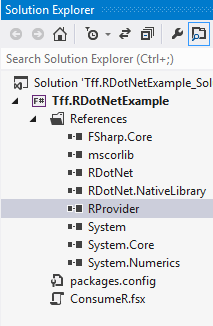
I added the R type provider via NuGet and it showed up in my references tab:

image

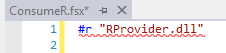
When I go to reference the library in code:

image

But if I fully-qualify the reference, it works:

image

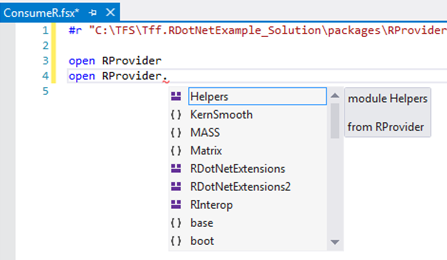
Very Strange, but then I get yummy intellisense

image


I then wanted to add in the RDotNet assembly:

Filly qualified does not work

image

but if you add the “@” symbol, it does…

image

I then added the test case that is on codeplex(https://rdotnet.codeplex.com/).

After figuring out that your can only have 1 instance of the engine going at any point in time and the FSI holds a reference (my issue logged here), I wrote this very much procedural code:

  1. #r @"C:\TFS\Tff.RDotNetExample_Solution\packages\R.NET.1.5.3\lib\net40\RDotNet.dll"
  2. #r @"C:\TFS\Tff.RDotNetExample_Solution\packages\R.NET.1.5.3\lib\net40\RDotNet.NativeLibrary.dll"
  3.  
  4. open System.IO
  5. open RDotNet
  6.  
  7. let environmentPath = System.Environment.GetEnvironmentVariable("PATH")
  8. let binaryPath = @"C:\Program Files\R\R-3.0.1\bin\x64"
  9. System.Environment.SetEnvironmentVariable("PATH",environmentPath+System.IO.Path.PathSeparator.ToString()+binaryPath)
  10.  
  11. let engine = RDotNet.REngine.CreateInstance("RDotNet")
  12. engine.Initialize()
  13.  
  14. let group1 = engine.CreateNumericVector([30.02;29.99;30.11;29.97;30.01;29.99]);
  15. engine.SetSymbol("group1", group1)
  16. let expression = "group2 <- c(29.89,29.93,29.72,29.98,30.02,29.98)"
  17. let group2 = engine.Evaluate(expression).AsNumeric()
  18.  
  19. let calcExpression = "t.test(group1, group2)"
  20. let testResult = engine.Evaluate(calcExpression).AsList()
  21.  
  22. printfn "P-Value = %A" (testResult.Item("p.value").AsNumeric())

With the results coming out:

image

Calling R from F#

So I thought I would check out R.NET so I downloaded R from its home site.  I then created a basic F# library and installed R.DotNet.  I found it amusing that it installed from the recycle bin:

image

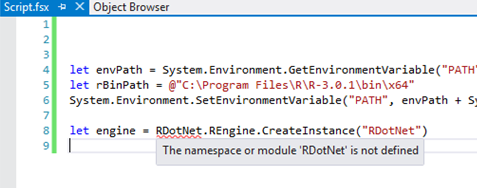
I then fired up a F# project to test it out.  I decided to mimic the C# example on the Codeplex site in F#.  I gopt to the 4th line where I actually tried to create an instance of the REngine:

image

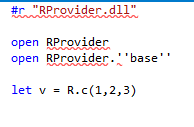
So I typed into Google R and F# and what do you know,  some folks created a type provider for R  How cool is that?  I installed the RProvider from NuGet and then typed in the basic code sample but it was not getting recognized.

image

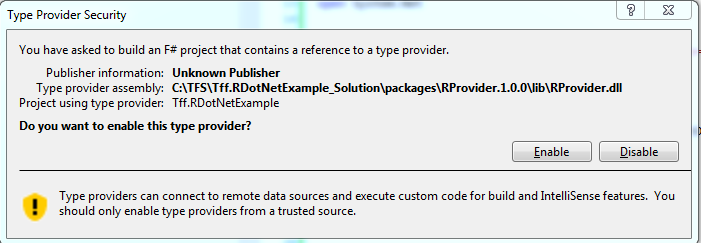
I then read in the documentation that you need to restart Visual Studio (good to know)  and make sure that the .NET version is 4.5.  Still no luck.  I then downloaded the example script that is on Github and I was getting the same problem.  Out of desperation, I hit F6 and I got this:

image


Then all of the R type provider references resolved.  I then changed the R.Net to point at the bin and all of those references resolved.  I then commented out

  1. //open RProvider.tseries
  2. //open RProvider.zoo

and

  1. //let adf = R.adf_test(msft)

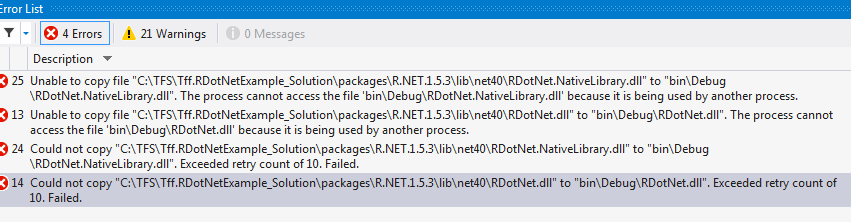
and no more red squiqqley!  When I hit F6 though, I get this:


image

Undaunted, I ran the script anyway and sure enough, I got some output:

image

F# and Unit Testing

Consider this code snippet in F#

  1. module Board =
  2.     let tiles = [|0 .. 39|]
  3.     let random = System.Random()
  4.  
  5.     let communityChest x =
  6.         let communityChestDraw = random.Next(1,17)
  7.         if communityChestDraw = 1 then
  8.             0
  9.         else if communityChestDraw = 2 then
  10.             10
  11.          else
  12.             x


I then went to create a unit test for the communityChest function when it hit me that I will get unpredictable behavior because I am getting a random number within the method body.  I made this same mistake when I created my windows phone 7 game where there combat engine was using a Random.Next() result.

Basically, I am repeating my mistakes across two languages.  The good news is that the solution is the same for both languages: I need to inject the result from Random.Next() into community chest.

  1. let communityChest x y =
  2.     if y = 1 then
  3.         0
  4.     else if y = 2 then
  5.         10
  6.      else
  7.         x


And then

  1. let move x y =
  2.     let communityChestDraw = random.Next(1,17)
  3.  
  4.     if x + y > 39 then
  5.         x + y – 40
  6.     else if x + y = 30 then
  7.         10
  8.     else if x + y = 2 then
  9.         communityChest 2 communityChestDraw
  10.     else if x + y = 7 then
  11.         chance 7
  12.     else if x + y = 17 then
  13.         communityChest 2 communityChestDraw
  14.     else if x + y = 22 then
  15.         chance 22
  16.     else if x + y = 33 then
  17.         communityChest 2 communityChestDraw
  18.     else if x + y = 36 then
  19.         chance 36
  20.     else
  21.         x + y


The other nice thing is I found the bug that was, well, bugging me.  The reason that 2 showed up the most was that I had copied and pasted 2 to be the results of all community chest runs.  I then changed the code to reflect the actual position of community chest:

  1. let move x y =
  2.     let communityChestDraw = random.Next(1,17)
  3.  
  4.     if x + y > 39 then
  5.         x + y – 40
  6.     else if x + y = 30 then
  7.         10
  8.     else if x + y = 2 then
  9.         communityChest 2 communityChestDraw
  10.     else if x + y = 7 then
  11.         chance 7
  12.     else if x + y = 17 then
  13.         communityChest 17 communityChestDraw
  14.     else if x + y = 22 then
  15.         chance 22
  16.     else if x + y = 33 then
  17.         communityChest 33 communityChestDraw
  18.     else if x + y = 36 then
  19.         chance 36
  20.     else
  21.         x + y


So now I can do my unit tests:

  1. [TestClass]
  2. public class SimulatorTests
  3. {
  4.     [TestMethod]
  5.     public void communityChestWithOne_ReturnsZero()
  6.     {
  7.         var result = Simulator.communityChest(2, 1);
  8.         Assert.AreEqual(0, result);
  9.     }
  10.  
  11.     [TestMethod]
  12.     public void communityChestWithTwo_ReturnsTen()
  13.     {
  14.         var result = Simulator.communityChest(2, 2);
  15.         Assert.AreEqual(10, result);
  16.     }
  17.  
  18.     [TestMethod]
  19.     public void communityChestWithThree_ReturnsTwo()
  20.     {
  21.         var result = Simulator.communityChest(2, 3);
  22.         Assert.AreEqual(2, result);
  23.     }
  24. }


And the tests run green:

image

I love being able to write C# tests and test F# code…