Consuming Azure ML With F#

(This post is a continuation of this one)

So with a model that works well enough,  I selected only that model and saved it

image


image

Created a new experiment and used that model with the base data.  I then marked the project columns as the input and the score as the output (green and blue circle respectively)

image

After running it, I published it as a web service

image

And voila, an endpoint ready to go.  I then took the auto generated script and opened up a new Visual Studio F# project to use it.  The problem was that this is the data structure that the model needs

FeatureVector = new Dictionary<string, string>() { { "Precinct", "0" }, { "VRN", "0" }, { "VRstatus", "0" }, { "VRlastname", "0" }, { "VRfirstname", "0" }, { "VRmiddlename", "0" }, { "VRnamesufx", "0" }, { "VRstreetnum", "0" }, { "VRstreethalfcode", "0" }, { "VRstreetdir", "0" }, { "VRstreetname", "0" }, { "VRstreettype", "0" }, { "VRstreetsuff", "0" }, { "VRstreetunit", "0" }, { "VRrescity", "0" }, { "VRstate", "0" }, { "Zip Code", "0" }, { "VRfullresstreet", "0" }, { "VRrescsz", "0" }, { "VRmail1", "0" }, { "VRmail2", "0" }, { "VRmail3", "0" }, { "VRmail4", "0" }, { "VRmailcsz", "0" }, { "Race", "0" }, { "Party", "0" }, { "Gender", "0" }, { "Age", "0" }, { "VRregdate", "0" }, { "VRmuni", "0" }, { "VRmunidistrict", "0" }, { "VRcongressional", "0" }, { "VRsuperiorct", "0" }, { "VRjudicialdistrict", "0" }, { "VRncsenate", "0" }, { "VRnchouse", "0" }, { "VRcountycomm", "0" }, { "VRschooldistrict", "0" }, { "11/6/2012", "0" }, { "Voted Ind", "0" }, }, GlobalParameters = new Dictionary<string, string>() { } };

And since I am only using 6 of the columns, it made sense to reload the Wake County Voter Data with just the needed columns.  I went back to the original CSV and did that.  Interestingly, I could not set the original dataset as the publish input so I added a project column module that does nothing

image

With that in place, I republished the service and opened Visual Studio.  I decided to start with a script.  I was struggling though the async when Tomas P helped me on Stack Overflow here.  I’ll say it again, the F# community is tops.  In any event, here is the initial script:

#r @"C:\Program Files (x86)\Reference Assemblies\Microsoft\Framework\.NETFramework\v4.5\System.Net.Http.dll" #r @"..\packages\Microsoft.AspNet.WebApi.Client.5.2.2\lib\net45\System.Net.Http.Formatting.dll" open System open System.Net.Http open System.Net.Http.Headers open System.Net.Http.Formatting open System.Collections.Generic type scoreData = {FeatureVector:Dictionary<string,string>;GlobalParameters:Dictionary<string,string>} type scoreRequest = {Id:string; Instance:scoreData} let invokeService () = async { let apiKey = "" let uri = "https://ussouthcentral.services.azureml.net/workspaces/19a2e623b6a944a3a7f07c74b31c3b6d/services/f51945a42efa42a49f563a59561f5014/score" use client = new HttpClient() client.DefaultRequestHeaders.Authorization <- new AuthenticationHeaderValue("Bearer",apiKey) client.BaseAddress <- new Uri(uri) let input = new Dictionary<string,string>() input.Add("Zip Code","27519") input.Add("Race","W") input.Add("Party","UNA") input.Add("Gender","M") input.Add("Age","45") input.Add("Voted Ind","1") let instance = {FeatureVector=input; GlobalParameters=new Dictionary<string,string>()} let scoreRequest = {Id="score00001";Instance=instance} let! response = client.PostAsJsonAsync("",scoreRequest) |> Async.AwaitTask let! result = response.Content.ReadAsStringAsync() |> Async.AwaitTask if response.IsSuccessStatusCode then printfn "%s" result else printfn "FAILED: %s" result response |> ignore } invokeService() |> Async.RunSynchronously


Unfortunately, when I run it, it fails.  Below is the Fiddler trace:

image


So it looks like the Json Serializer is postpending the “@” symbol.  I changed the records to types and voila:

image

You can see the final script here.

So then throwing in some different numbers. 

  • A millennial: ["27519","W","D","F","25","1","1","0.62500011920929"]
  • A senior citizen: ["27519","W","D","F","75","1","1","0.879632294178009"]

I wonder why social security never gets cut?

In any event, just to check the model:

  • A 15 year old: ["27519","W","D","F","15","1","0","0.00147285079583526"]

Sql Saturday and MVP Monday

Thanks to everyone who came to my session on F# Type Providers.  The code is found here.

Also, my article on the Eject-A-Bed was selected for MVP Mondays.  You can see a link here.


Fun with Statistics and Charts

I am preparing my Raleigh Code Camp submission ‘Nerd Dinner With Brains” this weekend.  If you are not familiar, Nerd Dinner is the canonical example of a MVC application and is very familiar to Web Devs who want to learn MVC the Microsoft way.  You can see the walkthrough here.   For everything that Nerd Dinner is, it is not … smart.  There is no business rules outside of some basic input validation, which is pretty representative of many “Boring Line Of Business Applications (BLOBAs according to Scott Waschlan).  Not coincidently, the lack of business logic is the biggest  reason many BLOBAs don’t have many unit tests –> if all you are doing is wire framing a database, what business logic needs to be tested? 

The talk is going to take the Nerd Diner wireframe and inject some analytics to the application.  To that end, I first considered the person who is attending the dinner.  All we know about them is their name and possibly their location.  So what can a name tell you?  Turns out, plenty.

As I showed in this post, there is a great source of the number of names given by gender, yearOfBrith, and stateOfBirth from the US census.  Picking up where that post left off, I loaded in the entire data set into memory.

My first question was, “given a name, can I tell what gender the person is?”  This is very straight forward to calculate.

1 let genderSearch name = 2 let nameFilter = usaData 3 |> Seq.filter(fun r -> r.Mary = name) 4 |> Seq.groupBy(fun r -> r.F) 5 |> Seq.map(fun (n,a) -> n,a |> Seq.sumBy(fun (r) -> r.``14``)) 6 7 let nameSum = nameFilter |> Seq.sumBy(fun (n,c) -> c) 8 nameFilter 9 |> Seq.map(fun (n,c) -> n, c, float c/float nameSum) 10 |> Seq.toArray 11 12 genderSearch "James" 13

And the REPL shows me that is is very likely that “James” is a male:

image

I can then set up in the web.config file a confidence point where there name is a male/female, I am thinking 75%.  Once we have that, the app can respond differently.  Perhaps we have a product-placement advertisement that becomes a male-focused if we are reasonably certain that the user is a male.  Perhaps we can be more subtle and change the theme of the site, or the page navigation, to induce the person to do additional things on the site.

In any event, I then wanted to tackle age.  I spun up some code to isolate a person’s age

1 let ageSearch name = 2 let nameFilter = usaData 3 |> Seq.filter(fun r -> r.Mary = name) 4 |> Seq.groupBy(fun r -> r.``1910``) 5 |> Seq.map(fun (n,a) -> n,a |> Seq.sumBy(fun (r) -> r.``14``)) 6 |> Seq.toArray 7 let nameSum = nameFilter |> Seq.sumBy(fun (n,c) -> c) 8 nameFilter 9 |> Seq.map(fun (n,c) -> n, c, float c/float nameSum) 10 |> Seq.toArray

I had no idea if names have a certain age connotation so I decided to do some basic charting.  Isaac Abraham pointed me to FSharp.Chart which is a great way to do some basic charting for discovery.

1 let chartData = ageSearch "James" 2 |> Seq.map(fun (y,c,p) -> y, c) 3 |> Seq.sortBy(fun (y,c) -> y) 4 5 Chart.Line(chartData).ShowChart()

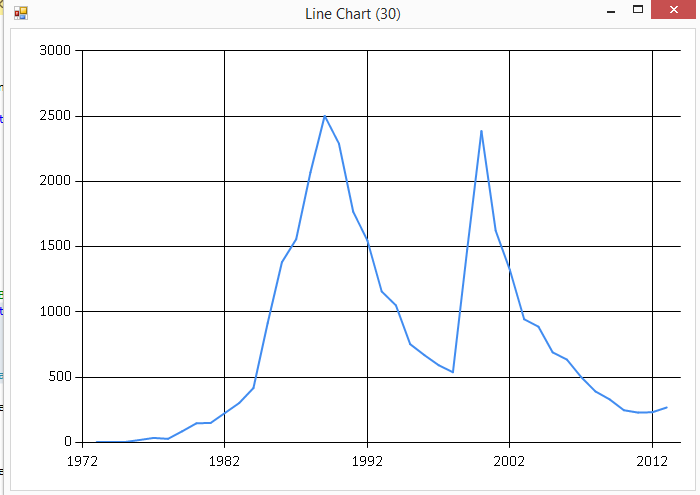
And sure enough, the name “James” has a real ebb and flow for its popularity.

image

so if the user has a name of “James”, you can make a reasonable assumption they are male and probably born before 1975.  Cue up the Van Halen!

And yes, because I had to:

1 let chartData = ageSearch "Britney" 2 |> Seq.map(fun (y,c,p) -> y, c) 3 |> Seq.sortBy(fun (y,c) -> y)

image

Kinda does match her career, no?

Anyway, back to the task at hand.  In terms of analytics, I want to be a bit more precise then eyeballing a chart.  I started with the following code:

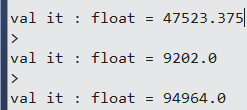
1 ageSearch "James" 2 |> Seq.map(fun (y,c,p) -> float c) 3 |> Seq.average 4 5 ageSearch "James" 6 |> Seq.map(fun (y,c,p) -> float c) 7 |> Seq.min 8 9 ageSearch "James" 10 |> Seq.map(fun (y,c,p) -> float c) 11 |> Seq.max 12

image

With these basic statistics out of the way, I then wanted to look at when the name was no longer popular.  I decided to use 1 standard deviation away from the average to determine an outlier.  First the standard deviation:

1 let variance (source:float seq) = 2 let mean = Seq.average source 3 let deltas = Seq.map(fun x -> pown(x-mean) 2) source 4 Seq.average deltas 5 6 let standardDeviation(values:float seq) = 7 sqrt(variance(values)) 8 9 ageSearch "James" 10 |> Seq.map(fun (y,c,p) -> float c) 11 |> standardDeviation 12 13 let standardDeviation' = ageSearch "James" 14 |> Seq.map(fun (y,c,p) -> float c) 15 |> standardDeviation 16 17 let average = ageSearch "James" 18 |> Seq.map(fun (y,c,p) -> float c) 19 |> Seq.average 20 21 let attachmentPoint = average+standardDeviation'

image

And then I can get the last year that the name was within 1 standard deviation above the average (greater than 71,180 names given):

1 2 let popularYears = ageSearch "James" 3 |> Seq.map(fun (y,c,p) -> y, float c) 4 |> Seq.filter(fun (y,c) -> c > attachmentPoint) 5 |> Seq.sortBy(fun (y,c) -> y) 6 |> Seq.last

image

So “James” is very likely a male and likely born before 1964.  Cue up the Pink Floyd!

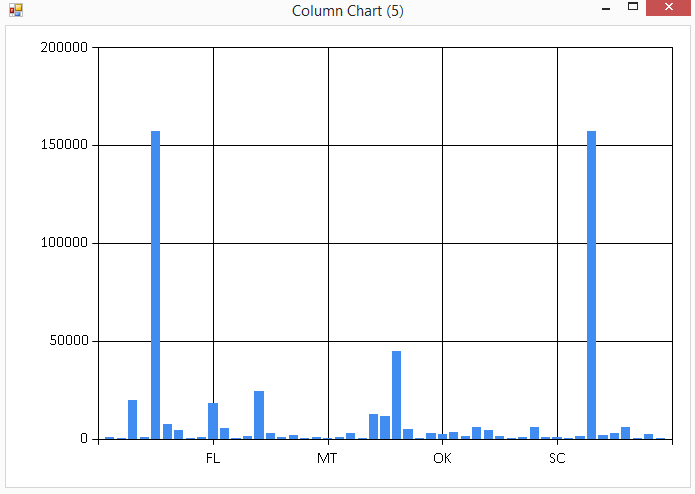
The last piece was the state of birth –> can I guess the state of birth for a user?  I first looked at the states on a plot

1 let chartData' = stateSearch "James" 2 |> Seq.map(fun (s,c,p) -> s,c) 3 4 Chart.Column(chartData').ShowChart() 5

image

Nothing really stands out at me –> states with the most births have the most names.  I could do an academic exercise of seeing what states favor certain names, but that does not help me with Nerd Dinner in guessing the state of birth when given a name.

I pressed on to look at the top 10 states:

1 let topTenStates = stateSearch "James" 2 |> Seq.sortBy(fun (s,c,p) -> -c-1) 3 |> Seq.take 10 4 5 let topTenTotal = topTenStates 6 |> Seq.sumBy(fun (s,c,p) -> c) 7 let total = stateSearch "James" 8 |> Seq.sumBy(fun (s,c,p) -> c) 9 10 float topTenTotal/float total

image

So 50% of “James” were born in 10 states.  Again, I am not sure there is any actionable information here.  For example, if a majority of “James” were born in MI, I might have something (cue up the Bob Seger). 

Interestingly, there are certain number of names where the state of birth does matter.  For example, consider “Jose”:

image

Unsurprisingly, the two states are CA and TX.  Just using James and Jose as an example:

  • James is a male born before 1964
  • Jose is a male born before 2008 in either TX or CA

As an academic exercise, we could construct a random forest to find the names with the greatest state affinity.  However, that won’t help us on Nerd Dinner so I am leaving that out for another day.

This analysis does not account for a host of factors (person not born in the USA, nicknames, etc..), but it is still better than the nothing that Nerd Dinner currently has.  This analysis is not particular sophisticated but I often find that even the most basic statistics can be very powerful if used correctly.  That will be the next part of the talk…


Consuming and Analyzing Census Data Using F#

As part of my Nerd Dinner refactoring, I wanted to add the ability to guess a person’s age and gender based on their name.  I did a quick search on the internet and the only place that I found that has an API is here and it doesn’t have everything I am looking for.  Fortunately, the US Census website has some flat files with the kind of data I am looking for here.

I grabbed the data and  pumped it into Azure Blob Storage here.  You can swap out the state code to get each dataset.  I then loaded in a list of State Codes found here that match to the file names.

I then fired up Visual Studio and created a new FSharp project.  I added FSharp.Data to use a Type Provider to access the data.  I don’t need to install the Azure Storage .dlls b/c the blobs are public and I just have to read the file

image

Once Nuget was done with its magic, I opened up the script file, pointed to the newly-installed FSharp.Data, and added a reference to the datasets on blob storage:

#r "../packages/FSharp.Data.2.0.9/lib/portable-net40+sl5+wp8+win8/FSharp.Data.dll" open FSharp.Data type censusDataContext = CsvProvider<"https://portalvhdspgzl51prtcpfj.blob.core.windows.net/censuschicken/AK.TXT"> type stateCodeContext = CsvProvider<"https://portalvhdspgzl51prtcpfj.blob.core.windows.net/censuschicken/states.csv">

(Note that I am going add FSharp as a language to my Live Writer code snippet add-in at a later date)

In any event, I then printed out all of the codes to see what it looks like:

let stateCodes = stateCodeContext.Load("https://portalvhdspgzl51prtcpfj.blob.core.windows.net/censuschicken/states.csv"); stateCodes.Rows |> Seq.iter(fun r -> printfn "%A" r)

image

And by changing the lambda slightly like so,

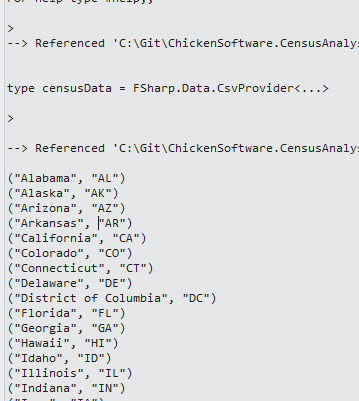
stateCodes.Rows |> Seq.iter(fun r -> printfn "%A" r.Abbreviation)

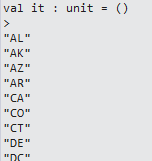
I get all of the state codes

image

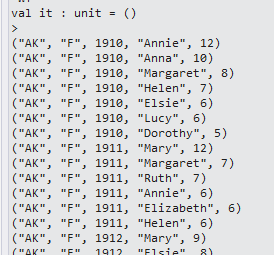
I then tested the census data with code and results are expected

let arkansasData = censusDataContext.Load("https://portalvhdspgzl51prtcpfj.blob.core.windows.net/censuschicken/AK.TXT"); arkansasData.Rows |> Seq.iter(fun r -> printfn "%A" r)

image

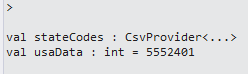
So then I created a method to load all of the state census data and giving me the length of the total:

let stateCodes = stateCodeContext.Load("https://portalvhdspgzl51prtcpfj.blob.core.windows.net/censuschicken/states.csv"); let usaData = stateCodes.Rows |> Seq.collect(fun r -> censusDataContext.Load(System.String.Format("https://portalvhdspgzl51prtcpfj.blob.core.windows.net/censuschicken/{0}.TXT",r.Abbreviation)).Rows) |> Seq.length

image

Since this is a I/O bound operation, it made sense to load the data asynchronously, which speeded things up considerably.  You can see my question over on Stack Overflow here and the resulting code takes about 50% of the time on a my dual-processor machine:

stopwatch.Start() let fetchStateDataAsync(stateCode:string)= async{ let uri = System.String.Format("https://portalvhdspgzl51prtcpfj.blob.core.windows.net/censuschicken/{0}.TXT",stateCode) let! stateData = censusDataContext.AsyncLoad(uri) return stateData.Rows } let usaData' = stateCodes.Rows |> Seq.map(fun r -> fetchStateDataAsync(r.Abbreviation)) |> Async.Parallel |> Async.RunSynchronously |> Seq.collect id |> Seq.length stopwatch.Stop() printfn "Parallel: %A" stopwatch.Elapsed.Seconds

image

With the data in hand, it was time to analyze the data to see if there is anything we can do.   Since 23 seconds is a bit too long to wait for a page load (Smile), I will need to put the 5.5 million records into a format that can be easily searched.  Thinking what we want is:
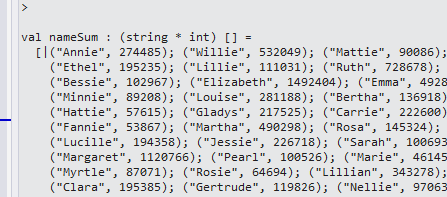
Given a name, what is the gender?

Given a name, what is the age?

Given a name, what is their state of birth?

Also, since we have their current location, we can also input the name and location and answer those questions.  If we make the assumption that their location is the same as their birth state, we can narrow down the list even further.

In any event, I first added a GroupBy to the name:

let nameSum = usaData' |> Seq.groupBy(fun r -> r.Mary) |> Seq.toArray

image

And then I summed up the counts of the names

let nameSum = usaData' |> Seq.groupBy(fun r -> r.Mary) |> Seq.map(fun (n,a) -> n,a |> Seq.sumBy(fun (r) -> r.``14``)) |> Seq.toArray

image

And then the total in the set:

let totalNames = nameSum |> Seq.sumBy(fun (n,c) -> c)

image

And then applied a simple average and sorted it descending

let nameAverage = nameSum |> Seq.map(fun (n,c) -> n,c,float c/ float totalNames) |> Seq.sortBy(fun (n,c,a) -> -a - 1.) |> Seq.toArray

image

So I feel really special that my parents gave me the most popular name in the US ever…

And focusing back to the task on hand, I want to determine the probability that a person is male or female based on their name:

let nameSearch = usaData' |> Seq.filter(fun r -> r.Mary = "James") |> Seq.groupBy(fun r -> r.F) |> Seq.map(fun (n,a) -> n,a |> Seq.sumBy(fun (r) -> r.``14``)) |> Seq.toArray

image

So 18196 parents thought is would be a good idea to name their daughter ‘James’.  I created a quick function like so:

let nameSearch' name = let nameFilter = usaData' |> Seq.filter(fun r -> r.Mary = name) |> Seq.groupBy(fun r -> r.F) |> Seq.map(fun (n,a) -> n,a |> Seq.sumBy(fun (r) -> r.``14``)) let nameSum = nameFilter |> Seq.sumBy(fun (n,c) -> c) nameFilter |> Seq.map(fun (n,c) -> n, c, float c/float nameSum) |> Seq.toArray nameSearch' "James"

image

So if I see the name “James”, there is a 99% chance it is a male.  This can lead to a whole host of questions like variance of names, names that are closest to gender neutral, etc….  Leaving those questions to another day, I now have something I can put into Nerd Dinner.  Now, if there was only a way to handle nicknames and friendly names….

You can see the full code here.


Controlling Servos Using Netdunio and Phidgets

As part of the Terminator program I am creating, I need a way of controlling servos to point the laser (and then gun) and different targets.  I decided to create a POC project and evaluate two different ways of controlling the servos.  As step one, I purchased a pan and tilt chassis from here

image

After playing with the servos from the kit, I decided to use my old stand-by servos that had a much higher quality and whose PWM signals I already know how to use.  With the chassis done, I needed a laser pointer so I figured why not get a shark with fricken laser?

I found one here.

image

So with the servos and laser ready to go, it was time to code.  I started with Netduninos:

public class Program { private const uint TILT_SERVO_STRAIGHT = 1500; private const uint TILT_SERVO_MAX_UP = 2000; private const uint TILT_SERVO_MAX_DOWN = 1000; private const uint PAN_SERVO_STRAIGHT = 1500; private const uint PAN_SERVO_MAX_LEFT = 1000; private const uint PAN_SERVO_MAX_RIGHT = 2000; private static PWM _tiltServo = null; private static PWM _panServo = null; private static uint _tiltServoCurrentPosition = 0; private static uint _panServoCurrentPosition = 0; public static void Main() { SetUpServos(); InputPort button = new InputPort(Pins.ONBOARD_BTN, false, Port.ResistorMode.Disabled); while (true) { if (button.Read()) { MoveServo(); } } } private static void SetUpServos() { uint period = 20000; _tiltServoCurrentPosition = TILT_SERVO_STRAIGHT; _panServoCurrentPosition = PAN_SERVO_STRAIGHT; _tiltServo = new PWM(PWMChannels.PWM_PIN_D3, period, _tiltServoCurrentPosition, PWM.ScaleFactor.Microseconds, false); _tiltServo.Start(); _panServo = new PWM(PWMChannels.PWM_PIN_D5, period, _panServoCurrentPosition, PWM.ScaleFactor.Microseconds, false); _panServo.Start(); } private static void MoveServo() { _panServo.Duration = PAN_SERVO_MAX_LEFT; Thread.Sleep(2000); _panServo.Duration = PAN_SERVO_MAX_RIGHT; Thread.Sleep(2000); _panServo.Duration = PAN_SERVO_STRAIGHT; Thread.Sleep(2000); _tiltServo.Duration = TILT_SERVO_MAX_UP; Thread.Sleep(2000); _tiltServo.Duration = TILT_SERVO_MAX_DOWN; Thread.Sleep(2000); _tiltServo.Duration = TILT_SERVO_STRAIGHT; } }

And sure enough the servos are behaving as expected

I then implemented a similar app using Phidgets.  Because the code is being executed on the PC, I could use F# to code (It does not look like the Netdunino/Microframework supports F#?)

open System open Phidgets let _servoController = new AdvancedServo() let mutable _isServoControllerReady = false let servoController_Attached(args:Events.AttachEventArgs) = let servoController = args.Device :?> AdvancedServo servoController.servos.[0].Engaged <- true servoController.servos.[7].Engaged <- true _isServoControllerReady <- true [<EntryPoint>] let main argv = _servoController.Attach.Add(servoController_Attached) _servoController.``open``() while true do if _isServoControllerReady = true then _servoController.servos.[0].Position<- 100. _servoController.servos.[7].Position<- 100. Console.ReadKey() |> ignore printfn "%A" argv 0


The choice then becomes using the Netduino or the Phidgets with my Kinect program.  I decided to defer the decision and use an interface for now.

type IWeaponsSystem = abstract member Activate: unit -> unit abstract member AquireTarget : float*float -> bool abstract member Fire: int -> bool

My decision about using Phidgets or Netduino is a series of trade-offs.  I can code Phidgets in C# or F# but I have to code Netduino in C#.  I would prefer to do this in F# so that makes me learn towards Phidgets.  I can put the Netduino anywhere and have it communicate via an Ethernet signal but I have to have the Phidgets wired to the PC.  Since the targeting system needs to be near the Kinect and the Kinect has to be tethered to the PC also, there is no real advantage of using the mobile Netduino.  Finally, the Phidgets API handles all communication to the servo control board for me, with the Netduino I would have to hook up a router to the Netduino and write the Ethernet communication code.  So I am leaning towards Phidgets, but since I am not sure, the interface allows me to swap in the Netduino at a later point without changing any code.  Love me some O in SOLID…

Up next, integrating the targeting system into the Terminator program.


Neural Network Part 3: Perceptrons

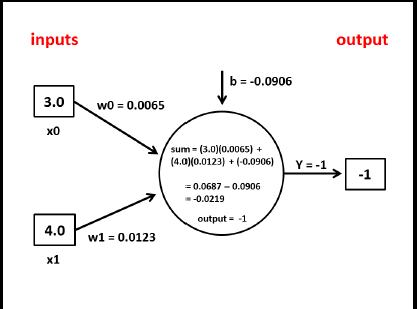
I went back to my code for building a Perceptron and I made some changes.  I realized that although McCaffrey combines the code together, there are actually two actions for the perceptron: training and predicting. I created a diagram to help me keep the functions that I need for each in mind:

image

I also skeletoned out some data structures that I think I need:

image

With the base diagrams out of the way, I created different data structures that were tailored to each action.   These are a bit different than the diagrams –> I didn’t go back and update the diagrams because the code is where you would look to see how the system works:

type observation = {xValues:float List} type weightedObservation = {xws:(float*float) List} type confirmedObservation = {observation:observation;yExpected:float} type weightedConfirmedObservation = {weightedObservation:weightedObservation;yExpected:float} type neuronInput = {weightedObservation:weightedObservation;bias:float} type cycleTrainingInput = {weightedConfirmedObservation:weightedConfirmedObservation;bias:float;alpha:float} type adjustmentInput = {weightedConfirmedObservation:weightedConfirmedObservation;bias:float;alpha:float;yActual:float} type adjustmentOutput = {weights:float List; bias:float} type rotationTrainingInput = {confirmedObservations:confirmedObservation List;weights:float List;bias:float;alpha:float} type trainInput = {confirmedObservations:confirmedObservation List; weightSeedValue:float;biasSeedValue:float;alpha:float; maxEpoches:int} type cyclePredictionInput = {weightedObservation:weightedObservation;bias:float} type rotationPredictionInput = {observations:observation List;weights:float List;bias:float} type predictInput = {observations:observation List;weights:float List;bias:float}

Note that I am composing data structures with the base being an observation.  The observation is a list of different xValues for a given, well, observation.  The weighted observation is the XValue paired with the perceptron weights.  The confirmedObservation is for training –> given an observation, what was the actual output? 

With the data structures out of the way, I went to the Perceptron and added in the basic functions for creating seed values:

member this.initializeWeights(xValues, randomSeedValue) = let lo = -0.01 let hi = 0.01 let xWeight = (hi-lo) * randomSeedValue + lo xValues |> Seq.map(fun w -> xWeight) member this.initializeBias(randomSeedValue) = let lo = -0.01 let hi = 0.01 (hi-lo) * randomSeedValue + lo

Since I was doing TDD, here are the unit tests I used for these functions:

[TestMethod] public void initializeWeightsUsingHalfSeedValue_ReturnsExpected() { var weights = _perceptron.initializeWeights(_observation.xValues, .5); var weightsList = new List<double>(weights); var expected = 0.0; var actual = weightsList[0]; Assert.AreEqual(expected, actual); } [TestMethod] public void initializeWeightsUsingLessThanHalfSeedValue_ReturnsExpected() { var weights = _perceptron.initializeWeights(_observation.xValues, .4699021627); var weightsList = new List<double>(weights); var expected = -0.00060; var actual = Math.Round(weightsList[0],5); Assert.AreEqual(expected, actual); } [TestMethod] public void initializeBiasesUsingHalfSeedValue_ReturnsExpected() { var expected = 0.0; var actual = _perceptron.initializeBias(.5); Assert.AreEqual(expected, actual); } [TestMethod] public void initializeBiasesUsingLessThanHalfSeedValue_ReturnsExpected() { var expected = -0.00060; var bias = _perceptron.initializeBias(.4699021627); var actual = Math.Round(bias, 5); Assert.AreEqual(expected, actual); } [TestMethod] public void initializeBiasesUsingGreaterThanHalfSeedValue_ReturnsExpected() { var expected = 0.00364; var bias = _perceptron.initializeBias(.6820621978); var actual = Math.Round(bias,5); Assert.AreEqual(expected, actual); }

I then created a base neuron and activation function that would work for both training and predicting:

member this.runNeuron(input:neuronInput) = let xws = input.weightedObservation.xws let output = xws |> Seq.map(fun (xValue,xWeight) -> xValue*xWeight) |> Seq.sumBy(fun x -> x) output + input.bias member this.runActivation(input) = if input < 0.0 then -1.0 else 1.0

[TestMethod] public void runNeuronUsingNormalInput_ReturnsExpected() { var expected = -0.0219; var perceptronOutput = _perceptron.runNeuron(_neuronInput); var actual = Math.Round(perceptronOutput, 4); Assert.AreEqual(expected, actual); } [TestMethod] public void runActivationUsingNormalInput_ReturnsExpected() { var expected = -1; var actual = _perceptron.runActivation(-0.0219); Assert.AreEqual(expected, actual); }

I then created the functions for training –> specifically to return adjusted weights and biases based on the result of the activation  function

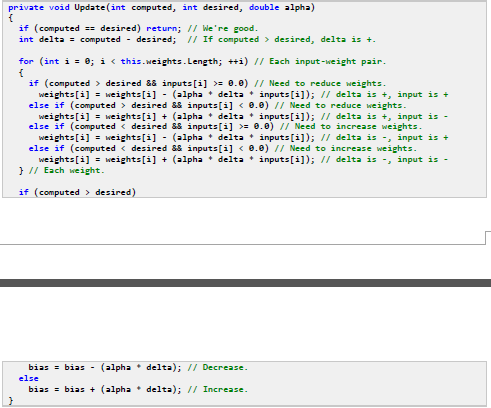
member this.calculateWeightAdjustment(xValue, xWeight, alpha, delta) = match delta > 0.0, xValue >= 0.0 with | true,true -> xWeight - (alpha * abs(delta) * xValue) | false,true -> xWeight + (alpha * abs(delta) * xValue) | true,false -> xWeight - (alpha * abs(delta) * xValue) | false,false -> xWeight + (alpha * abs(delta) * xValue) member this.calculateBiasAdjustment(bias, alpha, delta) = match delta > 0.0 with | true -> bias - (alpha * abs(delta)) | false -> bias + (alpha * abs(delta)) member this.runAdjustment (input:adjustmentInput) = match input.weightedConfirmedObservation.yExpected = input.yActual with | true -> let weights = input.weightedConfirmedObservation.weightedObservation.xws |> Seq.map(fun (x,w) -> w) let weights' = new List<float>(weights) {adjustmentOutput.weights=weights';adjustmentOutput.bias=input.bias} | false -> let delta = input.yActual - input.weightedConfirmedObservation.yExpected let weights' = input.weightedConfirmedObservation.weightedObservation.xws |> Seq.map(fun (xValue, xWeight) -> this.calculateWeightAdjustment(xValue,xWeight,input.alpha,delta)) |> Seq.toList let weights'' = new List<float>(weights') let bias' = this.calculateBiasAdjustment(input.bias,input.alpha,delta) {adjustmentOutput.weights=weights'';adjustmentOutput.bias=bias'}

[TestMethod] public void calculateWeightAdjustmentUsingPositiveDelta_ReturnsExpected() { var xValue = 1.5; var xWeight = .00060; var delta = 2; var weightAdjustment = _perceptron.calculateWeightAdjustment(xValue, xWeight, _alpha, delta); var actual = Math.Round(weightAdjustment, 4); var expected = -.0024; Assert.AreEqual(expected, actual); } [TestMethod] public void calculateWeightAdjustmentUsingNegativeDelta_ReturnsExpected() { var xValue = 1.5; var xWeight = .00060; var delta = -2; var weightAdjustment = _perceptron.calculateWeightAdjustment(xValue, xWeight, _alpha, delta); var actual = Math.Round(weightAdjustment, 5); var expected = .0036; Assert.AreEqual(expected, actual); } [TestMethod] public void calculateBiasAdjustmentUsingPositiveDelta_ReturnsExpected() { var bias = 0.00364; var delta = 2; var expected = .00164; var actual = _perceptron.calculateBiasAdjustment(bias, _alpha, delta); Assert.AreEqual(expected, actual); } [TestMethod] public void calculateBiasAdjustmentUsingNegativeDelta_ReturnsExpected() { var bias = 0.00364; var delta = -2; var expected = .00564; var actual = _perceptron.calculateBiasAdjustment(bias, _alpha, delta); Assert.AreEqual(expected, actual); } [TestMethod] public void runAdjustmentUsingMatchingData_ReturnsExpected() { var adjustmentInput = new adjustmentInput(_weightedConfirmedObservation, _bias, _alpha, -1.0); var adjustedWeights = _perceptron.runAdjustment(adjustmentInput); var expected = .0065; var actual = Math.Round(adjustedWeights.weights[0],4); Assert.AreEqual(expected, actual); } [TestMethod] public void runAdjustmentUsingNegativeData_ReturnsExpected() { weightedConfirmedObservation weightedConfirmedObservation = new NeuralNetworks.weightedConfirmedObservation(_weightedObservation, 1.0); var adjustmentInput = new adjustmentInput(weightedConfirmedObservation, _bias, _alpha, -1.0); var adjustedWeights = _perceptron.runAdjustment(adjustmentInput); var expected = .0125; var actual = Math.Round(adjustedWeights.weights[0], 4); Assert.AreEqual(expected, actual); } [TestMethod] public void runAdjustmentUsingPositiveData_ReturnsExpected() { var adjustmentInput = new adjustmentInput(_weightedConfirmedObservation, _bias, _alpha, 1.0); var adjustedWeights = _perceptron.runAdjustment(adjustmentInput); var expected = .0005; var actual = Math.Round(adjustedWeights.weights[0], 4); Assert.AreEqual(expected, actual); }

With these functions ready, I could run a training cycle for a given observation

member this.runTrainingCycle (cycleTrainingInput:cycleTrainingInput) = let neuronTrainingInput = {neuronInput.weightedObservation=cycleTrainingInput.weightedConfirmedObservation.weightedObservation; neuronInput.bias=cycleTrainingInput.bias} let neuronResult = this.runNeuron(neuronTrainingInput) let activationResult = this.runActivation(neuronResult) let adjustmentInput = {weightedConfirmedObservation=cycleTrainingInput.weightedConfirmedObservation; bias=cycleTrainingInput.bias;alpha=cycleTrainingInput.alpha; yActual=activationResult} this.runAdjustment(adjustmentInput)

[TestMethod] public void runTrainingCycleUsingNegativeData_ReturnsExpected() { var cycleTrainingInput = new cycleTrainingInput(_weightedConfirmedObservation, _bias, _alpha); var adjustmentOutput = _perceptron.runTrainingCycle(cycleTrainingInput); var expected = .0125; var actual = Math.Round(adjustmentOutput.weights[0], 4); Assert.AreEqual(expected, actual); } [TestMethod] public void runTrainingCycleUsingPositiveData_ReturnsExpected() { var cycleTrainingInput = new cycleTrainingInput(_weightedConfirmedObservation, _bias, _alpha); var adjustmentOutput = _perceptron.runTrainingCycle(cycleTrainingInput); var expected = .0065; var actual = Math.Round(adjustmentOutput.weights[0], 4); Assert.AreEqual(expected, actual); }

And then I could run a cycle for each of the observations in the training set, a rotation.  I am not happy that I am mutating the weights and biases here, though I am not sure how to fix that.  I looked for a Seq.Scan function where the results of a function applied to the 1st element of a Seq is used in the input of the next –> all I could see were examples of threading a collector of int (like Seq.mapi).  This will be something I will ask the functional ninjas when I see them again.

member this.runTrainingRotation(rotationTrainingInput: rotationTrainingInput)= let mutable weights = rotationTrainingInput.weights let mutable bias = rotationTrainingInput.bias let alpha = rotationTrainingInput.alpha for i=0 to rotationTrainingInput.confirmedObservations.Count-1 do let currentConfirmedObservation = rotationTrainingInput.confirmedObservations.[i] let xws = Seq.zip currentConfirmedObservation.observation.xValues weights let xws' = new List<(float*float)>(xws) let weightedObservation = {xws=xws'} let weightedTrainingObservation = {weightedObservation=weightedObservation;yExpected=currentConfirmedObservation.yExpected} let cycleTrainingInput = { cycleTrainingInput.weightedConfirmedObservation=weightedTrainingObservation; cycleTrainingInput.bias=bias; cycleTrainingInput.alpha=alpha} let cycleOutput = this.runTrainingCycle(cycleTrainingInput) weights <- cycleOutput.weights bias <- cycleOutput.bias {adjustmentOutput.weights=weights; adjustmentOutput.bias=bias}

[TestMethod] public void runTrainingRotationUsingNegativeData_ReturnsExpected() { var xValues = new List<double>(); xValues.Add(3.0); xValues.Add(4.0); var observation = new observation(xValues); var yExpected = -1.0; var confirmedObservation0 = new confirmedObservation(observation, yExpected); xValues = new List<double>(); xValues.Add(1.5); xValues.Add(2.0); yExpected = -1.0; var confirmedObservation1 = new confirmedObservation(observation, yExpected); var trainingObservations = new List<confirmedObservation>(); trainingObservations.Add(confirmedObservation0); trainingObservations.Add(confirmedObservation1); var weights = new List<double>(); weights.Add(.0065); weights.Add(.0123); var rotationTrainingInput = new rotationTrainingInput(trainingObservations, weights, _bias, _alpha); var trainingRotationOutput = _perceptron.runTrainingRotation(rotationTrainingInput); var expected = -0.09606; var actual = Math.Round(trainingRotationOutput.bias, 5); Assert.AreEqual(expected, actual); } [TestMethod] public void runTrainingRotationUsingPositiveData_ReturnsExpected() { var xValues = new List<double>(); xValues.Add(3.0); xValues.Add(4.0); var observation = new observation(xValues); var yExpected = 1.0; var confirmedObservation0 = new confirmedObservation(observation, yExpected); xValues = new List<double>(); xValues.Add(1.5); xValues.Add(2.0); yExpected = 1.0; var confirmedObservation1 = new confirmedObservation(observation, yExpected); var trainingObservations = new List<confirmedObservation>(); trainingObservations.Add(confirmedObservation0); trainingObservations.Add(confirmedObservation1); var weights = new List<double>(); weights.Add(.0065); weights.Add(.0123); var rotationTrainingInput = new rotationTrainingInput(trainingObservations, weights, _bias, _alpha); var trainingRotationOutput = _perceptron.runTrainingRotation(rotationTrainingInput); var expected = -.09206; var actual = Math.Round(trainingRotationOutput.bias, 5); Assert.AreEqual(expected, actual); }

With the rotation done, I could write the train function which runs rotations for N number of times to tune the weights and biases:

member this.train(trainInput:trainInput) = let currentObservation = trainInput.confirmedObservations.[0].observation let weights = this.initializeWeights(currentObservation.xValues,trainInput.weightSeedValue) let weights' = new List<float>(weights) let mutable bias = this.initializeBias(trainInput.biasSeedValue) let alpha = trainInput.alpha for i=0 to trainInput.maxEpoches do let rotationTrainingInput={rotationTrainingInput.confirmedObservations=trainInput.confirmedObservations; rotationTrainingInput.weights = weights'; rotationTrainingInput.bias=bias; rotationTrainingInput.alpha=trainInput.alpha} this.runTrainingRotation(rotationTrainingInput) |> ignore {adjustmentOutput.weights=weights'; adjustmentOutput.bias=bias}

[TestMethod] public void trainUsingTestData_RetunsExpected() { var xValues = new List<double>(); xValues.Add(1.5); xValues.Add(2.0); var observation = new observation(xValues); var yExpected = -1.0; var confirmedObservation0 = new confirmedObservation(observation, yExpected); xValues = new List<double>(); xValues.Add(2.0); xValues.Add(3.5); observation = new observation(xValues); yExpected = -1.0; var confirmedObservation1 = new confirmedObservation(observation, yExpected); xValues = new List<double>(); xValues.Add(3.0); xValues.Add(5.0); observation = new observation(xValues); yExpected = -1.0; var confirmedObservation2 = new confirmedObservation(observation, yExpected); xValues = new List<double>(); xValues.Add(3.5); xValues.Add(2.5); observation = new observation(xValues); yExpected = -1.0; var confirmedObservation3 = new confirmedObservation(observation, yExpected); xValues = new List<double>(); xValues.Add(4.5); xValues.Add(5.0); observation = new observation(xValues); yExpected = 1.0; var confirmedObservation4 = new confirmedObservation(observation, yExpected); xValues = new List<double>(); xValues.Add(5.0); xValues.Add(7.5); observation = new observation(xValues); yExpected = 1.0; var confirmedObservation5 = new confirmedObservation(observation, yExpected); xValues = new List<double>(); xValues.Add(5.5); xValues.Add(8.0); observation = new observation(xValues); yExpected = 1.0; var confirmedObservation6 = new confirmedObservation(observation, yExpected); xValues = new List<double>(); xValues.Add(6.0); xValues.Add(6.0); observation = new observation(xValues); yExpected = 1.0; var confirmedObservation7 = new confirmedObservation(observation, yExpected); var trainingObservations = new List<confirmedObservation>(); trainingObservations.Add(confirmedObservation0); trainingObservations.Add(confirmedObservation1); trainingObservations.Add(confirmedObservation2); trainingObservations.Add(confirmedObservation3); trainingObservations.Add(confirmedObservation4); trainingObservations.Add(confirmedObservation5); trainingObservations.Add(confirmedObservation6); trainingObservations.Add(confirmedObservation7); var random = new Random(); var weightSeedValue = random.NextDouble(); var biasSeedValue = random.NextDouble(); var alpha = .001; var maxEpoches = 100; var trainInput = new trainInput(trainingObservations, weightSeedValue, biasSeedValue, alpha, maxEpoches); var trainOutput = _perceptron.train(trainInput); Assert.IsNotNull(trainOutput); }

With the training out of the way, I could concentrate on the prediction.  The prediction was much easier because there are no adjustments and the rotation is run once.  The data structures are also simpler because I don’t have to pass in the knownY values.  I also only have 1 covering (all be it long) unit test that looks that the results of the prediction.

member this.runPredictionCycle (cyclePredictionInput:cyclePredictionInput) = let neuronInput = {neuronInput.weightedObservation=cyclePredictionInput.weightedObservation; neuronInput.bias=cyclePredictionInput.bias} let neuronResult = this.runNeuron(neuronInput) this.runActivation(neuronResult) member this.runPredictionRotation (rotationPredictionInput:rotationPredictionInput) = let output = new List<List<float>*float>(); let weights = rotationPredictionInput.weights for i=0 to rotationPredictionInput.observations.Count-1 do let currentObservation = rotationPredictionInput.observations.[i]; let xws = Seq.zip currentObservation.xValues weights let xws' = new List<(float*float)>(xws) let weightedObservation = {xws=xws'} let cyclePredictionInput = { cyclePredictionInput.weightedObservation = weightedObservation; cyclePredictionInput.bias = rotationPredictionInput.bias} let cycleOutput = this.runPredictionCycle(cyclePredictionInput) output.Add(currentObservation.xValues, cycleOutput) output member this.predict(predictInput:predictInput) = let rotationPredictionInput = { rotationPredictionInput.observations = predictInput.observations; rotationPredictionInput.weights = predictInput.weights; rotationPredictionInput.bias = predictInput.bias } this.runPredictionRotation(rotationPredictionInput)

[TestMethod] public void predictUsingTestData_ReturnsExpected() { var xValues = new List<double>(); xValues.Add(3.0); xValues.Add(4.0); var observation0 = new observation(xValues); xValues = new List<double>(); xValues.Add(0.0); xValues.Add(1.0); var observation1 = new observation(xValues); xValues = new List<double>(); xValues.Add(2.0); xValues.Add(5.0); var observation2 = new observation(xValues); xValues = new List<double>(); xValues.Add(5.0); xValues.Add(6.0); var observation3 = new observation(xValues); xValues = new List<double>(); xValues.Add(9.0); xValues.Add(9.0); var observation4 = new observation(xValues); xValues = new List<double>(); xValues.Add(4.0); xValues.Add(6.0); var observation5 = new observation(xValues); var observations = new List<observation>(); observations.Add(observation0); observations.Add(observation1); observations.Add(observation2); observations.Add(observation3); observations.Add(observation4); observations.Add(observation5); var weights = new List<double>(); weights.Add(.0065); weights.Add(.0123); var bias = -0.0906; var predictInput = new predictInput(observations, weights, bias); var predictOutput = _perceptron.predict(predictInput); Assert.IsNotNull(predictOutput); }

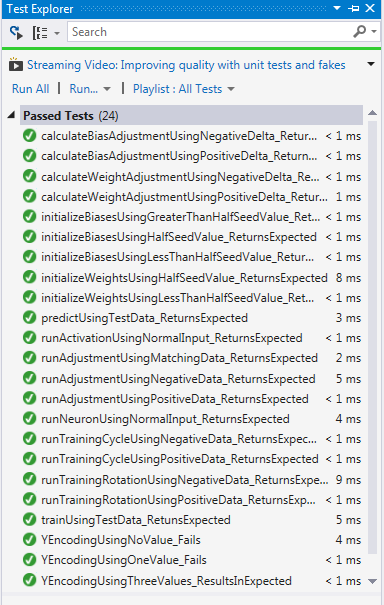
When I run all of the unit tests the all run green:

image

With the Perceptron created, I can now go back and change the code and figure out:

1) Why my weights across the XValues are the same (wrong!)

2) How to implement a more idomatic/recursive way of running rotations so I can remove the mutation

With my unit tests running green, I know I am covered in case I make a mistake

Neural Network Part 2: Perceptrons

I started working though the second chapter of McCaffrey’s book Neural Networks Using C# Succinctly to see if I could write the examples using F#.

McCaffrey’s code is tough to read though because of its emphasis on loops and global mutable variables.  I read though his description and this is how <I think> the Perceptron should be constructed.

The inputs are a series of independent variables (in this case age and income) and the output is a single dependent variable (in this case party affiliation).  The values have been encoded and normalized like in this post here.

An example of the input (from page 31 of his book) is:
image

Or in a more abstract manner:

image

In terms of data structures, individual inputs (each row) is placed into an array of floats and the output is a single float

image

I call this single set of inputs an “observation” (my words, not McCaffrey).

Looking at McCaffrey’s example for a perceptron Input-Output,

image

all of the variables you need are not included. Here is what you need:

image

Where A0 and B0 are the same as X0 and X1 respectively in his diagram.  Also, McCaffrey uses the word “Perceptron” to mean two different concepts: the entire system as a whole and the individual calculation for a given list of X and Bias.  I am a big believer of domain ubiquitous languages so I am calling the individual calculation a neuron.

Once you run these values through the neuron for the 1st observation, you might have to alter the Weights and Bias based on the (Y)result.  Therefore, the data structure coming out of the Neuron is

image

These values are feed into the adjustment function to alter the weights and bias with the output as

image

I am calling this process of taking the a single observation, the xWeights, , and the bias and turning them into a series of weights and bais as a “cycle” (my words, not McCaffrey)

image


The output of a cycle is then fed with  the next observation and the cycle repeats for as many observations as there are fed into the system. 

image


I am calling the process of running a cycle for each observation in the input dataset a rotation (my words, not McCaffrey) and that the perceptron runs rotations for an x number of times to train itself.

image


Finally, the Perceptron takes a new set of observations where the Y is not known and runs a Rotation once to predict what the Y will be.

So with that mental image in place, the coding became much easier.  Basically, there was a 1 to 1 correspondence of F# functions to each step laid out.  I started with an individual cycle

  1. type cycleInput = {xValues:float list;yExpected:float;mutable weights:float list;mutable bias:float;alpha:float}
  2.  
  3. let runNeuron (input:cycleInput) =
  4.     let valuesAndWeights = input.xValues |> List.zip input.weights
  5.     let output = valuesAndWeights
  6.                     |> List.map(fun (xValue, xWeight) -> xValue*xWeight)
  7.                     |> List.sumBy(fun x -> x)
  8.     output + input.bias
  9.  
  10. let runActivation input =
  11.     if input < 0.0 then -1.0 else 1.0

I used record types all over the place in this code just so I could keep things straight in my head.  McCaffrey uses ambiguously-named arrays and global variables.  Although this makes my code a bit more wordy (esp for functional people), I think the increased readability is worth the trade-off.

In any event, with the Neuron and Activation calc out of the way, I created the functions that adjust the weights and bias:

  1. let calculateWeightAdjustment(xValue, xWeight, alpha, delta) =
  2.     match delta > 0.0, xValue >= 0.0 with
  3.         | true,true -> xWeight – (alpha * delta * xValue)
  4.         | false,true -> xWeight + (alpha * delta * xValue)
  5.         | true,false -> xWeight – (alpha * delta * xValue)
  6.         | false,false -> xWeight + (alpha * delta * xValue)
  7.  
  8. let calculateBiasAdjustment(bias, alpha, delta) =
  9.     match delta > 0.0 with
  10.         | true -> bias – (alpha * delta)
  11.         | false -> bias + (alpha * delta)

This code is significantly different than the for, nested if that McCaffrey uses. 

image

I maintain using this kind of pattern matching makes the intention much easier to comprehend.  I also split out the adjustment of the weights and the adjustment of the bias into individual functions.

With these functions ready, I created an input and output record type and implemented the adjustment function

  1. let runAdjustment (input:adjustmentInput) =
  2.     match input.yExpected = input.yActual with
  3.         | true -> {weights=input.weights;bias=input.bias;yActual=input.yActual}
  4.         | false ->
  5.             let delta = input.yActual – input.yExpected
  6.             let valuesAndWeights = input.xValues |> List.zip input.weights
  7.             let weights' =  valuesAndWeights |> List.map(fun (xValue, xWeight) -> calculateWeightAdjustment(xValue,xWeight,input.alpha,delta))
  8.             let bias' = calculateBiasAdjustment(input.bias,input.alpha,delta)
  9.             {weights=weights';bias=bias';yActual=input.yActual}

There is not a corresponding method in McCaffrey’s code, rather he just does some Array.copy and mutates the global variables in the Update method.  I am not a fan of side-effect programming so I created a function that explicitly does the  modification.

And to wrap up the individual cycle:

  1. let runCycle (cycleInput:cycleInput) =
  2.     let neuronResult = runNeuron(cycleInput)
  3.     let activationResult = runActivation(neuronResult)
  4.     let adjustmentInput = {xValues=cycleInput.xValues;weights=cycleInput.weights;yExpected=cycleInput.yExpected;
  5.                             bias=cycleInput.bias;alpha=cycleInput.alpha;yActual=activationResult}
  6.     runAdjustment(adjustmentInput)

Up next is to run the cycle for each of the observations (called a rotation)

  1. type observation = {xValues:float list;yExpected:float}
  2. type rotationInput = {observations: observation list;mutable weights:float list;mutable bias:float;alpha:float}
  3. type trainingRotationOutput = {weights:float list; bias:float}
  4. type predictionRotationOutput = {observation: observation;yActual:float}
  5.  
  6. let runTrainingRotation(rotationInput: rotationInput)=
  7.     for i=0 to rotationInput.observations.Length do
  8.         let observation = rotationInput.observations.[i]
  9.         let neuronInput = {cycleInput.xValues=observation.xValues;cycleInput.yExpected=observation.yExpected;cycleInput.weights=rotationInput.weights;
  10.                             cycleInput.bias=rotationInput.bias;cycleInput.alpha=rotationInput.alpha}
  11.         let cycleOutput = runCycle(neuronInput)
  12.         rotationInput.weights <- cycleOutput.weights
  13.         rotationInput.bias <- cycleOutput.bias
  14.     {weights=rotationInput.weights; bias=rotationInput.bias}

Again, note the liberal use of records to keep the inputs and outputs clear.  I also created a prediction rotation that is designed to be run only once that does not alter the weights and bias.

  1. let runPredictionRotation(rotationInput: rotationInput)=
  2.     let output = new System.Collections.Generic.List<predictionRotationOutput>()
  3.     for i=0 to rotationInput.observations.Length do
  4.         let observation = rotationInput.observations.[i]
  5.         let neuronInput = {cycleInput.xValues=observation.xValues;cycleInput.yExpected=observation.yExpected;cycleInput.weights=rotationInput.weights;
  6.                             cycleInput.bias=rotationInput.bias;cycleInput.alpha=rotationInput.alpha}
  7.         let cycleOutput = runCycle(neuronInput)
  8.         let predictionRotationOutput = {observation=observation;yActual=cycleOutput.yActual}
  9.         output.Add(predictionRotationOutput)   
  10.     output

With the rotations done, the last step was to create the Perceptron to train and then predict:

  1. type perceptronInput = {observations: observation list;weights:float list;bias:float}
  2. type perceptronOutput = {weights:float list; bias:float}
  3.  
  4. let initializeWeights(xValues, randomSeedValue) =
  5.     let lo = -0.01
  6.     let hi = 0.01
  7.     let xWeight = (hi-lo) * randomSeedValue + lo
  8.     xValues |> List.map(fun w -> xWeight)
  9.  
  10. let initializeBias(randomSeedValue) =
  11.     let lo = -0.01
  12.     let hi = 0.01
  13.     (hi-lo) * randomSeedValue + lo
  14.  
  15. let runTraining(perceptronInput: perceptronInput, maxEpoches:int) =
  16.     let random = System.Random()
  17.     let alpha = 0.001
  18.     let baseObservation = perceptronInput.observations.[0]
  19.     let mutable weights = initializeWeights(baseObservation.xValues,random.NextDouble())       
  20.     let mutable bias = initializeBias(random.NextDouble())
  21.     let rotationList = [0..maxEpoches]
  22.     for i=0 to maxEpoches do
  23.         let rotationInput = {observations=perceptronInput.observations;weights=weights;bias=bias;alpha=alpha}
  24.         let rotationOutput = runTrainingRotation(rotationInput)
  25.         weights <- rotationOutput.weights
  26.         bias <- rotationOutput.bias
  27.     {weights=weights;bias=bias}
  28.  
  29. let runPrediction(perceptronInput: perceptronInput, weights: float list, bias: float) =
  30.     let random = System.Random()
  31.     let alpha = 0.001
  32.     let rotationInput = {observations=perceptronInput.observations;weights=weights;bias=bias;alpha=alpha}
  33.     runPredictionRotation(rotationInput)


Before I go too much further, I have a big code smell.  I am iterating and using the mutable keyword.  I am not sure how to take the results of a function that is applied to the 1st element in a sequence and then input that into the second.  I need to do that with the weights and bias data structures –> each time it is used in a expression, it need to change and feed into the next expression.  I think the answer is the List.Reduce, so I am going to pick this up after looking at that in more detail.  I also need to implement the shuffle method so that that cycles are not called in the same order across rotations….

Neural Networks

I picked up James McCaffrey’s Neural Networks Using C# a couple of weeks ago and decided to see if I could rewrite the code in F#.  Unfortunately, the source code is not available (as far as I could tell), so I did some C# then F# coding to see if I could get functional equivalence.

My first stop was chapter one.  I made the decision to get the F# code working for the sample data that McCaffrey provided first and then refactor it to a more general program that would work with inputs and values of different datasets.  My final upgrade will be use Deedle instead of any other data structure.  But first things first, I want to get the examples working so I fired up a script file and opened my REPL.

McCaffrey defines a sample dataset like this

  1. string[] sourceData = new string[] { "Sex Age Locale Income Politics",
  2.     "==============================================",
  3.     "Male 25 Rural 63,000.00 Conservative",
  4.     "Female 36 Suburban 55,000.00 Liberal", "Male 40 Urban 74,000.00 Moderate",
  5.     "Female 23 Rural 28,000.00 Liberal" };

He then creates a parser for the comma-delimited string values into a double[][].  I just created the dataset as a List of tuples.

  1. let chapter1TestData = [("Male",25.,"Rural",63000.00,"Conservative");
  2.                 ("Female",36.,"Suburban",55000.00,"Liberal");
  3.                 ("Male",40.,"Urban",74000.00,"Moderate");
  4.                 ("Female",23.,"Rural",28000.00,"Liberal")]


I did try an implementation using a record type but for reasons below, I am using Tuples.  With the equivalent data loaded into  the REPL, I tackled the first supporting function: MinMax.  Here is the C# code that McCaffrey wrote:

  1. static void MinMaxNormal(double[][] data, int column)
  2. {
  3.     int j = column;
  4.     double min = data[0][j];
  5.     double max = data[0][j];
  6.     for (int i = 0; i < data.Length; ++i)
  7.     {
  8.         if (data[i][j] < min) min = data[i][j];
  9.         if (data[i][j] > max) max = data[i][j];
  10.     }
  11.     double range = max – min;
  12.     if (range == 0.0) // ugly
  13.     { for (int i = 0; i < data.Length; ++i)
  14.         data[i][j] = 0.5;
  15.         return; }
  16.     for (int i = 0; i < data.Length; ++i)
  17.         data[i][j] = (data[i][j] – min) / range;
  18. }

and here is the equivalent F# code.

  1. let minMax (fullSet, i) =
  2.     let min = fullSet |> Seq.min
  3.     let max = fullSet |> Seq.max
  4.     (i-min)/(max-min)


Note that McCaffrey does not have any unit tests but when I ran the dummy data through the F# implementation, the results matched his screen shots so that will work well enough.  If you ever need a reason to use F#, consider those 2 code samples.  Granted McCaffrey’s code is more abstract because it can be any column in double array, but my counterpoint is that the function is really doing too much and it is trivial in F# to pick a given column.  Is there any doubt what the F# code is doing?  Is there any certainty of what the C# code is doing?

In any event, moving along to the next functions, McCaffrey created two functions that do all of the encoding of the string values to appropriate numeric ones.  Depending on if the value is a X value (independent) or Y value (dependent), there is a different encoding scheme:

  1.  static string EffectsEncoding(int index, int N)
  2.  {
  3.      // If N = 3 and index = 0 -> 1,0.
  4.      // If N = 3 and index = 1 -> 0,1.
  5.      // If N = 3 and index = 2 -> -1,-1.
  6.      if (N == 2)
  7.      // Special case.
  8.      { if (index == 0) return "-1"; else if (index == 1) return "1"; }
  9.      int[] values = new int[N – 1];
  10.      if (index == N – 1)
  11.      // Last item is all -1s.
  12.      { for (int i = 0; i < values.Length; ++i) values[i] = -1; }
  13.      else
  14.      {
  15.          values[index] = 1;
  16.          // 0 values are already there.
  17.      } string s = values[0].ToString();
  18.      for (int i = 1; i < values.Length; ++i) s += "," + values[i]; return s;
  19.  }
  20.  
  21.  static string DummyEncoding(int index, int N)
  22.  {
  23.      int[] values = new int[N]; values[index] = 1;
  24.      string s = values[0].ToString();
  25.      for (int i = 1; i < values.Length; ++i) s += "," + values[i];
  26.      return
  27. }

In my F# project, I decided to domain-specific encoding.  I plan to refactor this to something more abstract. 

  1. //Transform Sex
  2. let testData' = chapter1TestData |> Seq.map(fun (s,a,l,i,p) -> match s with
  3.                                                                | "Male"-> -1.0,a,l,i,p
  4.                                                              | "Female" -> 1.0,a,l,i,p
  5.                                                              | _ -> failwith "Invalid sex")
  6. //Normalize Age
  7. let testData'' =
  8.     let fullSet =  testData' |> Seq.map(fun (s,a,l,i,p) -> a)
  9.     testData' |> Seq.map(fun (s,a,l,i,p) -> s,minMax(fullSet,a),l,i,p)
  10.  
  11. //Transform Locale
  12. let testData''' = testData'' |> Seq.map(fun (s,a,l,i,p) -> match l with
  13.                                                                 | "Rural" -> s,a,1.,0.,i,p
  14.                                                                 | "Suburban" -> s,a,0.,1.,i,p
  15.                                                                 | "Urban" -> s,a,-1.,-1.,i,p
  16.                                                                 | _ -> failwith "Invalid locale")
  17. //Transform and Normalize Income
  18. let testData'''' =
  19.     let fullSet =  testData''' |> Seq.map(fun (s,a,l0,l1,i,p) -> i)
  20.     testData''' |> Seq.map(fun (s,a,l0,l1,i,p) -> s,a,l0,l1,minMax(fullSet,i),p)
  21.  
  22. //Transform Politics
  23. let testData''''' = testData'''' |> Seq.map(fun (s,a,l0,l1,i,p) -> match p with
  24.                                                                 | "Conservative" -> s,a,l0,l1,i,1.,0.,0.
  25.                                                                 | "Liberal" -> s,a,l0,l1,i,0.,1.,0.
  26.                                                                 | "Moderate" -> s,a,l0,l1,i,0.,0.,1.
  27.                                                                 | _ -> failwith "Invalid politics")

When I execute the script:

image

Which is the same as McCaffrey’s.

image

Note that he used Gaussian normalization on column 2 and I did Min/Max based on his advice in the book.


Terminator Program: Part 2

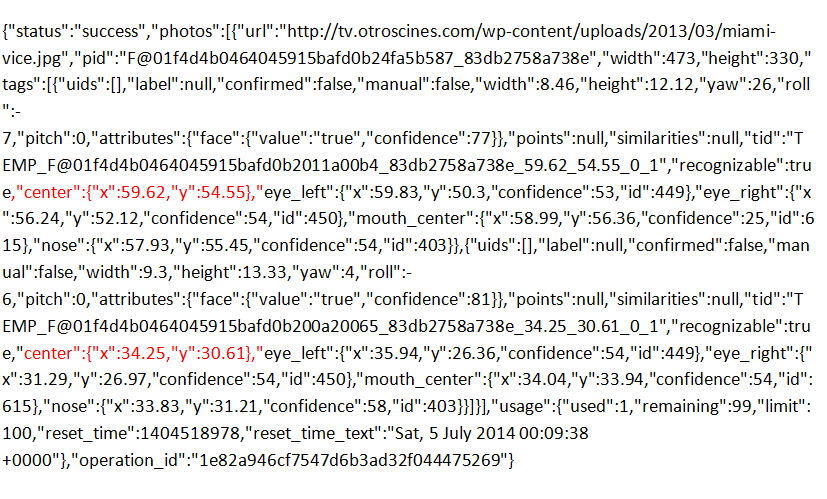
Following up on my last post, I decided to send the entire photograph to Sky Biometry and have them parse the photograph and identify individual people.  This ability is built right into their API.  For example, if you pass them this picture, you get the following json back.

image

I added the red highlight to show that Sky Biometry can recognize multiple people (it is an array of uids) and that each face tag has a center.x and center:y.  Reading the API documentation, this point is center of the face tag point and their point is a percentage of the photo width.

image

So I need to translate the center point of the skeleton from the Kinect to eqiv center point of the sky biometry recognition output and I should be able to identify individual people within the Kinect’s field of vision.  Going back to the Kinect code, I ditched the DrawBoxAroundHead method and altered the UpdateDisplay method like so

  1. private void UpdateDisplay(byte[] colorData, Skeleton[] skeletons)
  2. {
  3.     if (_videoBitmap == null)
  4.     {
  5.         _videoBitmap = new WriteableBitmap(640, 480, 96, 96, PixelFormats.Bgr32, null);
  6.     }
  7.     _videoBitmap.WritePixels(new Int32Rect(0, 0, 640, 480), colorData, 640 * 4, 0);
  8.     kinectColorImage.Source = _videoBitmap;
  9.     var selectedSkeleton = skeletons.FirstOrDefault(s => s.TrackingState == SkeletonTrackingState.Tracked);
  10.     if (selectedSkeleton != null)
  11.     {
  12.         var headPosition = selectedSkeleton.Joints[JointType.Head].Position;
  13.         var adjustedHeadPosition =
  14.             _sensor.CoordinateMapper.MapSkeletonPointToColorPoint(headPosition, ColorImageFormat.RgbResolution640x480Fps30);
  15.         var adjustedSkeletonPosition = _sensor.CoordinateMapper.MapSkeletonPointToColorPoint(selectedSkeleton.Position, ColorImageFormat.RgbResolution640x480Fps30);
  16.  
  17.         skeletonCanvas.Children.Clear();
  18.         Rectangle headRectangle = new Rectangle();
  19.         headRectangle.Fill = new SolidColorBrush(Colors.Blue);
  20.         headRectangle.Width = 10;
  21.         headRectangle.Height = 10;
  22.         Canvas.SetLeft(headRectangle, adjustedHeadPosition.X);
  23.         Canvas.SetTop(headRectangle, adjustedHeadPosition.Y);
  24.         skeletonCanvas.Children.Add(headRectangle);
  25.  
  26.         Rectangle skeletonRectangle = new Rectangle();
  27.         skeletonRectangle.Fill = new SolidColorBrush(Colors.Red);
  28.         skeletonRectangle.Width = 10;
  29.         skeletonRectangle.Height = 10;
  30.         Canvas.SetLeft(skeletonRectangle, adjustedHeadPosition.X);
  31.         Canvas.SetTop(skeletonRectangle, adjustedHeadPosition.Y);
  32.         skeletonCanvas.Children.Add(skeletonRectangle);
  33.  
  34.         String skeletonInfo = headPosition.X.ToString() + " : " + headPosition.Y.ToString() + " — ";
  35.         skeletonInfo = skeletonInfo + adjustedHeadPosition.X.ToString() + " : " + adjustedHeadPosition.Y.ToString() + " — ";
  36.         skeletonInfo = skeletonInfo + adjustedSkeletonPosition.X.ToString() + " : " + adjustedSkeletonPosition.Y.ToString();
  37.  
  38.         skeletonInfoTextBox.Text = skeletonInfo;
  39.  
  40.     }
  41. }

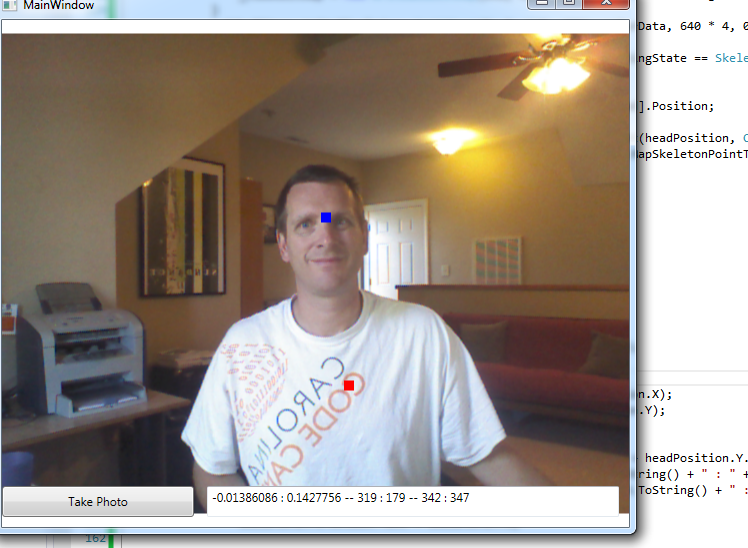
Notice that there are two rectangles because I was not sure if the Head.Position or the Skeleton.Position would match SkyBiometry.  Turns out that I want the Head.Position for SkyBiometry (besides, the terminator would want head shots only)

image

So I ditched the Skeleton.Position.  I then needed a way to translate the Head.Posotion.X to SkyBiometry.X and Head.Posotion.Y to SkyBiometry.Y.  Fortunately, I know the size of each photograph (640 X 480) so calculating the percent is an exercise of altering UpdateDisplay:

  1. private void UpdateDisplay(byte[] colorData, Skeleton[] skeletons)
  2. {
  3.     Int32 photoWidth = 640;
  4.     Int32 photoHeight = 480;
  5.  
  6.     if (_videoBitmap == null)
  7.     {
  8.         _videoBitmap = new WriteableBitmap(photoWidth, photoHeight, 96, 96, PixelFormats.Bgr32, null);
  9.     }
  10.     _videoBitmap.WritePixels(new Int32Rect(0, 0, photoWidth, photoHeight), colorData, photoWidth * 4, 0);
  11.     kinectColorImage.Source = _videoBitmap;
  12.     var selectedSkeleton = skeletons.FirstOrDefault(s => s.TrackingState == SkeletonTrackingState.Tracked);
  13.     if (selectedSkeleton != null)
  14.     {
  15.         var headPosition = selectedSkeleton.Joints[JointType.Head].Position;
  16.         var adjustedHeadPosition =
  17.             _sensor.CoordinateMapper.MapSkeletonPointToColorPoint(headPosition, ColorImageFormat.RgbResolution640x480Fps30);
  18.  
  19.         skeletonCanvas.Children.Clear();
  20.         Rectangle headRectangle = new Rectangle();
  21.         headRectangle.Fill = new SolidColorBrush(Colors.Blue);
  22.         headRectangle.Width = 10;
  23.         headRectangle.Height = 10;
  24.         Canvas.SetLeft(headRectangle, adjustedHeadPosition.X);
  25.         Canvas.SetTop(headRectangle, adjustedHeadPosition.Y);
  26.         skeletonCanvas.Children.Add(headRectangle);
  27.  
  28.         var skyBiometryX = ((float)adjustedHeadPosition.X / photoWidth)*100;
  29.         var skyBioMetryY = ((float)adjustedHeadPosition.Y / photoHeight)*100;
  30.  
  31.         String skeletonInfo = adjustedHeadPosition.X.ToString() + " : " + adjustedHeadPosition.Y.ToString() + " — ";
  32.         skeletonInfo = skeletonInfo + Math.Round(skyBiometryX,2).ToString() + " : " + Math.Round(skyBioMetryY,2).ToString();
  33.  
  34.         skeletonInfoTextBox.Text = skeletonInfo;
  35.  
  36.     }

And so now I have

image

The next step is to get the Kinect photo to Sky Biometry.  I decided to use Azure Blob Storage as my intermediately location.  I updated the architectural diagram like so:

image

At this point, it made sense to move the project over to F# so I could better concentrate on the work that needs to be done and also getting the important code out of the UI code behind.  I fired up a F# project in my solution added a couple different implementations of Storing Photos.  To keep things consistent, I created a data structure and an interface:

  1. namespace ChickenSoftware.Terminator.Core
  2.  
  3. open System
  4.  
  5. type public PhotoImage (uniqueId:Guid, imageBytes:byte[]) =
  6.     member this.UniqueId = uniqueId
  7.     member this.ImageBytes = imageBytes
  8.  
  9. type IPhotoImageProvider =
  10.     abstract member InsertPhotoImage : PhotoImage -> unit
  11.     abstract member DeletePhotoImage : Guid -> unit
  12.     abstract member GetPhotoImage : Guid -> PhotoImage

My 1st stop was to replicate what Miles did with the Save File Dialog box with a File System Provider.  It was very much like a C# implementation:

  1. namespace ChickenSoftware.Terminator.Core
  2.  
  3. open System
  4. open System.IO
  5. open System.Drawing
  6. open System.Drawing.Imaging
  7.  
  8. type LocalFileSystemPhotoImageProvider(folderPath: string) =
  9.  
  10.     member this.GetPhotoImageUri(uniqueIdentifier: Guid) =
  11.         let fileName = uniqueIdentifier.ToString() + ".jpg"
  12.         Path.Combine(folderPath, fileName)
  13.  
  14.     interface IPhotoImageProvider with
  15.         member this.InsertPhotoImage(photoImage: PhotoImage) =
  16.             let fullPath = this.GetPhotoImageUri(photoImage.UniqueId)
  17.             use memoryStream = new MemoryStream(photoImage.ImageBytes)
  18.             let image = Image.FromStream(memoryStream)
  19.             image.Save(fullPath)
  20.  
  21.         member this.DeletePhotoImage(uniqueIdentifier: Guid) =
  22.             let fullPath = this.GetPhotoImageUri(uniqueIdentifier)
  23.             File.Delete(fullPath)        
  24.  
  25.         member this.GetPhotoImage(uniqueIdentifier: Guid) =
  26.             let fullPath = this.GetPhotoImageUri(uniqueIdentifier)
  27.             use fileStream = new FileStream(fullPath,FileMode.Open)
  28.             let image = Image.FromStream(fileStream)
  29.             use memoryStream = new MemoryStream()
  30.             image.Save(memoryStream,ImageFormat.Jpeg)
  31.             new PhotoImage(uniqueIdentifier, memoryStream.ToArray())

To call the save method, I altered the SavePhoto method in the C# project to use a MemoryStream and not a FileStream:

  1. private void SavePhoto(byte[] colorData)
  2. {
  3.     var bitmapSource = BitmapSource.Create(640, 480, 96, 96, PixelFormats.Bgr32, null, colorData, 640 * 4);
  4.     JpegBitmapEncoder encoder = new JpegBitmapEncoder();
  5.     encoder.Frames.Add(BitmapFrame.Create(bitmapSource));
  6.     using (MemoryStream memoryStream = new MemoryStream())
  7.     {
  8.         encoder.Save(memoryStream);
  9.         PhotoImage photoImage = new PhotoImage(Guid.NewGuid(), memoryStream.ToArray());
  10.  
  11.         String folderUri = @"C:\Data";
  12.         IPhotoImageProvider provider = new LocalFileSystemPhotoImageProvider(folderUri);
  13.  
  14.         provider.InsertPhotoImage(photoImage);
  15.         memoryStream.Close();
  16.     }
  17.     _isTakingPicture = false;
  18. }

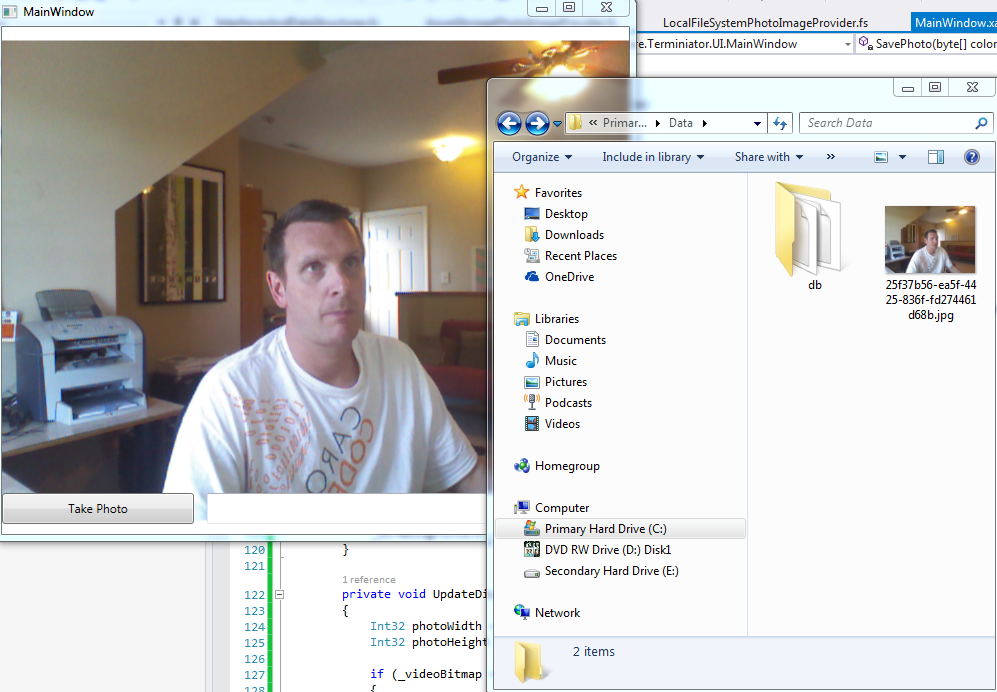
And sure enough, it saves the photo to disk:

image

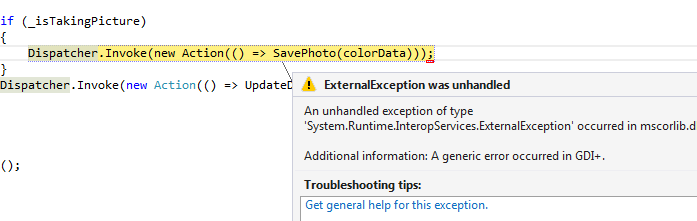
One problem that took me 20 minutes to uncover is that if you get your file system path wrong, you get the unhelpful exception:

image

This has been well-bitched about on stack overflow so I won’t comment further. 

With the file system up and running, I turned my attention to Azure.  Like the File System provider, it is very close to a C# implementation

  1. namespace ChickenSoftware.Terminator.Core
  2.  
  3. open System
  4. open System.IO
  5. open Microsoft.WindowsAzure.Storage
  6. open Microsoft.WindowsAzure.Storage.Blob
  7.  
  8. type AzureStoragePhotoImageProvider(customerUniqueId: Guid, connectionString: string) =
  9.  
  10.     member this.GetBlobContainer(blobClient:Blob.CloudBlobClient) =
  11.         let container = blobClient.GetContainerReference(customerUniqueId.ToString())
  12.         if not (container.Exists()) then
  13.             container.CreateIfNotExists() |> ignore
  14.             let permissions = new BlobContainerPermissions()
  15.             permissions.PublicAccess <- BlobContainerPublicAccessType.Blob
  16.             container.SetPermissions(permissions)
  17.         container
  18.  
  19.     member this.GetBlockBlob(uniqueIdentifier: Guid) =
  20.         let storageAccount = CloudStorageAccount.Parse(connectionString)
  21.         let blobClient = storageAccount.CreateCloudBlobClient()
  22.         let container = this.GetBlobContainer(blobClient)
  23.         let photoUri = this.GetPhotoImageUri(uniqueIdentifier)
  24.         container.GetBlockBlobReference(photoUri)
  25.  
  26.     member this.GetPhotoImageUri(uniqueIdentifier: Guid) =
  27.         uniqueIdentifier.ToString() + ".jpg"
  28.  
  29.     interface IPhotoImageProvider with
  30.         member this.InsertPhotoImage(photoImage: PhotoImage) =
  31.             let blockBlob = this.GetBlockBlob(photoImage.UniqueId)
  32.             use memoryStream = new MemoryStream(photoImage.ImageBytes)
  33.             blockBlob.UploadFromStream(memoryStream)
  34.  
  35.         member this.DeletePhotoImage(uniqueIdentifier: Guid) =
  36.             let blockBlob = this.GetBlockBlob(uniqueIdentifier)
  37.             blockBlob.Delete()       
  38.  
  39.         member this.GetPhotoImage(uniqueIdentifier: Guid) =
  40.             let blockBlob = this.GetBlockBlob(uniqueIdentifier)
  41.             if blockBlob.Exists() then
  42.                 blockBlob.FetchAttributes()
  43.                 use memoryStream = new MemoryStream()
  44.                 blockBlob.DownloadToStream(memoryStream)
  45.                 let photoArray = memoryStream.ToArray()
  46.                 new PhotoImage(uniqueIdentifier,photoArray)
  47.             else
  48.                 failwith "photo not found"

And when I pop it into the WPF application,

  1. private void SavePhoto(byte[] colorData)
  2. {
  3.     var bitmapSource = BitmapSource.Create(640, 480, 96, 96, PixelFormats.Bgr32, null, colorData, 640 * 4);
  4.     JpegBitmapEncoder encoder = new JpegBitmapEncoder();
  5.     encoder.Frames.Add(BitmapFrame.Create(bitmapSource));
  6.     using (MemoryStream memoryStream = new MemoryStream())
  7.     {
  8.         encoder.Save(memoryStream);
  9.         PhotoImage photoImage = new PhotoImage(Guid.NewGuid(), memoryStream.ToArray());
  10.  
  11.         Guid customerUniqueId = new Guid("7282AF48-FB3D-489B-A572-2EFAE80D0A9E");
  12.         String connectionString =
  13.             "DefaultEndpointsProtocol=http;AccountName=XXX;AccountKey=XXX";
  14.         IPhotoImageProvider provider = new AzureStoragePhotoImageProvider(customerUniqueId, connectionString);
  15.  
  16.  
  17.         provider.InsertPhotoImage(photoImage);
  18.         memoryStream.Close();
  19.     }
  20.     _isTakingPicture = false;
  21. }

I can now write my images to Azure.

image

With that out of the way, I can now have SkyBiometry pick up my photo, analyze it, and push the results back.  I went ahead and added in the .fs module that I had already created for this blog post.  I then added FSharp.Data via NuGet and was ready to roll. In he Save photo event handler,after saving the photo to blob storage, it then calls Sky Biometry to compare against a base image that has already been trained:

  1. private void SavePhoto(byte[] colorData)
  2. {
  3.     var bitmapSource = BitmapSource.Create(640, 480, 96, 96, PixelFormats.Bgr32, null, colorData, 640 * 4);
  4.     JpegBitmapEncoder encoder = new JpegBitmapEncoder();
  5.     encoder.Frames.Add(BitmapFrame.Create(bitmapSource));
  6.     PhotoImage photoImage = UploadPhotoImage(encoder);
  7.  
  8.     String skyBiometryUri = "http://api.skybiometry.com&quot;;
  9.     String uid = "Kinect@ChickenFace";
  10.     String apiKey = "XXXX";
  11.     String apiSecret = "XXXX";
  12.  
  13.     var imageComparer = new SkyBiometryImageComparer(skyBiometryUri, uid, apiKey, apiSecret);
  14.     String basePhotoUri = "XXXX.jpg";
  15.     String targetPhotoUri = "XXXX/" + photoImage.UniqueId + ".jpg";
  16.  
  17.     currentImage.Source = new BitmapImage(new Uri(basePhotoUri));
  18.     compareImage.Source = new BitmapImage(new Uri(targetPhotoUri)); ;
  19.     
  20.     var matchValue = imageComparer.CalculateFacialRecognitionConfidence(basePhotoUri, targetPhotoUri);
  21.     FacialRecognitionTextBox.Text = "Match Value is: " + matchValue.ToString();
  22.     _isTakingPicture = false;
  23. }

And I am getting a result back from Sky Biometry.

image

Finally, I added in the SkyBiometry X and Y coordinates for the photo and compared to the calculated ones based on the Kinect Skeleton Tracking:

  1. currentImage.Source = new BitmapImage(new Uri(basePhotoUri));
  2. compareImage.Source = new BitmapImage(new Uri(targetPhotoUri)); ;
  3.  
  4. var matchValue = imageComparer.CalculateFacialRecognitionConfidence(basePhotoUri, targetPhotoUri);
  5.  
  6. var selectedSkeleton = skeletons.FirstOrDefault(s => s.TrackingState == SkeletonTrackingState.Tracked);
  7. if (selectedSkeleton != null)
  8. {
  9.     var headPosition = selectedSkeleton.Joints[JointType.Head].Position;
  10.     var adjustedHeadPosition =
  11.         _sensor.CoordinateMapper.MapSkeletonPointToColorPoint(headPosition, ColorImageFormat.RgbResolution640x480Fps30);
  12.  
  13.     var skyBiometryX = ((float)adjustedHeadPosition.X / 640) * 100;
  14.     var skyBioMetryY = ((float)adjustedHeadPosition.Y / 480) * 100;
  15.  
  16.     StringBuilder stringBuilder = new StringBuilder();
  17.     stringBuilder.Append("Match Value is: ");
  18.     stringBuilder.Append(matchValue.Confidence.ToString());
  19.     stringBuilder.Append("Sky Biometry X: ");
  20.     stringBuilder.Append(matchValue.X.ToString());
  21.     stringBuilder.Append("Sky Biometry Y: ");
  22.     stringBuilder.Append(matchValue.Y.ToString());
  23.     stringBuilder.Append("Kinect X: ");
  24.     stringBuilder.Append(Math.Round(skyBiometryX, 2).ToString());
  25.     stringBuilder.Append("Kinect Y: ");
  26.     stringBuilder.Append(Math.Round(skyBioMetryY, 2).ToString());
  27.     FacialRecognitionTextBox.Text = stringBuilder.ToString();
  28. }
  29.  
  30. _isTakingPicture = false;

And the results are encouraging –> it looks like I can use the X and Y to identify different people on the screen:

Match Value is: 53
Sky Biometry X: 10
Sky Biometry Y: 13.33

Kinect X: 47.5
Kinect Y: 39.79

Up next will be pointing the laser and the target…


TRINUG F# Analytics Prep: Part 2

I finished up the second part of the F#/Analytics lab scheduled for August.  It is a continuation of going through Astborg’s F# for Quantitative Finance that we started last month.  Here is my fist blog post on it.

In this lab, we are going to tackle the more advanced statistical calculations: the Black-Scholes formula, the Greeks, and Monte Carlo simulation. Using the same solution and projects, I started the script file to figure out the Black Scholes formula.  Astborg uses a couple of supporting functions which I knocked out first: Power and CumulativeDistribution.  I first created his function verbatim like this:

  1. let pow x n = exp(n*log(x))

and then refactored it to make it more readable like this

  1. let power baseNumber exponent = exp(exponent * log(baseNumber))

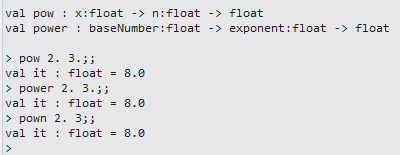
and then I realized it is the same thing as using pown which is already found in FSharp.Core. 

image

In any event, I then attacked the cumulativeDistribution method.  I downloaded the source from his website and then refactored it so that each step is clearly laid out.  Here is the refactored function:

  1. let cumulativeDistribution (x) =
  2.         let a1 =  0.31938153
  3.         let a2 = -0.356563782
  4.         let a3 =  1.781477937
  5.         let a4 = -1.821255978
  6.         let a5 =  1.330274429
  7.         let pi = 3.141592654
  8.         let l  = abs(x)
  9.         let k  = 1.0 / (1.0 + 0.2316419 * l)
  10.  
  11.         let a1' = a1*k
  12.         let a2' = a2*k*k
  13.         let a3' = a3*(power k 3.0)
  14.         let a4' = a4*(power k 4.0)
  15.         let a5' = a5*(power k 5.0)
  16.         let w1 = 1.0/sqrt(2.0*pi)
  17.         let w2 = exp(-l*l/2.0)
  18.         let w3 = a1'+a2'+a3'+a4'+a5'
  19.         let w  = 1.0-w1*w2*w3
  20.         if x < 0.0 then 1.0 – w else w

And here is some test values from the REPL:

image

Finally, the Black Scholes formula.  I did create a separate POCO for the input data like this:

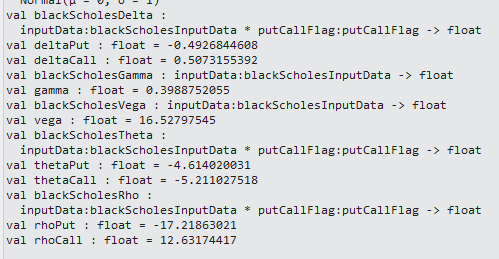
  1. type putCallFlag = Put | Call
  2.  
  3. type blackScholesInputData =
  4.     {stockPrice:float;
  5.     strikePrice:float;
  6.     timeToExpiry:float;
  7.     interestRate:float;
  8.     volatility:float}

And I refactored his code to make it more readable like this:

  1. let blackScholes(inputData:blackScholesInputData, putCallFlag:putCallFlag)=
  2.    let sx = log(inputData.stockPrice / inputData.strikePrice)
  3.    let rv = inputData.interestRate+inputData.volatility*inputData.volatility*0.5
  4.    let rvt = rv*inputData.timeToExpiry
  5.    let vt = (inputData.volatility*sqrt(inputData.timeToExpiry))
  6.    let d1=(sx + rvt)/vt
  7.    let d2=d1-vt
  8.     
  9.    match putCallFlag with
  10.     | Put ->
  11.         let xrt = inputData.strikePrice*exp(-inputData.interestRate*inputData.timeToExpiry)
  12.         let cdD1 = xrt*cumulativeDistribution(-d2)
  13.         let cdD2 = inputData.stockPrice*cumulativeDistribution(-d1)
  14.         cdD1-cdD2
  15.     | Call ->
  16.         let xrt = inputData.strikePrice*exp(-inputData.interestRate*inputData.timeToExpiry)
  17.         let cdD1 = inputData.stockPrice*cumulativeDistribution(d1)
  18.         let cdD2 = xrt*cumulativeDistribution(d2)
  19.         cdD1-cdD2

And since I was in the script environment, I put in test data that matches the sample that Astborg used in the book:

  1. let inputData = {stockPrice=58.60;strikePrice=60.;timeToExpiry=0.5;interestRate=0.01;volatility=0.3}
  2. let runBSCall = blackScholes(inputData,Call)
  3. let runBSPut = blackScholes(inputData,Put)

And voila, the results match the book:

image

With the Black-Scholes out of the way, I then implemented the Greeks.  Note that I did add helper functions for clarity, and the results match the book:

  1. let blackScholesDelta (inputData:blackScholesInputData, putCallFlag:putCallFlag) =
  2.     let sx = log(inputData.stockPrice / inputData.strikePrice)
  3.     let rv = inputData.interestRate+inputData.volatility*inputData.volatility*0.5
  4.     let rvt = rv*inputData.timeToExpiry
  5.     let vt = (inputData.volatility*sqrt(inputData.timeToExpiry))
  6.     let d1=(sx + rvt)/vt
  7.     match putCallFlag with
  8.     | Put -> cumulativeDistribution(d1) – 1.0
  9.     | Call -> cumulativeDistribution(d1)
  10.  
  11. let deltaPut = blackScholesDelta(inputData, Put)
  12. let deltaCall = blackScholesDelta(inputData, Call)
  13.  
  14. let blackScholesGamma (inputData:blackScholesInputData) =
  15.     let sx = log(inputData.stockPrice / inputData.strikePrice)
  16.     let rv = inputData.interestRate+inputData.volatility*inputData.volatility*0.5
  17.     let rvt = rv*inputData.timeToExpiry
  18.     let vt = (inputData.volatility*sqrt(inputData.timeToExpiry))
  19.     let d1=(sx + rvt)/vt
  20.     normalDistribution.Density(d1)
  21.  
  22. let gamma = blackScholesGamma(inputData)
  23.  
  24. let blackScholesVega (inputData:blackScholesInputData) =
  25.     let sx = log(inputData.stockPrice / inputData.strikePrice)
  26.     let rv = inputData.interestRate+inputData.volatility*inputData.volatility*0.5
  27.     let rvt = rv*inputData.timeToExpiry
  28.     let vt = (inputData.volatility*sqrt(inputData.timeToExpiry))
  29.     let d1=(sx + rvt)/vt   
  30.     inputData.stockPrice*normalDistribution.Density(d1)*sqrt(inputData.timeToExpiry)
  31.  
  32. let vega = blackScholesVega(inputData)
  33.  
  34. let blackScholesTheta (inputData:blackScholesInputData, putCallFlag:putCallFlag) =
  35.     let sx = log(inputData.stockPrice / inputData.strikePrice)
  36.     let rv = inputData.interestRate+inputData.volatility*inputData.volatility*0.5
  37.     let rvt = rv*inputData.timeToExpiry
  38.     let vt = (inputData.volatility*sqrt(inputData.timeToExpiry))
  39.     let d1=(sx + rvt)/vt   
  40.     let d2=d1-vt
  41.     match putCallFlag with
  42.     | Put ->
  43.         let ndD1 = inputData.stockPrice*normalDistribution.Density(d1)*inputData.volatility
  44.         let ndD1' = ndD1/(2.0*sqrt(inputData.timeToExpiry))
  45.         let rx = inputData.interestRate*inputData.strikePrice
  46.         let rt = exp(-inputData.interestRate*inputData.timeToExpiry)
  47.         let cdD2 = rx*rt*cumulativeDistribution(-d2)
  48.         -(ndD1')+cdD2
  49.     | Call ->
  50.         let ndD1 = inputData.stockPrice*normalDistribution.Density(d1)*inputData.volatility
  51.         let ndD1' = ndD1/(2.0*sqrt(inputData.timeToExpiry))
  52.         let rx = inputData.interestRate*inputData.strikePrice
  53.         let rt = exp(-inputData.interestRate*inputData.timeToExpiry)
  54.         let cdD2 = cumulativeDistribution(d2)
  55.         -(ndD1')-rx*rt*cdD2
  56.  
  57. let thetaPut = blackScholesTheta(inputData, Put)
  58. let thetaCall = blackScholesTheta(inputData, Call)
  59.  
  60. let blackScholesRho (inputData:blackScholesInputData, putCallFlag:putCallFlag) =
  61.     let sx = log(inputData.stockPrice / inputData.strikePrice)
  62.     let rv = inputData.interestRate+inputData.volatility*inputData.volatility*0.5
  63.     let rvt = rv*inputData.timeToExpiry
  64.     let vt = (inputData.volatility*sqrt(inputData.timeToExpiry))
  65.     let d1=(sx + rvt)/vt   
  66.     let d2=d1-vt
  67.     match putCallFlag with
  68.     | Put ->
  69.         let xt = inputData.strikePrice*inputData.timeToExpiry
  70.         let rt = exp(-inputData.interestRate*inputData.timeToExpiry)  
  71.         -xt*rt*cumulativeDistribution(-d2)
  72.     | Call ->
  73.         let xt = inputData.strikePrice*inputData.timeToExpiry
  74.         let rt = exp(-inputData.interestRate*inputData.timeToExpiry)          
  75.         xt*rt*cumulativeDistribution(d2)
  76.  
  77. let rhoPut = blackScholesRho(inputData, Put)
  78. let rhoCall = blackScholesRho(inputData, Call)


image

Finally, I threw in the Monte Carlo, which also used a POCO:

  1. type monteCarloInputData =
  2.     {stockPrice:float;
  3.     strikePrice:float;
  4.     timeToExpiry:float;
  5.     interestRate:float;
  6.     volatility:float}
  7.  
  8. let priceAtMaturity (inputData:monteCarloInputData, randomValue:float) =
  9.     let s = inputData.stockPrice
  10.     let rv = (inputData.interestRate-inputData.volatility*inputData.volatility/2.0)
  11.     let rvt = rv*inputData.timeToExpiry
  12.     let vr = inputData.volatility*randomValue
  13.     let t = sqrt(inputData.timeToExpiry)
  14.     s*exp(rvt+vr*t)
  15.     
  16. let maturityPriceInputData = {stockPrice=58.60;strikePrice=60.0;timeToExpiry=0.5;interestRate=0.01;volatility=0.3}
  17. priceAtMaturity(maturityPriceInputData, 10.0)
  18.  
  19. let monteCarlo(inputData: monteCarloInputData, randomValues:seq<float>) =
  20.     randomValues
  21.         |> Seq.map(fun randomValue -> priceAtMaturity(inputData,randomValue) – inputData.strikePrice )
  22.         |> Seq.average
  23.  
  24.  
  25. let random = new System.Random()
  26. let rnd() = random.NextDouble()
  27. let data = [for i in 1 .. 1000 -> rnd() * 1.0]
  28.  
  29. let monteCarloInputData = {stockPrice=58.60;strikePrice=60.0;timeToExpiry=0.5;interestRate=0.01;volatility=0.3;}
  30. monteCarlo(monteCarloInputData,data)

image

One thing I really like about Astborg is that the Monte Carlo function does not new up the array of random numbers, rather they are passed in.  This makes the function much more testable and is the right way to right it (IMHO).  In fact, I think that seeing “new Random” or “DateTime.Now” hard-coded into functions is an anti-pattern that is all too common.

With the last of the functions done in the script file, I moved them into the .fs file and created covering unit tests based on the sample data that I did in the REPL.

  1. [TestMethod]
  2. public void PowerUsingValidData_ReturnsExpected()
  3. {
  4.     var calculations = new Calculations();
  5.     Double expected = 8;
  6.     Double actual = Math.Round(calculations.Power(2.0, 3.0), 0);
  7.     Assert.AreEqual(expected, actual);
  8. }
  9.  
  10. [TestMethod]
  11. public void CumulativeDistributionUsingValidData_ReturnsExpected()
  12. {
  13.     var calculations = new Calculations();
  14.     Double expected = .84134;
  15.     Double actual = Math.Round(calculations.CumulativeDistribution(1.0),5);
  16.     Assert.AreEqual(expected, actual);
  17. }
  18.  
  19. [TestMethod]
  20. public void BlackScholesCallUsingValidData_ReturnsExpected()
  21. {
  22.     var calculations = new Calculations();
  23.     Double expected = 4.4652;
  24.     var inputData = new BlackScholesInputData(58.6, 60.0, .5, .01, .3);
  25.     Double actual = Math.Round(calculations.BlackScholes(inputData,PutCallFlag.Call), 5);
  26.     Assert.AreEqual(expected, actual);
  27. }
  28.  
  29. [TestMethod]
  30. public void BlackScholesPutUsingValidData_ReturnsExpected()
  31. {
  32.     var calculations = new Calculations();
  33.     Double expected = 5.56595;
  34.     var inputData = new BlackScholesInputData(58.6, 60.0, .5, .01, .3);
  35.     Double actual = Math.Round(calculations.BlackScholes(inputData, PutCallFlag.Put), 5);
  36.     Assert.AreEqual(expected, actual);
  37. }
  38.  
  39. [TestMethod]
  40. public void DaysToYearsUsingValidData_ReturnsExpected()
  41. {
  42.     var calculations = new Calculations();
  43.     Double expected = .08214;
  44.     Double actual = Math.Round(calculations.DaysToYears(30), 5);
  45.     Assert.AreEqual(expected, actual);
  46. }
  47.  
  48. [TestMethod]
  49. public void BlackScholesDeltaCallUsingValidData_ReturnsExpected()
  50. {
  51.     var calculations = new Calculations();
  52.     Double expected = .50732;
  53.     var inputData = new BlackScholesInputData(58.6, 60.0, .5, .01, .3);
  54.     Double actual = Math.Round(calculations.BlackScholesDelta(inputData, PutCallFlag.Call), 5);
  55.     Assert.AreEqual(expected, actual);
  56. }
  57.  
  58. [TestMethod]
  59. public void BlackScholesDeltaPutUsingValidData_ReturnsExpected()
  60. {
  61.     var calculations = new Calculations();
  62.     Double expected = -.49268;
  63.     var inputData = new BlackScholesInputData(58.6, 60.0, .5, .01, .3);
  64.     Double actual = Math.Round(calculations.BlackScholesDelta(inputData, PutCallFlag.Put), 5);
  65.     Assert.AreEqual(expected, actual);
  66. }
  67.  
  68. [TestMethod]
  69. public void BlackScholesGammaUsingValidData_ReturnsExpected()
  70. {
  71.     var calculations = new Calculations();
  72.     Double expected = .39888;
  73.     var inputData = new BlackScholesInputData(58.6, 60.0, .5, .01, .3);
  74.     Double actual = Math.Round(calculations.BlackScholesGamma(inputData), 5);
  75.     Assert.AreEqual(expected, actual);
  76. }
  77.  
  78. [TestMethod]
  79. public void BlackScholesVegaUsingValidData_ReturnsExpected()
  80. {
  81.     var calculations = new Calculations();
  82.     Double expected = 16.52798;
  83.     var inputData = new BlackScholesInputData(58.6, 60.0, .5, .01, .3);
  84.     Double actual = Math.Round(calculations.BlackScholesVega(inputData), 5);
  85.     Assert.AreEqual(expected, actual);
  86. }
  87.  
  88. [TestMethod]
  89. public void BlackScholesThetaCallUsingValidData_ReturnsExpected()
  90. {
  91.     var calculations = new Calculations();
  92.     Double expected = -5.21103;
  93.     var inputData = new BlackScholesInputData(58.6, 60.0, .5, .01, .3);
  94.     Double actual = Math.Round(calculations.BlackScholesTheta(inputData, PutCallFlag.Call), 5);
  95.     Assert.AreEqual(expected, actual);
  96. }
  97.  
  98. [TestMethod]
  99. public void BlackScholesThetaPutUsingValidData_ReturnsExpected()
  100. {
  101.     var calculations = new Calculations();
  102.     Double expected = -4.61402;
  103.     var inputData = new BlackScholesInputData(58.6, 60.0, .5, .01, .3);
  104.     Double actual = Math.Round(calculations.BlackScholesTheta(inputData, PutCallFlag.Put), 5);
  105.     Assert.AreEqual(expected, actual);
  106. }
  107.  
  108. [TestMethod]
  109. public void BlackScholesRhoCallUsingValidData_ReturnsExpected()
  110. {
  111.     var calculations = new Calculations();
  112.     Double expected = 12.63174;
  113.     var inputData = new BlackScholesInputData(58.6, 60.0, .5, .01, .3);
  114.     Double actual = Math.Round(calculations.BlackScholesRho(inputData, PutCallFlag.Call), 5);
  115.     Assert.AreEqual(expected, actual);
  116. }
  117.  
  118. [TestMethod]
  119. public void BlackScholesRhoPutUsingValidData_ReturnsExpected()
  120. {
  121.     var calculations = new Calculations();
  122.     Double expected = -17.21863;
  123.     var inputData = new BlackScholesInputData(58.6, 60.0, .5, .01, .3);
  124.     Double actual = Math.Round(calculations.BlackScholesRho(inputData, PutCallFlag.Put), 5);
  125.     Assert.AreEqual(expected, actual);
  126. }
  127.  
  128.  
  129. [TestMethod]
  130. public void PriceAtMaturityUsingValidData_ReturnsExpected()
  131. {
  132.     var calculations = new Calculations();
  133.     Double expected = 480.36923;
  134.     var inputData = new MonteCarloInputData(58.6, 60.0, .5, .01, .3);
  135.     Double actual = Math.Round(calculations.PriceAtMaturity(inputData, 10.0), 5);
  136.     Assert.AreEqual(expected, actual);
  137. }
  138.  
  139. [TestMethod]
  140. public void MonteCarloUsingValidData_ReturnsExpected()
  141. {
  142.     var calculations = new Calculations();
  143.     var inputData = new MonteCarloInputData(58.6, 60.0, .5, .01, .3);
  144.     var random = new System.Random();
  145.     List<Double> randomData = new List<double>();
  146.     for (int i = 0; i < 1000; i++)
  147.     {
  148.         randomData.Add(random.NextDouble());
  149.     }
  150.  
  151.     Double actual = Math.Round(calculations.MonteCarlo(inputData, randomData), 5);
  152.     var greaterThanFour = actual > 4.0;
  153.     var lessThanFive = actual < 5.0;
  154.  
  155.     Assert.AreEqual(true, greaterThanFour);
  156.     Assert.AreEqual(true, lessThanFive);
  157. }


With all of the tests running green, I then turned my attention to the UI.  I created more real state on the MainWindow  and added some additional data structures to the results of the analytics that lend themselves to charting and graphing.  For example:

  1. public class GreekData
  2. {
  3.     public Double StrikePrice { get; set; }
  4.     public Double DeltaCall { get; set; }
  5.     public Double DeltaPut { get; set; }
  6.     public Double Gamma { get; set; }
  7.     public Double Vega { get; set; }
  8.     public Double ThetaCall { get; set; }
  9.     public Double ThetaPut { get; set; }
  10.     public Double RhoCall { get; set; }
  11.     public Double RhoPut { get; set; }
  12.  
  13. }

And in the code behind of the MainWindow, I added some calcs based on the prior code that was already in it:

  1. var theGreeks = new List<GreekData>();
  2. for (int i = 0; i < 5; i++)
  3. {
  4.     var greekData = new GreekData();
  5.     greekData.StrikePrice = closestDollar – i;
  6.     theGreeks.Add(greekData);
  7.     greekData = new GreekData();
  8.     greekData.StrikePrice = closestDollar + i;
  9.     theGreeks.Add(greekData);
  10. }
  11. theGreeks.Sort((greek1,greek2)=>greek1.StrikePrice.CompareTo(greek2.StrikePrice));
  12.  
  13. foreach (var greekData in theGreeks)
  14. {
  15.     var inputData =
  16.         new BlackScholesInputData(adjustedClose, greekData.StrikePrice, .5, .01, .3);
  17.     greekData.DeltaCall = calculations.BlackScholesDelta(inputData, PutCallFlag.Call);
  18.     greekData.DeltaPut = calculations.BlackScholesDelta(inputData, PutCallFlag.Put);
  19.     greekData.Gamma = calculations.BlackScholesGamma(inputData);
  20.     greekData.RhoCall = calculations.BlackScholesRho(inputData, PutCallFlag.Call);
  21.     greekData.RhoPut = calculations.BlackScholesRho(inputData, PutCallFlag.Put);
  22.     greekData.ThetaCall = calculations.BlackScholesTheta(inputData, PutCallFlag.Call);
  23.     greekData.ThetaPut = calculations.BlackScholesTheta(inputData, PutCallFlag.Put);
  24.     greekData.Vega = calculations.BlackScholesVega(inputData);
  25.  
  26. }
  27.  
  28. this.TheGreeksDataGrid.ItemsSource = theGreeks;
  29.  
  30.  
  31. var blackScholes = new List<BlackScholesData>();
  32. for (int i = 0; i < 5; i++)
  33. {
  34.     var blackScholesData = new BlackScholesData();
  35.     blackScholesData.StrikePrice = closestDollar – i;
  36.     blackScholes.Add(blackScholesData);
  37.     blackScholesData = new BlackScholesData();
  38.     blackScholesData.StrikePrice = closestDollar + i;
  39.     blackScholes.Add(blackScholesData);
  40. }
  41. blackScholes.Sort((bsmc1, bsmc2) => bsmc1.StrikePrice.CompareTo(bsmc2.StrikePrice));
  42.  
  43. var random = new System.Random();
  44. List<Double> randomData = new List<double>();
  45. for (int i = 0; i < 1000; i++)
  46. {
  47.     randomData.Add(random.NextDouble());
  48. }
  49.  
  50. foreach (var blackScholesMonteCarlo in blackScholes)
  51. {
  52.     var blackScholesInputData =
  53.         new BlackScholesInputData(adjustedClose, blackScholesMonteCarlo.StrikePrice, .5, .01, .3);
  54.     var monteCarloInputData =
  55.         new MonteCarloInputData(adjustedClose, blackScholesMonteCarlo.StrikePrice, .5, .01, .3);
  56.  
  57.     blackScholesMonteCarlo.Call = calculations.BlackScholes(blackScholesInputData, PutCallFlag.Call);
  58.     blackScholesMonteCarlo.Put = calculations.BlackScholes(blackScholesInputData, PutCallFlag.Put);
  59.     blackScholesMonteCarlo.MonteCarlo = calculations.MonteCarlo(monteCarloInputData, randomData);
  60. }
  61.  
  62. this.BlackScholesDataGrid.ItemsSource = blackScholes;

And Whammo, the UI.


image

Fortunately Conrad D’Cruz is a member of TRINUG and an options trader and is going to explain what the heck we are looking at when the SIG gets together again.