MVC and Unit Testing

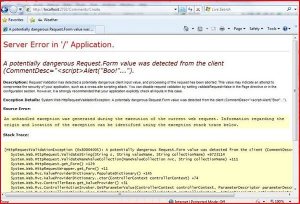
I set up a entity framework in my model for Northwind:

I then created a Region Controller to return all of the regions for the Index() Method

        public ViewResult Index()

        {

            var region = (from r in dataContext.Regions

             select r);

            return View(region.ToList());

        }


 I then set up a Unit Test to check to make sure I am getting 4 regions back (Yes, I know I should be using a stub).

        [TestMethod()]

        public void IndexTest()

        {

            RegionController target = new RegionController();

            List<Region> regions = (List<Region>)target.Index().ViewData.Model;

            int expected = 4;

            int actual = regions.Count;

            Assert.AreEqual(expected, actual);

        }


The thing that surprised me is that the chain I needed to go though to get to the model and the cast.  However, seeing this:

makes it all worthwhile.


ASP.NET JSON WebService Port to MVC Controller

I want to learn a bit more about JQuery serialization so I worked though this working example.

I got the ASP.NET Web Service solution up and running no problem.

I then ported it over to a MVC solution.

The first thing I did was to set up the controller and the routing to handle incoming requests – basically replacing the web service from the original solution:

Here is the controller:

    public class WeatherController : Controller

    {

        private readonly static string FindNearByWeatherUrl =

        "http://ws.geonames.org/findNearByWeatherJSON?lat={0}&lng={1}&username={2}&quot;;


        public JsonResult GetWeatherByLocation(double latitude, double longitude)

        {

            JsonResult jsonResponse = new JsonResult();


            string formattedUri = String.Format(CultureInfo.InvariantCulture, FindNearByWeatherUrl, latitude, longitude, "fatbgr");

            Uri serviceUri = new Uri(formattedUri, UriKind.Absolute);

            HttpWebRequest httpWebRequest = WebRequest.Create(serviceUri) as HttpWebRequest;

            if (httpWebRequest != null)

            {

                HttpWebResponse httpWebResponse = (HttpWebResponse)httpWebRequest.GetResponse();

                string readerResponse = string.Empty;

                using (StreamReader streamReader = new StreamReader(httpWebResponse.GetResponseStream()))

                {

                    readerResponse = streamReader.ReadToEnd();

                }


                jsonResponse.Data = readerResponse;


            }

            return jsonResponse;

        }

    }


Here is the routing:

            routes.MapRoute(

                "WeatherRoute",

                "Weather/GetWeatherByLocation/{latitude}/{longitude}",

                new { controller = "Weather", action = "GetWeatherByLocation"}

            );


And here is the javascript that I use to call the controller:

        function CallService() {

            var latitude = "35.797153";

            var longitude = "-78.886546";

            var postData = { latitude: latitude, longitude: longitude };

            $.ajax({

                type: "POST",

                url: "/Weather/GetWeatherByLocation",

                data: postData,

                dataType: "json",

                success: function (msg) {

                    GetWeather_Success(msg);

                }

            });

        }


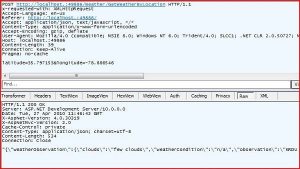
Everything is working fine in terms of the Json exchange – Wahoo!
However, I was blindsided by the Jquery selectors.  When I replace the hard-coded values for latitude and longitude with some JQuery, the variables are null:

            var latitude = $("txtLatitude").val;

            var longitude = $("txtLongitude").val;


Here is how the controls are created on the form

    <p>

        <input type="text" id="txtLatitude"  value = "35.797153" />

        <input type="text" id="txtLongitude" value = "-78.886546" />

        <input type= "button" value="Get Weather Info" onclick="CallService();" />

    </p>


Note that I also try and stuff the result set into the div – but that also is not being recognized

$("#divResult").html = e.toString();


I am at a loss – why aren’t the JQuery selectors working???
 

Posting JSON Arrays to a MVC Controller using JQuery 1.4.1

Following up on my April 13th post, I have the drag and drop working between the 2 tables.  I now want to post the data back to the server for processing

Posting to a server method like so:

        [AcceptVerbs(HttpVerbs.Post)]

        public ActionResult Index(string regionId)

        {

            //Do Something Useful Here

            return View();


        }


(I know that the return will be JSON, not an ActionResult, but one thing at a time)

I set up a simple AJAX call in JQuery like so:

$.post("Region/Index",{regionId: "Hello"});


Things worked great:


I then tried to change the parameter from a single string to an array of strings

        [AcceptVerbs(HttpVerbs.Post)]

        public ActionResult Index(List<String> regionIds)

        {

            //Do Something Useful Here

            return View();


        }


And I changed the AJAX call to this:

            var regionArray = new Array();


            $("#destinationTable tr:gt(0)").each(function () {

                var regionId = $(this).find("#regionId").html();

                regionArray.push(regionId);

            });


            var postData = { regionIds: regionArray };


            $.post("Region/Index", postData);


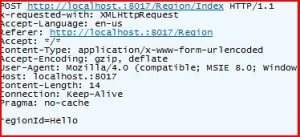
When looking at Fiddler, data is crossing over the wire:

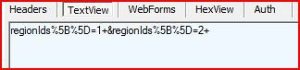
With the web form view like so:

But the MVC function was not recognizing the input – the paramters were null.  After many hours of searching and trial-by-error, I found this post

Once I changed the $post to $.ajax and specified the traditional attribute, the parameters were filled fine.

Note that

jQuery.ajaxSetting.traditional = true

does not work – traditional is not a property of ajaxSetting

MVC AJAX

I started working with MVC Ajax last week.  I started working though the examples found the Wrox’s Pro ASP.NET MVC

    <% using (Html.BeginForm(new { action = "HelloAjax" }))

       { %>

       <input type="text" name="query" size="40" />

       <input type="submit" value="go" />

    <%} %>


    <div id="results">


    </div>

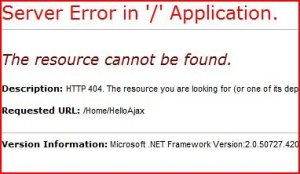
And I got this

It took about a second to understand that I didn’t have a “HelloAjax” method so I went farther into the chapter to find this:

        public string HelloAjax(string query)

        {

            return "You entered: " + query;

        }

That works better:


I then changed the form to AJAXify it: 

    <%using (Ajax.BeginForm("HelloAjax",

        new AjaxOptions { UpdateTargetId = "results" }))

      {%>

        <%=Html.TextBox("query", null, new { size = 40 })%>

        <input type="submit" />

        <%} %>

    <div id="results">


And got it:

Which is what I expected.  I then loaded Fiddler to see the traffic

The important thing with Fiddler is that when you are using your local machine, you need to either type "localhost." (note the extra period) or the machine name.  You also need to allow Fiddler to be a proxy so you need to adjust Vista’s security settings.

I am really impressed how light weight the payload is.

Java Script Injection in MVC

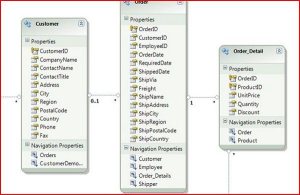
I set up a Hello World project based on the webcast found here.  I set up a model, a controller, and a view and tried to run a simple JavaScript injection to see if I could replicate the error.  However, I could not get the attack to work because the MVC layers protection on out of the box.


This is great – but in the name of understanding, I started rolling back the protections to get my attack to work.  I first thought I had to add a ValidateRequest = false in my page and web.config, just as the error page directed.   I added this

<%@ Page Title="" ValidateRequest="false" Language="C#" …

 to the page but I got the same Server Error.  I checked the web.config and found that the ValidateRequest is already off for the pages

<add verb="*" path="*.mvc" validate="false"

 I then realized that I needed to disable validation on the controller like this.

    [ValidateInput(false)]

    public class CommentsController : Controller

That got me closer – I would then enter in tags and the data was persisting to the database:


A quick glance at the auto-generated code in the View told me that the Html.Encode is applied out of the box – which protects you from the script running (< is &lt, etc…)

<%= Html.Encode(Model.CommentDesc) %>

Once I remove the encode statement, I got closer to the desired attack – the JavaScript was running on my page from the data in the database – however, the closing tag was not rendered so I got this error:


And the offending code looked like this:


I am at a high enough wall to stop this endeavor for now.  Suffice to say, with the out of the box features of MVC, sites should be reasonably protected from JavaScript injections.


MVC – Dealing with the Identity Column

I am following a MVC  introduction tutorial found here.  I have gone though it a couple of times and I am coming up to speed with the basics of MVC.  I found an interesting error though.  I created a controller called movie and then coded up the functions for the insertion of a movie record like this:

        public ActionResult Create()

        {

            return View();

        }


        [AcceptVerbs(HttpVerbs.Post)]

        public ActionResult Create(Movie movieToCreate)

        {

            if (ModelState.IsValid)

            {

                context.AddToMovieSet(movieToCreate);

                context.SaveChanges();

                return View(movieToCreate);

            }

            else

            {

                return View();

            }

        }

I then created a Unit Test to check my work like this (note the exclusion of the primary key):

        public void CreateTest()

        {

            MovieController target = new MovieController();

            Movie movieToCreate = new Movie();

            movieToCreate.Title = "AAA";

            movieToCreate.Director = "BBB";

            movieToCreate.DateReleased = DateTime.Now;


            ActionResult actual = target.Create(movieToCreate);

            Assert.IsNotNull(actual);

        }


Things worked great so I then created a View using the code generator (Right Click -> AddView) to create a data entry page.  I then deleted the ID field because it is an identity key in the database:

Unfortunately, when I ran it, I got a validation error:

So I added back the ID Field and placed in a dummy value:

And the data took!  Note the new ID number:


This illustrates my biggest problem with MVC so far – you need to rely almost exclusively on the Code Gen (and know the conventions) to get anything done and when things don’t work as expected, it is really hard to pinpoint the problem.

In this case, I found the error was that I didn’t tell the controller that the ID should not be bound.  I changed the signature of the Create Function to this

public ActionResult Create([Bind(Exclude="Id")]Movie movie)

and it worked like a charm


MVC

I started researching MVC this last week.  My 1st stop was the series of webcasts that are on the ASP.NET/MVC site.  For me, the best one so far has been the nerddiner.  I was surprised on how much of a convention curve there is for even a basic crud site: each controller having their own View folder, the index, Details, Edit, and Create for Gets and Posts.  Also, spending so much time in the HTML marketup seems to be a step backward. 


On the flip side, I love the prompt to add a test project when you create a new MVC project.  That is progress and shows how serious Microsoft has become about TDD techniques.  I have to believe there will be a mocking framework in the in the next release of VS (2013?).