Association Rule Learning Via F# (Part 2)

Continuing on the path of re-writing the association rule learning code found in this month’s MSDN, I started with the next function on list:

MakeAntecedent

Here is the original code C#

  1. public static int[] MakeAntecedent(int[] itemSet, int[] comb)
  2. {
  3.   // if item-set = (1 3 4 6 8) and combination = (0 2)
  4.   // then antecedent = (1 4)
  5.   int[] result = new int[comb.Length];
  6.   for (int i = 0; i < comb.Length; ++i)
  7.   {
  8.     int idx = comb[i];
  9.     result[i] = itemSet[idx];
  10.   }
  11.   return result;
  12. }


and the F# code:

  1. static member MakeAntecedent(itemSet:int[] , comb:int[]) =
  2.     comb |> Array.map(fun x -> itemSet.[x])


It is much easier to figure out what is going on via the F# code.  The function takes in 2 arrays.  Array #1 has values, Array #2 has the index of array #1 that is needed.  Using the Array.Map, I return an array where the index number is swapped out to the actual value.  The unit tests run green:

  1. [TestMethod]
  2. public void MakeAntecedentCSUsingExample_ReturnsExpectedValue()
  3. {
  4.     int[] itemSet = new int[5] { 1, 3, 4, 6, 8 };
  5.     int[] combo = new int[2] { 0, 2 };
  6.     int[] expected = new int[2] { 1, 4 };
  7.     var actual = CS.AssociationRuleProgram.MakeAntecedent(itemSet, combo);
  8.     Assert.AreEqual(expected.Length, actual.Length);
  9.     Assert.AreEqual(expected[0], actual[0]);
  10.     Assert.AreEqual(expected[1], actual[1]);
  11. }
  12.  
  13. [TestMethod]
  14. public void MakeAntecedentFSUsingExample_ReturnsExpectedValue()
  15. {
  16.     int[] itemSet = new int[5] { 1, 3, 4, 6, 8 };
  17.     int[] combo = new int[2] { 0, 2 };
  18.     int[] expected = new int[2] { 1, 4 };
  19.     var actual = FS.AssociationRuleProgram.MakeAntecedent(itemSet, combo);
  20.     Assert.AreEqual(expected.Length, actual.Length);
  21.     Assert.AreEqual(expected[0], actual[0]);
  22.     Assert.AreEqual(expected[1], actual[1]);
  23. }


MakeConsequent

Here is the original C# code:

  1. public static int[] MakeConsequent(int[] itemSet, int[] comb)
  2. {
  3.   // if item-set = (1 3 4 6 8) and combination = (0 2)
  4.   // then consequent = (3 6 8)
  5.   int[] result = new int[itemSet.Length – comb.Length];
  6.   int j = 0; // ptr into combination
  7.   int p = 0; // ptr into result
  8.   for (int i = 0; i < itemSet.Length; ++i)
  9.   {
  10.     if (j < comb.Length && i == comb[j]) // we are at an antecedent
  11.       ++j; // so continue
  12.     else
  13.       result[p++] = itemSet[i]; // at a consequent so add it
  14.   }
  15.   return result;
  16. }


Here is the F# Code:

  1. static member MakeConsequent(itemSet:int[] , comb:int[])=   
  2.     let isNotInComb x = not(Array.exists(fun elem -> elem = x) comb)
  3.     itemSet
  4.         |> Array.mapi(fun indexer value -> value,indexer )
  5.         |> Array.filter(fun (value,indexer) -> isNotInComb indexer)
  6.         |> Array.map(fun x -> fst x)


Again, it is easier to look at the F# code to figure out what is going on.  In this case, we have to take all of the items in the first array that are not in the second array.  The trick is that the second array does not contain values to be checked, rather the index position.  If you add the Antecedent and the Consequent, you have the total original array.

This code code me a bit of time to figure out because I kept trying to use the out of the box Array features (including slicing) for F# when it hit me that it would be much easier to create a tuple from the original array –> the value and the index.  I would then look up the index in the second array and confirm it is not there and then filter the ones that are not there.  The map function at the end removes the index part of the tuple because it is not needed anymore.

Sure enough, my unit tests ran green:

  1. [TestMethod]
  2. public void MakeConsequentCSUsingExample_ReturnsExpectedValue()
  3. {
  4.     int[] itemSet = new int[5] { 1, 3, 4, 6, 8 };
  5.     int[] combo = new int[2] { 0, 2 };
  6.     int[] expected = new int[3] { 3, 6, 8 };
  7.     var actual = CS.AssociationRuleProgram.MakeConsequent(itemSet, combo);
  8.     Assert.AreEqual(expected.Length, actual.Length);
  9.     Assert.AreEqual(expected[0], actual[0]);
  10.     Assert.AreEqual(expected[1], actual[1]);
  11.     Assert.AreEqual(expected[2], actual[2]);
  12. }
  13.  
  14. [TestMethod]
  15. public void MakeConsequentFSUsingExample_ReturnsExpectedValue()
  16. {
  17.     int[] itemSet = new int[5] { 1, 3, 4, 6, 8 };
  18.     int[] combo = new int[2] { 0, 2 };
  19.     int[] expected = new int[3] { 3, 6, 8 };
  20.     var actual = FS.AssociationRuleProgram.MakeConsequent(itemSet, combo);
  21.     Assert.AreEqual(expected.Length, actual.Length);
  22.     Assert.AreEqual(expected[0], actual[0]);
  23.     Assert.AreEqual(expected[1], actual[1]);
  24.     Assert.AreEqual(expected[2], actual[2]);
  25. }


IndexOf

I then decided to tackle the remaining three functions in reverse because they depend on each other (CountInTrans –> IsSubSetOf –> IndexOf).  IndexOf did not have any code comments of example cases, but the C# code is clear

  1. public static int IndexOf(int[] array, int item, int startIdx)
  2. {
  3.   for (int i = startIdx; i < array.Length; ++i)
  4.   {
  5.     if (i > item) return -1; // i is past where the target could possibly be
  6.     if (array[i] == item) return i;
  7.   }
  8.   return -1;
  9. }


What is even clearer is the F# code that does the same thing (yes, I am happy that FindIndex returns a –1 when not found and so did McCaffey):

  1. static member IndexOf(array:int[] , item:int, startIdx:int) =
  2.     Array.FindIndex(array, fun x -> x=item)


And I built some unit tests that run green that I think reflect McCaffey’s intent:

  1. [TestMethod]
  2. public void IndexOfCSUsingExample_ReturnsExpectedValue()
  3. {
  4.     int[] itemSet = new int[4] { 0, 1, 4, 5 };
  5.     Int32 item = 1;
  6.     Int32 startIndx = 1;
  7.  
  8.     int expected = 1;
  9.     int actual = CS.AssociationRuleProgram.IndexOf(itemSet, item, startIndx);
  10.  
  11.     Assert.AreEqual(expected, actual);
  12. }
  13. public void IndexOfFSUsingExample_ReturnsExpectedValue()
  14. {
  15.     int[] itemSet = new int[4] { 0, 1, 4, 5 };
  16.     Int32 item = 1;
  17.     Int32 startIndx = 1;
  18.  
  19.     int expected = 1;
  20.     int actual = FS.AssociationRuleProgram.IndexOf(itemSet, item, startIndx);
  21.  
  22.     Assert.AreEqual(expected, actual);
  23. }


IsSubsetOf

In the C# implementation, IndexOf is called to keep track of where the search is currently pointed. 

  1. public static bool IsSubsetOf(int[] itemSet, int[] trans)
  2. {
  3.   // 'trans' is an ordered transaction like [0 1 4 5 8]
  4.   int foundIdx = -1;
  5.   for (int j = 0; j < itemSet.Length; ++j)
  6.   {
  7.     foundIdx = IndexOf(trans, itemSet[j], foundIdx + 1);
  8.     if (foundIdx == -1) return false;
  9.   }
  10.   return true;
  11. }

In The F# one, that is not needed:

  1. static member IsSubsetOf(itemSet:int[] , trans:int[]) =
  2.     let isInTrans x = (Array.exists(fun elem -> elem = x) trans)
  3.     let filteredItemSet = itemSet
  4.                             |> Array.map(fun value -> value, isInTrans value)
  5.                             |> Array.filter(fun (value, trans) -> trans = false)
  6.     if filteredItemSet.Length = 0 then true
  7.         else false

CountInTrans

Here is the original C# code uses the IsSubsetOf function.

  1. public static int CountInTrans(int[] itemSet, List<int[]> trans, Dictionary<int[], int> countDict)
  2. {
  3.    //number of times itemSet occurs in transactions, using a lookup dict
  4.  
  5.     if (countDict.ContainsKey(itemSet) == true)
  6.     return countDict[itemSet]; // use already computed count
  7.  
  8.   int ct = 0;
  9.   for (int i = 0; i < trans.Count; ++i)
  10.     if (IsSubsetOf(itemSet, trans[i]) == true)
  11.       ++ct;
  12.   countDict.Add(itemSet, ct);
  13.   return ct;
  14. }

And here is the F# Code that also uses that subfunction

  1. static member CountInTrans(itemSet: int[], trans: List<int[]>, countDict: Dictionary<int[], int>) =
  2.     let trans' = trans |> Seq.map(fun value -> value, AssociationRuleProgram.IsSubsetOf (itemSet,value))
  3.     trans' |> Seq.filter(fun item -> snd item = true)
  4.            |> Seq.length


 GetHighConfRules

With the subfunctions created and running green, I then tackled the point of the exercise –> GetHighConfRules.  The C# implementation is pretty verbose and there are lots of things happening: 

  1.     public static List<Rule> GetHighConfRules(List<int[]> freqItemSets, List<int[]> trans, double minConfidencePct)
  2.     {
  3.       // generate candidate rules from freqItemSets, save rules that meet min confidence against transactions
  4.       List<Rule> result = new List<Rule>();
  5.  
  6.       Dictionary<int[], int> itemSetCountDict = new Dictionary<int[], int>(); // count of item sets
  7.  
  8.       for (int i = 0; i < freqItemSets.Count; ++i) // each freq item-set generates multiple candidate rules
  9.       {
  10.         int[] currItemSet = freqItemSets[i]; // for clarity only
  11.         int ctItemSet = CountInTrans(currItemSet, trans, itemSetCountDict); // needed for each candidate rule
  12.         for (int len = 1; len <= currItemSet.Length – 1; ++len) // antecedent len = 1, 2, 3, . .
  13.         {
  14.           int[] c = NewCombination(len); // a mathematical combination
  15.  
  16.           while (c != null) // each combination makes a candidate rule
  17.           {
  18.             int[] ante = MakeAntecedent(currItemSet, c);
  19.             int[] cons = MakeConsequent(currItemSet, c); // could defer this until known if needed
  20.           
  21.             int ctAntecendent = CountInTrans(ante, trans, itemSetCountDict); // use lookup if possible
  22.             double confidence = (ctItemSet * 1.0) / ctAntecendent;
  23.  
  24.             if (confidence >= minConfidencePct) // we have a winner!
  25.             {
  26.               Rule r = new Rule(ante, cons, confidence);
  27.               result.Add(r); // if freq item-sets are distinct, no dup rules ever created
  28.             }
  29.             c = NextCombination(c, currItemSet.Length);
  30.           } // while each combination
  31.         } // len each possible antecedent for curr item-set
  32.       } // i each freq item-set
  33.  
  34.       return result;
  35.     } // GetHighConfRules

In the F# code, It decided to work inside out and get the rule for 1 itemset.  I think the code reads pretty clear where each step is laid out

  1. static member GetHighConfRules(freqItemSets:List<int[]>, trans:List<int[]>,  minConfidencePct:float) =
  2.     let returnValue = new List<Rule>()
  3.     freqItemSets
  4.         |> Seq.map (fun i -> i, AssociationRuleProgram.CountInTrans'(i,trans))
  5.         |> Seq.filter(fun (i,c) -> (float)c > minConfidencePct)
  6.         |> Seq.map(fun (i,mcp) -> i,mcp,AssociationRuleProgram.MakeAntecedent(i, trans.[0]))
  7.         |> Seq.map(fun (i,mcp,a) -> i,mcp, a, AssociationRuleProgram.MakeConsequent(i, trans.[0]))
  8.         |> Seq.iter(fun (i,mcp,a,c) -> returnValue.Add(new Rule(a,c,mcp)))
  9.     returnValue

I then attempted to put this block into a larger block (trans.[0]) but then I realized that I was going about this the wrong way.  Instead of using the C# code as a my base line, I need to approach the problem from a functional viewpoint.  That will be the subject of my blog next week…


Association Rule Learning Via F# (Part 1)

I was reading the most recent MSDN when I came across this article.  How awesome is this?  McCaffrey did a great job explaining a really interesting area of analytics and I am loving the fact that MSDN is including articles about data analytics.  When I was reading the article, I ran across this sentence “The demo program is coded in C# but you should be able to refactor the code to other .NET languages such as Visual Basic or Iron Python without too much difficulty”  Iron Python?  Iron Python!  What about F#, the language that matches analytics the way peanut butter goes with chocolate?  Challenge accepted!

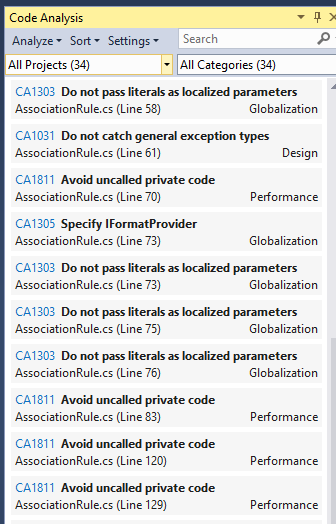
The first thing I did was to download his source code from here.  When I first opened the source code, I realized that the code would be a little bit hard to port because it is written from a scientific angle, not a business application point of view.  34 FxCop errors in 259 lines of code confirmed this:

image

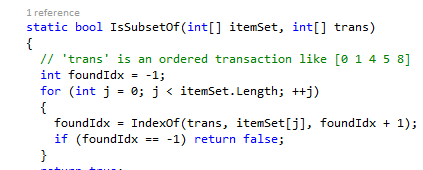
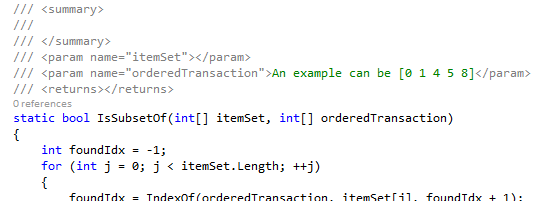
Also, there are tons of comments which is very distracting. I generally hate comments, but I figure that since it is a MSDN article and it is supposed to explain what is going on, comments are OK. However, many of the comments can be refactored into more descriptive variables and method names. For example:

imageimage

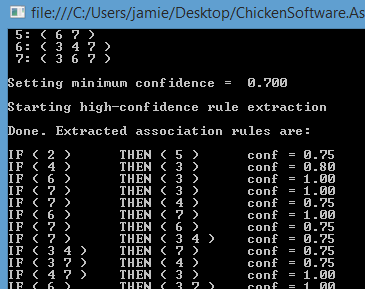
In any event, let’s look at the code. The first thing I did was change the CS project from a console app to a library and move the test data into an another project . I then moved the console code to the UI. I also moved the Rule class code into its own file, made sure the namespaces matched, and made the AssociationRuleProgram public.  Yup it still runs:

imageimage

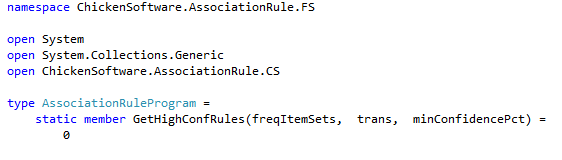
So then I created a FSharp library in the solution and set up the class with the single method:

image

A couple of things to note:

1) I left the parameter naming the same, even though it is not particularly intention-revealing

2) F# is typed inferred, so I don’t have to assign the types to the parameters

Next, started looking at the supporting functions to GetHighConfRules.  Up first was the function call NextCombination.  Here is the side by side between the imperative style and the functional style:

imageimage

The next function was NextCombination was more difficult for me to understand.  I stopped what I was doing and built a unit test project that proved correctness using the commented examples as the expected values.  I used 1 test project for both the C# and F# project so I could see both side by side.  An interesting side not is that the unit test naming is different than usual –> instead of naming the class XXXXTests where XXXX is the name of another class, XXXX is the function name that both classes are implementing:

So going back to the example,

image

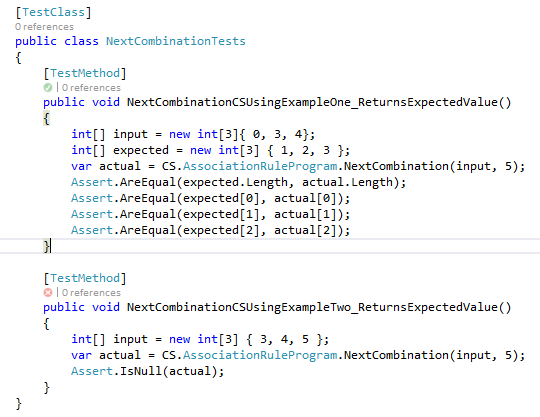
I wrote two unit tests that match the two comments

image

When I ran the tests, the 1st test passed but the second did not:

image

The problem with the failing test is that null is not being returned, rather {3,4,6}.  So now I have a problem, do I base the F# implementation on the code comments or the code itself?  I decided to base it on the code, because comments often lie but CODE DON”T LIE (thanks ‘sheed).  I adjusted the unit test, got green. 

One of the reasons the code is pretty hard to read/understand is because of the use of ‘i’,’j’,’k’,’n’ variables.  I went back to the article and McCaffrey explains what is going on at the bottom left of page 60.  Another name for the function ‘NextCombination’ could be called ‘GetLexicographicalSuccessor’ and the variable ‘n’ could be called ‘numberOfPossibleItems’.   With that mental vocabulary in place, I went through the functional and divided it into 4 parts:

1Checking to see if the value of the first element is of a certain length

image

2) Creating a result array that is seeded with the values of the input array

image

3) Looping backwards to identify the 1st number in the array that will be adjusted

image

4) From that target element, looping forward and adjusting all subsequent items

image

#1 I will not worry about now and #2 is not needed in F#, so #3 is the first place to start.  What I need is a way of splitting the array into two parts.  Part 1 has the original values that will not change and part 2 has the values that will change.  Seq.Take and Seq.Skip are perfect for this:

  1. let i = Array.LastIndexOf(comb,n)
  2. let i' = if i = – 1 then 0 else i
  3. let comb' = comb |> Seq.take(i') |> Seq.toArray
  4. let comb'' = comb |> Seq.skip(i') |> Seq.toArray

Looking at #4, I now need to increment the values in part 2 by 1.  Seq.take will work:

image

And then putting part 1 and part 2 back together via Array.Append, we have equivalence*:

imageimage

*Equivalence is defined by my unit tests, which both pass green.  I have no idea if other inputs will not work.  Note that the second unit test runs red, so I really think that the code is wrong and that the comment to return null is correct.  The value I am getting for (3;4;5)(5) is (3;4;1) which seems to make sense.

I am not crazy about these explanatory variables (comb’, comb’’, and comb’’’) but I am not sure how to combine them without sacrificing readability.  I definitely want to combine the i and i’ into 1 statement…
I am not sure why Scan is returning 4 items in an array when I am passing in an array that has a length of 3.  I am running out of time today so I just hacked in a Seq.Take.

I’ll continue this exercise in my blog next week.


Kaplan-Meier Survival Analysis Using F#

I was reading the most recent issue of MSDN a couple of days ago when I came across this article on doing a Kaplan-Meier survival analysis.  I thought the article was great and I am excited that MSDN is starting to publish articles on data analytics.  However, I did notice that there wasn’t any code in the article, which is odd, so I went to the on-line article and others had a similar question:

image

I decided to implement a Kaplan-Meier survival (KMS) analysis using F#.  After reading the article a couple of times, I was still a bit unclear on how the KMS is implemented and there does not seem to be any pre-rolled in the standard .NET stat libraries out there.  I went on over to this site where there was an excellent description of how the survival probability is calculated.  I went ahead and built an Excel spreadsheet to match the nih one and then compare to what Topol is doing:

image

Notice that Topol censored the data for the article.  If we only cared about the probability of crashes, then we would not censor the data for when the device was turned off.

So then I was ready to start coding so spun up a solution with an F# project for the analysis and a C# project for the testing. 

image

I then loaded into the unit test project the datasets that Topol used:

  1. [TestMethod]
  2. public void EstimateForApplicationX_ReturnsExpected()
  3. {
  4.     var appX = new CrashMetaData[]
  5.     {
  6.         new CrashMetaData(0,1,false),
  7.         new CrashMetaData(1,5,true),
  8.         new CrashMetaData(2,5,false),
  9.         new CrashMetaData(3,8,false),
  10.         new CrashMetaData(4,10,false),
  11.         new CrashMetaData(5,12,true),
  12.         new CrashMetaData(6,15,false),
  13.         new CrashMetaData(7,18,true),
  14.         new CrashMetaData(8,21,false),
  15.         new CrashMetaData(9,22,true),
  16.     };
  17. }

I could then wire up the unit tests to compare the output to the article and what I had come up with.

  1. public void EstimateForApplicationX_ReturnsExpected()
  2. {
  3.     var appX = new CrashMetaData[]
  4.     {
  5.         new CrashMetaData(0,1,false),
  6.         new CrashMetaData(1,5,true),
  7.         new CrashMetaData(2,5,false),
  8.         new CrashMetaData(3,8,false),
  9.         new CrashMetaData(4,10,false),
  10.         new CrashMetaData(5,12,true),
  11.         new CrashMetaData(6,15,false),
  12.         new CrashMetaData(7,18,true),
  13.         new CrashMetaData(8,21,false),
  14.         new CrashMetaData(9,22,true),
  15.     };
  16.  
  17.     var expected = new SurvivalProbabilityData[]
  18.     {
  19.         new SurvivalProbabilityData(0,1.000),
  20.         new SurvivalProbabilityData(5,.889),
  21.         new SurvivalProbabilityData(12,.711),
  22.         new SurvivalProbabilityData(18,.474),
  23.         new SurvivalProbabilityData(22,.000)
  24.     };
  25.  
  26.     KaplanMeierEstimator estimator = new KaplanMeierEstimator();
  27.     var actual = estimator.CalculateSurvivalProbability(appX);
  28.  
  29.     Assert.AreSame(expected, actual);
  30. }


However, one of the neat features of F# is the REPL so I don’t need to keep running unit tests to prove correctness when I am proving out a concept.  So I added equivalent test code in the beginning of the F# project so I could run in the REPL my ideas:

  1. type CrashMetaData = {userId: int; crashTime: int; crashed: bool}
  2.  
  3. type KapalanMeierAnalysis() =
  4.     member this.GenerateXAppData ()=
  5.                     [|  {userId=0; crashTime=1; crashed=false};{userId=1; crashTime=5; crashed=true};
  6.                         {userId=2; crashTime=5; crashed=false};{userId=3; crashTime=8; crashed=false};
  7.                         {userId=4; crashTime=10; crashed=false};{userId=5; crashTime=12; crashed=true};
  8.                         {userId=6; crashTime=15; crashed=false};{userId=7; crashTime=18; crashed=true};
  9.                         {userId=8; crashTime=21; crashed=false};{userId=9; crashTime=22; crashed=true}|]
  10.     
  11.     member this.RunAnalysis(crashMetaData: array<CrashMetaData>) =

The first thing I did was duplicate the 1st 3 columns of the Excel spreadsheet:

  1. let crashSequence = crashMetaData
  2.                         |> Seq.map(fun crash -> crash.crashTime, (match crash.crashed with
  3.                                                                                 | true -> 1
  4.                                                                                 | false -> 0),
  5.                                                                  (match crash.crashed with
  6.                                                                                 | true -> 0
  7.                                                                                 | false -> 1))


In the REPL:

image

The forth column is tricky because it is a cumulative calculation.  Instead of for..eaching in an imperative style, I took advantage of the functional language constructs to make the code much more readable.   Once I calculated that column outside of the base Sequence, I added it back in via Seq.Zip

  1. let cumulativeDevices = crashMetaData.Length
  2.  
  3. let crashSequence = crashMetaData
  4.                         |> Seq.map(fun crash -> crash.crashTime, (match crash.crashed with
  5.                                                                                 | true -> 1
  6.                                                                                 | false -> 0),
  7.                                                                  (match crash.crashed with
  8.                                                                                 | true -> 0
  9.                                                                                 | false -> 1))
  10. let availableDeviceSequence = Seq.scan(fun cumulativeCrashes (time,crash,nonCrash) -> cumulativeCrashes – 1 ) cumulativeDevices crashSequence
  11.  
  12. let crashSequence' = Seq.zip crashSequence availableDeviceSequence
  13.                             |> Seq.map(fun ((time,crash,nonCrash),cumldevices) -> time,crash,nonCrash,cumldevices)


In the REPL:

image

The next two columns were a snap –> they were just calculations based on the existing values:

  1. let cumulativeDevices = crashMetaData.Length
  2.  
  3. let crashSequence = crashMetaData
  4.                         |> Seq.map(fun crash -> crash.crashTime, (match crash.crashed with
  5.                                                                                 | true -> 1
  6.                                                                                 | false -> 0),
  7.                                                                  (match crash.crashed with
  8.                                                                                 | true -> 0
  9.                                                                                 | false -> 1))
  10. let availableDeviceSequence = Seq.scan(fun cumulativeCrashes (time,crash,nonCrash) -> cumulativeCrashes – 1 ) cumulativeDevices crashSequence
  11.  
  12. let crashSequence' = Seq.zip crashSequence availableDeviceSequence
  13.                             |> Seq.map(fun ((time,crash,nonCrash),cumldevices) -> time,crash,nonCrash,cumldevices)
  14.  
  15. let crashSequence'' = crashSequence'
  16.                             |> Seq.map(fun (t,c,nc,cumld) -> t,c,nc,cumld, float c/ float cumld, 1.-(float c/ float cumld))


The last column was another cumulative calculation so I added another accumulator and used Seq.scan and Seq.Zip.

  1. let cumulativeDevices = crashMetaData.Length
  2. let cumulativeSurvivalProbability = 1.
  3.  
  4. let crashSequence = crashMetaData
  5.                         |> Seq.map(fun crash -> crash.crashTime, (match crash.crashed with
  6.                                                                                 | true -> 1
  7.                                                                                 | false -> 0),
  8.                                                                  (match crash.crashed with
  9.                                                                                 | true -> 0
  10.                                                                                 | false -> 1))
  11. let availableDeviceSequence = Seq.scan(fun cumulativeCrashes (time,crash,nonCrash) -> cumulativeCrashes – 1 ) cumulativeDevices crashSequence
  12.  
  13. let crashSequence' = Seq.zip crashSequence availableDeviceSequence
  14.                             |> Seq.map(fun ((time,crash,nonCrash),cumldevices) -> time,crash,nonCrash,cumldevices)
  15.  
  16. let crashSequence'' = crashSequence'
  17.                             |> Seq.map(fun (t,c,nc,cumld) -> t,c,nc,cumld, float c/ float cumld, 1.-(float c/ float cumld))
  18.  
  19. let survivalProbabilitySequence = Seq.scan(fun cumulativeSurvivalProbability (t,c,nc,cumld,dp,sp) -> cumulativeSurvivalProbability * sp ) cumulativeSurvivalProbability crashSequence''
  20. let survivalProbabilitySequence' = survivalProbabilitySequence
  21.                                             |> Seq.skip 1

The last step was to map all of the columns and only output what was in the article.  The final answer is:

  1. namespace ChickenSoftware.SurvivalAnalysis
  2.  
  3. type CrashMetaData = {userId: int; crashTime: int; crashed: bool}
  4. type public SurvivalProbabilityData = {crashTime: int; survivalProbaility: float}
  5.  
  6. type KaplanMeierEstimator() =
  7.     member this.CalculateSurvivalProbability(crashMetaData: array<CrashMetaData>) =
  8.             let cumulativeDevices = crashMetaData.Length
  9.             let cumulativeSurvivalProbability = 1.
  10.  
  11.             let crashSequence = crashMetaData
  12.                                     |> Seq.map(fun crash -> crash.crashTime, (match crash.crashed with
  13.                                                                                             | true -> 1
  14.                                                                                             | false -> 0),
  15.                                                                              (match crash.crashed with
  16.                                                                                             | true -> 0
  17.                                                                                             | false -> 1))
  18.             let availableDeviceSequence = Seq.scan(fun cumulativeCrashes (time,crash,nonCrash) -> cumulativeCrashes – 1 ) cumulativeDevices crashSequence
  19.  
  20.             let crashSequence' = Seq.zip crashSequence availableDeviceSequence
  21.                                         |> Seq.map(fun ((time,crash,nonCrash),cumldevices) -> time,crash,nonCrash,cumldevices)
  22.  
  23.             let crashSequence'' = crashSequence'
  24.                                         |> Seq.map(fun (t,c,nc,cumld) -> t,c,nc,cumld, float c/ float cumld, 1.-(float c/ float cumld))
  25.  
  26.             let survivalProbabilitySequence = Seq.scan(fun cumulativeSurvivalProbability (t,c,nc,cumld,dp,sp) -> cumulativeSurvivalProbability * sp ) cumulativeSurvivalProbability crashSequence''
  27.             let survivalProbabilitySequence' = survivalProbabilitySequence
  28.                                                         |> Seq.skip 1
  29.  
  30.             let crashSequence''' = Seq.zip crashSequence'' survivalProbabilitySequence'
  31.                                         |> Seq.map(fun ((t,c,nc,cumld,dp,sp),cumlsp) -> t,c,nc,cumld,dp,sp,cumlsp)
  32.             crashSequence'''
  33.                     |> Seq.filter(fun (t,c,nc,cumld,dp,sp,cumlsp) -> c=1 )
  34.                     |> Seq.map(fun (t,c,nc,cumld,dp,sp,cumlsp) -> t,System.Math.Round(cumlsp,3))

image

And this matches the article (almost exactly).  The article also has a row for iteration zero, which I did not bake in.  Instead of fixing my code, I changed the unit test and removed that 1st column.  In any event, I ran the test and it ran red –> but the values are identical so I assume it is a problem with the Assert.AreSame()  function.  I would take the time to figure it out but it is 75 degrees on a Sunday afternoon and I want to go play catch with my kids…

image

Note it also matches the other data set Topol has in the article:

image

In any event, this code reads pretty much the way I was thinking about the problem – each column of the Excel spreadsheet has a 1 to 1 correspondence to the F# code block.   I did use explanatory variables liberally which might offend the more advanced functional programmers but taking each step in turn really helped me focus on getting each step correct before going to the next one.

1) I had to offset the cumulativeSurvivalProabability by one because the calculation is how many crashed on a day compared to how many were working at the start of the day.  The Seq.Scan increments the counter for the next row of the sequence and I need it for the current row.  Perhaps there is an overload for Seq.Scan?

2) I adopted the functional convention of using ticks to denote different physical manifestations of the same logic concept (crashedDeviceSequence “became” crashedDeviceSequence’, etc…).  Since everything is immutable by default in F#, this kind of naming convention makes a lot of sense to me.  However, I can see it quickly becoming unwieldy.

3) I could not figure out how to operate on the base tuple so instead  I used a couple of supporting Sequences and then put everything together using Seq.Zip.  I assume there is a more efficient way to do that.

4) One of the knocks against functional/scientific programming is that values are named poorly.  To combat that, I used the full names in my tuples  to start.  After a certain point though, the names got too unwieldy so I resorted to their initials.  I am not sure what the right answer is here, or even if there is right answer.

.


Microsoft Language Stack Analogy

I am getting ready for my presentations at Charlotte Code Camp next Saturday.  My F# session is a business-case driven one: reasons why the average C# developer might want to take a look at F#.  I break the session down into 5 sections:  F# is integrated, fast, expressive, bug-resistant, and analytical.  In the fast piece, I am going to make the analogy of Visual Studio to a garage. 

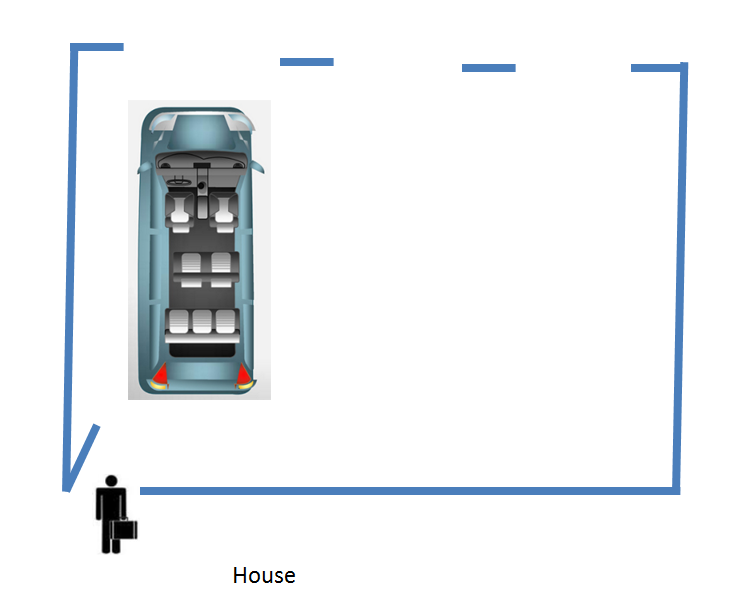
Consider a man who lives in a nice house in a suburban neighborhood with a three car garage. Every morning when he gets ready for his morning commute to work, he opens the door that goes from their house into the their garage and there sitting in the 1st bay is a minivan. 

image

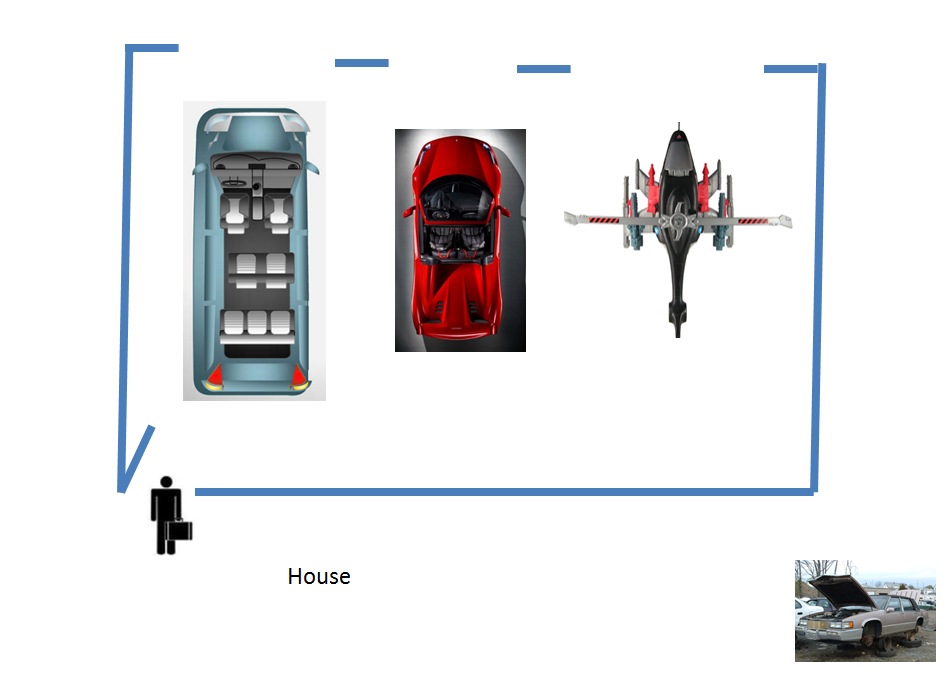
Now there is nothing wrong with the minivan – it is dependable, all of the neighbors drive it, it does many things pretty well.  However, consider that right next to the minivan, never been used, is a Ferrari.  Our suburban programmer has heard about a Ferrari, and has perhaps even glanced at it curiously when he  pulls out in the morning , but he:

  • Doesn’t see the point of driving it because the minivan suits him just fine
  • Is afraid to try driving it because he doesn’t drive stick and taking the time to learn would slow him down
  • Don’t want to drive it because then he would have to explain to his project manager wife why he are driving around town in such a car

So the Ferrari sits unused.  To round out the analogy, in the 3rd bay is a helicopter that no one in their right mind will touch.  Finally, there is a junked car around back that no one uses anymore that he has to keep around because it is too expensive to haul it to the junkyard.

image


So this is what happens to a majority of .NET developers when they open their garage called visual studio.  The go with the comfortable language of the C# minivan, ignoring the power and expressiveness of the F# Ferrari and certainly not touching the C++ helicopter.  I picked helicopter for C++ b/c helicopters can go places cars can not, is notoriously difficult to pilot, and when they crash, it is often spectacular and brings down others with them.  The junked car is VB.NET, which makes me sad on certain days….

Also, since C# 2.0, the minivan has tried to becomes more Ferrari-like.  It has added turbo engine called linq, added the var keyword, anonymous types, the dynamic keyword, all in the attempt to become the one minivan that shall rule all.

image

I don’t know much about Roslyn but what I have seen, I think I can take and remove language syntax and it will still compile.  If so, I will try and write a C# program that removes all curly-braces and semi-colons and replaces the var keyword with let.  Is it still C# then?

OT: can you tell which session I am doing at the Hartford Code Camp in 2 weeks?

image

(And no, I did not submit in all caps.  I guess the organizer is very excited about the topic?)

F# and List manipulations

I am preparing for a Beginning F# dojo for TRINUG tomorrow and I decided to do a presentation of Seq.GroupBy, Seq.CountBy, and Seq.SumBy for tuples.  It is not apparent by the same the difference among these constructs and I think having a knowledge of them is indispensible when doing any kind of list analysis.

I started with a basic list like so:

  1. let data = [("A",1);("A",3);("B",2);("C",1)]

I then ran a GroupBy through the REPL and got the following results:

  1. let grouping = data
  2.                 |> Seq.groupBy(fun (letter,number) -> letter)
  3.                 |> Seq.iter (printfn "%A")

  1. ("A", seq [("A", 1); ("A", 3)])
  2. ("B", seq [("B", 2)])
  3. ("C", seq [("C", 1)])

I then ran a CountBy through the REPL and got the following results:

  1. let counting = data
  2.                 |> Seq.countBy(fun (letter,number) -> letter)
  3.                 |> Seq.iter (printfn "%A")

  1. ("A", 2)
  2. ("B", 1)
  3. ("C", 1)

I then ran a SumBy through the REPL and got the following results:

  1. let summing = data
  2.                 |> Seq.sumBy(fun (letter,number) -> number)
  3.                 |> printfn "%A"

  1. 7

Now the fun begins.  I combined a GroupBy and a CountBy through the REPL and got the following results:

  1. let groupingAndCounting = data
  2.                         |> Seq.groupBy(fun (letter,number) -> letter)
  3.                         |> Seq.map(fun (letter,sequence) -> (letter,sequence |> Seq.countBy snd))
  4.                         |> Seq.iter (printfn "%A")

  1. ("A", seq [(1, 1); (3, 1)])
  2. ("B", seq [(2, 1)])
  3. ("C", seq [(1, 1)])

Next I combined a GroupBy and a SumBy through the REPL and got the following results:

  1. let groupingAndSumming = data
  2.                             |> Seq.groupBy(fun (letter,number) -> letter)
  3.                             |> Seq.map(fun (letter,sequence) -> (letter,sequence |> Seq.sumBy snd))
  4.                             |> Seq.iter (printfn "%A")

  1. ("A", 4)
  2. ("B", 2)
  3. ("C", 1)

I then combined all three:

  1. let groupingAndCountingSummed = data
  2.                                 |> Seq.groupBy(fun (letter,number) -> letter)
  3.                                 |> Seq.map(fun (letter,sequence) -> (letter,sequence |> Seq.countBy snd))
  4.                                 |> Seq.map(fun (letter,sequence) -> (letter,sequence |> Seq.sumBy snd))
  5.                                 |> Seq.iter (printfn "%A")

  1. ("A", 2)
  2. ("B", 1)
  3. ("C", 1)

With this in hand, I created a way of both counting and summing the second value of a tuple, which is a pretty common task:

  1. let revisedData =
  2.     let summed = data
  3.                     |> Seq.groupBy(fun (letter,number) -> letter)
  4.                     |> Seq.map(fun (letter,sequence) -> (letter,sequence |> Seq.sumBy snd))
  5.     let counted = data
  6.                     |> Seq.groupBy(fun (letter,number) -> letter)
  7.                     |> Seq.map(fun (letter,sequence) -> (letter,sequence |> Seq.countBy snd))
  8.                     |> Seq.map(fun (letter,sequence) -> (letter,sequence |> Seq.sumBy snd))
  9.     Seq.zip summed counted
  10.                     |> Seq.map(fun ((letter,summed),(letter,counted)) -> letter,summed,counted)
  11.                     |> Seq.iter (printfn "%A")

  1. ("A", 4, 2)
  2. ("B", 2, 1)
  3. ("C", 1, 1)

Finally, Mathias pointed out that I could use this as an entry to Deddle.  Which is a really good idea….


F# and the Open/Closed Principle

One of the advantages of using F# is that it is a .NET language.  Although F# is a functional-first language, it also supports object-oriented constructs.  One of the most powerful (indeed, the most powerful) technique in OO programming is using interfaces to follow the Open/Closed principle.  If you are not familiar, a good explanation of Open/Closed principle is found here.

As part of the F# for beginners dojo I am putting on next week, we are consuming and then analyzing Twitter.  The problem with always making calls to Twitter is that

1) The data changes every call

2) You might get throttled

Therefore, it makes good sense to have an in-memory representation of the data for testing and some Twitter data on disk so that different experiments can be run on the same data to see the result.  Using Interfaces in F# makes this a snap.

First, I created an interface:

  1. namespace NewCo.TwitterAnalysis
  2.  
  3. open System
  4. open System.Collections.Generic
  5.  
  6. type ITweeetProvider =
  7.    abstract member GetTweets : string -> IEnumerable<DateTime * int * string>

Next, I created the actual Twitter feed.  Note I am using TweetInvi (available on Nuget) and that this file has to be below the interface in the solution explorer:

  1. namespace NewCo.TwitterAnalysis
  2.  
  3. open System
  4. open System.Configuration
  5. open Tweetinvi
  6.  
  7. type TwitterProvider() =
  8.     interface ITweeetProvider with
  9.         member this.GetTweets(stockSymbol: string) =
  10.             let consumerKey = ConfigurationManager.AppSettings.["consumerKey"]
  11.             let consumerSecret = ConfigurationManager.AppSettings.["consumerSecret"]
  12.             let accessToken = ConfigurationManager.AppSettings.["accessToken"]
  13.             let accessTokenSecret = ConfigurationManager.AppSettings.["accessTokenSecret"]
  14.         
  15.             TwitterCredentials.SetCredentials(accessToken, accessTokenSecret, consumerKey, consumerSecret)
  16.             let tweets = Search.SearchTweets(stockSymbol);
  17.             tweets
  18.                 |> Seq.map(fun t -> t.CreatedAt, t.RetweetCount, t.Text)


I then hooked up a unit (integration, really) test

  1. [TestClass]
  2. public class UnitTest1
  3. {
  4.     [TestMethod]
  5.     public void GetTweetsUsingIBM_returnsExpectedValue()
  6.     {
  7.         ITweeetProvider provider = new TwitterProvider();
  8.         var actual = provider.GetTweets("IBM");
  9.         Assert.IsNotNull(actual);
  10.     }
  11. }

Sure enough, it ran green with actual Twitter data coming back:

image

I then created an In-Memory Tweet provider that can be used to:

1) Provide repeatable results

2) Have 0 external dependencies so that I can monkey with the code and a red unit test really does mean red

Here is its implementation:

  1. namespace NewCo.TwitterAnalysis
  2.  
  3. open System
  4. open System.Collections.Generic
  5.  
  6. type InMemoryProvider() =
  7.     interface ITweeetProvider with
  8.         member this.GetTweets(stockSymbol: string) =
  9.             let list = new List<(DateTime*int*string)>()
  10.             list.Add(DateTime.Now, 1,"Test1")
  11.             list.Add(DateTime.Now, 0,"Test2")
  12.             list :> IEnumerable<(DateTime*int*string)>

The only really interesting thing is the smiley/bird character (: >).  F# implements interfaces a bit differently than what I was used to –> F# implements interfaces explicitly.  I then fired up a true unit test and it also ran green:

  1. [TestClass]
  2. public class InMemoryProviderTests
  3. {
  4.     [TestMethod]
  5.     public void GetTweetsUsingValidInput_ReturnsExpectedValue()
  6.     {
  7.         ITweeetProvider provider = new InMemoryProvider();
  8.         var tweets = provider.GetTweets("TEST");
  9.         var tweetList = tweets.ToList();
  10.         Int32 expected = 2;
  11.         Int32 actual = tweetList.Count;
  12.         Assert.AreEqual(expected, actual);
  13.     }
  14. }

Finally, I created a file-system bound provider so that I can download and then hold static a large dataset.  Based on past experience dealing with on-line data sources, getting data local to run multiple tests against is generally a good idea.  Here is the implementation:

  1. namespace NewCo.TwitterAnalysis
  2.  
  3. open System
  4. open System.Collections.Generic
  5. open System.IO
  6.  
  7. type FileSystemProvider(filePath: string) =
  8.     interface ITweeetProvider with
  9.         member this.GetTweets(stockSymbol: string) =
  10.             let fileContents = File.ReadLines(filePath)
  11.                                 |> Seq.map(fun line -> line.Split([|'\t'|]))
  12.                                 |> Seq.map(fun values -> DateTime.Parse(values.[0]),int values.[1], string values.[2])
  13.             fileContents

And the covering unit (integration really) tests look like this:

  1. [TestClass]
  2. public class FileSystemProviderTests
  3. {
  4.     [TestMethod]
  5.     public void GetTweetsUsingValidInput_ReturnsExpectedValue()
  6.     {
  7.         var baseDir = Path.GetDirectoryName(Assembly.GetExecutingAssembly().Location);
  8.         var testFile = Path.Combine(baseDir, "TweetData.csv");
  9.         ITweeetProvider provider = new FileSystemProvider(testFile);
  10.         var tweets = provider.GetTweets("TEST");
  11.         var tweetList = tweets.ToList();
  12.         Int32 expected = 2;
  13.         Int32 actual = tweetList.Count;
  14.         Assert.AreEqual(expected, actual);
  15.     }
  16. }

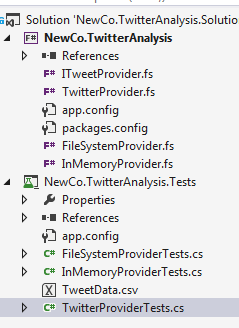
Note that I had to add the actual file in the test project. 

image

Finally, the F# code needs to include try..catches for the external calls (web service and disk) and some argument validation for the strings come in.

In any event, I now have 3 different implementations that I can swap out depending on my needs.  I love having the power of Interfaces combined with benefits of using a functional-first language.

Consuming Twitter With F#

I set up a meetup for TRINUG’s F#/data analytics SIG to center around consuming and analyzing Tweets.  Since Twitter is just JSON, I assumed it would be easy enough to search Tweets for a given subjects in a given time period.  How wrong I was.  I spent several hours research different ways to consume Twitter to varying degrees of success.  My 1st stop was to investigate some of the more common libraries that C# developers use to consume Twitter.  Here is my survey of some of the more popular ones:

Twitterizer: No longer maintained

  1. // Install-Package twitterizer -Version 2.4.2
  2. // Update-Package Newtonsoft.Json -Reinstall
  3. open Twitterizer
  4.  
  5. type public TwitterProvider() =
  6.     member this.GetTweetsForDateRange(ticker:string, startDate: DateTime, endDate: DateTime) =
  7.         let consumerKey = ConfigurationManager.AppSettings.["consumerKey"]
  8.         let consumerSecret = ConfigurationManager.AppSettings.["consumerSecret"]
  9.         let accessToken = ConfigurationManager.AppSettings.["accessToken"]
  10.         let accessTokenSecret = ConfigurationManager.AppSettings.["accessTokenSecret"]
  11.         
  12.         let tokens = new OAuthTokens()
  13.         tokens.set_ConsumerKey(consumerKey)
  14.         tokens.set_ConsumerSecret(consumerSecret)
  15.         tokens.set_AccessToken(accessToken)
  16.         tokens.set_AccessTokenSecret(accessTokenSecret)
  17.  
  18.         let searchOptions = new SearchOptions()
  19.         searchOptions.SinceDate <- startDate
  20.         searchOptions.UntilDate <- endDate
  21.         let results = TwitterSearch.Search(tokens, ticker,searchOptions)
  22.         results.ResponseObject
  23.                     |> Seq.map(fun r -> r.CreatedDate, r.Text)

TweetSharp: No longer maintained

  1. open TweetSharp
  2.  
  3. type public TwitterProvider() =
  4.     member this.GetTweetsForDateRange(ticker:string, startDate: DateTime, endDate: DateTime) =
  5.         let consumerKey = ConfigurationManager.AppSettings.["consumerKey"]
  6.         let consumerSecret = ConfigurationManager.AppSettings.["consumerSecret"]
  7.         let accessToken = ConfigurationManager.AppSettings.["accessToken"]
  8.         let accessTokenSecret = ConfigurationManager.AppSettings.["accessTokenSecret"]
  9.         
  10.         let service = new TwitterService(consumerKey, consumerSecret)
  11.         service.AuthenticateWith(accessToken, accessTokenSecret)
  12.  
  13.         let searchOptions = new SearchOptions()
  14.         searchOptions.Q <- "IBM%20since%3A2014-03-01&src=typd"
  15.         service.Search(searchOptions).Statuses
  16.                                         |> Seq.map(fun s -> s.CreatedDate, s.Text)

Note that I did try and add a date range the way the Twitter API instructs, but it still came back with only 20 tweets.

LinqToTwitter: Active but nave to use Linq syntax.  Ugh!

Twitterinvi: Active but does not have date range functionality

  1. open System
  2. open System.Configuration
  3. open Tweetinvi
  4.  
  5. type public TwitterProvider() =
  6.     member this.GetTodaysTweets(ticker: string) =
  7.         let consumerKey = ConfigurationManager.AppSettings.["consumerKey"]
  8.         let consumerSecret = ConfigurationManager.AppSettings.["consumerSecret"]
  9.         let accessToken = ConfigurationManager.AppSettings.["accessToken"]
  10.         let accessTokenSecret = ConfigurationManager.AppSettings.["accessTokenSecret"]
  11.  
  12.         TwitterCredentials.SetCredentials(accessToken, accessTokenSecret, consumerKey, consumerSecret)
  13.         let tweets = Search.SearchTweets(ticker);
  14.         tweets |> Seq.map(fun t -> t.CreatedAt, t.RetweetCount)
  15.  
  16.     member this.GetTweetsForDateRange(ticker: string, startDate: DateTime)=
  17.         let consumerKey = ConfigurationManager.AppSettings.["consumerKey"]
  18.         let consumerSecret = ConfigurationManager.AppSettings.["consumerSecret"]
  19.         let accessToken = ConfigurationManager.AppSettings.["accessToken"]
  20.         let accessTokenSecret = ConfigurationManager.AppSettings.["accessTokenSecret"]
  21.  
  22.         TwitterCredentials.SetCredentials(accessToken, accessTokenSecret, consumerKey, consumerSecret)
  23.         let searchParameter = Search.GenerateSearchTweetParameter(ticker)
  24.         searchParameter.Until <- startDate;
  25.         let tweets = Search.SearchTweets(searchParameter);
  26.         tweets |> Seq.map(fun t -> t.CreatedAt, t.RetweetCount)

So without an out of the box API to use, I thought about using a Json Type Provider the way Lincoln Atkinson did.  The problem is that is example is for V1 of Twitter and V 1.1 uses Oauth.  If you run his code, you get

image

I then thought about a 3rd party API that captures Tweets.  I ran across gnip ($500!) and Topsy (no longer accepting new licenses b/c Apple bought them) so I am back to square one.

So finally I thought about rolling my own (with OAuth being the hard part) but I am quickly running out of time to get ready for the SIG and I don’t want to spend the time on only this part. 

Why isn’t there a Twitter type provider?  I’ll add it to the list….

JavaScript Signature Capture Panel

I am attempting to teach myself some more JavaScript.  To that end I decided to replicate some of the projects I did in WPF/C# in HTML5/JavaScript.   One of the 1st ‘hello world’ projects I did in WPF was creating a signature panel – so it seemed like a good place to start.  The original blog post is here.   The original WPF project took advantage of the InkCanvas class.  Below is a code snippet of the how the events were captured in the original project:

  1. private void inkSignature_MouseDown(object sender, MouseButtonEventArgs e)
  2. {
  3.     IsCapturing = true;
  4.     glyph = new Glyph();
  5.  
  6. }
  7.  
  8. private void inkSignature_MouseUp(object sender, MouseButtonEventArgs e)
  9. {
  10.     IsCapturing = false;
  11.     _signature.Glyphs.Add(glyph);
  12.     startPoint = new Point();
  13.     endPoint = new Point();
  14.  
  15. }
  16.  
  17. private void inkSignature_MouseMove(object sender, MouseEventArgs e)
  18. {
  19.     if (IsCapturing)
  20.     {
  21.         if (startPoint.X == 0 && startPoint.Y == 0 && endPoint.X == 0 && endPoint.Y == 0)
  22.         {
  23.             endPoint = new Point(e.GetPosition(this).X, e.GetPosition(this).Y);
  24.         }
  25.         else
  26.         {
  27.             startPoint = endPoint;
  28.             endPoint = new Point(e.GetPosition(this).X, e.GetPosition(this).Y);
  29.             Line line = new Line(startPoint, endPoint);
  30.             glyph.Lines.Add(line);
  31.         }
  32.  
  33.     }
  34.  
  35. }

To have the same effect in the browser, I swapped out the InkCanvas with the Canvas tag.

  1. <canvas id="myCanvas" width="578" height="200" style="border:solid"></canvas>
  2. <br />
  3. <button id="resultButton" onclick="showSignature()"></button>

I then stubbed out the ‘mousedown’, ‘mouseup’, and ‘mousemove’ events to see if I was hooked up to them correctly and they were firing as expected:

  1. <body>
  2.  
  3.     <script>
  4.         canvas.addEventListener('mousemove', function (event) {
  5.         }, false);
  6.  
  7.         canvas.addEventListener('mousedown', function (event) {
  8.             alert("mousedown");
  9.         }, false);
  10.  
  11.         canvas.addEventListener('mouseup', function (event) {
  12.             alert("mouseup");
  13.         }, false);
  14.     </script>
  15.  
  16. </body>

I then thought about how to implement the InkCanvas code in JavaScript so I added some variables that all of the examples of StackOverflow use:

  1. var canvas = document.getElementById('myCanvas');
  2. var context = canvas.getContext('2d');

I then needed the function to calculate the mouse position relative to the signature panel (versus the screen).  This was also pretty common on StackOverflow:

  1. function getMousePosition(canvas, event) {
  2.     var rectangle = canvas.getBoundingClientRect();
  3.     return {
  4.         x: event.clientX – rectangle.left,
  5.         y: event.clientY – rectangle.top
  6.     };
  7. };

Finally, I could implement the WPF-equivalent logic.  First was the variables to maintain state:

  1. var isCapturing = false;
  2. var startX = 0;
  3. var startY = 0;
  4. var endX = 0;
  5. var endY = 0;
  6. var signature = [];
  7. var glyph = [];

And then the 3 event handlers:

  1. canvas.addEventListener('mousemove', function (event) {
  2.     if (isCapturing) {
  3.         var mousePosition = getMousePosition(canvas, event);
  4.  
  5.         if (startX === 0 && startY === 0 && endX === 0 && endY === 0) {
  6.             endX = mousePosition.x;
  7.             endY = mousePosition.y;
  8.         }
  9.         else {
  10.             startX = endX;
  11.             startY = endY;
  12.             endX = mousePosition.x;
  13.             endY = mousePosition.y;
  14.  
  15.             context.beginPath();
  16.             context.moveTo(startX, startY);
  17.             context.lineTo(endX, endY);
  18.             context.stroke()
  19.  
  20.             glyph.push(startX, startY, endX, endY);
  21.         }
  22.     }
  23. }, false);
  24.  
  25. canvas.addEventListener('mousedown', function (event) {
  26.     isCapturing = true;
  27.     glyph = [];
  28. }, false);
  29.  
  30. canvas.addEventListener('mouseup', function (event) {
  31.     isCapturing = false;
  32.     signature.push(glyph);
  33.     var startX = 0;
  34.     var startY = 0;
  35.     var endX = 0;
  36.     var endY = 0;
  37. }, false);

When I ran it, I <almost> got it right:

image

The problem is that the mouseup event was not resetting the starting value of the next point to 0, so the signature was coming out as 1 long line.  After sleeping on it (my pattern is write bugs at night, fix them in the morning), I realized I just had to reset the start and end coordinates on mouseup and then inspect in the mousemove.  Here is the complete final code:

  1. <!DOCTYPE html>
  2. <html xmlns="http://www.w3.org/1999/xhtml"&gt;
  3. <head>
  4.     <title></title>
  5. </head>
  6. <body>
  7.     <canvas id="myCanvas" width="578" height="200" style="border:solid"></canvas>
  8.     <br />
  9.     <button id="resultButton" onclick="showSignature()"></button>
  10.  
  11.  
  12.     <script>
  13.         function showSignature() {
  14.             alert(signature.length);
  15.         };
  16.     </script>
  17.  
  18.     <script>
  19.         var canvas = document.getElementById('myCanvas');
  20.         var context = canvas.getContext('2d');
  21.         var isCapturing = false;
  22.         var startX = 0;
  23.         var startY = 0;
  24.         var endX = 0;
  25.         var endY = 0;
  26.         var signature = [];
  27.         var glyph = [];
  28.  
  29.         function getMousePosition(canvas, event) {
  30.             var rectangle = canvas.getBoundingClientRect();
  31.             return {
  32.                 x: event.clientX – rectangle.left,
  33.                 y: event.clientY – rectangle.top
  34.             };
  35.         };
  36.  
  37.         canvas.addEventListener('mousemove', function (event) {
  38.             if (isCapturing) {
  39.                 var mousePosition = getMousePosition(canvas, event);
  40.  
  41.                 if (endX === 0 && endY === 0) {
  42.                     endX = mousePosition.x;
  43.                     endY = mousePosition.y;
  44.                 }
  45.                 else {
  46.                     startX = endX;
  47.                     startY = endY;
  48.                     endX = mousePosition.x;
  49.                     endY = mousePosition.y;
  50.  
  51.                     context.beginPath();
  52.                     context.moveTo(startX, startY);
  53.                     context.lineTo(endX, endY);
  54.                     context.stroke()
  55.  
  56.                     glyph.push(startX, startY, endX, endY);
  57.                 }
  58.             }
  59.         }, false);
  60.  
  61.         canvas.addEventListener('mousedown', function (event) {
  62.             isCapturing = true;
  63.             glyph = [];
  64.  
  65.             var mousePosition = getMousePosition(canvas, event);
  66.             var startX = mousePosition.x;
  67.             var startY = mousePosition.y;
  68.         }, false);
  69.  
  70.         canvas.addEventListener('mouseup', function (event) {
  71.             isCapturing = false;
  72.             signature.push(glyph);
  73.  
  74.             startX = 0;
  75.             startY = 0;
  76.             endX = 0;
  77.             endY = 0;
  78.         }, false);
  79.     </script>
  80.  
  81. </body>
  82. </html>

And here it is in action:

image

Now all I have to do is put the points into the same data structures that I used in the WPF project: Signature –> Glyphs[] –> Lines[] –> Line.StartPoint && Line.EndPoint.


Apriori Algorithm and F# Using Elevator Inspection Data

Now that I have the elevator dataset in a workable state, I wanted to see what I could see with the data.  I was reading Machine Learning In Action and the authors suggested that an Apriori Algorithm as a way to quantify associations among data points.  I read both Harrington’s code and Wikipedia’s description and I found both the be impenetrable – the former because their code was unreadable and the later because  the mathematical formulas depended on a level of algebra that I don’t have.

Fortunately, I found a C# project on Codeproject that had both an excellent example/introduction and C# code.  I used the examples on the website to formulate my F# implementation.

The first thing I did was create a class that matched the 1st grid in the example

image

  1. namespace ChickenSoftware.ElevatorChicken.Analysis
  2.  
  3. open System.Collections.Generic
  4.  
  5. type Transaction = {TID: string; Items: List<string> }
  6.  
  7. type Apriori(database: List<Transaction>, support: float, confidence: float) =
  8.     member this.Database = database
  9.     member this.Support = support
  10.     member this.Confidence = confidence

Note that because F# is immutable by default, the properties are read-only.  I then created a unit test project that makes sure the constructor works without exceptions.  The data matches the example:

  1. public AprioriTests()
  2. {
  3.     var database = new List<Transaction>();
  4.     database.Add(new Transaction("100", new List<string>() { "A", "C", "D" }));
  5.     database.Add(new Transaction("200", new List<string>() { "B", "C", "E" }));
  6.     database.Add(new Transaction("300", new List<string>() { "A", "B", "C", "E" }));
  7.     database.Add(new Transaction("400", new List<string>() { "B", "E" }));
  8.  
  9.     _apriori = new Apriori(database, .5, .80);
  10.  
  11. }
  12.  
  13. [TestMethod]
  14. public void ConstructorUsingValidArguments_ReturnsExpected()
  15. {
  16.     Assert.IsNotNull(_apriori);
  17. }

I then need a function to count up all of the items in the Itemsets.  I refused to use loops, so I first started using Seq.Fold, but I was having zero luck because I was trying to fold a Seq of List.  I then started experimenting with other functions when I found Seq.Collect – which was perfect.  So I created a function like this:

  1. member this.GetC1() =
  2.     database
  3.  
  4. member this.GetL1() =
  5.     let numberOfTransactions = this.GetC1().Count
  6.  
  7.     this.GetC1()
  8.         |> Seq.collect(fun d -> d.Items)
  9.         |> Seq.countBy(fun i -> i)
  10.         |> Seq.map(fun (t,i) -> t, i, float i/ float numberOfTransactions)
  11.         |> Seq.filter(fun (t,i,p) -> p >= support)
  12.         |> Seq.map(fun (t,i,p) -> t,i)
  13.         |> Seq.sort
  14.         |> Seq.toList

Note that the numberOfTransactions is for the database, not the individual items in the List<Item>.  And the results match the example:

imageimage

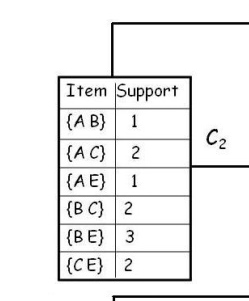
So this is great.  My next stop was to build a list of pair combinations of the remaining values

image

The trick is that is not a Cartesian join of the original sets – it is only the surviving sets that are needed.  My first attempt looked like:

  1. let C1 = database
  2.  
  3. let L1 = C1
  4.         |> Seq.map(fun t -> t.Items)
  5.         |> Seq.collect(fun i -> i)
  6.         |> Seq.countBy(fun i -> i)
  7.         |> Seq.map(fun (t,i) -> t, i, float i/ float numberOftransactions)
  8.         |> Seq.filter(fun (t,i,p) -> p >= support)
  9.         |> Seq.toArray
  10. let C2A = L1
  11.             |> Seq.map(fun (x,y,z) -> x)
  12.             |> Seq.toArray
  13. let C2B = L1
  14.             |> Seq.map(fun (x,y,z) -> x)
  15.             |> Seq.toArray
  16. let C2 = C2A |> Seq.collect(fun x -> C2B |> Seq.map(fun y -> x+y))
  17. C2   

With the output like this:

image

I was running out of Saturday morning so I went over to stack overflow and got a couple of responses.  I was on the right track with the concat, but I didn’t think about the List.Filter(), which would prune my list.  With this in mind, I copied Mark’s code and got what I was looking for

  1. member this.GetC2() =
  2.     let l1Itemset = this.GetL1()
  3.                     |> Seq.map(fun (i,s) -> i)
  4.  
  5.     let itemset =
  6.         l1Itemset
  7.             |> Seq.map(fun x -> l1Itemset |> Seq.map(fun y -> (x,y)))
  8.             |> Seq.concat
  9.             |> Seq.filter(fun (x,y) -> x < y)
  10.             |> Seq.sort
  11.             |> Seq.toList         
  12.     
  13.     let listContainsItem(l:List<string>, a,b) =
  14.             l.Contains(a) && l.Contains(b)
  15.     
  16.     let someFunctionINeedToRename(l1:List<string>, l2)=
  17.             l2 |> Seq.map(fun (x,y) -> listContainsItem(l1,x,y))
  18.  
  19.     let itemsetMatches = this.GetC1()
  20.                             |> Seq.map(fun t -> t.Items)
  21.                             |> Seq.map(fun i -> someFunctionINeedToRename(i,itemset))
  22.  
  23.     let itemSupport = itemsetMatches
  24.                             |> Seq.map(Seq.map(fun i -> if i then 1 else 0))
  25.                             |> Seq.reduce(Seq.map2(+))
  26.  
  27.     itemSupport
  28.         |> Seq.zip(itemset)
  29.         |> Seq.toList

So now I have C2 filling correctly:

image


Taking the results, I needed to get L2.

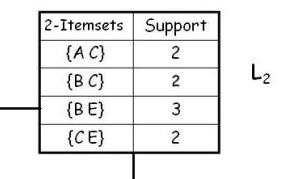
image

That was much simpler that getting C2 –> here is the code:

  1. member this.GetL2() =
  2.     let numberOfTransactions = this.GetC1().Count
  3.     
  4.     this.GetC2()
  5.             |> Seq.map(fun (i,n) -> i,n,float n/float numberOfTransactions)
  6.             |> Seq.filter(fun (i,n,p) -> p >= support)
  7.             |> Seq.map(fun (t,i,p) -> t,i)
  8.             |> Seq.sort
  9.             |> Seq.toList    

And when I run it – it matches this example exactly:

image

Finally, I added in a C# and L3.  This code is identical to the C2/L2 code with one exception: mapping a triple and not a tuple:  The C2 code maps like this

  1. let itemset =
  2.     l1Itemset
  3.         |> Seq.map(fun x -> l1Itemset |> Seq.map(fun y -> (x,y)))
  4.         |> Seq.concat
  5.         |> Seq.filter(fun (x,y) -> x < y)
  6.         |> Seq.sort
  7.         |> Seq.toList     

and the C3 code looks like this (took me 15 minutes to figure out line 3 below):

  1. let itemset =
  2.     l2Itemset
  3.         |> Seq.map(fun x -> l2Itemset |> Seq.map(fun y-> l2Itemset |> Seq.map(fun z->(fst x,fst y,snd z))))
  4.         |> Seq.concat
  5.         |> Seq.collect(fun d -> d)
  6.         |> Seq.filter(fun (x,y,z) -> x < y && y < z)
  7.         |> Seq.distinct
  8.         |> Seq.sort
  9.         |> Seq.toList    

With the C3 and L3 matching the example also:

image

image


I was now ready to put in the elevator data into the analysis.  I think I am getting better at F# because I did the mapping, filtering, and transformation of the data from the server without looking at any other material and it look only 15 minutes.

  1. type public ElevatorBuilder() =
  2.     let connectionString = ConfigurationManager.ConnectionStrings.["localData2"].ConnectionString;
  3.  
  4.     member public this.GetElevatorTransactions() =
  5.         let transactions = this.GetElevators()
  6.                               |> Seq.map(fun e ->this.ConvertElevatorToTransaction(e))
  7.         let transactionsList = new System.Collections.Generic.List<Transaction>(transactions)
  8.         transactionsList
  9.  
  10.     member public this.ConvertElevatorToTransaction(i: string, t:string, c:string, s:string) =
  11.         let items = new System.Collections.Generic.List<String>()
  12.         items.Add(t)
  13.         items.Add(c)
  14.         items.Add(s)
  15.         let transaction = {TID=i; Items=items}
  16.         transaction
  17.  
  18.     member public this.GetElevators () =
  19.         SqlConnection.GetDataContext(connectionString).ElevatorData201402
  20.             |> Seq.map(fun e -> e.ID, e.EquipType,e.Capacity,e.Speed)
  21.             |> Seq.filter(fun (i,et,c,s) -> not(String.IsNullOrEmpty(et)))
  22.             |> Seq.filter(fun (i,et,c,s) -> c.HasValue)
  23.             |> Seq.filter(fun (i,et,c,s) -> s.HasValue)
  24.             |> Seq.map(fun (i,t,c,s) -> i, this.CatagorizeEquipmentType(t),c,s)
  25.             |> Seq.map(fun (i,t,c,s) -> i,t,this.CatagorizeCapacity(c.Value),s)
  26.             |> Seq.map(fun (i,t,c,s) -> i,t,c,this.CatagorizeSpeed(s.Value))
  27.             |> Seq.map(fun (i,t,c,s) -> i.ToString(),t,c,s)

The longest part was aggregating the free-form text of the Equipment Type field (here is partial snip, you get the idea…)

  1. member public this.CatagorizeEquipmentType(et: string) =
  2.     match et.Trim() with
  3.         | "OTIS" -> "OTIS"
  4.         | "OTIS (1-2)" -> "OTIS"
  5.         | "OTIS (2-1)" -> "OTIS"
  6.         | "OTIS hydro" -> "OTIS"
  7.         | "OTIS, HYD" -> "OTIS"
  8.         | "OTIS/ ASHEVILLE " -> "OTIS"
  9.         | "OTIS/ MOUNTAIN " -> "OTIS"
  10.         | "OTIS/#1" -> "OTIS"
  11.         | "OTIS/#19 " -> "OTIS"

Assigning categories for speed and capacity was a snap using F#

  1. member public this.CatagorizeCapacity(c: int) =
  2.     let lowerBound = (c/25 * 25) + 1
  3.     let upperBound = lowerBound + 24
  4.     lowerBound.ToString() + "-" + upperBound.ToString()        
  5.  
  6. member public this.CatagorizeSpeed(s: int) =
  7.     let lowerBound = (s/50 * 50) + 1
  8.     let upperBound = lowerBound + 49
  9.     lowerBound.ToString() + "-" + upperBound.ToString()    

With this in hand, I created a Console app that takes the 27K records and pushes them though the apriori algorithm:

  1. private static void RunElevatorAnalysis()
  2. {
  3.     Stopwatch stopwatch = new Stopwatch();
  4.     stopwatch.Start();
  5.     ElevatorBuilder builder = new ElevatorBuilder();
  6.     var transactions = builder.GetElevatorTransactions();
  7.     stopwatch.Stop();
  8.     Console.WriteLine("Building " + transactions.Count + " transactions took: " + stopwatch.Elapsed.TotalSeconds);
  9.     var apriori = new Apriori(transactions, .1, .75);
  10.     var c2 = apriori.GetC2();
  11.     stopwatch.Reset();
  12.     stopwatch.Start();
  13.     var l1 = apriori.GetL1();
  14.     Console.WriteLine("Getting L1 took: " + stopwatch.Elapsed.TotalSeconds);
  15.     var l2 = apriori.GetL2();
  16.     Console.WriteLine("Getting L2 took: " + stopwatch.Elapsed.TotalSeconds);
  17.     var l3 = apriori.GetL3();
  18.     Console.WriteLine("Getting L3 took: " + stopwatch.Elapsed.TotalSeconds);
  19.     stopwatch.Stop();
  20.     Console.WriteLine("–L1");
  21.     foreach (var t in l1)
  22.     {
  23.         Console.WriteLine(t.Item1 + ":" + t.Item2);
  24.     }
  25.     Console.WriteLine("–L2");
  26.     foreach (var t in l2)
  27.     {
  28.         Console.WriteLine(t.Item1 + ":" + t.Item2);
  29.     }
  30.     Console.WriteLine("–L3");
  31.     foreach (var t in l3)
  32.     {
  33.         Console.WriteLine(t.Item1 + ":" + t.Item2);
  34.     }
  35. }

I then made an offering to the F# Gods and hit F5:

image

Doh!  The gods were not pleased.  I then went back to my initial filtering function and added a Seq.Take(25000) and the results:

image

So there a couple of things to draw from this exercise.

1) Apriori Algorithm is the wrong classification technique for this dataset.  I had to bring the support way down (10%) to even get any readings.  Also, there is too much dispersion of the values.  This kind of algorithm is much better with N number of a smaller set of data values versus a fixed number of large values.

2) Even so, how cool is this?  Compare the files just to make the C#/OO work versus with F#

imageimage

And the Total LOC is 539 for C# versus 120 for F# – and the F# can be optimized using a better way to create search and itemsets.  Hard-coding each level was a hack I did to get thing working and give me an understanding of how AA works.  I bet this can be consolidated to well under 75 lines without sacrificing readability

3) I think the StackOverflow exception is because I am doing a Cartesian join and then paring the result.  Using one of the other techniques suggested on SO will give much better results.

I any event, what a fun project!  I can’t wait to optimize this and perhaps throw a different algorithm at the dataset in the coming weeks.


Elevator App: Part 1 – Data Layer Using F#


At Open Data Day, fellow TRINUGER Elaine Cahill told me about a website where you can get all of the elevator inspection data for the state.  It is found here.  She went ahead and put the Wake County data onto Socrata.  I wanted to look at the entire state so I went to the report page like so:


image

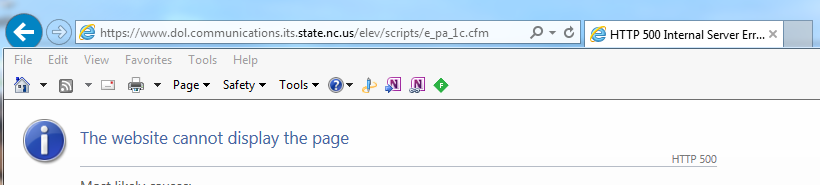
Unfortunately, when you try and pull down the entire state, you cause a server exception:


image


So I split the download in half.  I then Imported it into Access and then SSISed it into Azure Sql.  I then created a project to server the data and I decided to use F# type providers as a replacement for Entity Framework for my ORM.  I could either use the SqlEntity TP or the SqlDataConnection TP to access the Sql Database on Azure.  Both do not work out of the box.

SqlDataConnection

I could not get  SqlDataConnection to work at all.  When I hooked it up to a standard connection string in the config file, I got:

image

So when I copy and paste the connection string into the TP directly, it does make the connection to Azure, but then it comes back with this exception:

image

Without looking at the source. my guess is that the TP has hard-coded a reference to ‘syscomments’ and alas, Azure does not have that table.

SqlEntity

I then headed over to the SlqEntityTP to see if I could have better luck.  Fortunately, the SqlEntity does work with both an Azure connection string in the .config file and can make a connection to an Azure database.

The problem I ran into was when I wanted to expose the SqlConnection the the WebAPI project that I wrote in C#.  You can not mark SqlEntityTPs as public:

image

Note that the SqlDataConnection can be marked as public. <sigh>.  I marked the SqlEntityTP as internal and then created a POCO to map between the SqlEntity type and a type that can be consumed by the outside world:

  1. type public Elevator ={
  2.         ID: int
  3.         County: string
  4.         StateId: string
  5.         Type: string
  6.         Operation: string
  7.         Owner: string
  8.         O_Address1: string
  9.         O_Address2: string
  10.         O_City: string
  11.         O_State: string
  12.         O_Zip: string
  13.         User: string
  14.         U_Address1: string
  15.         U_Address2: string
  16.         U_City: string
  17.         U_State: string
  18.         U_Zip: string
  19.         U_Lat: double
  20.         U_Long: double
  21.         Installed: DateTime
  22.         Complied: DateTime
  23.         Capacity: int
  24.         CertStatus: int
  25.         EquipType: string
  26.         Drive: string
  27.         Volts: string
  28.         Speed: int
  29.         FloorTo: string
  30.         FloorFrom: string
  31.         Landing: string
  32.         Entrances: string
  33.         Ropes: string
  34.         RopeSize: string
  35.     }
  36.  
  37. type public DataRepository() =
  38.     let connectionString = ConfigurationManager.ConnectionStrings.["azureData"].ConnectionString;
  39.  
  40.     member public this.GetElevators () =
  41.         SqlConnection.GetDataContext(connectionString).ElevatorData201402
  42.         |> Seq.map(fun x -> this.GetElevatorFromElevatorData(x))
  43.  
  44.     member public this.GetElevator (id: int) =
  45.         SqlConnection.GetDataContext(connectionString).ElevatorData201402
  46.         |> Seq.where(fun x -> x.ID = id)
  47.         |> Seq.map(fun x -> this.GetElevatorFromElevatorData(x))
  48.         |> Seq.head
  49.  
  50.     member internal this.GetElevatorFromElevatorData(elevatorData: SqlConnection.ServiceTypes.ElevatorData201402) =
  51.         let elevator = {ID= elevatorData.ID;
  52.             County=elevatorData.County;
  53.             StateId=elevatorData.StateID;
  54.             Type=elevatorData.Type;
  55.             Operation=elevatorData.Operation;
  56.             Owner=elevatorData.Owner;
  57.             O_Address1=elevatorData.O_Address1;
  58.             O_Address2=elevatorData.O_Address2;
  59.             O_City=elevatorData.O_City;
  60.             O_State=elevatorData.O_St;
  61.             O_Zip=elevatorData.O_Zip;
  62.             User=elevatorData.User;
  63.             U_Address1=elevatorData.U_Address1;
  64.             U_Address2=elevatorData.U_Address2;
  65.             U_City=elevatorData.U_City;
  66.             U_State=elevatorData.U_St;
  67.             U_Zip=elevatorData.U_Zip;
  68.             U_Lat=elevatorData.U_lat;
  69.             U_Long=elevatorData.U_long;
  70.             Installed=elevatorData.Installed.Value;
  71.             Complied=elevatorData.Complied.Value;
  72.             Capacity=elevatorData.Capacity.Value;
  73.             CertStatus=elevatorData.CertStatus.Value;
  74.             EquipType=elevatorData.EquipType;
  75.             Drive=elevatorData.Drive;
  76.             Volts=elevatorData.Volts;
  77.             Speed=int elevatorData.Speed;
  78.             FloorTo=elevatorData.FloorTo;
  79.             FloorFrom=elevatorData.FloorFrom;
  80.             Landing=elevatorData.Landing;
  81.             Entrances=elevatorData.Entrances;
  82.             Ropes=elevatorData.Ropes;
  83.             RopeSize=elevatorData.RopeSize
  84.         }
  85.         elevator

I am not happy about writing any of this code.  I have 84 lines of code for a single class.  I might have well used the code code gen of EF.  I could have taken the performance hit and used System.Reflection to map field of the same names (I have done that on other projects) , but that also feels like a hack.   In any event, I then added a reference to my F# project in my C# WebAPI project.  I did have to add a reference to FSharp.Core in the C# project (which further vexed me), but then I created a couple of GET methods to expose the data:


  1. public class ElevatorController : ApiController
  2. {
  3.     // GET api/Elevator
  4.     public IEnumerable<Elevator> Get()
  5.     {
  6.         DataRepository repository = new DataRepository();
  7.         return repository.GetElevators();
  8.     }
  9.  
  10.     // GET api/Elevator/5
  11.     public Elevator Get(int id)
  12.     {
  13.         DataRepository repository = new DataRepository();
  14.         return repository.GetElevator(id);
  15.     }
  16.  
  17. }


When I viewed the JSON from a handy browser, it looks like, well, junk:

image

So now I have to get rid of that random characters (x0040 suffix)– yet a 3rd POCO, this one in C#:

  1. public class ElevatorController : ApiController
  2. {
  3.     // GET api/Elevator
  4.     public IEnumerable<CS.Elevator> Get()
  5.     {
  6.         List<CS.Elevator> elevators = new List<CS.Elevator>();
  7.         FS.DataRepository repository = new FS.DataRepository();
  8.         var fsElevators = repository.GetElevators();
  9.         foreach (var fsElevator in fsElevators)
  10.         {
  11.             elevators.Add(GetElevatorFromFSharpElevator(fsElevator));
  12.         }
  13.         return elevators;
  14.     }
  15.  
  16.     // GET api/Elevator/5
  17.     public CS.Elevator Get(int id)
  18.     {
  19.         FS.DataRepository repository = new FS.DataRepository();
  20.         return GetElevatorFromFSharpElevator(repository.GetElevator(id));
  21.     }
  22.  
  23.     internal CS.Elevator GetElevatorFromFSharpElevator(FS.Elevator fsElevator)
  24.     {
  25.         CS.Elevator elevator = new CS.Elevator();
  26.         elevator.ID = fsElevator.ID;
  27.         elevator.County = fsElevator.County;
  28.         elevator.StateId = fsElevator.StateId;
  29.         elevator.Type = fsElevator.Type;
  30.         elevator.Operation = fsElevator.Operation;
  31.         elevator.Owner = fsElevator.Owner;
  32.         elevator.O_Address1 = fsElevator.O_Address1;
  33.         elevator.O_Address2 = fsElevator.O_Address2;
  34.         elevator.O_City = fsElevator.O_City;
  35.         elevator.O_State = fsElevator.O_State;
  36.         elevator.O_Zip = fsElevator.O_Zip;
  37.         elevator.User = fsElevator.User;
  38.         elevator.U_Address1 = fsElevator.U_Address1;
  39.         elevator.U_Address2 = fsElevator.U_Address2;
  40.         elevator.U_City = fsElevator.U_City;
  41.         elevator.U_State = fsElevator.U_State;
  42.         elevator.U_Zip = fsElevator.U_Zip;
  43.         elevator.Installed = fsElevator.Installed;
  44.         elevator.Complied = fsElevator.Complied;
  45.         elevator.Capacity = fsElevator.Capacity;
  46.         elevator.CertStatus = fsElevator.CertStatus;
  47.         elevator.EquipType = fsElevator.EquipType;
  48.         elevator.Drive = fsElevator.Drive;
  49.         elevator.Volts = fsElevator.Volts;
  50.         elevator.Speed = fsElevator.Speed;
  51.         elevator.FloorTo = fsElevator.FloorTo;
  52.         elevator.FloorFrom = fsElevator.FloorFrom;
  53.         elevator.Landing = fsElevator.Landing;
  54.         elevator.Entrances = fsElevator.Entrances;
  55.         elevator.Ropes = fsElevator.Ropes;
  56.         elevator.RopeSize = fsElevator.RopeSize;
  57.         return elevator;
  58.     }
  59.  
  60. }


So that gives me that I want…

image

As a side note, I learned the hard way that the only way to force the SqlEntityTP to update based on a schema  change in the DB is to change the connection string in the .config file

Finally, when I published the WebAPI project to Azure, I got an exception. 

<Error><Message>An error has occurred.</Message><ExceptionMessage>Could not load file or assembly 'FSharp.Core, Version=4.3.1.0, Culture=neutral, PublicKeyToken=b03f5f7f11d50a3a' or one of its dependencies. The system cannot find the file specified.</ExceptionMessage><ExceptionType>System.IO.FileNotFoundException</ExceptionType><StackTrace> at System.Web.Http.ApiController.<InvokeActionWithExceptionFilters>d__1.MoveNext() --- End of stack trace from previous location where exception was thrown --- at System.Runtime.CompilerServices.TaskAwaiter.ThrowForNonSuccess(Task task) at System.Runtime.CompilerServices.TaskAwaiter.HandleNonSuccessAndDebuggerNotification(Task task) at System.Web.Http.Dispatcher.HttpControllerDispatcher.<SendAsync>d__0.MoveNext()</StackTrace

Turns out you need to not only add a reference to the F# project and FSharp.Core, you have to deploy the .dlls to Azure also.  Thanks to hocho on SO for that one.

In conclusion, I love the promise of TPs.  I want nothing more than to throw away all of the EF code-gen, .tt files, seeding for code-first nonsense, etc… and replace it with a single line TP.  I have done this on a local project, but when I did it with an Azure, things were harder than they should be.  Since it is easier to throw hand grenades than catch them, I made a list of the things I want to help the open source FSharp.Data project accomplish in the coming months:

1) SqlDatabaseConnection working with Azure Sql Storage

2) MSAccessConnection needed

3) ActiveDirectoryConnection needed

4) Json and WsdlService ability to handle proxies

5) SqlEntityConnection exposing classes publicly

Regardless of what the open-source community does, MSFT will still have to make a better commitment to F# on Azure, IMHO…