Elevator App: Part 0

When I was young, I used to have window races with my siblings in the car. In those days, windows would be manual with a crank like this:

clip_image001

Each kid would get a door and on “go”, we would crank, crank, crank the window all the way up and all the way down. These were great time passers on a long trip – until dad noticed that it was getting alternately windy and calm in the car and put an end to it. With the advent of electric motors for the windows in the car, the races became much closer – we honestly thought that harder you pushed on the button would cause the window move up and down faster. It was good fun until dad caught me pouring Crisco down the back left window of the Buick Skylark.  Greasing the wheels, if you will.

Fast forward 15 years when I was just out of school at my 1st job in San Francisco. One of the things we did when we didn’t have any money (often) on a Friday night was to ride elevators. Find a nice building, walk in like you knew what you were doing, and ride to the top and back down. Hotels were the best – ideally you could get free food in the bar for happy hour too – it was dinner theatre. Sometimes, if there were two elevators in the bank, we would turn it into a competition – pick your elevator wisely. If someone got on your elevator while you were racing, you were out of luck. This added a good deal of tension to the race. You were in the lead on the way back down but then someone stopped you on floor 2 to go down to G. “UGHHHHH. Take the stairs fat-ass!”

(BTW: how great would this be for a plot of a movie? The main characters pick different building to race until one night, they picked the wrong one….)

The biggest problem with elevator races (outside of getting caught and spending a night in jail), was that if the building only had 1 elevator, you really couldn’t race. Even if you had a stopwatch, you really didn’t know if the person made it to the top. Also, the chance of other people who were waiting stopping your elevator was now 100%.  Plus, do you really trust your competition with the stop-watch?  Maybe your friends, but not mine…

Fast forward 20 more years and I started working with open data. One of the data sets that TRINUG wanted to look at was elevator inspection data. When I went to the website where you can do reporting and there was a column called…. speed. Holy smokes, we can see the speed of the different elevators in town! I then thought about a phone app that could measure the speed of the elevator versus the reported speed. Also, we finally have a solution to the 1-elevator race problem! I then thought about how to tie this into coming up to speed with the latest javascript technologies (I am trying to get my MCSD in Web too).  Thus, I am going to create an elevator speed app using Angular and Phonegap.  Let’s see how it goes…

Restaurant Classifier: Async For Faster Performance?

Going back to my restaurant classifier using F# from last week, I decided to speed things up some.  Each request to the Yellow Pages API takes 1 second, so with the 5,682 records, I am looking at a little over 1.5 hours to pull down the data when running serial.

I first thought about making my methods async so I changed the API call method to async and used the Http.AsyncRequest method like so (line 10 below):

  1. member this.GetCatagoriesAsync(restaurantName: string, restaurantAddress: string) =
  2.          async{
  3.              if(String.IsNullOrEmpty(restaurantName)) then
  4.                  failwith("restaurantName cannot be null or empty.")
  5.              if(String.IsNullOrEmpty(restaurantAddress)) then
  6.                  failwith("restaurantAddress cannot be null or empty.")
  7.              let cleanedName = this.CleanName(restaurantName)
  8.              let cleanedAddress = this.CleanAddress(restaurantAddress);
  9.              let uri = "http://pubapi.atti.com/search-api/search/devapi/search?term="+cleanedName+"&searchloc="+cleanedAddress+"&format=json&key=qj5l8pphj5"
  10.              let! response = FSharp.Net.Http.AsyncRequest(uri, headers=["user-agent", "None"])
  11.              let ypResult = ypProvider.Parse(response)
  12.              try
  13.                  return ypResult.SearchResult.SearchListings.SearchListing.[0].Categories
  14.              with
  15.                  | ex -> return String.Empty
  16.          }

I then made the covering function async also (line 11 below)

  1. member this.IsRestaurantInCatagoryAsync(restaurantName: string, restaurantAddress: string, restaurantCatagory: string) =
  2.     async {
  3.         if(String.IsNullOrEmpty(restaurantName)) then
  4.             failwith("restaurantName cannot be null or empty.")
  5.         if(String.IsNullOrEmpty(restaurantAddress)) then
  6.             failwith("restaurantAddress cannot be null or empty.")
  7.         if(String.IsNullOrEmpty(restaurantCatagory)) then
  8.             failwith("restaurantCatagory cannot be null or empty.")
  9.  
  10.         System.Threading.Thread.Sleep(new System.TimeSpan(0,0,1))
  11.         let! catagories = this.GetCatagoriesAsync(restaurantName, restaurantAddress)
  12.         if(String.IsNullOrEmpty(catagories)) then return false
  13.         else return this.IsCatagoryInCatagories(catagories,restaurantCatagory)
  14.     }

The problem is that invoking the covering function via an anonymous method did not work easily.

image

After screwing around with the synax a bit, I went over to stack overflow where I found out two things:

  • There is not an easy way to do it (I was hoping for a Seq.FilterAsyc method)
  • Thomas Petricek is above my pay-grade. 

In any event, I decided to drop the async and just look at parallelism.   Turns out that there is a Parallel Seq class called PSeq, it is just not in the FSharp core library yet.   I created a PSeq file in my project, moved it to the top and dropped the code in.   I then changed the method call to use PSeq to invoke the serial methods:

  1. member public this.GetChineseRestaurants () =
  2.     let catagoryRepository = new RestaurantCatagoryRepository()
  3.     let catagory = "Chinese"
  4.     this.GetRestaurants()
  5.             |> PSeq.filter(fun (name, address) -> catagoryRepository.IsRestaurantInCatagory(name, address,catagory))
  6.             |> Seq.toList    

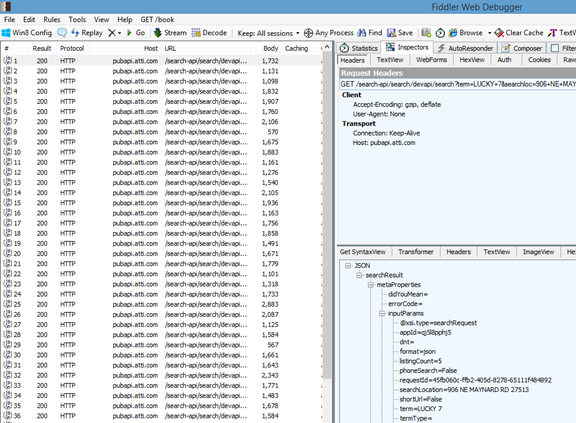
When I first invoked it and looked at Fiddler (OT: did anyone notice that Fiddler’s new logo looks alot like a FSharp one?  Probably just a coincidence), it was clear that things were running in parallel and that performance would improve.  I have two cores on this workstation so my time be cut in half. 

image

With the parallel method in my back pocket, I decided to see the ultimate result of the restaurant classification.  I created a quick console app

  1. class Program
  2. {
  3.     static void Main(string[] args)
  4.     {
  5.         Console.WriteLine("Start");
  6.  
  7.         Stopwatch stopwatch = new Stopwatch();
  8.         stopwatch.Start();
  9.         RestaurantBuilder builder = new RestaurantBuilder();
  10.         var restaurants = builder.GetChineseRestaurants();
  11.         
  12.         foreach (var restaurant in restaurants)
  13.         {
  14.             Console.WriteLine(restaurant.Item1 + ":" + restaurant.Item2);
  15.         }
  16.         
  17.         stopwatch.Stop();
  18.         Console.WriteLine("Number of Chinese Restaurants: " + restaurants.Count());
  19.         Console.WriteLine(stopwatch.Elapsed.ToString());
  20.         Console.WriteLine("End");
  21.         Console.ReadKey();
  22.     }
  23. }

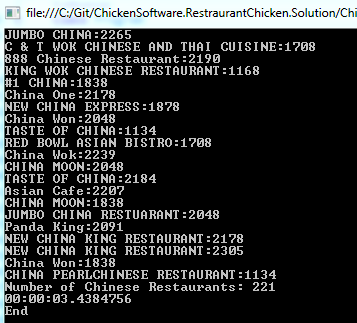
I then ran the search on YP.com using my 4 core laptop and got the following results:

image

Compared to my original classifier based on name:

image

So the results make sense.  The YP serial search would take at least 94.7 minutes, the YP parallel search took 41 minutes, and the in-memory name search took 3 seconds.  The YP search(s) found restaurants that the name did not (Wang’s Kitchen, Crazy Fire Mongolian Grill, etc…) – 275 to 221, or 24% more restaurants.

I think that the next step is to look at the classifier and see how many restaurants are in both datasets and why the ones that are not in the YP one – where they are (did they even pay to be in the Yellow Pages?).  Perhaps there is another YP category that can be considered.  Also, it would be interesting to see of the restaurants that are in the name search and in the Yellow Pages that were not classified as Chinese – the false positive rate.  Finally, I did see some 500s in Fiddler that had “read time out” so there is room for improvement to account for the transient faults…

Restaurant Classification Via the Yellow Pages API Using F#

As part of the restaurant analysis I did for open data day, I built a crude classifier to identify Chinese restaurants.  The classifier looked at the name of the establishment and if certain key words were in the name, it was tagged as a Chinese restaurant.

  1. member public x.IsEstablishmentAChineseRestraurant (establishmentName:string) =
  2.     let upperCaseEstablishmentName = establishmentName.ToUpper()
  3.     let numberOfMatchedWords = upperCaseEstablishmentName.Split(' ')
  4.                                 |> Seq.map(fun x -> match x with
  5.                                                         | "ASIA" -> 1
  6.                                                         | "ASIAN" -> 1
  7.                                                         | "CHINA" -> 1
  8.                                                         | "CHINESE" -> 1
  9.                                                         | "PANDA" -> 1
  10.                                                         | "PEKING" -> 1
  11.                                                         | "WOK" -> 1
  12.                                                         | _ -> 0)
  13.                                 |> Seq.sum
  14.     match numberOfMatchedWords with
  15.         | 0 -> false
  16.         | _ -> true

Although this worked well enough for the analysis, I was interested in seeing if there was a way of using something that is more precise.  To that end, I thought of the Yellow Pages – they classify restaurants into categories and assuming that the restaurant is in the yellow pages, it is a better way to determine the restaurant category versus just a name search.

The first thing I did was head over to the Yellow Pages (YP.com) website and sure enough, they have an API and a developers program.  I signed up and had an API key within a couple of minutes.

The first thing I did was to try and search for a restaurant in the browser.  I picked the first restaurant I came across in the dataset – Jumbo China #5.  I created a request uri based on their API like so

http://pubapi.atti.com/search-api/search/devapi/search?term=Jumbo+China+5&searchloc=6108+Falls+Of+Neuse+Rd+27609&format=json&key=XXXXXXXXXX

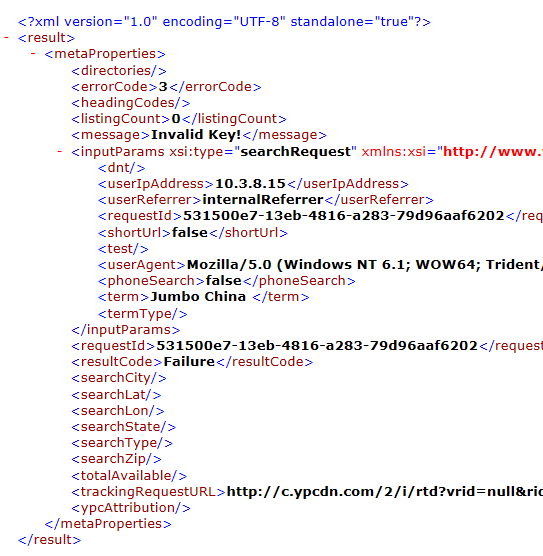
When I plugged the name into the browser, I got this:

image

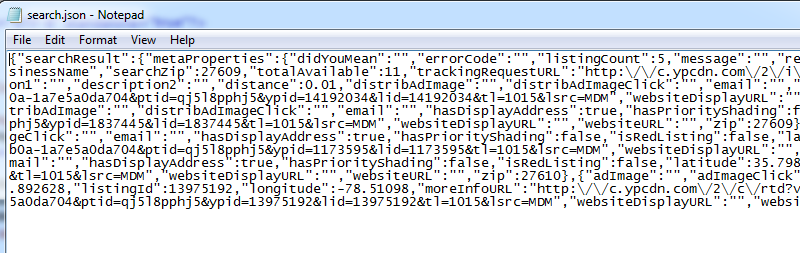
After screwing around with the code for about ten minutes thinking it was my API Key (Invalid Key would lead you to believe that, no?), Mike Thomas came over and told me that the url encoding was messing with my request – specifically the ‘#’ in Jumbo China #5.  When I removed the # symbol, I got Json back:

image

Throwing the Json into Json2CSharp, the results look great:

image

I then took this URL and tried to load it into a F# type provider, I couldn’t understand why I was getting a red squiggly line of approbation (Json and XML):

image


so I pulled out Fiddler to see I was getting a 400.  Digging into the response value, I found that “User Agent” was a required field. 

image

The problem was then compounded because the FSharp Json type provider does not allow you to enter a User Agent into the constructor.  I headed over to Stack Overflow where Thomas Petricek was kind enough to answer the question – basically you have to use the FSharp Http class to make the request (which you can add the user agent to) and then parse the response via the JsonProvider using the “Parse” versus the “Load” method.  So spinning up the method like so:

image

This gave me the results back that I wanted.  I then created a couple of methods to clean up any characters that might screw up the url encoding, added some argument validation, and I had a pretty good module to consume the YP.com listings:

  1. namespace ChickenSoftware.RestaurantClassifier
  2.  
  3. open System
  4. open FSharp.Data
  5. open FSharp.Net
  6.  
  7. type ypProvider = JsonProvider< @"YP.txt">
  8.  
  9. type RestaurantCatagoryRepository() =
  10.    member this.GetCatagories(restaurantName: string, restaurantAddress: string) =
  11.         if(String.IsNullOrEmpty(restaurantName)) then
  12.             failwith("restaurantName cannot be null or empty.")
  13.         if(String.IsNullOrEmpty(restaurantAddress)) then
  14.             failwith("restaurantAddress cannot be null or empty.")
  15.         let cleanedName = this.CleanName(restaurantName)
  16.         let cleanedAddress = this.CleanAddress(restaurantAddress);
  17.         let uri = "http://pubapi.atti.com/search-api/search/devapi/search?term=&quot;+cleanedName+"&searchloc="+cleanedAddress+"&format=json&key=XXXXXX"
  18.         let response = FSharp.Net.Http.Request(uri, headers=["user-agent", "None"])
  19.         let ypResult = ypProvider.Parse(response)
  20.         try
  21.             ypResult.SearchResult.SearchListings.SearchListing.[0].Categories
  22.         with
  23.             | ex -> String.Empty
  24.  
  25.     member this.CleanName(name: string) =
  26.                 name.Replace("#","").Replace(" ","+")
  27.  
  28.     member this.CleanAddress(address: string)=
  29.                 address.Replace("#","").Replace(" ","+")
  30.     
  31.     member this.IsCatagoryInCatagories(catagories: string, catagory: string) =
  32.         if(String.IsNullOrEmpty(catagories)) then false
  33.         else if (String.IsNullOrEmpty(catagory)) then false
  34.         else catagories.Contains(catagory)
  35.  
  36.     member this.IsRestaurantInCatagory(restaurantName: string, restaurantAddress: string, restaurantCatagory: string) =
  37.         if(String.IsNullOrEmpty(restaurantName)) then
  38.             failwith("restaurantName cannot be null or empty.")
  39.         if(String.IsNullOrEmpty(restaurantAddress)) then
  40.             failwith("restaurantAddress cannot be null or empty.")
  41.         if(String.IsNullOrEmpty(restaurantCatagory)) then
  42.             failwith("restaurantCatagory cannot be null or empty.")
  43.  
  44.         System.Threading.Thread.Sleep(new System.TimeSpan(0,0,1))
  45.         let catagories = this.GetCatagories(restaurantName, restaurantAddress)
  46.         if(String.IsNullOrEmpty(catagories)) then false
  47.         else this.IsCatagoryInCatagories(catagories,restaurantCatagory)
  48.  
  49.     member this.IsRestaurantInCatagoryAsync(restaurantName: string, restaurantAddress: string, restaurantCatagory: string) =
  50.         async {
  51.             if(String.IsNullOrEmpty(restaurantName)) then
  52.                 failwith("restaurantName cannot be null or empty.")
  53.             if(String.IsNullOrEmpty(restaurantAddress)) then
  54.                 failwith("restaurantAddress cannot be null or empty.")
  55.             if(String.IsNullOrEmpty(restaurantCatagory)) then
  56.                 failwith("restaurantCatagory cannot be null or empty.")
  57.  
  58.             let catagories = this.GetCatagories(restaurantName, restaurantAddress)
  59.             if(String.IsNullOrEmpty(catagories)) then return false
  60.             else return this.IsCatagoryInCatagories(catagories,restaurantCatagory)
  61.         }

The associated unit and integration tests that I made in building this module look like this:

  1. [TestClass]
  2. public class CatagoryBuilderTests
  3. {
  4.  
  5.     [TestMethod]
  6.     public void CleanName_ReturnsExpectedValue()
  7.     {
  8.         RestaurantCatagoryRepository repository = new RestaurantCatagoryRepository();
  9.         String restaurantName = "Jumbo China #5";
  10.  
  11.         String expected = "Jumbo+China+5";
  12.         String actual = repository.CleanName(restaurantName);
  13.         Assert.AreEqual(expected, actual);
  14.     }
  15.  
  16.     [TestMethod]
  17.     public void CleanAddress_ReturnsExpectedValue()
  18.     {
  19.         RestaurantCatagoryRepository repository = new RestaurantCatagoryRepository();
  20.         String restaurantAddress = "6108 Falls Of Neuse Rd 27609";
  21.  
  22.         String expected = "6108+Falls+Of+Neuse+Rd+27609";
  23.         String actual = repository.CleanAddress(restaurantAddress);
  24.         Assert.AreEqual(expected, actual);
  25.     }
  26.  
  27.  
  28.     [TestMethod]
  29.     public void GetCatagories_ReturnsExpectedValue()
  30.     {
  31.         string restaurantName = "Jumbo China #5";
  32.         String restaurantAddress = "6108 Falls Of Neuse Rd 27609";
  33.  
  34.         RestaurantCatagoryRepository repository = new RestaurantCatagoryRepository();
  35.         var result = repository.GetCatagories(restaurantName, restaurantAddress);
  36.         Assert.IsNotNull(result);
  37.     }
  38.  
  39.     [TestMethod]
  40.     public void CatagoryIsContainedInCatagoriesUsingValidTrueData_ReturnsExpectedValue()
  41.     {
  42.         RestaurantCatagoryRepository repository = new RestaurantCatagoryRepository();
  43.  
  44.         String catagories = "Chinese Restaurants|Restaurants|";
  45.         String catagory = "Chinese";
  46.  
  47.         Boolean expected = true;
  48.         Boolean actual = repository.IsCatagoryInCatagories(catagories, catagory);
  49.  
  50.         Assert.AreEqual(expected, actual);
  51.     }
  52.  
  53.     [TestMethod]
  54.     public void CatagoryIsContainedInCatagoriesUsingValidFalseData_ReturnsExpectedValue()
  55.     {
  56.         RestaurantCatagoryRepository repository = new RestaurantCatagoryRepository();
  57.  
  58.         String catagories = "Chinese Restaurants|Restaurants|";
  59.         String catagory = "Seafood";
  60.  
  61.         Boolean expected = false;
  62.         Boolean actual = repository.IsCatagoryInCatagories(catagories, catagory);
  63.  
  64.         Assert.AreEqual(expected, actual);
  65.     }
  66.  
  67.     [TestMethod]
  68.     public void IsJumboChinaAChineseRestaurant_ReturnsTrue()
  69.     {
  70.         RestaurantCatagoryRepository repository = new RestaurantCatagoryRepository();
  71.  
  72.         string restaurantName = "Jumbo China #5";
  73.         String restaurantAddress = "6108 Falls Of Neuse Rd 27609";
  74.         String restaurantCatagory = "Chinese";
  75.  
  76.         Boolean expected = true;
  77.         Boolean actual = repository.IsRestaurantInCatagory(restaurantName, restaurantAddress, restaurantCatagory);
  78.  
  79.         Assert.AreEqual(expected, actual);
  80.     }
  81.  
  82.     [TestMethod]
  83.     public void IsJumboChinaAnItalianRestaurant_ReturnsFalse()
  84.     {
  85.         RestaurantCatagoryRepository repository = new RestaurantCatagoryRepository();
  86.  
  87.         string restaurantName = "Jumbo China #5";
  88.         String restaurantAddress = "6108 Falls Of Neuse Rd 27609";
  89.         String restaurantCatagory = "Italian";
  90.  
  91.         Boolean expected = false;
  92.         Boolean actual = repository.IsRestaurantInCatagory(restaurantName, restaurantAddress, restaurantCatagory);
  93.  
  94.         Assert.AreEqual(expected, actual);
  95.     }
  96.  
  97.     [TestMethod]
  98.     public void IsUnknownAnItalianRestaurant_ReturnsFalse()
  99.     {
  100.         RestaurantCatagoryRepository repository = new RestaurantCatagoryRepository();
  101.  
  102.         string restaurantName = "Some Unknown Restaurant";
  103.         String restaurantAddress = "Some Address";
  104.         String restaurantCatagory = "Italian";
  105.  
  106.         Boolean expected = false;
  107.         Boolean actual = repository.IsRestaurantInCatagory(restaurantName, restaurantAddress, restaurantCatagory);
  108.  
  109.         Assert.AreEqual(expected, actual);
  110.     }
  111.  
  112.  
  113.  
  114.     [TestMethod]
  115.     public void CatagoryIsContainedInCatagoriesUsingEmptyCatagory_ReturnsExpectedValue()
  116.     {
  117.         RestaurantCatagoryRepository repository = new RestaurantCatagoryRepository();
  118.  
  119.         String catagories = "Chinese Restaurants|Restaurants|";
  120.         String catagory = String.Empty;
  121.  
  122.         Boolean expected = false;
  123.         Boolean actual = repository.IsCatagoryInCatagories(catagories, catagory);
  124.  
  125.         Assert.AreEqual(expected, actual);
  126.     }

The hardest test to get run green was the negative test – passing in a restaurant name that is not recognized

  1. [TestMethod]
  2. public void IsUnknownAnItalianRestaurant_ReturnsFalse()
  3. {
  4.     RestaurantCatagoryRepository repository = new RestaurantCatagoryRepository();
  5.  
  6.     string restaurantName = "Some Unknown Restaurant";
  7.     String restaurantAddress = "Some Address";
  8.     String restaurantCatagory = "Italian";
  9.  
  10.     Boolean expected = false;
  11.     Boolean actual = repository.IsRestaurantInCatagory(restaurantName, restaurantAddress, restaurantCatagory);
  12.  
  13.     Assert.AreEqual(expected, actual);
  14. }

To code around the fact that a different set of Json came back and the original code is expecting a specific structure, I finally resorted to a try…catch

  1. try
  2.     ypResult.SearchResult.SearchListings.SearchListing.[0].Categories
  3. with
  4.     | ex -> String.Empty

I feel dirty, but I don’t know how else to get around it.  In any event, I then coded up a module that pulled the list of restaurants from Azure and put them through the classifier.

  1. namespace ChickenSoftware.RestaurantClassifier
  2.  
  3. open FSharp.Data
  4. open System.Linq
  5. open System.Configuration
  6. open Microsoft.FSharp.Linq
  7. open Microsoft.FSharp.Data.TypeProviders
  8.  
  9. type internal SqlConnection = SqlEntityConnection<ConnectionStringName="azureData">
  10.  
  11. type public RestaurantBuilder () =
  12.     
  13.     let connectionString = ConfigurationManager.ConnectionStrings.["azureData"].ConnectionString;
  14.     
  15.     member public this.GetRestaurants () =
  16.         SqlConnection.GetDataContext(connectionString).Restaurants
  17.             |> Seq.map(fun x -> x.EstablishmentName, x.EstablishmentAddress + " " + x.EstablishmnetZipCode)
  18.             |> Seq.toArray
  19.             
  20.     member public this.GetChineseRestaurants () =
  21.         let catagoryRepository = new RestaurantCatagoryRepository()
  22.         let catagory = "Chinese"
  23.         this.GetRestaurants()
  24.                 |> Seq.filter(fun (name, address) -> catagoryRepository.IsRestaurantInCatagory(name, address,catagory))
  25.                 |> Seq.toList

This code is almost identical to the code I posted 2 weeks ago.  Sure enough, When I threw my integration tests at the functions, check out fiddler. 

image

I was getting responses.  I ran into the problem on the 50th request though.

image

To get around this occasional timeout issue, I threw in a second delay between each request, which seemed the solve the problem.

  1. System.Threading.Thread.Sleep(new System.TimeSpan(0,0,1))
  2. let catagories = this.GetCatagories(restaurantName, restaurantAddress)
  3. if(String.IsNullOrEmpty(catagories)) then false
  4. else this.IsCatagoryInCatagories(catagories,restaurantCatagory)

However, this then introduced a new problem.  There are 4,000 or so restaurants, so that is over 66 minutes of running.  Not good.  Next week, I hope to add some parallelism to speed things up…


Trigrams and F#

Rob Seder wrote a great post of trigrams last week.  He then asked me how the same functionality would be implemented in F# – specifically dropping the for..each.  Challenge accepted!.

The first thing I did was hit Stack Overflow to see if there is a built in function to parse a string by groups and  I had a answer within minutes for exactly what I was looking for (thanks MattNewport).

So to match Rob’s BuildTrigram function, I wrote this:

  1. type TrigramBuilder() =
  2.     member this.BuildTrigrams(inputString: string) =
  3.         inputString
  4.             |> Seq.windowed 3
  5.             |> Seq.map(fun a -> System.String a)
  6.             |> Seq.toArray

And I had a covering unit test already created:

  1. [TestMethod]
  2. public void GetTrigrams_ReturnsExpectedValue()
  3. {
  4.     var builder = new TrigramBuilder();
  5.     String inputString = "ABCDEFG";
  6.  
  7.     String[] expected = new String[] { "ABC", "BCD", "CDE", "DEF", "EFG" };
  8.     String[] actual = builder.BuildTrigrams(inputString);
  9.  
  10.     CollectionAssert.AreEqual(expected, actual);
  11. }

I then Implemented a function that matches his double loops (can’t tell the function name from the code snippet on the blog post):

  1. member this.GetMatchPercent(baseString: string, compareString: string) =
  2.     let trigrams = this.BuildTrigrams(compareString)
  3.     let matchCount = trigrams
  4.                         |> Seq.map(fun t -> match baseString.Contains(t) with
  5.                                                 | true -> 1
  6.                                                 | false -> 0)
  7.                         |> Seq.sum
  8.     let totalCount = trigrams.Length
  9.     float matchCount/float totalCount

And throwing in some covering unit tests:

  1. public void GetMatchPercentageOfExactMatch_ReturnsExpectedValue()
  2. {
  3.     var builder = new TrigramBuilder();
  4.     
  5.     String baseString = "ABCDEF";
  6.     String compareString = "ABCDEF";
  7.  
  8.     double expected = 1.0;
  9.     double actual = builder.GetMatchPercent(baseString, compareString);
  10.  
  11.     Assert.AreEqual(expected, actual);
  12. }
  13.  
  14. [TestMethod]
  15. public void GetMatchPercentageOf50PercentMatch_ReturnsExpectedValue()
  16. {
  17.     var builder = new TrigramBuilder();
  18.  
  19.     String baseString = "ABCD";
  20.     String compareString = "ABCDEF";
  21.  
  22.     double expected = 0.5;
  23.     double actual = builder.GetMatchPercent(baseString, compareString);
  24.  
  25.     Assert.AreEqual(expected, actual);
  26. }

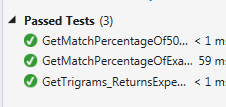
Sure enough, green across the board:

image


Analysis of Health Inspection Data using F#

As part of the TRINUG F#/Analytics SIG, I did a public records request from Wake County for all of the restaurant inspections in 2013.  If you are not familiar, the inspectors go out and then give a score to the restaurant.  The restaurant then has to display their score like this:

image

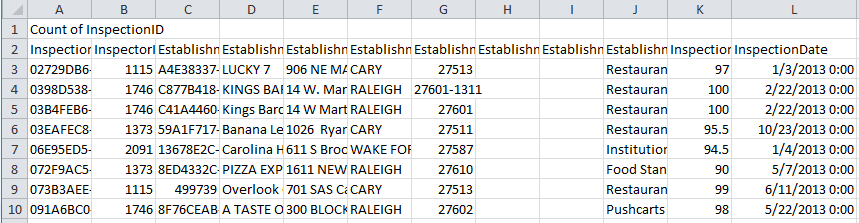
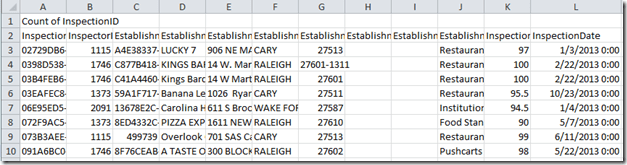
After some back and forth, I got the data as an Excel spreadsheet that looks like this
image

I then loaded the spreadsheet into a sql server and exposed it as some OData endpoints.

  1. // GET odata/Restaurant
  2. [Queryable]
  3. public IQueryable<Restaurant> GetRestaurant()
  4. {
  5.     return db.Restaurants;
  6. }
  7.  
  8. // GET odata/Restaurant(5)
  9. [Queryable]
  10. public SingleResult<Restaurant> GetRestaurant([FromODataUri] int key)
  11. {
  12.     return SingleResult.Create(db.Restaurants.Where(restaurant => restaurant.Id == key));
  13. }

I then dove into the data to see if there were any interesting conclusions to be found.  Following my pattern of doing analytics using F# and unit testing using C#, I created a project with the following code:

  1. namespace ChickenSoftware.RestraurantChicken.Analysis
  2.  
  3. open System.Linq
  4. open System.Configuration
  5. open Microsoft.FSharp.Linq
  6. open Microsoft.FSharp.Data.TypeProviders
  7.  
  8. type internal SqlConnection = SqlEntityConnection<ConnectionStringName="azureData">
  9.  
  10. type public RestaurantAnalysis () =
  11.     
  12.     let connectionString = ConfigurationManager.ConnectionStrings.["azureData"].ConnectionString;

Note that I am using the connection string in two places – the 1st for the type provider to do its magic at design time and the second for actually accessing the data at run time.  With that set up, the 1st question I had was “ is there seasonality in inspection scores like there are in traffic tickets?”  To that end, I created the following function:

  1. member public x.GetAverageScoreByMonth () =
  2.     SqlConnection.GetDataContext(connectionString).Restaurants
  3.         |> Seq.map(fun x -> x.InspectionDate.Value.Month, x.InspectionScore.Value)
  4.         |> Seq.groupBy(fun x -> fst x)
  5.         |> Seq.map(fun (x,y) -> (x,y |> Seq.averageBy snd))
  6.         |> Seq.map(fun (x,y) -> x, System.Math.Round(y,2))
  7.         |> Seq.toArray
  8.         |> Array.sort

This is pretty vanilla F# code, with the tricky part being the average by month (lines 4 and 5 here).  What the code is doing is grouping up the 4,000 or so tuples that were created on line 3 into another tuple – with the fst being the groupBy value (in this case month) and then the second tuple being a tuple with the month and score.  Then, by averaging up the score of the second tuple, we get an average for each month.  I create a unit (really integration) test like so:

  1. [TestMethod]
  2. public void GetAverageScoreByMonth_ReturnsTwelveItems()
  3. {
  4.     var analysis = new RestaurantAnalysis();
  5.     var scores = analysis.GetAverageScoreByMonth();
  6.     Int32 expected = 12;
  7.     Int32 actual = scores.Length;
  8.     Assert.AreEqual(expected, actual);
  9. }

And the result ran green. 

image

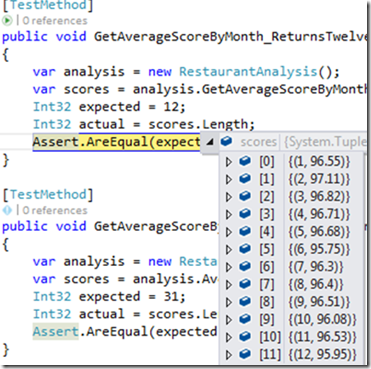
Putting a break on the Assert and a watch on scores, you can see the values:
image

A couple of things stand out

1) The overall average is around 96 and change

2) There does not seem to be any significant variance among months.

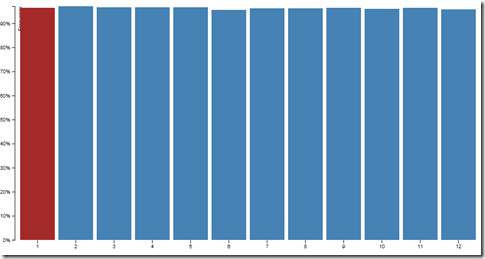
Since I am trying to also teach myself D3, I then added a MVC5 project to my solution and added an analysis controller that calls the function in the analysis module and serves the results as json:

  1. public JsonResult AverageScoreByMonth()
  2. {
  3.     var analysis = new RestaurantAnalysis();
  4.     var scores = analysis.GetAverageScoreByMonth();
  5.     return Json(scores,JsonRequestBehavior.AllowGet);
  6. }

I then made a page with a simple D3 chart that calls this controller

  1. @{
  2.     Layout = "~/Views/Shared/_Layout.cshtml";
  3. }
  4.  
  5. <svg class="chart"></svg>
  6.  
  7. <style>
  8.     .bar {
  9.         fill: steelblue;
  10.     }
  11.  
  12.         .bar:hover {
  13.             fill: brown;
  14.         }
  15.  
  16.     .axis {
  17.         font: 10px sans-serif;
  18.     }
  19.  
  20.         .axis path,
  21.         .axis line {
  22.             fill: none;
  23.             stroke: #000;
  24.             shape-rendering: crispEdges;
  25.         }
  26.  
  27.     .x.axis path {
  28.         display: none;
  29.     }
  30. </style>
  31.  
  32.  
  33.  
  34. <script>
  35.  
  36.     var margin = { top: 20, right: 20, bottom: 30, left: 40 },
  37.         width = 960 – margin.left – margin.right,
  38.         height = 500 – margin.top – margin.bottom;
  39.  
  40.     var x = d3.scale.ordinal()
  41.         .rangeRoundBands([0, width], .1);
  42.  
  43.     var y = d3.scale.linear()
  44.         .range([height, 0]);
  45.  
  46.     var xAxis = d3.svg.axis()
  47.         .scale(x)
  48.         .orient("bottom");
  49.  
  50.     var yAxis = d3.svg.axis()
  51.         .scale(y)
  52.         .orient("left")
  53.         .ticks(10, "%");
  54.  
  55.     var svg = d3.select("body").append("svg")
  56.         .attr("width", width + margin.left + margin.right)
  57.         .attr("height", height + margin.top + margin.bottom)
  58.       .append("g")
  59.         .attr("transform", "translate(" + margin.left + "," + margin.top + ")");
  60.  
  61.  
  62.  
  63.     $.ajax({
  64.         url: "http://localhost:3057/Analysis/AverageScoreByMonth/&quot;,
  65.         dataType: "json",
  66.         success: function (data) {
  67.             x.domain(data.map(function (d) { return d.Item1; }));
  68.             y.domain([0, d3.max(data, function (d) { return d.Item2; })]);
  69.  
  70.             svg.append("g")
  71.                 .attr("class", "x axis")
  72.                 .attr("transform", "translate(0," + height + ")")
  73.                 .call(xAxis);
  74.  
  75.             svg.append("g")
  76.                 .attr("class", "y axis")
  77.                 .call(yAxis)
  78.               .append("text")
  79.                 .attr("transform", "rotate(-90)")
  80.                 .attr("y", 6)
  81.                 .attr("dy", ".71em")
  82.                 .style("text-anchor", "end")
  83.                 .text("Frequency");
  84.  
  85.             svg.selectAll(".bar")
  86.                 .data(data)
  87.               .enter().append("rect")
  88.                 .attr("class", "bar")
  89.                 .attr("x", function (d) { return x(d.Item1); })
  90.                 .attr("width", x.rangeBand())
  91.                 .attr("y", function (d) { return y(d.Item2); })
  92.                 .attr("height", function (d) { return height – y(d.Item2); });
  93.  
  94.         },
  95.         error: function (e) {
  96.             alert("error");
  97.         }
  98.     });
  99.  
  100.     function type(d) {
  101.         d.Item2 = +d.Item2;
  102.         return d;
  103.     }
  104. </script>

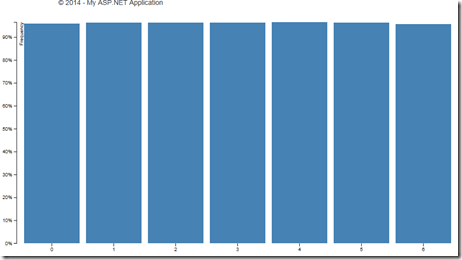
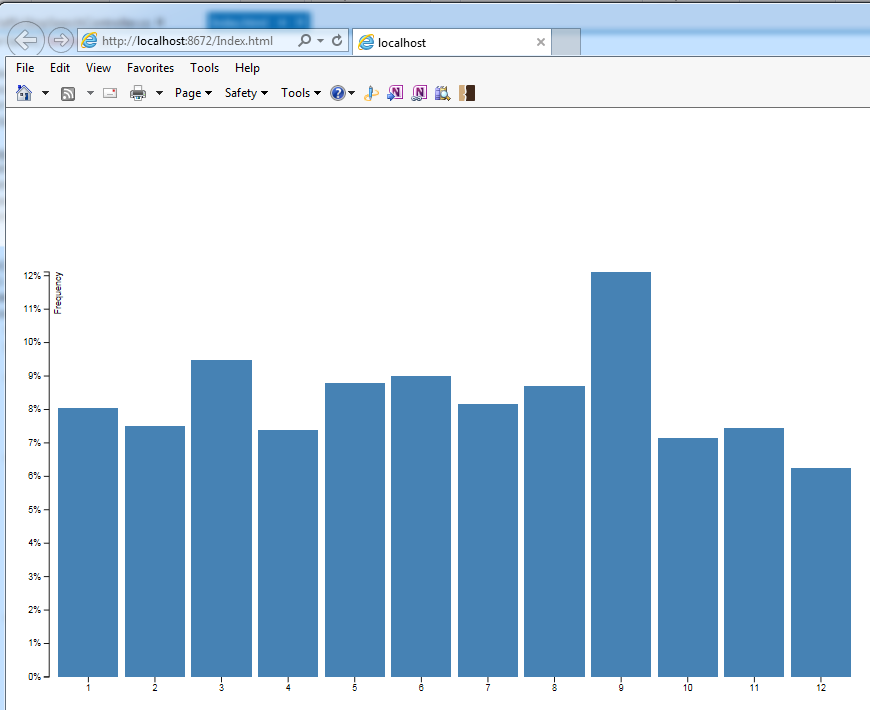
And when I run it, a run-of-the mill barchart (I did have to adjust the F# to shift the decimal to the left two positions so that I could match the scale of the chart’s template.  For me, it is easier to alter the F# than the javascript:
image

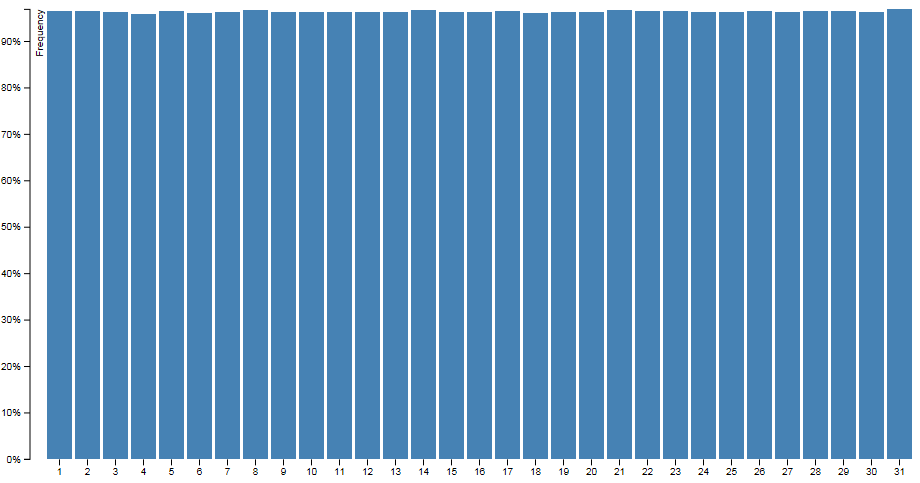
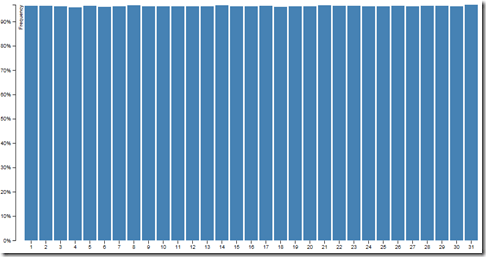
Following this pattern, I did some other season analysis like average by DayOfMonth
image

DayOf Week.

image

So there does not seem to be any seasonality in inspection scores.

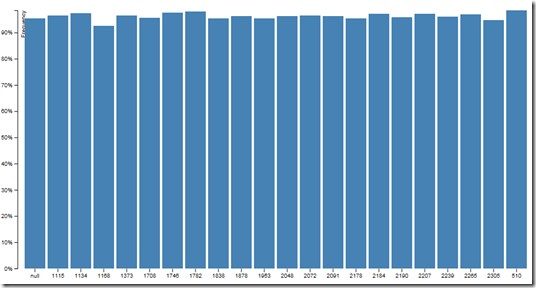
I then did an average of inspectors
image

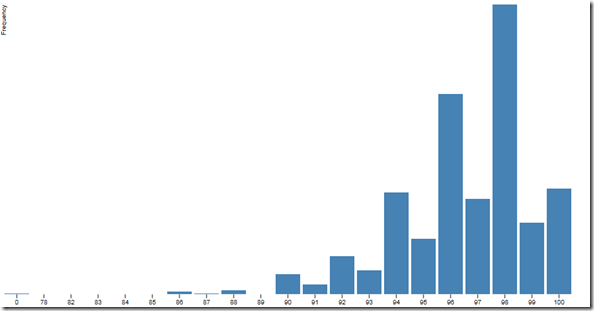
And there looks to be some variance, but it is getting lost of the scale of the map.  The problem is that the range of the scores is not 0 to 100

Here is a function that counts the number of scores (rounded to 0)

  1. member public x.CountOfRoundedScores () =
  2.     SqlConnection.GetDataContext(connectionString).Restaurants
  3.         |> Seq.map(fun x -> System.Math.Round(x.InspectionScore.Value,0), x.InspectionID)
  4.         |> Seq.groupBy(fun x -> fst x)
  5.         |> Seq.map(fun (x,y) -> (x,y |> Seq.countBy snd))
  6.         |> Seq.map(fun (x,y) -> (x,y |> Seq.sumBy snd))
  7.         |> Seq.toArray

That graphically looks like:
image

So back to inspectors, I needed to adjust the scale from 0 to 100 to 80 to 100.  I also needed to remove the null inspection Ids and the records that were for the ‘test facility’ and the 6 records that were below 80.

  1. member public x.AverageScoreByInspector () =
  2.     SqlConnection.GetDataContext(connectionString).Restaurants
  3.         |> Seq.filter(fun x -> x.EstablishmentName <> "Test Facility")
  4.         |> Seq.filter(fun x -> x.InspectionScore.Value > 80.)
  5.         |> Seq.filter(fun x -> x.InspectionID <> null)
  6.         |> Seq.map(fun x -> x.InspectorID, x.InspectionScore.Value)
  7.         |> Seq.groupBy(fun x -> fst x)
  8.         |> Seq.map(fun (x,y) -> (x,y |> Seq.averageBy snd))
  9.         |> Seq.map(fun (x,y) -> x, y/100.)
  10.         |> Seq.map(fun (x,y) -> x, System.Math.Round(y,4))
  11.         |> Seq.toArray
  12.         |> Array.sort

I then adjusted the scale of the inspector graph to have to domain from 80 to 100 (versus 0 to 100) and the scale of the y axis.  This was a good article explaining Scales and Domains in D3.

  1. var yAxis = d3.svg.axis()
  2.     .scale(y)
  3.     .orient("left")
  4.     .ticks(10);

  1. $.ajax({
  2.     url: "http://localhost:3057/Analysis/AverageScoreByInspector/&quot;,
  3.     dataType: "json",
  4.     success: function (data) {
  5.         x.domain(data.map(function (d) { return d.Item1; }));
  6.         y.domain([80, d3.max(data, function (d) { return d.Item2; })]);

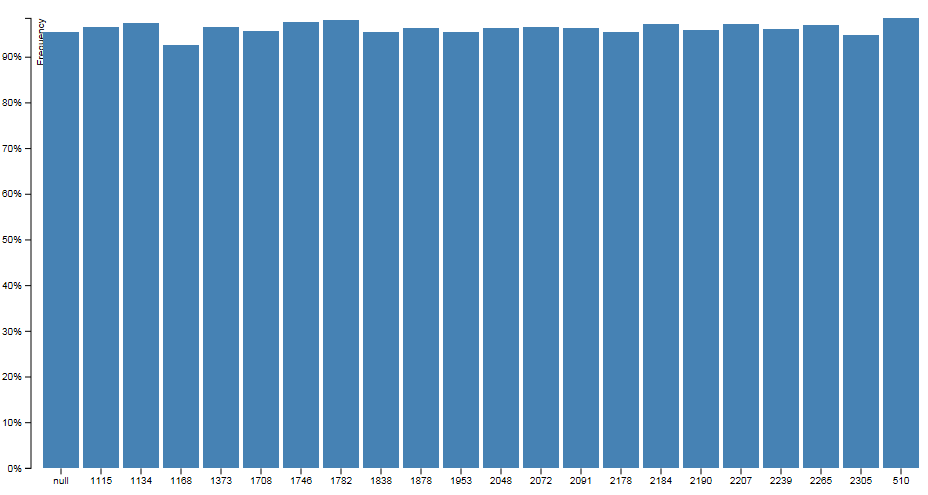
and now there is pretty good graph showing the variance among inspectors:

image

So the interesting this is that #1168 is 2 below the average – which of a domain of 10 is pretty significant.  Interestingly, 1168 is also the inspector who has all of the “Test facility” records – so they are probably the trainer and/or lead inspector.  With this analysis in the back pocket, ran a function that did the inspection score by establishment type:

image

This is kinda interesting (esp that pushcarts got the highest scores) but I wanted to see if there was any truth the the common perception that Chinese restaurants are less sanitary than other kinds of restaurants.  To that end, I created a rudimentary classifier that searched the name of the establishment to see if it had a name that is typically associated with fast-food Chinese:

  1. member public x.IsEstablishmentAChineseRestraurant (establishmentName:string) =
  2.     let upperCaseEstablishmentName = establishmentName.ToUpper()
  3.     let numberOfMatchedWords = upperCaseEstablishmentName.Split(' ')
  4.                                 |> Seq.map(fun x -> match x with
  5.                                                         | "ASIA" -> 1
  6.                                                         | "ASIAN" -> 1
  7.                                                         | "CHINA" -> 1
  8.                                                         | "CHINESE" -> 1
  9.                                                         | "PANDA" -> 1
  10.                                                         | "PEKING" -> 1
  11.                                                         | "WOK" -> 1
  12.                                                         | _ -> 0)
  13.                                 |> Seq.sum
  14.     match numberOfMatchedWords with
  15.         | 0 -> false
  16.         | _ -> true

I then created a function that returned the average and ran my unit tests.

  1. [TestMethod]
  2. public void IsEstablishmentAChineseRestraurantUsingWOK_ReturnsTrue()
  3. {
  4.     var analysis = new RestaurantAnalysis();
  5.     String establishmentName = "JAMIE'S WOK";
  6.  
  7.     var expected = true;
  8.     var actual = analysis.IsEstablishmentAChineseRestraurant(establishmentName);
  9.     Assert.AreEqual(expected, actual);
  10. }
  11.  
  12. [TestMethod]
  13. public void IsEstablishmentAChineseRestraurantUsingWok_ReturnsTrue()
  14. {
  15.     var analysis = new RestaurantAnalysis();
  16.     String establishmentName = "Jamie's Wok";
  17.  
  18.     var expected = true;
  19.     var actual = analysis.IsEstablishmentAChineseRestraurant(establishmentName);
  20.     Assert.AreEqual(expected, actual);
  21. }
  22.  
  23. [TestMethod]
  24. public void AverageScoreForChineseRestaurants_ReturnsExpected()
  25. {
  26.     var analysis = new RestaurantAnalysis();
  27.     var actual = analysis.AverageScoreForChineseRestaurants();
  28.     Assert.IsNotNull(actual);
  29. }

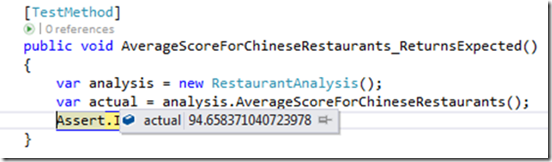
When a break was put on the value of the average, it was apparent that Chinese restaurants scored significantly lower than the average of 96
image

So then I applied 1 more segmentation: Chinese versus Non-Chinese scores by inspector:

  1. member public x.AverageScoresOfChineseAndNonChineseByInspector () =
  2.     let dataSet = SqlConnection.GetDataContext(connectionString).Restaurants
  3.                     |> Seq.map(fun x -> x.EstablishmentName, x.InspectorID,x.InspectionScore.Value)
  4.     let chineseRestraurants = dataSet
  5.                                 |> Seq.filter(fun (a,b,c) -> x.IsEstablishmentAChineseRestraurant(a))
  6.                                 |> Seq.map(fun (a,b,c) -> b,c)
  7.                                 |> Seq.groupBy(fun x -> fst x)
  8.                                 |> Seq.map(fun (x,y) -> (x,y |> Seq.averageBy snd))
  9.                                 |> Seq.map(fun (x,y) -> x, System.Math.Round(y,2))
  10.                                 |> Seq.toArray
  11.                                 |> Array.sort
  12.     let nonChineseRestraurants = dataSet
  13.                                 |> Seq.filter(fun (a,b,c) -> not(x.IsEstablishmentAChineseRestraurant(a)))
  14.                                 |> Seq.map(fun (a,b,c) -> b,c)
  15.                                 |> Seq.groupBy(fun x -> fst x)
  16.                                 |> Seq.map(fun (x,y) -> (x,y |> Seq.averageBy snd))
  17.                                 |> Seq.map(fun (x,y) -> x, System.Math.Round(y,2))
  18.                                 |> Seq.toArray
  19.                                 |> Array.sort
  20.     Seq.zip chineseRestraurants nonChineseRestraurants
  21.            |> Seq.map(fun ((a,b),(c,d)) -> a,b,d)
  22.            |> Seq.toList

And in graphics using a double-bar chart:

image

So this is kinda interesting.  The lead inspector (1168) who grades everyone lower actually gives Chinese restaurants higher marks.  Everyone else pretty much grades Chinese restaurants lower except for 1 inspector.  Also, 1708 must really not like Chinese restaurants – or their inspection list has a series of really bad Chinese restaurants.

Note that this may not be statistically significant (I didn’t control for sample size, etc..) – but further analysis might be warranted, no?  If you are interested, here is the endpoint: http://restaurantchicken.cloudapp.net/odata/Restaurant

Finally, when I presented this analysis to TRINUG last week, lots of people became interested in F# and analytics (ok, maybe 3).  You can see the comments here.  Also, I now have an appointment with the head of the health department department and the CIO of Wake County later this week – let’s see what they say…


Unit Testing F# Projects

I am a big believer of unit tests and as I write more and more code, I suffer what sociologists call “confirmation bias” whereby I keep finding more and more reasons to confirm that I am right.  But I am at the point where I don’t believe in developer documentation (sorry Sandcastle), reflector (sorry Redgate), code comments, or architectural diagrams.  I believe in the code, the whole code, and nothing but the code.  Or as Rasheed Wallace might say if he was a coder versus a professional basketball player: “Code Don’t Lie!”.

And the only code that tells you what a module is doing is the unit tests.  If you want to see how the module behaves, look at the green unit tests.  If you want to see how the module is supposed to behave but is not, look at the red unit tests.  If you want to see how the module might or might behave because the code is out of control, look for the non-existent unit tests.

So when I started writing code in F#, the unit tests went along for the ride.  F# folks will tell you to use the REPL to get your code working and/or use a unit test project in F#.  I don’t do either because:

1) The REPL is designed for quick prototyping, not for having a durable, cantonal example of module behavior. Having a full suite of unit tests gives you code coverage, tests at the build, and a fail-proof way of documenting the code’s behavior.

2) Most of the other developers I work with are CSharpers.  Having the unit tests in C# allows them to understand the behavior in a language in which they are familiar.  Since the tests need to communicate the working code’s intent, having that in a language they understand is critical.  They don’t have to understand F# to use a F# module.  Also, porting from C# in MSTest to NUnit in C# is a snap.

So when you add a C# Unit Test project to your solution that has a F# module you want to test, there are a couple of things you need to do.

1) Add a reference from the Unit Test Project to the F# Project (Right Click, Add Reference)

image

2) Add a reference to F#

image

3) If you are using type providers (and who doesn’t) and you have the connection string in the .config file of the working code project, add a .config file to the unit test project and copy over the connection string

image

Note that you code has to reflect that the connection string is being used in 2 different ways by the type provider, as explained in this post.  Your F# code needs to look like this:

  1. type internal SqlConnection = SqlEntityConnection<ConnectionStringName="azureData">
  2.  
  3.  
  4. type public RestaurantAnalysis () =
  5.     
  6.     let connectionString = ConfigurationManager.ConnectionStrings.["azureData"].ConnectionString;
  7.     member public x.GetScoresByMonth () =
  8.         SqlConnection.GetDataContext(connectionString).Restaurants
  9.             |> Seq.map(fun x -> x.InspectionDate.Value.Month, x.InspectionScore.Value)
  10.             |> Seq.groupBy(fun x -> fst x)
  11.             |> Seq.toList

4) Finally, you have to rebuild the F# project each time you want the unit tests to pick up changes.  That is different from a C# unit test project referencing a C# working code project.

Finally, not related to unit testing but too short for a blog post, if you are using the type providers (and who doesn’t) and you need to expose your classes publicly, you can’t use the SqlEntity provider – you need to use the SqlData provider.  The catch is that SqlData does not work with Azure Sql Storage as far as I can tell.  In my case, I used SqlEntity and exposed tuples and custom types publicly.  Not the best, but still better than using C# and Entity Framework…

Basic Insert Operation Using F#

So the more I use F#,  the more I come to understand the benefits and limitations of the language.  Since I spend a majority of my day job in C# and JavaScript, it is a natural comparison between these two languages and F#.  One of the tenants of F# is ‘less noise, more signal’.  After looking at some projects, I am coming to the conclusion that Entity Framework, LinqToSql, <Any other ORM> is just noise.  It is expensive noise at that – if you have worked on a production app using EF and you to do anything outside of the examples on MSDN, you know what I mean.

So can EF type providers replace the overhead, code bloat, and additional costs of Entity Framework?  I decided to do a small test to see.  I needed to load into SqlServer 27,481 records of crash data that I get from the North Carolina DOT.  The records came to me in an Excel Spreadsheet which I pumped into MSAccess.  Then, instead of using SQl Server SSIS/Bulk Data Load functions, I decided to create an app that pulls that data from the Access database and load it into the SqlServer database via a type provider.

My first step was to look for a MSAccess type provider.  No luck.  I then hit up Stack Overflow and found this and this article for working with Access.  I coded up a solution to get the data into a DataReader like so

  1. static member GetCrashData =
  2.     let connectionString = "Provider=Microsoft.ACE.OLEDB.12.0;Data Source=E:\Documents\Road Alert\WakeCountyCrashes.accdb; Persist Security Info=False;"
  3.     use connection = new OleDbConnection(connectionString)
  4.     let commandText = "Select * from Data"
  5.     use command = new OleDbCommand(commandText,connection)
  6.     connection.Open()
  7.     use reader = command.ExecuteReader()

My first attempt to get the data from the read was a tuple like so:

  1. [while reader.Read() do
  2.      yield reader.GetInt32(0),
  3.      reader.GetFieldValue(1).ToString(),
  4.      reader.GetFieldValue(2).ToString(),
  5.      reader.GetDouble(3),
  6.      reader.GetFieldValue(4).ToString(),
  7.      reader.GetFieldValue(5).ToString(),
  8.      reader.GetFieldValue(6).ToString(),
  9.      reader.GetDateTime(7),
  10.      reader.GetDateTime(8),
  11.      reader.GetFieldValue(9).ToString(),
  12.      reader.GetFieldValue(10).ToString()
  13.  ]

Sure enough, it works like a champ from my C# UI (once I ran AccessDatabaseEngine.exe on my machine – sigh)

  1. private static void GetCrashData()
  2. {
  3.     var results = CrashDataLoader.GetCrashData;
  4.     Console.WriteLine(results.Count().ToString());
  5. }

Gives

image

The next thing I did was to create a Type Provider

image

And then create the method to insert the data into the database:

  1. static member LoadCrashData  =
  2.     let targetDatabase = targetSchema.GetDataContext()
  3.     let rows = CrashDataLoader.GetCrashData
  4.     targetDatabase.TrafficCrashes.InsertAllOnSubmit(rows)
  5.     targetDatabase.DataContext.SubmitChanges()
  6.     true

The problem is that I ran into was that the GetCrashData was returning a Tuple and the LoadCrashData was expecting a Typed CrashData element.  I searched for a bit and then gave up trying to figure out how to map the two without explicitly assigning each field.  So then I did it the old fashion way like so:

  1. static member TrafficCrashFromReader(reader: OleDbDataReader) =
  2.     let trafficCrash = new targetSchema.ServiceTypes.TrafficCrashes()
  3.     trafficCrash.NCDmvCrashId <- System.Nullable<float> (float (reader.GetFieldValue(0).ToString()))
  4.     trafficCrash.Municipality <- reader.GetFieldValue(1).ToString()  
  5.     trafficCrash.OnRoad <- reader.GetFieldValue(2).ToString()  
  6.     trafficCrash.Miles <- System.Nullable<double> (double (reader.GetFieldValue(3).ToString()))
  7.     trafficCrash.Direction <- reader.GetFieldValue(4).ToString()
  8.     trafficCrash.FromRoad <- reader.GetFieldValue(5).ToString()
  9.     trafficCrash.TowardRoad <- reader.GetFieldValue(6).ToString()
  10.     trafficCrash.DateOfCrash <- System.Nullable<DateTime> (reader.GetDateTime(7))
  11.     trafficCrash.TimeOfCrash <- System.Nullable<DateTime> (reader.GetDateTime(8))
  12.     trafficCrash.CrashType <- reader.GetFieldValue(9).ToString()
  13.     trafficCrash.CrashSeverity <- reader.GetFieldValue(10).ToString()
  14.     trafficCrash

The fact that I am using the <- symbol is a code smell, but I am not sure how to get around it.

In any event, once I ran it in my Console app:

  1. private static void LoadCrashData()
  2. {
  3.     Stopwatch stopWatch = new Stopwatch();
  4.     stopWatch.Start();
  5.     CrashDataLoader.LoadCrashData();
  6.     stopWatch.Stop();
  7.     Console.WriteLine("The load took " + stopWatch.Elapsed.TotalSeconds + " seconds.");
  8. }

I got nothing after 30m minutes!  Yikes.

I then went back and wrote a function to insert 1 row at a time:

  1. static member LoadCrashDataRow dataRow =
  2.     let targetDatabase = targetSchema.GetDataContext()
  3.     targetDatabase.TrafficCrashes.InsertOnSubmit(dataRow)
  4.     targetDatabase.DataContext.SubmitChanges()
  5.     true

And the consuming app:

  1. private static void LoadCrashData()
  2. {
  3.  
  4.     var crashRows = CrashDataLoader.GetCrashData;
  5.     Stopwatch stopWatch = new Stopwatch();
  6.     stopWatch.Start();
  7.     foreach (var crashRow in crashRows)
  8.     {
  9.         CrashDataLoader.LoadCrashDataRow(crashRow);
  10.         Console.WriteLine(crashRow.NCDmvCrashId + " loaded.");
  11.     }
  12.     stopWatch.Stop();
  13.     Console.WriteLine("The load took " + stopWatch.Elapsed.TotalSeconds + " seconds.");
  14. }

Sure enough, it works like a champ.

image

So it is slow – though I am not sure EF is any faster.  But not having to deal with that .edmx files, the .tt files, the whatever-else-we-throw-in files, I think further research is definitely warranted.  Also, there are some other things I think F# Type Providers need to have:

1) Ability to handle proxies

2) Making Plural tables singular (The table name is Crashes, the type should be Crash)

3) An MS Access TP would be great

4) An Azure Sql Database TP would be doubly great 

Traffic Stop Visualization Using D3

One of the comments I got from the TRINUG Data SIG was that the data and analysis were exciting but the results were, well, boring.  So I went back to the traffic stop data and thought about how I could sexy it up.  Since lots of people have been using D3 to present the data. I thought it would be a good place to start.

My 1st step was to look at their samples page and they have a simple bar chart that seems like a good introduction to the library.  I created an endpoint on my webapi for the summary data like so:

  1. [HttpGet]
  2. [Route("api/TrafficStopSearch/StopsByMonth/")]
  3. public dynamic StopsByMonth()
  4. {
  5.     return ChickenSoftware.RoadAlert.Analysis.AnalysisEngine.TrafficStopsByMonth;
  6.  
  7. }

I then spun up an empty asp.net website and created an index page based on their sample.  I then added an ajax call to the controller and replaced the reference to the data.tsv file:

  1. $.ajax({
  2.    url: "http://localhost:17680/api/TrafficStopSearch/StopsByMonth/&quot;,
  3.    dataType: "json",
  4.    success: function (data) {
  5.        x.domain(data.map(function (d) { return d.m_Item1; }));
  6.        y.domain([0, d3.max(data, function (d) { return d.m_Item6; })]);
  7.  
  8.        svg.append("g")
  9.            .attr("class", "x axis")
  10.            .attr("transform", "translate(0," + height + ")")
  11.            .call(xAxis);
  12.  
  13.        svg.append("g")
  14.            .attr("class", "y axis")
  15.            .call(yAxis)
  16.          .append("text")
  17.            .attr("transform", "rotate(-90)")
  18.            .attr("y", 6)
  19.            .attr("dy", ".71em")
  20.            .style("text-anchor", "end")
  21.            .text("Frequency");
  22.  
  23.        svg.selectAll(".bar")
  24.            .data(data)
  25.          .enter().append("rect")
  26.            .attr("class", "bar")
  27.            .attr("x", function (d) { return x(d.m_Item1); })
  28.            .attr("width", x.rangeBand())
  29.            .attr("y", function (d) { return y(d.m_Item6); })
  30.            .attr("height", function (d) { return height – y(d.m_Item6); });
  31.        
  32.    },
  33.    error: function(e){
  34.        alert("error");
  35.    }
  36. });

On thing to note is that the tuple that was created in F# and then passed though via the C# controller had its name changed.  Specially, Tuple.Item1 became Tuple.m_Item1.  I think that passing out tuple.anything is a horrible idea, so I created a POCO that actually lets the consumer know what each field means:

  1. public class OutputValue
  2. {
  3.     public Int32 Month { get; set; }
  4.     public Int32 ExpectedStops { get; set; }
  5.     public Int32 ActualStops { get; set; }
  6.     public Double DifferenceBetweenExpectedAndActual { get; set; }
  7.     public Double PercentDifferenceBetweenExpectedAndActual { get; set; }
  8.     public Double Frequency { get; set; }
  9. }

and then I adjusted the controller like so:

  1.  
  2. [HttpGet]
  3. [Route("api/TrafficStopSearch/StopsByMonth/")]
  4. public dynamic StopsByMonth()
  5. {
  6.     var outputs = new List<OutputValue>();
  7.     var resultSet= ChickenSoftware.RoadAlert.Analysis.AnalysisEngine.TrafficStopsByMonth;
  8.     foreach (var tuple in resultSet)
  9.     {
  10.         var outputValue = new OutputValue()
  11.         {
  12.             Month = tuple.Item1,
  13.             ExpectedStops = tuple.Item2,
  14.             ActualStops = tuple.Item3,
  15.             DifferenceBetweenExpectedAndActual = tuple.Item4,
  16.             PercentDifferenceBetweenExpectedAndActual = tuple.Item5,
  17.             Frequency = tuple.Item6
  18.         };
  19.         outputs.Add(outputValue);
  20.     }
  21.  
  22.     return outputs;
  23. }

So I adjusted the javascript and voila: a bar chart:

image

Up next – some real charts…


Screen Scraping The Department Of Health

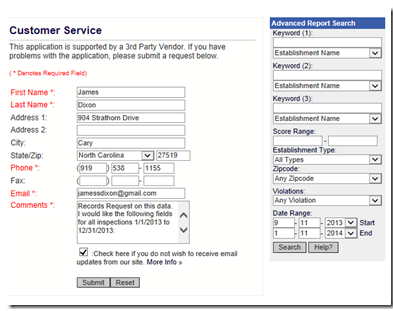
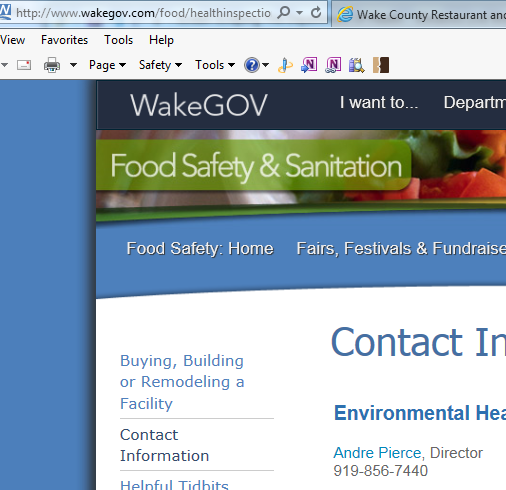
As part of TRINUG’s Analytics SIG, some of the people were interested in health inspections found here.  I created a Public Records Request (PRR) on their website’s intact form:

image

And in the comments, I said this:

I would like to make a Public Records Request on this data.  I would like the following fields for all inspections 1/1/2013 to 12/31/2013: 

InspectionId
InspectorId
EstablishmentId
EstablishmenName
EstablishmentAddress
EstablishmentCity
EstablishmentZip
EstablishmentLat
EstablishmentLong
EstablishmentTypeId
EstablishmentTypeDesc
InspectionScore
NumberOfNonCriticalViolations
NumberOfCriticalViolations
InspectionDate


After a week, I did not hear back (their response is supposed to be 48 hours) so I emailed the director:

image

Not wanting to wait any longer for the data, I decided to do some screen scraping.  To that end, I did an on-line report and go something like this:

image

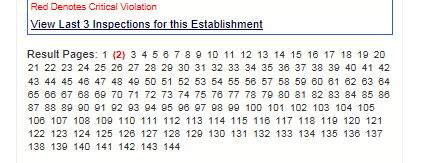
with the pages of the report down here:

image

I then went into source and checked out the pagination.  Fortunately, it was uri-based so there are 144 different uris like this one:

image

I pulled down all of the uris and put them into Excel.  I then trimmed off the <a and the text after the word “class”:

image

Fortunately, there was no restaurant with the word “class” in its name.  I know have 144 uris ready to go.  I then saved the uris into a .csv.

My next step is to suck these uris into a a database.  I have learned the hard way that screen scraping is fraught with mal-formed data and unstable connections.  Therefore, I will make a request and pull down a page and store it when the getting is good.  I will then parse that page separately.  Since the data appears in the past, I am less concerned about the data changing after I pull it local.

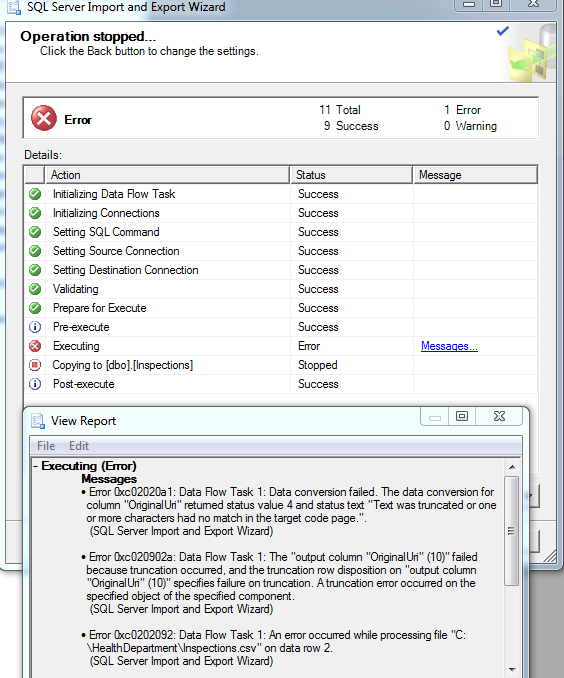
When I spun up an instance of Sql Server and tried to import the data, I kept getting things like this. 

image


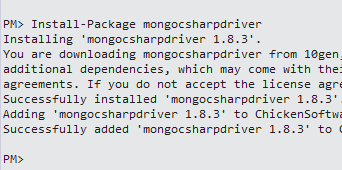
So it is pretty obvious that Sql Server doesn’t make it easy to import text like uris (and I can image HTML).  I decided to spin up an instance of MongoDb.  Also, because the F# MongoDb driver is not in NuGet, I decided to go with C#. 

image

I then fired up a C# and read all of the uris into a List

  1. static List<String> GetUrisFromFileSystem()
  2. {
  3.     var path = @"C:\HealthDepartment\Inspections.csv";
  4.     var contents = File.ReadAllText(path);
  5.     var splitContents = contents.Split('\n');
  6.     var contentList = splitContents.ToList<String>();
  7.     contentList.RemoveAt(0);
  8.     return contentList;
  9. }

I then wrote the list into MongoDb.

  1. static void LoadDataIntoMongo(List<String> uris)
  2. {
  3.     var connectionString = "mongodb://localhost";
  4.     var client = new MongoClient(connectionString);
  5.     var server = client.GetServer();
  6.     var database = server.GetDatabase("HealthDepartment");
  7.     var collection = database.GetCollection<String>("UriEntities");
  8.     foreach (String uri in uris)
  9.     {
  10.         var entity = new UriEntity { Uri = uri };
  11.         collection.Insert(entity);
  12.         var id = entity.Id;
  13.         Console.WriteLine(id);
  14.     }
  15.  
  16.     
  17. }


The 1 gotcha is that I made my UriEntity class have a string as the Id.  This is not idomatic to Mongo and I got this:

image

It needs to be a a type of ObjectId.  Once I made that switch, I got this:

image

The fact that MongoDb makes things so much easier than SqlServer is really impressive.

With the Uris in Mongo, I then wanted to make a request to the individual pages.  I created a method that got to the contents of the page:

  1. static String GetHtmlForAUri(String uri)
  2. {
  3.     var fullyQualifiedUri = "http://wake.digitalhealthdepartment.com/&quot; + uri;
  4.     var request = WebRequest.Create(fullyQualifiedUri);
  5.     var response = request.GetResponse();
  6.     using(var stream = response.GetResponseStream())
  7.     {
  8.         using(var reader = new StreamReader(stream))
  9.         {
  10.             return reader.ReadToEnd();
  11.         }
  12.     }
  13.  
  14. }

I then fired up class to take the contents that are associated with the Uri:

  1. public class PageContentEntity
  2. {
  3.     public ObjectId Id { get; set; }
  4.     public ObjectId UriId { get; set; }
  5.     public String PageContent { get; set; }
  6. }

And created a method to persist the contents:

  1. static void LoadPageContentIntoMongo(PageContentEntity entity)
  2. {
  3.     var connectionString = "mongodb://localhost";
  4.     var client = new MongoClient(connectionString);
  5.     var server = client.GetServer();
  6.     var database = server.GetDatabase("HealthDepartment");
  7.     var collection = database.GetCollection<PageContentEntity>("PageContentEntities");
  8.     collection.Insert(entity);
  9.     Console.WriteLine(entity.Id);
  10. }

And then a method to put everything together

  1. static void LoadAllPageContentIntoMongo()
  2. {
  3.     var connectionString = "mongodb://localhost";
  4.     var client = new MongoClient(connectionString);
  5.     var server = client.GetServer();
  6.     var database = server.GetDatabase("HealthDepartment");
  7.     var collection = database.GetCollection<UriEntity>("UriEntities");
  8.     foreach(var uriEntity in collection.FindAllAs<UriEntity>())
  9.     {
  10.         String pageContent =  GetHtmlForAUri(uriEntity.TargetUri);
  11.         var pageEntity = new PageContentEntity()
  12.         {
  13.             UriId = uriEntity.Id,
  14.             PageContent =pageContent
  15.         };
  16.         LoadPageContentIntoMongo(pageEntity);
  17.     }
  18. }

So sure enough, I know have all of the pages local.  Doing something with it – that is the next trick…

Note that as soon as I finished up this piece, I got a note from the director of the department saying that they are looking at my request and will get back to me soon.

Traffic Stop Disposition: Classification Using F# and KNN

I have already looked at the summary statistics of the traffic stop data I received from the town here.  My next stop was to try and do a machine learning exercise with the data.  One of the more interesting questions I want to answer is what factors into weather a person gets a warning or a ticket (called disposition)?  Of all of the factors that may be involved, the dataset that I have is fairly limited:

image_thumb1

Using dispositionId as the result variable, there is StopDateTime and Location (Latitude/Longitude).  Fortunately, DateTime can be decomposed into several input variables.  For this exercise, I wanted to use the following:

  • TimeOfDay
  • DayOfWeek
  • DayOfMonth
  • MonthOfYear
  • Location (Latitude:Longitude)

And the resulting variable being disposition.  To make it easier for analysis, I limited the analysis set to finalDisposition as either “verbal warning” or “citation”  I decided to do a K-Nearest Neighbor because it is regarded as an easy machine learning algorithm to learn and the question does seem to be a classification problem.

My first step was to decide weather to write or borrow the KNN algorithm.  After looking at what kind of code would be needed to write my own and then looking at some other libraries, I decided to use Accord.Net.

My next first step was to get the data via the web service I spun up here.

  1. namespace ChickenSoftware.RoadAlert.Analysis
  2.  
  3. open FSharp.Data
  4. open Microsoft.FSharp.Data.TypeProviders
  5. open Accord.MachineLearning
  6.  
  7. type roadAlert2 = JsonProvider<"http://chickensoftware.com/roadalert/api/trafficstopsearch/Sample&quot;>
  8. type MachineLearningEngine =
  9.     static member RoadAlertDoc = roadAlert2.Load("http://chickensoftware.com/roadalert/api/trafficstopsearch&quot;)

My next first step was to filter the data to only verbal warnings (7) or citations (15). 

  1.   static member BaseDataSet =
  2.       MachineLearningEngine.RoadAlertDoc
  3.             |> Seq.filter(funx -> x.DispositionId = 7 || x.DispositionId = 15)
  4.           |> Seq.map(fun x -> x.Id, x.StopDateTime, x.Latitude, x.Longitude, x.DispositionId)
  5.           |> Seq.map(fun (a,b,c,d,e) -> a, b, System.Math.Round(c,3), System.Math.Round(d,3), e)
  6.           |> Seq.map(fun (a,b,c,d,e) -> a, b, c.ToString() + ":" + d.ToString(), e)
  7.           |> Seq.map(fun (a,b,c,d) -> a,b,c, match d with
  8.                                               |7 -> 0
  9.                                               |15 -> 1
  10.                                               |_ -> 1)
  11.           |> Seq.map(fun (a,b,c,d) -> a, b.Hour, b.DayOfWeek.GetHashCode(), b.Day, b.Month, c, d)
  12.           |> Seq.toList

You will notice that I had to transform the dispositionIds from 7 and 15 to 1 and 0.  The reason why is that the KNN method in Accord.Net assumes that the values match the index position in the array.  I had to dig into the source code of Accord.Net to figure that one out.

My next step was to divide the dataset in half: one half being the training sample and the other the validation sample:

  1. static member TrainingSample =
  2.     let midNumber = MachineLearningEngine.NumberOfRecords/ 2
  3.     MachineLearningEngine.BaseDataSet
  4.         |> Seq.filter(fun (a,b,c,d,e,f,g) -> a < midNumber)
  5.         |> Seq.toList
  6.  
  7. static member ValidationSample =
  8.     let midNumber = MachineLearningEngine.NumberOfRecords/ 2
  9.     MachineLearningEngine.BaseDataSet
  10.         |> Seq.filter(fun (a,b,c,d,e,f,g) -> a > midNumber)
  11.         |> Seq.toList

The next step was to actually run the KKN.  Before I could do that though, I had to create the distance function.  Since this was my 1st time, I dropped the geocoordinates and focused only on the time of day derivatives.

  1. static member RunKNN inputs outputs input =
  2.     let distanceFunction (a:int,b:int,c:int,d:int) (e:int,f:int,g:int,h:int) =  
  3.       let b1 = b * 4
  4.       let f1 = f * 4
  5.       let d1 = d * 2
  6.       let h1 = h * 2
  7.       float((pown(a-e) 2) + (pown(b1-f1) 2) + (pown(c-g) 2) + (pown(d1-h1) 2))
  8.  
  9.     let distanceDelegate =
  10.           System.Func<(int * int * int * int),(int * int * int * int),float>(distanceFunction)
  11.     
  12.     let knn = new KNearestNeighbors<int*int*int*int>(10,2,inputs,outputs,distanceDelegate)
  13.     knn.Compute(input)

You will notice I  tried to normalize the values so that they all had the same basis.  They are not exact, but they are close.  You will also notice that I had to create a delegate from for the distanceFunction (thanks to Mimo on SO).  This is because Accord.NET was written in C# with C# consumers in mind and F# has a couple of places where the interfaces are not as seemless as one would hope.

In any event, once the KKN function was written, I wrote a function that to the validation sample, made a guess via KKN, and then reported the result:

  1. static member GetValidationsViaKKN  =
  2.     let inputs = MachineLearningEngine.TrainingInputClass
  3.     let outputs = MachineLearningEngine.TrainingOutputClass
  4.     let validations = MachineLearningEngine.ValidationClass
  5.  
  6.     validations
  7.         |> Seq.map(fun (a,b,c,d,e) -> e, MachineLearningEngine.RunKNN inputs outputs (a,b,c,d))
  8.         |> Seq.toList
  9.  
  10. static member GetSuccessPercentageOfValidations =
  11.     let validations = MachineLearningEngine.GetValidationsViaKKN
  12.     let matches = validations
  13.                     |> Seq.map(fun (a,b) -> match (a=b) with
  14.                                                 | true -> 1
  15.                                                 | false -> 0)
  16.  
  17.     let recordCount =  validations |> Seq.length
  18.     let numberCorrect = matches |> Seq.sum
  19.     let successPercentage = double(numberCorrect) / double(recordCount)
  20.     recordCount, numberCorrect, successPercentage

I then hopped over to my UI console app and looked that the success percentage.


  1. private static void GetSuccessPercentageOfValidations()
  2. {
  3.     var output = MachineLearningEngine.GetSuccessPercentageOfValidations;
  4.     Console.WriteLine(output.Item1.ToString() + ":" + output.Item2.ToString() + ":" + output.Item3.ToString());
  5. }

image

So there are 12,837 records in the validation sample and the classifier guessed the correct disposition 9,001 times – a success percentage of 70%

So it looks like there is something there.  However, it is not clear that this is a good classifier without further tests – specifically seeing if the how to most common case results when pushing though the classifier.  Also, I would assume to make this a true ‘machine learning’ algorithm I would have to feed the results back to the distance function to see if I can alter it to get the success percentage higher.

One quick note about methodology – I used unit tests pretty extensively to understand how the KKN works.  I created a series of tests with some sample data to see who the function reacted. 

  1. [TestMethod]
  2. public void TestKKN_ReturnsExpected()
  3. {
  4.  
  5.     Tuple<int, int, int, int>[] inputs = {
  6.         new Tuple<int, int, int, int>(1, 0, 15, 1),
  7.         new Tuple<int,int,int,int>(1,0,11,1)};
  8.     int[] outputs = { 1, 1 };
  9.  
  10.     var input = new Tuple<int, int, int, int>(1, 1, 1, 1);
  11.  
  12.     var output = MachineLearningEngine.RunKNN(inputs, outputs, input);
  13.  
  14. }

This was a big help to get me up and running (walking, really..)…