WPF and Images In Subdirectories

Dear Jamie of the future:

When you have a WPF project and you want to add images in a subfolder to a page, you need to do this:

  1. Image x:Name="TestImage" Source="/Images/TestImage.png">

Note the forward slashes.

Also, if you have two images and you change the location on both, you will get the blue squiggly line of approbation like this:

image

If you fix the first one, BOTH will still have the BSLA:

image

So it looks to be all or none – perhaps b/c the IDE can’t parse anything so it leaves the last BSLA in place?  In any event, fix all of them and the BSLA goes away.

Sincerely,

Jamie of the past

PS: you really should exercise more….

MVVM on a Windows Store App

I blog for a couple of reasons:

  1. Professionalism – to think and write about a topic at least once a week
  2. Marketability – when I talk to people about jobs, I can point them to my blog to see how I code (and think about coding).  To me, it is much more effective and insightful than a exam or esoteric interview questions
  3. To keep track of stuff for me -  I write stuff down so I don’t have to remember something.

That last point came back to me today.  I wanted to take a break from F# so I looked at MVVM in a Windows RT application.  I went to refresh my brain on MVVM so I hit up Bing and Google.  All of the recent articles that I ran across talked about MVVM –as an after thought.  They were all pimping MVVM helpers like relay command, frameworks like MVVMLight, and other non-core MVVM concepts.  All important to be sure, but non related to MVVM.

I then hit up my own blog and sure enough – I blogged about MVVM 2 years ago when I did a Windows Phone 7 app and I could see just the MVVM in action.  So then I fired up a basic Windows RT application and added 3 folders to it: Models, Views, and ViewModels.

I then added a Model like so:

  1. public class Person
  2. {
  3.     public Int32 Id { get; set; }
  4.     public String FirstName { get; set; }
  5.     public String LastName { get; set; }
  6. }


I then added a View Model

  1. public class PersonViewModel: INotifyPropertyChanged
  2. {
  3.     private Person _person = null;
  4.     public event PropertyChangedEventHandler PropertyChanged;
  5.  
  6.     public PersonViewModel(Person person)
  7.     {
  8.         _person = person;
  9.     }
  10.  
  11.     public Int32 Id
  12.     {
  13.         get { return _person.Id; }
  14.         set
  15.         {
  16.             PropertyChanged(this, new PropertyChangedEventArgs("Id"));
  17.             _person.Id = value;
  18.         }
  19.     }
  20.     public String FirstName
  21.     {
  22.         get { return _person.FirstName; }
  23.         set
  24.         {
  25.             PropertyChanged(this, new PropertyChangedEventArgs("FirstName"));
  26.             _person.FirstName = value;
  27.         }
  28.     }
  29.     public String LastName
  30.     {
  31.         get { return _person.LastName; }
  32.         set
  33.         {
  34.             PropertyChanged(this, new PropertyChangedEventArgs("LastName"));
  35.             _person.LastName = value;
  36.         }
  37.     }
  38.  
  39. }

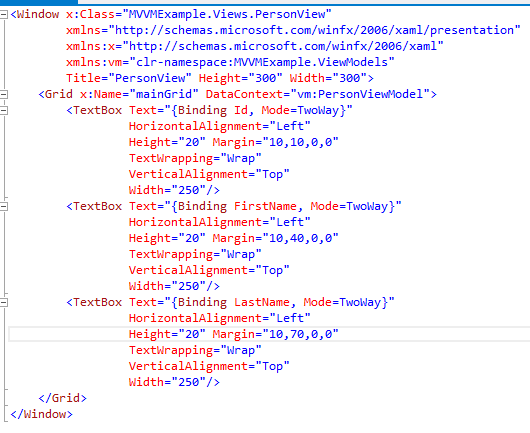
I then added a View like so:

image

and then in the code behind of the View:

  1. public PersonView(PersonViewModel viewModel)
  2. {
  3.     InitializeComponent();
  4.     this.mainGrid.DataContext = viewModel;
  5. }


Then in the main page, the ViewModel is injected into the View:

  1. public partial class MainWindow : Window
  2. {
  3.     public MainWindow()
  4.     {
  5.         InitializeComponent();
  6.         Person person = new Person(){Id=0,FirstName="Test",LastName="Person"};
  7.         PersonViewModel viewModel = new PersonViewModel(person);
  8.         PersonView view = new PersonView(viewModel);
  9.         view.Show();
  10.     }
  11. }


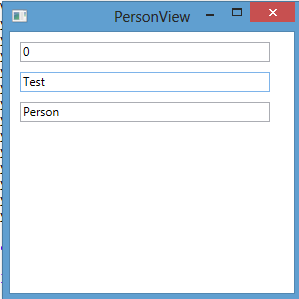
And we have data binding:

image


Now I know this is not a complete project and that many patterns are helpful (esp. the relay command one), but this is the core of making MVVM work the MSFT way: data binding and IPropertyNotifyChanged.

Multiple Linear Regression Using R and F#

Following up on my previous post, I decided to test calling R from F# for a multiple linear regression.  I decided to use the dataset from chapter 1 of Machine Learning For Hackers (ufo sightings).

Step #1 was to open R from F#

  1. #r @"C:\TFS\Tff.RDotNetExample_Solution\packages\R.NET.1.5.3\lib\net40\RDotNet.dll"
  2. #r @"C:\TFS\Tff.RDotNetExample_Solution\packages\R.NET.1.5.3\lib\net40\RDotNet.NativeLibrary.dll"
  3.  
  4. open System.IO
  5. open RDotNet
  6.  
  7.  
  8. //open R
  9. let environmentPath = System.Environment.GetEnvironmentVariable("PATH")
  10. let binaryPath = @"C:\Program Files\R\R-3.0.1\bin\x64"
  11. System.Environment.SetEnvironmentVariable("PATH",environmentPath+System.IO.Path.PathSeparator.ToString()+binaryPath)
  12.  
  13. let engine = RDotNet.REngine.CreateInstance("RDotNet")
  14. engine.Initialize()


Step #2 was to import the ufo dataset and clean it:

  1. //open dataset
  2. let path = @"C:\TFS\Tff.RDotNetExample_Solution\Tff.RDotNetExample\ufo_awesome.txt"
  3. let fileStream = new FileStream(path,FileMode.Open,FileAccess.Read)
  4. let streamReader = new StreamReader(fileStream)
  5. let contents = streamReader.ReadToEnd()
  6. let usStates = [|"AL";"AK";"AZ";"AR";"CA";"CO";"CT";"DE";"DC";"FL";"GA";"HI";"ID";"IL";"IN";"IA";
  7.                     "KS";"KY";"LA";"ME";"MD";"MA";"MI";"MN";"MS";"MO";"MT";"NE";"NV";"NH";"NJ";"NM";
  8.                     "NY";"NC";"ND";"OH";"OK";"OR";"PA";"RI";"SC";"SD";"TN";"TX";"UT";"VT";"VA";"WA";
  9.                     "WV";"WI";"WY"|]
  10. let cleanContents =
  11.     contents.Split([|'\n'|])
  12.     |> Seq.map(fun line -> line.Split([|'\t'|]))
  13.     |> Seq.filter(fun values -> values |> Seq.length = 6)
  14.     |> Seq.filter(fun values -> values.[0].Length = 8)
  15.     |> Seq.filter(fun values -> values.[1].Length = 8)
  16.     |> Seq.filter(fun values -> System.Int32.Parse(values.[0].Substring(0,4)) > 1900)
  17.     |> Seq.filter(fun values -> System.Int32.Parse(values.[1].Substring(0,4)) > 1900)
  18.     |> Seq.filter(fun values -> System.Int32.Parse(values.[0].Substring(0,4)) < 2100)
  19.     |> Seq.filter(fun values -> System.Int32.Parse(values.[1].Substring(0,4)) < 2100)
  20.     |> Seq.filter(fun values -> System.Int32.Parse(values.[0].Substring(4,2)) > 0)
  21.     |> Seq.filter(fun values -> System.Int32.Parse(values.[1].Substring(4,2)) > 0)
  22.     |> Seq.filter(fun values -> System.Int32.Parse(values.[0].Substring(4,2)) <= 12)
  23.     |> Seq.filter(fun values -> System.Int32.Parse(values.[1].Substring(4,2)) <= 12)      
  24.     |> Seq.filter(fun values -> System.Int32.Parse(values.[0].Substring(6,2)) > 0)
  25.     |> Seq.filter(fun values -> System.Int32.Parse(values.[1].Substring(6,2)) > 0)
  26.     |> Seq.filter(fun values -> System.Int32.Parse(values.[0].Substring(6,2)) <= 31)
  27.     |> Seq.filter(fun values -> System.Int32.Parse(values.[1].Substring(6,2)) <= 31)
  28.     |> Seq.filter(fun values -> values.[2].Split(',').[1].Trim().Length = 2)
  29.     |> Seq.filter(fun values -> Seq.exists(fun elem -> elem = values.[2].Split(',').[1].Trim().ToUpperInvariant()) usStates)
  30.     |> Seq.map(fun values ->
  31.         System.DateTime.ParseExact(values.[0],"yyyymmdd",System.Globalization.CultureInfo.InvariantCulture),
  32.         System.DateTime.ParseExact(values.[1],"yyyymmdd",System.Globalization.CultureInfo.InvariantCulture),
  33.         values.[2].Split(',').[0].Trim(),
  34.         values.[2].Split(',').[1].Trim().ToUpperInvariant(),
  35.         values.[3],
  36.         values.[4],
  37.         values.[5])
  38. cleanContents
  39.  
  40. let relevantContents =
  41.     cleanContents
  42.     |> Seq.map(fun (a,b,c,d,e,f,g) -> a.Year,d,g.Length)


Step #3 was to run the regression using the dataset.  You will notice that I made the length of the report the Y (dependent) variable – not that I think I will find any causality but it was a good enough to use).  Also, notice the Seq.Map of each column in the larger Seq(Int*String*Int) into the Vector.

  1. let reportLength = engine.CreateIntegerVector(relevantContents |> Seq.map (fun (a,b,c) -> c))
  2. engine.SetSymbol("reportLength", reportLength)
  3. let year = engine.CreateIntegerVector(relevantContents |> Seq.map (fun (a,b,c) -> a))
  4. engine.SetSymbol("year", year)
  5. let state = engine.CreateCharacterVector(relevantContents |> Seq.map (fun (a,b,c) -> b))
  6. engine.SetSymbol("state", state)
  7.  
  8. let calcExpression = "lm(formula = reportLength ~ year + state)"
  9. let testResult = engine.Evaluate(calcExpression).AsList()


Sure enough, you can get the results of the regression.  The challenge is teasing out the values that are interesting from the real data structure that is returned (testResult in this example)

> testResult.Item(0).AsCharacter();;
val it : CharacterVector =
  seq
    ["31775.5599180962"; "-15.2760355122386"; "37.8028841898059";
     "-91.2309146099364"; …]

Intercepts, I think, are Item(0).

RDotNet and F#: Example from the Code Project

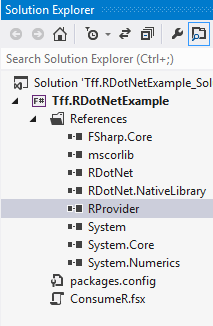
I added the R type provider via NuGet and it showed up in my references tab:

image

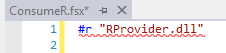
When I go to reference the library in code:

image

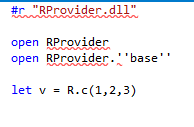
But if I fully-qualify the reference, it works:

image

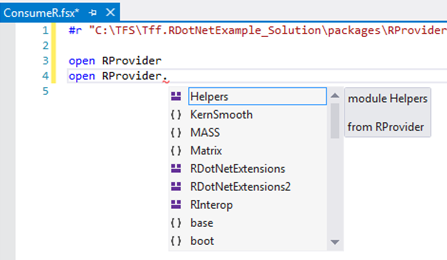
Very Strange, but then I get yummy intellisense

image


I then wanted to add in the RDotNet assembly:

Filly qualified does not work

image

but if you add the “@” symbol, it does…

image

I then added the test case that is on codeplex(https://rdotnet.codeplex.com/).

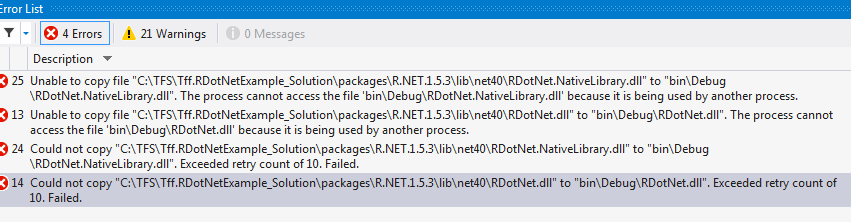
After figuring out that your can only have 1 instance of the engine going at any point in time and the FSI holds a reference (my issue logged here), I wrote this very much procedural code:

  1. #r @"C:\TFS\Tff.RDotNetExample_Solution\packages\R.NET.1.5.3\lib\net40\RDotNet.dll"
  2. #r @"C:\TFS\Tff.RDotNetExample_Solution\packages\R.NET.1.5.3\lib\net40\RDotNet.NativeLibrary.dll"
  3.  
  4. open System.IO
  5. open RDotNet
  6.  
  7. let environmentPath = System.Environment.GetEnvironmentVariable("PATH")
  8. let binaryPath = @"C:\Program Files\R\R-3.0.1\bin\x64"
  9. System.Environment.SetEnvironmentVariable("PATH",environmentPath+System.IO.Path.PathSeparator.ToString()+binaryPath)
  10.  
  11. let engine = RDotNet.REngine.CreateInstance("RDotNet")
  12. engine.Initialize()
  13.  
  14. let group1 = engine.CreateNumericVector([30.02;29.99;30.11;29.97;30.01;29.99]);
  15. engine.SetSymbol("group1", group1)
  16. let expression = "group2 <- c(29.89,29.93,29.72,29.98,30.02,29.98)"
  17. let group2 = engine.Evaluate(expression).AsNumeric()
  18.  
  19. let calcExpression = "t.test(group1, group2)"
  20. let testResult = engine.Evaluate(calcExpression).AsList()
  21.  
  22. printfn "P-Value = %A" (testResult.Item("p.value").AsNumeric())

With the results coming out:

image

Calling R from F#

So I thought I would check out R.NET so I downloaded R from its home site.  I then created a basic F# library and installed R.DotNet.  I found it amusing that it installed from the recycle bin:

image

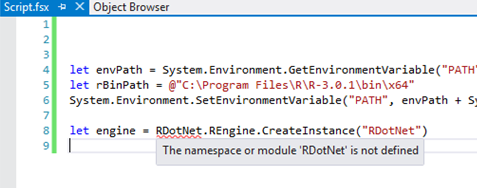
I then fired up a F# project to test it out.  I decided to mimic the C# example on the Codeplex site in F#.  I gopt to the 4th line where I actually tried to create an instance of the REngine:

image

So I typed into Google R and F# and what do you know,  some folks created a type provider for R  How cool is that?  I installed the RProvider from NuGet and then typed in the basic code sample but it was not getting recognized.

image

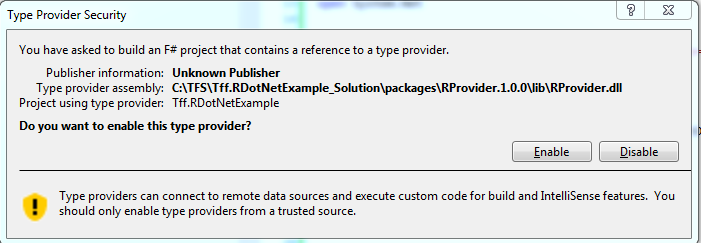
I then read in the documentation that you need to restart Visual Studio (good to know)  and make sure that the .NET version is 4.5.  Still no luck.  I then downloaded the example script that is on Github and I was getting the same problem.  Out of desperation, I hit F6 and I got this:

image


Then all of the R type provider references resolved.  I then changed the R.Net to point at the bin and all of those references resolved.  I then commented out

  1. //open RProvider.tseries
  2. //open RProvider.zoo

and

  1. //let adf = R.adf_test(msft)

and no more red squiqqley!  When I hit F6 though, I get this:


image

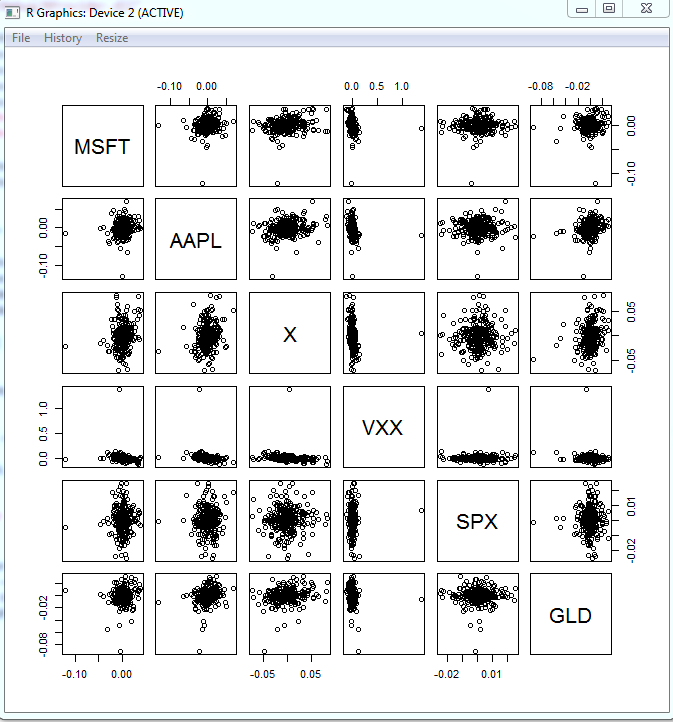
Undaunted, I ran the script anyway and sure enough, I got some output:

image

F# and Unit Testing

Consider this code snippet in F#

  1. module Board =
  2.     let tiles = [|0 .. 39|]
  3.     let random = System.Random()
  4.  
  5.     let communityChest x =
  6.         let communityChestDraw = random.Next(1,17)
  7.         if communityChestDraw = 1 then
  8.             0
  9.         else if communityChestDraw = 2 then
  10.             10
  11.          else
  12.             x


I then went to create a unit test for the communityChest function when it hit me that I will get unpredictable behavior because I am getting a random number within the method body.  I made this same mistake when I created my windows phone 7 game where there combat engine was using a Random.Next() result.

Basically, I am repeating my mistakes across two languages.  The good news is that the solution is the same for both languages: I need to inject the result from Random.Next() into community chest.

  1. let communityChest x y =
  2.     if y = 1 then
  3.         0
  4.     else if y = 2 then
  5.         10
  6.      else
  7.         x


And then

  1. let move x y =
  2.     let communityChestDraw = random.Next(1,17)
  3.  
  4.     if x + y > 39 then
  5.         x + y – 40
  6.     else if x + y = 30 then
  7.         10
  8.     else if x + y = 2 then
  9.         communityChest 2 communityChestDraw
  10.     else if x + y = 7 then
  11.         chance 7
  12.     else if x + y = 17 then
  13.         communityChest 2 communityChestDraw
  14.     else if x + y = 22 then
  15.         chance 22
  16.     else if x + y = 33 then
  17.         communityChest 2 communityChestDraw
  18.     else if x + y = 36 then
  19.         chance 36
  20.     else
  21.         x + y


The other nice thing is I found the bug that was, well, bugging me.  The reason that 2 showed up the most was that I had copied and pasted 2 to be the results of all community chest runs.  I then changed the code to reflect the actual position of community chest:

  1. let move x y =
  2.     let communityChestDraw = random.Next(1,17)
  3.  
  4.     if x + y > 39 then
  5.         x + y – 40
  6.     else if x + y = 30 then
  7.         10
  8.     else if x + y = 2 then
  9.         communityChest 2 communityChestDraw
  10.     else if x + y = 7 then
  11.         chance 7
  12.     else if x + y = 17 then
  13.         communityChest 17 communityChestDraw
  14.     else if x + y = 22 then
  15.         chance 22
  16.     else if x + y = 33 then
  17.         communityChest 33 communityChestDraw
  18.     else if x + y = 36 then
  19.         chance 36
  20.     else
  21.         x + y


So now I can do my unit tests:

  1. [TestClass]
  2. public class SimulatorTests
  3. {
  4.     [TestMethod]
  5.     public void communityChestWithOne_ReturnsZero()
  6.     {
  7.         var result = Simulator.communityChest(2, 1);
  8.         Assert.AreEqual(0, result);
  9.     }
  10.  
  11.     [TestMethod]
  12.     public void communityChestWithTwo_ReturnsTen()
  13.     {
  14.         var result = Simulator.communityChest(2, 2);
  15.         Assert.AreEqual(10, result);
  16.     }
  17.  
  18.     [TestMethod]
  19.     public void communityChestWithThree_ReturnsTwo()
  20.     {
  21.         var result = Simulator.communityChest(2, 3);
  22.         Assert.AreEqual(2, result);
  23.     }
  24. }


And the tests run green:

image

I love being able to write C# tests and test F# code…

F# and Monopoly Probabilities

My sons and I were playing Monopoly when we started discussing different strategies for property acquisition.  For example, should you try and get Park Place and Boardwalk for the large rent but low probability of someone landing on it or should you get the purples with a high hit chance but lower payout?

We decided to run a simulation and since I an teaching myself F#, we coded up a F# answer.  I created a F# Tutorial project and then added a .fsx file.  In that file, I first created a couple of variables – 1 of which is a .NET type:

  1. let tiles = [|0 .. 39|]
  2. let random = System.Random()


I then added a Community Chest function that returns a 1 in 16 chance of Going to Jail (board location 10) and a 1 in 16 chance of going to GO (board location 0).  This is not completely accurate because we don’t shuffle the deck after every draw – but it seems close enough.

  1. let communityChest x =
  2.     let communityChestDraw = random.Next(1,17)
  3.     if communityChestDraw = 1 then
  4.         0
  5.     else if communityChestDraw = 2 then
  6.         10
  7.      else
  8.         x


I then added a Chance function that did the same thing – with a lot more possibilities (Go to Boardwalk, go to the nearest railroad, etc…)

  1. let chance x =
  2.     let chanceDraw = random.Next(1,17)
  3.     if chanceDraw = 1 then
  4.         0
  5.     else if chanceDraw = 2 then
  6.         10
  7.     else if chanceDraw = 3 then
  8.         11
  9.     else if chanceDraw = 4 then
  10.         39
  11.     else if chanceDraw = 5 then
  12.         x – 3
  13.     else if chanceDraw = 6 then
  14.         5
  15.     else if chanceDraw = 7 then
  16.         24
  17.     else if chanceDraw = 8 then
  18.         if x < 5 then
  19.             5
  20.         else if x < 15 then
  21.             15
  22.         else if x < 25 then
  23.             25
  24.         else if x < 35 then
  25.             35
  26.         else
  27.             5
  28.     else if chanceDraw = 9 then
  29.         if x < 12 then
  30.             12
  31.         else if x < 28 then
  32.             28
  33.         else
  34.             12
  35.     else
  36.         x    


I then added a move function that handled going past the 39th tile and looping around past go and also the “Go to Jail” Tile:

  1. let move x y =
  2.     if x + y > 39 then
  3.         x + y – 40
  4.     else if x + y = 30 then
  5.         10
  6.     else if x + y = 2 then
  7.         communityChest 2
  8.     else if x + y = 7 then
  9.         chance 7
  10.     else if x + y = 17 then
  11.         communityChest 2
  12.     else if x + y = 22 then
  13.         chance 22
  14.     else if x + y = 33 then
  15.         communityChest 2
  16.     else if x + y = 36 then
  17.         chance 36
  18.     else
  19.         x + y


I then put it together with a simulation function that ran 10000 iterations:

  1. let simulation =
  2.     let mutable startingTile = 0
  3.     let mutable endingTile = 0
  4.     let mutable doublesCount = 0
  5.     let mutable inJail = false
  6.     let mutable jailRolls = 0
  7.     for diceRoll in 1 .. 10000 do
  8.         let dieOneValue = random.Next(1,7)
  9.         let dieTwoValue = random.Next(1,7)
  10.         let numberOfMoves = dieOneValue + dieTwoValue
  11.         
  12.         if dieOneValue = dieTwoValue then
  13.             doublesCount <- doublesCount + 1
  14.         else
  15.             doublesCount <- 0
  16.  
  17.         if inJail = true then
  18.             if doublesCount > 1 then
  19.                 inJail <- false
  20.                 jailRolls <- 0
  21.                 endingTile <- move 10 numberOfMoves
  22.             else
  23.                 if jailRolls = 3 then
  24.                     inJail <- false
  25.                     jailRolls <- 0
  26.                     endingTile <- move 10 numberOfMoves
  27.                 else
  28.                     inJail <- true
  29.                     jailRolls <- jailRolls + 1
  30.         else
  31.             if doublesCount = 3 then
  32.                 inJail <- true
  33.                 endingTile <- 10
  34.             else
  35.                 endingTile <- move startingTile numberOfMoves
  36.         
  37.         let endingTile = move startingTile numberOfMoves
  38.  
  39.         printfn "die1: %A + die2: %A = %A FROM %A TO %A"
  40.             dieOneValue dieTwoValue numberOfMoves startingTile endingTile
  41.  
  42.         startingTile <- endingTile
  43.         tiles.[endingTile] <- tiles.[endingTile] + 1

I hate the mutable keywords.  I don’t know enough about F# to not use it – but it seems that my code is a F# plate of spaghetti

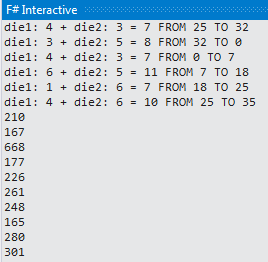
I then spit out the results like this:

  1. let Aggregation =
  2.     for tile in tiles do
  3.         printfn "%A" tile


And sure enough, I got some results:

image


I then put these results into Excel where I added the tile names
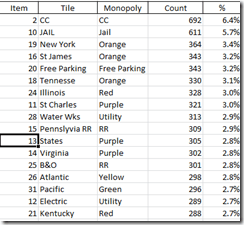
image

and did a quick pivot table on property groups like this:

image


Note that the results seem wrong (or not 100% correct) because Tile #2 (Community Chest) can’t be the most landed on tile and I also had 30 out of the 10,000 times where the cop was the final resting place for a turn – which can’t happen.

If I was using C#, I would have done this in about 25% of the time and been 100% right using unit tests – but I am trying to make myself uncomfortable by learning F# and so I muddle through – often I find that  the process is more important than the results in learning.

In any event, I want to make the following changes:

  • 1) Create a tuple using the Tile Name, the PropertyGroup, and the Count
  • 2) Write the unit tests so that I am 100% correct
  • 3) Re-write it getting rid of the mutable keyword
  • 4) Aggregate the list using the F# constrcuts (versus using Excel)

The kids also want to put in the expected rate of return based on the rent for each tile and then the adjustment for each house.  That might be fun – but it is irrelevant for actually winning the game (the marginal benefit of additional analysis is very low).   As long as you know they key colors and can get monopolies on them (and prevent monopolies by your opponent), you will win more often than not.


Infer.NET

I was on vacation last week so I decided to have some fun with Infer.Net.  As someone interested in F#/Machine learning, Infer.Net seemed like a cool side project.  I was not disappointed.  I downloaded the most recent bits (though no NuGet) and wired up a basic problem of determining the probability of 2 even-sided coins to both come up heads:

  1. Console.WriteLine("Start");
  2.  
  3. Variable<bool> firstCoin = Variable.Bernoulli(0.5);
  4. Variable<bool> secondCoin = Variable.Bernoulli(0.5);
  5. Variable<bool> bothHeads = firstCoin & secondCoin;
  6.  
  7. InferenceEngine engine = new InferenceEngine();
  8. Console.WriteLine("Probability both coins are heads: " + engine.Infer(bothHeads));
  9.  
  10. Console.WriteLine("End");
  11. Console.ReadKey();


Sure enough:

image

I can’t wait to dig into the other tutorials and then apply the inference to some of the real data sets I have collected…

Pluralsight

Or is it Pluralsite?  They seem to use both.  In any event, I finished an audition for Pluralsight yesterday.  It was a 10 minute demo of slides and code.  It was a really interesting process and makes me appreciate what it takes to do it.  Lesson learned include:

1) Script the slide deck – down to the pauses for breathing.  I first tried to do it without any help – epic failure.  I then tried to do it with bullet points – failure.  After about an hour of takes and re-takes of the first slide, I surrendered and scripted everything.  I then could get through the slide deck in about 5 takes per slide.

2) Everything is editable.  In the beginning, once I screwed up, I would stop and restart.  Then, I realized that I was re-recoding my good content so I started to place a break after my screw up, re-record and then edit out the the screw-up.  I learned that to do this effectively, I need splice points that don’t look like splice points so I can screw up without losing the good stuff.

3) Speaking of which, I spent waaaay too much time in Camtasia, the video editing software.  Just learning how to use that took a better part of my Sunday.  Once I figured it out some, it was great to use.

4) I did the code in about 6 takes – and it shows.  I did not script my code, instead I treated it more like the classes I teach with the occasional flub and mistyping (And I technical error that Rob Seder sent me).  I also typed my code versus drag and dropping code blocks (or using code snippets).  I talked to different people and each have a different option on this – I find presentations more interesting with typing, even if it is not as smooth as a professional typist.  Some people like the typing (you can really hear my mechanical keyboard in the video), others do not.  Derik Whittaker was kind enough to do a full-on, no holds-barred review of what I did suggested in speeding up time for the longer typing moments – which I didn’t even think of.

5) Speaking of Derik, he has done a couple of courses and he showed me how to prepare for a course.  If I get picked up, I will implement much of his methodology.  Basically, you can’t be too organized for teaching a Pluralsight course.  Derik has a 3 monitor setup when recording and he scripts everything in one-note.  He also does much of his effects in editing, so he is not concentrating on that stuff when recording.

6) Speaking of getting picked up, there is a TON of content in the pipeline.  I am pitching .NET best practices and there are several other courses that have some overlap (some already in prod) so I am curious that if the course gets green-lighted, how many people will actually watch it.

In any event, it was an interesting process and since I learned something, it was worth it.  If I get picked up, I will take a hiatus from blogging because my free time will be spent on that.  Seems like a worthwhile adventure, no?

WPF Event Bubbling and Routed Events

Consider a User Control with a single button on it:

  1. <UserControl x:Class="Tff.ButtonClickBubble.MainUserControl"
  2.              xmlns="http://schemas.microsoft.com/winfx/2006/xaml/presentation&quot;
  3.              xmlns:x="http://schemas.microsoft.com/winfx/2006/xaml&quot;
  4.              xmlns:mc="http://schemas.openxmlformats.org/markup-compatibility/2006&quot;
  5.              xmlns:d="http://schemas.microsoft.com/expression/blend/2008&quot;
  6.              mc:Ignorable="d" Height="100" Width="100">
  7.     <Grid Background="Red" Margin="0,0,0,0">
  8.         <Button x:Name="MainButton"
  9.             Content="Push Me" HorizontalAlignment="Left"
  10.                 Margin="19,36,0,0" VerticalAlignment="Top"
  11.                 Width="62" Height="25"
  12.                 Click="MainButton_Click"/>
  13.     </Grid>
  14. </UserControl>


In the code behind, the click event shows a dialog

  1. public partial class MainUserControl : UserControl
  2. {
  3.     public MainUserControl()
  4.     {
  5.         InitializeComponent();
  6.     }
  7.  
  8.     private void MainButton_Click(object sender, RoutedEventArgs e)
  9.     {
  10.         MessageBox.Show(e.Source.ToString());
  11.     }
  12. }

After hitting F6 so the control will show in my toolbox, I then put an instance of that control on a basic page like so:

  1. <Window
  2.         xmlns="http://schemas.microsoft.com/winfx/2006/xaml/presentation&quot;
  3.         xmlns:x="http://schemas.microsoft.com/winfx/2006/xaml&quot;
  4.         xmlns:local="clr-namespace:Tff.ButtonClickBubble" x:Class="Tff.ButtonClickBubble.MainWindow"
  5.         Title="MainWindow" Height="236" Width="184">
  6.     <Grid x:Name="MainGrid" Background="AliceBlue">
  7.         <local:MainUserControl HorizontalAlignment="Left" Margin="35,44,0,0" VerticalAlignment="Top"/>
  8.     </Grid>
  9. </Window>


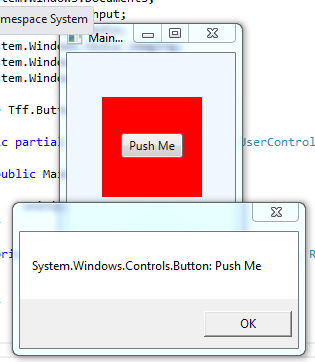
When I hit F5, I get the expected MessageBox:

image

So now I want the main window to intercept that button click and pop its own dialog box.  The Window class does not have a click event – rather it has a mousedown event.  By adding the mouse down event hander to the main window, I have this:

  1. <Window
  2.         xmlns="http://schemas.microsoft.com/winfx/2006/xaml/presentation&quot;
  3.         xmlns:x="http://schemas.microsoft.com/winfx/2006/xaml&quot;
  4.         xmlns:local="clr-namespace:Tff.ButtonClickBubble" x:Class="Tff.ButtonClickBubble.MainWindow"
  5.         Title="MainWindow" Height="236" Width="184" MouseDown="Window_MouseDown">


And in the code behind:

  1. private void Window_MouseDown(object sender, MouseButtonEventArgs e)
  2. {
  3.     MessageBox.Show(e.Source.ToString());
  4. }


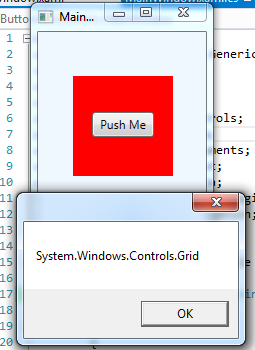
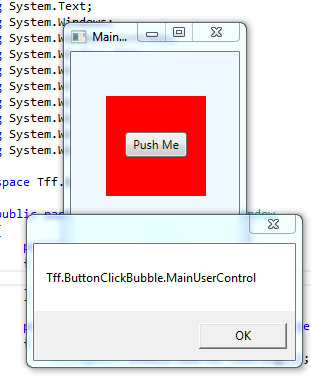
Unfortunately, that doesn’t work.  The button click event swallows the event so the MouseDown only fires on the part of the window where the button is not:

imageimage

So I went into StackOverflow and I found this post that I think describes the problem.  So I changed the MouseDown to the PreviewMouseDown event and sure enough, I can handle the event from the main screen:

image

But the ClickEvent on the button is not being fired.  I then added a e.handled = false but that did not help:

  1. private void Window_PreviewMouseDown(object sender, MouseButtonEventArgs e)
  2. {
  3.     MessageBox.Show(e.Source.ToString());
  4.     e.Handled = false;
  5. }


So the answer marked as correct on stack overflow does apply here.  The answer below the marked as correct answer is relevant.  I tried to add a handler to the Grid (Windows don’t have AddHandler methods) like this:

  1. public MainWindow()
  2. {
  3.     InitializeComponent();
  4.     MainGrid.AddHandler(MouseDownEvent, new MouseButtonEventHandler(MainGrid_MouseDown), true);
  5. }
  6.  
  7. private void MainGrid_MouseDown(object sender, MouseButtonEventArgs e)
  8. {
  9.     MessageBox.Show(e.Source.ToString());
  10. }


The problem is that it is not working either.  Fortunately, the answer below THAT one does work:

  1. <Window
  2.         xmlns="http://schemas.microsoft.com/winfx/2006/xaml/presentation&quot;
  3.         xmlns:x="http://schemas.microsoft.com/winfx/2006/xaml&quot;
  4.         xmlns:local="clr-namespace:Tff.ButtonClickBubble" x:Class="Tff.ButtonClickBubble.MainWindow"
  5.         Title="MainWindow" Height="236" Width="184" >
  6.     <Grid x:Name="MainGrid" Background="AliceBlue" Button.Click="MainGrid_MouseDown">
  7.         <local:MainUserControl HorizontalAlignment="Left" Margin="35,44,0,0" VerticalAlignment="Top"/>
  8.     </Grid>
  9. </Window>


And

  1. public partial class MainWindow : Window
  2. {
  3.     public MainWindow()
  4.     {
  5.         InitializeComponent();
  6.     }
  7.  
  8.     private void MainGrid_MouseDown(object sender, RoutedEventArgs e)
  9.     {
  10.         MessageBox.Show(e.Source.ToString());
  11.     }
  12.  
  13. }


They key thing is wiring up the Grid like this:  Button.Click="MainGrid_MouseDown"