Events && Multi-Threading

Dear Future Me:

When you need to write a vanilla event, use the following boilerplate:

public event EventHandler<EventArgs> MyEventName

And when you need to write a vanilla cross-thread function to update the UI in a WPF application, use the following boilerplate:

Dispatcher.BeginInvoke(DispatcherPriority.Normal, new Action(() =>
{
    SomeUIControl.Text = someValueFromThisThread;
}));

And this is in System.Windows.Threading, which is not in the Client Profile

And when you need to write a vanilla cross-thread function to update the UI in a WinForms application, use the following boiler plate:

this.BeginInvoke(new Action(() =>
{
    StringBuilder message = new StringBuilder();
    message.AppendFormat("{0:hh\\:mm\\:ss}", e.ElaspedTime);

    SomeUIControl.Text += Environment.NewLine;
    SomeUIControl.Text = message.ToString();
}));

Love,

Present Me

PS: you really should exercise more…

ADO.NET and Connection Pooling

I decided that I needed to learn more about ConnectionPooling – especially ConnectionPool fragmentation.   I ran into a great article here that explains in the ins and outs of connection pool fragmentation.  I decided to try out some scenarios.

I first created a class library that calls a select on a Northwind table:

public class NorthwindFactory
{
    public Dictionary<String, String> GetRegions(String connectionString)
    {
        Dictionary<String, String> regionDictionary = new Dictionary<string, string>();

        using (SqlConnection connection = new SqlConnection(connectionString))
        {
            String commandText = "Select * from Region";
            using(SqlCommand command = new SqlCommand(commandText, connection))
            {
                connection.Open();
                SqlDataReader reader = command.ExecuteReader();
                while (reader.Read())
                {
                    regionDictionary.Add(reader[0].ToString(), reader[1].ToString());
                }
            }
        }

        return regionDictionary;
    }
}

I then added a unit (really integration) test to run this function:

[TestClass()]
public class NorthwindFactoryTests
{

    [TestMethod()]
    public void GetRegionsTest()
    {
        NorthwindFactory target = new NorthwindFactory();
        string connectionString = @"Data Source=Dixon12;database=Northwind;Uid=NorthwindUser;Pwd=password";
        Dictionary<string, string> regionDictionary = target.GetRegions(connectionString);

        Int32 expected = 4;
        Int32 actual = regionDictionary.Count;
        Assert.AreEqual(expected, actual);
    }
}

I then opened up Sql Server Management Studio to see the impact that this call had:

select spid, loginame, status, program_name,cmd from master..sysprocesses where spid > 50

When I ran the test, nothing came out of sysprocess – by the time I flipped windows from VS to SSMS, the test ran and the connection went away.  I changed the code to allow me to flip over:

while (reader.Read())
{
    Thread.Sleep(TimeSpan.FromSeconds(3));
    regionDictionary.Add(reader[0].ToString(), reader[1].ToString());
}

Sure enough, when I run the test, I see the active connection

image

I then decided to see what would happen with two connections.  I went and added a second connection in serial:

[TestMethod()]
public void GetTwoRegionsInSequenceTest()
{
    NorthwindFactory target = new NorthwindFactory();
    string connectionString = @"Data Source=Dixon12;database=Northwind;Uid=NorthwindUser;Pwd=password";
    Dictionary<string, string> regionDictionaryOne = target.GetRegions(connectionString);
    Dictionary<string, string> regionDictionaryTwo = target.GetRegions(connectionString);

    Int32 expected = 8;
    Int32 actual = regionDictionaryOne.Count + regionDictionaryTwo.Count;
    Assert.AreEqual(expected, actual);
}

There is only 1 active connection at a time – the connectionPoolManager in action.

image

My next though was that if the connection is explicitly closed by the SqlConnection objects is not out of its using scope, would the connection stay open?

using(SqlCommand command = new SqlCommand(commandText, connection))
{
    connection.Open();
    SqlDataReader reader = command.ExecuteReader();
    while (reader.Read())
    {
        regionDictionary.Add(reader[0].ToString(), reader[1].ToString());
    }
    connection.Close();
    Thread.Sleep(TimeSpan.FromSeconds(10));
}

Sure enough, when I run this, the connection is “closed” on the client but on the Sql Server it is still active:

image

That is the connection pool manager keeping the connection alive.

So my next thought – does the connection pool manager work cross threads?  I created a new test like so:

[TestMethod()]
public void GetRegions_ParallelTest()
{
    NorthwindFactory target = new NorthwindFactory();
    string connectionString = @"Data Source=Dixon12;database=Northwind;Uid=NorthwindUser;Pwd=password";
    ConcurrentBag<KeyValuePair<String, String>> regionBag = new ConcurrentBag<KeyValuePair<String, String>>();

    Parallel.For(0, 2, i =>
    {
        Dictionary<string, string> regionDictionary = target.GetRegions(connectionString);
        foreach (KeyValuePair<String,String> keyValuePair in regionDictionary)
        {
            regionBag.Add(keyValuePair);
        }

    });

    Int32 expected = 8;
    Int32 actual = regionBag.Count;
    Assert.AreEqual(expected, actual);
}

And the GetRegions() has a 10 second delay built in.  I got this back on my dual-processor machine:

image

And to corroborate, I passed in two different times that the thread stays awake:

public Dictionary<String, String> GetRegions(String connectionString)
{
    return GetRegions(connectionString, 10);
}

public Dictionary<String, String> GetRegions(String connectionString, Int32 lengthOfSleep)
{
    Dictionary<String, String> regionDictionary = new Dictionary<string, string>();

    using (SqlConnection connection = new SqlConnection(connectionString))
    {
        String commandText = "Select * from Region";
        using (SqlCommand command = new SqlCommand(commandText, connection))
        {
            connection.Open();
            SqlDataReader reader = command.ExecuteReader();
            while (reader.Read())
            {
                regionDictionary.Add(reader[0].ToString(), reader[1].ToString());
            }
            connection.Close();
            Thread.Sleep(TimeSpan.FromSeconds(lengthOfSleep));
        }
    }

    return regionDictionary;
}

Add the test that checks:

[TestMethod()]
public void GetRegions_Parallel_DifferentSleepTimes_Test()
{
    NorthwindFactory target = new NorthwindFactory();
    string connectionString = @"Data Source=Dixon12;database=Northwind;Uid=NorthwindUser;Pwd=password";
    ConcurrentBag<KeyValuePair<String, String>> regionBag = new ConcurrentBag<KeyValuePair<String, String>>();

    Parallel.For(0, 2, i =>
    {
        Dictionary<string, string> regionDictionary = target.GetRegions(connectionString, 5+(i*5));
        foreach (KeyValuePair<String, String> keyValuePair in regionDictionary)
        {
            regionBag.Add(keyValuePair);
        }

    });

    Int32 expected = 8;
    Int32 actual = regionBag.Count;
    Assert.AreEqual(expected, actual);
}

Sure enough, in the 1st five seconds:

image

And in the last 5 seconds (or so):

image

Next, I added a new test that uses two different types of connection strings – 1 for integrated security, 1 for Sql Server security:

[TestMethod()]
public void GetRegions_DifferentConnectionStringsTest()
{
    NorthwindFactory target = new NorthwindFactory();
    string sqlServerSecurityConnectionString = @"Data Source=Dixon12;database=Northwind;Uid=NorthwindUser;Pwd=password";
    string integratedSecurityConnectionString = @"Data Source=Dixon12;database=Northwind;Integrated Security=true";

    Dictionary<string, string> sqlServerSecurityRegionDictionary = target.GetRegions(sqlServerSecurityConnectionString);
    Dictionary<string, string> integratedSecurityRegionDictionary = target.GetRegions(integratedSecurityConnectionString);

    Int32 expected = 8;
    Int32 actual = sqlServerSecurityRegionDictionary.Count + integratedSecurityRegionDictionary.Count;
    Assert.AreEqual(expected, actual);
}

Sure enough, 2 connections

 

image

I then realized that my test so far do not show the number of connection pools in existence, rather it just shows the number of active Sql Connections for each scenario that may or may not be controlled by different connection pools.  What I need to do is to have something on the client that I can use to inspect the number of connection pools and connections within those pools.  I ran across this site which showed how to use reflection to resolve the hidden properties/fields of the SqlConnection class.  To that end, I created the following class that determines the the ConnectionPool for a given connection and then the number of connections in that pool.

public static ConnectionPool GetConnectionPool(SqlConnection sqlConnection)
{
    ConnectionPool connectionPool = new ConnectionPool();
    connectionPool.PoolIdentifier = sqlConnection.ConnectionString;

    Type sqlConnectionType = typeof(SqlConnection);
    FieldInfo _poolGroupFieldInfo =
      sqlConnectionType.GetField("_poolGroup", BindingFlags.NonPublic | BindingFlags.Instance);
    var dbConnectionPoolGroup =
      _poolGroupFieldInfo.GetValue(sqlConnection);

    if (dbConnectionPoolGroup != null)
    {
        
        FieldInfo _poolCollectionFieldInfo =
          dbConnectionPoolGroup.GetType().GetField("_poolCollection",
             BindingFlags.NonPublic | BindingFlags.Instance);
        
        HybridDictionary poolCollection =
          _poolCollectionFieldInfo.GetValue(dbConnectionPoolGroup) as HybridDictionary;

        foreach (DictionaryEntry poolEntry in poolCollection)
        {
            var foundPool = poolEntry.Value;
            FieldInfo _objectListFieldInfo =
               foundPool.GetType().GetField("_objectList",
                  BindingFlags.NonPublic | BindingFlags.Instance);
            var listTDbConnectionInternal =
               _objectListFieldInfo.GetValue(foundPool);
            MethodInfo get_CountMethodInfo =
                listTDbConnectionInternal.GetType().GetMethod("get_Count");
            var numberOfConnections = get_CountMethodInfo.Invoke(listTDbConnectionInternal, null);
            connectionPool.NumberOfConnections = (Int32)numberOfConnections;
        }
    }

    return connectionPool;
}

I also realized that I needed the number of ConnectionPools in total.  That is also available via the SqlConnection.ConnectionFactory property. 

public static List<ConnectionPool> GetConnectionPools(SqlConnection sqlConnection)
{
    List<ConnectionPool> connectionPools = new List<ConnectionPool>();

    Type sqlConnectionType = typeof(SqlConnection);
    PropertyInfo _connectionFactoryPropertyInfo =
        sqlConnectionType.GetProperty("ConnectionFactory", BindingFlags.NonPublic | BindingFlags.Instance);
    var connectionFactory =
      _connectionFactoryPropertyInfo.GetValue(sqlConnection,null);


    if (connectionFactory != null)
    {
        FieldInfo _connectionPoolGroupsInfo =
          connectionFactory.GetType().BaseType.GetField("_connectionPoolGroups",
             BindingFlags.NonPublic | BindingFlags.Instance);
        var dbConnectionPoolGroups =
          _connectionPoolGroupsInfo.GetValue(connectionFactory);

        IEnumerable enumerator = dbConnectionPoolGroups as IEnumerable;
        ConnectionPool connectionPool = null;

        foreach (var item in enumerator)
        {
            connectionPool = new ConnectionPool();
            PropertyInfo _valuePropertyInfo =
                item.GetType().GetProperty("Value", BindingFlags.Public | BindingFlags.Instance);
            var _valuePropertyValue = _valuePropertyInfo.GetValue(item,null);

            PropertyInfo _keyPropertyInfo =
                item.GetType().GetProperty("Key", BindingFlags.Public | BindingFlags.Instance);
            var _keyPropertyValue = _keyPropertyInfo.GetValue(item, null);

            if (_valuePropertyValue != null)
            {
                FieldInfo _poolCollectionFieldInfo =
                    _valuePropertyValue.GetType().GetField("_poolCollection",
                     BindingFlags.NonPublic | BindingFlags.Instance);
                HybridDictionary poolCollection =
                  _poolCollectionFieldInfo.GetValue(_valuePropertyValue) as HybridDictionary;

                connectionPool.PoolIdentifier = _keyPropertyValue.ToString();
                connectionPool.NumberOfConnections = poolCollection.Count;
            }
            connectionPools.Add(connectionPool);
        }
    }

    return connectionPools;
}

So my unit(integration) tests show that with the same connection string, you have 1 pool with as many connection.Open() you call that have not been cleaned up but the GC yet. 

[TestMethod()]
public void GetConnectionPool_1OpenConnectionTest()
{
    string connectionString = @"Data Source=Dixon12;database=Northwind;Uid=NorthwindUser;Pwd=password";
    SqlConnection sqlConnection = new SqlConnection(connectionString);
    sqlConnection.Open();
    ConnectionPool connectionPool = ConnectionPoolFactory.GetConnectionPool(sqlConnection);

    Int32 expected = 1;
    Int32 actual = connectionPool.NumberOfConnections;
    Assert.AreEqual(expected, actual);
    sqlConnection.Close();
}

Also, you can see the number of ConnectionPools that are active at any 1 time and the number of connections in those strings. 

[TestMethod()]
public void GetConnectionPools_2OpenConnectionsDifferentConnectionStringsTest()
{
    string connectionString1 = @"Data Source=Dixon12;database=Northwind;Uid=NorthwindUser;Pwd=password";
    SqlConnection sqlConnection1 = new SqlConnection(connectionString1);
    sqlConnection1.Open();
    string connectionString2 = @"Data Source=Dixon12;database=Northwind2;Integrated Security=true";
    SqlConnection sqlConnection2 = new SqlConnection(connectionString2);
    sqlConnection2.Open();
    List<ConnectionPool> connectionPools = ConnectionPoolFactory.GetConnectionPools(sqlConnection1);

    Int32 expected = 2;
    Int32 actual = connectionPools.Count;
    Assert.AreEqual(expected, actual);
}

Armed with that information, I could then confirm if different connection strings open new pools (it does) and that if different threads with the same connection string opens a new pool (it doesn’t). 

[TestMethod()]
public void GetConnectionPools_2OpenConnectionsSameConnectionStringsDifferentThreads_Test()
{
    string connectionString1 = @"Data Source=Dixon12;database=Northwind2;Integrated Security=true";
    SqlConnection sqlConnection1 = new SqlConnection(connectionString1);
    Thread threadOne = new Thread(sqlConnection1.Open);
    threadOne.Start();

    string connectionString2 = @"Data Source=Dixon12;database=Northwind2;Integrated Security=true";
    SqlConnection sqlConnection2 = new SqlConnection(connectionString2);
    Thread threadTwo = new Thread(sqlConnection2.Open);
    threadTwo.Start();

    List<ConnectionPool> connectionPools = ConnectionPoolFactory.GetConnectionPools(sqlConnection2);
    Int32 numberOfConnectionPoolsExpected = 1;
    Int32 numberOfConnectionPoolsActual = connectionPools.Count;
    Assert.AreEqual(numberOfConnectionPoolsExpected, numberOfConnectionPoolsActual);

    Int32 numberOfConnectionsExpected = 0;
    Int32 numberOfConnectionsActual = connectionPools[0].NumberOfConnections;
    Assert.AreEqual(numberOfConnectionsExpected, numberOfConnectionsActual);

}

This means that the connection pool manager is thread safe.  Note that Connections are not thread safe, which is why the # of connections are 0 on the main thread.  And yes, I know I could have looked at MSFT source code to figure this out and perhaps there is some documentation on Thread-Safety is available, but this was fun.

So the next question in my mind is what can have an impact on performance?  For example, if you have connection pool fragmentation (via different connection strings), what is the performance gain my combining all of the active connections into 1 pool?  This post has gotten long enough, so I will show that in another one.

Book Review: Head First Design Patterns

So I understand now why java developers are often accused of spending more time doing mental gymnastics then writing working code.  I am working through Head First Design Patterns as sort of a break from the projects I have been coding (on the advice of Steve Suing) and I am running into some interesting questions.

First,  I like how the authors have taken the Gang Of Four patterns and made them much more accessible.  Not that I like running through academic-prose and small talk examples (I don’t) like in Design Patterns, but the way the Head First books deliver content is great. 

Second, the examples they pick for a given pattern are really well thought-out.  Faster than your can say “Liskov Substitution Principle”, the first chapters explanation of the limitations of inheritance using ducks was spot on. 

Third (notice 2 nice things before 1 not-nice?  They teach that at the positive coaching alliance), I am disappointed that their idea of a “test harness” is a console app.  The next version of the book should use unit tests.

Finally, some code.  I was working though the examples when I got to chapter 3 (I am using C# and not java because I value secure software):

Base Class:

public abstract class Beverage
{
    public Beverage()
    {
        Description = "Unknown Beverage";
    }
    public String Description { get; internal set; }

    public abstract double Cost();
}

(I changed the Description from a field and getter method to a property.  The IL effect is the same, I believe)

The Decorator:

public abstract class CondimentDecorator: Beverage
{
    public new abstract String Description { get; }
}

And example Beverage:

public class Espresso: Beverage
{
    public Espresso()
    {
        this.Description = this.GetType().Name;
    }

    public override double Cost()
    {
        return 1.99;
    }
}

(I changed the Description setter from a hard-coded string to a method assuming the class name is the same.  And yes, ToString() should be overridden also)

And Example Condiment:

public class Mocha: CondimentDecorator
{
    Beverage _beverage;

    public Mocha(Beverage beverage)
    {
        _beverage = beverage;
    }

    public override string Description
    {
        get
        {
            return _beverage.Description + ", " + this.GetType().Name;
        }
    }

    public override double Cost()
    {
        return .20 + _beverage.Cost();
    }
}

So what is wrong?  Well, are you asking or telling Mocha?  If you are asking, then the method should be CalcualteCost().  If you are asking, then you should call GetCost() or its syntactical equivalent Cost{Get;} so you   really have a POCO.  And if you are doing a calculation in a POCO, you are doing something wrong.  So the method should be CalculateCost().  Syntax aside, that means that the Description should be CalculateDescription().  So this looks like a clear violation of command/query separation.  Is this violations the pattern’s fault or the authors?  I don’t know.  I don’t really care.  I guess I “get” the decorator pattern enough so I can have this conversation:

Jamie: Hey, how would you architect an application that needs pluggable components?

Some architect: What about using the Decorator Pattern?

Jamie: Have you ever implemented that, like, for real?

Some architect: Oh, I don’t implement.  I just design.  Want to see the UML?

Jamie: No Thanks.

This brings me to the next part of the book that I am still thinking whether I like or not.  As Bob Martin explains, software has 2 values: the primary value and the secondary value.  The primary is how well the software changes, the secondary is how well it meets the current requirements.  Quite often I see line developers with immediate deadlines looking to solve the secondary value talking to the architect who is interested in  the primary.  Who is right?  Does it matter?  Until technical debt is put on the balance sheet, I fear that secondary will always be put in the back-seat.  I guess code re-work is good for consultants.

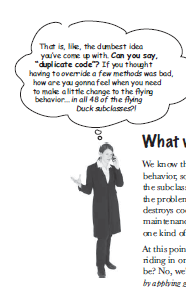
Finally, the one thing I really disagree with the book are these captions:

imageimage

I disagree that they put in this global assumption that is a hold-over from the mainframe programming days.  Duplicate code is better than code that has to be changed.  With modern source control and refactoring tools used correctly, duplicate code is not bad.  In fact, if you duplicate code to make sure your follow the Single Responsibility Principle, that is OK.  If you want to refactor later to consolidate, that is fine as long as the unit tests still run green. 

And I think that is the conclusion that I have to my 1st sentence.  Design Patterns are not the end of themselves (most people agree in theory).  They are not even the beginning (Too many architects that I know disagree with that).   Patterns are what you back into and refactor to, not the other way around.  Not really this books fault – after all it is a book about design patterns – not writing working software.  To this end, I think you need to look at Refactoring to Patterns.

Thanks to this clip which I listened to 5 times repeatedly when doing this blog post):

Clean Code and SOLID

I am presenting at TriNug’s Software Craftsmanship SIG on February 27, 2013.  The subject of my talk is Bob Martin’s SOLD principles.  The reason I chose that topic was because at the December lightning talks, I demonstrated the open and closed principle and there were some people in the audience that seemed genuinely interested in all of the SOLID principles.  I already have the CleanCoders brownbag materials that I used last year as a baseline, so I thought I would augment it with some additional resources.

One of the better presentations I have seen on SOLID and software craftsmanship is by Misko Henry in his series of Google Tech talks.  I had so much fun watching his talks that I jumped over to non-SOLID talks that he did.  For example, check out this talk on what Singletons are bad.  Like, really bad.  Like, poke your eyes out bad.

I incorporated what Misko said into my SRP section of the SOLID talk.  Specifically, SRP is not:

  • Use Singletons
  • Classes should only do a single thing
  • Code should be written in a single place (kinda of a DRY principle)

Rather, the SRP argues that classes should have 1 and only 1 reason to change.  To understand the reasons for change, you need to look at the actors.  Where I depart from Uncle Bob slightly is that if two actors both use a class and both have the same reason to change that class, you are still SRP.

In any event, I am doing O tomorrow.  I plan to use the notification example that I showed in the lightning talks as the code examples.

Rock,Paper,Azure

I started playing Rock,Paper,Azure today – a great code contest sponsored by Microsoft.  I ran into some trouble with their out-of-the-box bits (more on that later) but I had some fun once I got a successful deployment going.

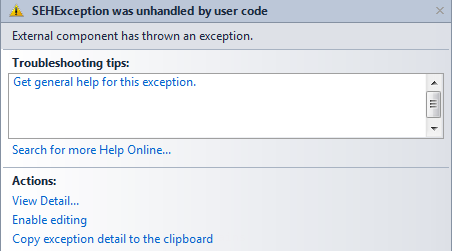
First, the problems.  I could not get the local emulator working.  Rather, I can get the Oct 2012 Azure Toolkit emulator running on my local Win7 machine,. but the RPA emulator solution does not work.  I got this weird exception:

image

That no one at Microsoft can figure out.  After about 3-4 hours of changes, I gave up and decided to just use the Azure site to test my Bots (is the plural of Bot “Botts” or “Bots”?).

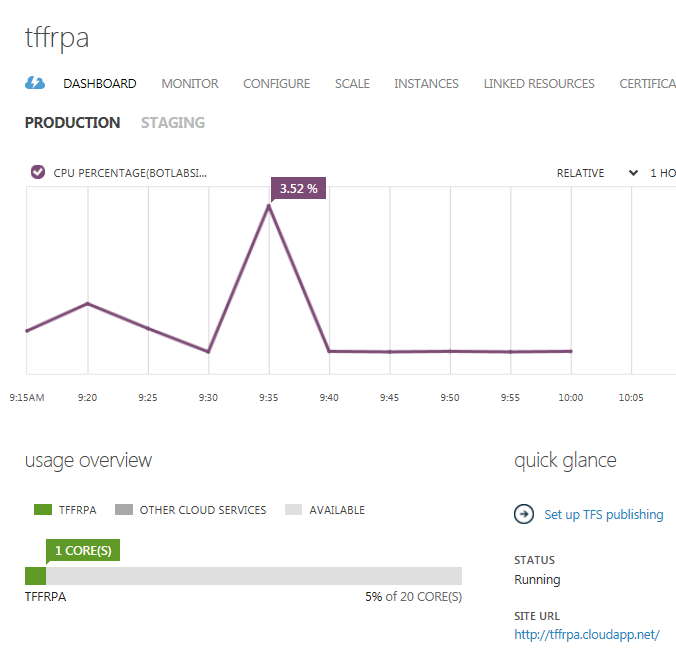
Second, the logistics.  It was pretty painless setting up an Azure account for this context.  All I had to do was to follow the instructions on their website and I got almost all of the way there.  The one omission from their directions is that once you have your cloud service running,

image

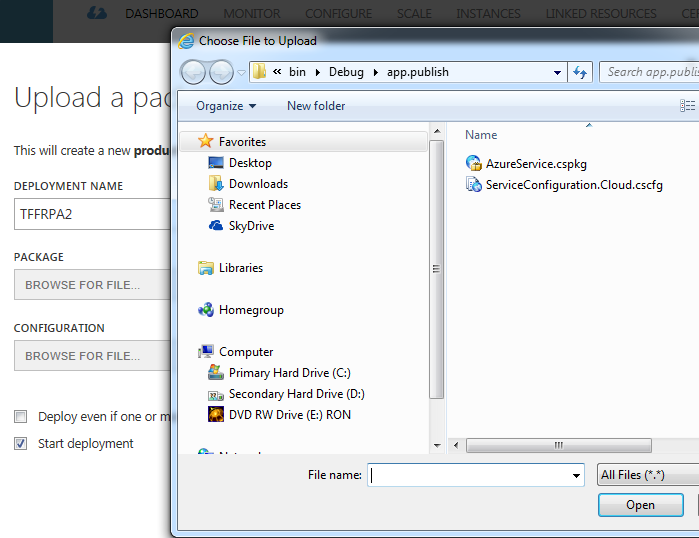
you need to upload the BotLab so you can test your bots before entering them into the contest.  There are not any instructions on the RPA site.  What you need to do is onmce your provision your site, you click on its name to navigate to the upload page:

image

You then need to click on the Upload A New Production Deployment.  You then click on “From Local” for the package and configuration files that you created when you followed this RPA step.

image

Once the files are loaded, Azure spins for a couple of minutes and then you get your lab that you can navigate to and upload your bots.

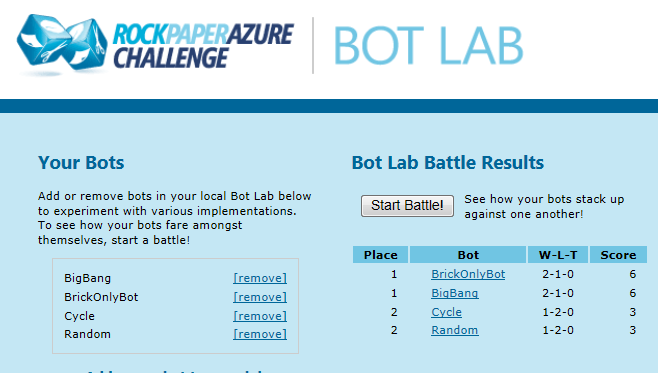
image

I then loaded up a “Brick Only” Bot to my BotLab:

image

and then pushed it to the actual contest site:

image

Third, the code.

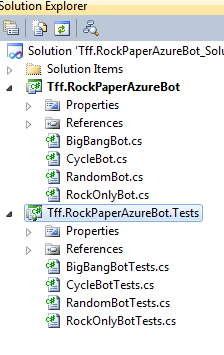
So now that I can upload to my lab and push to the contest, I thought about how to make a better Bot.  Instead of diving right into the code, I set up a new solution with a single project that had a single class.  I added the necessary references and coded up a Rock-only Bot with an associated unit test:

image

With the unit test like this:

[TestMethod()]
public void MakeMoveTest()
{
    RockOnlyBot target = new RockOnlyBot(); 
    IPlayer you = null; 
    IPlayer opponent = null;
    GameRules rules = null;

    Move expected = Moves.Rock;
    Move actual = target.MakeMove(you, opponent, rules);

    Assert.AreEqual(expected, actual);
}

And the class implementation like this:

public Move MakeMove(IPlayer you, IPlayer opponent, GameRules rules)
{
    return Moves.Rock;
}

Before writing my killer Bot, I then put several new classes that correspond to the examples included in the RPA bits into the project with associated unit tests.

image

An interesting thing is that for random moves, my unit test just checks to see if the move is not null (for now)

[TestMethod()]
public void MakeMove_ReturnsInstiantiatedObject_Test()
{
    RandomBot target = new RandomBot(); 
    IPlayer you = null; 
    IPlayer opponent = null; 
    GameRules rules = null;
    Move actual;
    actual = target.MakeMove(you, opponent, rules);
    Assert.IsNotNull(actual);
}

Another interesting thing is that the API that comes with the download does not include any implementations of the interfaces.  So for the BigBangBotTests, I need a instantiation of IPlayer you so I can keep track of you.NumberOfDecisions.  I thought, what a great place to use a Mocking Framework.  Since I am using VS2010, I decided to use MOQ to stub the IPlayer.

[TestMethod()]
public void MakeMove_ThrowsDynamiteOnFirstMove_Test()
{
    BigBangBot target = new BigBangBot();
    var mockYou = new Mock<IPlayer>();
    mockYou.Setup(y => y.NumberOfDecisions).Returns(0);
    IPlayer opponent = null; 
    GameRules rules = null;
    Move expected = Moves.Dynamite;
    Move actual = target.MakeMove(mockYou.Object, opponent, rules);
    
    Assert.AreEqual(expected, actual);
}


So to be safe, I should implement a test for moves 1-5 to make sure that dynamite only comes back.  But I am not safe.  What about moves 6+? For a mocking framework, I need to implement the Random method or just increment the mocked property.  The later seems easier, so that is where I started.  I first injected the Stub only returning NumberOfDecisions = 1 and I got red:

image

I then removed all of the individual runs and put the setup in the for..each loop:

[TestMethod()]
public void MakeMove_DoesNotOnlyThrowDynamiteAfterFifthMove_Test()
{
    BigBangBot target = new BigBangBot();
    var mockYou = new Mock<IPlayer>();
    IPlayer opponent = null;
    GameRules rules = null;

    int numberOfDynamites = 0;
    for (int i = 0; i < 95; i++)
    {
        mockYou.Setup(y => y.NumberOfDecisions).Returns(i);
        Move currentMove = target.MakeMove(mockYou.Object, opponent, rules);
        if (currentMove == Moves.Dynamite)
        {
            numberOfDynamites++;
        }
    }

    Int32 notExpected = 95;
    Int32 actual = numberOfDynamites;
    Assert.AreNotEqual(notExpected, actual);
}

And the test ran green.  As a side not, this test really rests the Random function.  After all, if it turns red, then the random function has returned 95 consecutive dynamites.

I then implemented unit tests for CycleBot like so (only the 1st test is shown):

[TestMethod()]
public void MakeMove_LastMoveRock_ReturnPaper_Test()
{
    CycleBot target = new CycleBot();
    var mockYou = new Mock<IPlayer>();
    mockYou.Setup(y => y.LastMove).Returns(Moves.Rock);
    IPlayer opponent = null; 
    GameRules rules = null;

    Move expected = Moves.Paper; 
    Move actual = target.MakeMove(mockYou.Object, opponent, rules);
    
    Assert.AreEqual(expected, actual);
}

Note that there is a condition in the implemntation if the last moves is Sissors – if the player still has dynamite.  I created tests for both conditions:

[TestMethod()]
public void MakeMove_LastMoveSissors_HasDynamite_ReturnDynamite_Test()
{
    CycleBot target = new CycleBot();
    var mockYou = new Mock<IPlayer>();
    mockYou.Setup(y => y.HasDynamite).Returns(true);
    mockYou.Setup(y => y.LastMove).Returns(Moves.Scissors);
    IPlayer opponent = null;
    GameRules rules = null;

    Move expected = Moves.Dynamite;
    Move actual = target.MakeMove(mockYou.Object, opponent, rules);

    Assert.AreEqual(expected, actual);
}

[TestMethod()]
public void MakeMove_LastMoveSissors_DoesNotHaveDynamite_ReturnWaterBaloon_Test()
{
    CycleBot target = new CycleBot();
    var mockYou = new Mock<IPlayer>();
    mockYou.Setup(y => y.HasDynamite).Returns(false);
    mockYou.Setup(y => y.LastMove).Returns(Moves.Scissors);
    IPlayer opponent = null;
    GameRules rules = null;

    Move expected = Moves.WaterBalloon;
    Move actual = target.MakeMove(mockYou.Object, opponent, rules);

    Assert.AreEqual(expected, actual);
}

And the battery of tests run green:

image

With the battery of tests done, I then wanted to deploy to Azure.  To that, I needed to add a BotFactory to my project and have it return the class that I am interested in competing:

public class BotFactory : IBotFactory
{
    public IBot CreateBot() { return new MyBot(); }
}

I then loaded the Bot to Azure and sure enough, I got it to compete:

image

With this framework in place, I am ready to start coding my killer bot!

Calling Command

I know I am supposed to be using (and loving) power shell, but I ran across a problem this weekend and the good-old command window worked fine.  I was building a one-click application that moved data from one location to another and then manipulating the data.  As part of the workflow, I created a DTS/SSIS package.  To execute this package, I used the following code to shell out to the command prompt and fire up the package:

            String sourceConnectionString = CreateSourceConnectionString();
            String targetConnectionString = CreateTargetConnectionString();

            Process process = new Process();
            process.StartInfo.FileName = "cmd";
            StringBuilder stringBuilder = new StringBuilder();
            stringBuilder.AppendFormat(@"/k");
            stringBuilder.AppendFormat(@"dtexec");
            stringBuilder.AppendFormat(@" /F");
            stringBuilder.AppendFormat(@" TransferAllTables.dtsx");

            stringBuilder.AppendFormat(" /Conn {0};\"{1}\"", "SourceConnectionOLEDB", sourceConnectionString);
            stringBuilder.AppendFormat(" /Conn {0};\"{1}\"", "DestinationConnectionOLEDB", targetConnectionString);
            process.StartInfo.Arguments = stringBuilder.ToString();

            process.Start();

I also want to thank my friend Ian (who doesn’t have a blog yet so I can’t point you to him) for mentioning  the StringBuilder.AppendFormat() function.  Append() + String.Format() in 1 place.  Nice! Thanks  Ian!

NOAA and how not to do a web service

I came across the NOAA API when I was looking at various providers of weather data via the programmable web.  Thinking that the government might be a great place to get (free) data, I dove into their API.  I am glad I didn’t go head-first.  The API is, well, wretched.  In fact, it probably is the worst public API I have come across in my limited travels.

Why is so bad?

1) Ambiguous Website.  Their use of jargon is over-whelming.  To understand the API, you need to learn about the NDFD .  What is that?  What about current weather?  Nope, I need to know about the National Digital Forecast Database.  How about the NCDC?  What is DWML? On to issue #2.

2) They invented their own version of SOAP: Digital Weather Markup Language.  Enough said.

3)  The web site is rife with links that show graphics that no one can use.  The API help is in clear language?  No where to be seen.

4) Hooking up to their WSDL is not much better.  I made a connection and this is what I got back:

  image

Got that?  You need to create an instance of ndfdXMLPortTypeClient.  Say that 3 times fast.  How about a weather class?  A forecast class?  Nope, this API assumes that other developers give a hoot about their internal implementation (and no one does). 

5) I tried a simple call to the web service just to see what it sent back:

public WeatherReading GetReading(string zipCode)
{
    ndfdXMLPortTypeClient client = new ndfdXMLPortTypeClient();
    String output = client.LatLonListZipCode("27519");
    return null;
}

And what did I get?

image

Got that – a non-standard encoding.  PTF (Palm to face…)

So I am giving up on the government and trying some of the other providers.

Using the Twitter API

As part of my alerting project, I wanted to implement a Twitter push. I first googled on Bing and got this post. I made a quick implementation of my IAlert Interface like so:

public void Send()
{

    HttpWebRequest request = (HttpWebRequest)HttpWebRequest.Create(_twitterUri);
    request.Credentials = new NetworkCredential(_twitterUserId, _twitterPassword);
    request.Timeout = 5000;
    request.Method = "POST";
    request.ContentType = "application/x-www-form-urlencoded";
    using (Stream requestStream = request.GetRequestStream())
    {
        using (StreamWriter streamWriter = new StreamWriter(requestStream))
        {
            streamWriter.Write(_message);
        }
    }
    WebResponse response = request.GetResponse();
}

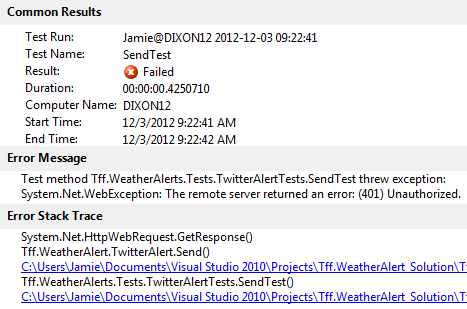
However, I get a 401

image

it looks like it is an old implementation of the Twitter API.  I then went to this page and it looks like I can’t do basic HTTP authentication with Twitter – I have to use OAuth.  Twitter’s help page recommended using the C# Twitterizer library.  I went ahead and and installed it from NuGet


image

I then re-wrote the send method to use the Twitterizer:

public void Send()
{
    OAuthTokens tokens = new OAuthTokens();
    tokens.ConsumerKey = _consumerKey;
    tokens.ConsumerSecret = _consumerSecret;
    tokens.AccessToken = _accessToken;
    tokens.AccessTokenSecret = _accessTokenSecret;

    TwitterResponse<TwitterStatus> tweetResponse = TwitterStatus.Update(tokens, _message);
}


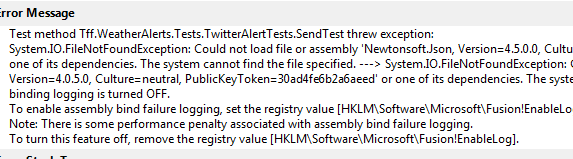
Alas, when I re-ran my unit tests

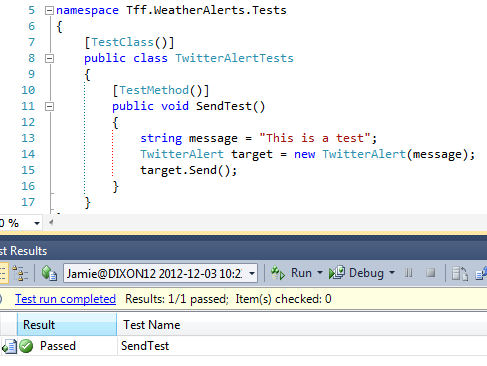
image

Ugh – I guess I need to add a reference to my test project.  Sure enough, that did the trick:

image

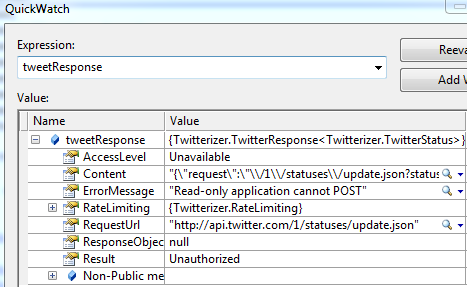
Now I am getting this message back from Twitter

image

I then when to my account settings for the app on Twitter and changed it from Read only to full control:

image

Hit save, regenerated the keys, and still got the same message

I then stumbled onto this.  I then restarted, changed the text of my integration test and voila (that’s French for “Whoop-de-do")

image

Polymorphic Dispatch, Open/Closed, Notification Part2

I received plenty of great feedback about this post on polymorphic dispatch, open/closed principle, and notifications.  I have made the following changes based on the comments

1) Send() should have the message as its argument so that for each message the collection does not have to be recreated.  The local variable that holds the message goes away:

public interface IAlert
{
    void Send(String message);
}

And an implementation looks like:


public void Send(String message)
{
    if (String.IsNullOrEmpty(message))
        throw new AlertsException("message cannot be null or empty.");

    SmtpClient smtpClient = new SmtpClient();
    MailMessage mailMessage = new MailMessage(_from, _to, _subject, message);
    smtpClient.Send(mailMessage);
}

2) I should not use an abstract base for the mail – because it tired me to a specific implementation (need a TO, FROM, SUBJECT).  Also, I should be favoring interfaces over abstract classes.  The benefit of reduction of code by using that abstract base is more than offset by the specific implementation and the making it harder to build extensible emails in the future.

3) My Twitter implementation was based on Twitter APIs for 2 years ago.  Twitter now requires OAuth.  A full blog post about hooking up to Twitter is found here.

4) Even though I am following the Open/Closed Principle (OCP) for notifications, I still have a problem.  If I add a new notification to the project, I can add the notification class and AlertFactory does not change (follows OCP).  However, the SqlAlerteeProvider does have to change (violation of OCP) to account for the new kind of notification.  For example:

public Alertee GetAlertee(Int32 alerteeId)
{
    Alertee alertee = new Alertee();
    alertee.AlerteeId = 1;
    alertee.FirstName = "Test";
    alertee.LastName = "Test";
    alertee.AlertList.Add(new LocalEmailAlert("Test","Test","Test"));
    alertee.AlertList.Add(new TwitterAlert());
    //Add new kind of Alert here
    return alertee;
}

I then thought about how to add the alert and have the factory not change.  I first looked at the Factory Pattern in Design Patterns.  This was no help because they too violate the OCP when they create the specific implementations of the subclasses (Creator class on p. 111)

Product* Creator::Create (ProductId id)

{

if(Id == MINE) return new MyProduct;

if(Id==YOURS) return new YourProduct

etc…

}

I also realized that I have been using the words “factory” wrong  my Factories are usually Builders.  In any event, the builder pattern also creates specific concrete classes and would therefor have to change as new types of alerts are added to the project.

I then realized that any concrete implementation will violate the OCP.  I see two ways out of the problem.  I could either make the individual objects responsible for their own creation (bad idea) or use an abstract factory pattern (GoF p.87) (not an all together a bad idea).  The abstract factory implementation needs to be alert specific.  So if you have TwitterAlert, you have a TwitterAlertFactory that follows the interface of the IFactory pattern.  The difference with my current implementation (SqlAlerteeProvider) is about implementing the object, not about implementing the data store.

Assuming this is right, what it means that every new alter that I add to the project is actually 2 classes.  Class 1 is the implementation of alert that follows IAlert and Class 2 is the implementation of alert construction that follows IAlertFactory. 

I don’t like this solution.  The problem is that I still can’t actually create alerts and assign them to users without changing code – now that code can be external (in Main) or in yet a third class that joins Alerts and AlertFactories together.   I suppose I can use a DI container but I will still need to alter the .config file and have a redeploy, so I get no practical value-added.  Just by moving something higher up in the call tree does not make it follow OCP.  The main function will still have to change and be aware of the types of alerts out there. 

I think I will go back to the provider model because it follows the MSFT patterns of use.  If I add a new alert, the Alert has to be added and the AlertProvider will have to change.  Not pure OCP, but closer – and the code is much cleaner than the typical if..then switch…case spaghetti that you typically find in most projects.

Polymorphic Dispatch, Open/Closed Principle, and Notifications

I started on working on a new application last week – one that will read data from various sources, analyze the data, and then notify interested parties about the results of the analysis.  I started working on the notification piece first.  My first premise is that there can be an variety of notification methods and an infinite number of providers of the methods.  For example, a person can receive a notification via an email, a text, a phone call, an IM, an audio signal from their phone app, Twitter, Skype, Facebook, etc…   Each of these methods can be served up by a host of providers.  Since these providers change so quickly and new mechanisms arrive (and quickly become old mechanisms), it makes sense that this part of my application should be extensible as possible.

After trying a variety of scenarios and objects, I decided to concentrate on the core Interface – which is the Alert.  I created an interface like so:

public interface IAlert
{
    void Send();
}

I then created a class called Alertee that contains a collection of IAlerts with some other properties:

public class Alertee
{
    public Alertee()
    {
        this.AlertList = new List<IAlert>();
    }

    public Int32 AlerteeId { get; set; }
    public String FirstName { get; set; }
    public String LastName { get; set; }
    public List<IAlert> AlertList { get; set; }

}

Notice the Command/Query separation.   This class is a data structure that only has public properties.  I initially toyed with calling the Alertee “User” but “User” is such an overused word – most every implementation of IAlert already has a “User” class – and I am a big believer of domain-unique language (and I hate fully-qualifying my Instances) so I chose the less ambiguous if-not-a-real-word: “alertee”.

I then created an AlertFactory (a command class) like so:

public class AlertFactory
{
    public void SendAlerts(List<Alertee> alertees)
    {
        foreach (Alertee alertee in alertees)
        {
            foreach (IAlert alert in alertee.AlertList)
            {
                alert.Send();
            }
        }
    }
}

Notice that by using the IAlert interface, the dependency is inverted and that Alert Factory delegates responsibility of the actual alert implementation via calling the alert.Send().

With the interface, the POCO, and the Factory class ready, I then started implementing the different kinds of alerts.  My first stop was an email alert from the local SMTP server.  I coded this class like so:

public class LocalEmailAlert: IAlert
{
    private String _from = String.Empty;
    private String _to = String.Empty;
    private String _subject = String.Empty;
    private String _body = String.Empty;

    public LocalEmailAlert(String from, String to, String subject, String body)
    {
        if (String.IsNullOrEmpty(from))
            throw new AlertsException("from cannot be null or empty.");
        if (String.IsNullOrEmpty(to))
            throw new AlertsException("to cannot be null or empty.");
        if (String.IsNullOrEmpty(subject))
            throw new AlertsException("message cannot be null or empty.");
        if (String.IsNullOrEmpty(body))
            throw new AlertsException("message cannot be null or empty.");

        _to = to;
        _from = from;
        _subject = subject;
        _body = body;
    }

    public void Send()
    {
        SmtpClient smtpClient = new SmtpClient();
        MailMessage mailMessage = new MailMessage(_from, _to, _subject, _body);
        smtpClient.Send(mailMessage);
    }
}

A couple of things to note.  All of the values that the SMTP needs to use are passed in via the constructor (constructor injection) and these values are stored in private fields.  Also, the values are verified in the constructor and a generic exception is thrown.

I then went to one of the million email providers out there and picked one at random: MailJet.  I then coded up a MailJetEmailProvider like so:

public class MailJetEMailAlert: IAlert
{
    private String _mailServerName = "in.mailjet.com";
    private Int32 _mailServerPort = 465;
    private String _apiKey = String.Empty;
    private String _secretyKey = String.Empty;
    private String _from = String.Empty;
    private String _to = String.Empty;
    private String _subject = String.Empty;
    private String _body = String.Empty;

    public MailJetEMailAlert(String from, String to, String subject, String body)
    {
        if (String.IsNullOrEmpty(from))
            throw new AlertsException("from cannot be null or empty.");
        if (String.IsNullOrEmpty(to))
            throw new AlertsException("to cannot be null or empty.");
        if (String.IsNullOrEmpty(subject))
            throw new AlertsException("message cannot be null or empty.");
        if (String.IsNullOrEmpty(body))
            throw new AlertsException("message cannot be null or empty.");

        _to = to;
        _from = from;
        _subject = subject;
        _body = body;
    }

    public void Send()
    {
        MailMessage mailMessage = new MailMessage();
        mailMessage.From = new MailAddress(_from);
        mailMessage.To.Add(new MailAddress(_to));
        mailMessage.Body = _body;
        mailMessage.Subject = _subject;

        SmtpClient client = new SmtpClient(_mailServerName, _mailServerPort);
        client.EnableSsl = true;
        client.Credentials = new NetworkCredential(_apiKey, _secretyKey);
        client.Send(mailMessage);
    }
}

Notice that the constructor is exactly the same as the local email implementation.  The Mail-Jet specific code/fields are assigned locally and are unique only to the Mailjet class.  I suppose that I could pass those elements in via the constructor and then keep the values in the .config file – but that didn’t seem right to me.  I also could access the config file directly from this class  but that introduces an unneeded dependency – now this class has to worry about the config file (see if it exists, if the section is there, etc…) which is another reason that the class has to change – a violation of the Single Responsibility Principle.  The more I code, the more I think that the config file should be accessed only once and in 1 place (in Main) and those values are then passed into the classes that need it.  That is a blog post for another time – and certainly is against what Microsoft has recommended for many years.

In any event, I don’t think that having the MailJetspecific code embedded into the class is a bad idea  in fact I think it is a good idea.  If these values changes, this class has to be recompiled and redeployed (so what, this isn’t java where the calling assembly has to be recompiled) compared to having the UI being mail-jet aware (via its config) and then having the config file redeployed.  I would rather have a cleaner separation of concerns and have a recompile than a muddied SOC and no recompile.  Both scenarios need to be redeployed anyway.

Back to Mail, I then realized that the mail classes could derive from an abstract base class like so:

public abstract class MailAlert
{

    private String _from = String.Empty;
    private String _to = String.Empty;
    private String _subject = String.Empty;
    private String _body = String.Empty;

    public MailAlert(String from, String to, String subject, String body)
    {
        if (String.IsNullOrEmpty(from))
            throw new AlertsException("from cannot be null or empty.");
        if (String.IsNullOrEmpty(to))
            throw new AlertsException("to cannot be null or empty.");
        if (String.IsNullOrEmpty(subject))
            throw new AlertsException("message cannot be null or empty.");
        if (String.IsNullOrEmpty(body))
            throw new AlertsException("message cannot be null or empty.");

        _to = to;
        _from = from;
        _subject = subject;
        _body = body;
    }

}

The problem is that the derived class still needs to access these private fields – the protected scope solves that:

protected String _from = String.Empty;
protected String _to = String.Empty; 
protected String _subject = String.Empty;
protected String _body = String.Empty;

So the next problem is abstract base class does not have a constructor that takes zero arguments  which is required.  So I added a default empty constructor like so:

public MailAlert():
    this(String.Empty,String.Empty,String.Empty,String.Empty)
{

}

It now complies and I removed the duplicative code.  The sub-lesson here is that, as rule, don’t start with an abstract class.  Start with implementations and if there is lots of repetitive code, the consider refactoring to an abstract class.  Your covering unit tests will tell you if your refactor is wrong  and you are using unit tests, aren’t you?

I then tackled Text pushing via CDyne.  I added a reference to the CDyne Service (I love SOAP) in Visual Studio, received a developer key from CDyne, and wrote the following implementation:

public class CDyneTextAlert: IAlert
{
    private String _phoneNumber = String.Empty;
    private String _message = String.Empty;
    private Guid _licenseKey = new Guid("XXXXXXXXXXXXXXXXXXXXXXX");
    
    public CDyneTextAlert(String phoneNumber, String message)
    {
        if (String.IsNullOrEmpty(phoneNumber))
            throw new AlertsException("phoneNumber cannot be null.");

        if (String.IsNullOrEmpty(message))
            throw new AlertsException("message cannot be null.");

        _phoneNumber = phoneNumber;
        _message = message;
    }

    public void Send()
    {
        IsmsClient client = new IsmsClient();
        SMSResponse response = client.SimpleSMSsend(_phoneNumber, _message, _licenseKey);
    }
}

I then added a Twitter push like so:

public class TwitterAlert: IAlert
{
    private String _twitterUri = "http://twitter.com/statuses/update.json";
    private String _twitterUserId = String.Empty;
    private String _twitterPassword = String.Empty;
    private String _message = String.Empty;

    public TwitterAlert(String message)
    {
        if (String.IsNullOrEmpty(message))
            throw new AlertsException("message cannot be null.");
        
        this._message = message;
    }

    public void Send()
    {

        HttpWebRequest request = (HttpWebRequest)HttpWebRequest.Create(_twitterUri);
        request.Credentials = new NetworkCredential(_twitterUserId, _twitterPassword);
        request.Timeout = 5000;
        request.Method = "POST";
        request.ContentType = "application/x-www-form-urlencoded";
        using (Stream requestStream = request.GetRequestStream())
        {
            using (StreamWriter streamWriter = new StreamWriter(requestStream))
            {
                streamWriter.Write(_message);
            }
        }
        WebResponse response = request.GetResponse();
    }
}

I then added a Phone notification from CDyne:

public class CDynePhoneAlert: IAlert
{
    String _phoneNumber = String.Empty;
    String _message = String.Empty;
    String _callerId = String.Empty;
    String _callerName = String.Empty;
    String _voiceId = String.Empty;
    String _licenseKey = "XXXXXXXXX";

    public CDynePhoneAlert(String phoneNumber, String message, String callerId, String callerName, String voiceId)
    {

        if (String.IsNullOrEmpty(phoneNumber))
            throw new AlertsException("phoneNumber cannot be null.");

        if (String.IsNullOrEmpty(message))
            throw new AlertsException("message cannot be null.");

        if (String.IsNullOrEmpty(callerId))
            throw new AlertsException("callerId cannot be null.");

        if (String.IsNullOrEmpty(callerName))
            throw new AlertsException("callerName cannot be null.");

        if (String.IsNullOrEmpty(voiceId))
            throw new AlertsException("voiceId cannot be null.");

        _phoneNumber = phoneNumber;
        _message = message;
        _callerId = callerId;
        _callerName = callerName;
        _voiceId = voiceId;

    }


    public void Send()
    {
        PhoneNotifySoapClient client = new PhoneNotifySoapClient("PhoneNotifySoap");
        NotifyReturn callReturnValue = client.NotifyPhoneBasic(_phoneNumber, _message, _callerId, _callerName, _voiceId, _licenseKey);
    }
}

I noticed that the message variable is being passed into the constructor in every IALert implementation so perhaps that should be added to the interface definition Send(String message) but then realized that each implementer might have its own requirements on the message.  For example, Twitter needs to check the number of characters:

public TwitterAlert(String message)
{
    if (String.IsNullOrEmpty(message))
        throw new AlertsException("message cannot be null.");

    if(message.Length > 140)
        throw new AlertsException("message is too long for Twitter.");
    
    this._message = message;
}

Also, what happens when the message is no longer a string – perhaps a .mp3 file with an recorded voice message to be sent to the phone?  Then the Send() method would have to overload an audioStream argument.

So instead of trying to build some class (or worse, some enum) of the different types messages that are passed in, I left it to the specific implementation.  This makes sense of the fluid nature of the distribution mechanisms in today’s technology landscape  – the API needs to be as flexible as possible.

So far, I have a solution that follows the Open/Closed principle.  As new distribution mechanisms come available, I just need to add a new class that implements the IAlert interface, add it to the Alertee’s Alerts collection, and it implements.  No other code needs to change.  I then ran into a bump – adding an Alert to the Alertee’s Alerts collection.

I added 1 more class to the project  – a Provider that creates alertes with instantiated Alerts.  I added a SqlAlerteeProvider figuring I will store each Alertee’s desired Alert mechanism (0 to infinity) in a Sql Server database so it looks like so:

public class SqlAlerteeProvider
{
    public Alertee GetAlertee(Int32 alerteeId)
    {
        return null;
    }

    public List<Alertee> GetAllAlertees()
    {
        return null;
    }

    public void UpdateAlertee(Alertee alertee)
    {

    }

    public void InsertAlertee(Alertee alertee)
    {

    }

    public void DeleteAlertee(Alertee aleertee)
    {

    }
}

However, I am deferring the implementation of the data store for as long as possible.  Who knows, I may find a different place to store the data.

So does application follow the open/closed principle?  It does up to the point of the Alertee Provider.  If a new alert needs to be created, a new class is added (ok with O/C) AND the GetAlertee code needs to be changed to account for the new provider (new fields in the database, etc..) (not OK with the O/C).  I suppose I can dig into making the provider follow the O/C, but that is a task for another day.

The important thing is that the calling application DOESN’T change – It just keeps calling SendAlerts() on the AlertFactory regardless of what else happens.