Town Of Cary ISAB

I was reappointed to a second term on the Town Of Cary’s Information Services Advisory Board (ISAB).  Not only that, I was made chair:

image

http://www.townofcary.org/Assets/Staff+Reports/2012+Recommended+Board+Appointments.pdf

Panzer Redux: WinRT

I was thinking of porting the Windows7 game that I created onto Windwos RT.  Since they are both XAML based, I thought it would be a snap.  I thought wrong.  Part of the problem is that I wrote the original game with poor architecture.  The other part of the problem is that Windows RT makes it hard to port existing code.

I first wanted to separate the game interface from the core game functions.  I created a new project and brought in all of the non-graphical components:

image


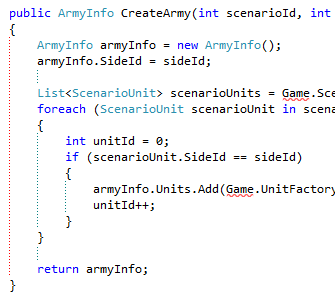
The problem is that every actor seems to have a dependency on the Game class.  For example:

image


So I need to break the dependencies between these factories and their implementation.  I decided on Property Injection versus constructor injection as a matter of convention because I am not sure on the number of dependencies for each factory and I hate really long constructors.  So my refactoring looks like:

public class ArmyFactory
{
    public ScenarioFactory ScenarioFactory { get; set; }
    public UnitFactory UnitFactory { get; set; }

    public ArmyInfo CreateArmy(int scenarioId, int sideId)
    {
        ArmyInfo armyInfo = new ArmyInfo();
        armyInfo.SideId = sideId;

        List<ScenarioUnit> scenarioUnits = ScenarioFactory.ScenarioUnitFactory.GetScenarioUnits(scenarioId);
        foreach (ScenarioUnit scenarioUnit in scenarioUnits)
        {
            int unitId = 0;
            if (scenarioUnit.SideId == sideId)
            {
                armyInfo.Units.Add(UnitFactory.CreateUnit(unitId, scenarioUnit));
                unitId++;
            }
        }

        return armyInfo;
    }
}

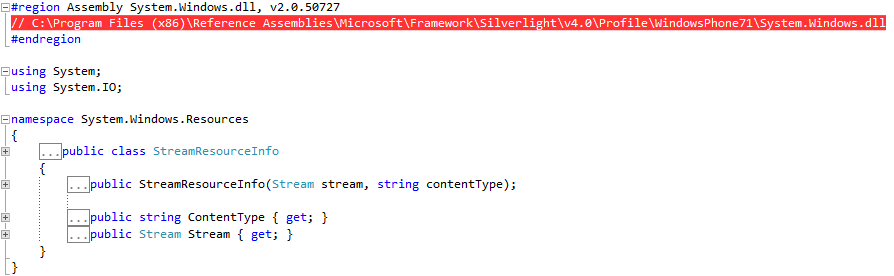
I then was confronted with the fact that my game engine has dependencies on Windows Phone:

image

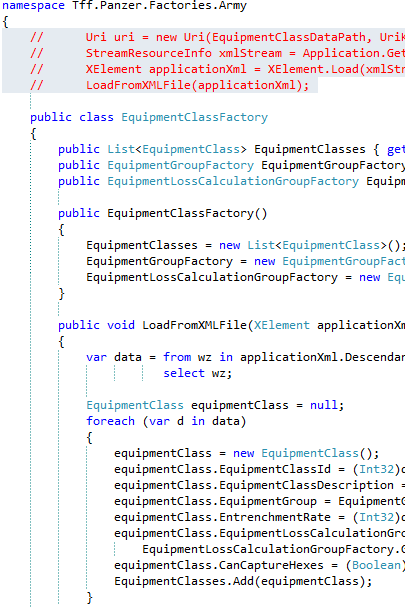
Looking at the original code:

image

So I need a way of loading from an XML file – or do I?  What if the EquipmentClass data was stored in something other than XML?  Do I really want my factory breaking?  I then looked at ScenarioTile – I had loaded data from either a web service or from an XML file.

I then realized that the factory is a translator –>  In goes XML, SOAP, ADO.NET recordset, whatever, out always pops the instantiated objects.  XML was used because that is the de-facto standard for Win Phones.  I also see that my Lookup data is in XML.  Therefore, what I need is a platform-agnostic XML Stream Reader.  Unfortunately, that is not in the cards: Windows Phone has its implementation, System.IO has its implementation, and Windows 8 RT has its implementation.   I then refactored the factory to take in an XML file of a certain structure and spit out the classes.  All of the implementation that is platform specific I removed.

image

So where do I implement the actual XML load?  In the calling application.  Windows Phone 7.x uses XElement, WindowsRT does, and I have to assume Windows Phone 8 does too.  I wonder if all platforms shared the same serialization implementation? 

Ugh!  looks like I picked the wrong week to quit drinkin

Web && App sub-config files

One of the cool features of VS2010 and web deploy is the ability to have sub-config files.  that way you don’t have to comment out (and remember) sections of your web .config for each environment.  You get this feature out of the box with web.config files when you create a new web project:


 image

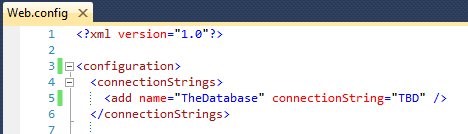
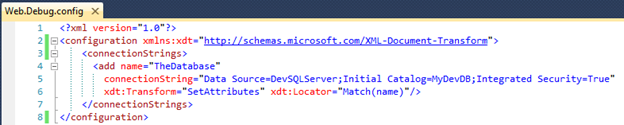
In the master web.config, you pretty much have the same as your normally do:image

In the Sub-Config file, you put in the updated value and some special xsd syntax:

image

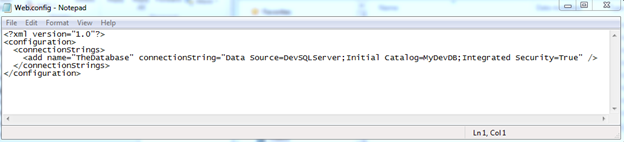
When you publish the website, you only have 1 web.config file. What happens is that the sub-config files have their values moved into the master web.config. For example, if you put a Debug connection String in the Web.Debug.Config, that entry is copied into the master web.config.

When you publish with the Solution Configuration set to Debug:

image

Your Web.Config gets updated:

image

Note that if you run the website locally inside Visual Studio (Hitting F5), it does not transform because you are not publishing. You need to publish to implement the change.

A good article is this one and a good webcast is here.

But what about app.configs?  Good question – because this is based on web deploy, you don’t get this feature in an out of the box desktop project.  There are two good posts that explain how to update your projects so they support app configs.  The most concise is this one.  The problem is that it is incomplete, After you follow Phil’s changes to the project file, you also need to follow this posts on how to update you sub-config to use the xdt.  For example:

image

Once you do that, you get the master app.config updated.  The other cool thing is that you don’t have to use any kind of publishing – hit F5 and the .config in your target environment folder is crated appropriately.

Lambda Expressions and Inner Joins

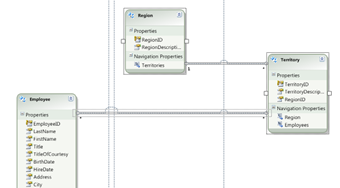
Consider Northwind database represented by Entity Framework:

082812_1923_LambdaExpre1

Notice that to get an employee’s region, you have to traverse the territory table. In TSQL, you would probably write something like this:

Select * from Employees as e 
inner join EmployeeTerritories as et on e.EmployeeID = et.EmployeeID 
inner join Territories as t on et.TerritoryID = t.TerritoryID 
inner join Region as r on t.RegionID = r.RegionID 
where r.RegionDescription = 'Eastern' 

(Note that EntityFramework does not show the EmployeeTerritory crosswalk table)

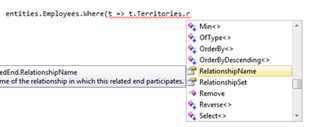
Using Lambdas, you have to get to region via territories, but that property is not available from the employee class:

082812_1923_LambdaExpre2

Enter the "Any" keyword – you can chain classes using the "Any" keyword just like you are doing inner joins in TSQL (or join in Linq):

For example, all employees in the eastern region is written like so:

var result = entities.Employees.Where(e => e.Territories.Any(t => t.Region.RegionDescription == "Eastern")); 

Unit Testing Windows RT Apps

I started building some Unit Tests for a windows RT application and I ran into 2 gotchas. 

#1) The file system moves in a test

Well, not really.  But consider this desktop application.  There is a folder called LookupData with an .xml file in it.

clip_image001

I wrote some code that accesses this file via the desktop application and it runs fine:

private async void Button_Click_1(object sender, RoutedEventArgs e)

{

StorageFolder storageFolder = await Package.Current.InstalledLocation.GetFolderAsync("LookupData");

StorageFile storageFile = await storageFolder.GetFileAsync("ObjectiveType.xml");

XmlDocument xmlDocument = await XmlDocument.LoadFromFileAsync(storageFile);

Debug.WriteLine(xmlDocument.InnerText);

}

I then crated a class library that access the same file.

clip_image002

When I run a unit test against this class library, the same code throws an exception:

clip_image003

It looks like Unit Tests add another layer to the path.  Here is the original:

clip_image004

And here is the Tests:

clip_image005

I am guessing MSFT will say that I should be using a Mocking Framework.  The problem is that if I want to do integration tests, I can’t.  Sigh!

#2) You need to make sure all of your tests are async and return a Tasks if they call a async method

I figured out my path problem when I ran into another problem.  I have this set of code wired up:

public async Task LoadFromXML(String path)
{
ObjectiveTypes = new List<ObjectiveType>();
StorageFile storageFile = await StorageFile.GetFileFromPathAsync(path);
XmlDocument xmlDocument = await XmlDocument.LoadFromFileAsync(storageFile);
XDocument xDocument = XDocument.Parse(xmlDocument.GetXml());
var data = from ot in xDocument.Descendants("ObjectiveType")
select ot;
ObjectiveType objectiveType = null;
foreach (var d in data)
{
objectiveType = new ObjectiveType();
objectiveType.ObjectiveTypeId = (Int32)d.Element("ObjectiveTypeId");
objectiveType.ObjectiveTypeDescription = (String)d.Element("ObjectiveTypeDescription");
ObjectiveTypes.Add(objectiveType);
}
}

To unit test, I wrote the following code

[TestMethod]
public void LoadObjectiveTypeFromXML_LoadsSuccessfully_Test()
{
CampaignVictoryConditionFactory factory = new CampaignVictoryConditionFactory();
StorageFolder storageFolder = Package.Current.InstalledLocation;
String path = storageFolder.Path + @"\Tff.Core\LookupData\VictoryCondition_Campaign.xml";
await factory.LoadFromXML(path);
int notExpected = 0;
int actual = factory.CampaignVictoryConditions.Count;
Assert.AreNotEqual(notExpected, actual);
}

But then I get the compiler complaining:

Error 1 The ‘await’ operator can only be used within an async method. Consider marking this method with the ‘async’ modifier and changing its return type to ‘Task’.

I then changed the test’s signature and it ran:

public async Task LoadObjectiveTypeFromXML_LoadsSuccessfully_Test()

Exception Handling in WPF

There are 2 overriding principles since .NET 1.0, irrespective of  platform:

  • Only catch exceptions you plan to handle
  • Only catch System.Exception in 1 place
    I whipped up a WinForm project and added a button to the default form.  I then added the following code its code behind:
    private void ThrowExceptionButton_Click(object sender, EventArgs e)
    {
        ArgumentOutOfRangeException exception = new ArgumentOutOfRangeException("New Exception");
        throw exception;
    }
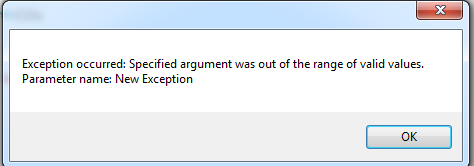
    When I run the app and press the button, I get this:

image

      Then, I added a general try…catch around the Application.Run method in Program.cs:
    try
    {
        Application.Run(new Form1());
    }
    catch (Exception exception)
    {
        MessageBox.Show("Exception occurred: " + exception.Message);
    }

    And I got this:

    image

    All well and good – this has been the standard for years. I then decided to apply the same methodology to a WPF application.

    The first thing I noticed is that there is not an Application.Run method.  Rather, there is this:

    <Application x:Class="Tff.ExceptionHandling.App"
                 xmlns="http://schemas.microsoft.com/winfx/2006/xaml/presentation"
                 xmlns:x="http://schemas.microsoft.com/winfx/2006/xaml"
                 StartupUri="MainWindow.xaml">
        <Application.Resources>
             
        </Application.Resources>
    </Application>
    

    Which means I can’t put that StartupUri in a general try…catch.  Going over to MSDN, I see that you are supposed to use the Application.Current.DispatcherUnhandledException like so:

    public partial class App : Application
    {
        protected override void OnStartup(StartupEventArgs e)
        {
            Application.Current.DispatcherUnhandledException += 
                new System.Windows.Threading.DispatcherUnhandledExceptionEventHandler(Current_DispatcherUnhandledException);
            base.OnStartup(e);
        }
    
        void Current_DispatcherUnhandledException(object sender, System.Windows.Threading.DispatcherUnhandledExceptionEventArgs e)
        {
            //log(e);
            e.Handled = true;
        }
    }

    All well and good.  If I run the app without debugging, the application handles the exception without shutting down.  However if I run the application while debugging, I got this with or without the exception handling:

    image

    Which is different than WinForms…

    So now that I have come to grips with WPF Exceptions on the mainUI thread, what about secondary threads?

    In WinForms, I can do something like this:

    BackgroundWorker backgroundWorker = null;
    public Form1()
    {
        backgroundWorker = new BackgroundWorker();
        backgroundWorker.DoWork += new DoWorkEventHandler(backgroundWorker_DoWork);
        InitializeComponent();
    }
    
    void backgroundWorker_DoWork(object sender, DoWorkEventArgs e)
    {
        Thread.Sleep(1000);
        ArgumentOutOfRangeException exception = new ArgumentOutOfRangeException("New Exception");
        throw exception;
    }
    
    private void ThrowExceptionOnSecondThreadButton_Click(object sender, EventArgs e)
    {
        backgroundWorker.RunWorkerAsync();
    }

    Sure enough:

    image

    But the important thing is this.  If I start the application without debugging, then nothing happens when the secondary thread has an exception raised – it just ends silently.  Another interesting offshoot of this is that when I add the global try..catch in Program – it doesn’t do anything for the background thread.  Therefore, the debugger still stops when the exception is raised.

    Hopping over to the WCF solution, the effect was exactly the same.  If I am debugging, I get this:

    image

    But if I am not, the thread ends silently.  As just like WinForms, that DispatcherUnhandledException doesn’t matter to the secondary thread.

    Consuming REST services using Visual Studio 2010

    Aetna is dipping its toe into public facing APIs via Carepass.  I signed up for a license and wanted to see how easy it was to consume some HHS drug data found here.  I first checked a GET inside a browser with the following uri:

    https://api.carepass.com/hhs-directory-api/drugs/search?name=Cymbalta&apikey=xxx

    and I got my results:

    image

    I then fired up Visual Studio to see how easy it would be to make a REST WCF call.  Turns out, there is not a way to add-> service reference like you can with SOAP.  This means I am turning back the clock of HttpWebRequest and HttpWebResponse.  Interestingly, there are not very good examples on Stackoverflow and MSDN about consuming non-WCF REST services.  The best example I found was here on Yahoo!

    I created a simple ConsoleApp (changed it target runtime from client profile to full .NET 4.0) and launched into code:

    static void Main(string[] args)
    {
        Uri address = new Uri(@"https://api.carepass.com/hhs-directory-api/drugs/search?name=Cymbalta&apikey=t8bnhyvu9hj7eh4c8tg97jgb");   
        HttpWebRequest request = WebRequest.Create(address) as HttpWebRequest;   
        request.Method = "POST";   
        request.ContentType = "application/x-www-form-urlencoded";   
    
        using (HttpWebResponse response = request.GetResponse() as HttpWebResponse)   
        {   
            StreamReader reader = new StreamReader(response.GetResponseStream());   
            Console.WriteLine(reader.ReadToEnd());   
        }
    
        Console.ReadKey();
    }

    Sure enough, it worked like a charm:

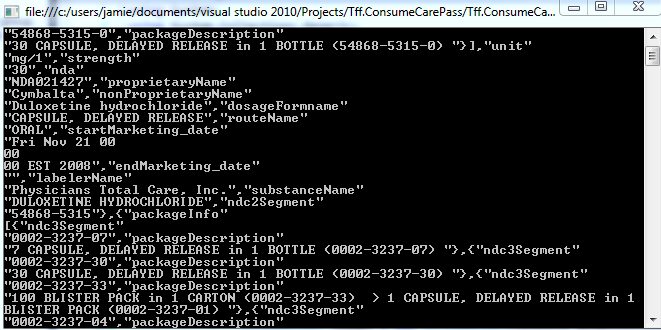
    image

    So then the next problem – how to I parse this blob of name/value pairs?  And is there hierarchical data in there?  I first thought (hoped) it would be easy – just split by the ‘:’

    using (HttpWebResponse response = request.GetResponse() as HttpWebResponse)   
    {
        StreamReader reader = new StreamReader(response.GetResponseStream());
        String output = reader.ReadToEnd();
        Console.WriteLine("Response was: " + output.Length);
        String[] splitOutput = output.Split(':');
        foreach (String item in splitOutput)
        {
            Console.WriteLine(item);
        }
    }

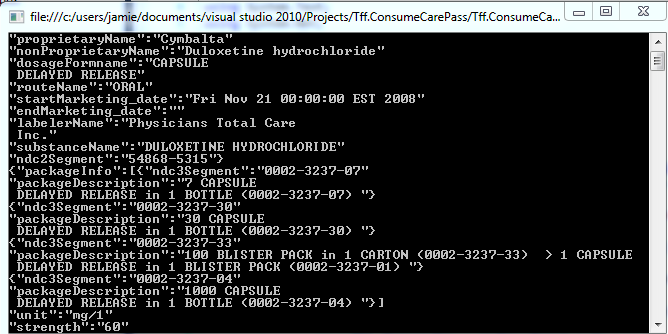
    No dice:

    image

    I then switched my delimited to a comma:

    image

    That is actually better.  The next thing is seems is to check to see if the comma is inside the double quotes.  I know that the industry is going to REST from SOAP – but this is so much worse than adding a reference in Visual Studio….

    One Simple Change Would Redefine How Software Is Created

    If Companies would add technical debt to their 10-Qs and 10-Ks, perhaps more people would listen to the clean coders who are pleading for the right tools, the right SDLC methodologies, and the correct investment in software professionals.

    For example, consider Google.  I took their most recent 10-K and added a line item for technical debt.  I have no idea about the quality of their code.  My understanding is that they do all night “hack-a-thons” and hire people who consider themselves the best in their field.  As a general rule => Large Ego + Lack Of Sleep == Bad Code.  I bet this plug number is understated:

    image

    Is technical debt a “real number?”  It is a real as Goodwill or Intangible Assets.  What kinds of companies would have the most technical debt?

    • Companies that sell software but make most of their money on support
    • Companies that have software assets but make most of their money on suing other companies
    • Companies that are 100% dependent on their IT systems but don’t aren’t serious about owning their own code base

    A result  of reporting the technical debt on the 10-Qs and Ks is that the free lunch of hacking together spaghetti code (usually offshore) lowest-bidder dev shop stops: the income statement gain of lower costs is offset by an increase of technical debt on the balance sheet.  And this is not a 1 to 1 relationship, I bet every dollar of savings on the income statement increases technical debt by a factor of two.

    Another result is that companies that are hacking together code to get acquired will have their purchase price offset by the mess that they are dumping on the acquiring company.  Lower valuations would possibly force companies to get their act together before they are put up for sale.  But if their act is together, perhaps they wouldn’t be for sale?

    In any event, my guess is that once executives are focused on technical debt and have to confront it as a real number that affects their annual report, companies will becomes more serious about eliminating their debt. 

    Cary Technology Task Force

    I was recently appointed to the Town Of Cary’s technology task force: http://carycitizen.com/2012/07/31/cary-names-tech-task-force/

    Programming the Kinect

    I recently went back to programming to Kinect for a little off-base fun.  I wanted to see how hard it would be to move the Kinect up and down and then capture a picture.  Forgoing TDD, I created a WPF project that referenced the Kinect SDK.

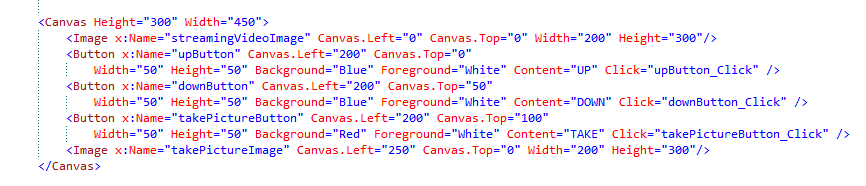
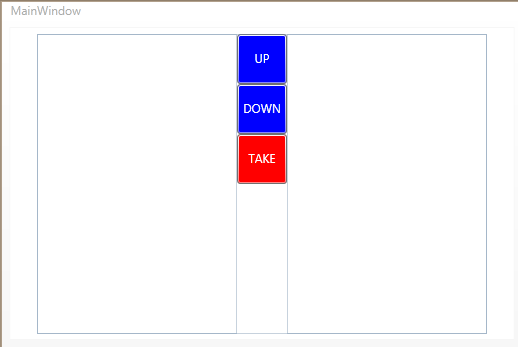
    I then added some buttons to control the up/down of the Kinect and a button to take a picture of the streaming image. I threw in 2 image controls – one to show the streaming image and one to show the still picture that was taken.

    image

    Here is the designer for those of you who are XAML-Impaired:
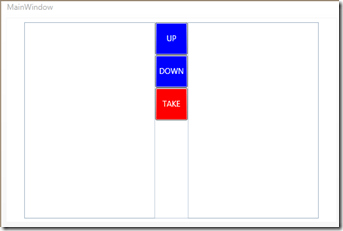
    image

    I then wired up the code behind to stream the images:

    public MainWindow()
    {
        InitializeComponent();          
        kinectSensor.DepthStream.Enable();
        kinectSensor.ColorStream.Enable();
        kinectSensor.AllFramesReady += new EventHandler<AllFramesReadyEventArgs>(kinectSensor_AllFramesReady);
        kinectSensor.Start();
    }
    
    void kinectSensor_AllFramesReady(object sender, AllFramesReadyEventArgs e)
    {
        ColorImageFrame currentFrame = e.OpenColorImageFrame();
        if (currentFrame != null)
        {
            byte[] pixelData = new byte[currentFrame.PixelDataLength];
            currentFrame.CopyPixelDataTo(pixelData);
            BitmapSource bitMapSource = BitmapImage.Create(currentFrame.Width,
                currentFrame.Height,96,96, PixelFormats.Bgr32, null,
                pixelData, currentFrame.Width * currentFrame.BytesPerPixel);
            this.streamingVideoImage.Source = bitMapSource;
        }
    
    }

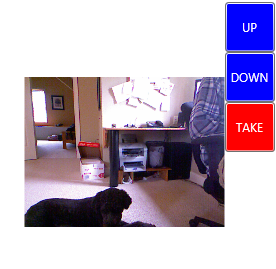
    And here is the output:
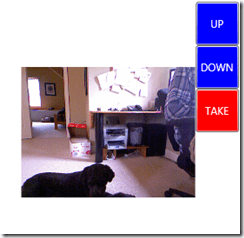
    image

    I then added in the ability to take a picture:

    void kinectSensor_AllFramesReady(object sender, AllFramesReadyEventArgs e) {

    //Same code as before


    this.streamingVideoImage.Source = bitMapSource; if (takePicture) { this.takePictureImage.Source = bitMapSource; takePicture = false; } } }


    And here is the output:
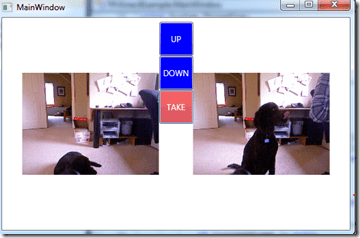
    image

    Feelin’ good, I then went to add the ability to move the Kinect up and down.  I read this article with the point of emphasis that you shouldn’t run the motor often or continuously.  I thought of moving the sensor of groups of 5 degrees at a time like so:

    private void upButton_Click(object sender, RoutedEventArgs e)
    {
        
        if (kinectSensor.ElevationAngle < kinectSensor.MaxElevationAngle - 5)
        {
            kinectSensor.ElevationAngle = kinectSensor.ElevationAngle + 5;
        }
    }

    With a complimentary function for down.  Sure enough, it worked.

    imageimageimage

    The only thing I don’t like is that the picture freezes between the adjustment.  In addition, if you follow the MSDN article where you should throw is a Thread.Sleep(1000) after each change, the effect is kinda hokey.  I then thought about putting in an Image like this image while the camera is adjusting and the thread sleeps – just so the user knows that the camera is adjusting.  I whipped up a function like this:

    private void downButton_Click(object sender, RoutedEventArgs e)
    {
        
        if (kinectSensor.ElevationAngle > kinectSensor.MinElevationAngle + 5)
        {
            kinectSensor.ElevationAngle = kinectSensor.ElevationAngle - 5;
        }
        XOutTheStreamingImage();
        Thread.Sleep(1000);
    }
    private void XOutTheStreamingImage()
    {
        this.InvalidateVisual();
        BitmapImage xImage = new BitmapImage();
        xImage.BeginInit();
        xImage.UriSource = new Uri(@"C:\Users\Jamie\Documents\Visual Studio 2010\Projects\Tff.KinectExample_Solution\Tff.KinectExample\X.PNG");
        xImage.EndInit();
        this.streamingVideoImage.Source = xImage;
        this.InvalidateVisual();
    }

    One of the problem is – it doesn’t work.  A larger problem is – I don’t know why.  The image never shows – though the thread is sleeping.  I then put the XOutTheStreamingImage before the sensor change.  Nope.  I then detached the event handler and then reattached it:

    private void upButton_Click(object sender, RoutedEventArgs e)
    {
        kinectSensor.AllFramesReady -= new EventHandler<AllFramesReadyEventArgs>(kinectSensor_AllFramesReady);
        XOutTheStreamingImage();
        if (kinectSensor.ElevationAngle < kinectSensor.MaxElevationAngle - 5)
        {
            kinectSensor.ElevationAngle = kinectSensor.ElevationAngle + 5;
        }
        Thread.Sleep(1000);
        kinectSensor.AllFramesReady += new EventHandler<AllFramesReadyEventArgs>(kinectSensor_AllFramesReady);
    }

    Nope.  I then detached it and left it detached.  It then kinda worked.  If I hit up/down a couple of times, I got it to work:

    image

    This kind of random behavior smells like a multi-threading issue.  If the AllFramesReady event was on a different thread, then the X image would shows for 1/6 of a second.  If the elevation angle was also on a different thread – then the sleep wouldn’t matter.  I fired up IL Spy and sure enough, check the locks:

    image

    And after searching for “Thread”, I found this:

    image

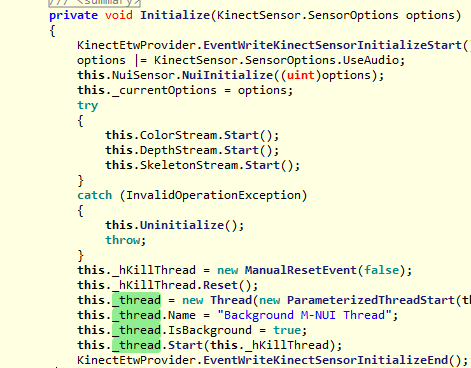
    Sure enough, the frame is processed a a different thread. And check out the Initialize method:

    image

    so it looks like I can’t put my XImage  into the elevationChange event and the frameReady event.  Instead, I can unhook the event handler and show the image:

    kinectSensor.AllFramesReady -= new EventHandler<AllFramesReadyEventArgs>(kinectSensor_AllFramesReady);
    XOutTheStreamingImage();
    if (kinectSensor.ElevationAngle < kinectSensor.MaxElevationAngle - 5)
    {
        kinectSensor.ElevationAngle = kinectSensor.ElevationAngle + 5;
    }

    Sure enough – that works – but it only flashes for a second.  I then tried and displayed the X for a second after the screen is invalidated:


    private void XOutTheStreamingImage()
    {
        this.InvalidateVisual();
        BitmapImage xImage = new BitmapImage();
        xImage.BeginInit();
        xImage.UriSource = new Uri(@"C:\Users\Jamie\Documents\Visual Studio 2010\Projects\Tff.KinectExample_Solution\Tff.KinectExample\X.PNG");
        xImage.EndInit();
        this.streamingVideoImage.Source = xImage;
        this.InvalidateVisual();
        Thread.Sleep(1000);
    }

    However, that doesn’t work.  The thread sleeps BEFORE the screen refreshes, so I am stuck with the last image from the Kinect.  I am thinking I am stuck – there is no way to:

    • Stop the Kiect from capturing images
    • Update the screen
    • Move the Kinect Angle
    • Start the Kiect to capture images
      The way the API is set up…
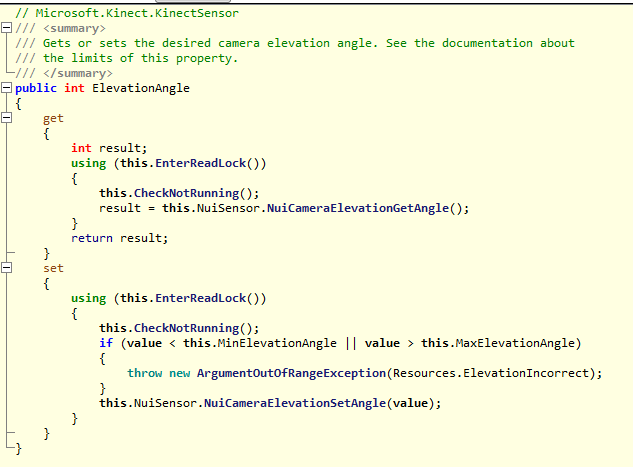
    I think I need my thinking chair…