Rotating a Signature: Part 2

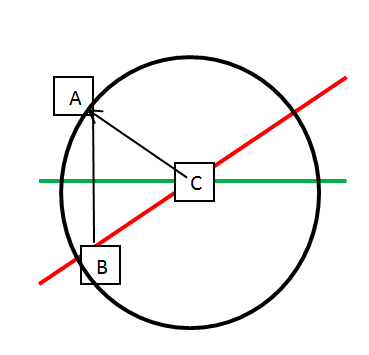
I know the center point and I need to rotate every point of the signature around the center point as the centerline rotates. I established the center point in this blog post.

image

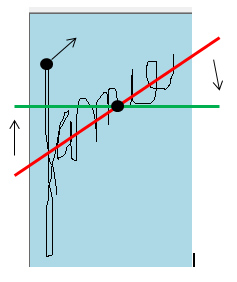
Replacing the black dots with some letters, I have this:

image

Where Line AC is the same distance as Line A’C.  They are 2 points on a circle around C with the line as the radius:

image

In addition, you can drop a vertical line from A until its Y equals the Y in the center line.  The distance between LineAB is then known – the difference in Y from the center line that shares the same X Coordinate.

image

Now that the length of LineAC and LineAB is known, the LineBC can be calculated using the Pythagoram theorem.

Then, the A can be moved along its arc with LineAB and LineBC kept constant.  The rotation stops when the Y of Point B is equal to the Y of the horizontal line.

image


At least, that it what I think.  I started with a simple test for the distance:

[TestMethod()]
[DeploymentItem("Tff.Signature.Comparison.dll")]
public void GetDistanceBetweenTwoPoints_SamePoints_ReturnsZero()
{
    ScatterplotComparisonFactory_Accessor target = new ScatterplotComparisonFactory_Accessor();
    Point pointOne = new Point(1, 1);
    Point pointTwo = new Point(1, 1);
    Double expected = 0.0;
    Double actual = target.GetDistanceBetweenTwoPoints(pointOne, pointTwo);
    Assert.AreEqual(expected, actual);
}

I then wrote my function:

private Double GetDistanceBetweenTwoPoints(Point pointOne, Point pointTwo)
{
    Int32 differenceBetweenXs = pointOne.X - pointTwo.X;
    Int32 differentBetweenYs = pointOne.Y - pointTwo.Y;
    Double differenceBetweenXsSquared = differenceBetweenXs * differenceBetweenXs;
    Double differentBetweenYsSquared = differentBetweenYs * differentBetweenYs;
    Double SumOfXandYSquared = differenceBetweenXsSquared + differentBetweenYsSquared;
    return Math.Sqrt(SumOfXandYSquared);
}

It ran green so I added some additional tests – and they were also green to go

[TestMethod()]
[DeploymentItem("Tff.Signature.Comparison.dll")]
public void GetDistanceBetweenTwoPoints_SameX_ReturnsExpected()
{
    ScatterplotComparisonFactory_Accessor target = new ScatterplotComparisonFactory_Accessor();
    Point pointOne = new Point(1, 1);
    Point pointTwo = new Point(1, 2);
    Double expected = 1.0;
    Double actual = target.GetDistanceBetweenTwoPoints(pointOne, pointTwo);
    Assert.AreEqual(expected, actual);
}

[TestMethod()]
[DeploymentItem("Tff.Signature.Comparison.dll")]
public void GetDistanceBetweenTwoPoints_DifferentXAndY_ReturnsExpected()
{
    ScatterplotComparisonFactory_Accessor target = new ScatterplotComparisonFactory_Accessor();
    Point pointOne = new Point(1, 4);
    Point pointTwo = new Point(4, 0);
    Double expected = 5.0;
    Double actual = target.GetDistanceBetweenTwoPoints(pointOne, pointTwo);
    Assert.AreEqual(expected, actual);
}

Now that I have AC, I need to calculate AB.  I looked at my test and realized I already have the calculation – all I have to is fine the point on the center line whose Y matches point A’s Y.  That will be the subject of my next post…

Rotating a Signature: Part 1

For the next step of my signature analysis, I need to rotate the signatures so that both the compared and the comparee signatures are on the same horizontal plain.  To rotate the signatures, I need to find the center line (which I did in this blog post)  and then rotate that line to horizontal with all of the signature’s points keeping the exact same relationship to the center line.

image

To that end, I need to find the center point of the signature.  I created my first unit test like this:

[TestMethod()]
[DeploymentItem("Tff.Signature.Comparison.dll")]
public void GetCenterPoint_OddNumberOfPoints_ReturnsCenterPoint()
{
    ScatterplotComparisonFactory_Accessor target = new ScatterplotComparisonFactory_Accessor();
    List<Point> points = new List<Point>();
    points.Add(new Point(0, 0));
    points.Add(new Point(1, 1));
    points.Add(new Point(2, 2));

    Point expected = new Point(1,1);
    Point actual = target.GetCenterPoint(points);
    Assert.AreEqual(expected, actual);
}

I then wrote enough production to pass this test:

private Point GetCenterPoint(List<Point> comparePoints)
{
    Int32 totalX = 0;
    Int32 totalY = 0;
    Int32 totalCount = 0;

    foreach (Point point in comparePoints)
    {
        totalX += point.X;
        totalY += point.Y;
        totalCount += 1;
    }

    Int32 averageX = (Int32)(totalX / totalCount);
    Int32 averageY = (Int32)(totalY / totalCount);

    return new Point(averageX, averageY);
}

Sure enough: GreenToGo:

image

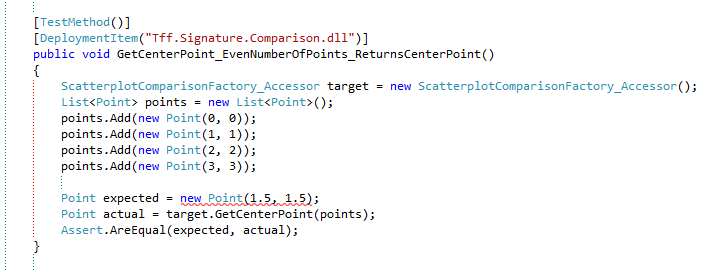
I then wrote a test for a list of 4 points and quickly realize that I can’t calculate the center point for a list that contains an even-number of points:

image

Sounds like an exception to me.  I altered the test like so

[TestMethod()]
[DeploymentItem("Tff.Signature.Comparison.dll")]
[ExpectedException(typeof(ArgumentException))]
public void GetCenterPoint_EvenNumberOfPoints_ThrowsArgumentException()
{
    ScatterplotComparisonFactory_Accessor target = new ScatterplotComparisonFactory_Accessor();
    List<Point> points = new List<Point>();
    points.Add(new Point(0, 0));
    points.Add(new Point(1, 1));
    points.Add(new Point(2, 2));
    points.Add(new Point(3, 3));

    Point actual = target.GetCenterPoint(points);
    Assert.Fail("Should not get here.");
}

and then the production code:

private Point GetCenterPoint(List<Point> comparePoints)
{
    if (comparePoints.Count % 2 == 0)
    {
        throw new ArgumentException("comparePoints must have an even number.");
    }

    Int32 totalX = 0;
    Int32 totalY = 0;
    Int32 totalCount = 0;

    foreach (Point point in comparePoints)
    {
        totalX += point.X;
        totalY += point.Y;
        totalCount += 1;
    }

    Int32 averageX = (Int32)(totalX / totalCount);
    Int32 averageY = (Int32)(totalY / totalCount);

    return new Point(averageX, averageY);
}

And I was greentogo.

So then I thought – what about a line where the center point is not included in the list?

[TestMethod()]
[DeploymentItem("Tff.Signature.Comparison.dll")]
[ExpectedException(typeof(ArgumentException))]
public void GetCenterPoint_OddNumberOfNonConsecutivePoints_ReturnsCenterPoint()
{
    ScatterplotComparisonFactory_Accessor target = new ScatterplotComparisonFactory_Accessor();
    List<Point> points = new List<Point>();
    points.Add(new Point(0, 0));
    points.Add(new Point(1, 1));
    points.Add(new Point(2, 2));
    points.Add(new Point(5, 5));
    points.Add(new Point(6, 6));

    Point expected = new Point(3, 3);
    Point actual = target.GetCenterPoint(points);
    Assert.AreEqual(expected, actual);
}

I got Red

image

The problem is that list of points that I am using to represent the line may or may not include the true center point.  But that is not the center points problem – its only job is to tell me the center point for an odd number of points.  The problem is that there is a rounding assumption in the code – 1/2 way between 0 and 6 is three – the values of the other numbers are irrelevant.  I then refactored the GetCenterPoint like so:

private Point GetCenterPoint(List<Point> comparePoints)
{
    if (comparePoints.Count % 2 == 0)
    {
        throw new ArgumentException("comparePoints must have an odd number.");
    }

    Point lowestPoint = comparePoints.Min();
    Point highestPoint = comparePoints.Max();

    Double MidX = (highestPoint.X + lowestPoint.X)/2;
    Double MidY = (highestPoint.Y + lowestPoint.Y)/2;

    Int32 MidXRounded = (Int32)MidX;
    Int32 MidYRounded = (Int32)MidY;
    return new Point(MidXRounded, MidYRounded);
}

And I was GreenToGo.

I then realized that GetCenterPoint implicitly violates the SRP – it doesn’t matter if there is a even or odd number in the compare points – just as long as there is at least 1 point.  The even/odd is only if I want to see if the center point of the line is in the list of points that I am using to represent the line.  That is another function – and another set of tests.  I refactored the GetCenterPoint like this:

if (comparePoints.Count == 0)
 {
     throw new ArgumentException("comparePoints has no points.");
 }

And changed my ArguementExceptionTest:

[TestMethod()]
[DeploymentItem("Tff.Signature.Comparison.dll")]
[ExpectedException(typeof(ArgumentException))]
public void GetCenterPoint_NoPointsInArgument_ThrowsArgumentException()
{
    ScatterplotComparisonFactory_Accessor target = new ScatterplotComparisonFactory_Accessor();
    List<Point> points = new List<Point>();
    Point actual = target.GetCenterPoint(points);
    Assert.Fail("Should not get here.");
}

And I was still green everywhere.  With the center point established, I was ready to tackle the rotation of the points around that center point.

Whoop! My Windows Phone App Store Check Came Today!

WP_000462


I know it is hard to read  – I just wanted to show the full effect of $3.46…

Why you should never use code from MSDN

I think part of the problem with bad code is the habit to copy/paste samples from MSDN.

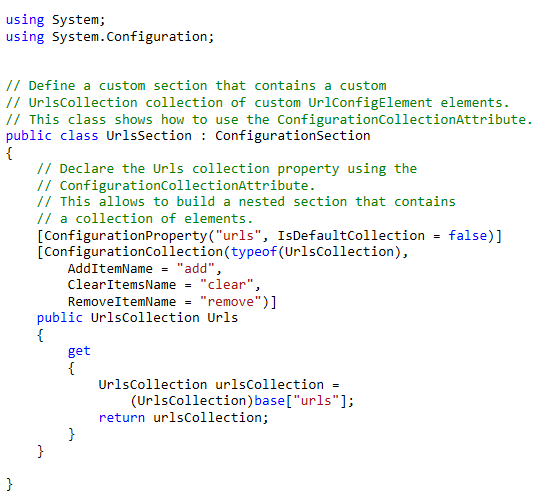
For example, consider this example.

Explanatory Comments

image

I agree that Microsoft should put explanatory comments into the code – the code is a sample on how to do something.   The problem is that someone who doesn’t know better will copy/paste the entire block into their solution.  I think Microsoft could help its developers by putting a provision at the top of the sample:

image

The cynic in me would then expect to see that warning also copy/pasted into someone’s project.  Perhaps the copy/paste button on the page could filter the comments.

Big Blocks Of Code

Another problem with the MSDN code “as-is” is that the code is one big block – there are three classes put into 1 block.  It wouldn’t kill Microsoft to put each class into their own block.  The MSDN explanations could then be broken up and when you copy/paste the code, you only get 1 class at a time.  As it stands, all of the explanations is in 1 big paragraph at the top of the 1 big code sample.  A step by step approach might be more helpful – and promote better code.

Constructor Chaining

Finally, MSDN doesn’t chain the constructors of the example. 

public UrlConfigElement(String name, String url)
{
    this.Name = name;
    this.Url = url;
}

public UrlConfigElement()
{

    this.Name = "Contoso";
    this.Url = "http://www.contoso.com";
    this.Port = 0;
}

Should be

public UrlConfigElement(String name, String url)
{
    this.Name = name;
    this.Url = url;
    this.Port = 0;
}

public UrlConfigElement()
    : this("Contoso", "http://www.contoso.com")
{
    
}


That is just sloppy coding and should be fixed…

Property Assignment

I am a big fan of separation of concerns and layering when it comes to application architecture.  Using a dedicated service layer means that all client/calling layers are insulated from all dependencies past the service layer.  In a usual n-tier architecture, that means that the layer(s) calling the service layer have no idea about the data tier behind the service.

Because of that, you can not use the concrete classes from the permanent data store as the data structures that carry data among the layers.  Enter in the EF POCO generator!  Using this add-in, you get EF integrated POCOs that are already WCF-ifed.

The downside is the update (or so I thought on Friday) – because you are using a different instance between service calls, you have to rehydrate a new object, assign in the new values, and then persist.  This is very much the problem of EF classes when EF came out.

So I created a test project to see if I could use System.Reflection to help me do that assignment.  I created a project with the following two classes:

public class Person
{
    public int PersonId { get; set; }
    public String PersonName { get; set; }
}
public class Student: Person
{
    public String SchoolName { get; set; }
}

Following TDD, I created a Test Project with the following test:

[TestMethod()]
public void CreateStudentFromPerson_PersonNameAssigns_Test()
{
    Person person = new Person();
    person.PersonId = 0;
    person.PersonName = "Test";

    StudentFactory studentFactory = new StudentFactory();
    Student student = studentFactory.CreateStudentFromPerson(person);

    string expected = person.PersonName;
    string actual = student.PersonName;

    Assert.AreEqual(actual, expected);
}

I then implemented the factory:

public Student CreateStudentFromPerson(Person person)
{
    Student student = new Student();

    PropertyInfo[] personPropertyInfos = typeof(Person).GetProperties();
    PropertyInfo[] studentPropertyInfos = typeof(Student).GetProperties();

    PropertyInfo studentPropertyInfo = null;
    foreach (PropertyInfo personPropertyInfo in personPropertyInfos)
    {
        studentPropertyInfo = studentPropertyInfos.FirstOrDefault(spi => spi.Name == personPropertyInfo.Name);
        if (studentPropertyInfo != null)
        {
            object personValue = personPropertyInfo.GetValue(person, null);
            studentPropertyInfo.SetValue(student, personValue, null);
        }
    }
    return student;
}

Sure enough, the test ran green.

I then wanted to implement a generic method that would assign property values over regardless of the types in the arguments:

public Student CreateStudentFromPerson(Person person)
{
    Student student = new Student();
    return (Student)AssignObjectPropertyValues(person, student);
}

public Object AssignObjectPropertyValues(Object baseObject, Object targetObject)
{
    PropertyInfo[] basePropertyInfos = baseObject.GetType().GetProperties();
    PropertyInfo[] targetPropertyInfos = targetObject.GetType().GetProperties(); ;

    PropertyInfo targetPropertyInfo = null;
    foreach (PropertyInfo basePropertyInfo in basePropertyInfos)
    {
        targetPropertyInfo = targetPropertyInfos.FirstOrDefault(spi => spi.Name == basePropertyInfo.Name);
        if (targetPropertyInfo != null)
        {
            object basePropertyValue = basePropertyInfo.GetValue(baseObject, null);
            targetPropertyInfo.SetValue(targetObject, basePropertyValue, null);
        }
    }

    return targetObject;
}

And wouldn’t you know: Green to go <trademark pending>!

image

MSDN warns about the performance cost, but I have to believe that my compiler is so good that there is negligible difference.

So then there was one more requirement, all Strings needed to be encrypted.  I created another test like so:

[TestMethod()]
public void CreateStudentFromPerson_PersonNameAssignsEncrypted_Test()
{
    Person person = new Person();
    person.PersonId = 0;
    person.PersonName = "Test";

    StudentFactory studentFactory = new StudentFactory();
    Student student = studentFactory.CreateStudentFromPerson(person,true);

    string expected = "XXXXX";
    string actual = student.PersonName;

    Assert.AreEqual(actual, expected);
}

with the “XXXXX” serving as a proxy for the actual encryption.

I then overloaded the method in the factory like so:

public Object AssignObjectPropertyValues(Object baseObject, Object targetObject, Boolean useEncryption)
{
    PropertyInfo[] basePropertyInfos = baseObject.GetType().GetProperties();
    PropertyInfo[] targetPropertyInfos = targetObject.GetType().GetProperties(); ;

    PropertyInfo targetPropertyInfo = null;
    foreach (PropertyInfo basePropertyInfo in basePropertyInfos)
    {
        targetPropertyInfo = targetPropertyInfos.FirstOrDefault(spi => spi.Name == basePropertyInfo.Name);
        if (targetPropertyInfo != null)
        {
            object basePropertyValue = basePropertyInfo.GetValue(baseObject, null);
            if (targetPropertyInfo.GetType() == typeof(String) && useEncryption)
            {
                targetPropertyInfo.SetValue(targetObject, "XXXXX", null);
            }
            else
            {
                targetPropertyInfo.SetValue(targetObject, basePropertyValue, null);
            }
        }
    }

    return targetObject;
}

and had the original method chain:

public Student CreateStudentFromPerson(Person person, Boolean useEncryption)
{
    Student student = new Student();
    return (Student)AssignObjectPropertyValues(person, student, useEncryption);
}

My test ran red:

image

Going back to the factory, I change the if condition to this:

if (targetPropertyInfo.PropertyType.Name == "String" && useEncryption)

And I was green to go <trademark pending>.

I then realized that Bob Martin would yell at me because I have boolean arguments.  I then created an interface called IEncryptable like so:

public interface IEncryptable
{
    Boolean IsEncrypted { get; set; }
}

I then adjusted my method signatures to remove the boolean argument.

public Student CreateStudentFromPerson(Person person)
{
    Student student = new Student();
    return (Student)AssignObjectPropertyValues(person, student);
}

and adjusted the AssignObjectPropertyValues to check if the targettype implements IEncryptable:

object basePropertyValue = basePropertyInfo.GetValue(baseObject, null);
 Type targetObjectType = targetObject.GetType();
 if(targetObjectType.GetInterfaces().Contains(typeof(IEncryptable)))
 {
     if (targetPropertyInfo.PropertyType.Name == "String")
     {
         targetPropertyInfo.SetValue(targetObject, "XXXXX", null);
     }
 }
 else
 {
     targetPropertyInfo.SetValue(targetObject, basePropertyValue, null);
 }

Sure enough, the Encrypt Unit test passed but the unencrypt did not

image

Time to refactor!  I added in a check for IEncryptable like so

if(targetObjectType.GetInterfaces().Contains(typeof(IEncryptable)))
{
    PropertyInfo encryptedPropertyInfo = targetPropertyInfos.FirstOrDefault(tpi => tpi.Name == "IsEncrypted");
    Boolean isEncrypted = (Boolean)encryptedPropertyInfo.GetValue(targetObject,null);

    if (isEncrypted)
    {
        if (targetPropertyInfo.PropertyType.Name == "String")
        {
            targetPropertyInfo.SetValue(targetObject, "XXXXX", null);
        }
        else
        {
            targetPropertyInfo.SetValue(targetObject, basePropertyValue, null);
        }
    }
    else
    {
        targetPropertyInfo.SetValue(targetObject, basePropertyValue, null);
    }
}
else
{
    targetPropertyInfo.SetValue(targetObject, basePropertyValue, null);
}

and I was green to go.  I then noticed all of the nested if..thens and realized I should make some additional classes – EncryptedStudent perhaps.  That would cut down on the cyclomic complexity.

After all that, I was informed of the ApplyCurrentValues method.  This makes the application part of my solution useless – but not the encryption…


Signature Project: Slope of the Signature (Part 1)

Continuing the signature project, I then wanted to calculate the slope of each signature to then normalize the different slopes to determine the match % of the signatures’ scatterplots.  To that end, I needed to figure out the “center” line of each signature’s scatterplot.  Remembering the “Sum of Least Square” method from biostatistics 20 years ago, I realized that I needed to plot my best “guess of the line with 50% of the points above the line and 50% below.  I could then create the line based on this Y coordinate and the far left and right X Coordinate.  Note that I could then figure out the dispersion of the points away from this line.  Perhaps that could then tell me if someone signed the second signature more messily and were perhaps under duress.  Leaving that analysis for another day – I just wanted to figure out the center line.

Following TDD, I created a test:

[TestMethod()]
[DeploymentItem("Tff.Signature.Comparison.dll")]
public void GetCenterYPoint_TwoPoints_ReturnsAverage_Test()
{
    ScatterplotComparisonFactory_Accessor target = new ScatterplotComparisonFactory_Accessor();
    List<Point> points = new List<Point>();
    points.Add(new Point(0, 0));
    points.Add(new Point(0, 2));

    int expected = 1;
    int actual = target.GetCenterYPoint(points);
    Assert.AreEqual(expected, actual);
}

I then wrote the GetCenterYPoint method (note the syntax to access private methods):

private Int32 GetCenterYPoint(List<Point> points)
{
    int totalYValue = 0;
    foreach (Point point in points)
    {
        totalYValue += point.Y;
    }
    return (Int32)(totalYValue / points.Count);
}

The test ran green so I tackled the Left and Right X Points:

[TestMethod()]
[DeploymentItem("Tff.Signature.Comparison.dll")]
public void GetLeftMostXPoint_TwoPoints_ReturnsLowest_Test()
{
    ScatterplotComparisonFactory_Accessor target = new ScatterplotComparisonFactory_Accessor();
    List<Point> points = new List<Point>();
    points.Add(new Point(1, 0));
    points.Add(new Point(0, 2));

    int expected = 0;
    int actual = target.GetLeftMostXPoint(points);
    Assert.AreEqual(expected, actual);
}

[TestMethod()]
[DeploymentItem("Tff.Signature.Comparison.dll")]
public void GetRightMostXPoint_TwoPoints_ReturnsHighest_Test()
{
    ScatterplotComparisonFactory_Accessor target = new ScatterplotComparisonFactory_Accessor();
    List<Point> points = new List<Point>();
    points.Add(new Point(0, 0));
    points.Add(new Point(1, 2));

    int expected = 1;
    int actual = target.GetRightMostXPoint(points);
    Assert.AreEqual(expected, actual);
}

The methods are pretty much what you expect:

private Int32 GetLeftMostXPoint(List<Point> points)
{
    int mostLeftXValue = points[0].X;
    foreach (Point point in points)
    {
        if (point.X < mostLeftXValue)
        {
            mostLeftXValue = point.X;
        }
    }
    return mostLeftXValue;
}

private Int32 GetRightMostXPoint(List<Point> points)
{
    int mostRightXValue = points[0].X;
    foreach (Point point in points)
    {
        if (point.X > mostRightXValue)
        {
            mostRightXValue = point.X;
        }
    }
    return mostRightXValue;
}

Those also ran green so I created the CenterLineOfPoints tests.  The first was a Horizontal line should return the same value:


[TestMethod()]
[DeploymentItem("Tff.Signature.Comparison.dll")]
public void GetCenterLineOfPoints_HorizontalLine_ReturnsSame_Test()
{
    ScatterplotComparisonFactory_Accessor target = new ScatterplotComparisonFactory_Accessor();

    List<Point> points = new List<Point>();
    points.Add(new Point(0, 0));
    points.Add(new Point(4, 0));

    Line expected = new Line(0, 0, 4, 0);
    Line actual = target.GetCenterLineOfPoints(points);
    Assert.AreEqual(expected, actual);
}

I wrote my method:

private Line GetCenterLineOfPoints(List<Point> points)
{
    Point leftPoint = new Point();
    leftPoint.X = GetLeftMostXPoint(points);
    leftPoint.Y = GetCenterYPoint(points);

    Point rightPoint = new Point();
    rightPoint.X = GetRightMostXPoint(points);
    rightPoint.Y = leftPoint.Y;

    return new Line(leftPoint, rightPoint);
}

It ran green, so I ran the next test – two vertical lines should return the average distance between them:

[TestMethod()]
[DeploymentItem("Tff.Signature.Comparison.dll")]
public void GetCenterLineOfPoints_VerticalLine_ReturnsSamePointInMiddle_Test()
{
    ScatterplotComparisonFactory_Accessor target = new ScatterplotComparisonFactory_Accessor();

    List<Point> points = new List<Point>();
    points.Add(new Point(0, 0));
    points.Add(new Point(0, 4));

    Line expected = new Line(0, 2, 0, 2);
    Line actual = target.GetCenterLineOfPoints(points);
    Assert.AreEqual(expected, actual);
}

That also ran green (Note that some TDDers put both of those tests in the same test method.  I don’t like to do that – even if it means red/green/refactor crosses several tests.  In any event, I then added the final test to confirm the awesomeness of my calculation.  A line at 45 degree angle should return the same line with a .5 slope.

[TestMethod()]
[DeploymentItem("Tff.Signature.Comparison.dll")]
public void GetCenterLineOfPoints_45degreeSlopeLine_ReturnsAverage_Test()
{
    ScatterplotComparisonFactory_Accessor target = new ScatterplotComparisonFactory_Accessor();

    List<Point> points = new List<Point>();
    points.Add(new Point(0, 0));
    points.Add(new Point(4, 4));

    Line expected = new Line(0, 0, 4, 4);
    Line actual = target.GetCenterLineOfPoints(points);
    Assert.AreEqual(expected, actual);
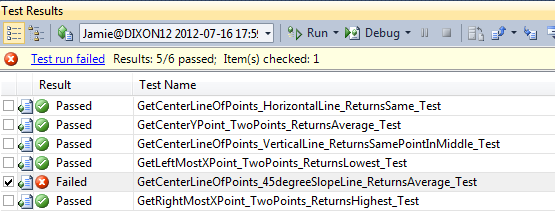
}

And I ran it and got RED!  Crap!
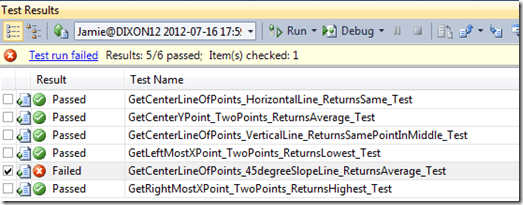
image

I am doing something wrong in my calculation.  It was pretty obvious, the Y point for that center line is NOT the same for both points.  If it was, the slope would always be 0.0. What I need to do was channel my inner Gauss and use his formula for calculating SLS.  I then binged around and found this great step by step article to the finding the center line.

Forgetting TDD for a second, I attempted to implement the formula using C#.  I came up with this:

private Line GetCenterLineViaSumOfLeastSquares(List<Point> points)
{
    Int32 sumOfXValue = 0;
    Int32 sumOfYValue = 0;
    Int32 sumOfXValueSquared = 0;
    Int32 sumOfXValueMultipledByYValue = 0;
    Int32 numberOfPoints = 0;

    foreach (Point point in points)
    {
        sumOfXValue += point.X;
        sumOfYValue += point.Y;
        sumOfXValueSquared += point.X ^ 2;
        sumOfXValueMultipledByYValue += point.X * point.Y;
        numberOfPoints ++;
    }
    Double xMean = sumOfXValue / numberOfPoints;
    Double yMean = sumOfYValue / numberOfPoints;

    Double numerator = sumOfXValueMultipledByYValue - ((sumOfXValue * sumOfYValue) / numberOfPoints);
    Double denomiator = sumOfXValueSquared - ((sumOfXValue ^ 2)/numberOfPoints);
    Double slope = numerator / denomiator;
    Double yIntercept = yMean - (slope) * sumOfXValue;

    Point startPoint = new Point(0, (Int32)yIntercept);
    Point endPoint = new Point(0, 0);

    return new Line(startPoint, endPoint);
}

Note that I didn’t know how to calculate the Xaxis intercept yet, so I left it as 0,0.  Some of you might ask why did I do this

Double xMean = sumOfXValue / numberOfPoints;

When I could have done this?

Double xMean = sumOfXValue / points.Count;

In a word.  Readability.  Using explanatory variables does not waste any meaningful processing time, and the code is more readable – it matches the mathematical formula’s text.

In any event, I then realized that I don’t need a line to represent the middle line – I just needed the slope.  And lookie right there – I have a variable called… slope.  I changed the method to return the slope of the middle line:

private Double GetSlopeOfScatterplot(List<Point> points)
{
    //Bunch of code
    return numerator / denomiator;

}

Jumping back to TDD, I realized I need a bunch of tests to verify that my slope calculation is correct.   I deleted all of my prior work – thank goodness for source control and here is what I came up with:

[TestMethod()]
[DeploymentItem("Tff.Signature.Comparison.dll")]
public void GetSlopeOfScatterplot_HorizontalLine_ReturnsZero_Test()
{
    ScatterplotComparisonFactory_Accessor target = new ScatterplotComparisonFactory_Accessor();

    List<Point> points = new List<Point>();
    points.Add(new Point(0, 2));
    points.Add(new Point(1, 2));
    points.Add(new Point(3, 2));
    points.Add(new Point(4, 2));

    Double expected = 0.0;
    Double actual = target.GetSlopeOfScatterplot(points);
    Assert.AreEqual(expected, actual);
}


[TestMethod()]
[ExpectedException(typeof(DivideByZeroException))]
[DeploymentItem("Tff.Signature.Comparison.dll")]
public void GetSlopeOfScatterplot_VerticalLine_ReturnsUndefined_Test()
{
    ScatterplotComparisonFactory_Accessor target = new ScatterplotComparisonFactory_Accessor();

    List<Point> points = new List<Point>();
    points.Add(new Point(2, 0));
    points.Add(new Point(2, 1));
    points.Add(new Point(2, 2));
    points.Add(new Point(2, 3));

    Double expected = 0.0;
    Double actual = target.GetSlopeOfScatterplot(points);
    Assert.AreEqual(expected, actual);
}

[TestMethod()]
[DeploymentItem("Tff.Signature.Comparison.dll")]
public void GetSlopeOfScatterplot_45DegreeLine_ReturnsOne_Test()
{
    ScatterplotComparisonFactory_Accessor target = new ScatterplotComparisonFactory_Accessor();

    List<Point> points = new List<Point>();
    points.Add(new Point(0, 0));
    points.Add(new Point(1, 1));
    points.Add(new Point(2, 2));
    points.Add(new Point(3, 3));

    Double expected = 1.0;
    Double actual = target.GetSlopeOfScatterplot(points);
    Assert.AreEqual(expected, actual);
}


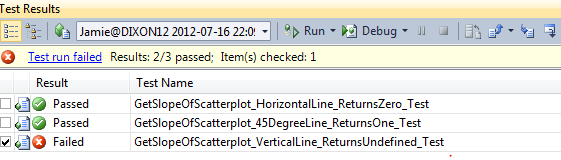
The thing – The vertical line is coming back as 0 – when it should be divideByZero.  Crap X 2!

!image
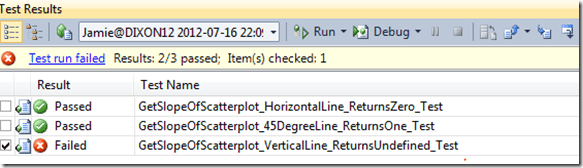
I then went back and looked at my code and I realized I made a rookie mistake!

sumOfXValueSquared += (point.X ^ 2);

is wrong and

sumOfXValueSquared += (point.X * point.X);

is right.  I then got this exception:

image

NaN.  Wahoo!!!!  I thought I would get a DividByZeroException, but I was wrong.  I then used the Double.Nan function in that unit test

[TestMethod()]
[DeploymentItem("Tff.Signature.Comparison.dll")]
public void GetSlopeOfScatterplot_VerticalLine_ReturnsUndefined_Test()
{
    ScatterplotComparisonFactory_Accessor target = new ScatterplotComparisonFactory_Accessor();

    List<Point> points = new List<Point>();
    points.Add(new Point(2, 0));
    points.Add(new Point(2, 1));
    points.Add(new Point(2, 2));
    points.Add(new Point(2, 3));

    Boolean expected = true;
    Boolean actual = Double.IsNaN(target.GetSlopeOfScatterplot(points));
    Assert.AreEqual(expected, actual);
}

and I was “green to go” <trademark pending>
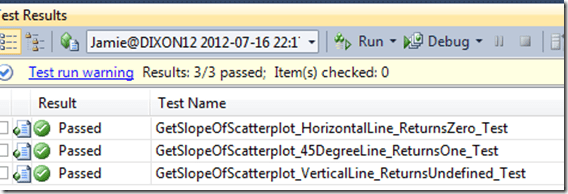
image

Now I can compare 2 signatures and analyze the slope between them.
Signature Comparison

Following the signature capture projects, I decided to make a program that analyzes the signature to see how close two different signatures match.

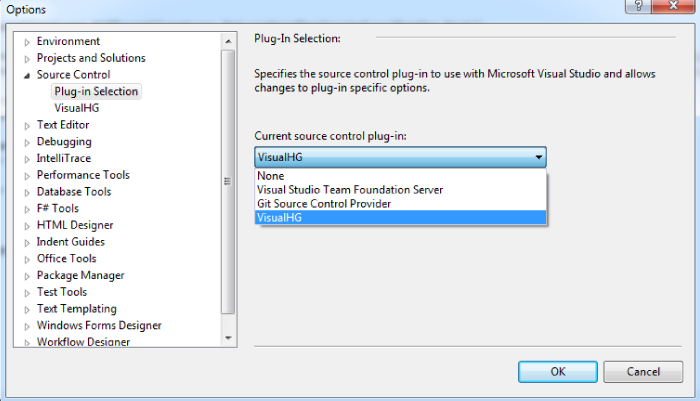
My first step was create an account on bitbucket.  The reason I chose bitbucket over github was because bitbucket allows for private repros.  Also, I wanted to try out Mercurial.  I installed the most recent version on my machine and then added the VisualHG extension to Visual Studio 2010.  Note that you have to change your source control plug in Visual Studio (Tools –> Source Control)

image

I then was pushing/pulling my repro to bitbucket.  There are still some small things I don’t like (for example, having to enter your credentials each push/pull), but on the whole Mercurial is easier to use in Visual Studio than git and bitbucket is much better than github.

In any event, once I set up my source control, I consolidated all of my projects having to do with this signature series and renamed from things.

image

The once thing I don’t like is that the word ’signature’ is in both the namespace and is a class name – so I get conflicts.  I am not sure what I want to rename the class so I left it ‘as is’ right now.  But as Bob Martin says “with these modern/fancy IDEs, renaming a class should take no time at all.”

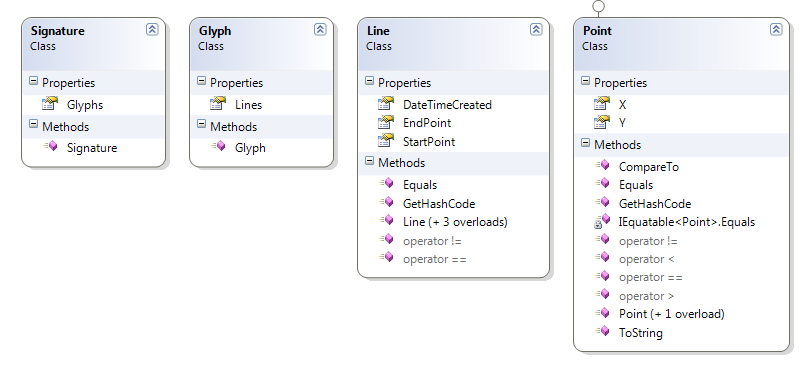
I then refactored my object graph:

image

Note that I discarded using System.Drawing.Line and System.Drawing.Point from earlier projects so my analysis program would not have a dependency on System.Drawing.  I spun up the unit tests for line and class in a separate project:

image

and got pretty good code coverage:

image

Note that I didn’t write unit tests for things that the API handles – like the constructor.

With the support classes ready to go, I then tackled the signature analysis.  I first started doing a line analysis – basically starting with a base signature and then layering over a second signature to see how close the lines match.  Because the signatures might be different sizes and on different slopes, I thought I would have to adjust the second signature to match the base’s dimensions.  I would do this by matching the left and top point of both signatures and moving the second one’s lines over to that adjustment factor.

I then realized that I don’t know enough about signature analysis to have “THE” solution to code.  I then adjusted my project to reflect that there might be many different ways to analyze a signature and I should use the power of polymorphism to help me.  I then threw away all of the analysis code that I was working on to get to “THE” solution.

I created an interface called IComparisonFactory like so (note the fully qualified name – I really need to change that)

public interface IComparisonFactory
{
    double CompareSignatures(Tff.Signature.Support.Signature signature1, Tff.Signature.Support.Signature signature2, int levelOfFreedom);
}

I then created an abstract base class that has some functions that do the low level plumbing:

public abstract class BaseComparisonFactory
{

    protected List<Line> GetAllLinesInASignature(Tff.Signature.Support.Signature signature)
    {
        List<Line> lines = new List<Line>();
        List<Glyph> glyphs = signature.Glyphs;
        foreach (Glyph glyph in signature.Glyphs)
        {
            foreach (Line line in glyph.Lines)
            {
                lines.Add(line);
            }
        }

        return lines;
    }
    

    protected List<Point> GetAllPointsInASignature(Tff.Signature.Support.Signature signature)
    {
        List<Point> points = new List<Point>();
        List<Line> lines = GetAllLinesInASignature(signature);
        foreach (Line line in lines)
        {
            points.Add(line.StartPoint);
            points.Add(line.EndPoint);
        }
        return points;
    }
}

I then created my 1st attempt an analyzing two signatures by looking at the dispersal of their points – a scatterplot analysis.

public class ScatterplotComparisonFactory: BaseComparisonFactory, IComparisonFactory
{
    public Double CompareSignatures(Tff.Signature.Support.Signature signature1, Tff.Signature.Support.Signature signature2, Int32 levelOfFreedom)
    {

        Int32 pointTrys = 0;
        Int32 pointHits = 0;

        List<Point> basePoints = GetAllPointsInASignature(signature1);
        List<Point> comparePoints = GetAllPointsInASignature(signature2);

        List<Point> normalizedBasePoints = basePoints.Distinct().ToList<Point>();
        normalizedBasePoints.Sort(ComparePoints); 

        List<Point> normalizedComparePoints = NormalizePoints(comparePoints, levelOfFreedom);
        normalizedComparePoints.Sort(ComparePoints);

        foreach (Point basePoint in normalizedBasePoints)
        {
            foreach (Point comparePoint in normalizedComparePoints)
            {
                if (basePoint == comparePoint)
                {
                    pointHits++;
                    break;
                }
            }
            pointTrys++;
        }

        Double returnValue = ((Double)pointHits / (Double)pointTrys);
        return returnValue;
    }

    private List<Point> NormalizePoints(List<Point> comparePoints, int levelOfFreedom)
    {
        List<Point> normalizedPoints = CreateNormalizedPoints(comparePoints, levelOfFreedom);
        normalizedPoints = RemoveNegativePoints(normalizedPoints);
        return normalizedPoints;
    }

    private List<Point> CreateNormalizedPoints(List<Point> comparePoints, int levelOfFreedom)
    {
        List<Point> normalizedPoints = new List<Point>();
        foreach (Point basePoint in comparePoints)
        {
            normalizedPoints.Add(basePoint);
            for (int i = 1; i <= levelOfFreedom; i++)
            {
                normalizedPoints.Add(new Point(basePoint.X - i, basePoint.Y - i));
                normalizedPoints.Add(new Point(basePoint.X - i, basePoint.Y));
                normalizedPoints.Add(new Point(basePoint.X - i, basePoint.Y + i));
                normalizedPoints.Add(new Point(basePoint.X, basePoint.Y + i));
                normalizedPoints.Add(new Point(basePoint.X + i, basePoint.Y + i));
                normalizedPoints.Add(new Point(basePoint.X + i, basePoint.Y));
                normalizedPoints.Add(new Point(basePoint.X + i, basePoint.Y - 1));
                normalizedPoints.Add(new Point(basePoint.X, basePoint.Y - 1));
            }
        }

        return normalizedPoints;
    }

    private List<Point> RemoveNegativePoints(List<Point> normalizedPoints)
    {
        List<Point> points = new List<Point>();

        foreach (Point point in normalizedPoints)
        {
            if (point.X >= 0 && point.Y >= 0)
            {
                points.Add(point);
            }
        }

        return points;
    }

    private static int ComparePoints(Point point01, Point point02)
    {
        if (point01 == point02)
        {
            return 0;
        }
        if(point01.X == point02.X)
        {
            if (point01.Y < point02.Y)
            {
                return -1;
            }
            else
            {
                return 1;
            }
        }

        if (point01.X < point02.X)
        {
            return -1;
        }
        else
        {
            return 1;
        }

    }

}

Note that the ComparePoints function allows me to call .Sort().

The levelOfFreedom argument takes the second signature’s points and increases them to all adjacent points.  I also remove duplicate points, sort them (first X than Y), and remove any point that is less than zero.

Instead of creating tests for each of the ComparisonFactories that I will create, I created a test class for ICompairisonFactory and injected in the implementation in the constructor.  I then ran the scatterplot though the tests to see if they pass basic analysis (same signature returns 1, etc…).

public class ScatterplotComparisonFactory: BaseComparisonFactory, IComparisonFactory
{
    public Double CompareSignatures(Tff.Signature.Support.Signature signature1, Tff.Signature.Support.Signature signature2, Int32 levelOfFreedom)
    {

        Int32 pointTrys = 0;
        Int32 pointHits = 0;

        List<Point> basePoints = GetAllPointsInASignature(signature1);
        List<Point> comparePoints = GetAllPointsInASignature(signature2);

        List<Point> normalizedBasePoints = basePoints.Distinct().ToList<Point>();
        normalizedBasePoints.Sort(ComparePoints); 

        List<Point> normalizedComparePoints = NormalizePoints(comparePoints, levelOfFreedom);
        normalizedComparePoints.Sort(ComparePoints);

        foreach (Point basePoint in normalizedBasePoints)
        {
            foreach (Point comparePoint in normalizedComparePoints)
            {
                if (basePoint == comparePoint)
                {
                    pointHits++;
                    break;
                }
            }
            pointTrys++;
        }

        Double returnValue = ((Double)pointHits / (Double)pointTrys);
        return returnValue;
    }

    private List<Point> NormalizePoints(List<Point> comparePoints, int levelOfFreedom)
    {
        List<Point> normalizedPoints = CreateNormalizedPoints(comparePoints, levelOfFreedom);
        normalizedPoints = RemoveNegativePoints(normalizedPoints);
        return normalizedPoints;
    }

    private List<Point> CreateNormalizedPoints(List<Point> comparePoints, int levelOfFreedom)
    {
        List<Point> normalizedPoints = new List<Point>();
        foreach (Point basePoint in comparePoints)
        {
            normalizedPoints.Add(basePoint);
            for (int i = 1; i <= levelOfFreedom; i++)
            {
                normalizedPoints.Add(new Point(basePoint.X - i, basePoint.Y - i));
                normalizedPoints.Add(new Point(basePoint.X - i, basePoint.Y));
                normalizedPoints.Add(new Point(basePoint.X - i, basePoint.Y + i));
                normalizedPoints.Add(new Point(basePoint.X, basePoint.Y + i));
                normalizedPoints.Add(new Point(basePoint.X + i, basePoint.Y + i));
                normalizedPoints.Add(new Point(basePoint.X + i, basePoint.Y));
                normalizedPoints.Add(new Point(basePoint.X + i, basePoint.Y - 1));
                normalizedPoints.Add(new Point(basePoint.X, basePoint.Y - 1));
            }
        }

        return normalizedPoints;
    }

    private List<Point> RemoveNegativePoints(List<Point> normalizedPoints)
    {
        List<Point> points = new List<Point>();

        foreach (Point point in normalizedPoints)
        {
            if (point.X >= 0 && point.Y >= 0)
            {
                points.Add(point);
            }
        }

        return points;
    }

    private static int ComparePoints(Point point01, Point point02)
    {
        if (point01 == point02)
        {
            return 0;
        }
        if(point01.X == point02.X)
        {
            if (point01.Y < point02.Y)
            {
                return -1;
            }
            else
            {
                return 1;
            }
        }

        if (point01.X < point02.X)
        {
            return -1;
        }
        else
        {
            return 1;
        }

    }

}

Here is the full suite:

image

Finally, I had everything in place to do an integration test.  I loaded some signatures into XML files and ran them through the integration tests.  Interestingly, the scatterplot seemed to work.

Case #1: Same Signature Compared To Itself (Same Person, Same Signature)

imageimage

returns

0 = 1.0

1= 1.0

2= 1.0

3= 1.0

4= 1.0

5= 1.0

6= 1.0

7= 1.0

8= 1.0

9= 1.0


Case #2: Two Signatures That Are Close To Each Other (Same Person, Different Times)

imageimage

0 = 0.0131578947368421

1 = 0.177631578947368

2 = 0.266447368421053

3 = 0.391447368421053

4 = 0.463815789473684

5 = 0.542763157894737

6 = 0.628289473684211

7 = 0.661184210526316

8 = 0.700657894736842

9 = 0.753289473684211


Case #3: Two Signatures That Are Not Close (Different People)

clip_image001clip_image001[4]


0 = 0

1 = 0.111842105263158

2 = 0.154605263157895

3 = 0.180921052631579

4 = 0.213815789473684

5 = 0.220394736842105

6 = 0.299342105263158

7 = 0.305921052631579

8 = 0.319078947368421

9 = 0.345394736842105

Note that using a 9 point degree of freedom, the same person signature is at 75% matching, but the different person ones are at 35%….

Pretty cool.  Next steps will be the adjust for slope and location on the canvas.  Also, Rob Seder suggested that the Line should include a DateTime stamp, because the meter/pace of someone’s signature is also important.  I’ll add that analysis in too – as well as a line comparison….

Signature Capture–WPF

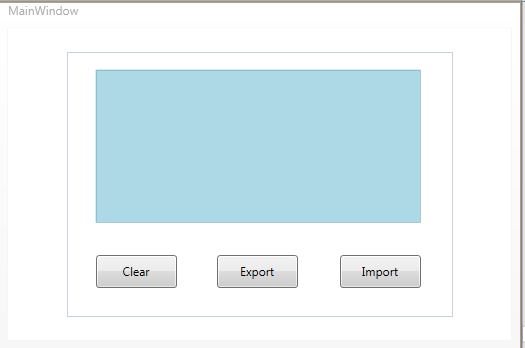
I kept working on the SignaturePanel this last week.  I decided to make the same thing in WPF.   I fired up a new WPF Application and hooked up a reference to my existing SignatureCapture.Support class.  I then added a Rectangle (changed it later to a Canvas) to the MainWindow and three buttons.

image


  I then started copy/pasting the code from my WinForms application to the window’s code-behind.

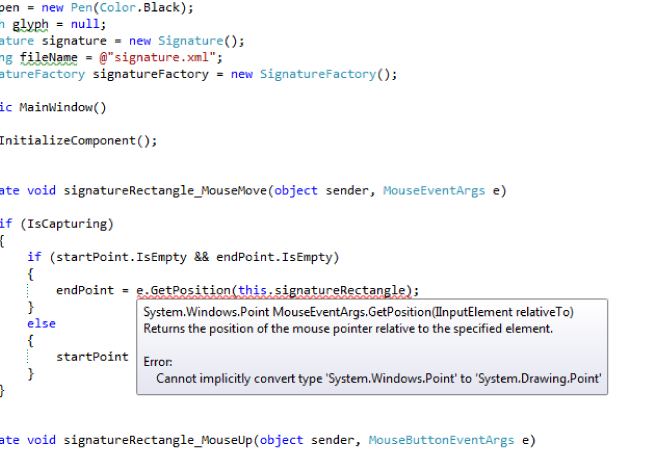
image


Yikes!  It looks like the Point and Pen class has been changed from the Windows Implementation to the WPF implementation.  My first thought was to throw away the WPF version by using the trusty Remove and Sort Using context menu:

image

I then fully-qualified my classes:

image

And then I realized that I was completely wrong and if I spent more than 1 second thinking about the problem, the whole remove usings/fully qualifying the classes won’t work.

image

BECAUSE THEY ARE TWO DIFFERENT TYPES.

Given the choice of adding new functions to my Support class or converted, I chose the later.  I added a Convert Line method like so:

private System.Drawing.Point ConvertPoint(System.Windows.Point point)
{
    System.Drawing.Point returnPoint = new System.Drawing.Point();
    returnPoint.X = (Int32)point.X;
    returnPoint.Y = (Int32)point.Y;
    return returnPoint;
}

and then I wired up the UI:

private void signatureCanvas_MouseMove(object sender, MouseEventArgs e)
{
    if (IsCapturing)
    {
        if (startPoint.IsEmpty && endPoint.IsEmpty)
        {
            endPoint = ConvertPoint(e.GetPosition(this.signatureCanvas));
        }
        else
        {
            startPoint = endPoint;
            endPoint = ConvertPoint(e.GetPosition(this.signatureCanvas));
            Line line = new Line(startPoint, endPoint);
            glyph.Lines.Add(line);
            DrawLine(line);
        }
    }
}

Note that the e.GetPosition() method replaces the WinForm’s e.Location property.  The key thing is that the second argument (location) needs to be your capturing panel to make it equivalent to the WinForm implementation…

private void DrawLine(Line line)
{
    System.Windows.Shapes.Line currentLine = new System.Windows.Shapes.Line();
    currentLine.Stroke = System.Windows.Media.Brushes.Black;
    currentLine.X1 = line.StartPoint.X;
    currentLine.Y1 = line.StartPoint.Y;
    currentLine.X2 = line.EndPoint.X;
    currentLine.Y2 = line.EndPoint.Y;
    currentLine.StrokeThickness = 1;
    signatureCanvas.Children.Add(currentLine);

}
private void signatureCanvas_MouseUp(object sender, MouseButtonEventArgs e)
{
    IsCapturing = false;
    signature.Glyphs.Add(glyph);
    startPoint = new System.Drawing.Point();
    endPoint = new System.Drawing.Point();

}
private void signatureCanvas_MouseDown(object sender, MouseButtonEventArgs e)
{
    IsCapturing = true;
    glyph = new Glyph();
}

All that was left was to handle the button clicks:

private void clearButton_Click(object sender, RoutedEventArgs e)
{
    signatureCanvas.Children.Clear();
}
private void exportButton_Click(object sender, RoutedEventArgs e)
{
    signatureFactory.SerializeSignatureToDisk(signature, fileName);
}
private void DrawSignature()
{
    foreach (Glyph glyph in signature.Glyphs)
    {
        foreach (Line line in glyph.Lines)
        {
            DrawLine(line);
        }
    }
}
private void importButton_Click(object sender, RoutedEventArgs e)
{
    signature = signatureFactory.DeserializeSignatureFromDisk(fileName);
    signatureCanvas.Children.Clear();
    DrawSignature();
}

And now I have a WPF implementation of the signature capture panel:

image

With the cool thing is that I can import and signature from a WinForm into my WPF app, or export my WPF generated signature into the WinForm app or that Web Form app,

Server.MapPath

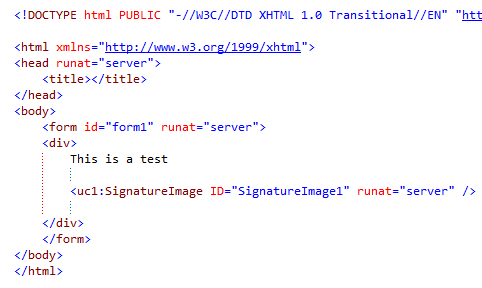
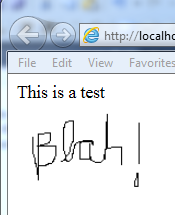
Last week, I created a WinForms signature capture panel and then rendered the data out to a webpage.  You can read about it here.  The problem is that I used Response.Write to write the image to the browser.  Even in a web control, the only thing shown in a browser is the image:

image

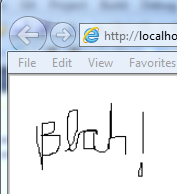
gives this:

image


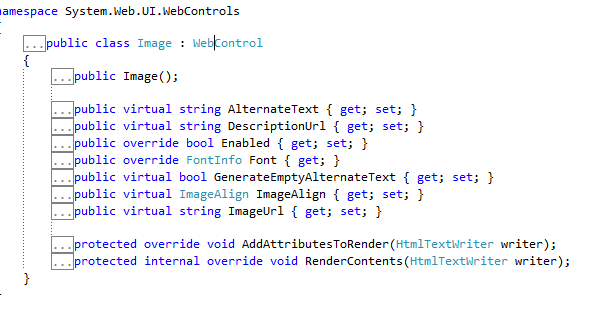
I then decided that I should use a Web.UI.Image Control to render the image. 

image

The problem?  ImageUrl is the method you use to assign the image, and that only has 1 signature – 1 String that is the Url of the image that is, typically, located on the file system.


image

Without thinking too hard, I decided to put the image on the file system  and then point to the image in the code behind.

I wrote the following code:

private void LoadSignature()
{
    SignatureFactory signatureFactory = new SignatureFactory();
    String fileName = String.Format("~/images/Signature.bmp");

    using (Bitmap bitmap = new Bitmap(200, 100))
    {
        using (Graphics graphics = Graphics.FromImage(bitmap))
        {
            Signature signature = signatureFactory.LoadSignatureFromFileSystem(@"C:\Signatures\signature.xml");
            Pen pen = new Pen(Color.Black);

            SolidBrush solidBrush = new SolidBrush(Color.White);
            graphics.FillRectangle(solidBrush, 0, 0, 400, 50);

            foreach (Glyph glyph in signature.Glyphs)
            {
                foreach (Line line in glyph.Lines)
                {
                    graphics.DrawLine(pen, line.StartPoint.X, line.StartPoint.Y,
                        line.EndPoint.X, line.EndPoint.Y);
                }
            }
            bitmap.Save(fileName, System.Drawing.Imaging.ImageFormat.Bmp);
        }
    }
    this.signatureImage.ImageUrl = fileName;
}

When I ran it, I got the following exception:

image

Carp!  And no inner exception to boot!  When you Bing/Google/AskJeeves this exception, you get TONS of potential reasons (Security, Location, OOM, etc…) – basically, the managed wrapper for the CGI+ call didn’t implement any exceptions.  Without knowing anything about the implementation, I have to believe that HRESULT did return something, MSFT was just to lazy busy to send out meaningful exception message.

After screwing around for a bit, I would get the message to write to the file system by hard-coding the path like so:

//String fileName = String.Format("~/images/Signature.bmp");
String fileName = String.Format(@"C:\Users\Jamie\Desktop\Tff.SignatureCapture\Tff.SignatureCapture.WebForm\images\Signature.bmp");

The problem is that the Signature.ImageUrl now breaks:

image

It was coding after 8PM, so I immediately started throwing more gasoline on the fire by compounding my mistakes.  I thought, heck, I need need 2 strings for the file – 1 that the GDI+ uses to write and 1 that the ASP:Image control can read from like this:

It worked, so I went to

String readFileName = String.Format("~/images/Signature.bmp");
String writeFleName = String.Format(@"C:\Users\Jamie\Desktop\Tff.SignatureCapture\Tff.SignatureCapture.WebForm\images\Signature.bmp");

bed, safe in the knowledge that I created a great solution:

image


Around 2 in the morning I woke up.  “You idiot” I thought.  The ASP.NET framework already has a provision to resolve relative and absolute paths.  It is the Server.MapPath function:

bitmap.Save(Server.MapPath(fileName), System.Drawing.Imaging.ImageFormat.Bmp);

Sure enough, that did the trick.  Since I was up a 2:15AM with my computer on, I decided to look at the ASP Image.Control to see if I could extend it to have an ImageStream function.

image

Sure enough, it is not sealed.  that might be a fun project for next week.  I went back to sleep, in a better place….

Signature Capture

I was chatting with another member of TriNug last night and we talked about the best way to capture a user’s signature.  There are some pretty good articles out there, including this one.  I dove right in with a WinForm application and a Panel control and built something like this:

image


Visual Studio 2010 and WinForms made this a pretty straightforward task.  First, I built up my domain model starting with the points that are captured from the Panel.MouseMove event handler (MouseEventArgs) with the e.Location of type Point.

I created a Line class that has 2 points that make up the line:

[Serializable]
public class Line
{
    public Line()
    {

    }

    public Line(Point startPoint, Point endPoint)
    {
        this.StartPoint = startPoint;
        this.EndPoint = endPoint;
    }

    public Point StartPoint { get; set; }
    public Point EndPoint { get; set; }
}

I then created a Glyph class that is a collection of those lines:

[Serializable]
public class Glyph
{
    public Glyph()
    {
        this.Lines = new List<Line>();
    }
    public List<Line> Lines { get; set; }
}

I could have called this class “letter” but each glyph may or may not be a letter – it could be several letters strung together in cursive, a part of a letter (the dot of the i), or may not be any letter (like when R2D2 signs his name.  R2D2 is a boy, right?)

Anyway, I then created a Signature class that is a collection of glyphs:

[Serializable]
public class Signature
{
    public Signature()
    {
        this.Glyphs = new List<Glyph>();
    }

    public List<Glyph> Glyphs { get; set; }
}

If this was used in a real-world application, this class would have a uniqueId so you can relate it back to your people/user class.  It might have some other properties to allow easy comparison and analysis.

I then coded in my WinForm a way to capture the user’s mouse strokes and putting them into this signature graph.  First, I started with some form level variables:

Boolean IsCapturing = false;
private Point startPoint;
private Point endPoint;
Pen pen = new Pen(Color.Black);
Glyph glyph = null;
Signature signature = new Signature();
String fileName = @"signature.xml";

I then handled three events from the panel:

private void SignaturePanel_MouseMove(object sender, MouseEventArgs e)
{
    if (IsCapturing)
    {
        if (startPoint.IsEmpty && endPoint.IsEmpty)
        {
            endPoint = e.Location;
        }
        else
        {
            startPoint = endPoint;
            endPoint = e.Location;
            Line line = new Line(startPoint, endPoint);
            glyph.Lines.Add(line);
            DrawLine(line);
        }

    }
}
private void SignaturePanel_MouseUp(object sender, MouseEventArgs e)
{
    IsCapturing = false;
    signature.Glyphs.Add(glyph);
    startPoint = new Point();
    endPoint = new Point();

}

private void SignaturePanel_MouseDown(object sender, MouseEventArgs e)
{
    IsCapturing = true;
    glyph = new Glyph();
}

Basically, every time a user clicks down it starts capturing the points and turning them into lines.  When the user clicks up, all of those lines go into 1 glyph.  Capture…Rinse….Repeat.

There is 1 supporting function (DrawLine) that looks like this to render it to the screen:

private void DrawLine(Line line)
{
    using (Graphics graphic = this.SignaturePanel.CreateGraphics())
    {
        graphic.DrawLine(pen, line.StartPoint, line.EndPoint);
    }
}

A couple of notes on the code blocks above.

  • The Point struct has a convenience property called IsEmpty.  This resolves to X and Y equaling 0.
  • The Point Equals overload resolved to the X and Y values.   If you have 2 instances of a Point with the same X and Y, they are equal.

Once the signature is captured on the panel, I needed a way to save the signature.  Most people capture the image.  Me, I want the signature transformed into structured data for better down-steam analysis.  Therefore, I decided to put it into XML.  To that end, I marked all of the classes in the Signature graph as Serializable.  I then created two functions to push and pull the signature out of a XML file:

private void SerializeSignature()
{
    XmlSerializer serializer = new XmlSerializer(typeof(Signature));

    if (File.Exists(fileName))
    {
        File.Delete(fileName);
    }

    using (TextWriter textWriter = new StreamWriter(fileName))
    {
        serializer.Serialize(textWriter, signature);
        textWriter.Close();
    }
}

And

private void DeserializeSignature()
{
    XmlSerializer deserializer = new XmlSerializer(typeof(Signature));
    using (TextReader textReader = new StreamReader(fileName))
    {
        signature = (Signature)deserializer.Deserialize(textReader);
        textReader.Close();
    }
}

I then wired up the button clicks to save the signature:

private void ExportButton_Click(object sender, EventArgs e)
{
    SerializeSignature();
}

and to load it:

private void ImportButton_Click(object sender, EventArgs e)
{
    DeserializeSignature();
    ClearSignaturePanel();
    DrawSignature();

}

and these are the two other supporting methods:

private void ClearSignaturePanel()
{
    using (Graphics graphic = this.SignaturePanel.CreateGraphics())
    {
        SolidBrush solidBrush = new SolidBrush(Color.LightBlue);
        graphic.FillRectangle(solidBrush, 0, 0, SignaturePanel.Width, SignaturePanel.Height);
    }
    
}

and

private void DrawSignature()
{
    foreach (Glyph glyph in signature.Glyphs)
    {
        foreach (Line line in glyph.Lines)
        {
            DrawLine(line);
        }
    }

}

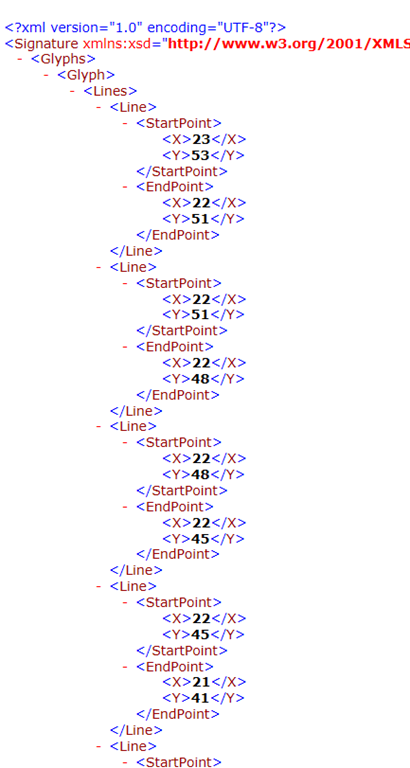
Sure enough, here is the XML in the file:

image

The problem is that this file is larger than a image file – but much more analyzable (and yes, that is a real word).  I then wanted to display the signature in a web browser.  To that end, I fired up a classic ASP.NET application and created a web control.  In the code, I rendered the points out of the XML file back into a graphic:

protected void Page_Load(object sender, EventArgs e)
{
    this.Response.ContentType = "image/gif";
    using (Bitmap bitmap = new Bitmap(200, 100))
    {
        using (Graphics graphics = Graphics.FromImage(bitmap))
        {
            SignatureFactory signatureFactory = new SignatureFactory();
            String fileName = @"C:\signature.xml";
            Signature signature = signatureFactory.LoadSignatureFromFileSystem(fileName);
            Pen pen = new Pen(Color.Red);
            foreach (Glyph glyph in signature.Glyphs)
            {
                foreach (Line line in glyph.Lines)
                {
                    graphics.DrawLine(pen, line.StartPoint.X, line.StartPoint.Y,
                        line.EndPoint.X, line.EndPoint.Y);
                }
            }

            bitmap.Save(Response.OutputStream, System.Drawing.Imaging.ImageFormat.Gif);
        }
    }
}

And the output on a web form:

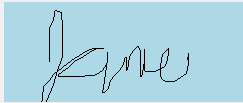
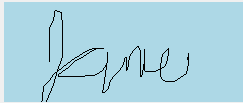
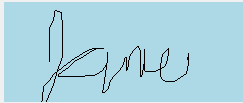
image