Curse you copy/paste gremlin!

I was on to deserializing my Windows Phone 7 game data when I ran across this oh-so helpful exception:

System.InvalidOperationException was unhandled Message=There is an error in XML document (0, 0).

And the cause?  I copy and pasted the code for both the turn class and the tiles list .  However, I didn’t update the stream name (turnStream).

IsolatedStorageFileisolatedStorageFile=IsolatedStorageFile.GetUserStoreForApplication();
//Turn
IsolatedStorageFileStreamturnStream=isolatedStorageFile.OpenFile("turn",FileMode.Open);
XmlSerializerturnSerializer=newXmlSerializer(typeof(List<Turn>));
Game.Turns=(List<Turn>)turnSerializer.Deserialize(turnStream);
 
//Tile
IsolatedStorageFileStreamtileStream=isolatedStorageFile.OpenFile("tiles",FileMode.Open);
XmlSerializertileSerializer=newXmlSerializer(typeof(List<Tile>));
Game.BoardFactory.Tiles=(List<Tile>)turnSerializer.Deserialize(turnStream);

This is another good example of why you should break out 1 task into its own function – I would have gotten a compile exception right away and wouldn’t have spent a hour chasing down ghosts in my object model and other such red herrings…

Serialization in an WP7 project

So if you want to do some basic serialization in your Windows Phone 7 app, (cerealization to my kids) image 

you most likely will start here.  However, if you copy/paste the code an out of the box project, you get the dreaded wiggly red line:

image

What is going on?

image

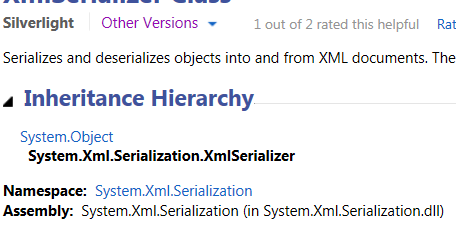
Oh crud.  The default for MSDN is .NET Framework 4.  When you switch it to Silverlight, you see that you need a reference to System.Xml.Serialization.

image

Out of the box, WP7 projects don’t have a reference to System.Xml.Serialization – only System.Xml.  Once I add that assembly to the project, we get the happy blue:

image

This is a bit confusing, to say the least.

WP7 Phone Capabilities

Note to self.  When adding a Web Browser to a Windows Phone 7 page like this:

<phone:WebBrowser x:Name="HelpBrowser"
                    Grid.Row="1"
                    HorizontalAlignment="Stretch"
                    VerticalAlignment="Stretch"
                    />

and code up a navigation like this:

public GameInformation()
        {
            InitializeComponent();
            this.HelpBrowser.Loaded += new RoutedEventHandler(HelpBrowser_Loaded);
        }

        void HelpBrowser_Loaded(object sender, RoutedEventArgs e)
        {
            this.HelpBrowser.Navigate(new Uri(Constants.HelpDocumentsLocation, UriKind.Absolute));
        }

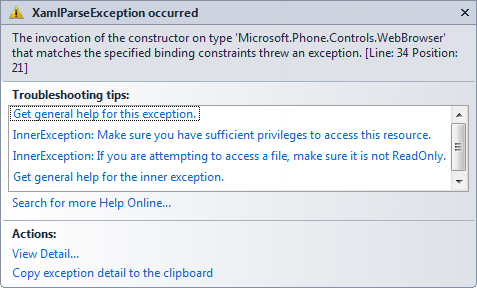
and you get an exception like this:

image

You are forgetting the capabilities section of the phone app for web browsers.  The inner exception about privileges gives it away (short of actually telling you what happened).  Just add this to the WMAPPManifest.xml file:

<Capabilities>
      <Capability Name="ID_CAP_NETWORKING" />
      <Capability Name="ID_CAP_WEBBROWSERCOMPONENT" />


Faking Synch WCF calls in WP7

So you can’t do synchronous WCF calls in Windows Phone 7. I have a use case where I do a WCF call to get all of the data to set up a game board of the phone game I am writing. I don’t want the application to progress until the board is set up, so I need it as a blocking call. In addition, the WCF call is 5-6 layers deep in my class hierarchy.  My first idea was just to use a non-thread-safe variable from the Main UI thread and set the flag when the asynch call/thread returned:

        private List<ScenarioTile> GetScenarioTilesFromWebService(int scenarioId)
        {
            CallbackComplete = false;
            PanzerProxy.PanzerClient panzerClient = new PanzerProxy.PanzerClient();
            panzerClient.GetScenarioTilesCompleted += new EventHandler<PanzerProxy.GetScenarioTilesCompletedEventArgs>(panzerClient_GetScenarioTilesCompleted);
            panzerClient.GetScenarioTilesAsync(scenarioId);
            while (CallbackComplete == false)
            {
                Thread.Sleep(1000);
            }
            return ScenarioTiles;
        }

        void panzerClient_GetScenarioTilesCompleted(object sender, PanzerProxy.GetScenarioTilesCompletedEventArgs e)
        {
            ScenarioTiles = new List<ScenarioTile>();
            List<PanzerProxy.ScenarioTile> proxyTiles = e.Result as List<PanzerProxy.ScenarioTile>;
            foreach (PanzerProxy.ScenarioTile proxyScenarioTile in proxyTiles)
            {
                ScenarioTiles.Add(ConvertProxyScenarioTileToScenarioTile(proxyScenarioTile));
            }
            CallbackComplete = true;
        }

The problem is that, well, it doesn’t work. The app just hangs. I then thought of using a ManualResetEvent or AutoResetEvent class to trigger like this:

        ManualResetEvent manualResetEvent = new ManualResetEvent(false);

        private List<ScenarioTile> GetScenarioTilesFromWebService(int scenarioId)
        {
            PanzerProxy.PanzerClient panzerClient = new PanzerProxy.PanzerClient();
            panzerClient.GetScenarioTilesCompleted += new EventHandler<PanzerProxy.GetScenarioTilesCompletedEventArgs>(panzerClient_GetScenarioTilesCompleted);
            panzerClient.GetScenarioTilesAsync(scenarioId);
            manualResetEvent.WaitOne();
            return ScenarioTiles;
        }

        void panzerClient_GetScenarioTilesCompleted(object sender, PanzerProxy.GetScenarioTilesCompletedEventArgs e)
        {
            ScenarioTiles = new List<ScenarioTile>();
            List<PanzerProxy.ScenarioTile> proxyTiles = e.Result as List<PanzerProxy.ScenarioTile>;
            foreach (PanzerProxy.ScenarioTile proxyScenarioTile in proxyTiles)
            {
                ScenarioTiles.Add(ConvertProxyScenarioTileToScenarioTile(proxyScenarioTile));
            }
            manualResetEvent.Set();
        }

Still no luck.  I then ran across this thread – basically you can’t do anything to block the Main UI thread.  Chong’s solution was to launch a 3rd thread from the secondary thread.  That seemed to me as overly complex and smelled of brittle code.  I then took a step back and realized I just had to architect my solution to get the same effect.  Basically, once the user hits the LOAD button, the MAINUI thread is done.  However, the page also subscribes to an event that the business logic raises.  Once the event fires, then the app progresses to the next page.

So instead of this:

private void SetupScenario(int scenarioId)
{
    Game.CurrentScenarioId = scenarioId;
    Game.BoardFactory.PopulateBoard(scenarioId);
    Game.CurrentBoard = Game.BoardFactory.Board;
    Game.Turns = Game.TurnFactory.GetTurnsForAScenario(scenarioId);
    this.NavigationService.Navigate(new Uri(@"/Briefing.xaml", UriKind.Relative));
}

I have this:

private void SetupScenario(int scenarioId)
{
    Game.CurrentScenarioId = scenarioId;
    Game.BoardFactory.BoardLoaded += new EventHandler<EventArgs>(BoardFactory_BoardLoaded);
    Game.BoardFactory.PopulateBoard(scenarioId);
    Game.CurrentBoard = Game.BoardFactory.Board;
    Game.Turns = Game.TurnFactory.GetTurnsForAScenario(scenarioId);

}

void BoardFactory_BoardLoaded(object sender, EventArgs e)
{
    this.NavigationService.Navigate(new Uri(@"/Briefing.xaml", UriKind.Relative));
}

The event is defined as simple as it comes:

public event EventHandler<EventArgs> BoardLoaded;

and

void TileFactory_TilesLoaded(object sender, EventArgs e)
{
    Tiles = Game.TileFactory.Tiles;
    Hexes = Game.HexFactory.GetHexes(Tiles);
    foreach (Hex hex in Hexes)
    {
        Board.MainCanvas.Children.Add(hex);
    }
    SetBoardDimensions(Board, Tiles);
    BoardLoaded(null, null);
}

Basically I just bubbled up the WCF asych event up from the lowest level to the UI page.

Ruminations About Enumerations


I have been busy refactoring my Windows Phone 7 game and I started using enumerations more to increase the readability of my code.  Some of the game rules are so complex and convoluted that I found enumerations a very handy way to express my intentions.  For example, consider this:

1 2 if (targetUnit.Equipment.EquipmentSubClass.EquipmentClass.EquipmentGroup.EquipmentGroupId == 0 3 && targetTile.Terrain.TerrainType.TerrainTypeId == 1 4 && targetUnit.CanMove 5 && targetUnit.CanAttack) 6 { 7 this.menuFactory.ShowUpgrade = true; 8 }

to this:

1 if (targetUnit.Equipment.EquipmentGroupEnum == EquipmentGroupEnum.Land 2 && targetTile.Terrain.TerrainTypeEnum == TerrainTypeEnum.Port 3 && targetUnit.CanMove 4 && targetUnit.CanAttack) 5 { 6 this.menuFactory.ShowUpgrade = true; 7 }

If you dropped into this project, which one would you understand quicker?  This readability comes with a cost though – I now have to create separate files of code that I need to maintain. A second problem is that I am duplicating data – the lookup values from my database are hard-coded into the business layer.  If I add a value to the database and want to use it in my business logic, I will have to recompile.  A final problem is one of naming – I have a class and an enum that means exactly the same thing but I don’t want to name them the same thing (see Domain specific language), even if used different namespaces.  In this example, I appended “enum” to the suffix of the class: TerrainType and TerrainTypeEnum.  Taking these problems in order:

Problem #1: separate code to maintain – Yes, though it seems like a small price to pay.  The trend in our industry is to have more classes/things that do only 1 thing (Single Responsibility Principle) so a large number of files is a natural side-effect.  Fortunately, VS2010 makes file cataloging easy so it does not really get in the way of developer productivity.

Problem #2: duplicate data.  Yes, but…. The enums are data that is to be used in design time (as part of the business/programming logic).  The data that is stored in the classes are for the end-user.  That data is volatile  and changes can be reflected at run-time without recompiling, mostly.  I would maintain that due to the separate audiences, it is ok to have 2 “things” represent the same data.  I would also argue that enums are only for classes that are lookups – reference tables in your database for example.  In that case, even if you make a change to a reference table and want to implement some additional logic in your code, guess what?  You are still recompiling.  You just have to remember to add that value to the enum – which should be fairly straightforward if your spent some time to make sure your projects are consistent and well-organized.

Problem #3 Naming.  Since the project now has two things (the class and the enum) representing the same data, what should be done about naming.  The .NET API/Framework Design Guidelines is not much help here – Color is an enum only, there is no color class.  If more colors are added/created, they are NOT reflected in the .NET Color enum, you have to use the RGB values.  I  appended the enum suffix on the name of the class because it is pretty clear the intention of the files:

image

I punted – but at least I punted consistently.

After all that, I find that my code is MUCH more readable and I am writing business rules much faster and finding my logic errors much quicker. 

As a side note, do you notice that some organizations they dub “SMEs” that are just walking enums?  For example, they can recite what ICD-9 code for a broken leg off of the top of their head.  I wonder if a well-designed system replaces this kind of expert….

Using Lambdas To Increase Code Readability

I was having a spirited debate with Rob Seder yesterday about the use of lambdas – the question was weather using them increases or decreases the codes readability.  For example, here is a basic for…each:

1 foreach (Employee employee in employeeFactory.GetAllEmployees()) 2 { 3 if (employee.Name == "Moe") 4 { 5 Console.WriteLine(employee.ToString()); 6 } 7 }

Replacing with a lambda:

1 var moe = employeeFactory.GetAllEmployees().Where(e => e.Name == "Moe").FirstOrDefault(); 2 Console.WriteLine(moe.ToString());

Readability suffers for three reasons: the function chaining. the use of single letters for the variable, and the use of the var keyword.  A more readable use of lambda is like so:

1 List<Employee> employeeList = employeeFactory.GetAllEmployees().ToList(); 2 Employee selectedEmployee = employeeList.Where(employee => employee.Name == "Moe").FirstOrDefault(); 3 Console.WriteLine(selectedEmployee.ToString());

Taking the problems in reverse, Rob mentioned that he uses the var keyword when he is knocking something out, then he goes back and refactors the var keyword to the correct type.  I would agree with this.  As for the single varaible, I am less convinced that readability suffers because

  • Everyone does it – making this convention readability by default
  • You actually don’t use the variable – it is not returned or acted on beyond the line of code.

As for function chaining, I can see why readability suffers.  Breaking out the functions into logic units of work with each getting their own line seems reasonable.

Optimize Searching Using Value Types

As mentioned in my blog post here, I need to write a searching algorithm of hexes adjacent to the active unit to display movable/visible/attackable hexes.  The original code was a bit of a beast across 3 functions:


1 public List<Hex> GetTotalAdjacentHexes(Hex currentHex, Int32 maxDistance) 2 { 3 List<Hex> hexes = new List<Hex>(); 4 List<Hex> tempList = GetAdjacentHexes(currentHex); 5 foreach (Hex hex in tempList) 6 { 7 if (!InHexList(hexes,hex)) 8 GetAdjacentHexes(currentHex, hexes, hex, tempList, 0, maxDistance); 9 } 10 return hexes; 11 } 12 13 public void GetAdjacentHexes(Hex currentHex, List<Hex> hexes, Hex hex, List<Hex> currentList, int distanceCounter, int maxDistance) 14 { 15 distanceCounter++; 16 { 17 foreach (Hex tempHex in currentList) 18 { 19 hexes.Add(tempHex); 20 if (distanceCounter < maxDistance) 21 { 22 List<Hex> tempList = GetAdjacentHexes(tempHex); 23 GetAdjacentHexes(currentHex, hexes, hex, tempList, distanceCounter, maxDistance); 24 } 25 } 26 } 27 } 28 29 public List<Hex> GetAdjacentHexes(Hex currentHex) 30 { 31 32 List<Hex> adjacentHexes = new List<Hex>(); 33 Hex targetHex = null; 34 //Above 35 int targetColumnNumber = currentHex.ColumnNumber; 36 int targetRowNumber = currentHex.RowNumber - 1; 37 targetHex = GetHex(targetColumnNumber, targetRowNumber); 38 if (targetHex != null) 39 adjacentHexes.Add(targetHex); 40 //Top Left 41 targetColumnNumber = currentHex.ColumnNumber - 1; 42 if (currentHex.ColumnNumber % 2 == 0) 43 targetRowNumber = currentHex.RowNumber - 1; 44 else 45 targetRowNumber = currentHex.RowNumber; 46 targetHex = GetHex(targetColumnNumber, targetRowNumber); 47 if (targetHex != null) 48 adjacentHexes.Add(targetHex); 49 //Bottom Left 50 targetColumnNumber = currentHex.ColumnNumber - 1; 51 if (currentHex.ColumnNumber % 2 == 0) 52 targetRowNumber = currentHex.RowNumber; 53 else 54 targetRowNumber = currentHex.RowNumber + 1; 55 targetHex = GetHex(targetColumnNumber, targetRowNumber); 56 if (targetHex != null) 57 adjacentHexes.Add(targetHex); 58 //Below 59 targetColumnNumber = currentHex.ColumnNumber; 60 targetRowNumber = currentHex.RowNumber + 1; 61 targetHex = GetHex(targetColumnNumber, targetRowNumber); 62 if (targetHex != null) 63 adjacentHexes.Add(targetHex); 64 //Bottom Right 65 targetColumnNumber = currentHex.ColumnNumber + 1; 66 if (currentHex.ColumnNumber % 2 == 0) 67 targetRowNumber = currentHex.RowNumber; 68 else 69 targetRowNumber = currentHex.RowNumber + 1; 70 targetHex = GetHex(targetColumnNumber, targetRowNumber); 71 if (targetHex != null) 72 adjacentHexes.Add(targetHex); 73 //Top Right 74 targetColumnNumber = currentHex.ColumnNumber + 1; 75 if (currentHex.ColumnNumber % 2 == 0) 76 targetRowNumber = currentHex.RowNumber - 1; 77 else 78 targetRowNumber = currentHex.RowNumber; 79 targetHex = GetHex(targetColumnNumber, targetRowNumber); 80 if (targetHex != null) 81 adjacentHexes.Add(targetHex); 82 83 return adjacentHexes; 84 }

I recently had a duh moment when I tried to optimize the code for speed (replacing hexes with tiles) – each hex has an unique row/column value that I could use to calculate distance.  In addition, instead of looping and collecting heavy reference types, I am using 2 integers in 1 loop, so the performance is dramatically improved.  Finally, since I drop from 84 lines of code to 54, I am making my code more maintainable.


1 public List<Tile> GetTotalAdjacentTiles(Tile startTile, Int32 maxDistance) 2 { 3 List<Tile> tiles = new List<Tile>(); 4 int startingColumn = startTile.ColumnNumber - maxDistance; 5 if(startingColumn < 0) 6 { 7 startingColumn = 0; 8 } 9 int endingColumn = startTile.ColumnNumber + maxDistance; 10 if (endingColumn > Game.CurrentBoard.NumberOfColumns) 11 { 12 endingColumn = Game.CurrentBoard.NumberOfColumns; 13 } 14 15 int startingRow = startTile.RowNumber - maxDistance; 16 if (startingRow < 0) 17 { 18 startingRow = 0; 19 } 20 int endingRow = startTile.RowNumber + maxDistance; 21 if (endingRow > Game.CurrentBoard.NumberOfRows) 22 { 23 endingRow = Game.CurrentBoard.NumberOfRows; 24 } 25 26 Tile tile = null; 27 int combinedDistance = 0; 28 for (int i = startingColumn; i <= endingColumn; i++) 29 { 30 for (int j = startingRow; j <= endingRow; j++) 31 { 32 tile = GetTile(i, j); 33 if (!tiles.Contains(tile)) 34 { 35 combinedDistance = GetDistanceBetweenTwoTiles(startTile,tile); 36 if (combinedDistance <= maxDistance) 37 { 38 tiles.Add(tile); 39 } 40 } 41 } 42 } 43 44 //Remove Starting Tile 45 tiles.Remove(startTile); 46 47 return tiles; 48 } 49 50 public List<Tile> GetAdjacentTiles(Tile currentTile) 51 { 52 return GetTotalAdjacentTiles(currentTile, 1); 53 }

Town Of Cary Information Technology Board


Not much sharable code this week.  I did get appointed to the Town Of Cary’s Information Technology Board:

image

MCPD 4.0

I passed my last upgrade exam last week so I am now officially a MCPD 4.0.

MCPD(rgb)_1372_1371

Windows Phone 7– Duh Moment Of The Day

So I wrote this code block in a Windows Phone 7 application:

1 private void CreateNewLogFile() 2 { 3 string logFileLocation = Environment.GetFolderPath(Environment.SpecialFolder.ApplicationData); 4 if (File.Exists(logFileLocation)) 5 File.Delete(logFileLocation); 6 7 } 8

And I got this exception:

image

And it hit me – can’t write to the local file system of the emulator using Windows Desktop/Server constructs. To write in a Windows Phone 7 application, I need to write to the local storage.  However, since I can’t read from local storage easily (no WindowsExplorer access) – I would need to write a program to get the data out.  This seems more trouble than it is worth.  I’ll just write to the Debug window….