Windows Phone 7–Threading Issues With the Stopwatch Class

I am writing a profiling application to help me with some performance problems that I am having with the Windows Phone 7 game I am writing.  Here is a snippet where I track the time it takes to load in the game data for a given scenario:

1 private void LoadTile() 2 { 3 Stopwatch stopWatch = new Stopwatch(); 4 ScenarioTileFactory scenarioTileFactory = new ScenarioTileFactory(); 5 List<ScenarioTile> scenarioTiles = null; 6 stopWatch.Start(); 7 scenarioTiles = scenarioTileFactory.GetScenarioTiles(20); 8 stopWatch.Stop(); 9 this.TilesListBox.Items.Add(String.Format("Scenario {0} has {1} tiles and it took {2}.", 10 "20", scenarioTiles.Count.ToString(), stopWatch.ElapsedMilliseconds.ToString())); 11 12 } 13

When I run it, I get this (which is correct):

image

I then wanted time how long each scenario takes to load and update the UI after each load.  I immediately thought of using a second thread – 1 to load the data and the main UI thread to update the screen.  I update my load function for multi-threading like so:

1 Stopwatch stopWatch = new Stopwatch(); 2 ScenarioTileFactory scenarioTileFactory = new ScenarioTileFactory(); 3 List<ScenarioTile> scenarioTiles = null; 4 stopWatch.Start(); 5 scenarioTiles = scenarioTileFactory.GetScenarioTiles(20); 6 stopWatch.Stop(); 7 this.TilesListBox.Dispatcher.BeginInvoke(() => 8 { 9 this.TilesListBox.Items.Add(String.Format("Scenario {0} has {1} tiles and it took {2}.", 10 "20", scenarioTiles.Count.ToString(), stopWatch.ElapsedMilliseconds.ToString())); 11 }); 12 stopWatch.Reset(); 13 stopWatch.Start(); 14 scenarioTiles = scenarioTileFactory.GetScenarioTiles(21); 15 stopWatch.Stop(); 16 this.TilesListBox.Dispatcher.BeginInvoke(() => 17 { 18 this.TilesListBox.Items.Add(String.Format("Scenario {0} has {1} tiles and it took {2}.", 19 "21", scenarioTiles.Count.ToString(), stopWatch.ElapsedMilliseconds.ToString())); 20 }); 21

The results started getting screwy:
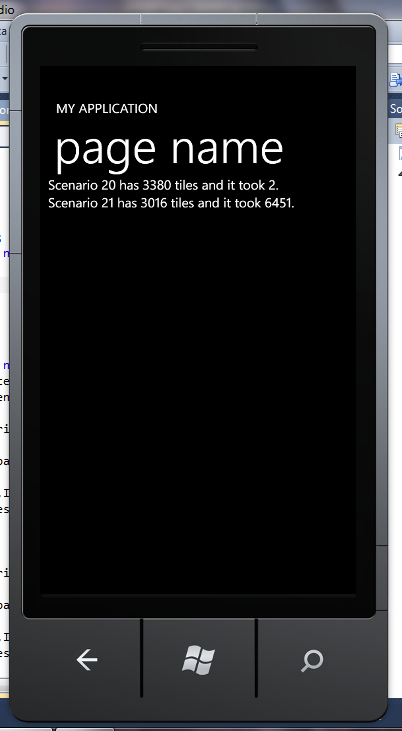
image


It sure looks like the Stopwatch.Reset is not thread-aware? Nope, hoping the thread back calls an auto refresh. For example, I put a break:

image


But when I hop the thread and go back to the UI thread:
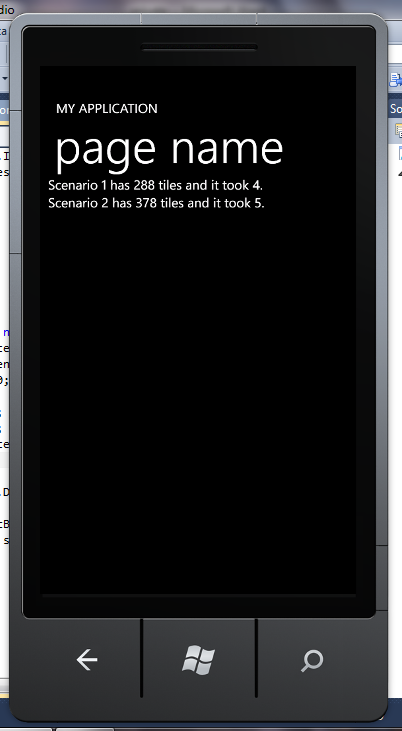
image

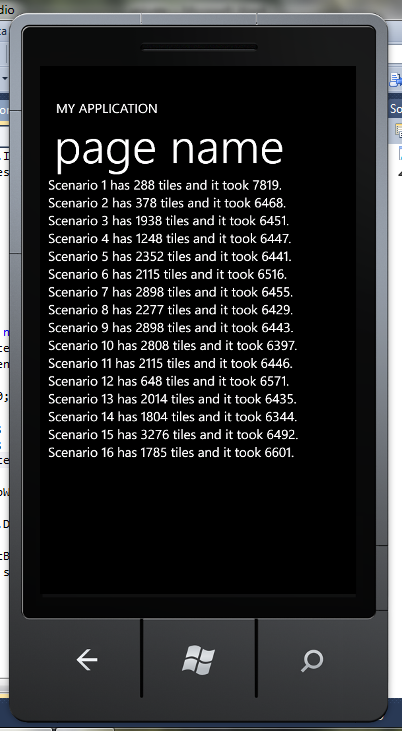
So the stopwatch class is not thread-safe. Good to know! To get around this problem, I created a local holding variable and passed that value over to the UI thread:

1 private void LoadTiles() 2 { 3 Stopwatch stopWatch = new Stopwatch(); 4 ScenarioTileFactory scenarioTileFactory = new ScenarioTileFactory(); 5 List<ScenarioTile> scenarioTiles = null; 6 long elapsedTime = 0; 7 for (int i = 0; i < 30; i++) 8 { 9 stopWatch.Reset(); 10 stopWatch.Start(); 11 scenarioTiles = scenarioTileFactory.GetScenarioTiles(i); 12 stopWatch.Stop(); 13 elapsedTime = stopWatch.ElapsedMilliseconds; 14 15 this.TilesListBox.Dispatcher.BeginInvoke(() => 16 { 17 this.TilesListBox.Items.Add(String.Format("Scenario {0} has {1} tiles and it took {2}.", 18 i.ToString(), scenarioTiles.Count.ToString(), elapsedTime.ToString())); 19 }); 20 } 21 } 22


Now I have accurate diagnostic information for my analysis:
 

image

RDU Code Camp Material

All of the material that I presented last Saturday at Trinug’s code camp is available here.

The Daily WTF

I took a break from coding for the RDU Code Camp and went over to the daily WTF. This is a great WTF that I decided to dig into.

I created a project and added in an enum with the following signature:

1 public enum ApplicationTypeEnum 2 { 3 Stradegy2, 4 AdDetector, 5 MagAdvisor, 6 AdDetectorAlerts, 7 MarketAdvisorAdTel, 8 NewspaperAdvisor, 9 MarketAdvisorMarketSpender, 10 StradegyOnline, 11 AdSpender, 12 Evaliant, 13 eBooks, 14 FrenchAdex 15 } 16

I then added an Application Class and copy/pasted in the method that was in the post:

1 public class Application 2 { 3 private int SetApplicationId() 4 { 5 switch (ApplicationUserInfo.Current.ApplicationType.ToString()) 6 { 7 case "Stradegy2": return Convert.ToInt32(ApplicationTypeEnum.Stradegy2); 8 case "AdDetector": return Convert.ToInt32(ApplicationTypeEnum.AdDetector); 9 case "MagAdvisor": return Convert.ToInt32(ApplicationTypeEnum.MagAdvisor); 10 case "AdDetectorAlerts": return Convert.ToInt32(ApplicationTypeEnum.AdDetectorAlerts); 11 case "MarketAdvisorAdTel": return Convert.ToInt32(ApplicationTypeEnum.MarketAdvisorAdTel); 12 case "NewspaperAdvisor": return Convert.ToInt32(ApplicationTypeEnum.NewspaperAdvisor); 13 case "MarketAdvisorMarketSpender": return Convert.ToInt32(ApplicationTypeEnum.MarketAdvisorMarketSpender); 14 case "StradegyOnline": return Convert.ToInt32(ApplicationTypeEnum.StradegyOnline); 15 case "AdSpender": return Convert.ToInt32(ApplicationTypeEnum.AdSpender); 16 case "Evaliant": return Convert.ToInt32(ApplicationTypeEnum.Evaliant); 17 case "eBooks": return Convert.ToInt32(ApplicationTypeEnum.eBooks); 18 case "FrenchAdex": return Convert.ToInt32(ApplicationTypeEnum.FrenchAdex); 19 20 } 21 return 0; 22 } 23 } 24

I then had to tackle this line of code to get the app to compile:

1 switch (ApplicationUserInfo.Current.ApplicationType.ToString())

I created a ApplicationUserInfo class like so:


1 public class ApplicationUserInfo 2 { 3 public Current Current { get; set; } 4 } 5

And then a Current class like so:

1 public class Current 2 { 3 public ApplicationTypeEnum ApplicationType { get; set; } 4 } 5

Since properties can’t be static in C#, I needed to create an instance of the ApplicationUserInfo class in the Application class via a property:

1 public ApplicationUserInfo ApplicationUserInfo { get; set; }

I changed the scope of the SetApplicationId method to public and was then ready to throw a couple of unit tests on this:

1 [TestMethod()] 2 public void SetApplicationId_SetStradgy2ToApplicationUserInfo_Returns0_Passes_Test() 3 { 4 Application application = new Application(); 5 application.ApplicationUserInfo = new ApplicationUserInfo(); 6 application.ApplicationUserInfo.Current = new Current(); 7 application.ApplicationUserInfo.Current.ApplicationType = ApplicationTypeEnum.Stradegy2; 8 int expected = 0; 9 int actual = application.SetApplicationId(); 10 Assert.AreEqual(expected, actual); 11 } 12 13 [TestMethod()] 14 public void SetApplicationId_DoNotSetApplicationUserInfo_Returns0_Passes_Test() 15 { 16 Application application = new Application(); 17 application.ApplicationUserInfo = new ApplicationUserInfo(); 18 application.ApplicationUserInfo.Current = new Current(); 19 int expected = 0; 20 int actual = application.SetApplicationId(); 21 Assert.AreEqual(expected, actual); 22 } 23

The tests point out 2 WTFS immediately. The classes depend on an external variable that may or may not be instantiated. There is no argument validation. Also, note how 0 is a return value for “Stradegy2” and “None provided”. If “Stradegy2” is supposed to be the default value, it would be put into the “defult” section of the switch…case. Oh wait, no default – WTF #3.

Finally, SetApplicationId can be cleaned up with this nugget:

1 public int SetApplicationId() 2 { 3 return Convert.ToInt32(ApplicationUserInfo.Current.ApplicationType); 4 } 5

If you read the comments of the question, this was suggested in various forms (some even with the right syntax). WTF #4.

Windows Phone Application Bar Icons: Gotcha

I wanted to toggle my Panzer General game between air and ground mode. To do so, I created an Icon Button like so:

1 <shell:ApplicationBarIconButton x:Name="airSurface" Text="air/surface" IconUri="Images/appbar.upload.rest.png" Click="airSurface_Click" />

I then wired up the code-behind like so:

1 if (Game.InGroundMode) 2 { 3 this.airSurface.IconUri = new Uri(@"/Images/appbar.upload.rest.png", UriKind.Relative); 4 Game.InGroundMode = false; 5 } 6 else 7 { 8 this.airSurface.IconUri = new Uri(@"/Images/appbar.download.rest.png", UriKind.Relative); 9 Game.InGroundMode = true; 10 } 11

When I ran it, I got this:

image

I first thought – I must have the url wrong. I double checked the properties of the icon images – they are content. After screwing around with url and paths for a bit, it dawned on me that perhaps the uri was fine. Sure enough, when I separated the uri creation into its own line, the error was on the IconUri assignment – the button is null! For someone used to WinForms/WebForm programming, this was unexpected.

image

Jumping back to Nathan’s excellent book, I see that he has a different way of referring to IconButtons in code. I updated my code to this:

1 IApplicationBarIconButton button = sender as IApplicationBarIconButton; 2 3 if (Game.InGroundMode) 4 { 5 Uri uri = new Uri(@"/Images/appbar.upload.rest.png", UriKind.Relative); 6 button.IconUri = uri; 7 Game.InGroundMode = false; 8 } 9 else 10 { 11 button.IconUri = new Uri(@"/Images/appbar.download.rest.png", UriKind.Relative); 12 Game.InGroundMode = true; 13 } 14

And it now toggles as expected

So the two lessons are:

1) When 1 line of code does the work on two, you are setting yourself up for debugging headaches. Separate 1st, then consolidate

2) Just b/c it looks like a duck, walks like a duck, and quacks like a duck; it doesn’t mean that it follows the other APIs that you are used to….

A curious property about dependency properties

For my Panzer General game, I have a collection of hexes that make up the main board. Before every turn, I update the main canvas with this collection. I wrote some code like this:

this.MainCanvas.Children.Clear(); foreach (Hex hex in Game.CurrentBoard) { hex.HexInfoTextBlock.Text = string.Empty; this.MainCanvas.Children.Add(hex); }

However, when I run it, I get the following exception:


System.InvalidOperationException was unhandled

Message=Element is already the child of another element.


My first thought was to create a Clone for each Hex – remove the old Hex and then add the new one to the collection. However, I still got the same error.

After mucking around Bing for a bit (and not getting any closer to the answer), I decided to back into the parent and try and clear the collection that way:

Canvas currentCanvas = Game.CurrentBoard[0].Parent as Canvas; if (currentCanvas != null) { currentCanvas.Children.Clear(); }

Surprise! Surprise! It worked. I am guessing that the dependency property of the children still hold onto their parent even after the clear until the page goes out of scope.

Using LINQ to replace foreach

I sometimes forget how powerful LINQ can be – especially when dealing with older constructs that work fine.  I recently wrote this nugget of crappy code:

Unit unit = null; foreach (Hex hex in Game.CurrentBoard) { if (hex.CurrentUnit != null) { if (hex.CurrentUnit.Country.AlliesIndicator == true) { unit = hex.CurrentUnit; } } }

I looked at it for a second and then re-wrote it using LINQ:

var q = (from h in Game.CurrentBoard where h.CurrentUnit.Country.AlliesIndicator == true select h);

Take about an improvement in readability!

Removing something from a collection

Consider the following snippet:

//Remove all hexes that have a unit in them for (int i = 0; i < returnValue.Count; i++ ) { if (returnValue[i].CurrentUnit != null) { returnValue.RemoveAt(i); } } return returnValue;

This does not work.  For example, here is a screen shot:

image

The reason why is that the indexer is evaluated once,, but the list changes after each iteration.  In graphical terms:

0

1

2

3

4

5

X

X

0

1

2

3

4

X


Index 1 becomes Index 0, and since the loop is already on 1, it gets skipped for evaluation. What we need it to remove a hex and then keep looping – so the while construct needs to be used:

bool keepLooping = true; while (keepLooping == true) { int totalHexes = returnValue.Count; for (int i = 0; i < returnValue.Count; i++) { if (returnValue[i].CurrentUnit != null) returnValue.RemoveAt(i); if (totalHexes == returnValue.Count) keepLooping = false; } }


And the results work as expected:

image

Windows Phone 7 Game: Getting Closer

I have spent the last month or so writing a port of Panzer General to a Windows Phone 7 application. 

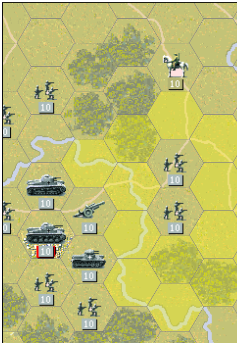
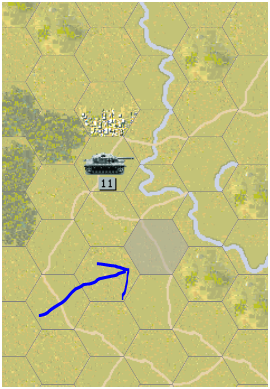
Here is a screen shot of the original game:

image

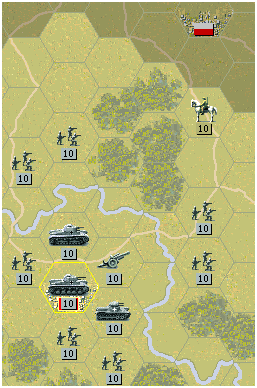
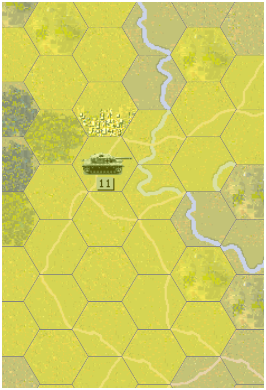
Here is a screen shot from my phone app:

image

And here it is after pinching:

image

There is 1 thing I don’t like about the graphics – each hex has a copy of the underlying image.  I really only need 1 in memory so I will make that change – which should improve the game load time.

Entity Framework: Identity Errors

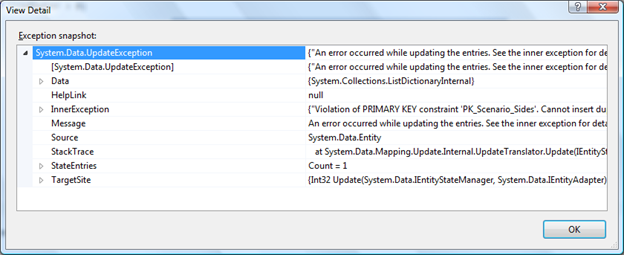
If you create a table with a PK that is not identity and then create a EF class from that and then try and load in an empty value, you get a System.Data.Update exception:

image


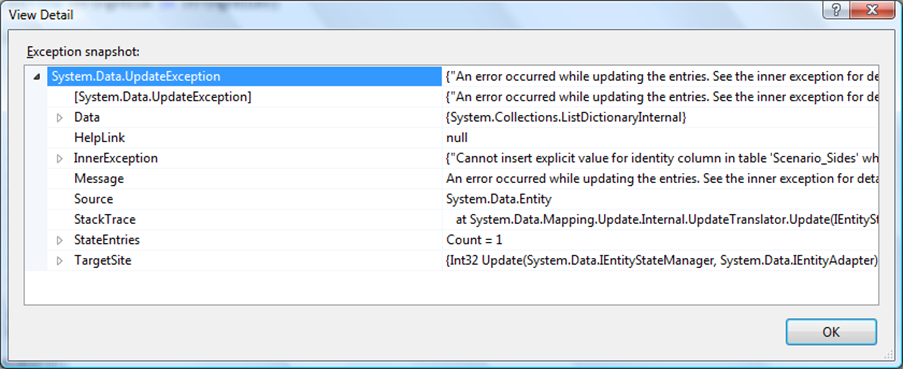
If you go ahead and change the server to identity without updating EF on your client, you still get a System.Data.Update exception, but with a different inner exception:

image

What you need to do is to fix it by changing to identity and then updating the EF on the client:

image

Volia: the change will now persist

However, if you create a PK on an existing table where there used to be a Implied key, you get an error. You need to drop the table and re-create.

What a drag

I am getting more into the details of the User Interface of the WinPhone7 game I am writing. I am using the ScrollViewer and the WindowPhone Toolkit.

Using the ScrollViewer_ManipulationStarted event handler, I check to see if there is a hex active. If it is, I call the e.complete() method so that we don’t scroll off the screen where the active hex is.

Using that model, I wanted to use the Tap and Drag completed events from the Toolkit. If the user taps a hex, that hex becomes active. They tap that active hex again, then the hex becomes inactive:

private void GestureListener_Tap(object sender, Microsoft.Phone.Controls.GestureEventArgs e) { Hex closestHex = GetClosestHex(e.GetPosition(this.MainCanvas)); if (Game.ActiveHex == null) { EnableGameActiveHex(closestHex); } else { if (Game.ActiveHex == closestHex) DisableGameActiveHex(); } }

That works fine:

image

I then wanted to code up the drag event. If there is not an active hex, then dragging should do nothing and the scroll viewer will allow the user to inspeact any part of the board. If there is an active hex and there is not a unit in that hex, then nothing should happen. If there is an active hex and there is an active unit in that hex, then the unit should “move” to the hex where the drag completed (and the hex becomes inactive).

To that end, I coded up a quick event handler:

private void GestureListener_DragCompleted(object sender, Microsoft.Phone.Controls.DragCompletedGestureEventArgs e) { if (Game.ActiveHex != null) { Hex closestHex = GetClosestHex(e.GetPosition(this.MainCanvas)); if (Game.ActiveHex.CurrentUnit != null) { MoveGameActiveUnit(closestHex); } DisableGameActiveHex(); } }

Toolkit does not have an e.complete() method so I couldn’t call that on the drag end – but since I don’t enter the drag unless the hex is active, I should be OK.

Next, I added movement allowances to the active unit based on the movement cost of each hex. Like last week’s post on recursion, I created a monster method and used the VS2010 extract method to make the code, well, suck less. To that end, I created a method that all of the movable hexes for the unit based on their max movement points.

private static List<Hex> GetMovableHexes(Hex startHex) { List<Hex> movableHexes = new List<Hex>(); List<Hex> tempHexes = new List<Hex>(); Unit currentUnit = startHex.CurrentUnit; int totalMovementPoints = currentUnit.BaseMovement; int unitMovementCost = 0; int pathMovementCost = 0; List<Hex> adjacentHexes = GetAdjacentHexes(startHex); startHex.PathMovementCost = pathMovementCost; foreach (Hex currentHex in adjacentHexes) { unitMovementCost = HexFactory.CalculateMovementCost(currentHex, currentUnit); pathMovementCost = pathMovementCost + unitMovementCost; if (pathMovementCost <= totalMovementPoints) { currentHex.PathMovementCost = pathMovementCost; movableHexes.Add(currentHex); } pathMovementCost = 0; } for (int i = 0; i < currentUnit.BaseMovement; i++) { DetermineMovableHexes(movableHexes, tempHexes, currentUnit, totalMovementPoints, ref unitMovementCost, ref pathMovementCost, ref adjacentHexes); } return movableHexes; }


I then determined if I could get to the hex from the current location (note the argument overload from VS2010 Extract Method):

private static void DetermineMovableHexes(List<Hex> movableHexes, List<Hex> tempHexes, Unit currentUnit, int totalMovementPoints, ref int unitMovementCost, ref int pathMovementCost, ref List<Hex> adjacentHexes) { foreach (Hex currentHex in movableHexes) { adjacentHexes = GetAdjacentHexes(currentHex); foreach (Hex tempHex in adjacentHexes) { unitMovementCost = HexFactory.CalculateMovementCost(tempHex, currentUnit); if (tempHex.CurrentTerrain.RiverInd == true && tempHex.CurrentTerrain.RoadInd == false) { unitMovementCost = 99; } pathMovementCost = currentHex.PathMovementCost + unitMovementCost; if (pathMovementCost <= totalMovementPoints) { if (currentHex.PathMovementCost < pathMovementCost) tempHex.PathMovementCost = pathMovementCost; tempHexes.Add(tempHex); } pathMovementCost = 0; } } foreach (Hex hex in tempHexes) { var q = (from Hex h in movableHexes where h.HexId == hex.HexId select h).FirstOrDefault(); if (q == null) { movableHexes.Add(hex); } } }

Basically, each hex has 2 movement points – the cost for the hex by itself and then the cumulative cost for the hex as part of a path. If the path is too much, the hex is not selected. By looping though each hex then its adjacent hexes, all possible paths are covered. The results look good:

image

Up next – having the unit attack another unit. Fun!