Search Engine Optimization Toolkit For IIS

I wanted to make MPMS Girls lax page more Search Engine friendly. I have never done any SEO ever so I jumped into Scott Allen’s article about SEO.

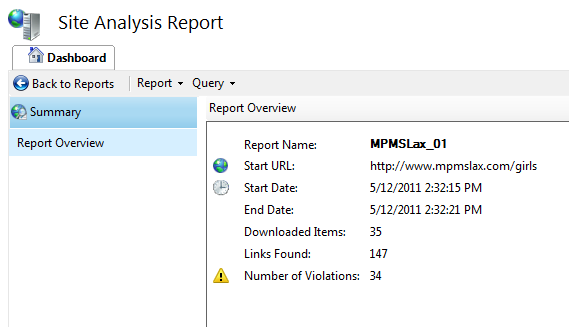
The first thing I did was to download the SEO toolkit to give myself a baseline. I launched the Search Engine Optimization (SEO) Toolkit and pointed to www.mpmslax.com:

image

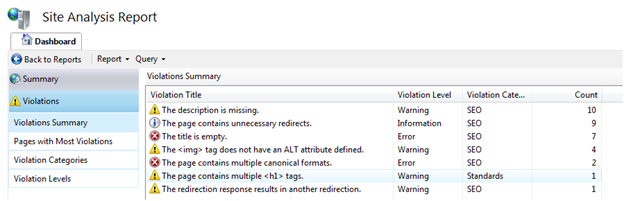
And by looking at the detail:

image

Working backwards:

Issue #7 has the blog redirect is throwing things off. Since we don’t even use that blog, I dropped it from the site.

Issue #6 – multiple <h1> was easily solved, I went to the offending .aspx page and dropped the <h1>. There is 1 <h1> and it is in the master page.

Issue #5 – canonical formats – I will deal with in a bit.

Issue #4 – not ALT attribute – all on the sponsor page – I just added a AlternateText attribute to the markup

Issue #3 – Title is empty – fixed (see below)

Issue #2 – Dropping the blog solves this problem

Issue #1 – Description is empty – fixed (See below)

The first couple of recommendations from Scott Allen and picked up by the SEO were easy. I added a title and some meta tags to my master page:

<head runat="server"> <title>Mills Park Girls Lacrosse</title> <meta name="keywords" content="MPMS, Mills Park Middle School, Girls Lacrosse, Girls Lax" /> <meta name="description" content="Mills Park Girls Lacrosse" /> <link href="~/Styles/Site.css" rel="stylesheet" type="text/css" /> <asp:ContentPlaceHolder ID="HeadContent" runat="server"> </asp:ContentPlaceHolder> </head>

I deployed the site and re-ran the SEO and got only the canonical formats error. Interestingly, I don’t see where the error is coming from. For example, I have these 2 errors:

The page with URL "http://www.mpmslax.com/girls/Public/ContactUs.aspx&quot; can also be accessed by using URL "http://www.mpmslax.com/girls/Public/Coaches.aspx&quot;.

The page with URL "http://www.mpmslax.com/girls/Public/Coaches.aspx&quot; can also be accessed by using URL "http://www.mpmslax.com/girls/Public/ContactUs.aspx&quot;.

But here is the relevant part of the site map:

<siteMapNode url="~/Public/Coaches.aspx" title="Coaches" description="MS Girls Lax Coaches" /> <siteMapNode url="~/Public/ContactUs.aspx" title="Contact Us" description="MP Girls Lax Contact Us" />

That’s it – I have no idea where this error is coming from.

On a related canonical issue, I have the following urls for the site:

· www.mpmslax.com

· www.mpmslax.org

· www.mpmslacrosse.com

· www.mpmslacrosse.org

Since WInHost does not point at subdirectories, I am stuck unless I write a url redirect script. Taking the path of least resistance, I just popped in a basic MVC site to the main directory. People can then click on the link to go to the girls subdirectory.

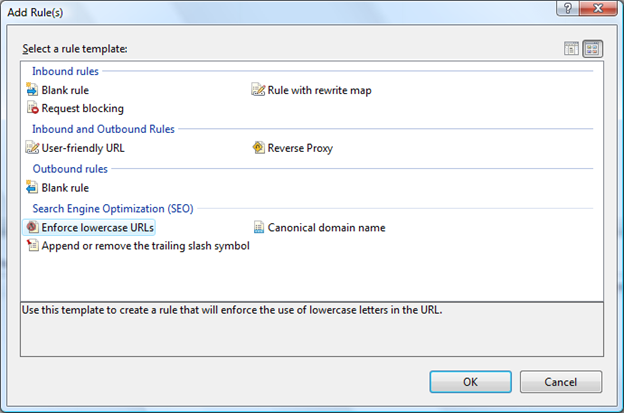
I finally wrapped up URL Rewriter – it was already installed on WinHost. I can’t believe how easy it is – Just open the dialog and select the rule you want to enforce:

image

I picked all 3 SEO ones and called it a day. I am really impressed with the IIS add-ins – they really made my life easier.

Overloading Controller Methods in a MVC Project

I cranked up a new MVC3 project (Razor and Unit Testing). I went to the Home controller and added an overloaded method to the Index:

public ActionResult Index(string userName) { ViewBag.Message = String.Format("Welcome to ASP.NET MVC, {0}!", userName); return View(); }

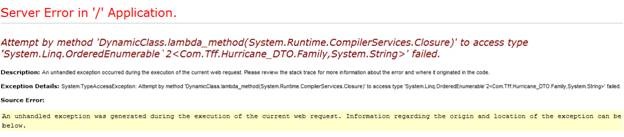
I then hit F5 and got the following error:

image


I tried adding a route:

routes.MapRoute( "HomeIndexWithString", "Home/Index/{userName}", new { controller = "Home", action = "Index", userName = "" } );

and being explicit with the URL but I got the same error:

image

I then looked on Stack Overflow and added the ActionName attribute to my overloaded method:

[ActionName("HomeIndexWithString")] public ActionResult Index(string userName) { ViewBag.Message = String.Format("Welcome to ASP.NET MVC, {0}!", userName); return View(); }

The Index page returned, but the problem is that even when I passed in the explicit url, it still returned the default page. I then went back to the overloaded method and deleted it. I then added an optional parameter to the original index method and handled it if the value was populated:

public ActionResult Index(string? userName) { StringBuilder stringBuilder = new StringBuilder(); stringBuilder.Append("Welcome to ASP.NET MVC"); if (userName != null) { stringBuilder.Append(String.Format(", {0}!", userName)); } ViewBag.Message = stringBuilder.ToString(); return View(); }

The problem is that the compiler complains:

Error 1 The type ‘string’ must be a non-nullable value type in order to use it as parameter ‘T’ in the generic type or method ‘System.Nullable<T>’

So I am down to creating a custom ActionMethodSelectAttribute that can handle the requests and parse appropriately. Since this smells like a kludge, I went back to the way MSFT wants me to do it – create a different method for each action and return to appropriate view. Naming confusion notwithstanding, I guess that is what I will do…

MVC, LINQ, and WinHost

I love MVC. I recently had to make some changes to the swim team website to get ready for the 2011 season. Because there was a nice SOC enforced by MVC, I simply had to add a couple of new controllers with some basic CRUD:

clip_image001

add their associated views, and then wire up to my factory using my POCOs:

public ActionResult Index(int? page) { FamilyFactory familyFactory = new FamilyFactory(); IQueryable<Family> families = familyFactory.GetAllFamilies() .OrderBy(family => family.FamilyDesc) .AsQueryable <Family>(); const int pageSize = 10; var paginatedFamilies = new PaginatedList<Family>(families, page ?? 0, pageSize); return View(paginatedFamilies); }

(note that I used the paginated list from Nerd Dinner)

Boom goes the dynamite.

Upon reflection, you can really see how useful using POCOs are when you have to extend your application. That upfront cost 2 years ago is paying huge dividends now.

I did run into 1 small hiccup when I deployed to WinHost. I received the following error:

clip_image002

After some digging (this error does not Google well), I added this:

<trust level="Full" />

To System.Web and things corrected.

MCPD 4.0

I passed exam 70-521 last week.


image

  I found the exam a bit different than other Microsoft exams that I have taken.  The content of the questions were pretty straightforward (except some of the LINQ questions were a bit contrived).  The biggest difference to prior exams is that you can apply test-taking strategies because on 95% of the questions, the answer was provided.  There were few, if any “none of the above” as answers.  That means it was fairly easy to use process of elimination  to narrow down the potential answers.


In other news, I created a slide deck to play before the TriNug meeting tomorrow night.  It is like the advertisements that play at some movies before the previews.  I took most of the questions from the MSFT training kit – though I threw in 1 question that I remember vividly from the exam.  I couldn’t remember it exactly, but the intent is like this:


What code sample makes this window in WPF (line numbers are for reference only)?

image

A:

  1. <DockPanel>            
  2. <Button Content="Top" DockPanel.Dock="Top"/>            
  3. <Button Content="Bottom" DockPanel.Dock="Bottom"/>            
  4. <Button Content="Left" DockPanel.Dock="Left"/>            
  5. <Button Content="Right" DockPanel.Dock="Right"/>           
  6. <Button Content="Center"/>        
  7. </DockPanel>

B:

  1. <DockPanel>            
  2. <Button Content="Top" DockPanel.Dock="Top"/>            
  3. <Button Content="Bottom" DockPanel.Dock="Bottom"/>            
  4. <Button Content="Left" DockPanel.Dock="Left"/>            
  5. <Button Content="Center"/>      
  6. <Button Content="Right" DockPanel.Dock="Right"/>             
  7. </DockPanel>

C:

  1. <DockPanel>            
  2. <Button Content="Left" DockPanel.Dock="Left"/>
  3. <Button Content="Top" DockPanel.Dock="Top"/>   
  4. <Button Content="Center"/>         
  5. <Button Content="Bottom" DockPanel.Dock="Bottom"/>            
  6. <Button Content="Right" DockPanel.Dock="Right"/>           
  7. </DockPanel>

D:

  1. <DockPanel>            
  2. <Button Content="Top" DockPanel.Dock="Top"/>            
  3. <Button Content="Bottom" DockPanel.Dock="Bottom"/>            
  4. <Button Content="Left" DockPanel.Dock="Left"/>            
  5. <Button Content="Right" DockPanel.Dock="Right"/>           
  6. <Button Content="Center“DockPanel.Dock
  7. </DockPanel>

It’s easy enough to figure out the answer – just copy past each possibility into a WPF form in VS2010.

In any event, I am going on vacation next week so I won’t post back here for 2 weeks.

Geocoding APIs

I am building my first Windows Phone 7 Application. As part of the applications requirements, I need to find the geo coordinates of cross streets. Unlike many phone apps, I do not need to gather that information real-time. Rather, I have a database of 700 cross streets (key locations) that I will load into the phone at app start-up and then use the built in GeocordinateWatcher class of the .NET phone framework to compare to this list when the PositionChanged  event is raised. The problem is that the initial list of 700 addresses do not have geocoordinates. I built an application that hits the major map APIs (Yahoo, Bing, Google) to see how well they can create geocoordinates from cross street information that can be used by my phone application.

Bing

I started with Microsoft because this is a .NET application. The really cool thing about the Microsoft API is that I can consume the WCF service so there is no HTTP requests to code or XML/JSON responses to parse.

string queryString = String.Format("{0} AT {1} {2}, NC", intersection.RoadA, intersection.RoadB, crash.City); string results = string.Empty; GeocodeRequest geocodeRequest = new GeocodeRequest(); geocodeRequest.Credentials = new GeocodeService.Credentials(); geocodeRequest.Credentials.ApplicationId = "XXXXXXXXXX"; geocodeRequest.Query = queryString; ConfidenceFilter[] filters = new ConfidenceFilter[1]; filters[0] = new ConfidenceFilter(); filters[0].MinimumConfidence = GeocodeService.Confidence.High; GeocodeOptions geocodeOptions = new GeocodeOptions(); geocodeOptions.Filters = filters; geocodeRequest.Options = geocodeOptions; GeocodeServiceClient geocodeServiceClient = new GeocodeServiceClient("BasicHttpBinding_IGeocodeService"); GeocodeResponse geocodeResponse = geocodeServiceClient.Geocode(geocodeRequest); if (geocodeResponse.Results.Length > 0) { if (geocodeResponse.Results[0].Locations[0].Latitude >= 33 && geocodeResponse.Results[0].Locations[0].Latitude <= 36 && geocodeResponse.Results[0].Locations[0].Longitude >= -84 && geocodeResponse.Results[0].Locations[0].Longitude <= -76) { intersection.Latitude = geocodeResponse.Results[0].Locations[0].Latitude; intersection.Longitude = geocodeResponse.Results[0].Locations[0].Longitude; intersection.GeoCodeSource = "Bing"; } }

Getting a developer key was a snap because I already had a liveID.

· Search Result Rating = Medium

· Developer Experience = High

Yahoo

I then went to Yahoo to supplement the data that was not found by Bing. Coding the Yahoo API was a straight Web Request/Response:

StringBuilder queryString = new StringBuilder(); queryString.Append("http://where.yahooapis.com/geocode?"); queryString.Append("?street="); queryString.Append(intersection.RoadA); queryString.Append("&xstreet="); queryString.Append(intersection.RoadB); queryString.Append("&city="); queryString.Append(intersection.City); queryString.Append("&state=NC"); queryString.Append("&appid="); queryString.Append("XXXXXX--"); HttpWebRequest webRequest = (HttpWebRequest)WebRequest.Create(queryString.ToString()); WebResponse webResponse = webRequest.GetResponse(); Stream stream = webResponse.GetResponseStream(); XmlDocument xmlDocument = new XmlDocument(); xmlDocument.Load(stream); if(xmlDocument != null) { XmlNode rootNode = xmlDocument.DocumentElement; string returnCode = rootNode.SelectSingleNode("Error").InnerText; if (returnCode == "0") { double latitude = Double.Parse(rootNode.SelectSingleNode("Result/latitude").InnerText); double longitude = Double.Parse(rootNode.SelectSingleNode("Result/longitude").InnerText); if (latitude >= 33 && latitude <= 36 && longitude >= -84 && longitude <= -76) { intesection.Latitude = latitude; intesection.Longitude = longitude; intesection.GeoCodeSource = "Yahoo"; } } }

Getting the applicationId was a snap because I already had a YahooId. The one amusing thing to me is that when I went to Yahoo Search and tped in “Maps”, Google’s Map page came up before Yahoo.

clip_image002[4]

· Search Result Rating = Medium

· Developer Experience = Medium

Google

I then tried Google’s API. Coding Google was the same as Yahoo (using HTTP Request and Response) with a slightly less verbose query string:

StringBuilder queryString = new StringBuilder(); queryString.Append("http://maps.googleapis.com/maps/api/geocode/xml?"); queryString.Append("?address="); queryString.Append(intersection.RoadA); queryString.Append(" + and + "); queryString.Append(intersection.RoadB); queryString.Append("&city="); queryString.Append(intersection.City); queryString.Append("&state=NC"); queryString.Append("&sensor="); queryString.Append("false");

The problem was that the data coming back is all wrong. For example, I tried to geocode a major street intersection near my house (you can put this into your browser to see the results):

http://maps.googleapis.com/maps/api/geocode/xml?address=I 440+&+Wake Forest Road+Raleigh,+NC&sensor=false

Check out what I got back:

clip_image001

I then tried this:

http://maps.googleapis.com/maps/api/geocode/xml?address=I 440+and+Wake Forest Road+Raleigh,+NC&sensor=false

clip_image003

At least I am in the country now, but not anywhere near the intersection.  It appears that Bing and Yahaoo have a much better way of geocoding cross streets. After too many false-positives (and no correct hits), I gave up on the Google API. The nice thing about the Google API is that I didn’t have to register for an app id. The not-so-nice thing is that I am limited to 2,500 a day unless I joined something called Premium Developer.

· Search Result Rating = Low

· Developer Experience = Medium

For my project then I am using Bing and supplementing with Yahoo. I am not using Google.

Illustrated WPF and WPF Programmer’s Reference

I am studying for my MCPD exams, which I am taking in 2 weeks.  Because the official exam guide is so horrible, I picked up a couple more more books.  The first is Illustrated WPF by Solis.  I made it through page 141 before giving up.  I then opened WPF Programmer’s Reference by Stephens.  I made it through page 178.  Both books suffer from the same problem – they don’t teach WPF.  Rather, they introduce all of the concepts of WPF in a subject-specific way.  For example in Solis, Chapter 5 Layout, then Panels, then the StackPanel, then the wrapPanel, etc…  Each section has an illustration or two with a basic code snippet that you can read.  The problem is that I (and most people) don’t learn computer languages like this – it is equivalent to reading MSDN cover to cover.  I draw on my experience from Ivor Horton’s Beginning C++ or Doug Wright’s Beginning VB6.  Those books were more tutorial based with exercises to encourage the reader to have his/her hands on the keyboard.


I have one more book WPF4 Unleashed by Nathan.  I am not optimistic.  I’ll give the book a creditable try but I am already thinking about an application I can write to teach myself the concepts.  I hope I can get it done by my self-imposed exam deadline.

Windows Applications Development with Microsoft .NET Framework 4

I am prepping for my first .NET 4.0 upgrade exam (70-521) that I want to take in a couple of weeks.  I purchased the Microsoft “official” training kit and worked my way though it over the last 7 days.  In a word – “terrible”.  In two words – “really terrible”.  In three words – well, you get the idea.  Why do I think this book is a waste of time?

  • There are little, if any, code samples to explain a concept
  • The material is not cumulative, nor is there a unifying application/project to tie concepts together
  • The actual explanations are overly wordy and opaque
  • The code samples, when they exist, are examples of anti-practices.  Consider this nugget from the first chapter:
  • foreach(FontFamily F in Fonts.SystemFontFamilies) { ListBoxItem l = new ListBoxItem(); l.Content = F.ToString(); l.FontFamily = F; listBox1.Items.Add(l); }

(Yup, this was written by someone who considers themselves a professional programmer)

  • The book’s size is due to listing each enumeration value in chart form – basically unreadable.
  • The pictures are in black and white
  • Each chapter ends with helpful “exercises” like “Build a calculator program” or “Practice creating resources” without any guidance on how to do the task or any final answer to check against.

I ordered some other WPF books that were recommended – I’ll spin through them in the coming weeks.  Until then, I am just puttering around with WPF – which is my new BFF (sorry WF)….

The Var Keyword

Consider the following block of code:

using (NorthwindEntities entities = new NorthwindEntities()) { var x = from y in entities.Categories select y; }

The Var keyword resolves at run-time, meaning that its value depends on the right hand side of the equation.  If I chain a function on the right hand side like this, var takes on a different meaning:

using (NorthwindEntities entities = new NorthwindEntities()) { var x = (from y in entities.Categories select y).First(); }

I see that var is used extensively, so I guess I am in the minority but I don’t like to use it.  I am willing to trade off some verbosity for clarity of intention.  If I use the var keyword, I need to read the right hand side of the equation first to figure out what goes in it (and hope that I guessed correctly – with some of the convoluted LINQ that I have seen written, no small task).  Since I read left to right, it waste time and my CPU cycles.  In addition, I fail to see what is wrong with being more explicit in the left hand side of your equation:

using (NorthwindEntities entities = new NorthwindEntities()) { IQueryable<Category> catagotyQuery = from catagories in entities.Categories select catagories; }

In this example, my intention is clear and I have much more readable and maintainable code.

.NET 4.0 Upgrade Exams–> Here I Go Again….

I have started studying for my .NET 4,0 upgrade exams: Exam 70-521 and Exam 70-523.  I read the subjects covered on the Microsoft exam website and it is obvious that they are covering more of the >NET 3.0, 3.5, and 4.0 framework than before.  For example, there is much more of an emphasis on LINQ and WPF than the 3.5 upgrade exam.

Diving into LINQ, I realized there is TONS I don’t know about –> SelectMany, Joining Tables, etc… As for WPF, I am coming up to speed on the basic syntax –> like what is the difference between a TextBox and a TextBlock.  The exam guides should be coming in the next couple of days.  Between that and the on-line Microsoft resources, I should be ready.

Polymorphism In Action

The swim team that I help out with is purchasing a timing system. The timing system’s data needs to interface with the existing datamart, which is stored in a SQL Server database. The database serves a variety of functions – from season registration, meet registration, team records, etc…

The system that the board chose is the industry leader with its own proprietary data storage mechanism. Their system does not allow any kind of RPC from a RDBMS system. The only way to get into and out of the system is via text files. These text files are structured using USA Swimming’s Standard Data Interchange Format – found here with a simplified version found here. I cracked open the RFC and was amazed – they are not using XML! Rather, it is a flat file format with each row of data conforming to certain field lengths. It is like going back to FORTRAN programming – without the sexiness of the green screen. Here is an example of a row of data:

D01 Whitaker, Taylor 122691TAY*WH 1226199118FF 1003 UNOV 1:25.00Y

And here is how the RFC tells you how to parse the payload:

Start /
Length Mandatory Type Description
1/2 M1* CONST "D0"
3/1 M2* CODE ORG Code 001, table checked
4/8 future use
12/28 M1 NAME swimmer name
40/12 M2 ALPHA USS#
52/1 CODE ATTACH Code 016, table checked
53/3 CODE CITIZEN Code 009, table checked
56/8 M2 DATE swimmer birth date
64/2 ALPHA swimmer age or class (such as Jr or Sr)
66/1 M1 CODE SEX Code 010, table checked
67/1 M1# CODE EVENT SEX Code 011, table checked
68/4 M1# INT event distance
72/1 M1# CODE STROKE Code 012, table checked
73/4 ALPHA Event Number
77/4 M1# CODE EVENT AGE Code 025, table checked
81/8 M2 DATE date of swim
89/8 TIME seed time
97/1 * CODE COURSE Code 013, table checked

Therefore, to interface with our SQL Server database, I need a way of translating the data that is in the database into the structured format (and back again).

There are a series of files – A0, B1, etc… I was thinking of making a class that is a concrete implementation of the RFC for that row of data. I then realized that I could use the power of an Object Oriented Language to make my solution less brittle and to try out some cool polymorphic techniques.

My first step was to create an Interface that handles each chunk of data. Just because USA Swimming isn’t going to use XML, it doesn’t mean I can’t use XML language syntax – heck it is all structured data.

I started with the attribute:

public interface IAttribute { int AttributeId { get; set; } int Start { get; set; } int Length { get; set; } bool Manditory { get; set; } AttributeType AttributeType { get; set; } string Description { get; set; } string AttributeValue { get; set; } string PaddedValue { get; } }

The AttributeValue is a string implementation of the value of the property. The PaddedValue is the same value with the padding and left/right justification applied.

I then thought about how I wanted to implement the 15 or so different elements (called “records”, which has nothing to do with swim meet records. Someone didn’t understand the importance of domain-specific language). Since the elements are fairly stable, I went with a Strategy Pattern.

Each element is a collection of Attributes. Therefore, I created one to see if I was barking up the right tree:

public class FileDescription: Collection<IAttribute> { public string ElementId { get { return "A0"; } } public string ElementDescription { get { return "File Description Record"; } } public FileDescription() { this.Add(new Attribute { AttributeId = 1, Start = 1, Length = 2, Manditory = true, AttributeType = AttributeType.CONST, Description = "A0"}); this.Add(new Attribute { AttributeId = 2, Start = 3, Length = 1, Manditory = false, AttributeType = AttributeType.CODE, Description = "ORG Code 001, table checked" }); this.Add(new Attribute { AttributeId = 3, Start = 4, Length = 8, Manditory = false, AttributeType = AttributeType.ALPHA, Description = "SDIF version number (same format as the version number from the title page)" }); etc… } }

I then realized that there is no easy way to get the correct Attribute from the collection except via its index number. Holding my nose, I then created a new unit test to see if I could create a fake for this class. The first test passed. I then wanted to add a ToString() override that spits out the FileDescription’s values – as if I was writing it out to the flat file. Here is what I came up with:

public override string ToString() { StringBuilder stringBuilder = new StringBuilder(); stringBuilder.Append(this[0].AttributeValue); stringBuilder.Append(this[1].AttributeValue); … stringBuilder.Append(this[12].AttributeValue); return stringBuilder.ToString(); }

I then realized that I would have to duplicate this code in every class that implements the Collection<IAttribute> I then created an abstract class to handle some of this work for me:

public abstract class Record : Collection<IAttribute> { public string RecordId { get { return this[0].AttributeValue.ToString(); } set { this[0].AttributeValue = value; } } public string OrganizationCode { get { return this[1].AttributeValue.ToString(); } set { this[1].AttributeValue = value; } } public const int MaxRecordLength = 160; public override string ToString() { StringBuilder stringBuilder = new StringBuilder(); foreach (Attribute attribute in this) { stringBuilder.Append(attribute.AttributeValue); } return stringBuilder.ToString(); } public string ToPaddedString() { int padLength = 0; StringBuilder stringBuilder = new StringBuilder(); stringBuilder.Append(ToString()); padLength = MaxRecordLength - stringBuilder.Length; for (int i = 0; i < padLength; i++) { stringBuilder.Append(string.Empty); } return stringBuilder.ToString(); } }

I then changed the concrete classes to inherit from the Record class. I finished my Fake for the unit tests like this:

file[0].AttributeValue = "A0"; file[1].AttributeValue = "1"; file[2].AttributeValue = "V3"; file[3].AttributeValue = "20"; file[5].AttributeValue = "Hy-Tek, Ltd"; file[6].AttributeValue = "6.0X"; file[7].AttributeValue = "Hy-Tek, Ltd -USS"; file[8].AttributeValue = "252-633-5177"; file[9].AttributeValue = "02172011";

I then realized that I hate working with indexers so I added properties that give a friendly name to the indexer:

public string SoftwareName { get { return this[5].AttributeValue.ToString(); } set { this[5].AttributeValue = value; } }

I then rewrote my Fake and still got green on the unit tests.

file.RecordId = "A0"; file.OrganizationCode = "1"; file.SDIFVersionNumber = "V3"; file.FileCode = "20"; file.SoftwareName = "Hy-Tek, Ltd"; file.SoftwareVersion = "6.0X"; file.ContactName = "Hy-Tek, Ltd -USS"; file.ContactPhone = "252-633-5177"; file.FileCreation = "02172011";

Tests were still green, so I feel good.

I then wanted to tackle the actual values that will be assigned to each attribute. There are two kinds of values – the value that come from the database (three is you want to count the .NET types versus the SQL Server ones) and the one that comes from/goes into the output file. The output file is a structured string file so perhaps I can just store the Value as a string and translate it into the native types. I would need a Translation Factory that takes the native types and pushes it into the string correctly – which seems like the right thing to do.

Before creating the Translation class , I created the classes that represent the data in the SQL Server database. I chose using EF.

I then added the Translation class that takes all of the datafrom the EF classes, translates it, and sticks it into the SDIF format. An example looks like this:

public List<IndividualEvent> CreateIndividualEventRecords(int meetId) { List<IndividualEvent> individualEvents = new List<IndividualEvent>(); IndividualEvent individualEvent = null; using (HurricaneEntities context = new HurricaneEntities()) { var q = from mea in context.tblMeetEventAssignments .Include("tblMeetEvent") .Include("tblMeetEvent.tblRaceStroke") .Include("tblMeetEvent.tblAgeGroup") .Include("tblMeetSwimmerCheckIn") .Include("tblMeetSwimmerCheckIn.tblSwimmerSeason") .Include("tblMeetSwimmerCheckIn.tblSwimmerSeason.tblSwimmer") where mea.tblMeetSwimmerCheckIn.MeetID == meetId select new { FirstName = mea.tblMeetSwimmerCheckIn.tblSwimmerSeason.tblSwimmer.FirstName, LastName = mea.tblMeetSwimmerCheckIn.tblSwimmerSeason.tblSwimmer.LastName, DateOfBirth = mea.tblMeetSwimmerCheckIn.tblSwimmerSeason.tblSwimmer.DateOfBirth, GenderId = mea.tblMeetSwimmerCheckIn.tblSwimmerSeason.tblSwimmer.GenderID, RaceStrokeId = mea.tblMeetEvent.RaceStrokeID, AgeGroupId = mea.tblMeetEvent.AgeGroupID, AgeDesc = mea.tblMeetEvent.tblAgeGroup.AgeDesc, RaceLengthId = mea.tblMeetEvent.tblAgeGroup.RaceLengthID}; foreach (var databaseRecord in q) { individualEvent = new IndividualEvent(); individualEvent.RecordId = "D0"; individualEvent.OrganizationCode = "1"; individualEvent.SwimmerName = databaseRecord.FirstName + " " + databaseRecord.LastName; individualEvent.USSwimmingNumber = "??????"; individualEvent.SwimmerBirthDate = CreateFormattedDate(databaseRecord.DateOfBirth); individualEvent.SwimmerAgeOrClass = "??"; individualEvent.SwimmerSex = CreateFormattedGender(databaseRecord.GenderId); individualEvent.EventSex = CreateFormattedGender(databaseRecord.GenderId); individualEvent.EventDistance = CreateFormattedEventDistance(databaseRecord.RaceLengthId); individualEvent.EventStroke = CreateFormattedEventStroke(databaseRecord.RaceStrokeId); individualEvent.EventAge = databaseRecord.AgeDesc; individualEvent.SeedTime = "99.99"; individualEvent.EventCourseCode = "Y"; individualEvents.Add(individualEvent); } } return individualEvents; }

An example of the Individual Helper functions that does the actual translation:

public string CreateFormattedEventDistance(int raceLengthId) { switch (raceLengthId) { case 1: return "15"; case 2: return "25"; case 3: return "50"; case 4: return "100"; default: return "0"; } }

After hooking up all of my translations, I was ready to create an output file.   All I had to do was write this

static void WriteToFile() { string fileName = @"C:\Users\Public\HHTest01.SD3"; MeetSetupFactory factory = new MeetSetupFactory(); Collection<string> collection = factory.CreateMeetSetUp(72); System.IO.File.WriteAllLines(fileName, collection); }

and because of polymorphism, the output came out perfectly:


A01V3      01                              Tff LLC.            1.0X      James Dixon         9193884228  02212011                                              
B11        Olive Chapel                  Highcroft Pool                                                                  0720201007202010            Y         
C11              Highcroft Hurricanes          HHST            100 Highcroft Drive                         Cary                NC27519     USA                 
D01        Sloan Dixon                 040420Dix*Sl    040420020708MM25  2    7-8         99.99   Y                                                              
D01        Sloan Dixon                 040420Dix*Sl    040420020708MM25  3    7-8         99.99   Y