//Build Word Count!

I started working with HadoopFs last week to see if I could get a better understanding of how to write FSharp mappers.  Since everyone uses word counts when doing a “Hello World” using hadoop, I thought I would also.

image

I decided to compare Satya’s //Build keynote from 2014 and 2015 to see if there was any shift in his focus between last year and this.  Isaac Abraham managed to reduce the 20+ lines of catastrophic C# code in the Azure HDInsight tutorial into 2 lines of F# code

C#

1 static void Main(string[] args) 2 { 3 if (args.Length > 0) 4 { 5 Console.SetIn(new StreamReader(args[0])); 6 } 7 8 string line; 9 string[] words; 10 11 while ((line = Console.ReadLine()) != null) 12 { 13 words = line.Split(' '); 14 15 foreach (string word in words) 16 Console.WriteLine(word.ToLower()); 17 } 18 }

F#

1 let result = testString.Split([| ' ' |], StringSplitOptions.RemoveEmptyEntries) |> Seq.countBy id 2 result 3

I added the data files to my solution and then added way to locate those files via a relative path.

1 let baseDirectory = __SOURCE_DIRECTORY__ 2 let baseDirectory' = Directory.GetParent(baseDirectory) 3 let filePath = "Data\Build_Keynote2014.txt" 4 let fullPath = Path.Combine(baseDirectory'.FullName, filePath) 5 let buildKeynote = File.ReadAllText(fullPath)

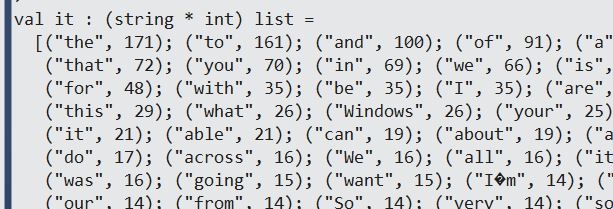
I then ran the mapper that Isaac created and got what I expected

1 buildKeynote.Split([| ' ' |], StringSplitOptions.RemoveEmptyEntries) 2 |> Seq.countBy id 3 |> Seq.sortBy(fun (w,c) -> c) 4 |> Seq.toList 5 |> List.rev

Capture

Interestingly, the 1st word that really jumps out is “Windows” at 26 times.

I then loaded in the 2015 Build keynote and ran the same function

1 let filePath' = "Data\Build_Keynote2015.txt" 2 let fullPath' = Path.Combine(baseDirectory'.FullName, filePath') 3 let buildKeynote' = File.ReadAllText(fullPath') 4 5 buildKeynote'.Split([| ' ' |], StringSplitOptions.RemoveEmptyEntries) 6 |> Seq.countBy id 7 |> Seq.sortBy(fun (w,c) -> c) 8 |> Seq.toList 9 |> List.rev

Capture2

And the 1st interesting word is “Platform” at 9 mentions.  “Windows” fell to 2 mentions.

1 result |> Seq.filter(fun (w,c) -> w = "Windows")

image

And just because I couldn’t resist

1 result |> Seq.filter(fun (w,c) -> w = "F#") 2 result |> Seq.filter(fun (w,c) -> w = "C#") 3

image

So I am feeling pretty good about HadoopFs and will now start trying to implement it on my instance of Azure this weekend.


Business Logic and F#

One of the reasons I like F# so much is that it allows me to think about the problem I am trying to solve, not about the language syntax and coding around language constructs.  Consider this example. 

I am putting on an art show in my neighborhood and I managed to obtain 3 paintings of cultural significance:

Starry Night

Capture2

Sunday Afternoon on the Island of La Grande Jatte

Capture

Dogs Playing Poker

Capture3

Each painting is in its own room and due to the volume of people that the art gallery can support, a person can only visit 1 painting.  1,000 tickets sold and all 1,000 people are going to show up.  This is a hot event.

I needed a way to forecast how many people will go into each room.  Since all 3 paintings are immensely popular, I could assume that each room will have 1/3 the number of visitors.  However, I wanted to be be a bit more precise and I know that each painting has a certain number of tags associated with them:

Tag Starry Night Afternoon Poker
Impressionism X X  
Nature X X  
Leisure Activity   X X
Modernism     X

Assuming that people will want to go see paintings with tags that interest them, paintings that have tag overlap will split visitors, paintings with no tag overlap will see more visitors, and paintings with more tags will draw more visitors.  In Excel:

Tag Starry Night Afternoon Poker Total
Impressionism 1 1   2
Nature 1 1   2
Leisure Activity   1 1 2
Modernism     1 1
         
         
Tag Starry Night Afternoon Poker  
Impressionism 0.5 0.5    
Nature 0.5 0.5    
Leisure Activity   0.5 0.5  
Modernism     1  
         
         
Tag People Starry Night Afternoon Poker
Impressionism 250 125 125  
Nature 250 125 125  
Leisure Activity 250   125 125
Modernism 250     250
  1,000 250 375 375

Putting this to code, I opened up the F# REPL and created my art show like so:

1 2 type Painting = {id:int;name:string;tags:string} 3 type ArtShow = {id:int;name:string;expectedAttendance:int;paintings:Painting list} 4 5 let painting0 = {id=0; 6 name="Starry Night"; 7 tags="Impressionism;Nature"} 8 let painting1 = {id=1; 9 name="Sunday Afternoon on the Island of La Grande Jatte"; 10 tags="Impressionism;Nature;LeisureActivities"} 11 let painting2 = {id=2; 12 name="Dogs Playing Poker"; 13 tags="Modernism;LeisureActivities"} 14 let paintings = [painting0;painting1;painting2] 15 16 let artShow = {id=0; 17 name="Art Extravaganza"; 18 expectedAttendance=1000; 19 paintings=paintings} 20

I then needed a way of uniquely identifying the tags.  Enter the goodness of piping and high order functions:

1 let tagSet = artShow.paintings |> Seq.map(fun p -> p.tags) 2 |> Seq.collect(fun t -> t.Split(';')) 3 |> Seq.groupBy(fun t -> t) 4 |> Seq.map(fun (id,t) -> id, t |> Seq.length) 5

image

I then needed a way of assigning number of people to tags.  Easy enough (this could have been part of the code block above but I split it for illustrative purposes)

1 let visitorsPerTag = artShow.expectedAttendance / (tagSet |> Seq.length) 2 let tagSet' = tagSet |> Seq.map(fun (id,c) -> id, visitorsPerTag/ c )

image

And then a function that calculates the number of expected visitor based on that the individual painting:

1 let tagModifier(painting: Painting) = 2 let tags = painting.tags.Split(';') 3 tags |> Seq.map(fun pt -> tagSet' |> Seq.find(fun(t,c) -> pt = t)) 4 |> Seq.sumBy(fun(t,c) -> c )

And running it against my show’s paintings gives me the expected values:

1 artShow.paintings |> Seq.map(fun p -> p, tagModifier(p)) 2

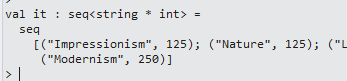
image

So this is why I love F#.  The REPL and the language helped me reason and solve the problem.  You can see the gist here.

After note: I sent the same challenge to some C# devs I know about how they would reason and then code the answer.  No one took me up on it.

System.AggregateException using Tweetinvi

Dear Future Jamie

If you are using TweetInvi in a new project and you get a System.AggregateException

Capture1

And that exception contains a single Inner exception of System.IO.FileNotFoundException and the exception reads “cannot load System.Http.Primitives”

 Capture

Install Microsoft.Net.Http in the calling project (in this case it was the unit test project).

Capture2


Love

Current Jamie

PS You should really exercise more

Global Azure Bootcamp Racing Game: More Analytics Using R and AzureML

Alan Smith, the creator and keeper of the Global Azure Bootcamp Racing Game, was kind enough to put the telemetry data from the races out on Azure Blob Storage.  The data was already available as XML from Table Storage but AzureML was choking on the format so Alan was kind enough to turn it in to csv and put the file out here:

https://alanazuredemos.blob.core.windows.net/alan/TelemetryData0.csv
https://alanazuredemos.blob.core.windows.net/alan/TelemetryData1.csv
https://alanazuredemos.blob.core.windows.net/alan/TelemetryData2.csv
https://alanazuredemos.blob.core.windows.net/alan/PlayerLapTimes0.csv
https://alanazuredemos.blob.core.windows.net/alan/PlayerLapTimes1.csv
https://alanazuredemos.blob.core.windows.net/alan/PlayerLapTimes2.csv

Note that there are 3 races with race0, race1, and race2 each having 2 datasets.  The TelemetryData is a reading foreaceach car in the race every 10 MS or so and the PlayerLapTimes is a summary of the demographics of the player as well as some final results.

I decided to do some unsupervised learning using Chapter 8 of Practical Data Science With R as my guide.  I pulled down all 972,780 observations from the Race0 telemetry data in R Studio.  It took a bit :-)  I then ran the following script to do a cluster dendrogram.  Alas, I killed the job after several minutes (actually the job killed my machine and I got a out of memory exception)

1 summary(TelemetryData0) 2 pmatrix <- scale(TelemetryData0[,]) 3 d <- dist(pmatrix, method="euclidean") 4 pfit <- hclust(d,method="ward") 5 plot(pfit) 6

I then tried to narrow my search down to damage and speed:

1 damage <- TelemetryData0$Damage 2 speed <- TelemetryData0$Speed 3 4 plot(damage, speed, main="Damage and Speed", 5 xlab="Damage ", ylab="Speed ", pch=20) 6 7 abline(lm(speed~speed), col="red") # regression line (y~x) 8 lines(lowess(speed,speed), col="blue") # lowess line (x,y) 9

(I added the red line manually)

image

So that is interesting.  It looks like there is a slight downhill (more damage) the lower the speed.  So perhaps speed does not automatically mean more damage to the car.  Anyone who drives in San Francisco can attest to that 🙂

I then went back and took a sample of the telemetry data

1 telemetry <- TelemetryData0[sample(1:nrow(TelemetryData0),10000),] 2 telemetry <- telemetry[0:10000,c("Damage","Speed")] 3 summary(telemetry) 4 pmatrix <- scale(telemetry[,]) 5 d <- dist(pmatrix, method="euclidean") 6 pfit <- hclust(d,method="ward") 7 plot(pfit) 8

And I got this:

image

And the fact that it is not showing me anything made me think of this clip:

image

In any event, I decided to try a similar analysis using AzureML to see if AzureML can handle the 975K records better than my desktop.

I fired up AzureML and added a data reader to the original file and then added some cleaning:

image

The problem is that these steps would take 10-12 minutes to complete.  I decided to give up and bring a copy of the data locally via the “Save As Dataset” context menu.  This speed things up significantly.  I added in a k-means module for speed and damage and ran the model

image 

The first ten times or so I ran this, I got a this

image

After I added in the “Clean Missing Data” module before the normalization step,

image

I got some results.  Note that Removing the entire row is what R does as a default when cleaning the data via import so I thought I would keep it matching.  In any event, the results look like this:

image

So I am not sure what this shows, other than there is overlap of speed and damage and there seems to be a relationship.

So there are some other questions I want to answer, like:

1) After a player sustains some damage, do they have a generic response (like breaking, turning right, etc…)

2) Are there certain “lines’’” that winner players take going though individual curves?

3) Do you really have to avoid damage to win?

I plan to try and answer these questions and more in the coming weeks.

“Word Counts”: Using FSharp and HDInsight


I decided to learn a bit more about HDINisght, Microsoft’s implementation of Hadoop on Azure.  I was surprised about the dirth of tutorials on-line (not even Pluralsight) with only this one seemingly having what I wanted.  I started down the tutorial path –> and rewrite the map and reduce programs in F#.

Here is the original mapper code (in C#)

1 static void Main(string[] args) 2 { 3 if (args.Length > 0) 4 { 5 Console.SetIn(new StreamReader(args[0])); 6 } 7 8 string line; 9 string[] words; 10 11 while ((line = Console.ReadLine()) != null) 12 { 13 words = line.Split(' '); 14 15 foreach (string word in words) 16 Console.WriteLine(word.ToLower()); 17 } 18 }

And here it is in F#

1 [<EntryPoint>] 2 let main argv = 3 if argv.Length > 0 then 4 let inputString = argv.[0] 5 Console.SetIn(new StreamReader(inputString)) 6 let mutable continueLooping = true 7 while continueLooping do 8 let line = Console.ReadLine() 9 match String.IsNullOrEmpty(line) with 10 | true -> 11 continueLooping <- false 12 | false -> 13 let words = line.Split(' ') 14 words |> Seq.iter(fun w -> Console.WriteLine(w.ToLower())) 15 0


And here is the original reducer in C#

1 static void Main(string[] args) 2 { 3 string word, lastWord = null; 4 int count = 0; 5 6 if (args.Length > 0) 7 { 8 Console.SetIn(new StreamReader(args[0])); 9 } 10 11 while ((word = Console.ReadLine()) != null) 12 { 13 if (word != lastWord) 14 { 15 if(lastWord != null) 16 Console.WriteLine("{0}[{1}]", lastWord, count); 17 18 count = 1; 19 lastWord = word; 20 } 21 else 22 { 23 count += 1; 24 } 25 } 26 Console.WriteLine(count); 27 }

and here it is in F#

1 [<EntryPoint>] 2 let main argv = 3 if argv.Length > 0 then 4 let inputString = argv.[0] 5 Console.SetIn(new StreamReader(inputString)) 6 let mutable continueLooping = true 7 let mutable lastWord = String.Empty 8 let mutable count = 0 9 while continueLooping do 10 let word = Console.ReadLine() 11 match String.IsNullOrEmpty(word), word = lastWord, String.IsNullOrEmpty(lastWord) with 12 | true,_,_ -> 13 continueLooping <- false 14 | false,true,_ -> 15 count <- count + 1 16 | false,false,true -> 17 count <- 1 18 lastWord <- word 19 | false,false,false -> 20 Console.WriteLine("{0}[{1}]",lastWord,count) 21 Console.WriteLine(count) 22 0


The biggest difference is that the conditional if..thens of the imperative style C# is replaced by pattern matching, which I feel makes the logic much more understandable.  The use of the mutable keyword is a smell, but I am not sure how to loop user input in a Console app without it.

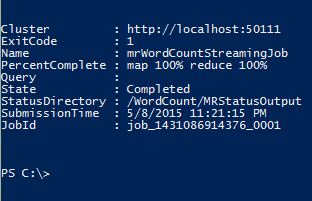
In any event, with the programs complete and pushed out to the Hadoop file system, I ran it via the Azure Powershell

 image


image

And looking at the output, nothing is coming down.

image

Drat.  I then tried to run the C# program and nothing is coming down.  I wonder if it is a problem with the original code or perhaps the data I am using?  The tutorial does not include a link to a dataset that works with the programs so I am a bit out of luck.  More investigation needed, as it were.

Set For List Comparisons in F#

Dear Jamie Of The Future:

Next time you want to see if there are elements in 2 different lists, use Set

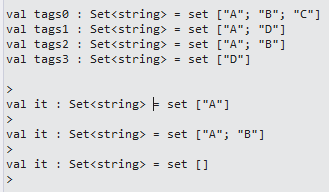
1 let tags0 = Set.ofList(["A";"B";"C"]) 2 let tags1 = Set.ofList(["A";"D"]) 3 let tags2 = Set.ofList(["A";"B"]) 4 let tags3 = Set.ofList(["D"]) 5 6 Set.intersect tags0 tags1 7 Set.intersect tags0 tags2 8 Set.intersect tags0 tags3

image

Love, Jamie of May 2015

PS.  You really should exercise more…

Using the XML Type Provider

Dear Future Jamie:

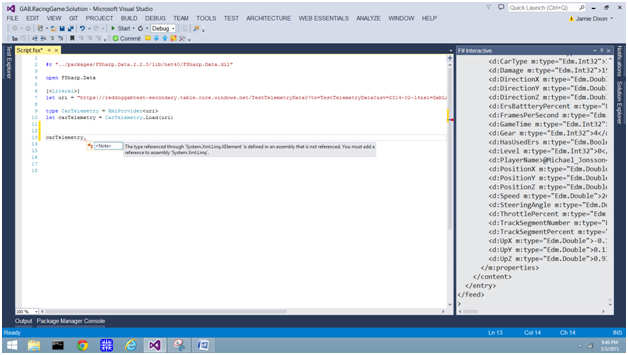
If you want to use the XML Type Provider to read an XML document from the web and you see something like this:

image

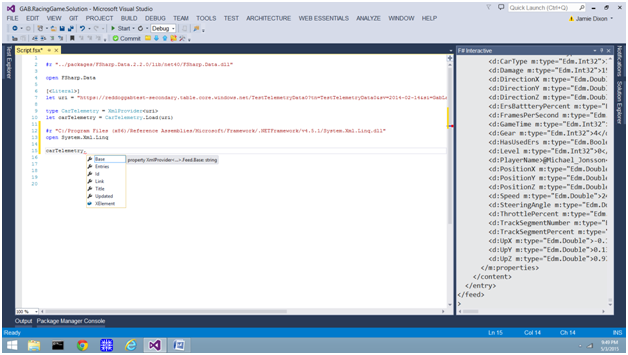
You need to add a reference to System.Xml.Linq.  The easiest way is to do Add.Reference in the solution explorer and and copy/paste the path from its property window into your script:

image

And then you should be cooking with gas:

image

Love,

Jamie of May 2015

PS: You really should exercise more…

Global Azure Bootcamp: Car Lab Analysis

As part of the Global Azure Bootcamp, the organizers created a hand-on lab where individuals could install a racing game and compete against other drivers.  The cool thing was the amount of telemetry that the game pushed to Azure (I assume using Event Hubs to Azure Tables).  The lab also had a basic “hello world” web app that could read data from the Azure Table REST endpoints so newcomers could see how easy it was to create and then deploy a website on Azure.

I decided to take a bit of a jaunt though the data endpoint to see what analytics I could run on it using Azure ML.  I went to the initial endpoint here and sure enough, the data comes down in the browser.  Unfortunately, when I set it up in Azure ML using a data reader:

image

I got 0 records returned.  I think this has something to do with how the datareader deals with XML.  I quickly used F# in Visual Studio with the XML type provider:

1 #r "../packages/FSharp.Data.2.2.0/lib/net40/FSharp.Data.dll" 2 3 open FSharp.Data 4 5 [<Literal>] 6 let uri = "https://reddoggabtest-secondary.table.core.windows.net/TestTelemetryData0?tn=TestTelemetryData0&sv=2014-02-14&si=GabLab&sig=GGc%2BHEa9wJYDoOGNE3BhaAeduVOA4MH8Pgss5kWEIW4%3D" 7 8 type CarTelemetry = XmlProvider<uri> 9 let carTelemetry = CarTelemetry.Load(uri) 10 11

I reached out to the creator of the lab and he put a summary file on Azure Blob Storage that was very easy to consume with AzureML, you can find it herehere.  I created Regression to predict the amount of damage a car will sustain based on the country and car type:

image

This was great, but I wanted to working on my R chops some so I decided to play around with the data in R Studio.  I imported the data into R Studio and then fired up the scripting window.  The first question I wanted to answer was “how does each country stack up against each other in terms of car crashes?”

I did some basic data exploration like so:

1 summary(PlayerLapTimes) 2 3 aggregate(Damage ~ Country, PlayerLapTimes, sum) 4 aggregate(Damage ~ Country, PlayerLapTimes, FUN=length) 5

image

And then getting down to the business of answering the question:

1 2 dfSum <- aggregate(Damage ~ Country, PlayerLapTimes, sum) 3 dfCount <- aggregate(Damage ~ Country, PlayerLapTimes, FUN=length) 4 5 dfDamage <- merge(x=dfSum, y=dfCount, by.x="Country", by.y="Country") 6 names(dfDamage)[2] <- "Sum" 7 names(dfDamage)[3] <- "Count" 8 dfDamage$Avg <- dfDamage$Sum/dfDamage$Count 9 dfDamage2 <- dfDamage[order(dfDamage$Avg),] 10

image

So that is kinda interesting that France has the most damage per race.  I have to ask Mathias Brandewinder about that.

In any event, I then wanted to ask “what county finished first”.  I decided to apply some R charting to the same biolerplate that I created earlier

1 dfSum <- aggregate(LapTimeMs ~ Country, PlayerLapTimes, sum) 2 dfCount <- aggregate(LapTimeMs ~ Country, PlayerLapTimes, FUN=length) 3 dfSpeed <- merge(x=dfSum, y=dfCount, by.x="Country", by.y="Country") 4 names(dfSpeed)[2] <- "Sum" 5 names(dfSpeed)[3] <- "Count" 6 dfSpeed$Avg <- dfSpeed$Sum/dfSpeed$Count 7 dfSpeed2 <- dfSpeed[order(dfSpeed$Avg),] 8 plot(PlayerLapTimes$Country,PlayerLapTimes$Damage) 9

image


image

So even though France appears to have the slowest drivers, the average is skewed by 2 pretty bad races –> perhaps the person never finished.

In any event, this was a fun exercise and I hope to continue with the data to show the awesomeness of Azure, F#, and R…


Battlehack Raleigh

This last weekend, I was fortunate enough to be part of a team that competed in Battlehack, a world-wide hackathon sponsored by Paypal.  The premise of the hackathon is that you are coding an application that uses Paypal and is for social good. 

My team met one week before and decided that the social problem that the application should address is how to make teenage driving safer.  This topic was inspired by this heat map that shows that there is a statistically significant increase of car crashes around certain local high schools.  The common theme of these high schools is that they are over capacity

HeatMapOfCaryCrashes

This is also a personal issue for my daughter, whose was friendly with a girl who died in an accident last year near Panther Creek High School.  In fact, she still wears a bracelet with the victims name on it.  Unfortunately, she could not come b/c of school and sports commitments that weekend.

The team approached safe driving as a “carrot/stick” issue with kids.  The phone app will capture the speed at which they are driving.  If they stay within a safe range for the week, they will receive a cash payment.  If they engage in risky behavior (speeding, fast stops, etc..), they will have some money charged to them.  We used the hackathon’s sponsors Braintree’s for payment and SendGrid for email.

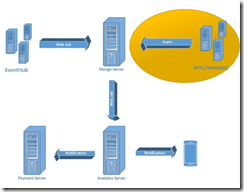
We divided the application into a couple major sections and the division of labor along each component.  I really wanted to use Azure EventHubs and Stream Analytics but the Api developer was not familiar with that and a hackathon is defiantly not a place where you want to learn a new technology.
 

image

We set to work

image

Here is the part of the solution that I worked on:

image

The Api is a typical boiler plate MVC5/Web Api2 application and the Data Model holds all of the server data structures and Interfaces.  C# was the right choice there as the Api developer was a C# web dev and the C# data structures serialize nicely to Json.

I did all of the Poc in the F# REPL and then moved the code into a compliable assembly.  The Braintree code was easy with their Nuget package:

1 type BrainTreeDebitService() = 2 interface IDebitService with 3 member this.DebitAccount(customerId, token, amount) = 4 let gateway = new BraintreeGateway() 5 gateway.Environment <- Environment.SANDBOX 6 gateway.MerchantId <- "aaaa" 7 gateway.PublicKey <- "bbbbb" 8 gateway.PrivateKey <- "cccc" 9 10 let transaction = new TransactionRequest() 11 transaction.Amount <- amount 12 transaction.CustomerId <- customerId 13 transaction.PaymentMethodToken <- token 14 gateway.Transaction.Sale(transaction) |> ignore

The Google Maps Api does have a nice set of methods for calculating Speed Limit.  Since I didn’t have the right account, I only had some demo Json –> enter the F# Type Provider:

1 type SpeedLimit = JsonProvider<"../Data/GoogleSpeedLimit.json"> 2 3 type GoogleMapsSpeedLimitProvider() = 4 interface ISpeedLimitProvider with 5 member this.GetSpeedLimit(latitude, longitude) = 6 let speedLimits = SpeedLimit.Load("../Data/GoogleSpeedLimit.json"); 7 let lastSpeedLimit = speedLimits.SpeedLimits |> Seq.head 8 lastSpeedLimit.SpeedLimit

Finally, we used MongoDb for our data store:

1 2 type MongoDataProvider() = 3 member this.GetLatestDriverData(driverId) = 4 let connectionString = "aaa" 5 let client = MongoDB.Driver.MongoClient(connectionString) 6 let server = client.GetServer() 7 let database = server.GetDatabase("battlehackraleigh"); 8 let collection = database.GetCollection<DriverPosition>("driverpositions"); 9 let collection' = collection.AsQueryable() 10 let records = collection'.Where(fun x -> x.DriverId = driverId) 11 records |> Seq.head 12 13 member this.GetCustomerData(customerId)= 14 let connectionString = "aaa" 15 let client = MongoDB.Driver.MongoClient(connectionString) 16 let server = client.GetServer() 17 let database = server.GetDatabase("battlehackraleigh"); 18 let collection = database.GetCollection<Customer>("customers"); 19 let collection' = collection.AsQueryable() 20 let records = collection'.Where(fun x -> x.Id = customerId) 21 records |> Seq.head 22 23 member this.GetCustomerDataFromDriverId(driverId)= 24 let connectionString = "aaa" 25 let client = MongoDB.Driver.MongoClient(connectionString) 26 let server = client.GetServer() 27 let database = server.GetDatabase("battlehackraleigh"); 28 let collection = database.GetCollection<Customer>("customers"); 29 let collection' = collection.AsQueryable() 30 let records = collection'.Where(fun x -> x.Number = driverId) 31 records |> Seq.head

There were 19 teams in Raleigh’s hackathon and my team placed 3rd.  I think the general consensus of our team (and the teams around us) is that we should have won with the idea but our presentation was very weak (the problem with coders presenting to non-coders).  We had 2 minutes to present and 1 minute for QA.  We packed our 2 minutes with technical details when we should have been spinning the ideas.  Also, I completely blew the QA piece. 

Question #1

Q: “How did you Integration IBM Watson?”

A: “We used it for the language translation service”

A I Wished I Said: “We baked machine learning into the app.  Do you know how Uber does surge pricing?  We tried a series of models that forecast a person’s driving based on their recent history.  If we see someone creeping up the danger scale, we increase the reward payout for them for the week.  The winning model was a linear regression, it had the best false-positive rate.  It is machine learning because we continually train our model as new data comes in.

Question #2

Q: “How will you make money on this?”

A: “Since we are taking money from poor drivers and giving it to good drivers, presumably we could keep a part for the company”

A I Wished I Said: “Making is money is so far from our minds.  Right now, there are too many kids driving around over capacity schools and after talking to the chief of police, they are looking for some good ideas.  This application is about social good first and foremost.”

Lesson learned –> I hate to say it, but if you are in a hack-a-thon, you need to know the judge’s background.  There was not an obvious coder on the panel, so we should have gone with more high level stuff and answered technical details in the QA.  Unfortunately, the coaches at Battlehack said it was the other way around (technical details 1st) in our dry-run.  In fact, we ditched the slide that showed a picture of the car crash at Panther Creek High School that started this app as well as the heat map.  That would have been much more effective in hindsight.