Consuming Azure ML web api endpoint from an array

Last week, I blogged about creating an Azure ML experiment, publishing it as a web service, and then consuming it from F#.  I then wanted to consume the web service using an array – passing in several values and seeing the results.  I created added on to my existing F #script with the following code

1 let input1 = new Dictionary<string,string>() 2 input1.Add("Zip Code","27519") 3 input1.Add("Race","W") 4 input1.Add("Party","UNA") 5 input1.Add("Gender","M") 6 input1.Add("Age","45") 7 input1.Add("Voted Ind","1") 8 9 let input2 = new Dictionary<string,string>() 10 input2.Add("Zip Code","27519") 11 input2.Add("Race","W") 12 input2.Add("Party","D") 13 input2.Add("Gender","F") 14 input2.Add("Age","47") 15 input2.Add("Voted Ind","1") 16 17 let inputs = new List<Dictionary<string,string>>() 18 inputs.Add(input1) 19 inputs.Add(input2) 20 21 inputs 22 |> Seq.map(fun i -> invokeService(i)) 23 |> Async.Parallel 24 |> Async.RunSynchronously 25

And sure enough, I can run the model using multiple inputs:

image

Consuming Azure ML With F#

(This post is a continuation of this one)

So with a model that works well enough,  I selected only that model and saved it

image


image

Created a new experiment and used that model with the base data.  I then marked the project columns as the input and the score as the output (green and blue circle respectively)

image

After running it, I published it as a web service

image

And voila, an endpoint ready to go.  I then took the auto generated script and opened up a new Visual Studio F# project to use it.  The problem was that this is the data structure that the model needs

FeatureVector = new Dictionary<string, string>() { { "Precinct", "0" }, { "VRN", "0" }, { "VRstatus", "0" }, { "VRlastname", "0" }, { "VRfirstname", "0" }, { "VRmiddlename", "0" }, { "VRnamesufx", "0" }, { "VRstreetnum", "0" }, { "VRstreethalfcode", "0" }, { "VRstreetdir", "0" }, { "VRstreetname", "0" }, { "VRstreettype", "0" }, { "VRstreetsuff", "0" }, { "VRstreetunit", "0" }, { "VRrescity", "0" }, { "VRstate", "0" }, { "Zip Code", "0" }, { "VRfullresstreet", "0" }, { "VRrescsz", "0" }, { "VRmail1", "0" }, { "VRmail2", "0" }, { "VRmail3", "0" }, { "VRmail4", "0" }, { "VRmailcsz", "0" }, { "Race", "0" }, { "Party", "0" }, { "Gender", "0" }, { "Age", "0" }, { "VRregdate", "0" }, { "VRmuni", "0" }, { "VRmunidistrict", "0" }, { "VRcongressional", "0" }, { "VRsuperiorct", "0" }, { "VRjudicialdistrict", "0" }, { "VRncsenate", "0" }, { "VRnchouse", "0" }, { "VRcountycomm", "0" }, { "VRschooldistrict", "0" }, { "11/6/2012", "0" }, { "Voted Ind", "0" }, }, GlobalParameters = new Dictionary<string, string>() { } };

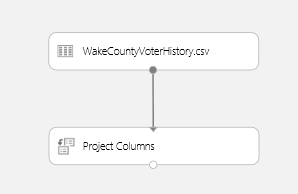
And since I am only using 6 of the columns, it made sense to reload the Wake County Voter Data with just the needed columns.  I went back to the original CSV and did that.  Interestingly, I could not set the original dataset as the publish input so I added a project column module that does nothing

image

With that in place, I republished the service and opened Visual Studio.  I decided to start with a script.  I was struggling though the async when Tomas P helped me on Stack Overflow here.  I’ll say it again, the F# community is tops.  In any event, here is the initial script:

#r @"C:\Program Files (x86)\Reference Assemblies\Microsoft\Framework\.NETFramework\v4.5\System.Net.Http.dll" #r @"..\packages\Microsoft.AspNet.WebApi.Client.5.2.2\lib\net45\System.Net.Http.Formatting.dll" open System open System.Net.Http open System.Net.Http.Headers open System.Net.Http.Formatting open System.Collections.Generic type scoreData = {FeatureVector:Dictionary<string,string>;GlobalParameters:Dictionary<string,string>} type scoreRequest = {Id:string; Instance:scoreData} let invokeService () = async { let apiKey = "" let uri = "https://ussouthcentral.services.azureml.net/workspaces/19a2e623b6a944a3a7f07c74b31c3b6d/services/f51945a42efa42a49f563a59561f5014/score" use client = new HttpClient() client.DefaultRequestHeaders.Authorization <- new AuthenticationHeaderValue("Bearer",apiKey) client.BaseAddress <- new Uri(uri) let input = new Dictionary<string,string>() input.Add("Zip Code","27519") input.Add("Race","W") input.Add("Party","UNA") input.Add("Gender","M") input.Add("Age","45") input.Add("Voted Ind","1") let instance = {FeatureVector=input; GlobalParameters=new Dictionary<string,string>()} let scoreRequest = {Id="score00001";Instance=instance} let! response = client.PostAsJsonAsync("",scoreRequest) |> Async.AwaitTask let! result = response.Content.ReadAsStringAsync() |> Async.AwaitTask if response.IsSuccessStatusCode then printfn "%s" result else printfn "FAILED: %s" result response |> ignore } invokeService() |> Async.RunSynchronously


Unfortunately, when I run it, it fails.  Below is the Fiddler trace:

image


So it looks like the Json Serializer is postpending the “@” symbol.  I changed the records to types and voila:

image

You can see the final script here.

So then throwing in some different numbers. 

  • A millennial: ["27519","W","D","F","25","1","1","0.62500011920929"]
  • A senior citizen: ["27519","W","D","F","75","1","1","0.879632294178009"]

I wonder why social security never gets cut?

In any event, just to check the model:

  • A 15 year old: ["27519","W","D","F","15","1","0","0.00147285079583526"]

Azure ML and Wake County Election Data

I have been spending the last couple of weeks using Azure ML and I think it is one of the most exciting technologies for business developers and analysts since ODBC and FSharp type providers.   If you remember, when ODBC came out, every relational database in the world became accessible and therefore usable/analyzable.   When type providers came out, programming, exploring, and analyzing data sources became much easier and it expanded from RDBMS to all formats (notably Json).  So getting data was no longer a problem, but analyzing it still was.

Enter Azure ML. 

I downloaded the Wake County Voter History data from here.  I took the Excel spreadsheet and converted it to a .csv locally.  I then logged into Azure ML and imported the data

image

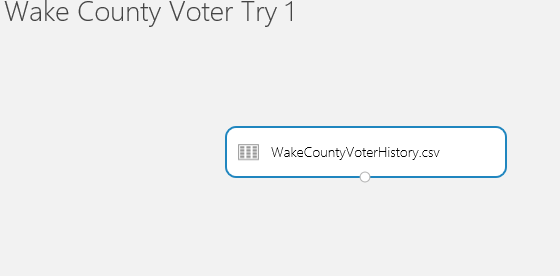
I then created an experiment and added the dataset to the canvas

image


And looked at the basic statistics of the data set

image

(Note that I find that using the FSharp REPL  a better way to explore the data as I can just dot each element I am interested in and view the results).

In any event, the first question I want to answer is

“given a person’s ZipCode, Race, Party,Gender, and Age, can I predict if they will vote in November”

To that end, I first narrowed down the columns using a Column Projection and picked only the columns I care about.  I picked “11/6/2012” and the X variable because that was the last  national election and that is what we are going to have in November.  I prob should have done 2010 b/c that is a national without a President, but that can be analyzed at a later date.

image

image

I then ran my experiment so the data would be available in the Project Column step.

image


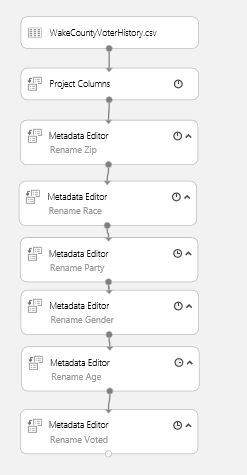
I then renamed the columns to make them a bit readable by using a series Metadata Editors (it does not look like you can do all renames in 1 step.  Equally as annoying is that you have to add each module, run it, then add the next.)

image

(one example)

image


I then added a Missing Values scrubber for the voted column.  So instead of a null field, people who didn’t vote get a “N”

image

The problem is that it doesn’t work –> looks like we can’t change the values per column.

image

I asked the question on the forum but in the interest of time, I decided to change the voted column from a categorical column to an indicator. That way I can do binary analysis.  That also failed.  I went back to the original spreadsheet and added a Indicator column and then also renamed the column headers so I am not cluttering up my canvas with those meta data transforms.  Finally, I realized I want only active voters but there does not seems to be a filtering ability (remove rows only works for missing) so I removed those also from the original dataset.  I think the ability to scrub and munge data is an area for improvement, but since this is release 1, I understand.

After re-importing the data, I changed my experiment like so

image

I then split the dataset into Training/Validation/And Testing using a 60/20/20 split

image

So the left point on the second split is 60% of the original dataset, the right point on the second split is 20% of the original dataset (or 75%/25% of the 80% of the first split)

I then added a SVM with a train and score module.  Note that I am training with 60% of the original dataset and I am validating with 20%


image

After it runs, there are 2 new columns in the dataset –> Scored labels and probabilities so each row now has a score.


image

With the model in place, I can then evaluate it using an evaluation model

image

And we can see an AUC of .666, which immediately made me think of this

image

In any event, I added a Logisitc Regression and a Boosted Decision Tree to the canvas and hooked them up to the training and validation sets

image

And this is what we have

image image


SVM: .666 AUC

Regression: .689 AUC

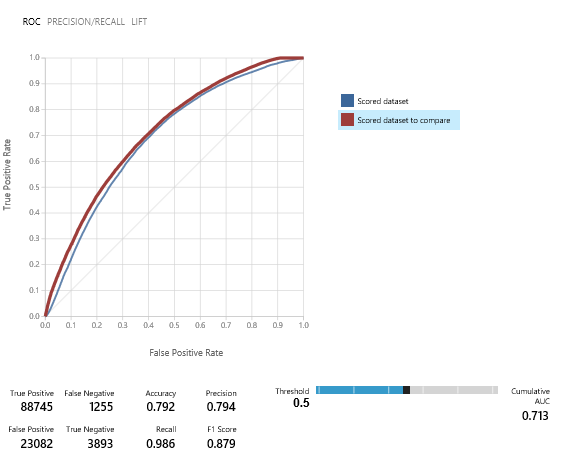
Boosted Decision Tree: .713 AUC

So with Boosted Decision Tree ahead, I added a Sweep Parameter module to see if I can tune it more.  I am using AUC as the performance metric

image

image

So the best AUC I am going to get is .7134 with the highlighted parameters.  I then added 1 more Model that uses those parameters against the entire training dataset (80% of the total) and then evaluates it against the remaining 20%.

image

With the final answer of

image

With that in hand, I can create a new experiment that will be the bases of a real time voting app.

Sql Saturday and MVP Monday

Thanks to everyone who came to my session on F# Type Providers.  The code is found here.

Also, my article on the Eject-A-Bed was selected for MVP Mondays.  You can see a link here.


Fun with Statistics and Charts

I am preparing my Raleigh Code Camp submission ‘Nerd Dinner With Brains” this weekend.  If you are not familiar, Nerd Dinner is the canonical example of a MVC application and is very familiar to Web Devs who want to learn MVC the Microsoft way.  You can see the walkthrough here.   For everything that Nerd Dinner is, it is not … smart.  There is no business rules outside of some basic input validation, which is pretty representative of many “Boring Line Of Business Applications (BLOBAs according to Scott Waschlan).  Not coincidently, the lack of business logic is the biggest  reason many BLOBAs don’t have many unit tests –> if all you are doing is wire framing a database, what business logic needs to be tested? 

The talk is going to take the Nerd Diner wireframe and inject some analytics to the application.  To that end, I first considered the person who is attending the dinner.  All we know about them is their name and possibly their location.  So what can a name tell you?  Turns out, plenty.

As I showed in this post, there is a great source of the number of names given by gender, yearOfBrith, and stateOfBirth from the US census.  Picking up where that post left off, I loaded in the entire data set into memory.

My first question was, “given a name, can I tell what gender the person is?”  This is very straight forward to calculate.

1 let genderSearch name = 2 let nameFilter = usaData 3 |> Seq.filter(fun r -> r.Mary = name) 4 |> Seq.groupBy(fun r -> r.F) 5 |> Seq.map(fun (n,a) -> n,a |> Seq.sumBy(fun (r) -> r.``14``)) 6 7 let nameSum = nameFilter |> Seq.sumBy(fun (n,c) -> c) 8 nameFilter 9 |> Seq.map(fun (n,c) -> n, c, float c/float nameSum) 10 |> Seq.toArray 11 12 genderSearch "James" 13

And the REPL shows me that is is very likely that “James” is a male:

image

I can then set up in the web.config file a confidence point where there name is a male/female, I am thinking 75%.  Once we have that, the app can respond differently.  Perhaps we have a product-placement advertisement that becomes a male-focused if we are reasonably certain that the user is a male.  Perhaps we can be more subtle and change the theme of the site, or the page navigation, to induce the person to do additional things on the site.

In any event, I then wanted to tackle age.  I spun up some code to isolate a person’s age

1 let ageSearch name = 2 let nameFilter = usaData 3 |> Seq.filter(fun r -> r.Mary = name) 4 |> Seq.groupBy(fun r -> r.``1910``) 5 |> Seq.map(fun (n,a) -> n,a |> Seq.sumBy(fun (r) -> r.``14``)) 6 |> Seq.toArray 7 let nameSum = nameFilter |> Seq.sumBy(fun (n,c) -> c) 8 nameFilter 9 |> Seq.map(fun (n,c) -> n, c, float c/float nameSum) 10 |> Seq.toArray

I had no idea if names have a certain age connotation so I decided to do some basic charting.  Isaac Abraham pointed me to FSharp.Chart which is a great way to do some basic charting for discovery.

1 let chartData = ageSearch "James" 2 |> Seq.map(fun (y,c,p) -> y, c) 3 |> Seq.sortBy(fun (y,c) -> y) 4 5 Chart.Line(chartData).ShowChart()

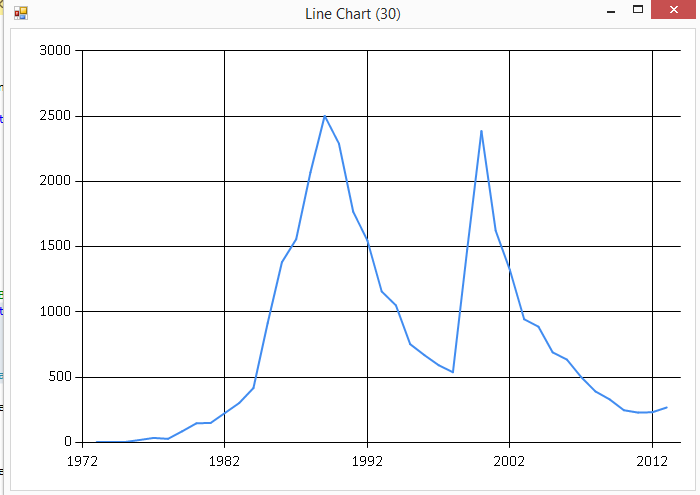
And sure enough, the name “James” has a real ebb and flow for its popularity.

image

so if the user has a name of “James”, you can make a reasonable assumption they are male and probably born before 1975.  Cue up the Van Halen!

And yes, because I had to:

1 let chartData = ageSearch "Britney" 2 |> Seq.map(fun (y,c,p) -> y, c) 3 |> Seq.sortBy(fun (y,c) -> y)

image

Kinda does match her career, no?

Anyway, back to the task at hand.  In terms of analytics, I want to be a bit more precise then eyeballing a chart.  I started with the following code:

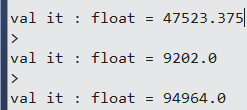
1 ageSearch "James" 2 |> Seq.map(fun (y,c,p) -> float c) 3 |> Seq.average 4 5 ageSearch "James" 6 |> Seq.map(fun (y,c,p) -> float c) 7 |> Seq.min 8 9 ageSearch "James" 10 |> Seq.map(fun (y,c,p) -> float c) 11 |> Seq.max 12

image

With these basic statistics out of the way, I then wanted to look at when the name was no longer popular.  I decided to use 1 standard deviation away from the average to determine an outlier.  First the standard deviation:

1 let variance (source:float seq) = 2 let mean = Seq.average source 3 let deltas = Seq.map(fun x -> pown(x-mean) 2) source 4 Seq.average deltas 5 6 let standardDeviation(values:float seq) = 7 sqrt(variance(values)) 8 9 ageSearch "James" 10 |> Seq.map(fun (y,c,p) -> float c) 11 |> standardDeviation 12 13 let standardDeviation' = ageSearch "James" 14 |> Seq.map(fun (y,c,p) -> float c) 15 |> standardDeviation 16 17 let average = ageSearch "James" 18 |> Seq.map(fun (y,c,p) -> float c) 19 |> Seq.average 20 21 let attachmentPoint = average+standardDeviation'

image

And then I can get the last year that the name was within 1 standard deviation above the average (greater than 71,180 names given):

1 2 let popularYears = ageSearch "James" 3 |> Seq.map(fun (y,c,p) -> y, float c) 4 |> Seq.filter(fun (y,c) -> c > attachmentPoint) 5 |> Seq.sortBy(fun (y,c) -> y) 6 |> Seq.last

image

So “James” is very likely a male and likely born before 1964.  Cue up the Pink Floyd!

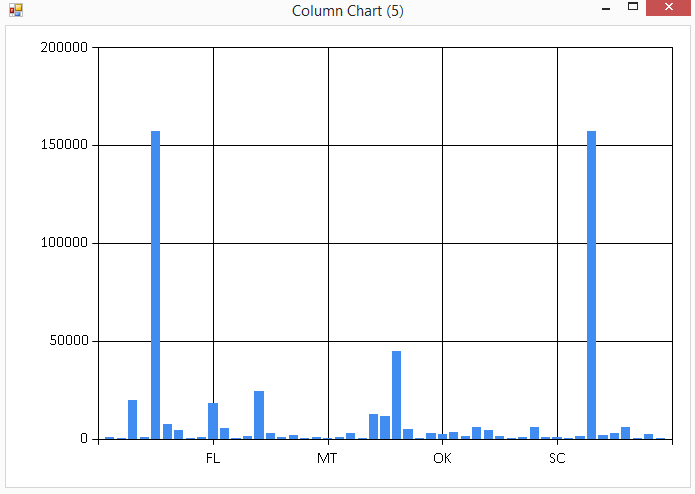
The last piece was the state of birth –> can I guess the state of birth for a user?  I first looked at the states on a plot

1 let chartData' = stateSearch "James" 2 |> Seq.map(fun (s,c,p) -> s,c) 3 4 Chart.Column(chartData').ShowChart() 5

image

Nothing really stands out at me –> states with the most births have the most names.  I could do an academic exercise of seeing what states favor certain names, but that does not help me with Nerd Dinner in guessing the state of birth when given a name.

I pressed on to look at the top 10 states:

1 let topTenStates = stateSearch "James" 2 |> Seq.sortBy(fun (s,c,p) -> -c-1) 3 |> Seq.take 10 4 5 let topTenTotal = topTenStates 6 |> Seq.sumBy(fun (s,c,p) -> c) 7 let total = stateSearch "James" 8 |> Seq.sumBy(fun (s,c,p) -> c) 9 10 float topTenTotal/float total

image

So 50% of “James” were born in 10 states.  Again, I am not sure there is any actionable information here.  For example, if a majority of “James” were born in MI, I might have something (cue up the Bob Seger). 

Interestingly, there are certain number of names where the state of birth does matter.  For example, consider “Jose”:

image

Unsurprisingly, the two states are CA and TX.  Just using James and Jose as an example:

  • James is a male born before 1964
  • Jose is a male born before 2008 in either TX or CA

As an academic exercise, we could construct a random forest to find the names with the greatest state affinity.  However, that won’t help us on Nerd Dinner so I am leaving that out for another day.

This analysis does not account for a host of factors (person not born in the USA, nicknames, etc..), but it is still better than the nothing that Nerd Dinner currently has.  This analysis is not particular sophisticated but I often find that even the most basic statistics can be very powerful if used correctly.  That will be the next part of the talk…


Hacking the Dream Cheeky Thunder

A couple of weeks ago, Atmel tweeted about some people that hacked the Dream Cheeky Thunder Missile Launcher by soldering on a Ardunino to the circuit board.

image

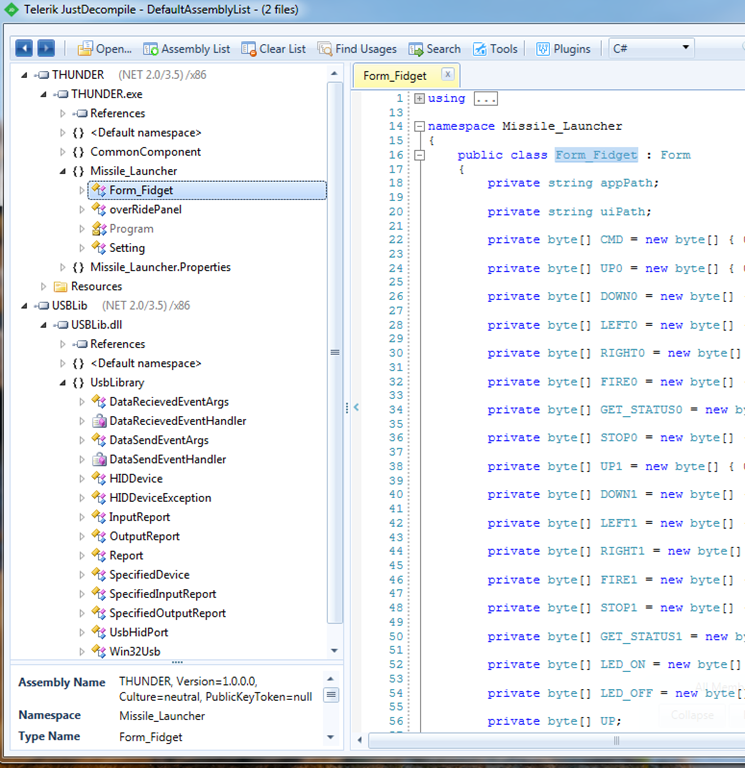
A quick Google search shows there are lots of people who done something similar, including this post.  Since I was not interested in messing around wit the circuit board, I decided to go the software hack route.  When the missile launcher arrived, I downloaded software and installed it on my Windows 7 machine.  I then used Telerik’s JustDecompile software to look at the source code.

image

Fortunately, the main executable is a .NET 2.0 Windows Form application.  Unfortunately, the code is a mess and it relies on user controls.  Specifically, the library that the .NET .exe consumes is called USBLib.dll which is a 23-bit Com component that creates a windows control that the main .exe uses.

When I took the code from JustDecompile and stuck it into Visual Studio (no F# option so I went with C#), it took about 2-3 hours to get all of the references set up, the resources set up, and the embedded code put into the right location, but I did manage to get a working Visual Studio solution

image

I then decided to build a brand new solution that controls the missile launcher without the graphical components that are baked into the app.  I added a reference to the USBLib.dll and then tried to make method calls.  No luck, it looks like the application uses Windows Event hooks to call and respond:

protected override void WndProc(ref Message m) { this.USB.ParseMessages(ref m); if (m.Msg == SingleProgramInstance.WakeupMessage) { if (base.WindowState == FormWindowState.Minimized) { base.Visible = true; base.WindowState = FormWindowState.Normal; } base.Activate(); } base.WndProc(ref m); }

Yuck!  I then did a quick search on Google to find a .NETUsbDriver that I could use because I already have the byte array values that the missile launcher is expected:

I found this but the suggestions did not compile and/or did not work.  I then found this site which in the right direction.  I added the code into my project like so:

image

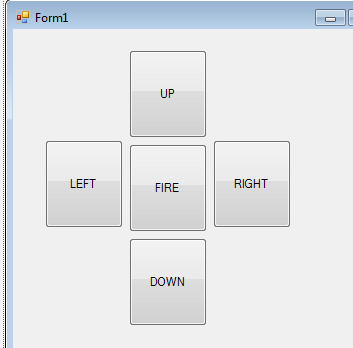
I then wired up the main form like this:

image

With the code behind like this:

MissileLauncher _launcher = new MissileLauncher(); public Form1() { InitializeComponent(); _launcher.command_reset(); _launcher.command_switchLED(true); } private void upButton_Click(object sender, EventArgs e) { _launcher.command_Up(2000); } private void fireButton_Click(object sender, EventArgs e) { _launcher.command_Fire(); } private void downButton_Click(object sender, EventArgs e) { _launcher.command_Down(1000); } private void rightButton_Click(object sender, EventArgs e) { _launcher.command_Right(3000); } private void leftButton_Click(object sender, EventArgs e) { _launcher.command_Left(3000); }

Then, when I run it, it works like a champ.  I now just need to translate the values passed into the Thread.Sleep() and have it correspond to the angles.  The author of the code was on the right track because s/he named the parameter “degree”. 

In the meantime, I ported the code to FSharp.  You can see it here and you can see the missle launcher in action here.  The major difference is that the C# code had 182 lines and the F# code has 83.

Consuming and Analyzing Census Data Using F#

As part of my Nerd Dinner refactoring, I wanted to add the ability to guess a person’s age and gender based on their name.  I did a quick search on the internet and the only place that I found that has an API is here and it doesn’t have everything I am looking for.  Fortunately, the US Census website has some flat files with the kind of data I am looking for here.

I grabbed the data and  pumped it into Azure Blob Storage here.  You can swap out the state code to get each dataset.  I then loaded in a list of State Codes found here that match to the file names.

I then fired up Visual Studio and created a new FSharp project.  I added FSharp.Data to use a Type Provider to access the data.  I don’t need to install the Azure Storage .dlls b/c the blobs are public and I just have to read the file

image

Once Nuget was done with its magic, I opened up the script file, pointed to the newly-installed FSharp.Data, and added a reference to the datasets on blob storage:

#r "../packages/FSharp.Data.2.0.9/lib/portable-net40+sl5+wp8+win8/FSharp.Data.dll" open FSharp.Data type censusDataContext = CsvProvider<"https://portalvhdspgzl51prtcpfj.blob.core.windows.net/censuschicken/AK.TXT"> type stateCodeContext = CsvProvider<"https://portalvhdspgzl51prtcpfj.blob.core.windows.net/censuschicken/states.csv">

(Note that I am going add FSharp as a language to my Live Writer code snippet add-in at a later date)

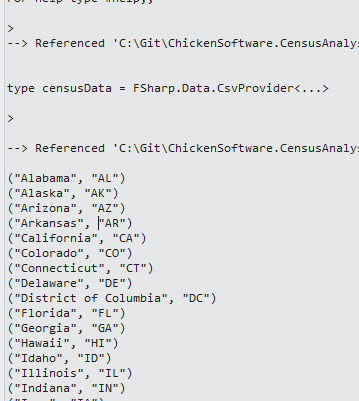
In any event, I then printed out all of the codes to see what it looks like:

let stateCodes = stateCodeContext.Load("https://portalvhdspgzl51prtcpfj.blob.core.windows.net/censuschicken/states.csv"); stateCodes.Rows |> Seq.iter(fun r -> printfn "%A" r)

image

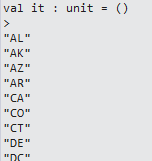
And by changing the lambda slightly like so,

stateCodes.Rows |> Seq.iter(fun r -> printfn "%A" r.Abbreviation)

I get all of the state codes

image

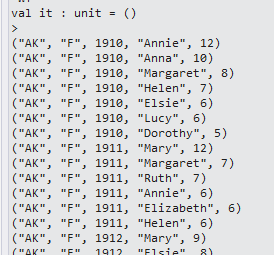
I then tested the census data with code and results are expected

let arkansasData = censusDataContext.Load("https://portalvhdspgzl51prtcpfj.blob.core.windows.net/censuschicken/AK.TXT"); arkansasData.Rows |> Seq.iter(fun r -> printfn "%A" r)

image

So then I created a method to load all of the state census data and giving me the length of the total:

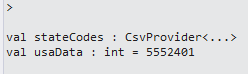
let stateCodes = stateCodeContext.Load("https://portalvhdspgzl51prtcpfj.blob.core.windows.net/censuschicken/states.csv"); let usaData = stateCodes.Rows |> Seq.collect(fun r -> censusDataContext.Load(System.String.Format("https://portalvhdspgzl51prtcpfj.blob.core.windows.net/censuschicken/{0}.TXT",r.Abbreviation)).Rows) |> Seq.length

image

Since this is a I/O bound operation, it made sense to load the data asynchronously, which speeded things up considerably.  You can see my question over on Stack Overflow here and the resulting code takes about 50% of the time on a my dual-processor machine:

stopwatch.Start() let fetchStateDataAsync(stateCode:string)= async{ let uri = System.String.Format("https://portalvhdspgzl51prtcpfj.blob.core.windows.net/censuschicken/{0}.TXT",stateCode) let! stateData = censusDataContext.AsyncLoad(uri) return stateData.Rows } let usaData' = stateCodes.Rows |> Seq.map(fun r -> fetchStateDataAsync(r.Abbreviation)) |> Async.Parallel |> Async.RunSynchronously |> Seq.collect id |> Seq.length stopwatch.Stop() printfn "Parallel: %A" stopwatch.Elapsed.Seconds

image

With the data in hand, it was time to analyze the data to see if there is anything we can do.   Since 23 seconds is a bit too long to wait for a page load (Smile), I will need to put the 5.5 million records into a format that can be easily searched.  Thinking what we want is:

Given a name, what is the gender?

Given a name, what is the age?

Given a name, what is their state of birth?

Also, since we have their current location, we can also input the name and location and answer those questions.  If we make the assumption that their location is the same as their birth state, we can narrow down the list even further.

In any event, I first added a GroupBy to the name:

let nameSum = usaData' |> Seq.groupBy(fun r -> r.Mary) |> Seq.toArray

image

And then I summed up the counts of the names

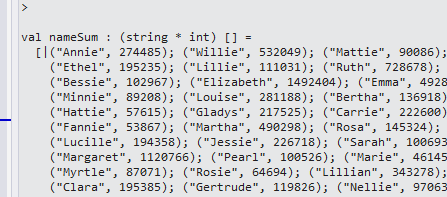
let nameSum = usaData' |> Seq.groupBy(fun r -> r.Mary) |> Seq.map(fun (n,a) -> n,a |> Seq.sumBy(fun (r) -> r.``14``)) |> Seq.toArray

image

And then the total in the set:

let totalNames = nameSum |> Seq.sumBy(fun (n,c) -> c)

image

And then applied a simple average and sorted it descending

let nameAverage = nameSum |> Seq.map(fun (n,c) -> n,c,float c/ float totalNames) |> Seq.sortBy(fun (n,c,a) -> -a - 1.) |> Seq.toArray

image

So I feel really special that my parents gave me the most popular name in the US ever…

And focusing back to the task on hand, I want to determine the probability that a person is male or female based on their name:

let nameSearch = usaData' |> Seq.filter(fun r -> r.Mary = "James") |> Seq.groupBy(fun r -> r.F) |> Seq.map(fun (n,a) -> n,a |> Seq.sumBy(fun (r) -> r.``14``)) |> Seq.toArray

image

So 18196 parents thought is would be a good idea to name their daughter ‘James’.  I created a quick function like so:

let nameSearch' name = let nameFilter = usaData' |> Seq.filter(fun r -> r.Mary = name) |> Seq.groupBy(fun r -> r.F) |> Seq.map(fun (n,a) -> n,a |> Seq.sumBy(fun (r) -> r.``14``)) let nameSum = nameFilter |> Seq.sumBy(fun (n,c) -> c) nameFilter |> Seq.map(fun (n,c) -> n, c, float c/float nameSum) |> Seq.toArray nameSearch' "James"

image

So if I see the name “James”, there is a 99% chance it is a male.  This can lead to a whole host of questions like variance of names, names that are closest to gender neutral, etc….  Leaving those questions to another day, I now have something I can put into Nerd Dinner.  Now, if there was only a way to handle nicknames and friendly names….

You can see the full code here.


Controlling Servos Using Netdunio and Phidgets

As part of the Terminator program I am creating, I need a way of controlling servos to point the laser (and then gun) and different targets.  I decided to create a POC project and evaluate two different ways of controlling the servos.  As step one, I purchased a pan and tilt chassis from here

image

After playing with the servos from the kit, I decided to use my old stand-by servos that had a much higher quality and whose PWM signals I already know how to use.  With the chassis done, I needed a laser pointer so I figured why not get a shark with fricken laser?

I found one here.

image

So with the servos and laser ready to go, it was time to code.  I started with Netduninos:

public class Program { private const uint TILT_SERVO_STRAIGHT = 1500; private const uint TILT_SERVO_MAX_UP = 2000; private const uint TILT_SERVO_MAX_DOWN = 1000; private const uint PAN_SERVO_STRAIGHT = 1500; private const uint PAN_SERVO_MAX_LEFT = 1000; private const uint PAN_SERVO_MAX_RIGHT = 2000; private static PWM _tiltServo = null; private static PWM _panServo = null; private static uint _tiltServoCurrentPosition = 0; private static uint _panServoCurrentPosition = 0; public static void Main() { SetUpServos(); InputPort button = new InputPort(Pins.ONBOARD_BTN, false, Port.ResistorMode.Disabled); while (true) { if (button.Read()) { MoveServo(); } } } private static void SetUpServos() { uint period = 20000; _tiltServoCurrentPosition = TILT_SERVO_STRAIGHT; _panServoCurrentPosition = PAN_SERVO_STRAIGHT; _tiltServo = new PWM(PWMChannels.PWM_PIN_D3, period, _tiltServoCurrentPosition, PWM.ScaleFactor.Microseconds, false); _tiltServo.Start(); _panServo = new PWM(PWMChannels.PWM_PIN_D5, period, _panServoCurrentPosition, PWM.ScaleFactor.Microseconds, false); _panServo.Start(); } private static void MoveServo() { _panServo.Duration = PAN_SERVO_MAX_LEFT; Thread.Sleep(2000); _panServo.Duration = PAN_SERVO_MAX_RIGHT; Thread.Sleep(2000); _panServo.Duration = PAN_SERVO_STRAIGHT; Thread.Sleep(2000); _tiltServo.Duration = TILT_SERVO_MAX_UP; Thread.Sleep(2000); _tiltServo.Duration = TILT_SERVO_MAX_DOWN; Thread.Sleep(2000); _tiltServo.Duration = TILT_SERVO_STRAIGHT; } }

And sure enough the servos are behaving as expected

I then implemented a similar app using Phidgets.  Because the code is being executed on the PC, I could use F# to code (It does not look like the Netdunino/Microframework supports F#?)

open System open Phidgets let _servoController = new AdvancedServo() let mutable _isServoControllerReady = false let servoController_Attached(args:Events.AttachEventArgs) = let servoController = args.Device :?> AdvancedServo servoController.servos.[0].Engaged <- true servoController.servos.[7].Engaged <- true _isServoControllerReady <- true [<EntryPoint>] let main argv = _servoController.Attach.Add(servoController_Attached) _servoController.``open``() while true do if _isServoControllerReady = true then _servoController.servos.[0].Position<- 100. _servoController.servos.[7].Position<- 100. Console.ReadKey() |> ignore printfn "%A" argv 0


The choice then becomes using the Netduino or the Phidgets with my Kinect program.  I decided to defer the decision and use an interface for now.

type IWeaponsSystem = abstract member Activate: unit -> unit abstract member AquireTarget : float*float -> bool abstract member Fire: int -> bool

My decision about using Phidgets or Netduino is a series of trade-offs.  I can code Phidgets in C# or F# but I have to code Netduino in C#.  I would prefer to do this in F# so that makes me learn towards Phidgets.  I can put the Netduino anywhere and have it communicate via an Ethernet signal but I have to have the Phidgets wired to the PC.  Since the targeting system needs to be near the Kinect and the Kinect has to be tethered to the PC also, there is no real advantage of using the mobile Netduino.  Finally, the Phidgets API handles all communication to the servo control board for me, with the Netduino I would have to hook up a router to the Netduino and write the Ethernet communication code.  So I am leaning towards Phidgets, but since I am not sure, the interface allows me to swap in the Netduino at a later point without changing any code.  Love me some O in SOLID…

Up next, integrating the targeting system into the Terminator program.


Neural Network Part 3: Perceptrons

I went back to my code for building a Perceptron and I made some changes.  I realized that although McCaffrey combines the code together, there are actually two actions for the perceptron: training and predicting. I created a diagram to help me keep the functions that I need for each in mind:

image

I also skeletoned out some data structures that I think I need:

image

With the base diagrams out of the way, I created different data structures that were tailored to each action.   These are a bit different than the diagrams –> I didn’t go back and update the diagrams because the code is where you would look to see how the system works:

type observation = {xValues:float List} type weightedObservation = {xws:(float*float) List} type confirmedObservation = {observation:observation;yExpected:float} type weightedConfirmedObservation = {weightedObservation:weightedObservation;yExpected:float} type neuronInput = {weightedObservation:weightedObservation;bias:float} type cycleTrainingInput = {weightedConfirmedObservation:weightedConfirmedObservation;bias:float;alpha:float} type adjustmentInput = {weightedConfirmedObservation:weightedConfirmedObservation;bias:float;alpha:float;yActual:float} type adjustmentOutput = {weights:float List; bias:float} type rotationTrainingInput = {confirmedObservations:confirmedObservation List;weights:float List;bias:float;alpha:float} type trainInput = {confirmedObservations:confirmedObservation List; weightSeedValue:float;biasSeedValue:float;alpha:float; maxEpoches:int} type cyclePredictionInput = {weightedObservation:weightedObservation;bias:float} type rotationPredictionInput = {observations:observation List;weights:float List;bias:float} type predictInput = {observations:observation List;weights:float List;bias:float}

Note that I am composing data structures with the base being an observation.  The observation is a list of different xValues for a given, well, observation.  The weighted observation is the XValue paired with the perceptron weights.  The confirmedObservation is for training –> given an observation, what was the actual output? 

With the data structures out of the way, I went to the Perceptron and added in the basic functions for creating seed values:

member this.initializeWeights(xValues, randomSeedValue) = let lo = -0.01 let hi = 0.01 let xWeight = (hi-lo) * randomSeedValue + lo xValues |> Seq.map(fun w -> xWeight) member this.initializeBias(randomSeedValue) = let lo = -0.01 let hi = 0.01 (hi-lo) * randomSeedValue + lo

Since I was doing TDD, here are the unit tests I used for these functions:

[TestMethod] public void initializeWeightsUsingHalfSeedValue_ReturnsExpected() { var weights = _perceptron.initializeWeights(_observation.xValues, .5); var weightsList = new List<double>(weights); var expected = 0.0; var actual = weightsList[0]; Assert.AreEqual(expected, actual); } [TestMethod] public void initializeWeightsUsingLessThanHalfSeedValue_ReturnsExpected() { var weights = _perceptron.initializeWeights(_observation.xValues, .4699021627); var weightsList = new List<double>(weights); var expected = -0.00060; var actual = Math.Round(weightsList[0],5); Assert.AreEqual(expected, actual); } [TestMethod] public void initializeBiasesUsingHalfSeedValue_ReturnsExpected() { var expected = 0.0; var actual = _perceptron.initializeBias(.5); Assert.AreEqual(expected, actual); } [TestMethod] public void initializeBiasesUsingLessThanHalfSeedValue_ReturnsExpected() { var expected = -0.00060; var bias = _perceptron.initializeBias(.4699021627); var actual = Math.Round(bias, 5); Assert.AreEqual(expected, actual); } [TestMethod] public void initializeBiasesUsingGreaterThanHalfSeedValue_ReturnsExpected() { var expected = 0.00364; var bias = _perceptron.initializeBias(.6820621978); var actual = Math.Round(bias,5); Assert.AreEqual(expected, actual); }

I then created a base neuron and activation function that would work for both training and predicting:

member this.runNeuron(input:neuronInput) = let xws = input.weightedObservation.xws let output = xws |> Seq.map(fun (xValue,xWeight) -> xValue*xWeight) |> Seq.sumBy(fun x -> x) output + input.bias member this.runActivation(input) = if input < 0.0 then -1.0 else 1.0

[TestMethod] public void runNeuronUsingNormalInput_ReturnsExpected() { var expected = -0.0219; var perceptronOutput = _perceptron.runNeuron(_neuronInput); var actual = Math.Round(perceptronOutput, 4); Assert.AreEqual(expected, actual); } [TestMethod] public void runActivationUsingNormalInput_ReturnsExpected() { var expected = -1; var actual = _perceptron.runActivation(-0.0219); Assert.AreEqual(expected, actual); }

I then created the functions for training –> specifically to return adjusted weights and biases based on the result of the activation  function

member this.calculateWeightAdjustment(xValue, xWeight, alpha, delta) = match delta > 0.0, xValue >= 0.0 with | true,true -> xWeight - (alpha * abs(delta) * xValue) | false,true -> xWeight + (alpha * abs(delta) * xValue) | true,false -> xWeight - (alpha * abs(delta) * xValue) | false,false -> xWeight + (alpha * abs(delta) * xValue) member this.calculateBiasAdjustment(bias, alpha, delta) = match delta > 0.0 with | true -> bias - (alpha * abs(delta)) | false -> bias + (alpha * abs(delta)) member this.runAdjustment (input:adjustmentInput) = match input.weightedConfirmedObservation.yExpected = input.yActual with | true -> let weights = input.weightedConfirmedObservation.weightedObservation.xws |> Seq.map(fun (x,w) -> w) let weights' = new List<float>(weights) {adjustmentOutput.weights=weights';adjustmentOutput.bias=input.bias} | false -> let delta = input.yActual - input.weightedConfirmedObservation.yExpected let weights' = input.weightedConfirmedObservation.weightedObservation.xws |> Seq.map(fun (xValue, xWeight) -> this.calculateWeightAdjustment(xValue,xWeight,input.alpha,delta)) |> Seq.toList let weights'' = new List<float>(weights') let bias' = this.calculateBiasAdjustment(input.bias,input.alpha,delta) {adjustmentOutput.weights=weights'';adjustmentOutput.bias=bias'}

[TestMethod] public void calculateWeightAdjustmentUsingPositiveDelta_ReturnsExpected() { var xValue = 1.5; var xWeight = .00060; var delta = 2; var weightAdjustment = _perceptron.calculateWeightAdjustment(xValue, xWeight, _alpha, delta); var actual = Math.Round(weightAdjustment, 4); var expected = -.0024; Assert.AreEqual(expected, actual); } [TestMethod] public void calculateWeightAdjustmentUsingNegativeDelta_ReturnsExpected() { var xValue = 1.5; var xWeight = .00060; var delta = -2; var weightAdjustment = _perceptron.calculateWeightAdjustment(xValue, xWeight, _alpha, delta); var actual = Math.Round(weightAdjustment, 5); var expected = .0036; Assert.AreEqual(expected, actual); } [TestMethod] public void calculateBiasAdjustmentUsingPositiveDelta_ReturnsExpected() { var bias = 0.00364; var delta = 2; var expected = .00164; var actual = _perceptron.calculateBiasAdjustment(bias, _alpha, delta); Assert.AreEqual(expected, actual); } [TestMethod] public void calculateBiasAdjustmentUsingNegativeDelta_ReturnsExpected() { var bias = 0.00364; var delta = -2; var expected = .00564; var actual = _perceptron.calculateBiasAdjustment(bias, _alpha, delta); Assert.AreEqual(expected, actual); } [TestMethod] public void runAdjustmentUsingMatchingData_ReturnsExpected() { var adjustmentInput = new adjustmentInput(_weightedConfirmedObservation, _bias, _alpha, -1.0); var adjustedWeights = _perceptron.runAdjustment(adjustmentInput); var expected = .0065; var actual = Math.Round(adjustedWeights.weights[0],4); Assert.AreEqual(expected, actual); } [TestMethod] public void runAdjustmentUsingNegativeData_ReturnsExpected() { weightedConfirmedObservation weightedConfirmedObservation = new NeuralNetworks.weightedConfirmedObservation(_weightedObservation, 1.0); var adjustmentInput = new adjustmentInput(weightedConfirmedObservation, _bias, _alpha, -1.0); var adjustedWeights = _perceptron.runAdjustment(adjustmentInput); var expected = .0125; var actual = Math.Round(adjustedWeights.weights[0], 4); Assert.AreEqual(expected, actual); } [TestMethod] public void runAdjustmentUsingPositiveData_ReturnsExpected() { var adjustmentInput = new adjustmentInput(_weightedConfirmedObservation, _bias, _alpha, 1.0); var adjustedWeights = _perceptron.runAdjustment(adjustmentInput); var expected = .0005; var actual = Math.Round(adjustedWeights.weights[0], 4); Assert.AreEqual(expected, actual); }

With these functions ready, I could run a training cycle for a given observation

member this.runTrainingCycle (cycleTrainingInput:cycleTrainingInput) = let neuronTrainingInput = {neuronInput.weightedObservation=cycleTrainingInput.weightedConfirmedObservation.weightedObservation; neuronInput.bias=cycleTrainingInput.bias} let neuronResult = this.runNeuron(neuronTrainingInput) let activationResult = this.runActivation(neuronResult) let adjustmentInput = {weightedConfirmedObservation=cycleTrainingInput.weightedConfirmedObservation; bias=cycleTrainingInput.bias;alpha=cycleTrainingInput.alpha; yActual=activationResult} this.runAdjustment(adjustmentInput)

[TestMethod] public void runTrainingCycleUsingNegativeData_ReturnsExpected() { var cycleTrainingInput = new cycleTrainingInput(_weightedConfirmedObservation, _bias, _alpha); var adjustmentOutput = _perceptron.runTrainingCycle(cycleTrainingInput); var expected = .0125; var actual = Math.Round(adjustmentOutput.weights[0], 4); Assert.AreEqual(expected, actual); } [TestMethod] public void runTrainingCycleUsingPositiveData_ReturnsExpected() { var cycleTrainingInput = new cycleTrainingInput(_weightedConfirmedObservation, _bias, _alpha); var adjustmentOutput = _perceptron.runTrainingCycle(cycleTrainingInput); var expected = .0065; var actual = Math.Round(adjustmentOutput.weights[0], 4); Assert.AreEqual(expected, actual); }

And then I could run a cycle for each of the observations in the training set, a rotation.  I am not happy that I am mutating the weights and biases here, though I am not sure how to fix that.  I looked for a Seq.Scan function where the results of a function applied to the 1st element of a Seq is used in the input of the next –> all I could see were examples of threading a collector of int (like Seq.mapi).  This will be something I will ask the functional ninjas when I see them again.

member this.runTrainingRotation(rotationTrainingInput: rotationTrainingInput)= let mutable weights = rotationTrainingInput.weights let mutable bias = rotationTrainingInput.bias let alpha = rotationTrainingInput.alpha for i=0 to rotationTrainingInput.confirmedObservations.Count-1 do let currentConfirmedObservation = rotationTrainingInput.confirmedObservations.[i] let xws = Seq.zip currentConfirmedObservation.observation.xValues weights let xws' = new List<(float*float)>(xws) let weightedObservation = {xws=xws'} let weightedTrainingObservation = {weightedObservation=weightedObservation;yExpected=currentConfirmedObservation.yExpected} let cycleTrainingInput = { cycleTrainingInput.weightedConfirmedObservation=weightedTrainingObservation; cycleTrainingInput.bias=bias; cycleTrainingInput.alpha=alpha} let cycleOutput = this.runTrainingCycle(cycleTrainingInput) weights <- cycleOutput.weights bias <- cycleOutput.bias {adjustmentOutput.weights=weights; adjustmentOutput.bias=bias}

[TestMethod] public void runTrainingRotationUsingNegativeData_ReturnsExpected() { var xValues = new List<double>(); xValues.Add(3.0); xValues.Add(4.0); var observation = new observation(xValues); var yExpected = -1.0; var confirmedObservation0 = new confirmedObservation(observation, yExpected); xValues = new List<double>(); xValues.Add(1.5); xValues.Add(2.0); yExpected = -1.0; var confirmedObservation1 = new confirmedObservation(observation, yExpected); var trainingObservations = new List<confirmedObservation>(); trainingObservations.Add(confirmedObservation0); trainingObservations.Add(confirmedObservation1); var weights = new List<double>(); weights.Add(.0065); weights.Add(.0123); var rotationTrainingInput = new rotationTrainingInput(trainingObservations, weights, _bias, _alpha); var trainingRotationOutput = _perceptron.runTrainingRotation(rotationTrainingInput); var expected = -0.09606; var actual = Math.Round(trainingRotationOutput.bias, 5); Assert.AreEqual(expected, actual); } [TestMethod] public void runTrainingRotationUsingPositiveData_ReturnsExpected() { var xValues = new List<double>(); xValues.Add(3.0); xValues.Add(4.0); var observation = new observation(xValues); var yExpected = 1.0; var confirmedObservation0 = new confirmedObservation(observation, yExpected); xValues = new List<double>(); xValues.Add(1.5); xValues.Add(2.0); yExpected = 1.0; var confirmedObservation1 = new confirmedObservation(observation, yExpected); var trainingObservations = new List<confirmedObservation>(); trainingObservations.Add(confirmedObservation0); trainingObservations.Add(confirmedObservation1); var weights = new List<double>(); weights.Add(.0065); weights.Add(.0123); var rotationTrainingInput = new rotationTrainingInput(trainingObservations, weights, _bias, _alpha); var trainingRotationOutput = _perceptron.runTrainingRotation(rotationTrainingInput); var expected = -.09206; var actual = Math.Round(trainingRotationOutput.bias, 5); Assert.AreEqual(expected, actual); }

With the rotation done, I could write the train function which runs rotations for N number of times to tune the weights and biases:

member this.train(trainInput:trainInput) = let currentObservation = trainInput.confirmedObservations.[0].observation let weights = this.initializeWeights(currentObservation.xValues,trainInput.weightSeedValue) let weights' = new List<float>(weights) let mutable bias = this.initializeBias(trainInput.biasSeedValue) let alpha = trainInput.alpha for i=0 to trainInput.maxEpoches do let rotationTrainingInput={rotationTrainingInput.confirmedObservations=trainInput.confirmedObservations; rotationTrainingInput.weights = weights'; rotationTrainingInput.bias=bias; rotationTrainingInput.alpha=trainInput.alpha} this.runTrainingRotation(rotationTrainingInput) |> ignore {adjustmentOutput.weights=weights'; adjustmentOutput.bias=bias}

[TestMethod] public void trainUsingTestData_RetunsExpected() { var xValues = new List<double>(); xValues.Add(1.5); xValues.Add(2.0); var observation = new observation(xValues); var yExpected = -1.0; var confirmedObservation0 = new confirmedObservation(observation, yExpected); xValues = new List<double>(); xValues.Add(2.0); xValues.Add(3.5); observation = new observation(xValues); yExpected = -1.0; var confirmedObservation1 = new confirmedObservation(observation, yExpected); xValues = new List<double>(); xValues.Add(3.0); xValues.Add(5.0); observation = new observation(xValues); yExpected = -1.0; var confirmedObservation2 = new confirmedObservation(observation, yExpected); xValues = new List<double>(); xValues.Add(3.5); xValues.Add(2.5); observation = new observation(xValues); yExpected = -1.0; var confirmedObservation3 = new confirmedObservation(observation, yExpected); xValues = new List<double>(); xValues.Add(4.5); xValues.Add(5.0); observation = new observation(xValues); yExpected = 1.0; var confirmedObservation4 = new confirmedObservation(observation, yExpected); xValues = new List<double>(); xValues.Add(5.0); xValues.Add(7.5); observation = new observation(xValues); yExpected = 1.0; var confirmedObservation5 = new confirmedObservation(observation, yExpected); xValues = new List<double>(); xValues.Add(5.5); xValues.Add(8.0); observation = new observation(xValues); yExpected = 1.0; var confirmedObservation6 = new confirmedObservation(observation, yExpected); xValues = new List<double>(); xValues.Add(6.0); xValues.Add(6.0); observation = new observation(xValues); yExpected = 1.0; var confirmedObservation7 = new confirmedObservation(observation, yExpected); var trainingObservations = new List<confirmedObservation>(); trainingObservations.Add(confirmedObservation0); trainingObservations.Add(confirmedObservation1); trainingObservations.Add(confirmedObservation2); trainingObservations.Add(confirmedObservation3); trainingObservations.Add(confirmedObservation4); trainingObservations.Add(confirmedObservation5); trainingObservations.Add(confirmedObservation6); trainingObservations.Add(confirmedObservation7); var random = new Random(); var weightSeedValue = random.NextDouble(); var biasSeedValue = random.NextDouble(); var alpha = .001; var maxEpoches = 100; var trainInput = new trainInput(trainingObservations, weightSeedValue, biasSeedValue, alpha, maxEpoches); var trainOutput = _perceptron.train(trainInput); Assert.IsNotNull(trainOutput); }

With the training out of the way, I could concentrate on the prediction.  The prediction was much easier because there are no adjustments and the rotation is run once.  The data structures are also simpler because I don’t have to pass in the knownY values.  I also only have 1 covering (all be it long) unit test that looks that the results of the prediction.

member this.runPredictionCycle (cyclePredictionInput:cyclePredictionInput) = let neuronInput = {neuronInput.weightedObservation=cyclePredictionInput.weightedObservation; neuronInput.bias=cyclePredictionInput.bias} let neuronResult = this.runNeuron(neuronInput) this.runActivation(neuronResult) member this.runPredictionRotation (rotationPredictionInput:rotationPredictionInput) = let output = new List<List<float>*float>(); let weights = rotationPredictionInput.weights for i=0 to rotationPredictionInput.observations.Count-1 do let currentObservation = rotationPredictionInput.observations.[i]; let xws = Seq.zip currentObservation.xValues weights let xws' = new List<(float*float)>(xws) let weightedObservation = {xws=xws'} let cyclePredictionInput = { cyclePredictionInput.weightedObservation = weightedObservation; cyclePredictionInput.bias = rotationPredictionInput.bias} let cycleOutput = this.runPredictionCycle(cyclePredictionInput) output.Add(currentObservation.xValues, cycleOutput) output member this.predict(predictInput:predictInput) = let rotationPredictionInput = { rotationPredictionInput.observations = predictInput.observations; rotationPredictionInput.weights = predictInput.weights; rotationPredictionInput.bias = predictInput.bias } this.runPredictionRotation(rotationPredictionInput)

[TestMethod] public void predictUsingTestData_ReturnsExpected() { var xValues = new List<double>(); xValues.Add(3.0); xValues.Add(4.0); var observation0 = new observation(xValues); xValues = new List<double>(); xValues.Add(0.0); xValues.Add(1.0); var observation1 = new observation(xValues); xValues = new List<double>(); xValues.Add(2.0); xValues.Add(5.0); var observation2 = new observation(xValues); xValues = new List<double>(); xValues.Add(5.0); xValues.Add(6.0); var observation3 = new observation(xValues); xValues = new List<double>(); xValues.Add(9.0); xValues.Add(9.0); var observation4 = new observation(xValues); xValues = new List<double>(); xValues.Add(4.0); xValues.Add(6.0); var observation5 = new observation(xValues); var observations = new List<observation>(); observations.Add(observation0); observations.Add(observation1); observations.Add(observation2); observations.Add(observation3); observations.Add(observation4); observations.Add(observation5); var weights = new List<double>(); weights.Add(.0065); weights.Add(.0123); var bias = -0.0906; var predictInput = new predictInput(observations, weights, bias); var predictOutput = _perceptron.predict(predictInput); Assert.IsNotNull(predictOutput); }

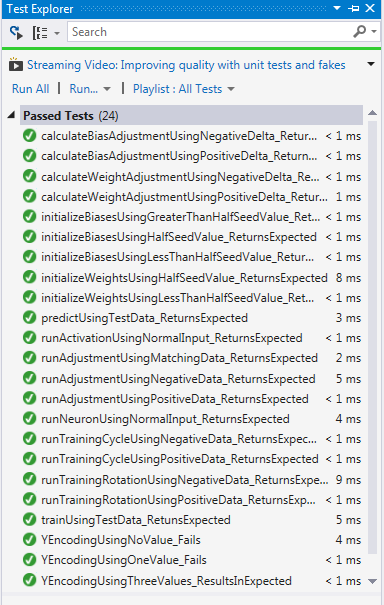
When I run all of the unit tests the all run green:

image

With the Perceptron created, I can now go back and change the code and figure out:

1) Why my weights across the XValues are the same (wrong!)

2) How to implement a more idomatic/recursive way of running rotations so I can remove the mutation

With my unit tests running green, I know I am covered in case I make a mistake

Terminator Program: With The Kinect 2

I got my hands on a Kinect2 last week so I decided to re-write the Terminator program using the Kinect2 api.  Microsoft made some major changes to the domain api (no more skeleton frame, now using a body) but the underlying logic is still the same.  Therefore, it was reasonably easy to port the code.  There is plenty of places in the V2 api that are not documented yet but because I did some work in the V1 api, I could still get things done.  For example, the V2 api documentation and code samples use event handlers to work with any new frame that arrives from the Kinect.  This lead to some pretty laggy code.  However, by using polling on a second thread, I was able to get the performance to where it needs to be.  Also, a minor annoyance is that you have to use Win8 with the Kinect 2.

So here is the Terminator application, Gen 2.  The UI is still just a series of UI controls:

1 <Window x:Class="ChickenSoftware.Terminator.Gen2.UI.MainWindow" 2 xmlns="http://schemas.microsoft.com/winfx/2006/xaml/presentation" 3 xmlns:x="http://schemas.microsoft.com/winfx/2006/xaml" 4 Title="MainWindow" Height="700" Width="650" Loaded="Window_Loaded"> 5 <Canvas Width="650" Height="700"> 6 <Image x:Name="kinectColorImage" Width="640" Height="480" /> 7 <Canvas x:Name="bodyCanvas" Width="640" Height="480" /> 8 <Button x:Name="takePhotoButton" Canvas.Left="10" 9 Canvas.Top="485" Height="40" Width="125" Click="takePhotoButton_Click">Take Photo</Button> 10 <TextBox x:Name="facialRecognitionTextBox" Canvas.Left="10" Canvas.Top="540" Width="125" Height="40" FontSize="8" /> 11 <Image x:Name="currentImage" Canvas.Left="165" Canvas.Top="485" Height="120" Width="170" /> 12 <Image x:Name="compareImage" Canvas.Left="410" Canvas.Top="485" Height="120" Width="170" /> 13 </Canvas> 14 </Window> 15

In the code behind, I set up some class-level variables.  The only real difference is that the photo is moving from 640/480 to 1920/1080:

1 KinectSensor _kinectSensor = null; 2 Boolean _isKinectDisplayActive = false; 3 Boolean _isTakingPicture = false; 4 WriteableBitmap _videoBitmap = null; 5 Int32 _width = 1920; 6 Int32 _height = 1080;

When the page is loaded, a new thread is spun up that handles rendering the Kinect data:

1 private void Window_Loaded(object sender, RoutedEventArgs e) 2 { 3 SetUpKinect(); 4 _isKinectDisplayActive = true; 5 Thread videoThread = new Thread(new ThreadStart(DisplayKinectData)); 6 videoThread.Start(); 7 }

Setting up the Kinect is a bit different (KinectSensor.GetDefault()) but intuitive:

1 internal void SetUpKinect() 2 { 3 _videoBitmap = new WriteableBitmap(1920, 1080, 96, 96, PixelFormats.Bgr32, null); 4 _kinectSensor = KinectSensor.GetDefault(); 5 _kinectSensor.Open(); 6 }

With the big change in the DisplayKinectData method

1 internal void DisplayKinectData() 2 { 3 var colorFrameSource = _kinectSensor.ColorFrameSource; 4 var colorFrameReader = colorFrameSource.OpenReader(); 5 var bodyFrameSource = _kinectSensor.BodyFrameSource; 6 var bodyFrameReader = bodyFrameSource.OpenReader(); 7 8 while (_isKinectDisplayActive) 9 { 10 using (var colorFrame = colorFrameReader.AcquireLatestFrame()) 11 { 12 if (colorFrame == null) continue; 13 using (var bodyFrame = bodyFrameReader.AcquireLatestFrame()) 14 { 15 if (bodyFrame == null) continue; 16 //Color 17 var colorFrameDescription = colorFrame.ColorFrameSource.CreateFrameDescription(ColorImageFormat.Bgra); 18 var bytesPerPixel = colorFrameDescription.BytesPerPixel; 19 var frameSize = colorFrameDescription.Width * colorFrameDescription.Height * bytesPerPixel; 20 var colorData = new byte[frameSize]; 21 if (colorFrame.RawColorImageFormat == ColorImageFormat.Bgra) 22 { 23 colorFrame.CopyRawFrameDataToArray(colorData); 24 } 25 else 26 { 27 colorFrame.CopyConvertedFrameDataToArray(colorData, ColorImageFormat.Bgra); 28 } 29 //Body 30 var bodies = new Body[bodyFrame.BodyCount]; 31 bodyFrame.GetAndRefreshBodyData(bodies); 32 var trackedBody = bodies.FirstOrDefault(b => b.IsTracked); 33 34 //Update 35 if (_isTakingPicture) 36 { 37 Dispatcher.Invoke(new Action(() => AnalyzePhoto(colorData))); 38 } 39 else 40 { 41 if (trackedBody == null) 42 { 43 Dispatcher.Invoke(new Action(() => UpdateDisplay(colorData))); 44 } 45 else 46 { 47 Dispatcher.Invoke(new Action(() => UpdateDisplay(colorData, trackedBody))); 48 } 49 } 50 } 51 } 52 } 53 } 54

I am using a frameReader and frameSource for both the color (the video image) and the body (the old skeleton).  The method to get the frame has changed –> I am using AquireLatestFrame().  It is nice that we are still using byte[] to hold the data.

With the data in the byte[] arrays, the display is updated.  There are two UpdateDisplay methods:

1 internal void UpdateDisplay(byte[] colorData) 2 { 3 var rectangle = new Int32Rect(0, 0, _width, _height); 4 _videoBitmap.WritePixels(rectangle, colorData, _width * 4, 0); 5 kinectColorImage.Source = _videoBitmap; 6 } 7 8 internal void UpdateDisplay(byte[] colorData, Body body) 9 { 10 UpdateDisplay(colorData); 11 var drawingGroup = new DrawingGroup(); 12 using (var drawingContext = drawingGroup.Open()) 13 { 14 var headPosition = body.Joints[JointType.Head].Position; 15 if (headPosition.Z < 0) 16 { 17 headPosition.Z = 0.1f; 18 } 19 var adjustedHeadPosition = _kinectSensor.CoordinateMapper.MapCameraPointToDepthSpace(headPosition); 20 bodyCanvas.Children.Clear(); 21 Rectangle headTarget = new Rectangle(); 22 headTarget.Fill = new SolidColorBrush(Colors.Red); 23 headTarget.Width = 10; 24 headTarget.Height = 10; 25 Canvas.SetLeft(headTarget, adjustedHeadPosition.X + 75); 26 Canvas.SetTop(headTarget, adjustedHeadPosition.Y); 27 bodyCanvas.Children.Add(headTarget); 28 } 29 }

This is pretty much like V1 where the video byte[] is being written to a WritableBitmap and the body is being drawn on the canvas.  Note that like V1, the coordinates of the body need to be adjusted to the color frame.  The API has a series of overloads that makes it easy to do the translation.

With the display working, I added in taking the photo, sending it to Azure blob storage, and having Sky Biometry analyze the results.  This code is identical to V1 with the connection strings for Azure and Sky Biometry broken out into their own methods and the sensitive values placed into the app.config:

1 internal void AnalyzePhoto(byte[] colorData) 2 { 3 var bitmapSource = BitmapSource.Create(_width, _height, 96, 96, PixelFormats.Bgr32, null, colorData, _width * 4); 4 JpegBitmapEncoder encoder = new JpegBitmapEncoder(); 5 encoder.Frames.Add(BitmapFrame.Create(bitmapSource)); 6 var photoImage = UploadPhotoImage(encoder); 7 CompareImages(photoImage); 8 _isTakingPicture = false; 9 }

1 internal PhotoImage UploadPhotoImage(JpegBitmapEncoder encoder) 2 { 3 using(MemoryStream memoryStream = new MemoryStream()) 4 { 5 encoder.Save(memoryStream); 6 var photoImage = new PhotoImage(Guid.NewGuid(), memoryStream.ToArray()); 7 8 var customerUniqueId = new Guid(ConfigurationManager.AppSettings["customerUniqueId"]); 9 var connectionString = GetAzureConnectionString(); 10 11 IPhotoImageProvider provider = new AzureStoragePhotoImageProvider(customerUniqueId, connectionString); 12 provider.InsertPhotoImage(photoImage); 13 memoryStream.Close(); 14 return photoImage; 15 } 16 }

1 internal void CompareImages(PhotoImage photoImage) 2 { 3 String skyBiometryUri = ConfigurationManager.AppSettings["skyBiometryUri"]; 4 String uid = ConfigurationManager.AppSettings["skyBiometryUid"]; 5 String apiKey = ConfigurationManager.AppSettings["skyBiometryApiKey"]; 6 String apiSecret = ConfigurationManager.AppSettings["skyBiometryApiSecret"]; 7 var imageComparer = new SkyBiometryImageComparer(skyBiometryUri, uid, apiKey, apiSecret); 8 9 String basePhotoUri = GetBasePhotoUri(); 10 String targetPhotoUri = GetTargetPhotoUri(photoImage); 11 currentImage.Source = new BitmapImage(new Uri(targetPhotoUri)); 12 compareImage.Source = new BitmapImage(new Uri(basePhotoUri)); 13 14 var matchValue = imageComparer.CalculateFacialRecognitionConfidence(basePhotoUri, targetPhotoUri); 15 facialRecognitionTextBox.Text = "Match Value Confience is: " + matchValue.Confidence.ToString(); 16 }

With the code in place, I can the run the Terminator Gen 2:

image

I think I am doing the Sky Biometry recognition incorrectly so I will look at that later.  In any event, working with the Kinect V2 was fairly easy because it was close enough to the V1 that the concepts could translate.  I look forward to adding the targeting system this weekend!!!