Using LINQ to replace foreach

I sometimes forget how powerful LINQ can be – especially when dealing with older constructs that work fine.  I recently wrote this nugget of crappy code:

Unit unit = null; foreach (Hex hex in Game.CurrentBoard) { if (hex.CurrentUnit != null) { if (hex.CurrentUnit.Country.AlliesIndicator == true) { unit = hex.CurrentUnit; } } }

I looked at it for a second and then re-wrote it using LINQ:

var q = (from h in Game.CurrentBoard where h.CurrentUnit.Country.AlliesIndicator == true select h);

Take about an improvement in readability!

UX that suck

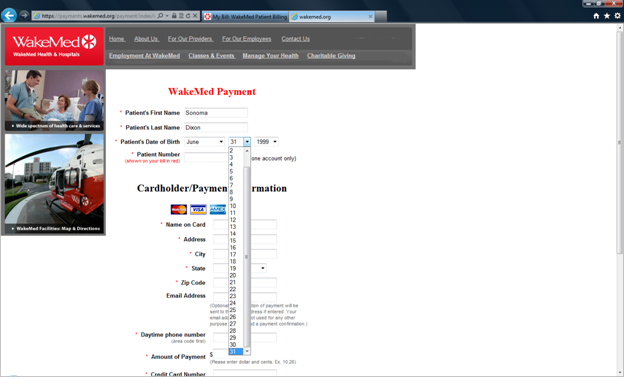
I am not the most anal-retentive person, but I do appreciate web pages that are well-designed.  I also resent professional organizations that make web sites that are less well-designed than a typical 8th grade class project.  I recently experienced one that falls more into the later category.  I had to pay a medical bill so I went to the hospital’s on-line payment site and filled in the information:

image

notice that I selected June 31 as her birthday.  I then hit submit and I got this:

image


Basic input validation should be part of any site –especially one that deals with medical/financial transactions.  I didn’t try to do a sql injection attack, but if I was a betting man, I would bet that this site is vulnerable to that too…

The Var Keyword

Consider the following block of code:

using (NorthwindEntities entities = new NorthwindEntities()) { var x = from y in entities.Categories select y; }

The Var keyword resolves at run-time, meaning that its value depends on the right hand side of the equation.  If I chain a function on the right hand side like this, var takes on a different meaning:

using (NorthwindEntities entities = new NorthwindEntities()) { var x = (from y in entities.Categories select y).First(); }

I see that var is used extensively, so I guess I am in the minority but I don’t like to use it.  I am willing to trade off some verbosity for clarity of intention.  If I use the var keyword, I need to read the right hand side of the equation first to figure out what goes in it (and hope that I guessed correctly – with some of the convoluted LINQ that I have seen written, no small task).  Since I read left to right, it waste time and my CPU cycles.  In addition, I fail to see what is wrong with being more explicit in the left hand side of your equation:

using (NorthwindEntities entities = new NorthwindEntities()) { IQueryable<Category> catagotyQuery = from catagories in entities.Categories select catagories; }

In this example, my intention is clear and I have much more readable and maintainable code.

Polymorphism In Action

The swim team that I help out with is purchasing a timing system. The timing system’s data needs to interface with the existing datamart, which is stored in a SQL Server database. The database serves a variety of functions – from season registration, meet registration, team records, etc…

The system that the board chose is the industry leader with its own proprietary data storage mechanism. Their system does not allow any kind of RPC from a RDBMS system. The only way to get into and out of the system is via text files. These text files are structured using USA Swimming’s Standard Data Interchange Format – found here with a simplified version found here. I cracked open the RFC and was amazed – they are not using XML! Rather, it is a flat file format with each row of data conforming to certain field lengths. It is like going back to FORTRAN programming – without the sexiness of the green screen. Here is an example of a row of data:

D01 Whitaker, Taylor 122691TAY*WH 1226199118FF 1003 UNOV 1:25.00Y

And here is how the RFC tells you how to parse the payload:

Start /
Length Mandatory Type Description
1/2 M1* CONST "D0"
3/1 M2* CODE ORG Code 001, table checked
4/8 future use
12/28 M1 NAME swimmer name
40/12 M2 ALPHA USS#
52/1 CODE ATTACH Code 016, table checked
53/3 CODE CITIZEN Code 009, table checked
56/8 M2 DATE swimmer birth date
64/2 ALPHA swimmer age or class (such as Jr or Sr)
66/1 M1 CODE SEX Code 010, table checked
67/1 M1# CODE EVENT SEX Code 011, table checked
68/4 M1# INT event distance
72/1 M1# CODE STROKE Code 012, table checked
73/4 ALPHA Event Number
77/4 M1# CODE EVENT AGE Code 025, table checked
81/8 M2 DATE date of swim
89/8 TIME seed time
97/1 * CODE COURSE Code 013, table checked

Therefore, to interface with our SQL Server database, I need a way of translating the data that is in the database into the structured format (and back again).

There are a series of files – A0, B1, etc… I was thinking of making a class that is a concrete implementation of the RFC for that row of data. I then realized that I could use the power of an Object Oriented Language to make my solution less brittle and to try out some cool polymorphic techniques.

My first step was to create an Interface that handles each chunk of data. Just because USA Swimming isn’t going to use XML, it doesn’t mean I can’t use XML language syntax – heck it is all structured data.

I started with the attribute:

public interface IAttribute { int AttributeId { get; set; } int Start { get; set; } int Length { get; set; } bool Manditory { get; set; } AttributeType AttributeType { get; set; } string Description { get; set; } string AttributeValue { get; set; } string PaddedValue { get; } }

The AttributeValue is a string implementation of the value of the property. The PaddedValue is the same value with the padding and left/right justification applied.

I then thought about how I wanted to implement the 15 or so different elements (called “records”, which has nothing to do with swim meet records. Someone didn’t understand the importance of domain-specific language). Since the elements are fairly stable, I went with a Strategy Pattern.

Each element is a collection of Attributes. Therefore, I created one to see if I was barking up the right tree:

public class FileDescription: Collection<IAttribute> { public string ElementId { get { return "A0"; } } public string ElementDescription { get { return "File Description Record"; } } public FileDescription() { this.Add(new Attribute { AttributeId = 1, Start = 1, Length = 2, Manditory = true, AttributeType = AttributeType.CONST, Description = "A0"}); this.Add(new Attribute { AttributeId = 2, Start = 3, Length = 1, Manditory = false, AttributeType = AttributeType.CODE, Description = "ORG Code 001, table checked" }); this.Add(new Attribute { AttributeId = 3, Start = 4, Length = 8, Manditory = false, AttributeType = AttributeType.ALPHA, Description = "SDIF version number (same format as the version number from the title page)" }); etc… } }

I then realized that there is no easy way to get the correct Attribute from the collection except via its index number. Holding my nose, I then created a new unit test to see if I could create a fake for this class. The first test passed. I then wanted to add a ToString() override that spits out the FileDescription’s values – as if I was writing it out to the flat file. Here is what I came up with:

public override string ToString() { StringBuilder stringBuilder = new StringBuilder(); stringBuilder.Append(this[0].AttributeValue); stringBuilder.Append(this[1].AttributeValue); … stringBuilder.Append(this[12].AttributeValue); return stringBuilder.ToString(); }

I then realized that I would have to duplicate this code in every class that implements the Collection<IAttribute> I then created an abstract class to handle some of this work for me:

public abstract class Record : Collection<IAttribute> { public string RecordId { get { return this[0].AttributeValue.ToString(); } set { this[0].AttributeValue = value; } } public string OrganizationCode { get { return this[1].AttributeValue.ToString(); } set { this[1].AttributeValue = value; } } public const int MaxRecordLength = 160; public override string ToString() { StringBuilder stringBuilder = new StringBuilder(); foreach (Attribute attribute in this) { stringBuilder.Append(attribute.AttributeValue); } return stringBuilder.ToString(); } public string ToPaddedString() { int padLength = 0; StringBuilder stringBuilder = new StringBuilder(); stringBuilder.Append(ToString()); padLength = MaxRecordLength - stringBuilder.Length; for (int i = 0; i < padLength; i++) { stringBuilder.Append(string.Empty); } return stringBuilder.ToString(); } }

I then changed the concrete classes to inherit from the Record class. I finished my Fake for the unit tests like this:

file[0].AttributeValue = "A0"; file[1].AttributeValue = "1"; file[2].AttributeValue = "V3"; file[3].AttributeValue = "20"; file[5].AttributeValue = "Hy-Tek, Ltd"; file[6].AttributeValue = "6.0X"; file[7].AttributeValue = "Hy-Tek, Ltd -USS"; file[8].AttributeValue = "252-633-5177"; file[9].AttributeValue = "02172011";

I then realized that I hate working with indexers so I added properties that give a friendly name to the indexer:

public string SoftwareName { get { return this[5].AttributeValue.ToString(); } set { this[5].AttributeValue = value; } }

I then rewrote my Fake and still got green on the unit tests.

file.RecordId = "A0"; file.OrganizationCode = "1"; file.SDIFVersionNumber = "V3"; file.FileCode = "20"; file.SoftwareName = "Hy-Tek, Ltd"; file.SoftwareVersion = "6.0X"; file.ContactName = "Hy-Tek, Ltd -USS"; file.ContactPhone = "252-633-5177"; file.FileCreation = "02172011";

Tests were still green, so I feel good.

I then wanted to tackle the actual values that will be assigned to each attribute. There are two kinds of values – the value that come from the database (three is you want to count the .NET types versus the SQL Server ones) and the one that comes from/goes into the output file. The output file is a structured string file so perhaps I can just store the Value as a string and translate it into the native types. I would need a Translation Factory that takes the native types and pushes it into the string correctly – which seems like the right thing to do.

Before creating the Translation class , I created the classes that represent the data in the SQL Server database. I chose using EF.

I then added the Translation class that takes all of the datafrom the EF classes, translates it, and sticks it into the SDIF format. An example looks like this:

public List<IndividualEvent> CreateIndividualEventRecords(int meetId) { List<IndividualEvent> individualEvents = new List<IndividualEvent>(); IndividualEvent individualEvent = null; using (HurricaneEntities context = new HurricaneEntities()) { var q = from mea in context.tblMeetEventAssignments .Include("tblMeetEvent") .Include("tblMeetEvent.tblRaceStroke") .Include("tblMeetEvent.tblAgeGroup") .Include("tblMeetSwimmerCheckIn") .Include("tblMeetSwimmerCheckIn.tblSwimmerSeason") .Include("tblMeetSwimmerCheckIn.tblSwimmerSeason.tblSwimmer") where mea.tblMeetSwimmerCheckIn.MeetID == meetId select new { FirstName = mea.tblMeetSwimmerCheckIn.tblSwimmerSeason.tblSwimmer.FirstName, LastName = mea.tblMeetSwimmerCheckIn.tblSwimmerSeason.tblSwimmer.LastName, DateOfBirth = mea.tblMeetSwimmerCheckIn.tblSwimmerSeason.tblSwimmer.DateOfBirth, GenderId = mea.tblMeetSwimmerCheckIn.tblSwimmerSeason.tblSwimmer.GenderID, RaceStrokeId = mea.tblMeetEvent.RaceStrokeID, AgeGroupId = mea.tblMeetEvent.AgeGroupID, AgeDesc = mea.tblMeetEvent.tblAgeGroup.AgeDesc, RaceLengthId = mea.tblMeetEvent.tblAgeGroup.RaceLengthID}; foreach (var databaseRecord in q) { individualEvent = new IndividualEvent(); individualEvent.RecordId = "D0"; individualEvent.OrganizationCode = "1"; individualEvent.SwimmerName = databaseRecord.FirstName + " " + databaseRecord.LastName; individualEvent.USSwimmingNumber = "??????"; individualEvent.SwimmerBirthDate = CreateFormattedDate(databaseRecord.DateOfBirth); individualEvent.SwimmerAgeOrClass = "??"; individualEvent.SwimmerSex = CreateFormattedGender(databaseRecord.GenderId); individualEvent.EventSex = CreateFormattedGender(databaseRecord.GenderId); individualEvent.EventDistance = CreateFormattedEventDistance(databaseRecord.RaceLengthId); individualEvent.EventStroke = CreateFormattedEventStroke(databaseRecord.RaceStrokeId); individualEvent.EventAge = databaseRecord.AgeDesc; individualEvent.SeedTime = "99.99"; individualEvent.EventCourseCode = "Y"; individualEvents.Add(individualEvent); } } return individualEvents; }

An example of the Individual Helper functions that does the actual translation:

public string CreateFormattedEventDistance(int raceLengthId) { switch (raceLengthId) { case 1: return "15"; case 2: return "25"; case 3: return "50"; case 4: return "100"; default: return "0"; } }

After hooking up all of my translations, I was ready to create an output file.   All I had to do was write this

static void WriteToFile() { string fileName = @"C:\Users\Public\HHTest01.SD3"; MeetSetupFactory factory = new MeetSetupFactory(); Collection<string> collection = factory.CreateMeetSetUp(72); System.IO.File.WriteAllLines(fileName, collection); }

and because of polymorphism, the output came out perfectly:


A01V3      01                              Tff LLC.            1.0X      James Dixon         9193884228  02212011                                              
B11        Olive Chapel                  Highcroft Pool                                                                  0720201007202010            Y         
C11              Highcroft Hurricanes          HHST            100 Highcroft Drive                         Cary                NC27519     USA                 
D01        Sloan Dixon                 040420Dix*Sl    040420020708MM25  2    7-8         99.99   Y                                                              
D01        Sloan Dixon                 040420Dix*Sl    040420020708MM25  3    7-8         99.99   Y                                                             
Improving performance using in-memory caching

I was thinking about how to make my random name generator more performant. I thought about a caching strategy where the EF dataset was loaded into memory at startup and then do queries on the in-memory set. I would use a Singleton pattern to make sure only 1 set was created. After searching around a bit using Bing, I realized that EF does not lend itself to this pattern -> every call could potentially go back to the database and the EF itself is rather heavy. I decided to go with a lightweight POCO using a Collection base.

My first stop was to create a Console application to see what kind of performance boost I could reasonably expect to obtain. I created 2the POCO and the collection like so:

public class LastName { public string Name { get; set; } public int Rank { get; set; } public double Frequency { get; set; } public double CumlFrequency { get; set; } } public class LastNameCollection: Collection<LastName> { }

I then made an EF class:

image

And then did a quick test.

class Program { public static LastNameCollection lastNameCollection = new LastNameCollection(); static void Main(string[] args) { Console.WriteLine("---Start---"); LoadAllData(); Stopwatch stopWatch = Stopwatch.StartNew(); Console.WriteLine("{0} was found remotely in {1} seconds", SearchForNameRemotely(), stopWatch.Elapsed.TotalSeconds); stopWatch.Restart(); Console.WriteLine("{0} was found locally in {1} seconds", SearchForNameLocally(), stopWatch.Elapsed.TotalSeconds); stopWatch.Stop(); Console.WriteLine("----End----"); Console.ReadKey(); } static void LoadAllData() { using (Tff.EntityFrameworkLoad.DB_9203_tffEntities entities = new DB_9203_tffEntities()) { var lastNameQuery = from lastName in entities.Census_LastName select lastName; foreach (Census_LastName censusLastName in lastNameQuery) { lastNameCollection.Add(new LastName { Name = censusLastName.LastName, Rank = censusLastName.Rank, Frequency = censusLastName.Frequency, CumlFrequency = censusLastName.Frequency }); } } } static string SearchForNameRemotely() { using (Tff.EntityFrameworkLoad.DB_9203_tffEntities entities = new DB_9203_tffEntities()) { Census_LastName lastNameFound = (from lastName in entities.Census_LastName where lastName.LastName == "Frankenstein" //Not case-sensitive select lastName).First(); return lastNameFound.LastName; } } static string SearchForNameLocally() { LastName lastNameFound = (from lastName in lastNameCollection where lastName.Name.ToLower() == "frankenstein" //NOTE Case-sensitivity select lastName).First(); return lastNameFound.Name; } }

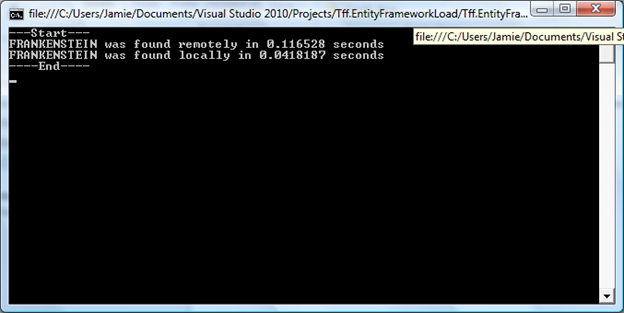
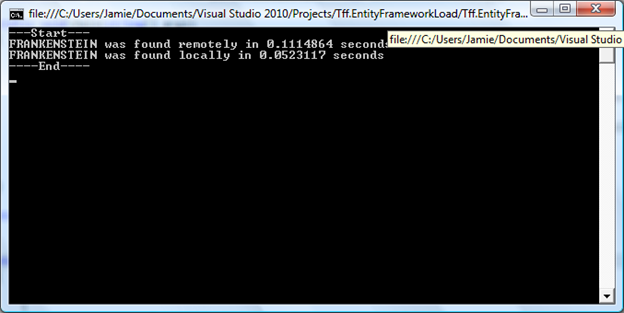
Sure enough, the in-memory gain was approximately 300%:

image

I then layered on PLIQ to see if the additional processors increase the speed. Last time, I showed that PLINQ did NOT have a positive impact on performance using the LINQ to EF queries.

I changed the functions to add in the AsParallell() extension method like this:

using (Tff.EntityFrameworkLoad.DB_9203_tffEntities entities = new DB_9203_tffEntities()) { Census_LastName lastNameFound = (from lastName in entities.Census_LastName.AsParallel() where lastName.LastName == "Frankenstein" //Not case-sensitive select lastName).First(); return lastNameFound.LastName; }

Interestingly, the EF LINQ then threw an exception:

image

When I just ran AsParallel () on the in-memory copy, the performance degraded:

image

I started to implement this pattern in the Random project to see if I can get the performance boost without the Parallelism. I would assume with a web service you would create the collections in the APP_Start event handler and then query them during each method call. I put it into the Application_Start method, however performance did not increase in my unit tests – it looks like that app_start was getting called each time and I am not sure how to hold the application in memory without requests – my hosting provider recycles frequently.

I then put the collections load into the singleton method of my Global class and my tests flew:


private static LastNameCollection _lastNameCollection = null; public static LastNameCollection LastNameCollection { get { if (_lastNameCollection == null) { _lastNameCollection = new LastNameCollection(); PopulateLastNameCollectionFromDatabase(); } return _lastNameCollection; } }

I then pushed it out to production and sure enough, performance increased when I did multiple calls.

The Carpool goes global

I received an email from someone who wants to have a carpool website in Albanian. I hadn’t worked on globalization issues (except for hello worlds for my exam preps) so it seems like a good way to get my feet wet in .NET globalization in a real-world app.

My 1st step was FxCop. I deleted all of my FxCop suppressed messages for globalization. I got four errors like this:

CA1305 : Microsoft.Globalization : Because the behavior of ‘DateTime.Parse(string)’ could vary based on the current user’s locale settings, replace this call in ‘CarpoolSummaryFactory.GetCurrentWeekCarpoolSummaries()’ with a call to ‘DateTime.Parse(string, IFormatProvider)’. If the result of ‘DateTime.Parse(string, IFormatProvider)’ will be based on input from the user, specify ‘CultureInfo.CurrentCulture’ as the ‘IFormatProvider’ parameter. Otherwise, if the result will based on input stored and accessed by software, such as when it is loaded from disk or from a database, specify ‘CultureInfo.InvariantCulture’.

I replaced all instances of this

startDate = DateTime.Parse(DateTime.Now.ToShortDateString() );

With this

startDate = DateTime.Parse(DateTime.Now.ToShortDateString(), CultureInfo.CurrentCulture );

I then had to fix 1 of my ToString functions

public override string ToString() { return String.Format("{0}-{1}", Id, Name); }

To this

public override string ToString() { return String.Format(CultureInfo.CurrentCulture, "{0}-{1}", Id, Name); }

I then ran FxCop on the UI project (it is MVC2): I first changed the settings on code analysis to only look at Globalization.

image

I got 11 errors. 9 were the same as before – DateTime.Parse and 2 were Int.Parse. All of the errors were in the controller where I was taking data out of the view model and jamming it into the POCOs. I added the CultureInfo parameter to the parse function to give me a clean FxCop report.

I ran all of unit tests – all green.

I then took a look through MSDN on Globalization.

Before refactoring and adding resources files, it seemed like a good time to implement a more mature branching strategy using TFS.  That is the subject of my next blog post.

Refactoring The Carpool Solution Using Code Analysis

Carpool refactoring – running code analysis.

I wanted to spend some time with the refactoring tools in VS2010 Ultimate so I decided to analyze the carpool solution. My initial showed that the solution was written “pretty well”:

clip_image002

I then wanted to see how well I complied with FxCop. I started with the Domain project because it had the most lines of code and had the most custom-code by the nature of the business rules.

clip_image004

Of the 84 errors, there were some reoccurring problems.

I am using a strongly-typed List to expose collections from the API (List<T>). FxCop recommends using the Collection<T>. I clicked on “Show Error Help” in the context menu and got to MSDN’s Do Not Expose Generic Lists. It seems that using List<T> versus Collection<T> is one of trade-offs. You should use List<T> is you are worried about performance and you should use Collection<T> is you are worried about extendibility. Since I am not planning to use the Carpool Domain in other solutions (Famous Last Words), I decided to keep the List<T> in this solution. I will try and use Collections<T> in my next project.

There are three possibilities in suppressing messages:

The individual message in the source, which puts an attribute on the function:

[System.Diagnostics.CodeAnalysis.SuppressMessage("Microsoft.Design", "CA1002:DoNotExposeGenericLists")] public static List<Carpool> GetCarpools(DateTime startDate, DateTime endDate, string userName) {

The individual message in the project suppression file, which puts the message in a GlobalSupression.cs file which looks like this:

[assembly: System.Diagnostics.CodeAnalysis.SuppressMessage("Microsoft.Design", "CA1002:DoNotExposeGenericLists", Scope = "member", Target = "Com.Tff.Carpool.Domain.CarpoolFactory.#GetAllCarpools()")] [assembly: System.Diagnostics.CodeAnalysis.SuppressMessage("Microsoft.Design", "CA1002:DoNotExposeGenericLists", Scope = "member", Target = "Com.Tff.Carpool.Domain.CarpoolSummaryFactory.#GetCarpoolSummaries(System.DateTime,System.DateTime)")]

If I want to suppress the error for ALL methods, I thought that I can change the suppression message to this:

[assembly: System.Diagnostics.CodeAnalysis.SuppressMessage("Microsoft.Design", "CA1002:DoNotExposeGenericLists", Scope = "member", Target = "")]


However, that didn’t seem to work. In liu of a global suppression, I just held the shift key down on messages of the same type and suppressed all of them at once

The next message was

Warning 55 CA1012 : Microsoft.Design : Change the accessibility of all public constructors in ‘ValidationBase’ to protected.

Apparently, Abstract types should not have constructors – which makes sense. I changed it to protected, ran my unit tests (I used CTRL-R, Y to only run impacted tests), and moved on.

The next error showed me that having some for thought on your design up front will save some headaches. The error was:

Warning 4 CA1014 : Microsoft.Design : Mark ‘Com.Tff.Carpool.Domain.Tests.dll’ with CLSCompliant(true) because it exposes externally visible types.

The problem is that my solution is NOT CLSCompliant. All of my public parameters follow the type-naming convention for reference types such as:

public static int InsertCarpool(Carpool carpool)

I can either rename all of the parameters, change my public members to protected, or suppress the message. Both renaming the methods and changing the scope of the methods will require significant refactoring. I suppressed the method and made a vow that the next project, I will mark as CLS compliant first, so I enforce it right off of the bat.

My next error is a standard one that many developers blow off because they don’t think their application will be internationalized.

CA1305 : Microsoft.Globalization : Because the behavior of ‘DateTime.Parse(string)’ could vary based on the current user’s locale settings, replace this call in ‘CarPoolFactoryIntegrationTest.CreateTestObjects()’ with a call to ‘DateTime.Parse(string, IFormatProvider)’. If the result of ‘DateTime.Parse(string, IFormatProvider)’ will be based on input from the user, specify ‘CultureInfo.CurrentCulture’ as the ‘IFormatProvider’ parameter. Otherwise, if the result will based on input stored and accessed by software, such as when it is loaded from disk or from a database, specify ‘CultureInfo.InvariantCulture’.

Most of these errors occur in the creation methods like this:

Practice practice = PracticeFactory.CreatePractice(DateTime.Parse(testCarpoolStartDate), false, DateTime.Parse(testCarpoolStartTime), DateTime.Parse(testCarpoolEndTime), swimGroup);

So the biggest problem in refactoring is adding CultureInfo.InvariantCulture like this:

Practice practice = PracticeFactory.CreatePractice(DateTime.Parse(testCarpoolStartDate, CultureInfo.InvariantCulture),false, DateTime.Parse(testCarpoolStartTime, CultureInfo.InvariantCulture), DateTime.Parse(testCarpoolEndTime, CultureInfo.InvariantCulture), swimGroup);

Not the worst thing, so I refactored and ran my unit tests.

Another set of errors were spelling errors. “Carpool” not “CarPool”, “Email” not “EMail”, and “Integration” not “Intigration”. I renamed and ran my unit tests. Finally, I did add a resource file for Tff. That is the correct spelling so I added a custom dictionary to the project and marked it as “Code Analysis Dictionary” under its build action property

<?xml version="1.0" encoding="utf-8" ?> <Dictionary> <Words> <Recognized> <Word>Tff</Word> </Recognized> </Words> </Dictionary>

Next, Code Analysis detected that I was being a lazy programmer.

CA1062 : Microsoft.Design : In externally visible method ‘CarpoolFactory.InsertCarpool(Carpool)’, validate parameter ‘carpool’ before using it.

I did not validate parameters in a couple places in my solution. I went back and validated them, ran my unit tests, and moved on.

Finally, I got this kind of errors:

CA1801 : Microsoft.Usage : Parameter ‘carpoolSummary’ of ‘CarpoolSummaryFactory.UpdateCarpoolSummary(CarpoolSummary)’ is never used. Remove the parameter or use it in the method body.

How cool is code analysis? I removed the offending blocks of code.

Refactoring using FxCop was a great exercise and I am better developer because of it. I also realized that I need to run code analysis more frequently when I am coding to keep the error list down to a manageable level.

.NET Code Camp Lessons

I gave a talk at the RDU .NET Code Camp on Saturday.  This was my 1st time speaking in a forum such as this and I learned some great lessons:

    • Code samples – have them in the toolbox, ready to drag.  I wasted too much time re-typing code that was not relevant to my presentation
    • Classes that are created during the presentation – Create them and then have them ‘removed from project’.  Bring them back into the project at the appropriate time
    • Audience – When covering a topic as wide as BAD, there are going to be experts in the audience on specific issues (cruse control, TDD, etc…).  Using them to help the presentation was awesome
    • Audience (part 2) – Sometimes people volunteered information that was incorrect.  Moving past that is a ‘soft skill’ that needs some forethought
    • Don’t leave directly from your son’s football tournament if you can help it – I was cold, west, muddy, and mentally out of sorts when I started.

That’s it.  I will refine my code samples and get this presentation ready for the next group.

Importance Of Variable Names

Can anyone see the problem with this bit of code?

    public class InterfaceKitDigitalOutputCollection
    {
        
// Fields
        private IntPtr phid;
 
        
// Methods
        internal InterfaceKitDigitalOutputCollection(InterfaceKit phid)
        {
            
this.phid = phid.phidgetDeviceHandle;
        }


I changed the local parameter

        // Methods
        internal InterfaceKitDigitalOutputCollection(InterfaceKit
 interfaceKit)
        {
            
this.phid = interfaceKit.phidgetDeviceHandle;
        }


And suddenly the code is more consistent and readable.  A small change to be sure, but I lost 5 minutes assuming that variable names were unique in the class.

Ugh – They forgot to turn of trace

I Binged Gun Safety (my daughter shot at camp 2 weeks ago and wants to do it again).  The 4th link is from magicyellow – which I assume is the Yellow Pages.  Check out the screen shot of the page’s footer:

 
My favorite SQL was this:

SQL =

INSERT INTO    logs_sc (code,

                                                     event,

                                                     client,

                                                     source,

                                                     sourceSite,

                                                     sourceQuery,

                                                     clientIP,

                                                     admin,

                                                     vid,

                                                     MYCatID,

                                                     locID,


                                                     userAgent,

                                                     aid,


                                                     siteID)

                                      VALUES (‘SCL’,

                                                     ‘[283868|USNC  ]’,

                                                     ‘[56959191.51529074]’,

                                                     http://www.bing.com/search?q=Cary%2C+NC+Gun+Club&form=QBLH&qs=n&sk=&#8217;,

                                                     http://www.bing.com/search&#8217;,

                                                     ‘q=Cary%2C+NC+Gun+Club&form=QBLH&qs=n&sk=’,

                                                     ‘98.101.143.134’,

                                                     0,

                                                     0,

                                                     283868,

                                                     ‘USNC  ‘,


                                                     ‘Mozilla/4.0 (compatible; MSIE 8.0; Windows NT 6.0; Trident/4.0; SLCC1; .NET CLR 2.0.50727; Media Center PC 5.0; .NET CLR 1.1.4322; .NET CLR 3.5.21022; .NET CLR 1.0.3705; .NET CLR 3.5.30729; MS-RTC EA 2; .NET CLR 3.0.30729; MS-RTC LM 8; .NET4.0C; .NET4.0E;’,

                                                     ‘0’,


                                                     1)


In case I was wondering what info they were collecting about me in my visit….

 And

Yup – they left all of their trace information on when they want to production.  I emailed them to fix it right away – I wonder how long it will take them to read my email?