Two More Reasons To Use F#

On March 1st, James McCaffrey posted a blog article about why he doesn’t like FSharp found here.  Being that it took 3 weeks for anyone to notice is revealing in of itself, but the post is probably important  being that McCaffrey writes monthly in MSDN on machine learning/scientific computing so he has a certain amount of visibility.  To his credit, McCaffrey did try and use F# in one of his articles when FSharp first came out –> unfortunately, he wrote the code in an imperative style so he pretty much missed the point and benefit of using F#.  Interestingly, he also writes his C# without using the important OO concepts that would make his code much more usable to the larger community (especially polymorphic dispatch). 

In any event,  the responses from the FSharp community were what you would pretty much expect, with two very good responses here and here (and probably more to come).   I had posed this similar question to the FSharp Google group a while back with even more reasons why people don’t use FSharp and some good responses why they use it.  Recently, Eric Sink also wrote a good article on FSharp adoption found here.

For the last year, I have had the opportunity to work with a couple of startups in Raleigh, NC that are using FSharp and have a couple of observations that haven’t been mentioned so far (I think) in response to McCaffrey :

  • CTOs in FSharp shops don’t want you to learn FSharp.  They view using FSharp as a competitive advantage and hope that their .NET competitors continue to use C# exclusively.  Their rational is less to do with the language itself (C# is a great language), but the folks who can’t go between the two languages (or see how learning FSharp makes you a better C# coder and vice-versa) are not the developers they want on their team. The FSharp shops I know about  have no problem attracting top-flight talent –> no recruiter, no posts on dice, no resumes, no interviews.  Interestingly, the rock star .NET developers have already left their  C# comfort zone.  A majority of these developers are webevs so they have been using javascript for least a couple of years.  For many, it was their first foray out of the C# bubble and they hated it.  But like most worthwhile things, they stuck with it and now are proficient and may even enjoy it.  In any event, McCaffrey also doesn’t like HTML/Javascript/CSS (7:45 here) so I guess those developers are in the same boat.

  • You don’t want any of the the 100,000 jobs on Stack Overflow that McCaffrey talks about.  My instinct is that those jobs are targeted to the 50% of the C# developers still don’t use linq and/or lambda expressions.  Those are the companies that view developers as a commodity.  This is not where you want to be because:
  1. They are wrong.  The world is not flat.  Never has been.  CMMI, six-sigma process improvement, and other such things do not work in software engineering.  The problem for those companies is that they have lots of architects that don’t write production code, project managers that are second-careering into technology, and off-shore development managers who have no idea about the domain they are managing.  All of these people all have mortgages, colleges to pay for etc… so this self-protecting bureaucracy will be slow to die.  Therefore, they will continue to try and attract coders that don’t want to think outside their comfort zone
  2. It sucks working there – because you are just a cog in their machine.  You will probably be maintaining post-back websites or fat-client applications.  Who needs Xamerian anyway?  And be happy with that 2% raise.  But they do have a startup culture.

In any event, I hope to meet McCaffery at //Build later this month.  My guess is that since his mind is made up, nothing I say will change his opinion.  But, it should be interesting to talk with him and I really do enjoy his article’s on MSDN – so we have that common ground.
Creating a crosswalk table between WCPSS School assignment results and school report card school list

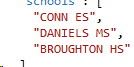
As part of my Wake County School Score analysis, I needed to build a cross-walk table between the Wake County School Site parsing that I did here and the school score result set.  The screen scraping put schools in this kind of format:

image

as an added wrinkle, there is some extra data for some of the schools:


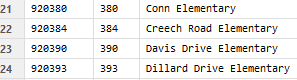
while the score result set is in this format:

image

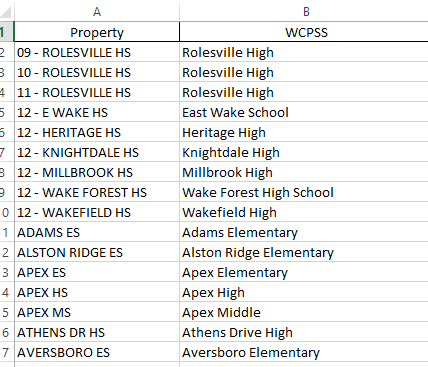
So I want to create a cross-walk table with this format:

image

Step one of this process is to get all of the distinct values from the school site data.  If the data was in a sql server database, getting that would as simple as

“Select distinct shoolName from reallyBigDenormalizedTable”

But the data is not in Sql Server, it is in a no-sql database and the json is structured where the names are in an array inside the data structure.  After messing around with the query syntax to traverse the nested array, I gave up and decided to sample the database.

Step one was to get a record out via the index

1 let getSchools (index:int) = 2 try 3 let endpointUrl = "https://chickensoftware.documents.azure.com:443/" 4 let client = new DocumentClient(new Uri(endpointUrl), authKey) 5 let database = client.CreateDatabaseQuery().Where(fun db -> db.Id = "wakecounty" ).ToArray().FirstOrDefault() 6 let collection = client.CreateDocumentCollectionQuery(database.CollectionsLink).Where(fun dc -> dc.Id = "houseassignment").ToArray().FirstOrDefault() 7 let documentLink = collection.SelfLink 8 let queryString = "SELECT * FROM houseassignment WHERE houseassignment.houseIndex = " + index.ToString() 9 let query = client.CreateDocumentQuery(documentLink,queryString) 10 match Seq.length query with 11 | 0 -> None 12 | _ -> 13 let firstValue = query |> Seq.head 14 let assignment = HouseAssignment.Parse(firstValue.ToString()) 15 Some assignment.Schools 16 with 17 | :? HttpRequestException as ex -> 18 None 19

The next step was to create an array of index numbers that have random values in them.  I found this really good extension method to System.Random to populate the array.  The next question was “how big does the sample size have to be to get most/all of the schools?”  I started seeding the array with different values and ran these functions:

1 let random = new System.Random(42) 2 let indexes = random.GetValues(1,350000) |> Seq.take(10000) |> Seq.toArray 3 let allSchools = indexes |> Seq.map(fun i -> getSchools(i)) |> Seq.toArray 4 let getNumberOfSchools (trial:int) = 5 let trialSchools = allSchools.[1..trial] 6 let allSchools' = trialSchools |> Seq.filter(fun s -> s.IsSome) 7 let allSchools'' = allSchools' |> Seq.collect(fun s -> s.Value) 8 let uniqueSchools = allSchools'' |> Seq.distinct 9 uniqueSchools |> Seq.length 10 11 let trialCount = [|1..9999|] 12 13 trialCount |> Seq.map(fun t -> t, getNumberOfSchools(t)) 14 |> Seq.iter(fun (t, c) -> printfn "%A %A" t c) 15

The sample above shows 10,000 records, which is pretty good.  If you graph it, you can see that you get the max values around 2,500.
image

Unfortunately, there were 11 schools on the report card that were not in the 10,000 set.  Confronted with this reality, I did what any reasonable research would do… I dropped them.  My guess is that these schools are not part of a base school pyramid, rather they are “application schools” like STEM or leadership academies.

In any event, with the list of schools down, I copied them into Excel and sorted them alphabetically.  I then put the school score list next to them and started matching.  Within 15 minutes, I had a creditable crosswalk table.

image

You can see the gist here

Aggregation of WCPSS Tax Records with School Assignment

So the next part of my WCPSS hit parade, I need a way of combing the screen scrape that I did from the Wake County Tax Records as described here and the screen scrape of the Wake County Public School Assignments as found here.  Getting data from the DocumentDb is straight foreword as long as you don’t ask too much from the query syntax.

I created two functions that pull the tax record and the school assignment via the index number:

1 let getAssignment (id:int) = 2 let collection = client.CreateDocumentCollectionQuery(database.CollectionsLink).Where(fun dc -> dc.Id = "houseassignment").ToArray().FirstOrDefault() 3 let documentLink = collection.SelfLink 4 let queryString = "SELECT * FROM houseassignment WHERE houseassignment.houseIndex = " + id.ToString() 5 let query = client.CreateDocumentQuery(documentLink,queryString) 6 match query |> Seq.length with 7 | 0 -> None 8 | _ -> 9 let assignmentValue = query |> Seq.head 10 let assignment = HouseAssignment.Parse(assignmentValue.ToString()) 11 Some assignment 12 13 let getValuation (id:int) = 14 let collection = client.CreateDocumentCollectionQuery(database.CollectionsLink).Where(fun dc -> dc.Id = "taxinformation").ToArray().FirstOrDefault() 15 let documentLink = collection.SelfLink 16 let queryString = "SELECT * FROM taxinformation WHERE taxinformation.index = 1" 17 let query = client.CreateDocumentQuery(documentLink,queryString) 18 match query |> Seq.length with 19 | 0 -> None 20 | _ -> 21 let valuationValue = query |> Seq.head 22 let valuation = HouseValuation.Parse(valuationValue.ToString()) 23 Some valuation

Note option types are being used because there any many index values where there is not a corresponding record.  Also, there might a situation where the assignment has a record but the valuation does not and vice-versa so I created a function to only put the records together where there both records:

1 let assignSchoolTaxBase (id:int) = 2 let assignment = getAssignment(id) 3 let valuation = getValuation(id) 4 match assignment.IsSome,valuation.IsSome with 5 | true, true -> assignment.Value.Schools 6 |> Seq.map(fun s -> s, valuation.Value.AssessedValue) 7 |> Some 8 | _ -> None

And running this on the first record, we are getting expected. 

image

Also, running it on an index where there there is not a record, we are also getting expected

image

With the matching working, we need a way of bring all of the school arrays together and then aggregating the tax valuation.  I decided to take a step by step approach to this, even though there might be a more terse way to write it. 

1 #time 2 indexes |> Seq.map(fun i -> assignSchoolTaxBase(i)) 3 |> Seq.filter(fun s -> s.IsSome) 4 |> Seq.collect(fun s -> s.Value) 5 |> Seq.groupBy(fun (s,av) -> s) 6 |> Seq.map(fun (s,ss) -> s,ss |> Seq.sumBy(fun (s,av)-> av)) 7 |> Seq.toArray

When I run it on the 1st 10 records, the values come back as expected

image

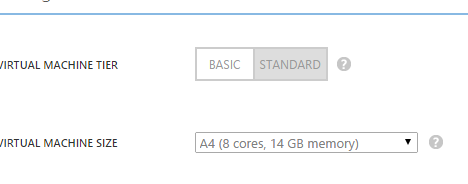
So the last step is to run it on all 350,000 indexes (let indexes = [|1..350000|]).  The problem is that after a long period of time, things were not returning.  So this is where the power of Azure comes in –> there is no problem so large I can’t thow more cores at it.  I went to management portal and increased the VM to 8 cores

Capture

I then went into the code base and added pseq for the database calls (which I assume was taking the longest time):

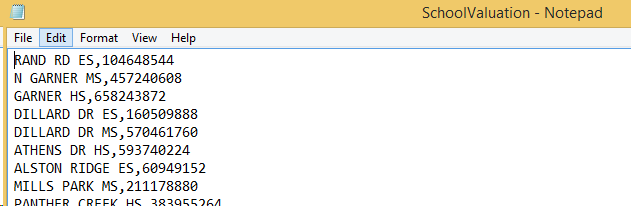
1 #time 2 let indexes = [|1..350000|] 3 let assignedValues = indexes |> PSeq.map(fun i -> assignSchoolTaxBase(i)) |> Seq.toArray 4 5 let filePath = @"C:\Git\WakeCountySchoolScores\SchoolValuation.csv" 6 7 assignedValues 8 |> Seq.filter(fun s -> s.IsSome) 9 |> Seq.collect(fun s -> s.Value) 10 |> Seq.groupBy(fun (s,av) -> s) 11 |> Seq.map(fun (s,ss) -> s,ss |> Seq.sumBy(fun (s,av)-> av)) 12 |> Seq.map(fun (s,v) -> s + "," + v.ToString() + Environment.NewLine) 13 |> Seq.iter(fun (s) -> File.AppendAllText(filePath, s))

and after 2 hours:

image

Combining Wake County Real Estate Lookup with Wake County School Assignment

As a follow up to this post and this post, I want to combine looking up Wake County Real Estate valuation with the Wake County School Assignment.  The matching values between the two datasets is the house address.

The first thing I did was to create a new script file in the project.  I then added a reference to the script that does the WCPSS lookup.  I then added a Json provider that will server as the type of the Wake County Real Estate Valuation data that was stored previously in a DocumentDb instance.

1 #r "../packages/FSharp.Data.2.1.1/lib/net40/FSharp.Data.dll" 2 #r "../packages/Microsoft.Azure.Documents.Client.0.9.2-preview/lib/net40/Microsoft.Azure.Documents.Client.dll" 3 #r "../packages/Newtonsoft.Json.4.5.11/lib/net40/Newtonsoft.Json.dll" 4 5 #load "SchoolAssignments.fsx" 6 7 open System 8 open System.IO 9 open FSharp.Data 10 open System.Linq 11 open SchoolAssignments 12 open Microsoft.Azure.Documents 13 open Microsoft.Azure.Documents.Client 14 open Microsoft.Azure.Documents.Linq 15 16 type HouseValuation = JsonProvider<"../data/HouseValuationSample.json">

The house valuation json looks like this:

{

  "index": 1,

  "addressOne": "1506 WAKE FOREST RD ",

  "addressTwo": "RALEIGH NC 27604-1331",

  "addressThree": " ",

  "assessedValue": "$34,848",

  "id": "c0e931de-68b8-452e-8365-66d3a4a93483",

  "_rid": "pmVVALZMZAEBAAAAAAAAAA==",

  "_ts": 1423934277,

  "_self": "dbs/pmVVAA==/colls/pmVVALZMZAE=/docs/pmVVALZMZAEBAAAAAAAAAA==/",

  "_etag": "\"0000c100-0000-0000-0000-54df83450000\"",

  "_attachments": "attachments/"

}


The first method pulls the data from the DocumentDb and serializes it into an instance of the type:

1 let getPropertyValue(id: int)= 2 let endpointUrl = "" 3 let authKey = "" 4 let client = new DocumentClient(new Uri(endpointUrl), authKey) 5 let database = client.CreateDatabaseQuery().Where(fun db -> db.Id = "wakecounty" ).ToArray().FirstOrDefault() 6 let collection = client.CreateDocumentCollectionQuery(database.CollectionsLink).Where(fun dc -> dc.Id = "taxinformation").ToArray().FirstOrDefault() 7 let documentLink = collection.SelfLink 8 let queryString = "SELECT * FROM taxinformation WHERE taxinformation.index = " + id.ToString() 9 let query = client.CreateDocumentQuery(documentLink,queryString) 10 let firstValue = query |> Seq.head 11 HouseValuation.Parse(firstValue.ToString()) 12

The next method uses the School Look script to pull the data from the WCPSS site.  The only real gotchas was that the space deliminator (char32) was not the only way to split the address.  The WCPSS site also added in a the hard break (char160).  It took me about a hour to figure out wht “” was not breaking into a array of words via splitting on “ “.  <sigh>

1 let createSchoolAssignmentSearchCriteria(houseValuation: option<HouseValuation.Root>) = 2 match houseValuation.IsSome with 3 | true -> let deliminators = [|(char)32;(char)160|] 4 let addressOneTokens = houseValuation.Value.AddressOne.Split(deliminators) 5 let streetNumber = addressOneTokens.[0] 6 let streetTemplateValue = addressOneTokens.[1] 7 let streetName = addressOneTokens.[1..] |> Array.reduce(fun acc t -> acc + "+" + t) 8 let addressTwoTokens = houseValuation.Value.AddressTwo.Split(deliminators) 9 let city = addressTwoTokens.[0] 10 let streetName' = streetName + city 11 Some {SearchCriteria.streetTemplateValue=streetTemplateValue; 12 streetName=streetName'; 13 streetNumber=streetNumber;} 14 | false -> None 15

In any event, the last piece was to take the value and push it back up to another DocumentDb collection:

1 let writeSchoolAssignmentToDocumentDb(houseAssignment:option<HouseAssignment>) = 2 match houseAssignment.IsSome with 3 | true -> 4 let endpointUrl = "" 5 let authKey = "" 6 let client = new DocumentClient(new Uri(endpointUrl), authKey) 7 let database = client.CreateDatabaseQuery().Where(fun db -> db.Id = "wakecounty" ).ToArray().FirstOrDefault() 8 let collection = client.CreateDocumentCollectionQuery(database.CollectionsLink).Where(fun dc -> dc.Id = "houseassignment").ToArray().FirstOrDefault() 9 let documentLink = collection.SelfLink 10 client.CreateDocumentAsync(documentLink, houseAssignment.Value) |> ignore 11 | false -> () 12 13

With that in place, the final function puts it all together:

1 let createHouseAssignment(id:int)= 2 let houseValuation = getPropertyValue(id) 3 let schools = houseValuation 4 |> createSchoolAssignmentSearchCriteria 5 |> createSearchCriteria' 6 |> createPage2QueryString 7 |> getSchoolData 8 match schools.IsSome with 9 | true -> Some {houseIndex=houseValuation.Value.Index; schools=schools.Value} 10 | false -> None 11

and now we have an end to end way of combing the content on two different sites:

1 //#time 2 //[1..100] |> Seq.iter(fun id -> generateHouseAssignment id)

gives this:

imageimage

You can see the gist here

Parsing Wake County School System Attendance Assignment Site With F#

As a follow up to this post, I then turned my attention to parsing the Wake County Public School Assignment Site.  If you are not familiar, large schools districts in America have a concept of ‘nodes’ where a child is assigned to a school pyramid (elementary, middle, high schools) based on their home address.  This gives the school attendance tremendous power because a house’s value is directly tied to how “good” (real or perceived) their assigned school pyramid.  WCPSS has a site here where you can enter in your address and find out the school pyramid.

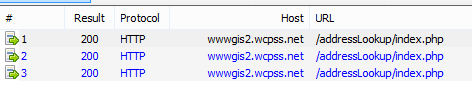
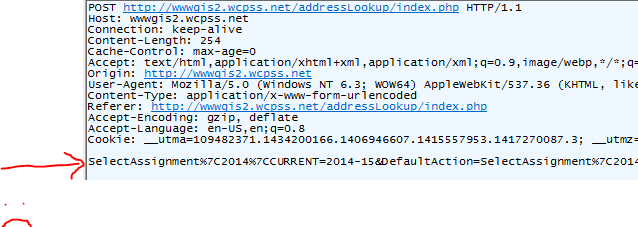
Since there is not a public Api or even a publically available dataset, I decided to see if I could screen scrape the site.  The first challenge is that you need to navigate through 2 pages to get to your answer.  Here is the Fiddler trace

image

The first mistake you will notice is that they are using php.  The second is that they are using the same uri and they are parameterizing the requests via the form value:

image

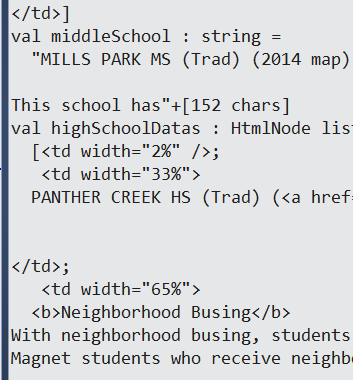
Finally, their third mistake is that the pages comes back in an non-consistent way, making the DOM traversal more challenging.

Undaunted, I fired up Visual Studio. Because there are 2 pages that need to be used, I imported both of them as a the model for the HtmlTypeProvider

image

I then pulled out the form query string and placed them into some values.  The code so far:

1 #r "../packages/FSharp.Data.2.1.1/lib/net40/FSharp.Data.dll" 2 3 open System.Net 4 open FSharp.Data 5 6 type context = HtmlProvider<"../data/HouseSearchSample01.html"> 7 type context' = HtmlProvider<"../data/HouseSearchSample02.html"> 8 9 let uri = "http://wwwgis2.wcpss.net/addressLookup/index.php" 10 let streetLookup = "StreetTemplateValue=STRATH&StreetName=Strathorn+Dr+Cary&StreetNumber=904&SubmitAddressSelectPage=CONTINUE&DefaultAction=SubmitAddressSelectPage" 11 let streetLookup' = "SelectAssignment%7C2014%7CCURRENT=2014-15&DefaultAction=SelectAssignment%7C2014%7CCURRENT&DefaultAction=SelectAssignment%7C2015%7CCURRENT&CatchmentCode=CA+0198.2&StreetName=Strathorn+Dr+Cary&StreetTemplateValue=STRATH&StreetNumber=904&StreetZipCode=27519" 12

Skipping the 1st page, I decided to make a request and see if I could get the school information out of the DOM.  It well enough but you can see the immediate problem –> the page’s structure varies so just tagging the n element of the table will not work

1 let webClient = new WebClient() 2 webClient.Headers.Add("Content-Type", "application/x-www-form-urlencoded") 3 let result = webClient.UploadString(uri,"POST",streetLookup') 4 let body = context'.Parse(result).Html.Body() 5 6 let tables = body.Descendants("TABLE") |> Seq.toList 7 let schoolTable = tables.[0] 8 let schoolRows = schoolTable.Descendants("TR") |> Seq.toList 9 let elementaryDatas = schoolRows.[0].Descendants("TD") |> Seq.toList 10 let elementarySchool = elementaryDatas.[1].InnerText() 11 let middleSchoolDatas = schoolRows.[1].Descendants("TD") |> Seq.toList 12 let middleSchool = middleSchoolDatas.[1].InnerText() 13 //Need to skip for the enrollement cap message 14 let highSchoolDatas = schoolRows.[3].Descendants("TD") |> Seq.toList 15 let highSchool = highSchoolDatas.[1].InnerText() 16


image

I decided to take the dog for a walk and that time away from the keyboard was very helpful because I realized that although the table is not consistent, I don’t need it to be for my purposes.  All I need are the schools names for a given address.  What I need to do it remove all of the noise and just find the rows of the table with useful data:

1 let webClient = new WebClient() 2 webClient.Headers.Add("Content-Type", "application/x-www-form-urlencoded") 3 let result = webClient.UploadString(uri,"POST",streetLookup') 4 let body = context'.Parse(result).Html.Body() 5 6 let tables = body.Descendants("TABLE") |> Seq.toList 7 let schoolTable = tables.[0] 8 let schoolRows = schoolTable.Descendants("TR") |> Seq.toList 9 let schoolData = schoolRows |> Seq.collect(fun r -> r.Descendants("TD")) |>Seq.toList 10 let schoolData' = schoolData |> Seq.map(fun d -> d.InnerText().Trim()) 11 let schoolData'' = schoolData' |> Seq.filter(fun s -> s <> System.String.Empty) 12 13 //Strip out noise 14 let removeNonEssentialData (s:string) = 15 let markerPosition = s.IndexOf('(') 16 match markerPosition with 17 | -1 -> s 18 | _ -> s.Substring(0,markerPosition).Trim() 19 20 let schoolData''' = schoolData'' |> Seq.map(fun s -> removeNonEssentialData(s)) 21 22 let unimportantPhrases = [|"Neighborhood Busing";"This school has an enrollment cap"|] 23 let containsUnimportantPhrase (s:string) = 24 unimportantPhrases |> Seq.exists(fun p -> s.Contains(p)) 25 26 let schoolData'''' = schoolData''' |> Seq.filter(fun s -> containsUnimportantPhrase(s) = false ) 27 28 schoolData''''

And Boom goes the dynamite:

image

So working backwards, I need to parse the 1st page to get the CatchmentCode for an address, build the second’s page form data and then parse the results.  Parsing the 1st page for the catachmentCode was very straight forward:

1 let result = webClient.UploadString(uri,"POST",streetLookup) 2 let body = context.Parse(result).Html.Body() 3 let inputs = body.Descendants("INPUT") |> Seq.toList

image

1 let catchmentCode = inputs' |> Seq.filter(fun (n,v) -> n = "CatchmentCode") 2 |> Seq.map(fun (n,v) -> v) 3 |> Seq.head 4 let streetName = inputs' |> Seq.filter(fun (n,v) -> n = "StreetName") 5 |> Seq.map(fun (n,v) -> v) 6 |> Seq.head 7 let streetTemplateValue = inputs' |> Seq.filter(fun (n,v) -> n = "StreetTemplateValue") 8 |> Seq.map(fun (n,v) -> v) 9 |> Seq.head 10 let streetNumber = inputs' |> Seq.filter(fun (n,v) -> n = "StreetNumber") 11 |> Seq.map(fun (n,v) -> v) 12 |> Seq.head 13 let streetZipCode = inputs' |> Seq.filter(fun (n,v) -> n = "StreetZipCode") 14 |> Seq.map(fun (n,v) -> v) 15 |> Seq.head


image

So the answer is there, just the code sucks.  I refactored it to a single function and

1 let getValueFromInput(nameToFind:string) = 2 inputs' |> Seq.filter(fun (n,v) -> n = nameToFind) 3 |> Seq.map(fun (n,v) -> v) 4 |> Seq.head 5 let catchmentCode = getValueFromInput("CatchmentCode") 6 let streetName = getValueFromInput("StreetName") 7 let streetTemplateValue = getValueFromInput("StreetTemplateValue") 8 let streetNumber =getValueFromInput("StreetNumber") 9 let streetZipCode = getValueFromInput("StreetZipCode")

With the page 1 out of the way, I was ready to start altering the form query string.  I pulled the values out of the string and set up like this:

1 let streetTemplateValue = "STRAT" 2 let street = "Strathorn" 3 let suffix = "Dr" 4 let city = "Cary" 5 let streetNumber = "904" 6 let streetName = street+"+"+suffix+"+"+city 7 let streetLookup = "StreetTemplateValue="+streetTemplateValue+"&StreetName="+streetName+"&StreetNumber="+streetNumber+"&SubmitAddressSelectPage=CONTINUE&DefaultAction=SubmitAddressSelectPage" 8

1 let streetLookup' = "SelectAssignment%7C2014%7CCURRENT=2014-15&DefaultAction=SelectAssignment%7C2014%7CCURRENT&DefaultAction=SelectAssignment%7C2015%7CCURRENT&CatchmentCode="+catchmentCode+"&StreetName="+streetName+"&StreetTemplateValue="+streetTemplateValue+"&StreetNumber="+streetNumber+"&StreetZipCode="+streetZipCode 2

So now it was just a matter of creating some data structures to pass into the 1st query string

1 type SearchCriteria = {streetTemplateValue:string;street:string;suffix:string;city:string;streetNumber:string;} 2 3 let searchCriteria = {streetTemplateValue="STRAT";street="Strathorn";suffix="Dr";city="Cary";streetNumber="904"} 4 //Page1 Query String 5 let streetName = searchCriteria.street+"+"+searchCriteria.suffix+"+"+searchCriteria.city 6 let streetLookup = "StreetTemplateValue="+searchCriteria.streetTemplateValue+"&StreetName="+streetName+"&StreetNumber="+searchCriteria.streetNumber+"&SubmitAddressSelectPage=CONTINUE&DefaultAction=SubmitAddressSelectPage" 7

and we now have the basis for a series of functions to do the school lookup.  You can see the gist here.

Parsing Wake County Tax Site With F#

Based on the response of my last post on Wake County School scores, I decided to look at each school’s revenue base.   Instead of looking at free and reduced lunch as a correlating factor for school scores, I wanted to look at the aggregate home valuations of each school’s population.

To do that, I thought of Wake County Tax Department’s web site found here, which you can look up an address and see the tax value of the property.  Although they don’t have an api, their web site’s search result page has a predictable uri like this: http://services.wakegov.com/realestate/Account.asp?id=0000001 so by placing in a 7-character integer, I could theoretically look at all of the tax records for the county.  Also, the HTML of the result page is standardized so parsing it should be fairly straightforward.

So I fired up Visual Studio and opened up the F# REPL. The first thing I did was to bring in the Html type provider and wire up a standard page for the type.

1 #r "../packages/FSharp.Data.2.1.1/lib/net40/FSharp.Data.dll" 2 open FSharp.Data 3 type context = HtmlProvider<"../data/RealEstateSample.html"> 4

I then could bring down all of the DOM elements for the page: and find all of the <Table> elements

1 let uri = "http://services.wakegov.com/realestate/Account.asp?id=0000001" 2 let body = context.Load(uri).Html.Body() 3 let tables = body.Descendants("TABLE") |> Seq.toList 4 tables |> Seq.length 5

image

So there are 14 tables on the page.  After some manual inspection, the table that holds the address information is table number 7:

1 let addressTable = tables.[7] 2

image

My first thought was to parse the text to see if there are key words that I can search on

1 let baseText = taxTable.ToString() 2 let marker = baseText.IndexOf("Total Value Assessed") 3 let remainingText = baseText.Substring(marker) 4 let marker' = remainingText.IndexOf("$") 5 let remainingText' = remainingText.Substring(marker') 6 let marker'' = remainingText'.IndexOf("<") 7 let finalText = remainingText'.Substring(0,marker'')

I then thought, “Jamie you are being stupid”.  Since the DOM is structured consistently,  I can just use the type provider and search on tags:

1 let addressTable = tables.[7] 2 let fonts = addressTable.Descendants("font") |> Seq.toList 3 let addressOne = fonts.[1].InnerText() 4 let addressTwo = fonts.[2].InnerText() 5 let addressThree = fonts.[3].InnerText() 6

and sure enough

image

And then going to table number 11, I can get the assessed value:

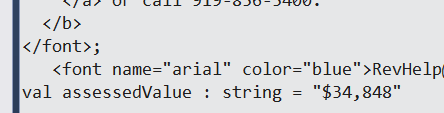
1 let taxTable = tables.[11] 2 let fonts' = taxTable.Descendants("font") |> Seq.toList 3 let assessedValue = fonts'.[3].InnerText() 4

and how cool is this?

image

So with the data elements in place, I need a way of saving the data.  Fortunately, the Json type provider is also in FSharp.Data so I could do this:

1 let valuation = JsonValue.Record [| 2 "addressOne", JsonValue.String addressOne 3 "addressTwo", JsonValue.String addressTwo 4 "addressThree", JsonValue.String addressThree 5 "assessedValue", JsonValue.String assessedValue |] 6 open System.IO 7 File.AppendAllText(@"C:\Data\dataTest.json",valuation.ToString()) 8

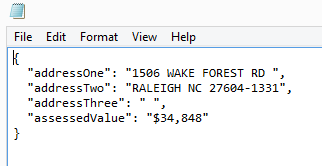
And in the file:

image

So now I have the pieces to make requests to the Wake County site and put the values into a json file.  I decided to push the data to the file after each request so if there is a reentrant fault, I would not lose everything:  So here is the gist and here is the results:

image

I then decided to see how long it will take to download the 1st 1,000 Ints.

1 #time 2 [1..100] |> Seq.iter(fun id -> doValuation id)

and with fiddler running

image

It took about 5 minutes for 1,000 ints

image

so extrapolating the max possible (9,999,999), it would take 83 hours.

image

Two thoughts come to mind for the next step

1) Use MBrace with some VMs on Azure to do the requests in parallel

2) Do a binary search to see the actual upper number for Wake County.

Tune in next week so see if that works.

Record Types and Serialization -> F# to C#

I was working on an exercise where I have a F# component being consumed by an MVC web application written in C#.   As I already asked about here, the CLIMutable is a great feature to the F# language spec.  I created a basic record type with the CLIMutable attribute like so:

1 [<CLIMutable>] 2 type Account = {Number:int; Holder:string; Amount:float}

I then create an instance of that type in the controller written in C#:

1 public class AccountController : ApiController 2 { 3 [HttpGet] 4 public Account Index() 5 { 6 var account = new Account(); 7 account.Amount = 100; 8 account.Holder = "Homer"; 9 account.Number = 1; 10 return account; 11 } 12 }

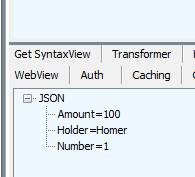
When I write the site and call the method via Fiddler, I get a nasty “@” symbol added to the end of the name:

image

which is no good.  I then thought of my question on SO and Mark Seeman’s blog post on this topic found here.  I added this to the WebApiConfig class

1 public static void Register(HttpConfiguration config) 2 { 3 // Web API configuration and services 4 GlobalConfiguration.Configuration.Formatters.JsonFormatter.SerializerSettings.ContractResolver = 5 new Newtonsoft.Json.Serialization.CamelCasePropertyNamesContractResolver(); 6 7 // Web API routes 8 config.MapHttpAttributeRoutes(); 9 10 config.Routes.MapHttpRoute( 11 name: "DefaultApi", 12 routeTemplate: "api/{controller}/{id}", 13 defaults: new { id = RouteParameter.Optional } 14 ); 15 }

And the “@” symbol goes away

image

The next task was to add in option types.  I updated the class like so:

1 [<CLIMutable>] 2 type Account = {Number:int;Holder:string option;Amount:float}

I then added a F# class to do the assignment of the value

1 type AccountRepository() = 2 member this.GetAccount() = 3 {Number=1;Holder=Some "Homer"; Amount=100.}

And then updated the controller:

1 [HttpGet] 2 public Account Index() 3 { 4 AccountRepository repository = new AccountRepository(); 5 return repository.GetAccount(); 6 }

And I get this:

image

Which is not what my UI friends want.  They want the same value for the json –> they want to ignore the existence of the option type.  Fair enough. I hit up stack overflow here and Sven had a great answer pointing me to Isaac Abraham’s serializer found here.  I popped that puppy into the project and updated the WebApiConfig like so:

1 var formatter = GlobalConfiguration.Configuration.Formatters.JsonFormatter; 2 formatter.SerializerSettings.ContractResolver = new DefaultContractResolver(); 3 formatter.SerializerSettings.Converters.Add(new IdiomaticDuConverter());

And boom goes the dynamite.

clip_image002

Logentries.com and F#

I recently was working on a project that has a fair bit of legacy code.  One of the pieces of the project is an logging service whose interface is this:

1 public interface ILoggingRepository 2 { 3 void LogMessage(String message); 4 void LogException(String message, Exception exception); 5 }


There are 2 or 3 different implementations of the logging repository – one that covers the windows logs, one that writes to azure service bus, one that writes to nothing (and in-memory one used for testing).  I thought about using Logentries as place to write the messages to.  I created an account and set up my first log

image image

Note that the log also gets a token (a guid) that I will use to send messages to the log at the bottom of the page.

I then fired up visual studio and created a new FSharp project and added a reference from the CSharp project to the FSharp project.  I then added an associated unit test class to the existing unit test project:

image

I then went back to Logentries and read the api documentation about posting to the log here.   They suggested either log4net or NLog.  For no particular reason, I picked NLog.  I fired up Nuget and installed the Logentries.NLog package

image

I then read further down the documentation and yuck, there is tons of places where you have to add to the configuration file.  I am trying to maintain a clean separation of concerns in the app and this intertwines the working code with the .config file.  Also, the other implementations don’t use the .config so I would like to keep consistant there.  After bouncing around in the api for a bit, I went to stack overflow and asked if there was a way I could implement without the .config file.  Sure enough, the dev team was kind enough to answer.  I went ahead and implemented their code (after porting it from C#)  in my project like so:

1 namespace ChickenSoftware.LoggingExample.FS 2 3 open NLog 4 open System 5 open NLog.Targets 6 open NLog.Config; 7 open ChickenSoftware.LoggingExample 8 9 type LogEntriesLoggingRepository(logEntriesToken:string) = 10 let target = new LogentriesTarget() 11 let config = new LoggingConfiguration() 12 do target.Token <- logEntriesToken 13 do target.Ssl <- true 14 do target.Debug <- true 15 do target.Name <- "Logentries" 16 let layout = Layouts.Layout.FromString("${date:format=ddd MMM dd} ${time:format=HH:mm:ss} ${date:format=zzz yyyy} ${logger} : ${LEVEL}, ${message}") 17 do target.Layout <- layout 18 do target.HttpPut <- false 19 do config.AddTarget("Logentries2",target) 20 let loggingRule = new LoggingRule("*", LogLevel.Debug, target) 21 do LogManager.Configuration.AddTarget("targetName", target) 22 do LogManager.Configuration.LoggingRules.Add(loggingRule) 23 do LogManager.Configuration.Reload() |> ignore 24 let logger = LogManager.GetCurrentClassLogger() 25 26 interface ILoggingRepository with 27 member this.LogMessage(message) = 28 logger.Log(LogLevel.Warn, message) 29 member this.LogException(message, exn) = 30 logger.LogException(LogLevel.Error,message,exn)

I then went into the unit test and attempted to generate a log message:

1 public class LogEntriesLoggingRepositoryTests 2 { 3 ILoggingRepository _repository = null; 4 public LogEntriesLoggingRepositoryTests() 5 { 6 string logEntriesToken = "XXXXXXXXXXXXXXXXXXXXXXXXXXXXXXXXXX"; 7 _repository = new LogEntriesLoggingRepository(logEntriesToken); 8 } 9 10 [TestMethod] 11 public void LogMessage_ReturnsExpected() 12 { 13 _repository.LogMessage("This is a test"); 14 15 } 16 }

Unfortunately, when I ran it, I got the following exception, even though I marked the .dlls to be copied

image image

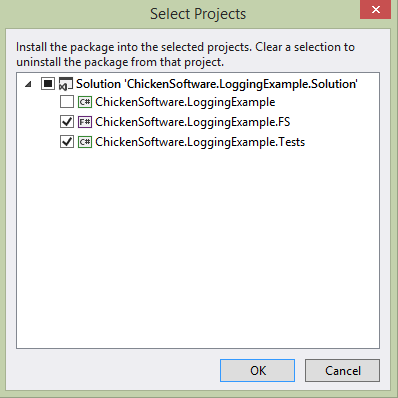
So back to Nuget, where I added in the Logentries.NLog to the Tests project.  I feel really dirty by doing it:

image

I then ran the test again but I got this exception:

image

When I added a break to the code and stepped through, I found it was on the LogManager.Configuration.

image

Apparently, the only way out of this pickle is to add some basic entries to the .config file <sigh>:

1 <?xml version="1.0" encoding="utf-8"?> 2 <configuration> 3 <configSections> 4 <section name="nlog" type="NLog.Config.ConfigSectionHandler, NLog" /> 5 </configSections> 6 <runtime> 7 <assemblyBinding xmlns="urn:schemas-microsoft-com:asm.v1"> 8 <dependentAssembly> 9 <assemblyIdentity name="NLog" publicKeyToken="5120e14c03d0593c" culture="neutral" /> 10 <bindingRedirect oldVersion="0.0.0.0-2.1.0.0" newVersion="2.1.0.0" /> 11 </dependentAssembly> 12 </assemblyBinding> 13 </runtime> 14 <nlog> 15 <extensions> 16 <add assembly="LogentriesNLog" /> 17 </extensions> 18 <targets> 19 <target name="logentries" type="Logentries" debug="true" httpPut="false" ssl="false" layout="${date:format=ddd MMM dd} ${time:format=HH:mm:ss} ${date:format=zzz yyyy} ${logger} : ${LEVEL}, ${message}" /> 20 </targets> 21 <rules> 22 <logger name="*" minLevel="Debug" appendTo="logentries" /> 23 </rules> 24 </nlog> 25 </configuration>

After I added it, the test ran green.

image

Alas, nothing was showing up in the log!

image

After some back and forth with the Logentries team, it became clear that the thread was terminating before the Logentries library had a chance to post it to the service.  This was proven by adding a Thread.Sleep to the test:

1 public void LogMessage_ReturnsExpected() 2 { 3 _repository.LogMessage("This is a test"); 4 Thread.Sleep(500); 5 6 }

image

So what to do?  The api does not have an async implementation so I can’t await it and if I leave that Thread.Sleep as is, the main thread will be blocked.  I decided to add an async implementation to the interface

1 public interface ILoggingRepository 2 { 3 void LogMessage(String message); 4 Task LogMessageAsync(String message); 5 void LogException(String message, Exception exception); 6 Task LogExceptionAsync(String message, Exception exception); 7 }

I then updated the repository like so:

1 interface ILoggingRepository with 2 member this.LogMessage(message) = 3 logger.Log(LogLevel.Warn, message) 4 member this.LogMessageAsync(message) = 5 Tasks.Task.Run(fun _ -> logger.Log(LogLevel.Warn, message) 6 Thread.Sleep(500)) 7 member this.LogException(message, exn) = 8 logger.LogException(LogLevel.Error,message,exn) 9 member this.LogExceptionAsync(message, exn) = 10 Tasks.Task.Run(fun _ -> logger.LogException(LogLevel.Error,message,exn) 11 Thread.Sleep(500))

And then I added an async unit test like so:

1 [TestMethod] 2 public void LogMessageAsync_ReturnsExpected() 3 { 4 var task = _repository.LogMessageAsync("This is an async test"); 5 task.Wait(); 6 }

And sure enough, green (note that the async test takes longer than 500MS) and the expected side-effect:

image 

image

So now another CSharp shop has some FSharp sprinkled into their code base.  Note the code actually used is slightly different b/c  the code as written will keep adding more and more targets, which is not what we want.

F# Record Types with SqlProvider Code-Last

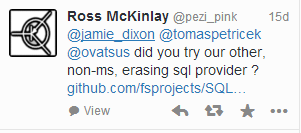
As I talked about last week, I was looking at different ways of using the Entity Framework type provider to map to my domain model.  While I was working on the process,  Ross McKinley saw some of my whining on Twitter and suggested that I take a look at SqlProvider.

 image

He made a good case to use this type provider over entity framework.  Specifically:

  • There is no code bloat/file bloat/code-gen issues that you get with EF
  • It targets Sql Server like EF, but also can handle Oracle, Postgres, MySql, and other RDBMS
  • It has had a update in the last year

So that was a good enough reason to take a look.  The project site is a bit lacking in terms of examples but between what is on GitHub and on Ross’s blog, you can get a pretty good idea of how to accomplish basic crud tasks.  I was interested in how well it handles nested types and F# choice types.  I fired up Visual Studio and installed it from nuget.

I then created the same domain types I was working with earlier –> note the Choice type for gender.

1 #r "../packages/SQLProvider.0.0.9-alpha/lib/net40/FSharp.Data.SqlProvider.dll" 2 3 open System.Linq 4 open FSharp.Data.Sql 5 open System.Security.Principal 6 7 type sqlSchema = SqlDataProvider< 8 ConnectionString = @"Server=.;Database=FamilyDomain;Trusted_Connection=True;", 9 UseOptionTypes = true > 10 11 let context = sqlSchema.GetDataContext() 12 13 //Local Idomatic Types 14 type Gender = Male | Female 15 [<CLIMutable>] 16 type Pet = {Id:int; ChildId:int; GivenName:string} 17 [<CLIMutable>] 18 type Child = {Id:int; FirstName:string; Gender:Gender; Grade:int; Pets: Pet list} 19 [<CLIMutable>] 20 type Address = {Id:int; State:string; County:string; City:string} 21 [<CLIMutable>] 22 type Parent = {Id:int; FirstName:string} 23 [<CLIMutable>] 24 type Family = {Id:int; LastName:string; Parents:Parent list; Children: Child list; Address:Address} 25 26

I then added in the same code that I used for the Entity Framework Type Provider, made some changes (like you get subtypes via querying the foreign key and I am not using Linq to query the data store

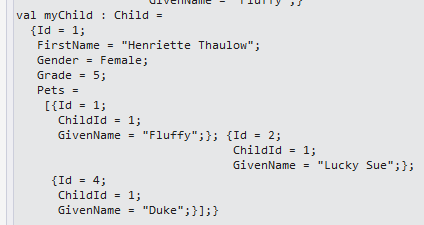
1 let MapPet(efPet: entity.dataContext.``[dbo].[Pet]Entity``) = 2 {Id=efPet.Id; ChildId=efPet.ChildId; GivenName=efPet.GivenName} 3 4 let MapGender(efGender) = 5 match efGender with 6 | "Male" -> Male 7 | _ -> Female 8 9 let MapChild(efChild: entity.dataContext.``[dbo].[Child]Entity``) = 10 let pets = efChild.fk_Pet_Child |> Seq.map(fun p -> MapPet(p)) 11 |> Seq.toList 12 {Id=efChild.Id; FirstName=efChild.FirstName; 13 Gender=MapGender(efChild.Gender); 14 Grade=efChild.Grade;Pets=pets} 15 16 let GetPet(id: int)= 17 context.``[dbo].[Pet]`` 18 |> Seq.where(fun p -> p.Id = id) 19 |> Seq.head 20 |> MapPet 21 22 let GetChild(id: int)= 23 context.``[dbo].[Child]`` 24 |> Seq.where(fun c -> c.Id = id) 25 |> Seq.head 26 |> MapChild 27 28 let myPet = GetPet(1) 29 30 let myChild = GetChild(1)

image

And then I added some code to insert a new pet

1 let SavePet(pet: Pet)= 2 let ssPet = context.``[dbo].[Pet]``.Create() 3 ssPet.ChildId <- pet.ChildId 4 ssPet.GivenName <- pet.GivenName 5 context.SubmitUpdates() 6 7 let newPet = {Id=0;ChildId=1;GivenName="Kiss"} 8 SavePet(newPet) 9 10 let failurePet = {Id=0;ChildId=0;GivenName="Should Fail"} 11 SavePet(failurePet)

And pow on the expected happy path

image

and pow pow on the expected exception

System.Data.SqlClient.SqlException (0x80131904): The INSERT statement conflicted with the FOREIGN KEY constraint "fk_Pet_Child". The conflict occurred in database "FamilyDomain", table "dbo.Child", column ‘Id’.

The statement has been terminated.

   at System.Data.SqlClient.SqlConnection.OnError(SqlException exception, Boolean breakConnection, Action`1 wrapCloseInAction)

So this is pretty cool.  But then it got better, I showed some of this code to Ross and he told me I was doing everything wrong.  Basically, I need to think about the get code less imperative linq and more like computed expressions.  The biggest downside to how I wrote the gets is that the TP would pull all of the records from the database locally before filtering them.  So going back to the documentation, I changed the getPet functional to this

1 let GetPet(id: int)= 2 query {for p in context.``[dbo].[Pet]`` do 3 where (p.Id = id) 4 select {Id=p.Id; ChildId=p.ChildId; GivenName=p.GivenName}} 5 |> Seq.head 6

And it still works

image

The nice thing is that I no longer need the mapPet function as the project happens in the select clause.  So this is pretty cool and very powerful.  Time to learn some more query syntax!

Using DocumentDB With F#

DocumentDB is Microsoft’s non-sql offering on Azure.  I have limited experience with non-sql databases in general so I thought it would be a good way to try out no-sql on a real project using F#.  The first thing I noticed is that you can’t get to DocumentDB from the “old” azure portal –> you have to spin it up in the new one:

 Capture

Once I created my DocumentDB instance, I went to the getting started guide and found the code samples to accomplish the basic tasks you would expect to see in  any database product.  The getting started guide does not make it an explicit step, but you need to spin up a new FSharp project in Visual Studio and then use NuGet to get the latest SDK.

Once the NuGet package is installed, I went to a script to add the references:

1 #r "../packages/Microsoft.Azure.Documents.Client.0.9.1-preview/lib/net40/Microsoft.Azure.Documents.Client.dll" 2 #r "../packages/Newtonsoft.Json.4.5.11/lib/net40/Newtonsoft.Json.dll" 3 4 open System 5 open Microsoft.Azure.Documents 6 open Microsoft.Azure.Documents.Client 7 open Microsoft.Azure.Documents.Linq 8

And I was good to go.  The 1st thing the walk through does is to create a database:


1 let client = new DocumentClient(new Uri(endpointUrl), authKey) 2 let database = new Database() 3 database.Id <- "FamilyRegistry" 4 let requestOptions = new RequestOptions() 5 let response = client.CreateDatabaseAsync(database,requestOptions).Result 6

image

Interestingly, that new database does not show up in the Azure portal until you do a post back

image  image

which really surprised me –> I figured the new portal would use SignalR.  In any event, with the database created, I went to create a collection, which seems roughly analogous to a table in a RDBMS world:


1 let documentCollection = new DocumentCollection() 2 documentCollection.Id <- "FamilyCollection" 3 client.CreateDocumentCollectionAsync(database.CollectionsLink,documentCollection,requestOptions) 4

Unfortunately, I got a oh-so-helpful null ref

System.NullReferenceException: Object reference not set to an instance of an object.

   at Microsoft.Azure.Documents.Database.get_CollectionsLink()

   at <StartupCode$FSI_0007>.$FSI_0007.main@() in C:\Users\Dixon\Desktop\ChickenSoftware.DocumentDb.Solution\

ChickenSoftware.DocumentDb\Script.fsx:line 23

Stopped due to error

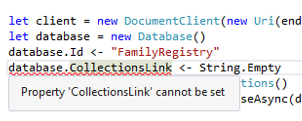
So, the CollectionsLink has to be populated, which begs the question “what the hell is a collections link?”  My first thought was to assign it a value

image

But no dice.  I then starting dotting the class and I found that there is not a response.CollectionsLink but there is a response.Resource.CollectionsLink

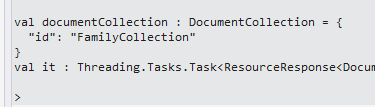
And sure enough, this did it.  I deleted the database on the azure portal and re-ran the create database, this time capturing the collectionsLink and now I could create a collection

1 let documentCollection = new DocumentCollection() 2 documentCollection.Id <- "FamilyCollection" 3 client.CreateDocumentCollectionAsync(response.Resource.CollectionsLink,documentCollection) 4

image

So now it is time to insert some data.  I went back to the walk-through, created some data structures, and attempted to insert them into the database:

1 type Parent = {firstName:string} 2 type Pet = {givenName:string} 3 type Child = {firstName:string; gender:string; grade: int; pets:Pet list} 4 type Address = {state:string; county:string; city:string} 5 type family = {id:string; lastName:string; parents: Parent list; children: Child list; address: Address; isRegistered:bool} 6 7 let andersenFamily = {id="AndersenFamily"; lastName="Andersen"; 8 parents=[{firstName="Thomas"};{firstName="Mary Kay"}]; 9 children=[{firstName="Henriette Thaulow";gender="female"; 10 grade=5;pets=[{givenName="Fluffy"}]}]; 11 address={state = "WA"; county = "King"; city = "Seattle"}; 12 isRegistered = true} 13 14 client.CreateDocumentAsync(documentCollection'.Resource.DocumentsLink, andersenFamily) 15

And it worked fine.  Note I still needed the documentsLink

image

And finally pulling the data out required both some sql and the documents link:

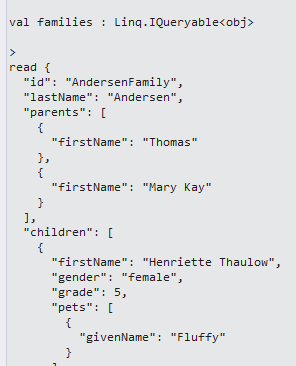
1 let queryString = "SELECT * FROM Families f WHERE f.id = \"AndersenFamily\"" 2 3 let families = client.CreateDocumentQuery(documentCollection'.Resource.DocumentsLink,queryString) 4 families |> Seq.iter(fun f -> printfn "read %A from SQL" f) 5

Gives us what we want

image

And if I only want 1 part of the results I thought to use seq.Map and case the results

1 let families = client.CreateDocumentQuery(documentCollection'.Resource.DocumentsLink,queryString) 2 families |> Seq.map(fun f -> f :?> family) 3 |> Seq.iter(fun f -> printfn "read %A from SQL" f.lastName) 4

But I am getting an exception, so I need to think about this more

System.InvalidCastException: Unable to cast object of type ‘Microsoft.Azure.Documents.QueryResult’ to type ‘family’.

   at Microsoft.FSharp.Core.LanguagePrimitives.IntrinsicFunctions.UnboxGeneric[T](Object source)

   at Microsoft.FSharp.Collections.IEnumerator.map@107.DoMoveNext(b& )

   at Microsoft.FSharp.Collections.IEnumerator.MapEnumerator`1.System-Collections-IEnumerator-MoveNext()

   at Microsoft.FSharp.Collections.SeqModule.Iterate[T](FSharpFunc`2 action, IEnumerable`1 source)

   at <StartupCode$FSI_0010>.$FSI_0010.main@()

Stopped due to error


In any event, one thing profoundly vexed me: “if I don’t have a document link to an existing database, how do I get documents out of the database?”  I started Googling around a bit and found this helpful post on Stack Overflow.

It is makes some sense then to use queries to traverse data base and collections by using queries –> esp because they are using linq.  I fired up a new script, put the stack overflow code in,

1 let client = new DocumentClient(new Uri(endpointUrl), authKey) 2 let database = client.CreateDatabaseQuery().Where(fun db -> db.Id = "FamilyRegistry" ).ToArray().FirstOrDefault() 3 printfn "%s" database.SelfLink

and wammo blamo:

image

I then went back to stack overflow to see if there was a more idiomatic way to interact with the documents and  Panagiotis Kanavos was kind of enough to answer my question here.  Of the different possibilities offered, I settled on this style:

1 let database = client.CreateDatabaseQuery() |> Seq.filter(fun db -> db.Id = "FamilyRegistry") 2 |> Seq.head 3 printfn "%s" database.SelfLink

And it works like a champ.

You can find the gist here