As part of my project to put Panzer General on the Windows Phone, I need a way to parse the map files from the original game. Unlike the scenario files or the unit data file, the files are not in ASCII:
I ran across a map editor by Frederick Chlanda that included source code – the only hitch is that it was written in C++. Dusting off those brain cells, I spent some time isolating the area where the map file is parsed. Here is what the code looks like:
void __fastcall TForm4::GetTrialBtnClick(TObject *Sender)
{
   FILE *inf;


   //we get the set file
  //read in the Mapxx.set
   OpenDialog1->Title="Open .set";
   OpenDialog1->Filter="*.set (*.set)|*.set|All files (*.*)|*.*";
   if (!OpenDialog1->Execute()) return;
   inf=fopen(OpenDialog1->FileName.c_str(),"rb");

   //0x65 is width and 0x67 is the height
   fseek(inf,0x65,SEEK_SET);
   fread(&SmMapX,2,1,inf);
   fread(&SmMapY,2,1,inf);
   ++SmMapX; ++SmMapY;
   SmMapT=SmMapY*SmMapX;

   //load entire 123 btyes of file start
   fseek(inf,0,SEEK_SET);
   for (int x=0; x<123; ++x)
     fread(&(SmStartup[x]),1,1,inf);

   //set the pointer to start of field
   fseek(inf,123+5*SmMapT,SEEK_SET);
   for (int y=0; y<SmMapY; ++y)
     for (int x=0; x<SmMapX; ++x)
      fread(&(SmTil[x][y]),2,1,inf);

   //get the country info
   fseek(inf,123+3*SmMapX*SmMapY,SEEK_SET);
   for (int y=0; y<SmMapY; ++y)
     for (int x=0; x<SmMapX; ++x)
       fread(&(SmOwn[x][y]),1,1,inf);

   //get the gln numbers (kind or name)
   fseek(inf,123+0*SmMapX*SmMapY,SEEK_SET);
   for (int y=0; y<SmMapY; ++y)
     for (int x=0; x<SmMapX; ++x)
       fread(&(SmGln[x][y]),2,1,inf);

   //get the side info
   fseek(inf,123+4*SmMapX*SmMapY,SEEK_SET);
   for (int y=0; y<SmMapY; ++y)
     for (int x=0; x<SmMapX; ++x)
       fread(&(SmSide[x][y]),1,1,inf);

   //get the road connectivity
   fseek(inf,123+2*SmMapX*SmMapY,SEEK_SET);
   for (int y=0; y<SmMapY; ++y)
     for (int x=0; x<SmMapX; ++x)
       fread(&(SmRdc[x][y]),1,1,inf);

   fclose(inf);

   OpenDialog1->Title="Open .stm";
   OpenDialog1->Filter="Mxxxx.stm (*.stm)|*.stm|All files (*.*)|*.*";
   if (!OpenDialog1->Execute()) return;
   inf=fopen(OpenDialog1->FileName.c_str(),"rb");

   for (int y=0; y<SmMapY; ++y)
     for (int x=0; x<SmMapX; ++x)
     {
       fread(&(SmUtr[x][y]),2,1,inf);

     }
   fclose(inf);
   SmShowMap();
}
I spent some digging up the conversion – the hex values sprinkled in as magic numbers, the cryptic naming conventions, the unsigned 2-byte integers that needed to be converted to C# , and my own clumbsiness with pointers and references all posed a challenge. However, in about 2 days of semi-intermittent work on this, I got myself an adequate port:
        private static void ReadMapFile()
        {
            String filePath = @"C:\Users\Jamie\Documents\Visual Studio 2010\Projects\Tff.Panzer.ParseEquipmentFile\Tff.Panzer.ParseEquipmentFile\MAP01.SET";

            FileStream fileStream = File.OpenRead(filePath);
            BinaryReader binaryReader = new BinaryReader(fileStream);
            Byte[] inputData = binaryReader.ReadBytes(10000);


            int sizeOfMapX = Convert.ToInt32(inputData[101]);
            int sizeOfMapY = Convert.ToInt32(inputData[103]);
            int totalNumberOfHexes = (sizeOfMapX + 1) * (sizeOfMapY + 1);
            string rowOutput = String.Empty;
            string rowSql = String.Empty;

            short[,] TileNumbers = new short[sizeOfMapX+1, sizeOfMapY+1];
            short currentTileValue = 0;
            int currentPosition = 123 + (5*totalNumberOfHexes);
            for (int y = 0; y <= sizeOfMapY; ++y)
            {
                for (int x = 0; x <= sizeOfMapX; ++x)
                {
                    currentTileValue = (short)inputData[currentPosition];
                    currentTileValue++;
                    TileNumbers[x, y] = currentTileValue;
                    rowOutput += currentTileValue + "\t";
                    currentPosition += 2;
                }
                Console.WriteLine(rowOutput);
                Debug.WriteLine(rowOutput);
                rowOutput = String.Empty;
            }

        }
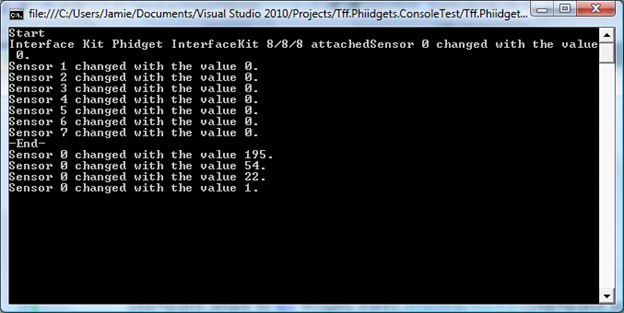
This exercise makes me appreciate C# even more. In any event, here is the parsed output:
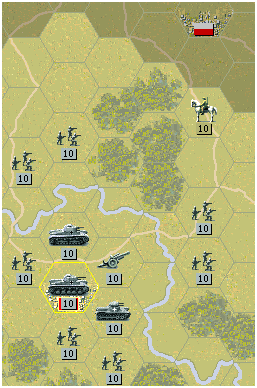
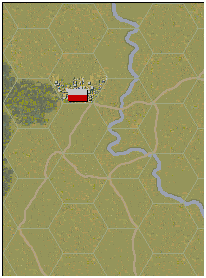
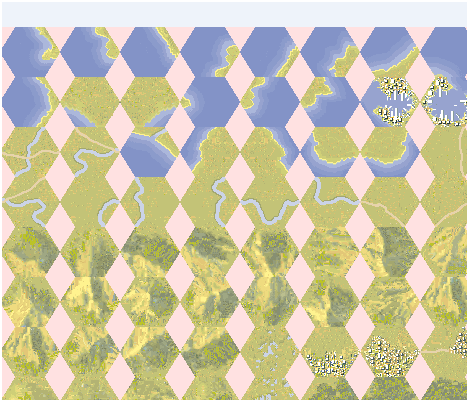
I then threw in some Linq to Entities statement and persisted all of the unstructured data into a local instance of SQL Server. I am up in the air about if I want to keep all of the game data in SQL Server on the phone or push the data to XML files. Turfing that decision, I put the 1st scenario on the phone and this is what I got:








 Jamie Dixon's Home