Machine Learning for Hackers: Using F#

I decided I wanted to learn more about F# so my Road Alert project.  I started by watching this great video.  After reviewing it a couple of times, I realized that I could try and do chapter 1 of Machine Learning for Hackers using F#.

Since I already had the data from this blog post, I just had to follow Luca’s example.  I wrote the following code in an F# project in Visual Studio 2012.

  1. open System.IO
  2. type UFOLibrary() =
  3.     member this.GetDetailData() =
  4.         let path = "C:\Users\Jamie\Documents\Visual Studio 2012\Projects\MachineLearningWithFSharp_Solution\Tff.MachineLearningWithFSharp.Chapter01\ufo_awesome.txt"
  5.         let fileStream = new FileStream(path,FileMode.Open,FileAccess.Read)
  6.         let streamReader = new StreamReader(fileStream)
  7.         let contents = streamReader.ReadToEnd()
  8.         let usStates = [|"AL";"AK";"AZ";"AR";"CA";"CO";"CT";"DE";"DC";"FL";"GA";"HI";"ID";"IL";"IN";"IA";
  9.                          "KS";"KY";"LA";"ME";"MD";"MA";"MI";"MN";"MS";"MO";"MT";"NE";"NV";"NH";"NJ";"NM";
  10.                          "NY";"NC";"ND";"OH";"OK";"OR";"PA";"RI";"SC";"SD";"TN";"TX";"UT";"VT";"VA";"WA";
  11.                           "WV";"WI";"WY"|]
  12.         let cleanContents =
  13.             contents.Split([|'\n'|])
  14.             |> Seq.map(fun line -> line.Split([|'\t'|]))
  15.             Seq.head()

I then added a C# console project to the solution and added the following code:

  1. static void Main(string[] args)
  2. {
  3.     Console.WriteLine("Start");
  4.     UFOLibrary ufoLibrary = new UFOLibrary();
  5.  
  6.     foreach (String currentString in ufoLibrary.GetDetailData())
  7.     {
  8.         Console.WriteLine(currentString);
  9.     }
  10.     Console.WriteLine("End");
  11.     Console.ReadKey();
  12. }


Sure enough, when I hit F5

image

How cool is it to call F# code from a C# project and it just works?  I feel a whole new world of possibilites just opened to me.

I then went back to the book and saw that they used the head function in R that returns the top 10 rows of data.  The F# head only returns the top 1 so I had to make the following change to my F# to duplicate the effect:

  1. let cleanContents =
  2.     contents.Split([|'\n'|])
  3.     |> Seq.map(fun line -> line.Split([|'\t'|]))
  4.     |> Seq.take(10)


I then had to remove the defective rows that had malformed data. To do this, I went back to the F# code and changed it to this

  1. let cleanContents =
  2.     contents.Split([|'\n'|])
  3.     |> Seq.map(fun line -> line.Split([|'\t'|]))


I then went back to the Console app to change it like this:

  1. Console.WriteLine("Start");
  2. UFOLibrary ufoLibrary = new UFOLibrary();
  3. IEnumerable<String> rows = ufoLibrary.GetDetailData();
  4. Console.WriteLine(String.Format("Number of rows: {0}", rows.Count()));
  5. Console.WriteLine("End");
  6. Console.ReadKey();


And I see this when I hit F5

image

So now I have a baseline of 61,394 rows.

My 1st step is to removed rows that do not have 6 columns.  To do that, I changed my code to this:

  1. Console.WriteLine("Start");
  2. UFOLibrary ufoLibrary = new UFOLibrary();
  3. IEnumerable<String> rows = ufoLibrary.GetDetailData();
  4. Console.WriteLine(String.Format("Number of rows: {0}", rows.Count()));
  5. Console.WriteLine("End");
  6. Console.ReadKey();

and when I hit F5, I can see that the number of records has dropped:

image

I then want to removed the bad date fields the way they did it in the book – all dates have to be 8 characters in length, no more, no less.

Going back to the F# code, I added this line

  1. |> Seq.filter(fun values -> values.[0].Length = 8)


and sure enough, fewer records in my dataset:

image

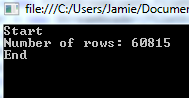
And finally applying the same logic to the second column – which is also a date

  1. |> Seq.filter(fun values -> values.[1].Length = 8)
 

image

Which raises eyebrows, I assume there would be some malformed data in the 2ndcolumn independent of the 1st column, but I guess not.

I then wanted to convert the 1st two columns from strings into DateTimes.  Going back to Luca’s examples, I did this:

  1. |> Seq.map(fun values ->
  2.     System.DateTime.Parse(values.[0]),
  3.     System.DateTime.Parse(values.[1]),
  4.     values.[2],
  5.     values.[2],
  6.     values.[3],
  7.     values.[4],
  8.     values.[5])

Interestingly, I then went back to my Console application and got this

Error    1    Cannot implicitly convert type ‘System.Collections.Generic.IEnumerable<System.Tuple<System.DateTime,System.DateTime,string,string,string,string>>’ to ‘System.Collections.Generic.IEnumerable<string[]>’. An explicit conversion exists (are you missing a cast?)

So I then did this:

   1: var rows = ufoLibrary.GetData();

so I can compile again.  When I ran it, I got his exception:
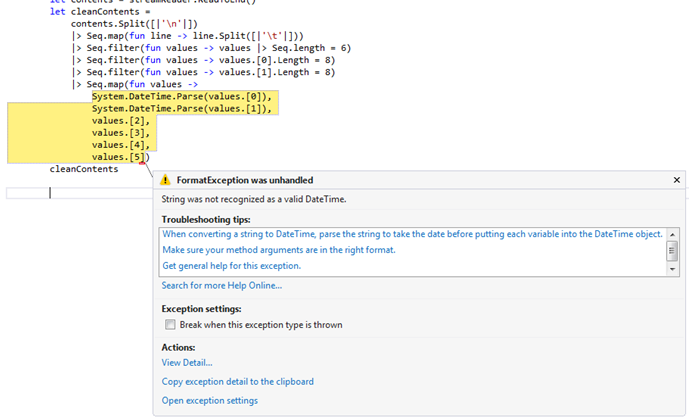
image


So it looks like R can handle YYYYMMDD while F# DateTime.Parse() can not.  So I went back to The different ways to parse in .NET I changed the parsing to this:

  1. System.DateTime.ParseExact(values.[0],"yyyymmdd",System.Globalization.CultureInfo.InvariantCulture),
  2. System.DateTime.ParseExact(values.[1],"yyyymmdd",System.Globalization.CultureInfo.InvariantCulture),

When I ran it, I got this:

image

Which I am not sure is progress.  so then it hit me that the data in the strings might be out of bounds – for example a month of “13”.  So I added the following filters to the dataset:

  1. |> Seq.filter(fun values -> System.Int32.Parse(values.[0].Substring(0,4)) > 1900)
  2. |> Seq.filter(fun values -> System.Int32.Parse(values.[1].Substring(0,4)) > 1900)
  3. |> Seq.filter(fun values -> System.Int32.Parse(values.[0].Substring(0,4)) < 2100)
  4. |> Seq.filter(fun values -> System.Int32.Parse(values.[1].Substring(0,4)) < 2100)
  5. |> Seq.filter(fun values -> System.Int32.Parse(values.[0].Substring(4,2)) > 0)
  6. |> Seq.filter(fun values -> System.Int32.Parse(values.[1].Substring(4,2)) > 0)
  7. |> Seq.filter(fun values -> System.Int32.Parse(values.[0].Substring(4,2)) <= 12)
  8. |> Seq.filter(fun values -> System.Int32.Parse(values.[1].Substring(4,2)) <= 12)      
  9. |> Seq.filter(fun values -> System.Int32.Parse(values.[0].Substring(6,2)) > 0)
  10. |> Seq.filter(fun values -> System.Int32.Parse(values.[1].Substring(6,2)) > 0)
  11. |> Seq.filter(fun values -> System.Int32.Parse(values.[0].Substring(6,2)) <= 31)
  12. |> Seq.filter(fun values -> System.Int32.Parse(values.[1].Substring(6,2)) <= 31)


Sure enough, now when I run it:
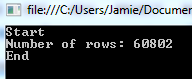
image

Which matches what the book’s R example.

I then wanted to match what the book does in terms of cleaning the city,state field (column).  We are only interested in data from the united states that follows the “City,State” pattern.  The R examples does some conditional logic to clean this data, up, which I didn’t want to do in F#.

So I added this filter than split the City,State column and checked that the state value is only 2 characters in length R uses the “Clean” keyword to remove white space, F# uses “Trim()”

  1. |> Seq.filter(fun values -> values.[2].Split(',').[1].Trim().Length = 2)


image


Next, the book limits the location values to only the Unites States.  To do that, it creates a list of values of all 50 postal codes (lower case) to then compare the state portion of the location field.  To that end, I added a string array like so:

  1. let usStates = [|"AL";"AK";"AZ";"AR";"CA";"CO";"CT";"DE";"DC";"FL";"GA";"HI";"ID";"IL";"IN";"IA";
  2.                  "KS";"KY";"LA";"ME";"MD";"MA";"MI";"MN";"MS";"MO";"MT";"NE";"NV";"NH";"NJ";"NM";
  3.                  "NY";"NC";"ND";"OH";"OK";"OR";"PA";"RI";"SC";"SD";"TN";"TX";"UT";"VT";"VA";"WA";
  4.                   "WV";"WI";"WY"|]

I then add this filter (took me about 45 minutes to figure out):

  1. |> Seq.filter(fun values -> Seq.exists(fun elem -> elem = values.[2].Split(',').[1].Trim().ToUpperInvariant()) usStates)


image

So now I am 1/2 way done with Chapter 1 – the data has now been cleaned and is ready to be analyzed. Here is the code that I have so far:

  1. member this.GetDetailData() =
  2.     let path = "C:\Users\Jamie\Documents\Visual Studio 2012\Projects\MachineLearningWithFSharp_Solution\Tff.MachineLearningWithFSharp.Chapter01\ufo_awesome.txt"
  3.     let fileStream = new FileStream(path,FileMode.Open,FileAccess.Read)
  4.     let streamReader = new StreamReader(fileStream)
  5.     let contents = streamReader.ReadToEnd()
  6.     let usStates = [|"AL";"AK";"AZ";"AR";"CA";"CO";"CT";"DE";"DC";"FL";"GA";"HI";"ID";"IL";"IN";"IA";
  7.                      "KS";"KY";"LA";"ME";"MD";"MA";"MI";"MN";"MS";"MO";"MT";"NE";"NV";"NH";"NJ";"NM";
  8.                      "NY";"NC";"ND";"OH";"OK";"OR";"PA";"RI";"SC";"SD";"TN";"TX";"UT";"VT";"VA";"WA";
  9.                       "WV";"WI";"WY"|]
  10.     let cleanContents =
  11.         contents.Split([|'\n'|])
  12.         |> Seq.map(fun line -> line.Split([|'\t'|]))
  13.         |> Seq.filter(fun values -> values |> Seq.length = 6)
  14.         |> Seq.filter(fun values -> values.[0].Length = 8)
  15.         |> Seq.filter(fun values -> values.[1].Length = 8)
  16.         |> Seq.filter(fun values -> System.Int32.Parse(values.[0].Substring(0,4)) > 1900)
  17.         |> Seq.filter(fun values -> System.Int32.Parse(values.[1].Substring(0,4)) > 1900)
  18.         |> Seq.filter(fun values -> System.Int32.Parse(values.[0].Substring(0,4)) < 2100)
  19.         |> Seq.filter(fun values -> System.Int32.Parse(values.[1].Substring(0,4)) < 2100)
  20.         |> Seq.filter(fun values -> System.Int32.Parse(values.[0].Substring(4,2)) > 0)
  21.         |> Seq.filter(fun values -> System.Int32.Parse(values.[1].Substring(4,2)) > 0)
  22.         |> Seq.filter(fun values -> System.Int32.Parse(values.[0].Substring(4,2)) <= 12)
  23.         |> Seq.filter(fun values -> System.Int32.Parse(values.[1].Substring(4,2)) <= 12)      
  24.         |> Seq.filter(fun values -> System.Int32.Parse(values.[0].Substring(6,2)) > 0)
  25.         |> Seq.filter(fun values -> System.Int32.Parse(values.[1].Substring(6,2)) > 0)
  26.         |> Seq.filter(fun values -> System.Int32.Parse(values.[0].Substring(6,2)) <= 31)
  27.         |> Seq.filter(fun values -> System.Int32.Parse(values.[1].Substring(6,2)) <= 31)
  28.         |> Seq.filter(fun values -> values.[2].Split(',').[1].Trim().Length = 2)
  29.         |> Seq.filter(fun values -> Seq.exists(fun elem -> elem = values.[2].Split(',').[1].Trim().ToUpperInvariant()) usStates)
  30.         |> Seq.map(fun values ->
  31.             System.DateTime.ParseExact(values.[0],"yyyymmdd",System.Globalization.CultureInfo.InvariantCulture),
  32.             System.DateTime.ParseExact(values.[1],"yyyymmdd",System.Globalization.CultureInfo.InvariantCulture),
  33.             values.[2].Split(',').[0].Trim(),
  34.             values.[2].Split(',').[1].Trim().ToUpperInvariant(),
  35.             values.[3],
  36.             values.[4],
  37.             values.[5])
  38.     cleanContents


I now want to finish up the chapter where the analysis happens.  R uses some built-in plotting libraries (ggplot).  Following Luca’s example of this

image 

I went to the flying frogs libraries and, alas, there is no longer a free edition.

image

So I am bit stuck.  I’ll continue to work on it for next week’s blog…

Why I am dropping my Make subscription

I have been a Make magazine subscriber for over 3 years.  I really enjoyed reading it with my kids and some of projects inspired us to try things at home (Drill Cart, Lawn Bott, etc…).  About 2.5 years ago, my son wanted to build an auto-sensing mailbox for his science fair.  It was about a 5 to 1 ratio of my time (prepping the work area, making sure all of the materials were available and cut to the right length, etc…) to his time (assembling the parts, copying the computer code), but it was well worth it – he might have learned some things and, most importantly, the project reinforced his belief that making things is really cool and fun.

After the science fair, I suggested that he submit this project to Make.  He and I sent some time and wrote this into their on-line form:

Here’s an idea for a story for MAKE:
———————————————
Project title
———————————————
We made a mailbox that uses light signals to let you know when the mail arrives.
———————————————
Description
———————————————
We used the Phidget 0/0/4 interface kit and the Phidget 8/8/8 interface kit.  We wired a regular house lamp to the 0/0/4 and 2 force detectors to the 8/8/8.  We glued the force detectors to the bottom of a mailbox.  <p>
We then hooked both interface kits to the computer and wrote the code to handle the input event from the force detector and to turn on the 0/0/4 circut, which turns the lamp on.<p>
Once the external data is captured, you could do other things with the mail event – Sloan wants to hook up a camera in the mailbox and take a picture of the mailman as he put the mail in.  I think a simple tweet might be an easier next step.<p>
The project is for a beginner – takes about 4-6 hours.  There is appx 20 lines of computer code to write.<p>
Up next is to use Netduino and not use the PC….
———————————————
Submitted by
———————————————
Jamie & Sloan Dixon
———————————————

To our surprise, the Editor And Chief wrote back almost immediately:

I would like to see a video of this in action!

     Best regards,

     Mark XXXXXXX

Editor-in-chief of MAKE

We put together a quick video of what he did here and sent it in.  Within 2 days, I got this back from the editor and chief:

This is great! I’d like to assign it. I can pay $250 for the article.

I can send you an assignment letter with fee and deadline info. First, could you please email me the following information:

— A two-sentence bio describing who you are (Note – If you want your email address to run in the magazine, incorporate it into your bio):

— Your name as you wish it to be printed

— Your legal name (who we make the check out to)

— Your address

— Your phone numbers

— Your preferred email address (and if you’d like it to run in the magazine)

Here is a link to a zip file with three important documents:


As you can image we were pretty excited.  We filled out the forms and sent them in.  I then wrote this in:

Is there someone I can work with to make sure the article is up to your standards?  We are trying to follow your guidelines.  We have never done anything like this before (can you tell we are excited?) and want to make sure we do thing right.

Thanks!

And we got the following response:

Paul XXXXX will be your editor. He’ll make sure the article looks and reads great in the magazine. It may be a while before he gets in touch, as this is slated for Vol 32 (October) and we are working on Vol 30 right now.

Thanks!
— Mark

So then we spent a weekend writing an article for Make and sent it in.  About a month later (March 2012), I sent in a reminder asking for the status. I got this from the editor in chief: 

Got your email. Sorry for late reply. I’m cc’ing Paul so he can update you on the status of your project. We are still planning on running it.

Best

Mark

I then sent in this video of my daughter to Mark and got the following response:

This looks cool, too! I’ll ask Paul to give you an assigment.

— Mark

After more waiting (May 2012), I sent in a reminder asking for status from my editor (Paul) and I got this:

This email account is no longer being monitored: contact Gareth XXXXX at XXXXXX@oreilly.com

So I emailed the Editor and Chief

> I read the last Make – sorry we couldn’t make into the home automation

> edition. Hopefully some people enjoy the Phidget twist on the mailbox

> and the home security system. Is there anything else you need for the

> mailbox article? My daughter is almost done with school and she can

> write up the laser system – if you are still interested.

and I got this:

Yes we are running the article. I’m at a conference but when I get access to my schedule I’ll let you know which issue of Make it’s slated for.

Best,

— Mark

So then a month later (June 2012), we got this

Hi James and Sloan,

We’re preparing your article for publication and we’re wondering, did you ever re-do the Auto Mailbox using Netduinos?  It’s not practical to leave a PC out on the street, but I think if we do a Netduino version our readers will like it and build it!

Let me know ASAP please, we need to select articles for the next issue right away.

Best regards,

Keith

So then we answered the question, changed the Phidgets relay to a Netdunino and re-wrote the article.  It was a fun weekend, but it took well, the entire weekend.  We got this back:

Great work, guys!  Simple, useful, novel sensors, relay … I like it a lot, it’s a nice twist on the other smart mailboxes some makers have made. 

I have a few questions, can you help me resolve these ASAP?

1) Will Sloan be in 5th grade this fall?  Our newsstand date for this issue is in October.

So we waited until October 2012 and when it was not in the issue, I emailed Make and I got this back:

I have to rework it as a "getting started with Netduino" article.  It’s slated for Volume 33 now (on sale January 22 2013).

So more waiting until February 2013 when I got another email from Make with our article marked up

Here’s what we’re working with at the moment, I’m going to try to slip it into the mag ASAP.  Can you look it over and make sure it’s OK, and answer any questions marked in red?  

That is the last I heard and I am not really interested in pestering them any more about the article.  My son hasn’t asked about the article since February.  I assume that professional writers deal with this all of the time, but I figured Make might be different because they are not dealing with professional writers – we are professional other things that want to share our passion.  Combine their treatment of me and my son with the fact that that the most of the projects are now waaay harder than they were two years ago (so we can’t even do them), I am dropping my subscription.  I think Popular Mechanics might have a DYI section now?  If so, I will start subscribing to them…

Windows Store Apps and Bing Maps

I started creating a RoadAlert client application to be used on RT tablets.  One of the first stumbling blocks was using Bing maps.  I downloaded the SDK easily.  However, when I went to add the maps to my project, I got this:

Capture1

What I had to do was change the project deployment FROM Any CPU to ARM so that the references would resolve:

Capture2

I was then able to get the reference:

Capture3

The problem is then when I ran the app on my developer workstation:

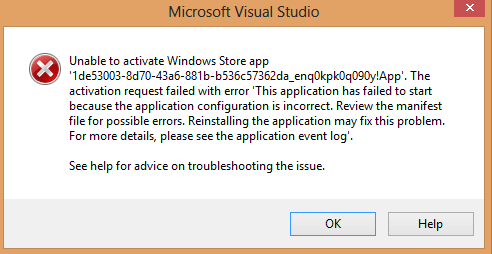
Capture

What I needed to do was the change the project type to x64 so that it would run locally.  Then, when I created the package, I only targeted ARM and then it ran great on my tablet.

Carolina Code Camp Material

I had a great time presenting and attending Carolina Code Camp.  Hats off the organizers for making such a large event run without a hitch.  I especially want to thank Dan Thyer and Mike Linnen for the BuilderFaire.  What a great time!  The best part of the camp was meeting such smart and innovative people.

My own presentation materials can be found here: https://github.com/jamessdixon/2013CarolinaCodeCamp

Carolina Code Camp Prep

I am going down to Charlotte for the Carolina Code Camp this weekend.  I am presenting at two sessions:

1) Remote Control Lawnmowers (that I am building with my daughter).  I will show how to intercept and use PWM signals from a RC transmitter/receiver and how to turn those commands into the drive system of the robot.  Here is a couple of clips that we did recently:


I am also doing a code-only SOLID presentation.  This is pretty much the same presentation that I did at TRINUG’s DEV Craftsmanship SIG in February.

I am looking forward to a fun (half) day and learning some great stuff from the other hackers coders.

This and That

Dear Future Jamie:

DI with a private constructor

When you are doing DI with a private constructor, this syntax will not work:

            String animalTypeName = ConfigurationManager.AppSettings["animalTypeName"].ToString();
            Type animalType = Type.GetType(animalTypeName);
            IAnimal animal = (IAnimal)Activator.CreateInstance(animalType);

Instead use this syntax:

            String animalTypeName = ConfigurationManager.AppSettings["animalTypeName"].ToString();
            Type animalType = Type.GetType(animalTypeName);
            IAnimal animal = (IAnimal)FormatterServices.GetUninitializedObject(animalType);

Params Keyword

When you have a series of overloaded methods that are taking on an ever-growing number of parameters, consider using the params keyword.  For example, instead of this:

        public void NameMe(String FirstName)
        {

        }

        public void NameMe(String FirstName, String LastName)
        {

        }

        public void NameMe(String FirstName, String MiddleName, String LastName)
        {

        }

Do this:

        public void NameMe(params String[] parameters)
        {

        }

Love Current Jamie

Machine Learning For Hackers: Using MSFT technologies

So I picked up Machine Learning for Hackers and started going though the 1st couple of chapters last night.  I love the premise that developers can learn something about machine learning using some easily-understood examples.  Why I didn’t love was that it used R.  After reading the 1st chapter, I said to myself, “self, everything they do in this chapter you can do in MSFT office.”  Now I get that this is supposed to be a simple example to get the reader up and running with R, but I thought, “Hey, I wonder how much of this book can I do using the MSFT stack?”

Chapter 1 was all about cleaning up data to get it ready for analysis.  This brought me back to my 1st job out of school (marketing analyst) when I spent more time collecting and cleaning the data than actually analyzing the data.

My 1st stop was to download the sample UFO dataset from the publisher site and save it locally with a .txt extension.  I then imported the data into Microsoft access: Note that I assigned column names and made sure that the Long Description is memo:

image


Note that there were

With that base data imported, I then added an additional field to the table called valid.  The book follows the process of analyzing each column’s data and removing rows that are not analyzable.  I learned the hard way many years ago that you should never permanently remove data because you need to be able to trace the data set back to its initial state for audit purposes.  I like the ability to make queries upon queries in Access to layer up data validation steps.

For example, in the book, the first validation is to parse the DateOccured field into year/month/columns – the problem is that some columns don’t have valid data.  To this 2 step process, the first is to aggregate the values in the column and see what the valid values look like:

imageimage


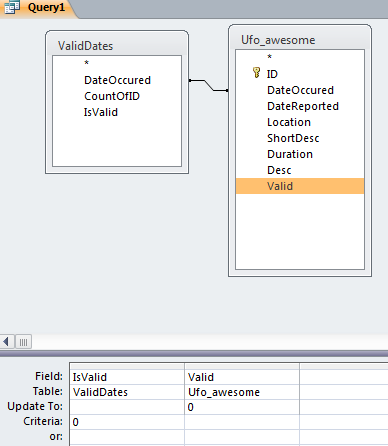
Sure enough, there are over 250 rows of data that cannot be used.  I created a table of the aggregate dates and the inner joined that table back to the base datatable.  Rows with invalid data was flagged as Invalid:

imageimage

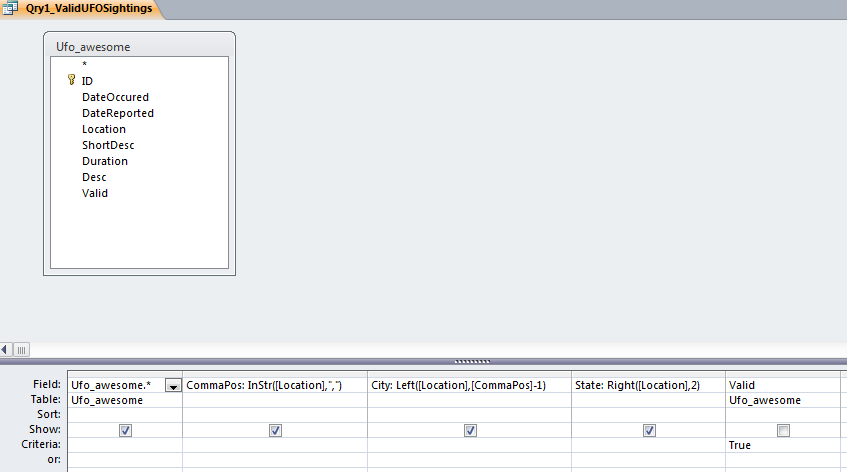
I then divided the Location field into City, State:

image

And then created table for valid states – the same way I did for the valid DateOccured.  I had to remove about 10% of the dataset – because of both malformed data and the fact that the dataset is world-wide and the book’s example is only interested in the USA.  The fact that 90% of the world’s UFO sightings is in America probably says something, though I am not sure what.

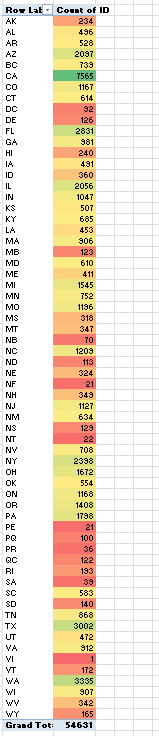
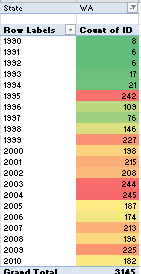
In any event,  then exported the data into Excel, threw a pivot table on the data and added some conditional formatting:

image

Note that some malformed data slipped in (“NT”, “NE”, etc…) but I was too lazy to go back and clean it up.

Note that this is total sightings, not per-capita so you would expect that the states with larger populations to have more sightings (assuming that UFOs are targeting the USA evenly).  I think the color presentation is more effective and really draw your eye to CA and WA much more than the 50 histogram display that is found in the book.

I then filtered the data to only greater than 1990 like the book did and changed the pivot table to filter on state.  Here is California:

imageimage

The color really shows how the number of sightings are increasing in CA and seem to be more consistent in WA.  I do wonder what happened in 1995 in WA to cause that spike?

The next chapter is about regression analysis, so I assume that I can use the built-in functions of Excel for that too…

Sql Server and “Saving Changes Are Not Permitted”

Dear Future Jamie:

If you are trying to add a identity column to a table after it is created and you get this message:

image

Make the change in Management Studio here:

image


Love,

Current Jamie

SignalR: 1st Project

So I wanted to learn more about SignalR so I went over to GitHib and checked out their getting started page.  The page makes some assumptions that a new .NET developer might run into so I thought I would show how I got it working.

Step #1: Open Visual Studio 2012 and File->NewProject  and select ASP.NET Empty Web Application:

image I

Note that I made the solution name different than the name of the project because I will be added another project to this solution.

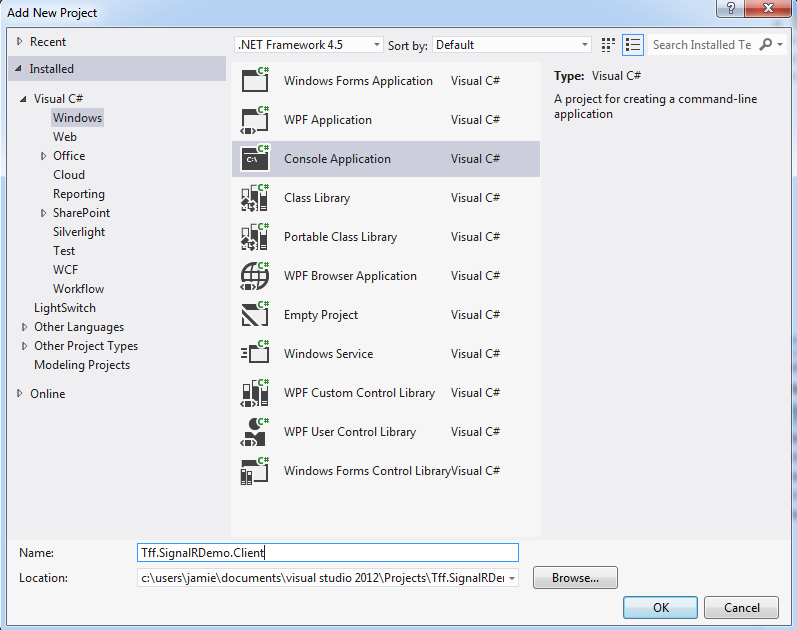
Step #2: Add a new console application to the solution:

image

Your solution should now look like this:

image

Step #3: Go to the Server project and open the NuGet Package Manager Console:

image

In the Package Manager Console Window, type

Install-Package Microsoft.AspNet.SignalR

Make sure that the Default Project is the Server project you created

image

after you hit enter, NuGet will do a bunch of stuff for you (adding libraries, resolving dependencies, etc…) and open the readme.txt file.  You can close that window.

Step #4: Add a class to your server project  called MyConnection (you are using Shift+Alt+C aren’t you?):

image

Step #5: Type (or copy) the code into your MyConnection class.  Note that you are inheriting from the PersistentConnection class and you will have to resolve (CTRL+.) both that class and the Task class.

image

Your class should look like this:

image

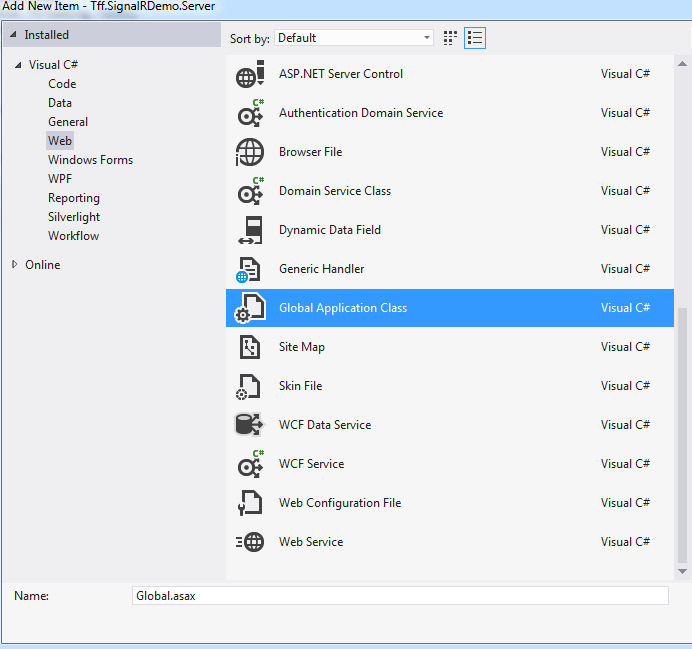
Step #6: Add a Global.asax file to your server project

image

Then type(or copy) the code into your Application_Start event handler:

image

Note that you will have to resolve the RouteTable class (CTRL+.).

The server project is now ready to go.  Make sure the server project is the startup project and run it.  IE will launch and you will get a web page like this:

image

Make a note of the address.  You can then stop the project from running.

Step #7: Go to the Client project and open the NuGet Package Manager Console and install the SignalR Client package.  Important, make sure that the default project is pointed to the client project

image

Step #8 Go to the Program.Main method and type (or copy) the code in.  Note that you will have to resolve the Connection class

image

Note that the address for the connection will be different for your machine.  Match that connection address back to the uri that IE showed you when you ran the server project.

Step #9: Open up the Configuration of the solution file and change the solution to have multiple startup projects.  Make sure you change the order so the client starts AFTER the server

image

Step #10 Run the solution and make the console window have focus.  Type in something and see the server push that message back out to you

image

InternalsVisibleTo

Dear Future Jamie:

When you want to test private methods, do this:

1) Change the scope from private to internal

2) Add this attribute to the namespace of the class that has the private method:

[assembly: InternalsVisibleTo(“NameSpace.Class.Tests”)]

3) Add this using statement to the class that has #2 in it:

using System.Runtime.CompilerServices;


Love,

Past Jamie