Chaining Tests

I learned something new about tests this morning.  Methods that are called from a test that have an Assert in them will be treated as a test.  For example:

        InterfaceKit interfaceKit = null;
 
        [
TestMethod()]
        
public void InterfaceKitAttachedTest_ReturnsTrue()
        {
            interfaceKit = 
new InterfaceKit();
            interfaceKit.Attach += 
new Events.AttachEventHandler(interfaceKit_Attach);
            interfaceKit.open();
        }
 
        
void interfaceKit_Attach(object sender, Events.AttachEventArgs e)
        {
            
bool expected = true;
            
bool actual = interfaceKit.Attached;
            
Assert.AreEqual(expected, actual);
            interfaceKit.close();
        }


Thinking about it, that makes sense – b/c the called method is sharing the stack so the Assert will be called and inspected.

Code Coverage: More Is Less?

I started working on some unit tests for the PhidgetException class.  Following the DRY principles, I re-wrote the constructor logic from this

    internal PhidgetException(int code) : base(string.Concat(new object[] { "PhidgetException ", code, " (", GetErrorDesc(code), ")" }))

    {

        this.desc = "Uninitialized Error";

        this.errType = this.errorCodeToErrorType(code);

        this.errCode = code;

        this.desc = GetErrorDesc(code);

    }


    public PhidgetException(string message, ErrorType type) : base("PhidgetException " + type.ToString() + " (" + message + ")")

    {

        this.desc = "Uninitialized Error";

        this.errType = type;

        this.errCode = 0;

        this.desc = message;

    }


    public PhidgetException(string message, int code) : base(string.Concat(new object[] { "PhidgetException ", code, " (", message, ")" }))

    {

        this.desc = "Uninitialized Error";

        this.errType = this.errorCodeToErrorType(code);

        this.errCode = code;

        this.desc = message;

    }


to this:

        public PhidgetException(string message, ErrorType errorType, int errorCode)
            : base(string.Concat(new object[] { "PhidgetException ", errorCode, " (", GetErrorDesc(errorCode), ")" }))
        {
            if (errorType == ErrorType.PHIDGET_ERR_OK && errorCode != 0)
            {
                this._errorCode = errorCode;
                this._errorType = this.ErrorCodeToErrorType(errorCode);
            } 
            
if (errorType != ErrorType
.PHIDGET_ERR_OK && errorCode == 0)             {                 this._errorCode = ErrorTypeToErrorCode(errorType);                 this._errorType = errorType;
            }

            
if (errorType != ErrorType
.PHIDGET_ERR_OK && errorCode != 0)             {                 int expectedErrorCode = ErrorTypeToErrorCode(errorType);                 if (expectedErrorCode != errorCode)                 {                     throw new ArgumentException("Error Code and Error Type Do Not Match");                 }                 else                  {                     this._errorCode = errorCode;                     this._errorType = errorType;                 }             }            
            
if (message == string
.Empty)                 this._errorDescription = GetErrorDesc(errorCode);             else                 this._errorDescription = message;         }
 
        
public PhidgetException(string message, ErrorType
 errorType)             : this(message, errorType, 0)         {         }
 
        
public PhidgetException(string message, int
 errorCode)             : this(message, ErrorType.PHIDGET_ERR_OK, errorCode)         {         }

 Honestly, the 1st constructor should be marked as private so that you can’t ever get to that ArgumentException, but that is another day’s refactoring.

I then layered some Unit Tests on top of the different constructors to see if my logic worked:

        [TestMethod()]
        public void PhidgetExceptionConstructorTest_Code1_ReturnsPHIDGET_ERR_NOTFOUND()
        {
            PhidgetException phidgetException = new PhidgetException("Test Message", 1);
            ErrorType expected = ErrorType.PHIDGET_ERR_NOTFOUND;
            ErrorType actual = phidgetException.Type;
            Assert.AreEqual(expected, actual);
        }
        [TestMethod()]         [ExpectedException(typeof(ArgumentException))]         public void PhidgetExceptionConstructorTest_PHIDGET_ERR_NOMEMORY_ErrorCode3_ThrowsException()         {             ErrorType errorType = ErrorType.PHIDGET_ERR_NOMEMORY;             PhidgetException phidgetException = new PhidgetException("Test Message", errorType,3);             Assert.Fail("Should Never Get Here");         }

        [
TestMethod
()]         public void PhidgetExceptionConstructorTest_PHIDGET_ERR_NOMEMORY_ErrorCode2_ReturnsErrorCode2AndPhidgetNoMemory()         {             ErrorType errorType = ErrorType.PHIDGET_ERR_NOMEMORY;             int errorCode = 2;             string message = "Test Message";             PhidgetException phidgetException = new PhidgetException(message, errorType, errorCode);             Assert.AreEqual(errorCode, phidgetException.Code);             Assert.AreEqual(errorType, phidgetException.Type);
        }

So far so good. 

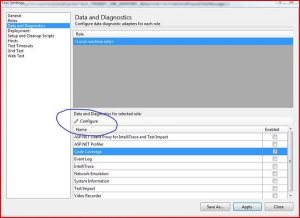
I then did a code coverage analysis of my project.  Note that the Code Coverage screens in VS2010 are not the most intuitive, you need to press that cleverly-hidden “Configure” label (why no Button VS team?):

I re-ran the tests and expected some high metrics.


47% – WTF?

Drilling down, I saw that I did not check the internal method.  Easy enough to fix, I added

[assemblyInternalsVisibleToAttribute("Com.Tff.Phidget.Tests")]

 to my PhidgetException code file (above the namespace, please), wrote a couple of covering Unit Tests

        [TestMethod()]
        public void GetErrorDescriptionTest_ErrorCode2_ReturnsValidString()
        {
            string notExpected = string.Empty;
            string actual = PhidgetException.GetErrorDesc(2);
            Assert.AreNotEqual(notExpected, actual);
        }
          [
TestMethod
()]         [ExpectedException(typeof(PhidgetException))]         public void GetErrorDescriptionTest_ErrorCodeNeg1_ThrowsException()         {             string notExpected = string.Empty;             string actual = PhidgetException.GetErrorDesc(-1);             Assert.Fail("Should Never Get Here");         }
 

 And now got


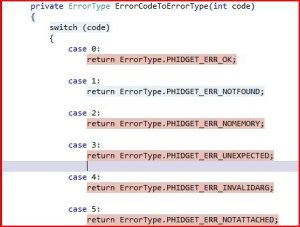
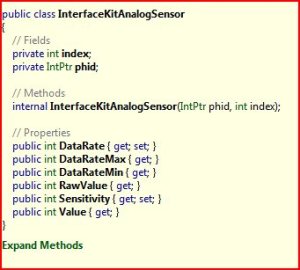
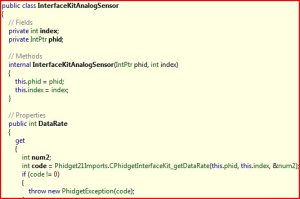
50%????!!!!  What is going on here?  I have no other methods to cover.  Drilling down, I re-learned the lesson of paying too much attention to Code Coverage.  Check out the code coverage of the 2 lookup methods.

These lookup methods look like this:

 You can see that unless I write 30 covering unit tests for each possible error code and inspect the return value, I will have low code coverage.  A good lesson re-learned.

Importance Of Variable Names

Can anyone see the problem with this bit of code?

    public class InterfaceKitDigitalOutputCollection
    {
        
// Fields
        private IntPtr phid;
 
        
// Methods
        internal InterfaceKitDigitalOutputCollection(InterfaceKit phid)
        {
            
this.phid = phid.phidgetDeviceHandle;
        }


I changed the local parameter

        // Methods
        internal InterfaceKitDigitalOutputCollection(InterfaceKit
 interfaceKit)
        {
            
this.phid = interfaceKit.phidgetDeviceHandle;
        }


And suddenly the code is more consistent and readable.  A small change to be sure, but I lost 5 minutes assuming that variable names were unique in the class.

Unsafe At Any Speed

What I wrote in Visual Studio 2010:   


 public unsafe void waitForAttachment(int milliseconds)
        {
            
if (this.managerPhidget)
            {
                
throw new PhidgetException(PhidgetException.GetErrorDesc(11), 11);
            }
            
int code = Phidget21Imports.CPhidget_waitForAttachment(this.phidgetDeviceHandle, milliseconds);
            
if (code != 0)
            {
                
throw new PhidgetException(code);
            }
            
while (!this.initialized)
            {
                
Thread.Sleep(10);
            }
        }


 What Reflector came up with:

public void waitForAttachment(int milliseconds)

{

    if (this.managerPhidget)

    {

        throw new PhidgetException(PhidgetException.GetErrorDesc(11), 11);

    }

    int code = Phidget21Imports.CPhidget_waitForAttachment(this.phidgetDeviceHandle, milliseconds);

    if (code != 0)

    {

        throw new PhidgetException(code);

    }

    while (!this.initialized)

    {

        Thread.Sleep(10);

    }

Note how Reflector dropped the “unsafe” keyword.


Also, I learned:

·         Static Methods cannot be in an interface

·         Internal Methods cannot be in an interface

·         I dropped Abstract b/c the code had references to its own instance

TFS

I installed TFS on my local machine for version control and build services.  I got the version control working fine – using a MAIN/DEV/PROD branching strategy.  The problem is setting up the builds.  I installed the Build Server and Agent no problem on the local machine.  Then wanted to associate current Team Project Collection to the Build Controller:


However, when I went to the Build Controllers – there is no button to add it to the available list.


I decided to stop – b/c I really don’t need CI for my local workstation but I was getting excited to alter the build steps using WF4.0 – just to see it in action.


Looks like you need to install the Build Controller BEFORE you create a Team Collection – there is no way to retro-add a collection to a controller?  I Binged the error and no one has answered it (yet).  I also tried to alter the properties of the Build Server in TFS Explorer and cannot alter the url:

Humm, perhaps an enhancement for later…

Testable Phidgets – Follow up from last week

I have given up in creating a one-off interface for the Phidget kit and instead want to see if Rhino Mocks can support mocking concrete classes and give me what I want from an Unit Test.  I whipped up a quick test to see if the open method worked.  Note that I am not using the Assert keyword because I am doing interaction based testing, not state based testing.  I am doing interaction based testing because the method has no return value and the class has no other supporting property that I can use to verify that the method worked.

        [TestMethod()]
        
public void OpenInterfaceKitTest()
        {
            
MockRepository mockRepository = new MockRepository();
            
InterfaceKit interfaceKit = mockRepository.DynamicMock<InterfaceKit>();
            mockRepository.ReplayAll();
            interfaceKit.open();
            mockRepository.VerifyAll();
        }


The test passed but 2 thoughts came to my mind:

·         Is this working right?

·         If so, what, in fact, am I actually testing?

Undaunted, I continued on to my next test – mocking the opening the actual Phidget channel.  I set up a unit test the same pattern:

        [TestMethod()]
        
public void
 OpenOutputOnInterfaceKitTest()
        {
            
MockRepository mockRepository = new MockRepository
();
            
InterfaceKit interfaceKit = mockRepository.DynamicMock<InterfaceKit
>();
            mockRepository.ReplayAll();
            interfaceKit.outputs[0] = 
true;
            mockRepository.VerifyAll();
        }


When I ran the test, I got a nasty surprise:

Test method VoiceActivatedToaster.Tests.ProgramTest.OpenOutputOnInterfaceKitTest threw exception:

Phidgets.PhidgetException: PhidgetException 5 (Phidget not physically attached.)


This is odd – the mock is actually using the real Phidget board – not the mock one that I created.  I then went back to the Rhino Mock documentation and realized that I didn’t tell the mock what to do via an expect call.  I wonder if it is because I am using a concrete class on the left hand side of the equation, not an interface?


There seems to be 2 options in front of me.  Build a stub and inject that into the program class.  The stub is based on an interface and I could then control expectations to test my program completely.  Since the classes I am using don’t have any interfaces, I tried to build my own “wrapper” interface.  That turned out harder than I thought so I went to option #2.  Option #2 was to forget the stubs and use a mock that I could control behavior to test.  The examples on-line make sense, but I am having a tough time getting it to work.  I think part of the problem is that the API that I am mocking is not designed to be testable – the Open method does not return a value and there is not a corroborating property to verify and there is not a InterfaceKitDigitalOutput class that I can use – you can only turn the channel on/off via the index on the collection and setting its value to true/false.  The problem with option #2 is that I still can’t create a Mock without an abstract class or an interface.  Here is an example from my last attempt:

        [TestMethod()]
        
public void
 OpenOutputOnInterfaceKitTest()
        {
            
MockRepository mockRepository = new MockRepository
();
            
InterfaceKit interfaceKit = mockRepository.DynamicMock<InterfaceKit
>();
            
Expect
.Call(interfaceKit.outputs.Count).Return(3);
            
LastCall
.IgnoreArguments();
            mockRepository.ReplayAll();
            
int i = interfaceKit.outputs.Count;
            mockRepository.VerifyAll();
        }


I’ll keep reading up on Rhino Mocks – but it appears to be a limitation with the framework.

I wonder how much Phidgets would pay me to write a testable .NET wrapper class to their API?   There are 40 classes in it, prob 20 methods each.   If I only had weekends to work on this stuff…

Testable Voice Activated Toaster

In following up to last week’s voice activated toaster, I wanted to work on making my solution more testable.  To that end, I re-read The Art Of Unit Testing:

 I still find his explanation of Mocks versus Stubs confusing.  In any event, I dove right in and added a test project to my solution.  I first realized that Rhino Mocks works either with Interfaces or Abstract Classes – the Phidget API had neither.  I read Brownfield Application Development In .NET:

 and realized that I needed to add an anti-corruption layer to the Phidget API and use an Adapter Pattern to wrap the existing API.

Moving to my code, the 1st stumbling block is that the SpeechRecognitionEngine and Choices classes do not have a defined interface.  I refactored the CreateSpeechRecognitionEngine method to a more testable chunks of code:


        public static void SetupSpeechRecognition()

        {

            SpeechRecognitionEngine _speechRecognitionEngine = new SpeechRecognitionEngine();

            Choices _choices = new Choices();


            CreateSpeechRecognitionEngine(_speechRecognitionEngine);

            LoadGrammarIntoSpeechRecognitionEngine(_speechRecognitionEngine, _choices);

            _speechRecognitionEngine.RecognizeAsync(RecognizeMode.Multiple);


        }


        public static void CreateSpeechRecognitionEngine(SpeechRecognitionEngine speechRecognitionEngine)

        {

            SpeechRecognitionEngine _speechRecognitionEngine = speechRecognitionEngine;

            _speechRecognitionEngine.SetInputToDefaultAudioDevice();

            _speechRecognitionEngine.SpeechRecognized += new EventHandler<SpeechRecognizedEventArgs>(speechRecognitionEngine_SpeechRecognized);

        }


        public static void LoadGrammarIntoSpeechRecognitionEngine(SpeechRecognitionEngine speechRecognitionEngine, Choices choices)

        {

            SpeechRecognitionEngine _speechRecognitionEngine = speechRecognitionEngine;


            Choices _choices = choices;

            _choices.Add("Toast");

            _choices.Add("Stop");

            Grammar grammar = new Grammar(_choices);


            _speechRecognitionEngine.LoadGrammar(grammar);

        }


I then used the adapter pattern to make a testable Phidget API.  I created interfaces for a Phidget, Interface Kit, and a PhidgetException.  I then created Phidget, Interface, and PhidgetException classes that implemented the interface.   I also split out the all of the enums that the API uses into their own class – the values are the same thanks to Reflector.  My solution looked like this:


I then had some supporting classes to take care of the rest of the API.  The first was the event handlers.  For the sake of keeping the class count down, I put all of the event handers into one class:


namespace Com.Tff.VoiceActivatedToaster.Phidget.Events

{

    //Phidgit Events

    public delegate void AttachEventHandler(object sender, AttachEventArgs e);

    public delegate void DetachEventHandler(object sender, DetachEventArgs e);

    public delegate void ErrorEventHandler(object sender, ErrorEventArgs e);

    public delegate void ServerConnectEventHandler(object sender, ServerConnectEventArgs e);

    public delegate void ServerDisconnectEventHandler(object sender, ServerDisconnectEventArgs e);


    //Interface Kit Events

    public delegate void OutputChangeEventHandler(object sender, OutputChangeEventArgs e);

    public delegate void SensorChangeEventHandler(object sender, SensorChangeEventArgs e);

}


I then added individual classes for each event args.  The Event Subdirectory looked like so:


Hooking up the events to the Phidget API, I made some good progress.  I then had 3 public fields (sigh) on the Interface Kit: Inputs, Outputs, and Sensors.  My 1st thought was to create interfaces and wrapper classes like I have done so far – but I immediately got a frying pan to the face:


Crap – the constructors are marked internal.  I could not wrap the classes.  I then went to plan B – use Reflector and implement the same code they used.  I then got a frying pan to the back of the head with Plan B when I looked at their code:


They were wrapping their unmanged code so they have these pointers and references all over the place.  I took a deep breath (“OK, I can do this”) and tried to implement.  I tried to reference the unmanaged assembly and got this:


Plan B is officially dead.  I then went to Plan C – use the Phidget API in my API.  I hated to do it, but I did it.  Here is the relevant code snippet:


    public class InterfaceKit : Phidget, IInterfaceKit

    {

        Phidgets.InterfaceKit _interfaceKit = null;


        //Have to use the Pdigit API b/c the Constructors are marked as internal

        public Phidgets.InterfaceKitDigitalInputCollection inputs;

        public Phidgets.InterfaceKitDigitalOutputCollection outputs;

        public Phidgets.InterfaceKitAnalogSensorCollection sensors;


        public InterfaceKit()

        {

            _interfaceKit = new Phidgets.InterfaceKit();

        }


I then hooked up my console application to the API and got nothing:


I then ran out of time: 5 hours of coding for Unit Test – and I have yet to write a single test.  I am just refactoring a poorly-written API to make the classes testable.


I’ll keep plugging away.


Voice Activated Toaster

I have played around with both the Speech API and the Phidget API over the last 5-7 years or so.  For the speech API, I created a home automation system to use the speech engine to control a house’s sound system, a cook’s recipe system, and to read the news and weather to a causal listener.  If patents weren’t $10,000, I would have sent something in – my neighbor in Alexandria worked at the Patent Office and thought it had a good chance to get approved, but I digress.  For the Phidget API, I did something similar to Brian Peek’s animated light show on Coding-4-Fun’s where I synched my Christmas’s lights to music.

I recently got back into both APIs to build a voice-activated toaster.  I plan to expand the project to include mocking of these external dependencies (the Phidget board/Toaster and the speech engine). 

To build the connection to the toaster, I used the Phidget 0/0/4 Interface kit.  I then wired it up like Brian did:

To handle the voice input, I used a cheap wireless microphone system from radio shack and hooked it into my microphone port. 

I used an old toaster that was hanging around my attic.

 I then slapped up a quick console application.  The application creates a connection to the Phidget board, starts up a speech recognition engine and listens for the word “Toast”.  Once recognized, the Phidget channel opens and the toaster is activated.  Once the word “Stop” is heard, the toaster is deactivated.

Here is the console output:

and here is the toaster in action:


I recognize that the code is not ready for prime time (heck, does not even have error handling), but I wanted to get a working skeleton down before throwing in my unit tests and mocking framework.  There will be more on that next week.  Here are the 80 lines of code that I needed to write to get it working:


namespace Com.Tff.VoiceActivatedToaster

{

    class Program

    {

        private static InterfaceKit interfaceKit = null;


        static void Main(string[] args)

        {

            Console.WriteLine("Starting");

            CreateSpeechRecognitionEngine();

            CreatePhigitInterface();

            Console.ReadKey();

        }


        private static void CreateSpeechRecognitionEngine()

        {

            SpeechRecognitionEngine speechRecognitionEngine = new SpeechRecognitionEngine();


            Choices choices = new Choices();

            choices.Add("Toast");

            choices.Add("Stop");

            Grammar grammar = new Grammar(choices);


            speechRecognitionEngine.LoadGrammar(grammar);

            speechRecognitionEngine.SetInputToDefaultAudioDevice();

            speechRecognitionEngine.SpeechRecognized += new EventHandler<SpeechRecognizedEventArgs>(speechRecognitionEngine_SpeechRecognized);

            speechRecognitionEngine.RecognizeAsync(RecognizeMode.Multiple);

            Console.WriteLine("Computer is listening");

        }


        static void speechRecognitionEngine_SpeechRecognized(object sender, SpeechRecognizedEventArgs e)

        {

            Console.WriteLine("{0} was recognized with {1} confidence", e.Result.Text, e.Result.Confidence.ToString());

            if (e.Result.Text == "Toast")

            {

                interfaceKit.outputs[0] = true;

            }


            if (e.Result.Text == "Stop")

            {

                interfaceKit.outputs[0] = false;

            }

        }


        private static void CreatePhigitInterface()

        {

            interfaceKit = new InterfaceKit();

            interfaceKit.open();


        }

    }

}


ASP.NET MVC 2 RoutingEngineSiteMapProvider

Continuing my thought on RoutingEngineSiteMapProvider, I worked with Rob Seder on Sunday for a bit

I was thinking of Maarten Balliau’s solution on CodePlex to a MVCSiteMapProvider and was wondering if there is an easier way. We tried inheriting from StaticSiteMapProvider and copy/pasting the code from XmlSiteMapProvider and re-writing it(like Maarten did), created our own implementation for the SiteMapProvider, and then giving up.

That afternoon I then looked at inheriting from XMLSiteMapProvider and intercepting the NodeCreation to plug in a MvcSiteMapNode.  I just created a basic node like so:

        public MvcSiteMapNode(SiteMapProvider provider, string key, string url, string title, string description, IList roles, NameValueCollection attributes, NameValueCollection explicitResourceKeys, string implicitResourceKey):

            base(provider, key, url, title, description,roles,attributes,explicitResourceKeys,implicitResourceKey)

        {

        }


        public string Controller { get; set; }

        public string Action { get; set; }


The rest of the constructiors were omitted for brevity

I then tried to intercept the call in BuildSiteMap method. 

    public class RoutingEngineSiteMapProvider: XmlSiteMapProvider

    {

        public override SiteMapNode BuildSiteMap()

        {

            SiteMapNode siteMapNode = base.BuildSiteMap();

            MvcSiteMapNode mvcSiteMapNode = ConvertSiteMapNodeIntoMvcSiteMapNode(siteMapNode);

            return mvcSiteMapNode;

        }


        private MvcSiteMapNode ConvertSiteMapNodeIntoMvcSiteMapNode(SiteMapNode siteMapNode)

        {

            MvcSiteMapNode mvcSiteMapNode = new MvcSiteMapNode(siteMapNode.Provider,siteMapNode.Key,

                siteMapNode.Url,siteMapNode.Title, siteMapNode.Description);


            mvcSiteMapNode.Controller = "Test Controller";

            mvcSiteMapNode.Action = "Test Action";


            return mvcSiteMapNode;

        }

    }


Surprisingly, it worked.  However, when I went to add a line to check on the nodes themselves in BuildSiteMapNode() like this:

            int counter = mvcSiteMapNode.ChildNodes.Count;


Things went bad – Stack Overflow.  I was in recursive hell.

I then tried to intercept AddNode like this:

        protected override void AddNode(SiteMapNode node)

        {

            base.AddNode(node);

        }


The problem is that this method is not called when I spun up the site.

Grrrr… I am out of patience on this.  Looking at the code in Reflector makes me appreciate best practices all that more.  Node6  Microsoft, really?  What happens if there is a 7th level node?  No exception is thrown.

The last thing I can think of is to copy/paste the code in BuildSiteMap() and then getting rid of the XMLReader completely.  However, this would be a mucho breaking change because the method violates the Open/Closed Principle and the IoC tenant and I really don’t have the time to track down all of the dangling dependencies in this API.

ASP.NET MVC and Menu Trimming

One of the nice features with ASP.NET is menu trimming pretty much out of the box.  You need to:

Create a SiteMap:

<?xml version="1.0" encoding="utf-8" ?>

<siteMap xmlns="http://schemas.microsoft.com/AspNet/SiteMap-File-1.0" >

  <siteMapNode url="" title=""  description="">

    <siteMapNode url="/Public" title="Public"  description="">

        <siteMapNode url="/Public/PublicContent1" title="Public Content #1"  description="" />

        <siteMapNode url="/Public/PublicContent2" title="Public Content #2"  description="" />

    </siteMapNode>

    <siteMapNode url="/Private" title="Private"  description="">

      <siteMapNode url="/Private/PrivateContent1" title="Private Content #1"  description="" />

      <siteMapNode url="/Private/PrivateContent2" title="Private Content #2"  description="" />

    </siteMapNode>

  </siteMapNode>

</siteMap>


Add the sitemap to your web.config:

    <siteMap defaultProvider="DefaultSiteMapProvider" enabled="true">

      <providers>

        <add name="DefaultSiteMapProvider" type="System.Web.XmlSiteMapProvider" siteMapFile="Web.sitemap"

             securityTrimmingEnabled="true" />

      </providers>

    </siteMap>


Add some roles to your web.config that protect certain areas

  <location path="~/Private">

    <system.web>

      <authorization>

        <deny users="*"/>

        <allow roles="admin"/>

      </authorization>

    </system.web>   

  </location>


Add a SiteMapDataProvider and a menu to your form that uses your SiteMapDataProvider:

            <div class="clear hideSkiplink">

                <asp:SiteMapDataSource ID="siteMapDataSource" runat ="server" ShowStartingNode="false" />

                <asp:Menu ID="NavigationMenu" runat="server" CssClass="menu" EnableViewState="false"

                    IncludeStyleBlock="false" Orientation="Horizontal" DataSourceID="siteMapDataSource">

<%                    <Items>

                        <asp:MenuItem NavigateUrl="~/Default.aspx" Text="Home"/>

                        <asp:MenuItem NavigateUrl="~/About.aspx" Text="About"/>

                    </Items>–%>

                </asp:Menu>


(Note that I left in the out of the box VS2010 template items for reference)

Voila – menu trimming

Behind the scenes, ASP.NET runtime knows to look for Web.Sitemap and then to look in your web.config for the roles


Once you move to MVC2, I thought all hope was lost.  No more server controls.  No more auto menu trimming.  No more free ice cream.  But, I was wrong.  You can use ASP.NET Server controls in your MVC2 project and things work just fine.   This is what I did:

I added a site map

<?xml version="1.0" encoding="utf-8" ?>

<siteMap xmlns="http://schemas.microsoft.com/AspNet/SiteMap-File-1.0" >

  <siteMapNode url="" title=""  description="">

    <siteMapNode url="" title="Home"  description="">

      <siteMapNode url="Home/Index" title="Index"  description="" />

      <siteMapNode url="Home/About" title="About Us"  description="" />

    </siteMapNode>

    <siteMapNode url="" title="User Input"  description="">

      <siteMapNode url="UserInput/Index" title="Index"  description="" />

    </siteMapNode>

    <siteMapNode url="" title="Private" description="">

      <siteMapNode url="Private/CurrentTime" title="Current Time"  description="" />

    </siteMapNode>

  </siteMapNode>

</siteMap>


The first thing to realize is that you are no longer mapping to physical file locations – you are still using the routing engine.  Note that my siteamp does not have a .aspx suffix nor a \Views subdirectory listed.  Also, if you have the file location on disk but no controller, you get a 404:

I then added the same SiteMapProvider and Location syntax to the web.config.  The then added the SiteMapDataSource to the Master page with the menu.

            <div id="menucontainer">

                <form runat="server">

                    <asp:SiteMapDataSource runat="server" ID="smds" ShowStartingNode="false" />

                    <asp:Menu runat="server" ID="aspmenu" DataSourceID="smds" />

                </form>

<%                <ul id="menu">             

                    <li><%: Html.ActionLink("Home", "Index", "Home")%></li>

                    <li><%: Html.ActionLink("About", "About", "Home")%></li>

                </ul>–%>

            </div>


(Note that I left in the out of the box VS2010 template items for reference)

(also note that I had to add a form tag around the provider and menu)

I ran it – to my <slight> surprise, it worked – sorta:
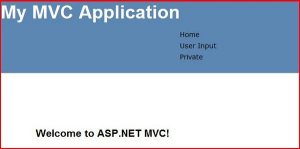
I worry about the formatting later – at least it is showing up.  Alas, no menu trimming though!

Interestingly, looking at the HTTP via Fiddler, you can see the view state:

 Here are the problems:

·         Hard-Coded URLs in the sitemap

·         Permissions tied to File System locations

·         View State in MVC – Say it aint’s so!


I wonder if there is a way to create a SiteMap provider based on the Routing Engine?  A quick search showed this one  here and here.

But I wanted to try to extend the XMLSiteMapProvider to account for the routes.  But then, it is not an XMLSiteMapProvider.  In fact, it is a RoutingEngineSiteMapProvider.

My next blog post continues this idea/rabbit hole.