Unit Testing and the Microframework

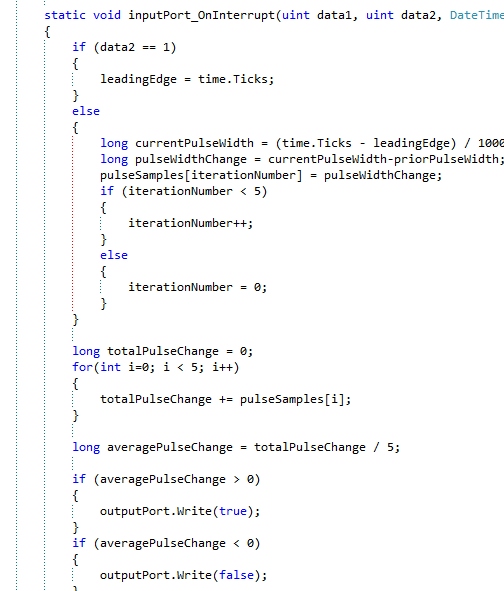
So I started writing some real code to handle the PWM signals coming into the Netduino from a RC receiver.  The simple code that I had has quickly  morphed into a jumbled mess of spaghetti code:

image

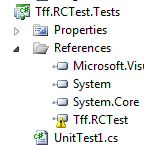
I stopped writing code and decided that this ripe for some unit testing.  I added a unit test project to my solution but I got this:

image

Sure enough:

image

This is the same problem I had with my Windows Phone app.  Instead of giving up on unit testing (which is what I did with my WP app, and now I am regretting it), I decided to take a separate approach.  I first thought of using a testable .dll that has the code for the Netduino app but I ran into the same problem:

image

So I need to create a test harness for my code in the Microframework.  Fortunately, when I googled that on bing, I found this great article.

Instead of adding a reference to the Microframework, I Added As Link to the class I want to test:

image

I can then test the methods in the class.

The problem with this way of testing is that if the class under test references other assemblies or services, those assemblies need to be referenced in the testing project.  What happened is that my testing project quickly became bloated and violated the Law Of Demeter.

I wonder if MSFT will come out with a testing framework for both the Microframework and/or the PCLs…

Capturing PWM with a Netduino (Part 2)

So I decided even if I can’t figure out what the signals are saying, at least I could capture the PWMs as they came into the Netduino.

Knowing that the PWM pulse occurs every 20MS, the duration of the pulse determines the direction of the servo.  For example, if the pulse is 2MS, the servo should move up.  If the pulse is 1MS the servo should move down.

The Netduino allows you to capture the leading edge of the pulse and the trailing edge of a pulse.  Theoretically. if you measure the leading edge of pulse 1 to the leading edge of pulse 2, the difference will always be 20MS.    However, the difference between the trailing edge of the pulse and the leading edge of the next pulse (or the trailing edge of the next pulse) will vary depending on the RC receiver’s signal.

That means I need a way to capture the 2 edges of the pulse, calculate the difference between them, and then do something with that information (altering a servio’s position for example).

My first approach was like this

public static void Main()
{

    InterruptPort inputPort = new InterruptPort(Pins.GPIO_PIN_D0,
        true, Port.ResistorMode.Disabled, Port.InterruptMode.InterruptEdgeBoth);

    inputPort.OnInterrupt += new NativeEventHandler(inputPort_OnInterrupt);

    Thread.Sleep(3000);
}

static long leadingEdge = 0;
static void inputPort_OnInterrupt(uint data1, uint data2, DateTime time)
{
    if (data2 == 1)
    {
        leadingEdge = time.Ticks;
    }
    else
    {
        long pulseWidth = (time.Ticks - leadingEdge)/1000;
        Debug.Print(pulseWidth.ToString());
    }
}

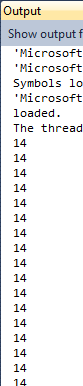
With the results like this:

image

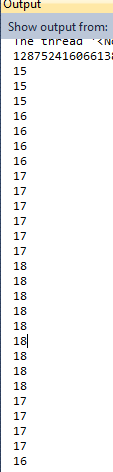
I expected to see 20MS, not 14.  In any event, I then ran the same program and moved the stick up and down.  Sure enough, the pulse modulated.

image

However, it did not modulate in discrete values.  Rather, it rose and dropped as if it was analog.

I then added this code to evaluate the rise and fall of the PWM:


static OutputPort outputPort = new OutputPort(Pins.ONBOARD_LED, false);

public static void Main()
{
    InterruptPort inputPort = new InterruptPort(Pins.GPIO_PIN_D0,
        true, Port.ResistorMode.Disabled, Port.InterruptMode.InterruptEdgeBoth);

    inputPort.OnInterrupt += new NativeEventHandler(inputPort_OnInterrupt);

    Thread.Sleep(Timeout.Infinite);
}

static long leadingEdge = 0;
static long priorPulseWidth = 0;
static void inputPort_OnInterrupt(uint data1, uint data2, DateTime time)
{
    if (data2 == 1)
    {
        leadingEdge = time.Ticks;
    }
    else
    {
        long currentPulseWidth = (time.Ticks - leadingEdge) / 1000;
        long pulseWidthChange = currentPulseWidth-priorPulseWidth;
        if(pulseWidthChange > 0)
        {
            outputPort.Write(true);
        }
        if(pulseWidthChange < 0)
        {
            outputPort.Write(false);
        }

        priorPulseWidth = currentPulseWidth;
    }
}

Sure enough, the LED went on when I pushed the stick up and turned off when I pulled the stick down – mostly.  I think that I need to smooth out the calculation so that I don’t capture each pulse – perhaps every 5th pulse. 

But the behavior is sporadic.  When I pull the stick down and leave it there, the LED sometimes blinks on and off.  Then it hit me as I was writing this – the reason why is that once the stick says still, the pulse still fires and the value is greater than the value when I was pulling the stick down.  Also, when the stick gets “pinned” to either Max up or down, the LED blinks rapidly.  I need to investigate that more.


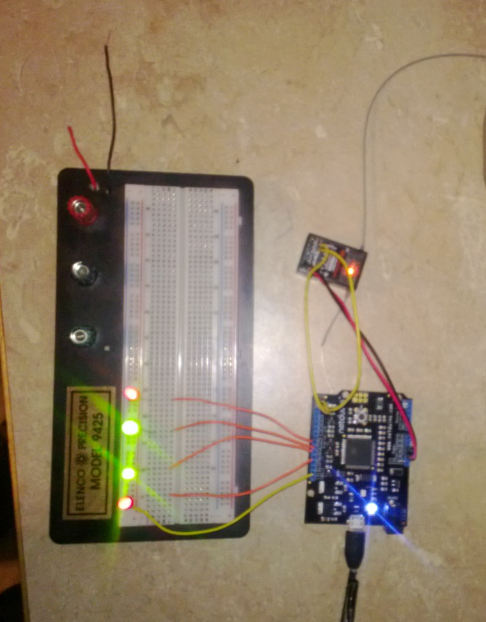
So I then hooked up 4 digital outputs to represent the up/down of the throttle and the left/right of the turn. 

image

I then added the following code to set up the 2 inputs and the 4 outputs:

static OutputPort _forwardPort = new OutputPort(Pins.GPIO_PIN_D8, false);
static OutputPort _backwardsPort = new OutputPort(Pins.GPIO_PIN_D9, false);

static OutputPort _leftPort = new OutputPort(Pins.GPIO_PIN_D10, false);
static OutputPort _rightPort = new OutputPort(Pins.GPIO_PIN_D11, false);

public static void Main()
{
    InterruptPort leftStickPort = new InterruptPort(Pins.GPIO_PIN_D0,
        true, Port.ResistorMode.Disabled, Port.InterruptMode.InterruptEdgeBoth);
    leftStickPort.OnInterrupt += new NativeEventHandler(leftStickPort_OnInterrupt);

    InterruptPort rightStickPort = new InterruptPort(Pins.GPIO_PIN_D1,
        true, Port.ResistorMode.Disabled, Port.InterruptMode.InterruptEdgeBoth);
    rightStickPort.OnInterrupt += new NativeEventHandler(rightStickPort_OnInterrupt);

    Thread.Sleep(Timeout.Infinite);
}

I then added the following code for the left stick:

static long rightStickLeadingEdge = 0;
static void rightStickPort_OnInterrupt(uint data1, uint data2, DateTime time)
{
    if (data2 == 1)
    {
        rightStickLeadingEdge = time.Ticks;
    }
    else
    {
        long currentPulseWidth = (time.Ticks - rightStickLeadingEdge) / 1000;

        switch (currentPulseWidth)
        {
            case 18:
                {
                    _forwardPort.Write(true);
                    _backwardsPort.Write(false);
                    break;
                }
            case 17:
                {
                    _forwardPort.Write(true);
                    _backwardsPort.Write(false);
                    break;
                }
            case 16:
                {
                    _forwardPort.Write(true);
                    _backwardsPort.Write(false);
                    break;
                }
            case 15:
                {
                    _forwardPort.Write(true);
                    _backwardsPort.Write(false);
                    break;
                }
            case 14:
                {
                    _forwardPort.Write(false);
                    _backwardsPort.Write(false);
                    break;
                }
            case 13:
                {
                    _forwardPort.Write(false);
                    _backwardsPort.Write(true);
                    break;
                }
            case 12:
                {
                    _forwardPort.Write(false);
                    _backwardsPort.Write(true);
                    break;
                }
            case 11:
                {
                    _forwardPort.Write(false);
                    _backwardsPort.Write(true);
                    break;
                }
            default:
                {
                    _forwardPort.Write(false);
                    _backwardsPort.Write(false);
                    break;
                }
        }
    }
}

Sure enough, moving the stick and down saw the expected response from the LEDs.  I went to test the right/left stick

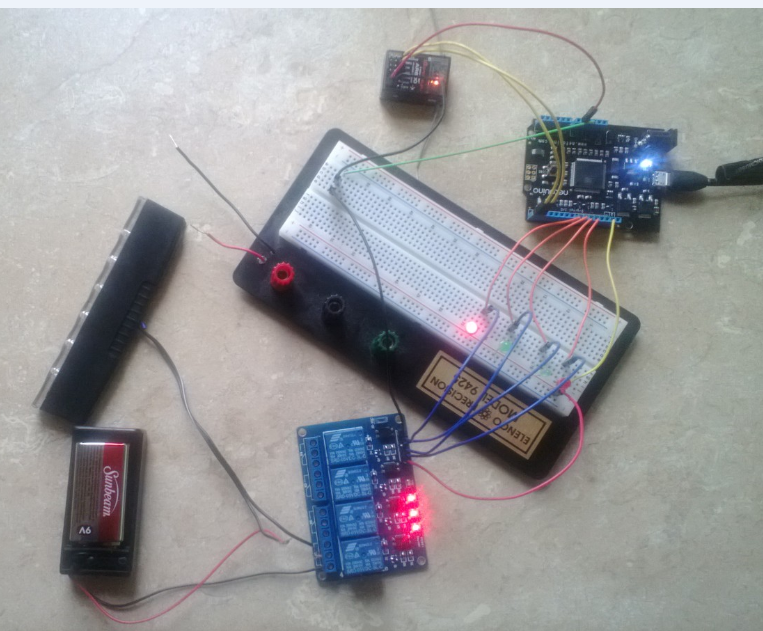
and that also acted as expected.  I then hooked up a relay module to the output and used a higher-voltage power source (the relay can go up to 250) and a small light.  Here is the final rig (note that I am using the Netduino 5.0V for the power source of the RC receiver):

image

Sure enough, I can now control standard household electrical currents using a RC transmitter and receiver.

Capturing PWM on a Netduino

I have been trying to send signals to my Netduino from a R/C transmitter and capture and analyze those signals.  To that end, I have a Spektrum AR600 RC transmitter and receiver.  My first stop was the Netduino forms where there was one very helpful person named Hanzibal who answered my questions.  I also had to use this great article that explains how PWM works in an RC unit.

Basically, the RC receiver sends a pulse of electricity every 20 MS.  This pulse will one of three lengths: 1 millisecond, 1.5 millisecond, or 2 milliseconds.  As I understand the article, 1.5 milliseconds means that servo should stay in the same position it is currently in (do nothing), 1 millisecond means that it should move down a given number of degrees and 2 milliseconds means that the servo goes up a given number of degrees.  The servo itself determines the turn rate and if the servo is at its max, it will ignore the signal.

My first challenge is to set up my hardware that will:

  1. 1) not destroy the hardware I am using
  2. 2) capture the PWMs

Thanks for Hanizbal and some significant trial and error, I set up my Netduino like so:

image

You will notice that the RC receiver is powered by a 4.8 V battery pack versus the 3.3V or 5.0V output of the Netduino.

Some of the things I learned are:

You don’t need a ground from the RC receiver to the Netduino board.  The only wire you need to connect is the Signal wire from the RC receiver to the Digital I/O port.

This is not completely fool-proof.  Sometimes when I deploy with the RC receiver connected to the board, I get this:

imageimage

I found that unplugging the Netduino cord and plugged it back into the Netduino, the code published.

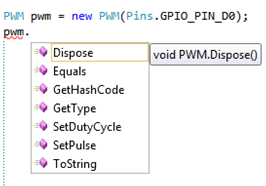
With this in mind, I jumped into Visual Studio fired up a Netduino project.  I first looked at the PWM class

   image

The problem is that the PWM class does not have a GetPulse method or EventHandler.  This is a limitation that is not present in the Arduino as documented in this post.

I then looked at the Interrupt Port class like this person did.  I created some code like this:

public static void Main()
{

    InterruptPort inputPort = new InterruptPort(Pins.GPIO_PIN_D0,
        true, Port.ResistorMode.Disabled, Port.InterruptMode.InterruptEdgeBoth);

    inputPort.OnInterrupt += new NativeEventHandler(inputPort_OnInterrupt);

    Thread.Sleep(3000);
}

static void inputPort_OnInterrupt(uint data1, uint data2, DateTime time)
{
    Debug.Print(data2 + ":" + time.Millisecond + ":" + time.Ticks);
}

When I ran it with the RC receiver unplugged I got this:

Done.

Waiting for debug commands…

The thread ‘<No Name>’ (0x1) has exited with code 0 (0x0).

So the port was not receiving any signals or generating any kind of false signal.

When the RC receiver was plugged into the port, I got:

1:273:128752416062731306

0:274:128752416062743466

1:295:128752416062957226

0:296:128752416062969386

1:318:128752416063183360

0:319:128752416063195520

1:340:128752416063409280

0:342:128752416063421653

1:363:128752416063635413

0:364:128752416063647573

1:386:128752416063861333

0:387:128752416063873706

1:408:128752416064087466

I then fiddled around with the InterruptMode and this is what I found:

  • InterruptEdgeLow= 0
  • InterruptEdgeLevelLow= None
  • InterruptEdgeHigh= 1
  • InterruptEdgeLevelHigh= None
  • InterruptEdge=Both 1 && 0
  • InterruptNone= Exception

So looking at the values of the interrupts, I can’t use time.Milliseconds because it is an Int32 – it doesn’t have the level of precision to read 1.5 MS.

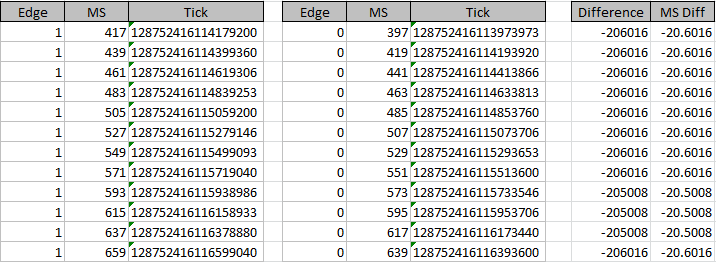
I then took this dataset and calculated the difference in ticks between the 0 and the 1 for each group:

image

With 10,000 ticks in a millisecond, it means the neutral pulse is 1.2 MS, not 1.5 MS as I initially thought.

This looks promising because at least it appears to be consistent

The battery pack supplying the 4.8V to the RC receiver then died.  I disconnected the battery pack and plugged the receiver into the Netduino 5V output and ran the same experiment again:

image

So the Period Length depends on the amount voltage coming in.  Also, it the difference is no longer consistent.

I decided to run 1 more experiment – push the stick up and down with the 5V power source:

image


Sure enough, The PW does change.  The range is from 1.0016 to  2.  The problem is that there is a wide range of possible values for the Pulse Width:

image

I was expecting only 3 values.  This is showing values 1.0, 1.1, 1.2, etc…  Without a discrete value, there is no way of determining if the stick is going up or down – unless perhaps I can determine that anything under 1.5 is down and above is up?  More hacking is in order…

Dependency Injection: Keeping It Simple

When I gave my talk at TriNug’s SIG about the SOLID principles, I whipped up an example of Dependency Injection (DI) that some people really liked.  I decided to blog about it.  Consider a basic console application that has a single Interface included – Animal.  The Animal interface looks like this:

public interface IAnimal
{
    void Talk();
    void Eat();
}

The Console application includes a couple of classes that implement the interface:

public class Elephant: IAnimal
{
    public void Talk()
    {
        Console.WriteLine("Trumpet");
    }

    public void Eat()
    {
        Console.WriteLine("Yummy Peanuts");
    }
}

public class Seal(): IAnimal 
{
    public void Talk()
    {
        Console.WriteLine("Ark Ark");
    }

    public void Eat()
    {
        Console.WriteLine("Yummy Fish");
    }
}

Then in the Main method, I want to inject in an animal at run time.  I could write something like this:

static void Main(string[] args)
{
    IAnimal animal = ????;
    animal.Talk();
    animal.Eat();
}

What I don’t want to do is to have a switch/if..then statement in the Main function because as new animals are added to my project, I would have to update existing code and violate the Open/Closed principle.  I know if a couple of ways around this problem:

  • Using a Dependency Injection Framework like Unity
  • Using Microsoft Extension Framework
  • Use a Factory Pattern
  • Injecting the name of the class and using Activator to resolve. Note that this name can come from a database call or a .config file.

A DI framework seems a bit too heavy for this kind of solution.  I tried MEF and quickly gave up, Using a factory pattern delays but does not alter the problem resolution.  I think the Activator keyword is the best solution to my problem.

To that end, I added a section in my .config file like this:

<configuration>
  <appSettings>
    <add key="animalTypeName" value="Tff.PoorMansDependencyInjection.Seal"/>
  </appSettings>
</configuration>

And then in my Main method:

String animalTypeName = ConfigurationManager.AppSettings["animalTypeName"].ToString();
Type animalType = Type.GetType(animalTypeName);
IAnimal animal = (IAnimal)Activator.CreateInstance(animalType);
animal.Talk();
animal.Eat();
Console.ReadKey();

And I get this:

image

HTML5 && MCSD

I was interested in keeping up my certifications with Microsoft and I am at a decision point.  I went to their new MCSD website here and cam to a decision point.  I could either get a MCSC in Web Applications using HTML5 or get a MCSD for Windows Store apps using C# and XAML.  Not sure what to pick, I hit Dice:

image

or

image

So I started with this:

image


and in their  1st java script example:

<!DOCTYPE html>
<html>
<head>
    <title>This is a test</title>
</head>
<body>
    <script>
        var drink = "Energy Drink";
        var lyrics = "";
        var cans = 99;

        while (cans > 0) {
            lyrics = lyrics + cans + " cans of " + drink + " on the wall <br>";
            lyrics = lyrics + cans + "cans of " + drink + "<br>";
            lyrics = lyrics + "Take one down, pass it around,<br>";

            if (cans > 1) {
                lyrics = lyrics + (cans - 1) + " cans of " + drink + " on the wall <br>";
            }
            else {
                lyrics = lyrics + "No more cans of " + drink + " on the wall <br>";
            }
            cans = cans - 1;
        }

        document.write(lyrics);
    </script>
</body>
</html>

I got

image

So I hit up NuGet and I found:

image


That still didn’t do the trick so I went to this site and realized I had to point my browser to HTML5

image

But that still didn’t work.  I can get it to work in VS2010 like this:

<script type="text/javascript">

image

But I want to remove the script type

So I hit up Twitter – still no luck.  I gave up.  I will have to chalk it up to VS2010 quirkiness.

Remote Debugging On Azure

I decided that I needed to learn a bit about remote debugging on Azure.  I know that you are supposed to use the Azure emulator to hash out your problems before hand, but I still would like the ability to debug remotely in case the need comes up.

I Googled on Bing how to do it and I ran across this article that seems to be a good place to start.  It looks like I need to upload the VS2010 remote tools to Azure as a necessary but not sufficient step.  The thing is, I have no idea how to do that.  Do I upload the tools only once to my azure account?  Is it site && project specific?  I don’t know and Binging on Google doesn’t seem to help.

I then looked at this article but it assumes that I am using a Virtual Machine and installing the MSVSMON.exe to the VM.  If that was the case, I would just install VS2010 to the VM and debug there.  So that article is of no help.

I am stuck on this line of the 1st article: “You can find the tools on Microsoft Download Center here, and then upload to your storage account using whatever Windows Azure Storage account tool of your choice. “  Going over to my Azure account, I see a “Storage” section.

So I create a new storage like so:

image

The illogical meter is running high.  Why should I need to install Data Services to install MSVSMON?  I can do Computer-> Cloud Service, but that us the same as creating a Cloud Service.

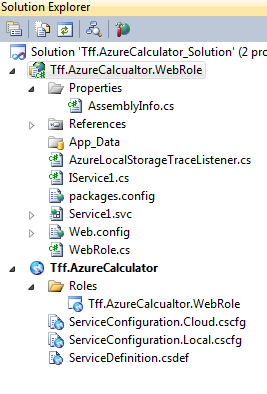
I decided to work in the other direction.  I created a new Azure hosted WCF Service in VS2010 like so:


image


and after the default template of this:

image

I changed Service1 name and then added a single method that returns the sum of two numbers:

public class AddingMachine : IAddingMachine
{
    public Int32 Add(Int32 number1, Int32 number2)
    {
        return number1 + number2;
    }

}

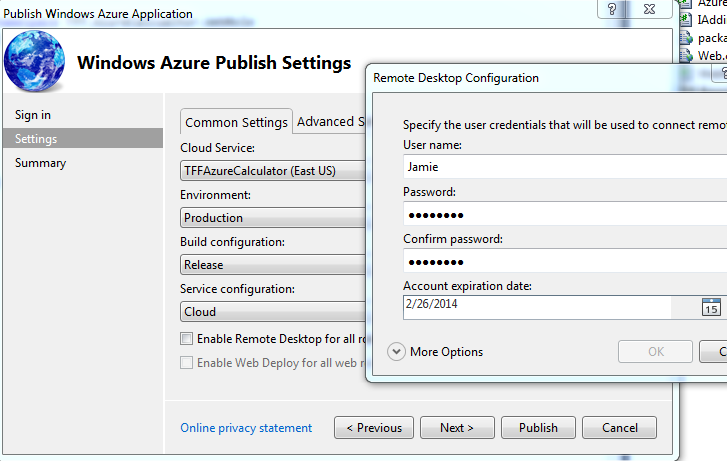
I then deployed his to the Azure server via Visual Studio – 1st I set up the deployment parameters

image


Then I added a certificate

image

And during the deployment I got this:

image

After a couple of minutes, I got the site up on Azure:

image

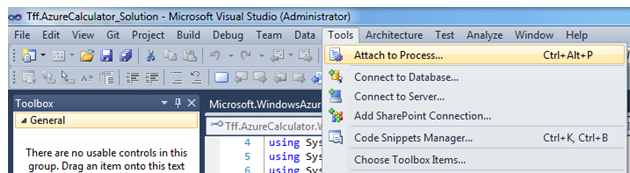
Which I assume might be the way to remote debug?  I then hit myself in the head that the Build Configuration is Release (the default) and not debug and I need the debug symbols to remote debug.  I deployed again and then I opened attach to process in Visual Studio:

image

I then pumped in the name of the site:

image

Doh!

Time to go to Brian Hitney’s office hours!

Data Transfer using WCF

So forgetting OData for a minute (not hard to do), I was thinking about how to transfer SDO classes to and from a WCF service.  All of the WCF projects I have worked on have been POCOs with the appropriate WCF attributes from System.ServiceModel and System.Runtime.Serialization.  I never thought about putting an ADO.NET recordset as a return value from a WCF method.  I also wondered about putting the recordset as a parameter to a WCF method.  I assume it is possible, I was curious about how much effort it would take.  I Binged on Google (or was it Googled on Bing) and these was nothing that jumped out.

I fired up a typical WCF project and then added a consuming console app to the solution.  I then wrote an interface that returns a dataTable like so:

[ServiceContract]
public interface IDataFactory
{
    [OperationContract]
    DataTable GetDataTable();
}
public class DataFactory : IDataFactory
{
    public DataTable GetDataTable()
    {
        throw new NotImplementedException();
    }
}

I then hit F6 and sure enough it compiled.  I then changed the implementation to this

public DataTable GetDataTable()
{
    DataTable dataTable = new DataTable();
    dataTable.TableName = "Customers";
    dataTable.Columns.Add("CustomerId");
    dataTable.Columns.Add("CustomerName");

    DataRow row1 = dataTable.NewRow();
    row1[0] = 1;
    row1[1] = "Customer #1";
    dataTable.Rows.Add(row1);
    DataRow row2 = dataTable.NewRow();
    row2[0] = 2;
    row2[1] = "Customer #2";
    dataTable.Rows.Add(row2);

    return dataTable;

}

and I am still compiling.  So then I went to the client and added a reference and it worked:

image

I then fired up the client like so:

static void Main(string[] args)
{
    Console.WriteLine("Starting");

    DataFactoryClient client = new DataFactoryClient();
    DataTable table = client.GetDataTable();

    foreach (DataRow row in table.Rows)
    {
        Console.WriteLine(String.Format("Customer {0} named {1}.",row[0],row[1]));
    }

    Console.WriteLine("Ending");
    Console.ReadKey();
}

And I hit F5:

image


Wow.  Microsoft made this stupid simple.

I then though about how to pass in an individual data row. 

[OperationContract]
String InsertDataRow(DataRow row);
public String InsertDataRow(DataRow row)
{
    return String.Format("You entered {0}.", row[0].ToString());
}

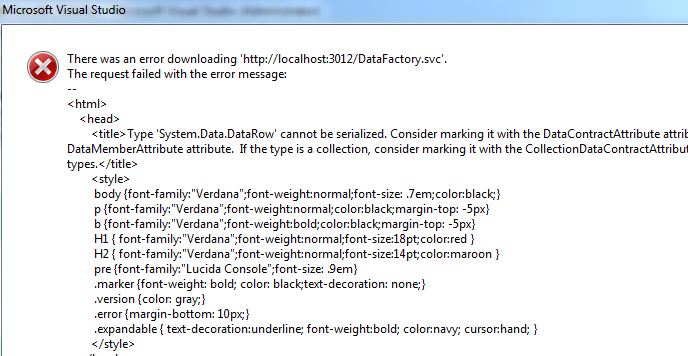
And when I hit update reference from my consuming app, I got this:

image

Crud!  I then thought I could just add a serializable data row like so:

[Serializable]
public class SerializableDataRow: DataRow
{
}

And this:

[OperationContract]
String InsertDataRow(SerializableDataRow row);

But no, I get this:

image

So now I have to jump down a rabbit hole and possible violate the Liskov Substitution Principle.  Since I want things to be stupid simple, I gave up with inheritance.  I then found this post.  So either use a datatable (and suffer the overhead) or convert the DataRow into something that can be seialized (like XML, custom classes, etc..)

So I give Microsoft a C on this – somewhat stupid simple, but not entirely…

Web Stress Tests: Part 2

Now that I have a web performance test that is run repeatedly by the loadtest, I want to alter a couple of things.  First, I want to change the Url from local host to another environment.  In my case, WinHost.  Here are the two Urls:

http://localhost:3002/AddingMachine.svc
http://www.tenfingersfree.com/tff/AddingMachine.svc

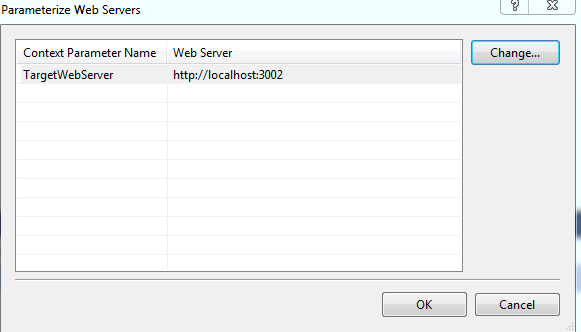
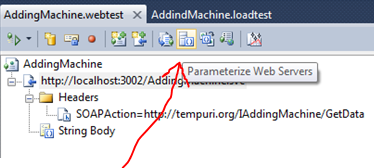
To allow the Url to be configurable, I want into the Web Text Editor and pressed on the parameterize Web Servers button

image

After this dialog box:

image

The Web Test in the project auto-magically puts in a parameter into its Url property

image

I then updated the Url to include the service name

image

I then ran my web test and it failed.

image

Apparently, I don’t need the service name in there.  Taking it out gives me green.

I then swapped in the WinHost web server and I still get green


So the next thing I want to make dynamic are the input parameters.  To that end, I created a notepad file like so:

image

I then changed the extension to .csv and imported it into the web test via the Add Data Source button on the test


image

It looks by default it assumes the 1st row is a column heading.  The only thing I changed from the default is the access method property of the table to random:

image

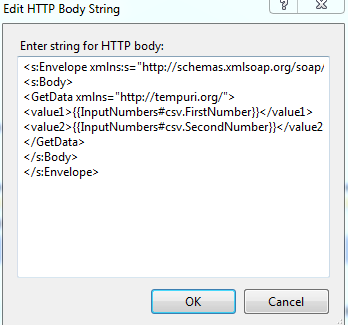
I now have to get these values into the String Body.  The MSDN documentation assumes that I will be altering input via the query parameter or the post parameters.  I am not doing that, I need to update the String Body.

image

to

image

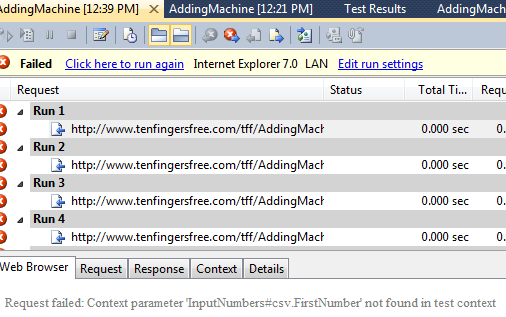
When I ran it, I got this:

image

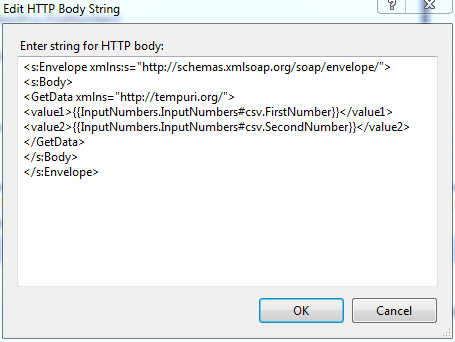
I then binged into this article that showed me how my data source syntax was wrong and how to get the correct syntax generated for me:


image


And I updated the string body like so:

image

And sure enough – different numbers thrown at my web service:

image

Wahoo!

Web Performance Test


So I decided I wanted to learn more about the testing capabilities of VS2010 – esp. load testing a web service.  I fired up Visual Studio and created an out of the box WCF Service with the following 1 method:

public class AddingMachine : IAddingMachine
{
    public int GetData(int value1, int value2)
    {
        Random random = new Random();
        Int32 delay = random.Next(15);
        Thread.Sleep(TimeSpan.FromSeconds(delay));

        return value1 + value2;
    }
}

I then added a new test project using a Web Performance Test template:

image

I then hit record, closed IE which automatically popped up, and navigated to the service using the WCF Test Client. 

image

I am sure you are not surprised that nothing was recorded.  The problem is that the out of the box Web Performance Test assumes that you are calling a web site so I couldn’t just hit a recording and navigate to a webservice the same way I would navigate to a website.

Instead, I had to right click and add a new web service request.  I then changed the Url property to the service location and tried to run the test.

image

I then binged on Google and ran across a couple of Stack Overflow posts and this nugget on MSDN.  Apparently, I need to use Fiddler to capture the request.  I fired up Fiddler and WCF Test Client (remember the “.” after local host) and sure enough and can make the call and intercept the traffic:

image

I copied the entire request from Fiddler:

image

But I got this when I ran the test I got the same exception.  The problem is that the article assumes an .asmx web service and I am using WCF.  Digging into the article’s code sample, I realized that I needed a Header like so:

image

and I needed to put only the body from Fiddler into the String Body property

Fiddler:

image

WebTest:

image

And green is good

image

Why .NET Developers Don’t Unit Test

Short answer: It’s Microsoft’s fault.

Long answer:

I am going to describe the journey of Well Intention Programmer (WIP).  He started writing software code in the mid-90s using this book:

image

and when .NET came out he slid over to C#
image

Along the way, he has written several highly-regarded programs that always exceed expectations and came in under-budget in the the 1st release but struggled in subsequent releases.  So the WIP decides to learn about how to improve his code quality to help him with the old code and to deliver more timely 2.x releases.  He picks up theses books:

imageimage

And  learns that he shouldn’t change a single line of code without covering unit tests.  Eager to try unit testing out, he opens up some legacy code and finds this:

public List<String> GetRegions()
{
    List<String> regions = new List<string>();
    String connectionString = @"Server=.;Database=Northwind;Trusted_Connection=True;";

    using(SqlConnection connection = new SqlConnection(connectionString))
    {
        String commandText = "Select * from Region";
        using (SqlCommand command = new SqlCommand(commandText, connection))
        {
            connection.Open();
            SqlDataReader reader = command.ExecuteReader();
            while (reader.Read())
            {
                regions.Add(reader["RegionDescription"].ToString());
            }
        }
    }

    return regions;
}

So the 1st thing the WIP might want to refactor is the hard-coded connection string in the function.  Microsoft has been telling the WIP for years that this string belongs in the .config file.  And it really does – not so much because you are going to swap out your DBMS (never happens) but because you should have environment-specific settings (that you don’t have on your local workstation).

To protect himself from the change, the WIP right clicks on the method name in VS2010
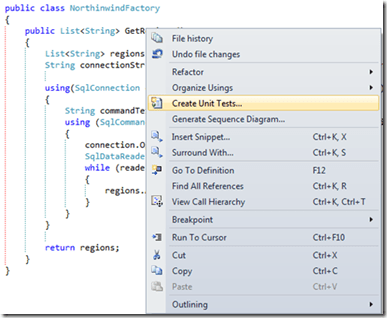
image

and he gets this out of the box test snippet like so:

[TestClass()]
public class NorthinwindFactoryTests
{
    [TestMethod()]
    public void GetRegionsTest()
    {
        NorthinwindFactory target = new NorthinwindFactory(); // TODO: Initialize to an appropriate value
        List<string> expected = null; // TODO: Initialize to an appropriate value
        List<string> actual;
        actual = target.GetRegions();
        Assert.AreEqual(expected, actual);
        Assert.Inconclusive("Verify the correctness of this test method.");
    }
}

He then alters it like so, using the Microsoft snippet to guide him.

[TestMethod()]
public void GetRegionsTest()
{
    NorthinwindFactory target = new NorthinwindFactory();
    Int32 expected = 4;
    Int32 actual = target.GetRegions().Count;
    Assert.AreEqual(expected, actual);
}

When he runs it, the test passes.

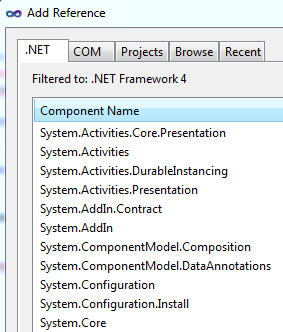
He then adds a reference to System.Configuration

image

The WIP comments out the initial line and then add a functionally equivalent line using a .config file:

//String connectionString = @"Server=.;Database=Northwind;Trusted_Connection=True;";
String connectionString = ConfigurationManager.ConnectionStrings["NorthwindConnectionString"].ConnectionString;

He re-runs the unit test and it still passes.  Felling good, he checks the code back into source.  Unfortunately, when the build goes to TEST/QA, it breaks because they have a special .config they use and that build server doesn’t have that database installed.  After a couple of hours of wrangling, WIP gets the correct .config into all environments and includes Northwind as part of the build.

WIP then reads that unit tests shouldn’t have external dependencies like databases and .config files.  To unit test right, he reads, he should use a Mocking Framework and he heard that MOQ is the best out there (editor comment: he’s right).  So WIP downloads MOQ and tries to mock his ConfigurationManager:

image

After a couple of hours of researching, he decides that the ConfigurationManager cannot be mocked.  Unwilling to give up on mocking, he fires up Rhino Mocks.  Alas:

image

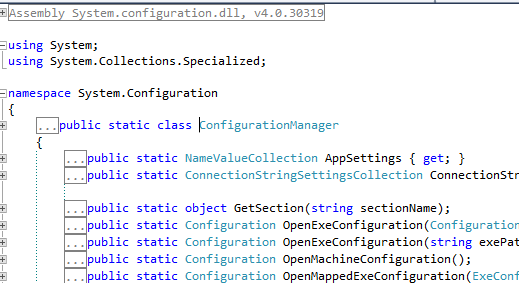
Still unwilling to give up, he hits F12 on the Configuration Manager to see if it uses an interface that he can mock.  Perhaps an IConfigurationManager?  Nope.

image

so now the WIP has spent several of hours and he is nowhere with Unit Tests.

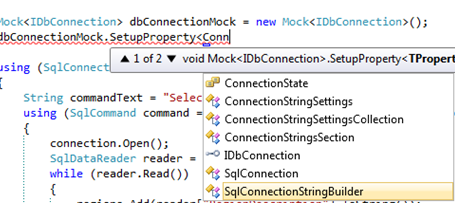
So forgetting ConfigurationManager, he decided to mock SqlConnection.  It starts out well enough:
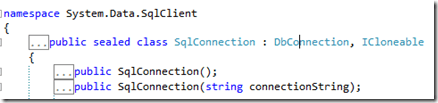
image

and then

image

So that is good.  he can create a mock connection like so but he can’t use it without casting.

image

image

So he just can’t set the connection string.  This violation of the Law Of Demeter makes it really hard.  All he wanted to do is set a String value called ConnectionString and instead he has to learn about the internal workings of the DbConnection class.

So the WIP decided that he needs to re-write the entire method and use Entity Framework.  After all, EF is the new new data access technology and it must be mockable.  So the WIP goes out to this great blog post and is disappointed to learn that EF is even harder to mock than ADO.NET classes.

The WIP then turns his attention to his UI and tried to unit test/mock the visual data controls in ASP.NET.  Already half-expecting the answer, the WIP is not surprised
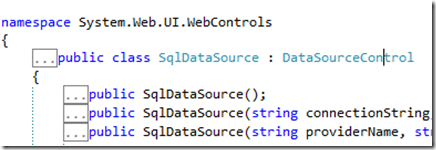
image

WIP probably gives up.

So whose fault is it?

The books?  Low. The point of the books are to teach the language, not good coding practices.  And basic books that don’t have a UI to demonstrate a concept (versus using unit tests) would take attention away from the primary focus – learning the language.  The most successful books have real working, albeit simple, UI projects.
The developer?  Low. WIP is hard-working, want to do the right thing, and are going to try unit testing.  He also has deadlines.

Unit Tests Advertising? Low.  True that unit tests have generally been forced upon dev teams by people better paid, with cooler job titles if not smarter than them.  Also, these smarter people also likely introduce different, convoluted techniques of hundreds of lines long or that use parts of the .NET language spec that only Phds understand to work around the fact that lots of the .NET APIs are untestable.

The projects?  Medium.  Many .NET projects do not have any business logic – they are simply CRUD UIs on top of a database.  Unit tests can’t tell you if the Sql string returns the expected result.  And in lots of projects, that is all it has.  Also, in lots of .NET projects, any logic that could be tested is intermingled with the untestable code.  In the example above, the assumption tha GetRegions() is testable is false.

The API?  Absolutely. Every major class in Microsoft’s data stack are un-mockable and therefore un-unit testable.   Would it really kill MSFT to have an interface for these classes because perhaps, just perhaps, the classes won’t be only used in the way that they were thought of 15-20 years ago?  I get that Microsoft has been dragging code and outdated APIs though the different versions of .NET and it has to be frustrating to them that they can’t introduce changes easily.  However, until Microsoft starts making the classes that everyone uses Mockable, unit testing will not take off.  And it is not just ADO.NET, WinForms, WebForms, System.IO, etc… all are un-mockable.

So some people might ask.  Why not use VS2012 MSFT mocks?  Well, that is a clown show.  It flies in the face of iterative development – every new object, regenerate your mocks.  Also, the syntax pales in comparison to MOQ.  It is a compensation for poor class design that has been dragged forward – interest on technical debt if you will…  I think Microsoft should change their APIs, not build tools to get around their API’s failings.