Visual Studio 2010 Extract Method

A common joke is that more CPU cycles are wasted than are actually used on a typical desktop computer.  Personally, I feel the same way about Visual Studio – I feel like I only use 25% of its capabilities.  I ran into a great refactoring problem over the weekend that demonstrated a really cool feature of VS2010 that literally saved me hours of wasted effort.

As you know, I am working on a Windows Phone 7 port of the timeless classic Panzer General.  I am have gotten the board set up with icons, but I want to know determine the acceptable movement and line of site for an individual unit.  To do so, I would need to loop over all adjacent hexes and see if they were close to the unit – and then loop over those hexes adjacent hexes until I was past an X distance.

I first tried to whip up a recursive method to do this – and after 1 hour or so, I was failing miserably.  I then decided to take a different approach – I hand-wrote each loop (hard coded in) like so:

private static List<Hex> GetTotalAdjacentHexes(Hex currentHex, Int32 maxDistance) { List<Hex> hexes = new List<Hex>(); List<Hex> tempList = GetAdjacentHexes(currentHex); foreach (Hex hex in tempList) { hex.MovementCost = HexFactory.CalcualteMovementCost(hex, currentHex.CurrentUnit); hexes.Add(hex); var tempList2 = GetAdjacentHexes(hex); foreach (Hex hex2 in tempList2) { hex2.MovementCost = HexFactory.CalcualteMovementCost(hex, currentHex.CurrentUnit); hexes.Add(hex2); var tempList3 = GetAdjacentHexes(hex2); foreach (Hex hex3 in tempList3) { hex3.MovementCost = HexFactory.CalcualteMovementCost(hex, currentHex.CurrentUnit); hexes.Add(hex3); var tempList4 = GetAdjacentHexes(hex3); foreach (Hex hex4 in tempList4) { hex4.MovementCost = HexFactory.CalcualteMovementCost(hex, currentHex.CurrentUnit); hexes.Add(hex4); } } } } return hexes; }

The thing is – it works:
image

After an hour of trying to hand-write recursion, I went a different direction – parse out each piece and let VS2010 help me. I too the last for..each (hex4…) and put it into a new method

Just following the default naming conventions, I now have 4 methods that look eerily similar:

private static List<Hex> GetTotalAdjacentHexes(Hex currentHex, Int32 maxDistance) { List<Hex> hexes = new List<Hex>(); List<Hex> tempList = GetAdjacentHexes(currentHex); NewMethod(currentHex, hexes, tempList); return hexes; } private static void NewMethod(Hex currentHex, List<Hex> hexes, List<Hex> tempList) { foreach (Hex hex in tempList) { hex.MovementCost = HexFactory.CalcualteMovementCost(hex, currentHex.CurrentUnit); hexes.Add(hex); var tempList2 = GetAdjacentHexes(hex); NewMethod2(currentHex, hexes, hex, tempList2); } } private static void NewMethod2(Hex currentHex, List<Hex> hexes, Hex hex, List<Hex> tempList2) { foreach (Hex hex2 in tempList2) { hex2.MovementCost = HexFactory.CalcualteMovementCost(hex, currentHex.CurrentUnit); hexes.Add(hex2); var tempList3 = GetAdjacentHexes(hex2); NewMethod1(currentHex, hexes, hex, tempList3); } } private static void NewMethod1(Hex currentHex, List<Hex> hexes, Hex hex, List<Hex> tempList3) { foreach (Hex hex3 in tempList3) { hex3.MovementCost = HexFactory.CalcualteMovementCost(hex, currentHex.CurrentUnit); hexes.Add(hex3); var tempList4 = GetAdjacentHexes(hex3); NewMethod(currentHex, hexes, hex, tempList4); } } private static void NewMethod(Hex currentHex, List<Hex> hexes, Hex hex, List<Hex> tempList4) { foreach (Hex hex4 in tempList4) { hex4.MovementCost = HexFactory.CalcualteMovementCost(hex, currentHex.CurrentUnit); hexes.Add(hex4); } }

You can notice that the 3 final methods all have the same signature. The first thing I did was to make the internal variables sufficiently generic, for example:

private static void NewMethod(Hex currentHex, List<Hex> hexes, Hex hex, List<Hex> currentList) { foreach (Hex tempHex in currentList) { tempHex.MovementCost = HexFactory.CalcualteMovementCost(hex, currentHex.CurrentUnit); hexes.Add(tempHex); } }

I then realized that there are 3 groups of methods. Method Type 1 is for the 1st time through; Method Type 2 is for second to total-1 times through; and Method Type 3 is for the last time.

Concentrating on Type 2 for a second, you can see that they are identical except that 1 calls the other. That seems like a prime candidate for recursion:

private static void NewMethod2(Hex currentHex, List<Hex> hexes, Hex hex, List<Hex> currentList) { foreach (Hex tempHex in currentList) { tempHex.MovementCost = HexFactory.CalcualteMovementCost(hex, currentHex.CurrentUnit); hexes.Add(tempHex); List<Hex> tempList = GetAdjacentHexes(tempHex); NewMethod1(currentHex, hexes, hex, tempList); } }

I changed this line:

NewMethod1(currentHex, hexes, hex, tempList);

To this:

NewMethod2(currentHex, hexes, hex, tempList);

And hit F5 and got this after a delay:

image

Which is another way of saying out of memory… Basically, there is no way out of the for…each without some kind of counter. So I threw a counter into the method and assigned a magic number of 2 (note the last time though, it only assigns and does not recurse. if I added the counter above the for..each, then the last time though would not assign):

private static void NewMethod2(Hex currentHex, List<Hex> hexes, Hex hex, List<Hex> currentList, int counter) { counter++; { foreach (Hex tempHex in currentList) { tempHex.MovementCost = HexFactory.CalcualteMovementCost(hex, currentHex.CurrentUnit); hexes.Add(tempHex); if (counter < 2) { List<Hex> tempList = GetAdjacentHexes(tempHex); NewMethod2(currentHex, hexes, hex, tempList, counter); } } } }

Sure enough, it worked. I then tackled the 1st method by adding hat counter variable and a Hex parameter that is initially placed with the 1st loop though of the collection and then I renamed the method:

private static List<Hex> GetTotalAdjacentHexes(Hex currentHex, Int32 maxDistance) { List<Hex> hexes = new List<Hex>(); List<Hex> tempList = GetAdjacentHexes(currentHex); foreach (Hex hex in tempList) { GetAdjacentHexes(currentHex, hexes, hex, tempList, 0, maxDistance); } return hexes; } private static void GetAdjacentHexes(Hex currentHex, List<Hex> hexes, Hex hex, List<Hex> currentList, int distanceCounter, int maxDistance) { distanceCounter++; { foreach (Hex tempHex in currentList) { tempHex.MovementCost = HexFactory.CalcualteMovementCost(hex, currentHex.CurrentUnit); hexes.Add(tempHex); if (distanceCounter < maxDistance) { List<Hex> tempList = GetAdjacentHexes(tempHex); GetAdjacentHexes(currentHex, hexes, hex, tempList, distanceCounter, maxDistance); } } }

Voila. A working recursive method (that is begging to be refactored even more). Undoubtedly, VS2010 and its extract method refactoring saved me hours.

WP7 and the Phone Controls Toolkit

I started hooking up events to my Panzer General Port over the weekend.  There are some see events I want to capture and react to: a tap to activate a cell, a double tap to display information about the cell, a pinch to make the screen smaller or larger, and a swipe to move to a different location on the screen.  Of these event, the pinch was the easiest to handle:

private void GestureListener_PinchCompleted(object sender, Microsoft.Phone.Controls.PinchGestureEventArgs e) { if (e.DistanceRatio < 1) { if (Game.CurrentViewLevel > 1) { Game.CurrentViewLevel--; UpdateHexes(); } } else { if (Game.CurrentViewLevel < 3) { Game.CurrentViewLevel++; UpdateHexes(); } } }

with the UpdateHexes basically redrawing the hexes that make up the board:

private void UpdateHexes() { this.MainCanvas.Children.Clear(); Game.CurrentBoard = BoardFactory.GetBoard(1); foreach (Hex hex in Game.CurrentBoard) { this.MainCanvas.Children.Add(hex); } this.MainCanvas.Width = BoardFactory.BoardWidth; this.MainCanvas.Height = BoardFactory.BoardHeight; }

It works great – here is the same view with the different zoom levels.

image

One of the more annoying things is that the screen “bounces” when you drag it past its designated screen size.  Apparently, this is by design and no one has an easy way to disable this “feature”.  You can ready my dialog on AppHub here.

The next event was the tap.  This was easy to implement on the hex level, however, it was really hard to implement on the board level.  I need it at the board level because the Hex class is unaware of its surroundings and many of the units actions in the game are dependent on its surroundings – what hexes it can go to, can it attack, etc…  I solved this problem with alot of trial and error and my old friend, the Pythagoriem Theorem:

private static Hex GetClosestHex(Point point) { double testDistance = 0; double finalDistance = 99999; Hex closestHex = null; double a = 0; double b = 0; foreach (Hex hex in Game.CurrentBoard) { a = point.X - hex.CenterPoint.X; b = point.Y - hex.CenterPoint.Y; testDistance = Math.Sqrt(a * a + b * b); if (testDistance < finalDistance) { finalDistance = testDistance; closestHex = hex; } } return closestHex; }

The point is found in EventArgument for both Tap, Dopuble Tap, Drag Complete events:

private void GestureListener_Tap(object sender, Microsoft.Phone.Controls.GestureEventArgs e) { Hex closestHex = GetClosestHex(e.GetPosition(this.MainCanvas)); if (closestHex.CurrentUnit != null) UpdateHexes(closestHex); }

I finally added in a Kludge to determine the adjacent hexes for the selected hexes like so:

private static List<Hex> GetAdjacentHexes(Hex currentHex) { List<Hex> adjacentHexes = new List<Hex>(); //Above int targetColumnNumber = currentHex.ColumnNumber; int targetRowNumber = currentHex.RowNumber - 1; adjacentHexes.Add(GetHex(targetColumnNumber, targetRowNumber)); //Below targetColumnNumber = currentHex.ColumnNumber; targetRowNumber = currentHex.RowNumber +1 ; adjacentHexes.Add(GetHex(targetColumnNumber, targetRowNumber)); //Top Left targetColumnNumber = currentHex.ColumnNumber -1 ; if (currentHex.ColumnNumber % 2 == 0) targetRowNumber = currentHex.RowNumber - 1; else targetRowNumber = currentHex.RowNumber; adjacentHexes.Add(GetHex(targetColumnNumber, targetRowNumber)); //Bottom Left targetColumnNumber = currentHex.ColumnNumber - 1; if (currentHex.ColumnNumber % 2 == 0) targetRowNumber = currentHex.RowNumber; else targetRowNumber = currentHex.RowNumber +1; adjacentHexes.Add(GetHex(targetColumnNumber, targetRowNumber)); //Top Right targetColumnNumber = currentHex.ColumnNumber + 1; if (currentHex.ColumnNumber % 2 == 0) targetRowNumber = currentHex.RowNumber - 1; else targetRowNumber = currentHex.RowNumber; adjacentHexes.Add(GetHex(targetColumnNumber, targetRowNumber)); //Bottom Right targetColumnNumber = currentHex.ColumnNumber + 1; if (currentHex.ColumnNumber % 2 == 0) targetRowNumber = currentHex.RowNumber; else targetRowNumber = currentHex.RowNumber +1; adjacentHexes.Add(GetHex(targetColumnNumber, targetRowNumber)); return adjacentHexes; } private static Hex GetHex(int targetColumnNumber, int targetRowNumber) { Hex targetHex = (from hex in Game.CurrentBoard where hex.ColumnNumber == targetColumnNumber && hex.RowNumber == targetRowNumber select hex).First(); if (targetHex != null) return targetHex; else return null; }


Note how the LINQ makes for search for the correct hex a snap.  I know have a way of detecting the selected hexs, surrounding hexes for units, and moving units to an end of a swipe:

image


This is all very cool (and very easy in Silverlight).  Up next is how to handle 2 unit interaction….

C++ to C# Port

As part of my project to put Panzer General on the Windows Phone, I need a way to parse the map files from the original game.  Unlike the scenario files or the unit data file, the files are not in ASCII:

image

I ran across a map editor by Frederick Chlanda  that included source code – the only hitch is that it was written in C++.  Dusting off those brain cells, I spent some time isolating the area where the map file is parsed.  Here is what the code looks like:

void __fastcall TForm4::GetTrialBtnClick(TObject *Sender) { FILE *inf; //we get the set file //read in the Mapxx.set OpenDialog1->Title="Open .set"; OpenDialog1->Filter="*.set (*.set)|*.set|All files (*.*)|*.*"; if (!OpenDialog1->Execute()) return; inf=fopen(OpenDialog1->FileName.c_str(),"rb"); //0x65 is width and 0x67 is the height fseek(inf,0x65,SEEK_SET); fread(&SmMapX,2,1,inf); fread(&SmMapY,2,1,inf); ++SmMapX; ++SmMapY; SmMapT=SmMapY*SmMapX; //load entire 123 btyes of file start fseek(inf,0,SEEK_SET); for (int x=0; x<123; ++x) fread(&(SmStartup[x]),1,1,inf); //set the pointer to start of field fseek(inf,123+5*SmMapT,SEEK_SET); for (int y=0; y<SmMapY; ++y) for (int x=0; x<SmMapX; ++x) fread(&(SmTil[x][y]),2,1,inf); //get the country info fseek(inf,123+3*SmMapX*SmMapY,SEEK_SET); for (int y=0; y<SmMapY; ++y) for (int x=0; x<SmMapX; ++x) fread(&(SmOwn[x][y]),1,1,inf); //get the gln numbers (kind or name) fseek(inf,123+0*SmMapX*SmMapY,SEEK_SET); for (int y=0; y<SmMapY; ++y) for (int x=0; x<SmMapX; ++x) fread(&(SmGln[x][y]),2,1,inf); //get the side info fseek(inf,123+4*SmMapX*SmMapY,SEEK_SET); for (int y=0; y<SmMapY; ++y) for (int x=0; x<SmMapX; ++x) fread(&(SmSide[x][y]),1,1,inf); //get the road connectivity fseek(inf,123+2*SmMapX*SmMapY,SEEK_SET); for (int y=0; y<SmMapY; ++y) for (int x=0; x<SmMapX; ++x) fread(&(SmRdc[x][y]),1,1,inf); fclose(inf); OpenDialog1->Title="Open .stm"; OpenDialog1->Filter="Mxxxx.stm (*.stm)|*.stm|All files (*.*)|*.*"; if (!OpenDialog1->Execute()) return; inf=fopen(OpenDialog1->FileName.c_str(),"rb"); for (int y=0; y<SmMapY; ++y) for (int x=0; x<SmMapX; ++x) { fread(&(SmUtr[x][y]),2,1,inf); } fclose(inf); SmShowMap(); }

I spent some digging up the conversion – the hex values sprinkled in as magic numbers, the cryptic naming conventions, the unsigned 2-byte integers that needed to be converted to C# , and my own clumbsiness with pointers and references all posed a challenge.  However, in about 2 days of semi-intermittent work on this, I got myself an adequate port:

private static void ReadMapFile() { String filePath = @"C:\Users\Jamie\Documents\Visual Studio 2010\Projects\Tff.Panzer.ParseEquipmentFile\Tff.Panzer.ParseEquipmentFile\MAP01.SET"; FileStream fileStream = File.OpenRead(filePath); BinaryReader binaryReader = new BinaryReader(fileStream); Byte[] inputData = binaryReader.ReadBytes(10000); int sizeOfMapX = Convert.ToInt32(inputData[101]); int sizeOfMapY = Convert.ToInt32(inputData[103]); int totalNumberOfHexes = (sizeOfMapX + 1) * (sizeOfMapY + 1); string rowOutput = String.Empty; string rowSql = String.Empty; short[,] TileNumbers = new short[sizeOfMapX+1, sizeOfMapY+1]; short currentTileValue = 0; int currentPosition = 123 + (5*totalNumberOfHexes); for (int y = 0; y <= sizeOfMapY; ++y) { for (int x = 0; x <= sizeOfMapX; ++x) { currentTileValue = (short)inputData[currentPosition]; currentTileValue++; TileNumbers[x, y] = currentTileValue; rowOutput += currentTileValue + "\t"; currentPosition += 2; } Console.WriteLine(rowOutput); Debug.WriteLine(rowOutput); rowOutput = String.Empty; } }

This exercise makes me appreciate C# even more.  In any event, here is the parsed output:

image

I then threw in some Linq to Entities statement and persisted all of the unstructured data into a local instance of SQL Server.  I am up in the air about if I want to keep all of the game data in SQL Server on the phone or push the data to XML files.  Turfing that decision, I put the 1st scenario on the phone and this is what I got:

image


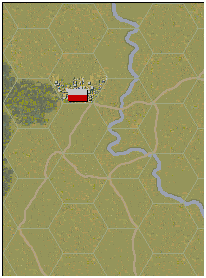
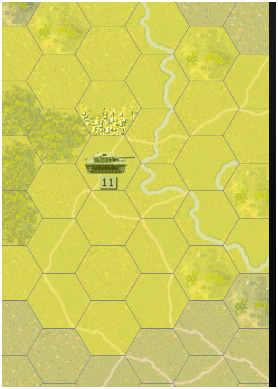
Which is pretty close to the original game:

image

Phidget Force Sensor Programming

For the next TriNUG main meeting, I thought of have a Family Feud type game. To that end, I wanted to simulate the buzzer/button that the contestants use:

image

To that end, I purchased 2 force sensors from Phidgets and hooked them up to my 8/8/8 Interface kit. I guess the contestants will use a finger versus their entire hand:

image

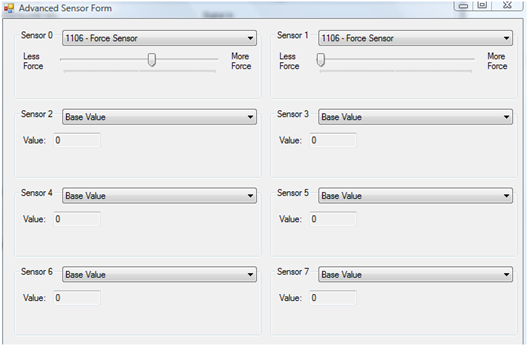
The sensor is very straight forward – you press the button and the Interface kit reads how much pressure is applied:

image

Thinking on how it would work as FamilyFeud buzzer system, I just need to keep track of who applied force 1st – the amount of pressure is irrelevant. Also, I need a trigger mechanism that starts listening at certain points – so that contestants don’t jump the gun.

I first started with a WPF project to see if I could hook into the Phidget InterfaceKit. I created a basic WPF application and wrote the following code (pretty much straight from the programmers guide):

public partial class MainWindow : Window { InterfaceKit _interfaceKit; public MainWindow() { InitializeComponent(); _interfaceKit = new InterfaceKit(); _interfaceKit.open(); _interfaceKit.waitForAttachment(3000); _interfaceKit.SensorChange += new SensorChangeEventHandler(_interfaceKit_SensorChange); StringBuilder stringBuilder = new StringBuilder(); stringBuilder.Append(String.Format("Name={0}",_interfaceKit.Name)); stringBuilder.Append(Environment.NewLine); stringBuilder.Append(String.Format("Label={0}", _interfaceKit.Label)); this.InterfaceKitInfoLabel.Content = stringBuilder.ToString(); } void _interfaceKit_SensorChange(object sender, SensorChangeEventArgs e) { StringBuilder stringBuilder = new StringBuilder(); stringBuilder.Append(String.Format("Index={0}", e.Index)); stringBuilder.Append(Environment.NewLine); stringBuilder.Append(String.Format("Value={0}", e.Value)); this.PressureSensor01Label.Content = stringBuilder.ToString(); } }

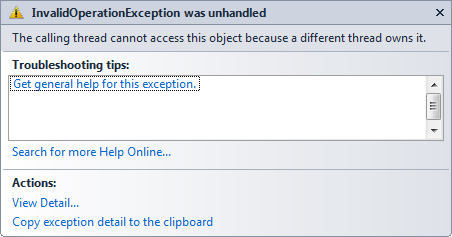
When I hit F5 and pressed a sensor, I got this error:


image

Ugh! I looks like Phidgets programming need to support thread affinity?! To confirm, I wrote a Console application that does pretty much the exact same thing:

static void Main(string[] args) { Console.WriteLine("Start"); InterfaceKit interfaceKit = new InterfaceKit(); interfaceKit.Attach += new Phidgets.Events.AttachEventHandler(interfaceKit_Attach); interfaceKit.SensorChange += new Phidgets.Events.SensorChangeEventHandler(interfaceKit_SensorChange); interfaceKit.open(); interfaceKit.waitForAttachment(); Console.WriteLine("-End-"); Console.ReadLine(); } static void interfaceKit_Attach(object sender, Phidgets.Events.AttachEventArgs e) { Console.Write(String.Format("Interface Kit {0} attached",e.Device.Name)); } static void interfaceKit_SensorChange(object sender, Phidgets.Events.SensorChangeEventArgs e) { Console.WriteLine(String.Format("Sensor {0} changed with the value {1}.",e.Index, e.Value)); } }

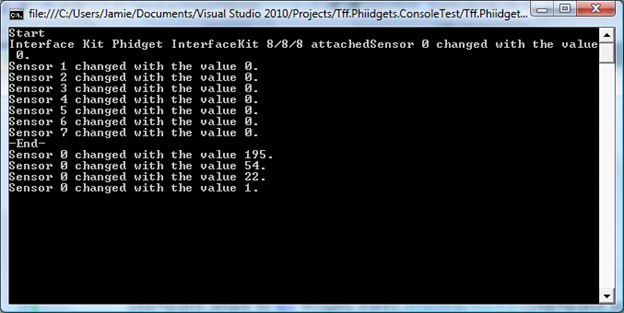
When I F5 and press the sensor, I get the following:

image

So it looks like I need to be thread-aware on WPF applications. After some digging into the code samples from the most recent documentation, I found this nugget of a project:

image

Sure enough, the code has thread-affinity:

void ifk_Attach(object sender, AttachEventArgs e) { this.Dispatcher.Invoke(new Action(delegate() { makeDigiInArrays(); makeDigiOutArrays(); makeSensorInArrays(); InterfaceKit attached = (InterfaceKit)sender; attachedLbl.Content = attached.Attached.ToString(); nameLbl.Content = attached.Name; serialNoLbl.Content = attached.SerialNumber.ToString(); versionLbl.Content = attached.Version.ToString(); digitalInputCountLbl.Content = attached.inputs.Count.ToString(); digitalOutputCountLbl.Content = attached.outputs.Count.ToString(); sensorCountLbl.Content = attached.sensors.Count.ToString(); for (int i = 0; i < attached.inputs.Count; i++) { digiInChkArray[i].Visibility = System.Windows.Visibility.Visible; digiInLblArray[i].Visibility = System.Windows.Visibility.Visible;

So this simple project just jumped up a notch if I want to use WPF.

MVVM && Game Design: Part 2

If you read this post that I wrote last week about building a game on Windows Phone 7 using MVVM, you know that I am trying to make a port of Panzer General to the Windows Phone.  Where I left it, I had made a repeating sets of hexagons to be the game board and I dynamically filled them based on the user’s touch.  My next step was to make the hexagons contain images of the terrain.  To that end, I snipped out a single hex of terrain and placed it in the images folder.  I then coded up this in the view hex:

Added this: <Image Canvas.Left="0" Canvas.Top="0" Height="100" x:Name="image1" Width="100" Stretch="Fill" Source="/Tff.Panzer;component/Images/Coast01.png" />

And I got this:

image

So then I realized that I need to add the image to the path, not layer it on top of the canvas:

<Path x:Name="PathRoot" IsHitTestVisible="True" Width="100" Height="100" d:LayoutOverrides="None" d:LastTangent="0,0" Stroke="Black" HorizontalAlignment="Stretch" VerticalAlignment="Stretch" Margin="0" Stretch="Fill" Data="M0,8.660254 L5,17.320508 15,17.320508 20,8.660254 15,0 5,0 0,8.660254 z" Canvas.Left="{Binding Path=CanvasLeft}" Canvas.Top="{Binding Path=CanvasTop}"> <Path.Fill > <ImageBrush ImageSource="/Tff.Panzer;component/Images/Coast01.png" /> </Path.Fill > </Path>

Doing that, I got this:

image

Well How about that!

There are 3 different ways to get this in markup:

Fill="{Binding Path=TerraineImage}"> <!--Fill="{Binding Path=Fill}"--> <!--<Path.Fill > <ImageBrush ImageSource="{Binding Path=TerraineImageLocation}" /> </Path.Fill >-->

I prefer the 1st option from a readability and brevity point of view.

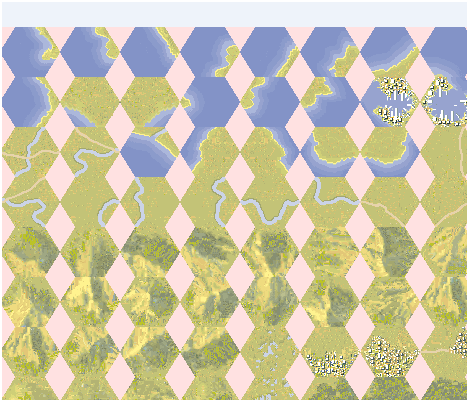
In my explorations, I found that a guy in Russia named Rudankort created a faithful PG port called PG Forever. Looking at his directory structure, he has all of the background hexes in a single image like this:

image

There are approximately 500+ images that I would need to clip and save to the file system if I wanted to separate them all out. I thought of another way of loading the entire image and then pulling pieces out of the image at runtime. Another challenge is to get the icons – removing the back fill.  I’ll work on that coming up…

MVVM and Game Design

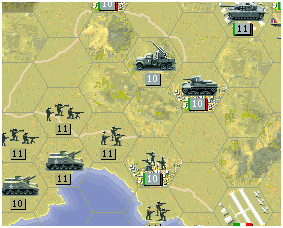
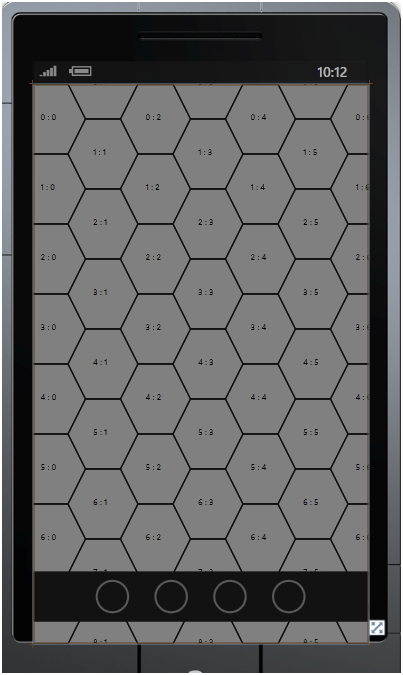
I fired up an old laptop last week and I found Panzer General installed on it. Bring back fond memories of wasted hours, I thought how cool it would be to port this game to Windows Phone. Ambitious? Absolutely. Realistic? Not even close. Undaunted, I thought a bit about how a game board are might be modeled. You can see from this screen shot that the game board is a series of Hexes – like so:

image

Dialing up the MVVM pattern, I thought the basic unit of code is the Hex. I looked at this article about building a MVVM Pattern for a Sudoku found in MSDN here but quickly threw it away. I think that Miller’s implementation is a bit mangled and all of the code in the View smells to me like an incorrect design. I realized that I need a HexModel, and HexView, and a HexViewModel. To start, I put all of the properties that I care about into the Model like so:

public class HexModel { public double Width { get; set; } public double Height { get; set; } public double CanvasTop { get; set; } public double CanvasLeft { get; set; } public SolidColorBrush Fill { get; set; } public int XCoordinate { get; set; } public int YCoordinate { get; set; } } }

I then put all of the implementation of INotifiedPropertyChanged in the ViewModel. It makes alot of sense to me that the View is a passive implementation of the underlying data structures (EF classes, POCOs, TakeYourPickDataStructure) and the ViewModel where all of the heavy lifting occurs (For example, your LINQ for the CRUD if this was working with a permanent data store) and that is where you notify the consuming layers that properties changed. Following this mental model, I first implemented an abstract class to handle INotifiedPropertyChanged:

public class ViewModelBase : INotifyPropertyChanged { public event PropertyChangedEventHandler PropertyChanged; protected void NotifyPropertyChanged(String propertyName) { if (string.IsNullOrEmpty(propertyName)) throw new ArgumentException("Argument 'propertyName' cannot be null or empty."); if (PropertyChanged != null) { PropertyChanged(this, new PropertyChangedEventArgs(propertyName)); } } }

I then implemented the HexViewModel like this (partial snip):

public class HexViewModel: ViewModelBase { HexModel _hexModel; public HexViewModel() { _hexModel = new HexModel(); Width = 100; Height = 100; CanvasTop = 0.0; CanvasLeft = 0.0; Fill = new SolidColorBrush(Colors.Gray); XCoordinate = 0; YCoordinate = 0; } public double Width { get { return _hexModel.Width; } set { _hexModel.Width = value; NotifyPropertyChanged("Width"); } }

With this view model done, I then was onto the View itself. A hex shape is a bit more tricky than a square for a game board – heck you can use a grid if you just want to build a game board of squares. I found a pretty good implementation of a WPF hex on Stack Overflow here. Since the Panzer General Hex is flat on the top (versus the flat sides in the Stack Overflow question), I reversed the path coordinates and threw it into a User Control:

<UserControl.DataContext> <vm:HexViewModel /> </UserControl.DataContext> <Canvas x:Name="CanvasRoot" Height="100" Width="100"> <Path x:Name="PathRoot" IsHitTestVisible="True" Width="100" Height="100" d:LayoutOverrides="None" d:LastTangent="0,0" Stroke="Black" Fill="{Binding Path=Fill}" HorizontalAlignment="Stretch" VerticalAlignment="Stretch" Margin="0" Stretch="Fill" Data="M0,8.660254 L5,17.320508 15,17.320508 20,8.660254 15,0 5,0 0,8.660254 z" Canvas.Left="{Binding Path=CanvasLeft}" Canvas.Top="{Binding Path=CanvasTop}"> </Path> <TextBox x:Name="LocationTextBox" IsHitTestVisible="False" Canvas.Left="21" Canvas.Top="22" FontSize="12" Background="{Binding Path=Fill}" HorizontalAlignment="Center" BorderThickness="0" Text="{Binding Path=Coordinates}"> </TextBox> </Canvas> </UserControl>

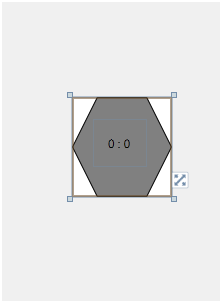
Sure enough, I rendered great in VS2010 at design time because of the magic of data binding and INotifyPropertyChanged:

image

I then though about how I would get a series of hexes as the game board using the same MVVM pattern. I set up a BoardModel like so:

public class BoardModel { public int NumberOfRows { get; set; } public int NumberOfColumns { get; set; } public int ZoomFactor { get; set; } }

I then implemented the model and added a collection to the ViewModel to have a collection of HexModels (screen shot, not code):

image

I then put together a BoardView that goes through the collection and renders out the HexViews in the constructor:

private void BindCanvas() { MainCanvas.Height = (_boardViewModel.NumberOfRows * 100); MainCanvas.Width = (_boardViewModel.NumberOfColumns * 100); foreach (HexViewModel hexViewModel in _boardViewModel.HexViewModels) { this.MainCanvas.Children.Add(CreateHexView(hexViewModel)); } }

Because this is not data bound, I don’t see the HexViews at design time. However, when I slap the BoardView into the MainPage at design time, I get a nice playboard:

image

Also, I used the Windows Phone Control Toolkit’s Gesture Listen class and I can intercept touches and active and deactivates hexes on a user’s touch (I love the SOC of the IPropertyNotifiedChanged):

private void GestureListener_Tap(object sender, Microsoft.Phone.Controls.GestureEventArgs e) { Path path = (Path)e.OriginalSource; Canvas canvas = (Canvas)path.Parent; HexView hexView = (HexView)canvas.Parent; if (currentHexViewModel != null) currentHexViewModel.Fill = new SolidColorBrush(Colors.Gray); currentHexViewModel = (HexViewModel)hexView.DataContext; currentHexViewModel.Fill = new SolidColorBrush(Colors.Red); e.Handled = true; }

Notice how I am changing the property of the ViewModel – not of the UI control.

I am not sure how to make the BoardVewModel can be data bound like the HexViewModel. I was thinking that the Board should expose a collection of HexViews (versus ViewModel) but that does seem right. Also, I am not sure how to code up design time data binding to that collection – I would think I would need a container control. After futzing around with Rob Seder and not getting anywhere, I gave up and went with the code-behind implementation. I am sure I will revisit, but I am jazzed just to get the board working. Up next, I want to see if I can put in a picture into the Hex.

A couple of gotchas for creating Windows Phone 7 Applications

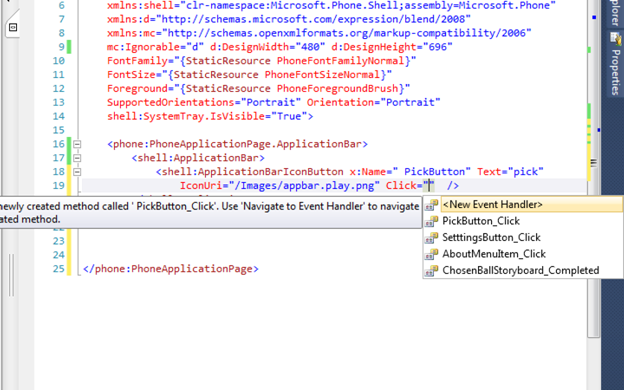
I have been doing Nathan’s Transforms and Animations projects. I made a typo when naming a Storyboard (note the space as the 1st character) and when I tried to auto-generate the code behind function:

image

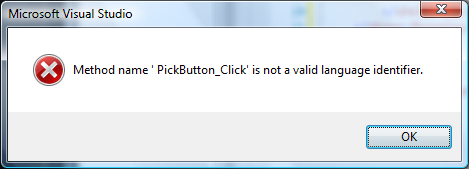
I got this error:

image

Notice how there is a space between the ‘ and the P -> however, if you are typing/reading fast, you might miss it.

Another gotcha I found was in Chapter 16, when coding up the DoubleAnimationUsingKeyFrames. I copied the code verbatim from his book and I got this:

image

When I added an x:name, the compiler was once again happy.

My final gotcha looked like this:

image

And the offending line is in the LotteryBall.Percolating Setter:

Storyboard.SetTargetProperty(this.percolatingStoryboard, new PropertyPath("Y"));

WTF? How can you set a property path to a property that doesn’t exist? I ran the code sample and it works! Ugh, I am at a loss. He has a Y property in the Tilt class that I didn’t include because it is non-essential. Oh well, it would have been cool to see the final solution work…

On Line Source Control

I have received some requests for the source code/project of the examples that I have been showing on this blog. Here to fore, I have been zipping up the solution and email the requestor. I thought I could take it up a level by using some of the services that are available on the internet. I checked out github, codeplex, googlecode, and assembla. I had 3 basic criteria – can I restrict the project to people I want, can I use TFS (I am a Microsoft dev after all) and is it free? Here is what I found:

Site

TFS?

Restrict Users

Free?

github

N

N (for free)

Y

codeplex

Y

N

Y

googlecode

N

Y

Y

assembla

N

Y

N

Rob Seder then suggested that I just upload the zipped up projects that I want into the blog using LiveWriter. <Sound of me slapping my forehead>Doh! </Sound of me slapping my forehead>.  Finally, for basic file sharing, I can always use SkyDrive…

I’ll go back and do that for the posts that people have emailed me about and perhaps in the future…

Windows Phone 7 Certification

I submitted my 1st phone for certification last week.  It failed for 3 reasons:

1) Because I use the location service, I need to have a privacy policy.  I am sure some lawyers at MSFT cooked this one up – in any event since I don’t store or transmit the data my privacy policy is pretty vanilla.  I stuck it on the configuration page.  I am surprised that MSFT doesn’t look at the source code and determine if the location service is actually doing any transmission or storage.  I guess they are just doing a CYA.

2) I had some chrome in my screenshot.  It is kind of pain doing the screen shot because the GeoService does not work with the emulator so I have to rig up a faux-screen to use the snipping tool.  Oh well, I’ll do another one.

3) When the location service is disabled on the phone, the app does not handle it gracefully (it goes boom).  This is issue I am glad Microsoft caught – I didn’t know that the users can disable the location service in the settings of the phone.  I need to code around this problem by checking the status of the GeoLocationWatcher before calling any of its functions.  This issue makes me appreciate the certification process.


In any event, I plan to make these changes and release 1.1 by the end of the day.  Less blog, more code…

TSQL ‘IN’ Equivalent in LINQ

I needed to create an ‘in’ query in LINQ.  After searching around a bit, I came across this post.  Very handy:

var q = from l in context.RoadAlert_Location join at in alertTypeIds on l.AlertTypeId equals at select l; foreach (RoadAlert_Location location in q) { locations.Add(MapLocation(location)); }