Export To Excel in MVC

I ran into the need to export a table to Excel in a MVC application.  A quick search on Bing showed a couple of different options.  For example, Steven Walther had the most complete solution found here but it had waaay to much code.

My original code in a web form application is much more compact:

        private void ExportTimesToExcel()

        {

            Response.ContentType = "application/vnd.ms-excel";

            Response.Charset = "";

            this.EnableViewState = false;


            StringWriter stringWriter = new StringWriter();

            HtmlTextWriter textWriter = new HtmlTextWriter(stringWriter);


            HtmlForm form = new HtmlForm();

            this.Controls.Add(form);

            form.Controls.Add(this.SwimmerTimeGridView);

            form.RenderControl(textWriter);


            Response.Write(stringWriter.ToString());

            Response.End();

        }


So I thought if there was a way to duplicate that in MVC.  I ran across a good starting point here.

public class ExcelResult : ActionResult

{

      public string FileName { get; set; }

      public string Path { get;set; }


      public override void ExecuteResult(ControllerContext context)

      {

            context.HttpContext.Response.Buffer = true;

            context.HttpContext.Response.Clear();

            context.HttpContext.Response.AddHeader("content-disposition", "attachment; filename=" + FileName);

            context.HttpContext.Response.ContentType = "application/vnd.ms-excel";

            context.HttpContext.Response.WriteFile(context.HttpContext.Server.MapPath(Path));   

      }

}


And here is the function to get the File

public ExcelResult GetExcelFile()

{

      return new ExcelResult

                  {

                        FileName = "sample.xls", Path = "~/Content/sample.xls"

                  };

}


And here is a MVC View control that calls it

<%= Html.ActionLink("Download Excel", "GetExcelFile", "Home")%>


So I needed to meld together some separated parts.

They key is this line:

context.HttpContext.Response.WriteFile(context.HttpContext.Server.MapPath(Path));   

The problem is that I don’t have an Excel file to start with so I can’t use Write File.  I first thought of writing a stream of XML that Excel recognizes.  So what is the fastest way to get XML from a Data Table?  I can’t use the web form trick of this

form.Controls.Add(this.SwimmerTimeGridView);

            form.RenderControl(textWriter);


because the controller doesn’t know anything about how the views are rendering the model.  It could use a Table, it could use a series of labels, etc…

I then thought (briefly) about looping through some LINQ  that is hitting the entire model – and realized that I didn’t want to do that (that is what Steve did)

I then thought – wait a second.  <insert second here> ADO.NET has a XML from DataTable.  If I had a model with the data as a DataTable, I can render the stream out as XML and everything should work…

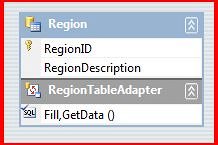
Step #1: Add a ADO.NET DataSet


Then
Step #2: Create that Excel Class

    public class ExcelResult : ActionResult

    {

        public string XMLStream { get; set; }

        public string FileName { get; set; }


        public override void ExecuteResult(ControllerContext context)

        {

            context.HttpContext.Response.Buffer = true;

            context.HttpContext.Response.Clear();

            context.HttpContext.Response.AddHeader("content-disposition", "attachment; filename=" + FileName);

            context.HttpContext.Response.ContentType = "application/vnd.ms-excel";

            context.HttpContext.Response.Write(XMLStream);

        }

    }


Step #3: Call it from the Controller


        public ExcelResult GetExcelData()

        {

            Northwind northwind = new Northwind();


            string xmlStream;

            using (StringWriter sw = new StringWriter())

            {

                northwind.Tables[0].WriteXml(sw);

                xmlStream = sw.ToString();

            }


            return new ExcelResult

            {

                FileName = "sample.xls",

                XMLStream = xmlStream

            };


Step #4: Hook up a link to try it out

    <%= Html.ActionLink("Download Region Info To Excel", "GetExcelData", "Region")%>


The first try I got this:

And the result was this:

Ooops – Looks like the DataTable is not like Linq to SQL or Entity Framework – I actually have to code up the loading of it.  I added this code to load the data table

            RegionTableAdapter regionTableAdapter = new RegionTableAdapter();

            Northwind.RegionDataTable regionDataTable = regionTableAdapter.GetData();


Getting Closer

I have the data, Excel is launching, but Excel is not recognizing the XML as XML:
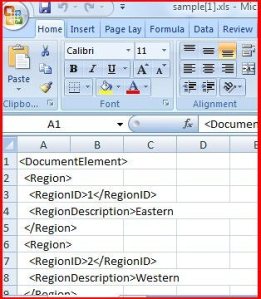
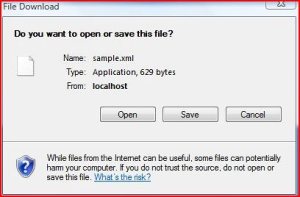
So the last thing I have to do is change the extension to .xml

            return new ExcelResult

            {

                FileName = "sample.xml",

                XMLStream = xmlStream

            };


and boom goes the dynamite (assuming the user has .xml hooked to open as Excel)
 

MVC Ajax/Json and Serialization

One of the biggest learning curves for me over the last week is how to pass data from the client to the server using Ajax and Json in an MVC solution.  As I can tell, there are 3 main patterns:

·         Individual parameters

·         Complex object that is serialized

·         Abstract Collection or array

MVC uses:

·         Request.Form[“x”] where x is the name of the property to assign to the object

·         UpdateModel(x) where x is the name of the class you want to update.  Behind the scenes, MVC hooks up the proprieties from the form collection to the proprieties in that object.  Therefore, the name of the property must match exactly between the form and the object

·         Or just pass in the object to the parameter.  Behind the scenes, MVC assigns the values to the properties, serializes the object, and throws it into your parameter

The first option, Request.Form[“x”] where x is the name of the property to assign to the object:

For example:

        [HttpPost]

        public ActionResult Create()

        {

            try

            {

                Region region = new Region();

                region.RegionID = Int32.Parse(Request.Form["regionId"]);

                region.RegionDescription = Request.Form["regionDescription"];


                //Insert Logic Here

                return RedirectToAction("Index");

            }

            catch

            {

                return View();

            }

        }


But you can’t have 2 methods with the same interface, so you can’t have this also:

        public ActionResult Create()

        {

            return View();

        }


So you can drop the one for the Get – but then every get requires an input.  So you are stuck, unless you muck about in the routing.

Alternatively, you can use the default and pass in a variable and not use it – which is what MVC does out of the box with the formCollection.  I passed in an Id for the heck of it:

        [HttpPost]

        public ActionResult Create(int? id)

        {

            try

            {

                Region region = new Region();

                region.RegionID = Int32.Parse(Request.Form["regionId"]);

                region.RegionDescription = Request.Form["regionDescription"];


                //Insert Logic Here

                return RedirectToAction("Index");

            }

            catch

            {

                return View();

            }

        }


And looking at the watch, you can see that the Form collection is being populated:


This is all well and good, but does not help me with a JSON request (and least not directly) because there is no Form Collection to be had. 

Interestingly, when making a method with the class as a parameter, MVC does a Json call behind the scenes.  For example, consider this method that returns a View:

        [HttpPost]

        public ActionResult Create(Region region)

        {


            //Insert Logic Here


            return View();

        }


Check out the base value: JsonSerialization:

So I wondered if MVC can do it, why can’t I?  Can I send the exactly same Json values and have it parse?

I wrote some JQuery with Ajax like so:

    <script type="text/javascript">

        function CallService() {

            var regionId = $("#RegionID").val();

            var regionDescription = $("#RegionDescription").val();

            var postData = { RegionID: regionId, RegionDescription: regionDescription };

            $.ajax({

                type: "POST",

                url: "/Region/Create",

                data: postData,

                dataType: "json"

            });

        }

    </script>


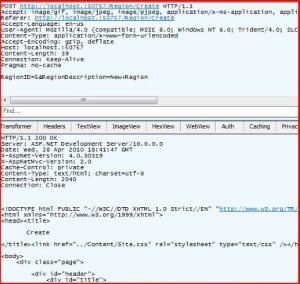
I then fired up Fiddler and find out:

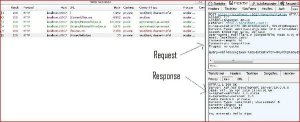
Here is the request/response:


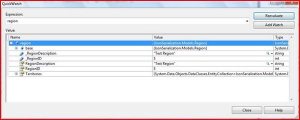
 And Holy Cow – It worked!  Check out a Quick Watch from my controller:

 
When using Json and Ajax, all you need is an object on the client, explicitly assigning  the parameter values, and have a matching object on the controller’s parameters.  I have not investigated default values, missing values, and the like, but I am just excited to see this working.

CSS gotcha when using VS2010 and IE

I ran into a frustrating gotcha when using VS2010 and updating my .css.

I created the following .css entry:

/* Hidden Column

———————————————————*/


.noDisplay

{

    display:none;

}


I then implemented it in a basic MVC View:

    <table>

        <tr>

            <th class="noDisplay">

                RegionID

            </th>

            <th>

                RegionDescription

            </th>

        </tr>


    <% foreach (var item in Model) { %>


        <tr>

            <td class="noDisplay">

                <%: item.RegionID %>

            </td>

            <td>

                <%: item.RegionDescription %>

            </td>

        </tr>


    <% } %>


    </table>


I then spun up my site and started changing some things.  Interesting, every time I change a value in the .css, it was not reflected on the next spin up of the site.  Even if I closed the instance of Cassani running on the desktop, I was getting the same mysterious behavior.  After some frustrating experimenting (that you fiddler), I deduced that IE is caching the .css so as long as I was using the same url (localhost/xxx), the cached .css was being used – IE was not recognizing changes to the .css.  Ugh.

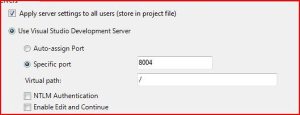
To get around IE’s limitation (perhaps there is also a setting – I haven’t checked yet), I changed the site address everytime.  How, you might ask?  Under Project Properities-> Web in VS:


Once I specified a different port for each run – IE would dedect a change in the address and re-load all of the filed – including the new .css.

For the record, this code

    <script type="text/javascript">

        function DisplayColumnIds() {


            $(".noDisplay:gt(0)").each(function () {

                var regionId = $(this).html();

                alert(regionId);

            });


        }   

    </script>


Detected the hidden field like a champ


MVC and Unit Testing

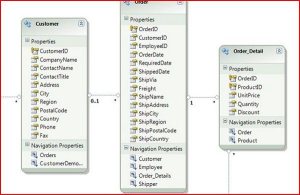
I set up a entity framework in my model for Northwind:

I then created a Region Controller to return all of the regions for the Index() Method

        public ViewResult Index()

        {

            var region = (from r in dataContext.Regions

             select r);

            return View(region.ToList());

        }


 I then set up a Unit Test to check to make sure I am getting 4 regions back (Yes, I know I should be using a stub).

        [TestMethod()]

        public void IndexTest()

        {

            RegionController target = new RegionController();

            List<Region> regions = (List<Region>)target.Index().ViewData.Model;

            int expected = 4;

            int actual = regions.Count;

            Assert.AreEqual(expected, actual);

        }


The thing that surprised me is that the chain I needed to go though to get to the model and the cast.  However, seeing this:

makes it all worthwhile.


Json and Entity Frameworks

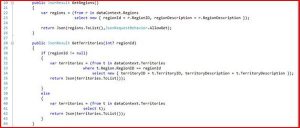
I started digging deeper into Ajax and Json in a MVC solution when I came across an interesting gotcha.  I wanted to have a table with some data be assocaited with a drop down – a very common pattern.  I started using Entity Frameworks and I created a couple of Json methods to expose some of the classes from the EF Data Context. 

The most import thing to recognize is on line 23 and 34.  If you do that I have on line 41, you get an error.  Gotcha #1 is that there is no way to detect the error using this code:

            $.ajax({

                type: "POST",

                traditional: true,

                url: "/Territory/GetRegions",

                dataType: "json",

                success: function (data) {

                    $.each(data, function () {

                           //Stuff

                }

            });


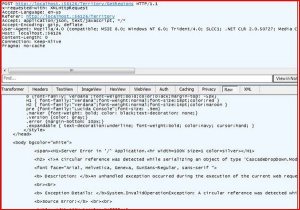
Because there is no error handler implemented.  Fortunately, Fiddler came and saved the day:

In addition, you can add an error handler with the Error property:

                error: function(XMLHttpRequest) {

                    alert(XMLHttpRequest.responseText);

                }


And now that I think about it, the gotcha makes sense.  The return from entity framework has all of these relation properities, etc… that json simply does not care about.  My lesson learned is to use DTOs where communicating with Json, don’t use the classes created by EF

In any event, once the Json methods got working, I needed to hook them up to the controls on hte form.  I started 1st with ASP.NET controls (drop down list and grid view) but the client side ID was getting screwed up (I think there is a fix in 4.0, need to investigate) so I used plain old HTML controls and implemented the following 2 loads.  The 1st goes on the page load for the select list:

        function LoadRegionList() {

            $.ajax({

                type: "POST",

                traditional: true,

                url: "/Territory/GetRegions",

                dataType: "json",

                success: function (data) {

                    $.each(data, function () {

                        $("#SelectRegion").append($("<option />").val(this.regionId).text(this.regionDescription));

                    });

                }

            });

        }


And the other goes on the select list changed event – updating the table

        function LoadTerritoryList() {

            $("#TerritoryTable tr:gt(0)").html("");


            var regionId = $("#SelectRegion").val();

            var postData = { RegionID: regionId };


            $.ajax({

                type: "POST",

                traditional: true,

                url: "/Territory/GetTerritories",

                data: postData,

                dataType: "json",

                success: function (data) {

                    $.each(data, function () {

                        $("#TerritoryTable").append("<tr><td>" + this.territoryID + "</td><td>" + this.territoryDescription + "</td></tr>");

                    });

                }

            });


I don’t like stringing together HTML (the <option>,<td>,<tr> tages) but I can’t find a simpler way.  It seems that there is no separation of concerns I am placing data into markup.

Once those methods were implemented – volia! I had a table that changed with every change of the select list.  Very cool.

I am still wondering if the developer experience taking a step-backwards might be worth the trade off – the user experience is much much better than ASP.NET post-back and even ASP AJAX update panels… 

ASP.NET JSON WebService Port to MVC Controller

I want to learn a bit more about JQuery serialization so I worked though this working example.

I got the ASP.NET Web Service solution up and running no problem.

I then ported it over to a MVC solution.

The first thing I did was to set up the controller and the routing to handle incoming requests – basically replacing the web service from the original solution:

Here is the controller:

    public class WeatherController : Controller

    {

        private readonly static string FindNearByWeatherUrl =

        "http://ws.geonames.org/findNearByWeatherJSON?lat={0}&lng={1}&username={2}&quot;;


        public JsonResult GetWeatherByLocation(double latitude, double longitude)

        {

            JsonResult jsonResponse = new JsonResult();


            string formattedUri = String.Format(CultureInfo.InvariantCulture, FindNearByWeatherUrl, latitude, longitude, "fatbgr");

            Uri serviceUri = new Uri(formattedUri, UriKind.Absolute);

            HttpWebRequest httpWebRequest = WebRequest.Create(serviceUri) as HttpWebRequest;

            if (httpWebRequest != null)

            {

                HttpWebResponse httpWebResponse = (HttpWebResponse)httpWebRequest.GetResponse();

                string readerResponse = string.Empty;

                using (StreamReader streamReader = new StreamReader(httpWebResponse.GetResponseStream()))

                {

                    readerResponse = streamReader.ReadToEnd();

                }


                jsonResponse.Data = readerResponse;


            }

            return jsonResponse;

        }

    }


Here is the routing:

            routes.MapRoute(

                "WeatherRoute",

                "Weather/GetWeatherByLocation/{latitude}/{longitude}",

                new { controller = "Weather", action = "GetWeatherByLocation"}

            );


And here is the javascript that I use to call the controller:

        function CallService() {

            var latitude = "35.797153";

            var longitude = "-78.886546";

            var postData = { latitude: latitude, longitude: longitude };

            $.ajax({

                type: "POST",

                url: "/Weather/GetWeatherByLocation",

                data: postData,

                dataType: "json",

                success: function (msg) {

                    GetWeather_Success(msg);

                }

            });

        }


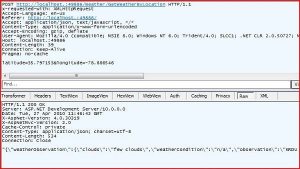
Everything is working fine in terms of the Json exchange – Wahoo!

However, I was blindsided by the Jquery selectors.  When I replace the hard-coded values for latitude and longitude with some JQuery, the variables are null:

            var latitude = $("txtLatitude").val;

            var longitude = $("txtLongitude").val;


Here is how the controls are created on the form

    <p>

        <input type="text" id="txtLatitude"  value = "35.797153" />

        <input type="text" id="txtLongitude" value = "-78.886546" />

        <input type= "button" value="Get Weather Info" onclick="CallService();" />

    </p>


Note that I also try and stuff the result set into the div – but that also is not being recognized

$("#divResult").html = e.toString();


I am at a loss – why aren’t the JQuery selectors working???


Posting JSON Arrays to a MVC Controller using JQuery 1.4.1

Following up on my April 13th post, I have the drag and drop working between the 2 tables.  I now want to post the data back to the server for processing

Posting to a server method like so:

        [AcceptVerbs(HttpVerbs.Post)]

        public ActionResult Index(string regionId)

        {

            //Do Something Useful Here

            return View();


        }


(I know that the return will be JSON, not an ActionResult, but one thing at a time)

I set up a simple AJAX call in JQuery like so:

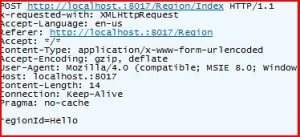
$.post("Region/Index",{regionId: "Hello"});


Things worked great:


I then tried to change the parameter from a single string to an array of strings

        [AcceptVerbs(HttpVerbs.Post)]

        public ActionResult Index(List<String> regionIds)

        {

            //Do Something Useful Here

            return View();


        }


And I changed the AJAX call to this:

            var regionArray = new Array();


            $("#destinationTable tr:gt(0)").each(function () {

                var regionId = $(this).find("#regionId").html();

                regionArray.push(regionId);

            });


            var postData = { regionIds: regionArray };


            $.post("Region/Index", postData);


When looking at Fiddler, data is crossing over the wire:

With the web form view like so:

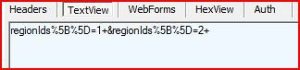
But the MVC function was not recognizing the input – the paramters were null.  After many hours of searching and trial-by-error, I found this post

Once I changed the $post to $.ajax and specified the traditional attribute, the parameters were filled fine.

Note that

jQuery.ajaxSetting.traditional = true

does not work – traditional is not a property of ajaxSetting

VS2010, JQuery and Intellisense

I installed VS2010 this week.  I am not sure what took longer – installing 2010 or uninstalling 2008.  In any event, I am working on a JQuery project.  I was all hot to get JQuery intellisense on a Hello World MVC2 Project.  I did file-> New , carved out a Script block, and went to town:


 I was immediately confused -> only Javascript intellise.  After poking at the problem with Tinu for a couple of minutes, we realized that we need to add in the JQuery Script to get its intellisense

Did the trick

Another problem with JQuery was that some of the selectors were not working.  Consider this code block:

        $(function () {

            $("#sourceTable tr:gt(0)").draggable({

                revert: ‘invalid’,

                cursor: ‘move’

            });


When I fired up IE to see this working, nothing was draggable.  I then changed the selector to this:

$("#sourceTable").draggable({

And I had draggability (warning: new word alert) in IE.  After banging my head for an hour or so, I accidently clicked on compatibility mode on IE.  Low and Behold – it worked!  Lesson to the wise – if something doesn’t work as expected, blame IE….

Finally, just so you know – forgot to reference Ajax library, the message box you get is o so helpful:

Finally, really, is a quick reminder to myself about Fiddler:


JQuery and Caching

I ran into a problem this morning that is turning into something that is more than a little annoying.  I am cooking up some JQuery to allow drag and drop between two data tables.  Building slowly, I wrote the following JQuery: 


    <script type="text/javascript">

        $(function() {

            $("#sourceTable").draggable();

            $("#destinationTable").draggable();

        }


        );

      </script>

I then added an additional qualifier on the source table to only select the data rows

$("#sourceTable tr:gt(1)").draggable();

The problem is that it is not working.  Any other qualifier than TR does work – which makes no sense.

I then took these methods and put them into a seperate file.  I first tested with an alert – which worked fine

function jamie() {

    alert("setupDragDrop called");

}

However, once I renamed the target function to something more meaningful, it failed

function setupDragDrop() {

    alert("setupDragDrop called");

}

And the reason why is that I had a function with the same name (but different signature) created earlier.  The kicker is that the original function is commented out – but the browser is still calling it. 

I recompiled the solution and stopped the instance of Cassani running, to no avail.  I am wondering if I have to clear my IE cache.  If so, this is nutz.  There is no way I should need to go though all of those steps just to update a java script file.

–As an update, I noticed that the relative path in debugging mode was localhost\scripts\JQueryExtender.js.  I deleted all of the debugging symbols out of the /bin folder (both working and test) and it stuck.  I wonder why the debug symbols were not getting updated even when I recompiled…


CI and MVC

I have been getting up a nights a lot lately b/c of some diabetes issues – so I have not been coding in the AM too much.  I did finish Continuous Integration over the weekend
I liked the read and some really good pointers.  I am going to install CruseControl (but no lava lamp) on the swim team server soon.
 
Speaking of which, I did 2 things for the site recently.  First, I implemented Blog Engine into the site.  It was "fairly" painless.  The biggest lesson learned is that BE only works as a Website.  When I tried to put it as a subdirectory in my web project, things fell apart – there are too many absolute paths, config changes, and the like.  After about 4 hours, I gave up on the conversion and just gave it its own subdomain.
 
In addition, I also started implementing the Volunteer section in the site.  The biggest issue (so far) with MVC was routing – I spent a bunch of time with a 404 error to come to find out that the routing tables were too specific.  A word to the wise, check the convention of the Controller and then check the routes for all 404 errors.
 
Finally, did you see the redirect header on this Blog? 
I see FakeHandlerPage.aspx.  Really Microsoft?  You couldn’t come up with something better in the age of XSS?